연산자
Liquid는 조건문에서 사용할 수 있는 다양한 연산자를 지원합니다. 이 페이지에서는 Liquid가 지원하는 연산자를 다루고, 메시지에서 활용할 수 있는 사용 사례를 제공합니다.
아래 표는 지원되는 연산자를 나열합니다. 괄호는 Liquid에서 유효하지 않은 문자이며 태그가 작동하지 않게 만들 수 있으므로 주의하세요.
| 구문 | 연산자 설명 |
|---|---|
| == | 같음 |
| != | 같지 않음 |
| > | 보다 큼 |
| < | 보다 작음 |
| >= | 크거나 같음 |
| <= | 작거나 같음 |
| or | 조건 A 또는 조건 B |
| and | 조건 A 그리고 조건 B |
| contains | 문자열 또는 문자열 배열에 특정 문자열이 포함되어 있는지 확인 |

연산자는 조건문(if, elsif, unless)에서 사용할 수 있지만, assign 문, for 루프 또는 배열 접근 대괄호에서는 사용할 수 없습니다. case와 when 태그에서는 각 분기가 임의의 연산자 표현식 대신 동등 비교를 사용하여 case 표현식을 when 값과 비교합니다. 예제는 조건부 메시징 로직을 참조하세요. 전체 분석은 연산자와 필터를 사용할 수 있는 위치를 참조하세요.
괄호 없이 조건 그룹화하기
Liquid는 표현식을 그룹화하기 위한 괄호를 지원하지 않습니다. (a and b) or c와 같은 복잡한 부울 로직을 평가하려면 중첩된 if 문이나 중간 변수를 사용하세요.
예를 들어, 값이 복합 조건을 충족하는지 확인하려면 중간 변수를 할당합니다:
{% assign qualifies = false %}
{% if points > 100 %}
{% assign qualifies = true %}
{% elsif points == 100 and member_level == 'gold' %}
{% assign qualifies = true %}
{% endif %}
{% if qualifies %}
You qualify for a reward!
{% endif %}
튜토리얼
마케팅 캠페인에서 이러한 연산자를 사용하는 방법을 몇 가지 튜토리얼을 통해 알아보겠습니다:
정수 커스텀 속성으로 메시지 선택하기
구매를 한 사용자와 하지 않은 사용자에게 개인화된 프로모션 할인이 포함된 푸시 알림을 보내겠습니다. 이 푸시 알림은 total_spend라는 정수 커스텀 속성을 사용하여 사용자의 총 지출을 확인합니다.
- 보다 큼(
>) 연산자를 사용하여 사용자의 총 지출이0보다 큰지 확인하는 조건문을 작성합니다. 이는 사용자가 구매를 했음을 나타냅니다. 그런 다음 해당 사용자에게 보낼 메시지를 작성합니다.
{% if {{custom_attribute.${total_spend}}} >0 %}
Surprise! We added a 15% discount code to your account that automatically applies to your next order.
{% else %}태그를 추가하여 총 지출이0이거나 존재하지 않는 사용자를 캡처합니다. 그런 다음 해당 사용자에게 보낼 메시지를 작성합니다.
{% else %}
Need a sign to update your wardrobe? We added a 15% discount code to your account that will automatically apply to your first order.
{% endif %}태그로 조건 로직을 닫습니다.
{% endif %}
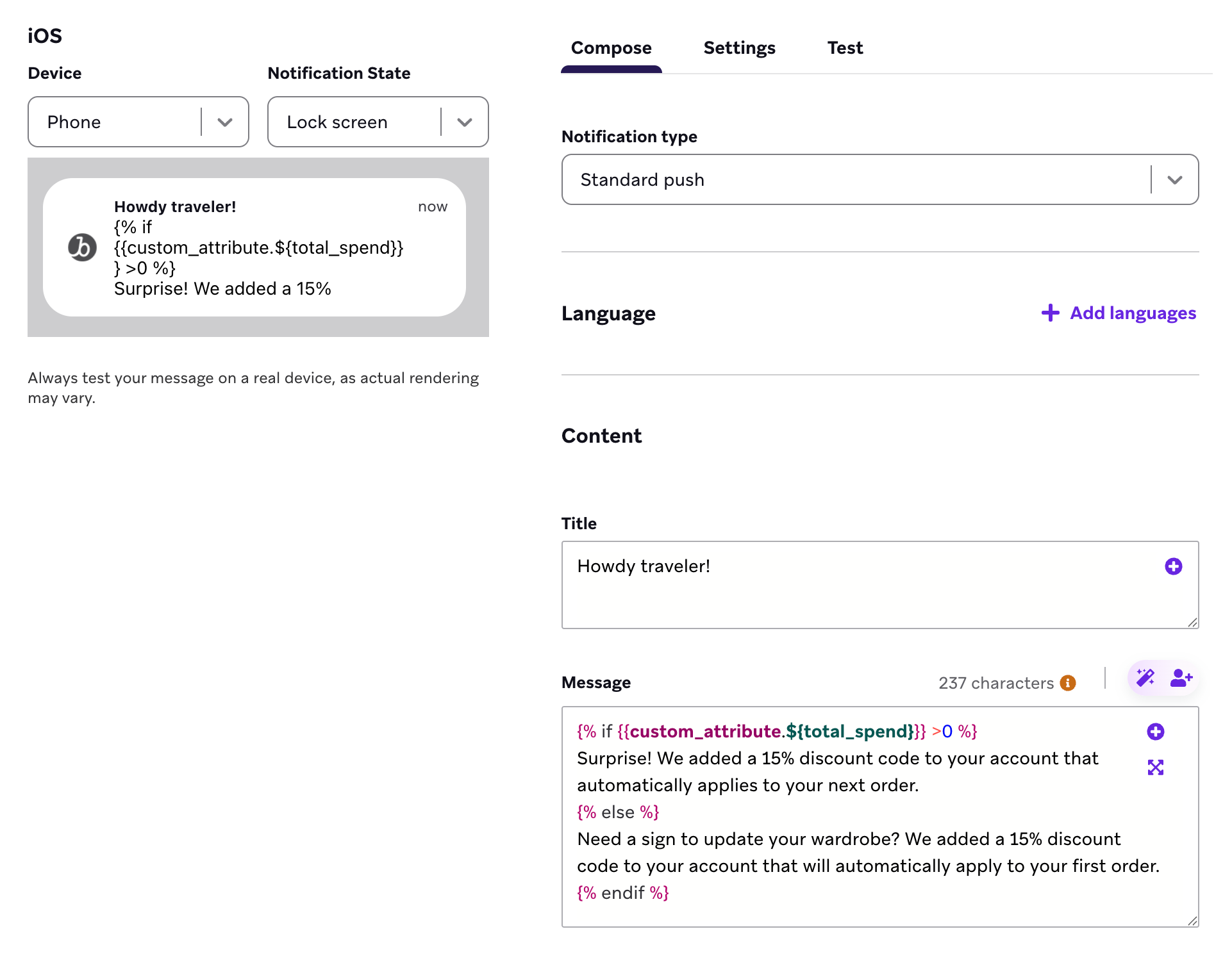
전체 Liquid 코드
{% if {{custom_attribute.${total_spend}}} >0 %}
Surprise! We added a 15% discount code to your account that automatically applies to your next order.
{% else %}
Need a sign to update your wardrobe? We added a 15% discount code to your account that will automatically apply to your first order.
{% endif %}
이제 사용자의 “Total Spend” 커스텀 속성이 0보다 크면 다음 메시지를 받게 됩니다:
Surprise! We added a 15% discount code to your account that automatically applies to your next order.
사용자의 “Total Spend” 커스텀 속성이 존재하지 않거나 0과 같으면 다음 메시지를 받게 됩니다:
Need a sign to update your wardrobe? We added a 15% discount code to your account that will automatically apply to your first order.
문자열 커스텀 속성으로 메시지 선택하기
사용자에게 푸시 알림을 보내고, 각 사용자가 가장 최근에 플레이한 게임을 기반으로 메시지를 개인화하겠습니다. 이를 위해 recent_game이라는 문자열 커스텀 속성을 사용하여 사용자가 마지막으로 플레이한 게임을 확인합니다.
- 같음(
==) 연산자를 사용하여 사용자의 가장 최근 게임이 Awkward Dinner Party인지 확인하는 조건문을 작성합니다. 그런 다음 해당 사용자에게 보낼 메시지를 작성합니다.
{% if {{custom_attribute.${recent_game}}} == 'Awkward Dinner Party' %}
You are formally invited to our next dinner party. Log on next week for another round of delectable dishes and curious conversations.
elsif태그와 같음(==) 연산자를 사용하여 사용자의 가장 최근 게임이 Proxy War 3: War of Thirst인지 확인합니다. 그런 다음 해당 사용자에게 보낼 메시지를 작성합니다.
{% elsif {{custom_attribute.${recent_game}}} == 'Proxy War 3: War of Thirst' %}
Your fleet awaits your next orders. Log on when you're ready to rejoin the war for hydration.
elsif태그와 “같지 않음”(!=) 및 “그리고”(and) 연산자를 사용하여 사용자에게 최근 게임이 있는지(값이 비어 있지 않은지) 확인하고, 해당 게임이 Awkward Dinner Party나 Proxy War 3: War of Thirst가 아닌지 확인합니다. 그런 다음 해당 사용자에게 보낼 메시지를 작성합니다.
{% elsif {{custom_attribute.${recent_game}}} != blank and {{custom_attribute.${recent_game}}} != 'Awkward Dinner Party' and {{custom_attribute.${recent_game}}} != 'Proxy War 3: War of Thirst' %}
Limited Time Deal! Get 15% off our best-selling classics!
{% else %}태그를 추가하여 최근 게임이 없는 사용자를 캡처합니다. 그런 다음 해당 사용자에게 보낼 메시지를 작성합니다.
{% else %}
Hey! I've got a deal for you. Buy 2 of our newest releases and get 10% off!
{% endif %}태그로 조건 로직을 닫습니다.
{% endif %}
전체 Liquid 코드
{% if {{custom_attribute.${recent_game}}} == 'Awkward Dinner Party' %}
You are formally invited to our next dinner party. Log on next week for another round of delectable dishes and curious conversations.
{% elsif {{custom_attribute.${recent_game}}} == 'Proxy War 3: War of Thirst' %}
Your fleet awaits your next orders. Log on when you're ready to rejoin the war for hydration.
{% elsif {{custom_attribute.${recent_game}}} != blank and {{custom_attribute.${recent_game}}} != 'Awkward Dinner Party' and {{custom_attribute.${recent_game}}} != 'Proxy War 3: War of Thirst' %}
Limited Time Deal! Get 15% off our best-selling classics!
{% else %}
Hey! I've got a deal for you. Buy 2 of our newest releases and get 10% off!
{% endif %}
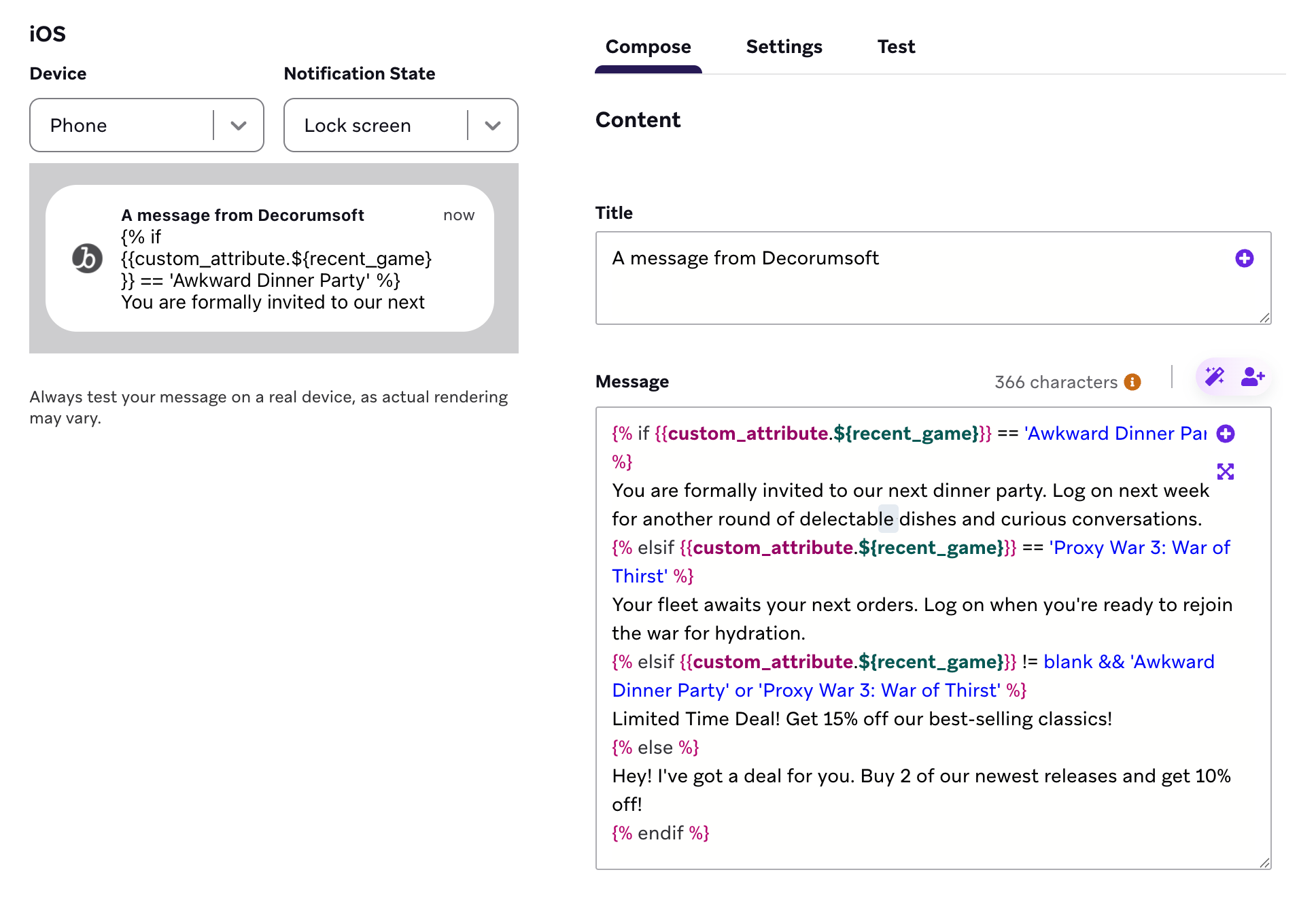
이제 사용자가 마지막으로 Awkward Dinner Party를 플레이했다면 다음 메시지를 받게 됩니다:
You are formally invited to our next dinner party. Log on next week for another round of delectable dishes and curious conversations.
사용자의 가장 최근 게임이 Proxy War 3: War of Thirst라면 다음 메시지를 받게 됩니다:
Your fleet awaits your next orders. Log on when you're ready to rejoin the war for hydration.
사용자가 최근에 Awkward Dinner Party나 Proxy War 3: War of Thirst가 아닌 게임을 플레이했다면 다음 메시지를 받게 됩니다:
Limited Time Deal! Get 15% off our best-selling classics!
사용자가 어떤 게임도 플레이하지 않았거나 해당 커스텀 속성이 프로필에 존재하지 않는다면 다음 메시지를 받게 됩니다:
Hey! I've got a deal for you. Buy 2 of our newest releases and get 10% off!
위치 기반 메시지 중단
거의 모든 조건을 기반으로 메시지를 중단할 수 있습니다. 사용자가 특정 지역에 있지 않은 경우 메시지를 중단해 보겠습니다. 해당 사용자는 프로모션, 쇼 또는 배송 대상이 아닐 수 있기 때문입니다.
- 같음(
==) 연산자를 사용하여 사용자의 시간대가America/Los_Angeles인지 확인하는 조건문을 작성한 다음, 해당 사용자에게 보낼 메시지를 작성합니다.
{% if {{${time_zone}}} == 'America/Los_Angeles' %}
Stream now!
America/Los_Angeles시간대 외의 사용자에게 메시지를 보내지 않으려면{% else %}와{% endif %}태그로{% abort_message () %}태그를 감쌉니다.
{% else %}
{% abort_message () %}
{% endif %}
전체 Liquid 코드
{% if {{${time_zone}}} =='America/Los_Angeles' %}
Stream now!
{% else %}
{% abort_message () %}
{% endif %}
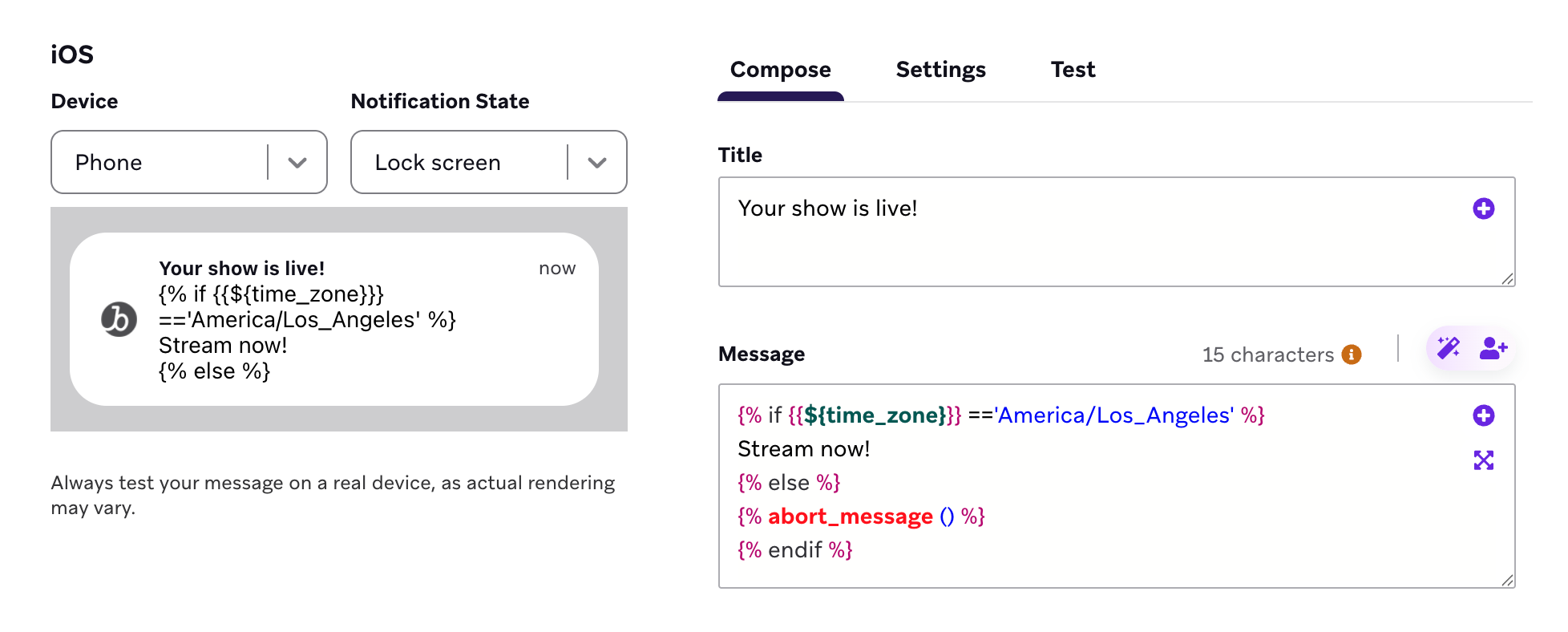
연결된 콘텐츠를 기반으로 메시지를 중단할 수도 있습니다.
문제 해결
abort_message 사용 시 테스트 발송이 도착하지 않음
abort_message를 사용하고 테스트 발송이 도착하지 않는 경우, 미리보기 사용자에게 Liquid가 기대하는 속성이 누락되어 있을 수 있습니다. 중단 로직은 렌더링 중에 실행되며, 실행되면 Braze는 메시지를 발송하지 않습니다. 필요한 프로필 데이터를 가진 사용자로 미리보기하거나, 사용자로 미리보기를 사용하여 프로덕션 오디언스와 동일한 값을 제공하는 수신자 필드를 테스트하세요.
미리보기에서 속성정보 유형이 잘못 변환될 수 있음
대시보드에서 메시지를 미리볼 때 대부분의 변수(예: 커스텀 속성)는 올바른 유형으로 변환됩니다. 그러나 일부 변수는 미리보기에서 조회할 수 있는 정의된 유형이 없습니다:
api_trigger_propertiescanvas_entry_propertiescontext
이러한 속성정보의 경우 미리보기는 값에서 유형을 추론하려고 시도합니다. 즉, 문자열로 의도한 값이 숫자로 잘못 해석될 수 있습니다. 예를 들어, 속성정보 값이 문자열 "3"인 경우 미리보기에서 정수 3으로 변환할 수 있으며, 이로 인해 contains나 split과 같은 문자열 연산에서 예상치 못한 동작이 발생할 수 있습니다.
이러한 속성정보 유형을 사용할 때 예상치 못한 미리보기 결과가 나타나면, 미리보기의 유형 추론이 실제 발송 시점의 동작과 다를 수 있다는 점을 유의하세요. 발송 시점에는 트리거 이벤트 또는 API 호출의 실제 데이터 유형이 유지됩니다.
미리보기에서 특정 유형을 강제하려면 값을 명시적으로 캐스팅할 수 있습니다:
{% comment %} Force a value to be treated as a number {% endcomment %}
{% assign orders = {{canvas_entry_properties.${number_of_orders}}} | plus: 0 %}
{% comment %} Force a value to be treated as a string {% endcomment %}
{% assign code = {{api_trigger_properties.${promo_code}}} | append: "" %}