규칙 기반 항목 추천 만들기
카탈로그의 항목에서 규칙 기반 추천 엔진을 만드는 방법을 알아보세요.
규칙 기반 항목 추천 소개
규칙 기반 추천 엔진은 사용자 데이터와 제품 정보를 사용하여 메시지 내에서 사용자에게 관련 항목을 제안합니다. Liquid과 Braze 카탈로그 또는 연결된 콘텐츠를 사용하여 사용자 행동 및 속성을 기반으로 콘텐츠를 동적으로 개인화합니다.

규칙 기반 추천은 수동으로 설정해야 하는 고정된 로직에 기반합니다. 즉, 로직을 업데이트하지 않으면 사용자의 구매 내역과 취향에 맞게 추천이 조정되지 않습니다.
사용자의 기록에 따라 자동으로 조정되는 개인화된 AI 추천을 만들려면 AI 항목 추천을 확인하세요.
추천 엔진 옵션
사용 가능한 리소스와 사용 사례에 적합한 추천 엔진을 결정할 때 아래 고려 사항 표를 참조하세요.
| 추천 엔진 | 기록되는 데이터 포인트 없음 | 코드 없는 솔루션 | 고급 Liquid 불필요 | 제품 피드 자동 업데이트 | Braze UI로 생성 | 데이터 호스팅 또는 문제 해결 불필요 |
|---|---|---|---|---|---|---|
| 카탈로그 CSV | ✔ | 예, 미리 생성된 Liquid를 사용하는 경우. | ✔ | 예, 추천이 자주 업데이트되지 않는 경우. | ✔ | ✔ |
| 카탈로그 API | ✔ | ✔ | 예, 추천이 매시간 업데이트되는 경우. | ✔ | ✔ | |
| 연결된 콘텐츠 | ✔ | ✔ (추천이 실시간으로 업데이트됨) |
예, Braze 외부에서 생성된 경우. | |||
| Liquid | ✔ | ✔ |
추천 엔진 만들기
카탈로그 또는 연결된 콘텐츠를 사용하여 추천 엔진을 만드세요:
카탈로그를 사용하여 추천 엔진을 만들려면:
- 제품 카탈로그를 생성합니다.
- 각 제품에 대해 추천 제품 목록을 구분 기호(예: 파이프
|)로 구분된 문자열로 “product_recommendations”라는 열에 추가합니다. - 추천을 찾으려는 제품 ID를 카탈로그에 전달합니다.
- 해당 카탈로그 항목의
product_recommendations값을 가져와서 Liquid split 필터를 사용하여 구분 기호로 분할합니다. - 이러한 ID 중 하나 이상을 카탈로그에 다시 전달하여 다른 제품 세부 정보를 수집합니다.
예시
건강식품 앱이 있고 사용자가 앱에 가입한 기간에 따라 다른 레시피를 전송하는 콘텐츠 카드 캠페인을 만들고 싶다고 가정해 보겠습니다. 먼저, 다음 정보를 포함하는 CSV 파일을 통해 카탈로그를 생성하고 업로드하세요:
| 필드 | 설명 |
|---|---|
| id | 사용자가 앱에 가입한 후 경과한 일수와 관련된 고유 번호입니다. 예를 들어 3은 3일과 관련이 있습니다. |
| type | comfort, fresh 등과 같은 레시피 카테고리. |
| title | “이번 주 점심 미리 만들어 놓기” 또는 “타코 먹자”와 같이 각 ID에 대해 전송될 콘텐츠 카드의 제목입니다. |
| link | 레시피 문서로 연결되는 링크입니다. |
| image_url | 레시피에 해당하는 이미지입니다. |
카탈로그가 Braze에 업로드된 후 카탈로그 페이지에서 카탈로그를 선택하고 미리보기 탭을 열어 가져온 정보가 정확한지 확인합니다. 미리보기에는 일부 항목만 표시되며 무작위로 나타날 수 있지만, 이는 추천 엔진의 출력에 영향을 미치지 않습니다.
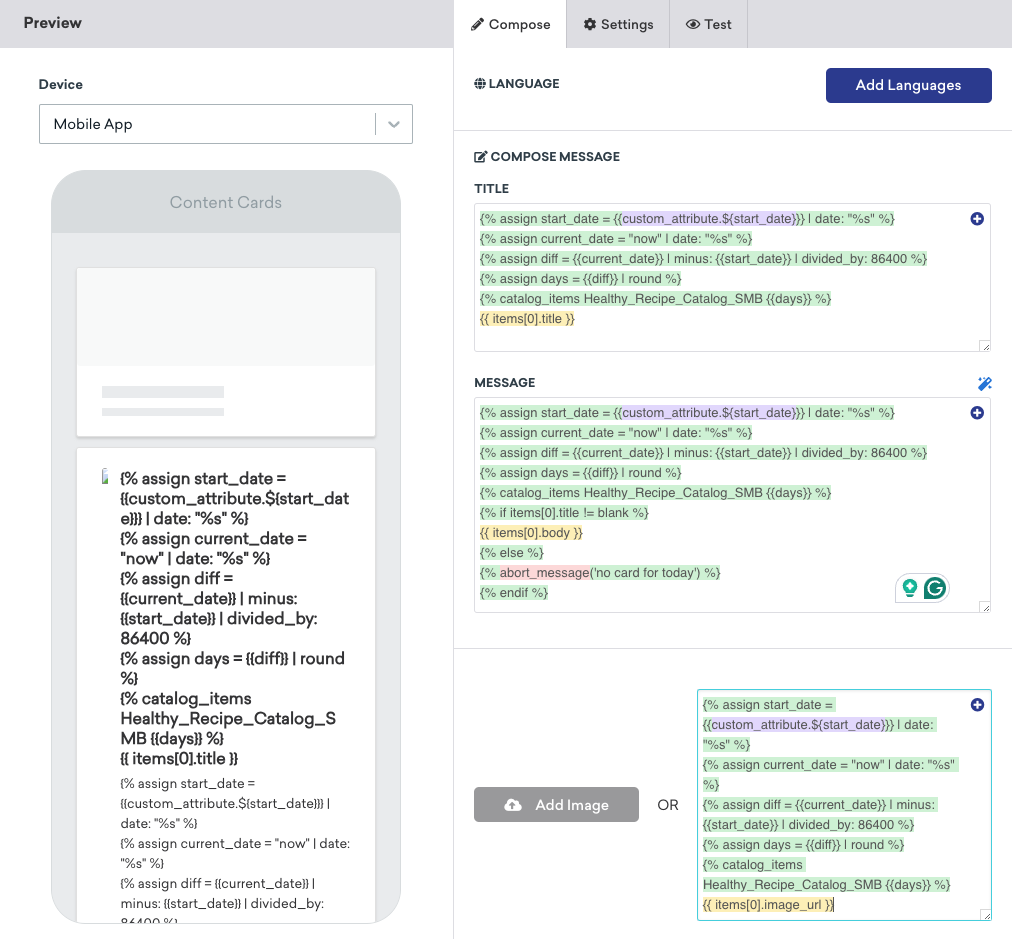
카탈로그가 준비되면 콘텐츠 카드 캠페인을 생성합니다. 작성기에서 Liquid 로직을 입력하여 캠페인을 수신할 사용자와 표시할 레시피 및 이미지를 결정합니다. 이 사용 사례에서 Braze는 사용자의 start_date(또는 가입 날짜)를 가져와 현재 날짜와 비교합니다. 날짜 차이에 따라 전송되는 콘텐츠 카드가 결정됩니다.
{% assign start_date = {{custom_attribute.${start_date}}} | date: "%s" %}
{% assign current_date = "now" | date: "%s" %}
{% assign diff = {{current_date}} | minus: {{start_date}} | divided_by: 86400 %}
{% assign days = {{diff}} | round %}
{% catalog_items Healthy_Recipe_Catalog_SMB {{days}} %}
{{ items[0].title }}
{% assign start_date = {{custom_attribute.${start_date}}} | date: "%s" %}
{% assign current_date = "now" | date: "%s" %}
{% assign diff = {{current_date}} | minus: {{start_date}} | divided_by: 86400 %}
{% assign days = {{diff}} | round %}
{% catalog_items Healthy_Recipe_Catalog_SMB {{days}} %}
{{ items[0].image_url }}
예시:
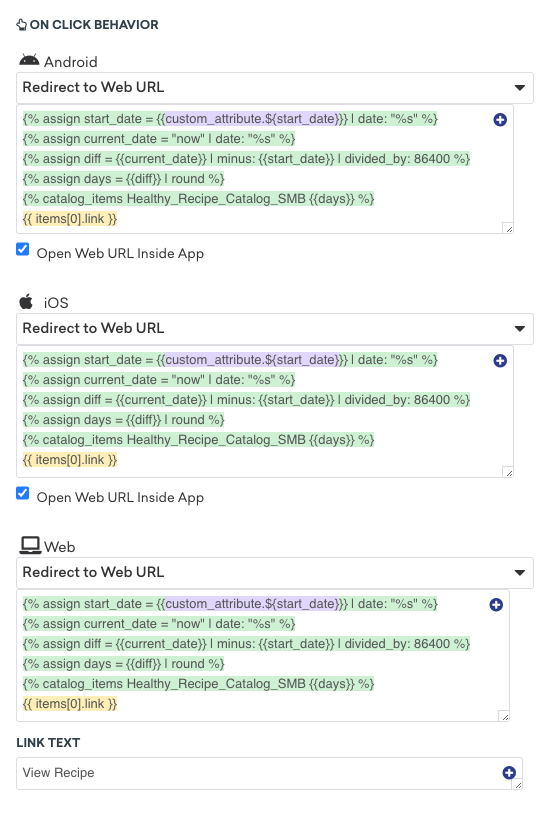
클릭 시 동작 섹션에서 사용자가 iOS, Android 및 웹 기기에서 콘텐츠 카드를 클릭할 때 리디렉션될 위치에 대한 Liquid 로직을 입력합니다.
{% assign start_date = {{custom_attribute.${start_date}}} | date: "%s" %}
{% assign current_date = "now" | date: "%s" %}
{% assign diff = {{current_date}} | minus: {{start_date}} | divided_by: 86400 %}
{% assign days = {{diff}} | round %}
{% catalog_items Healthy_Recipe_Catalog_SMB {{days}} %}
{{ items[0].link }}
예시:
테스트 탭으로 이동하여 사용자로 메시지 미리보기에서 커스텀 사용자를 선택합니다. 커스텀 속성 필드에 날짜를 입력하면 해당 날짜에 가입한 사용자에게 전송될 콘텐츠 카드를 미리 볼 수 있습니다.

연결된 콘텐츠를 사용하여 추천 엔진을 만들려면, 먼저 다음 방법 중 하나를 사용하여 새 엔드포인트를 생성하세요:
| 옵션 | 설명 |
|---|---|
| 스프레드시트 변환 | SheetDP와 같은 서비스를 사용하여 스프레드시트를 JSON API 엔드포인트로 변환하고, 생성된 API URL을 기록하세요. |
| 커스텀 엔드포인트 생성 | 커스텀으로 구축된 내부 엔드포인트를 구축하고 호스팅하며 유지 관리하세요. |
| 서드파티 엔진 사용 | Alloy 파트너 중 하나인 서드파티 추천 엔진을 사용하세요. 여기에는 Amazon Personalise, Certona, Dynamic Yield 등이 포함됩니다. |
다음으로, 엔드포인트를 호출하여 커스텀 속성 값을 사용자 프로필과 일치시키고 해당 추천을 가져오는 메시지에서 Liquid를 사용하세요.
{% connected_content YOUR_API_URL :save items %}
{% assign recommended_item_ids_from_user_profile = custom_attribute.${RECOMMENDED_ITEM_IDS} | split: ';' %}
{% for item_id in recommended_item_ids_from_user_profile %}
{% assign recommended_item = items | where: "ITEM_ID", ITEM_ID | first %}
recommended_item.item_name
{% endfor %}
다음을 교체하세요:
| 속성 | 교체 내용 |
|---|---|
YOUR_API_URL |
API의 실제 URL로 바꿉니다. |
RECOMMENDED_ITEM_IDS |
추천 항목의 ID가 포함된 커스텀 속성의 실제 이름으로 바꿉니다. 이 속성은 세미콜론으로 구분된 ID 문자열이어야 합니다. |
ITEM_ID |
API 응답에서 항목 ID에 해당하는 속성의 실제 이름으로 바꿉니다. |

예시
Zomato 레스토랑 데이터베이스에서 레스토랑 추천을 가져와 그 결과를 restaurants라는 로컬 변수로 저장한다고 가정해 보겠습니다. 다음과 같은 연결된 콘텐츠 호출을 할 수 있습니다:
{% connected_content https://developers.zomato.com/api/v2.1/search?entity_id={{city_id}}&entity_type=city&count=20&cuisines={{food_type}}&sort=rating:headers{“user-key”:“USER_KEY”} :save restaurants %}
{{city_food.restaurants[0]}}
다음으로 사용자의 도시와 음식 유형에 따라 레스토랑 추천을 가져오고 싶다고 가정해 보겠습니다. 사용자의 도시 및 음식 유형에 대한 커스텀 속성을 호출 시작 부분에 동적으로 삽입한 다음 restaurants 값을 city_food.restaurants 변수에 할당하면 됩니다.
연결된 콘텐츠 호출은 다음과 같습니다:
{% assign city_id = {{custom_attribute.${city_id} | default: ‘306’}} %}
{% assign food_type = {{custom_attribute.${food_type} | default: ‘471’}} %}
{%- connected_content https://developers.zomato.com/api/v2.1/search?entity_id={{city_id}}&entity_type=city&count=20&cuisines={{food_type}}&sort=rating:headers{“user-key”:“USER_KEY”} :save restaurants %}
{% assign restaurants = city_food.restaurants %}
{{city_food.restaurants[0]}}
레스토랑 이름과 평점만 검색하도록 응답을 맞춤 설정하려면 다음과 같이 호출 끝에 필터를 추가하면 됩니다:
{% assign city_id = {{custom_attribute.${city_id} | default: ‘306’}} %}
{% assign food_type = {{custom_attribute.${food_type} | default: ‘471’}} %}
{%- connected_content https://developers.zomato.com/api/v2.1/search?entity_id={{city_id}}&entity_type=city&count=20&cuisines={{food_type}}&sort=rating:headers{“user-key”:”USER_KEY”} :save restaurants %}
{% assign restaurants = city_food.restaurants %}
{{city_food.restaurants[0].restaurant.name}}
{{city_food.restaurants[0].restaurant.user_rating.rating_text}}
마지막으로 레스토랑 추천을 등급별로 그룹화한다고 가정해 보겠습니다. 다음을 수행합니다:
assign을 사용하여 “excellent”, “very good”, “good” 등급 카테고리에 대한 빈 배열을 만듭니다.- 목록에 있는 각 레스토랑의 등급을 조사하는
for루프를 추가합니다.- 평점이 “Excellent”인 경우
excellent_restaurants문자열에 레스토랑 이름을 추가한 다음 끝에 * 문자를 추가하여 각 레스토랑 이름을 구분합니다. - 평점이 “Very Good”인 경우
very_good_restaurants문자열에 레스토랑 이름을 추가한 다음 끝에 * 문자를 추가합니다. - 평점이 “Good”인 경우
good_restaurants문자열에 레스토랑 이름을 추가한 다음 끝에 * 문자를 추가합니다.
- 평점이 “Excellent”인 경우
- 반환되는 레스토랑 추천 수를 카테고리당 4개로 제한합니다.
최종 호출은 다음과 같습니다:
{% assign city_id = {{custom_attribute.${city_id} | default: ‘306’}} %}
{% assign food_type = {{custom_attribute.${food_type} | default: ‘471’}} %}
{%- connected_content https://developers.zomato.com/api/v2.1/search?entity_id={{city_id}}&entity_type=city&count=20&cuisines={{food_type}}&sort=rating:headers{“user-key”:”USER_KEY”} :save restaurants %}
{% assign restaurants = city_food.restaurants %}
{% assign excellent_restaurants = “” %}
{% assign very_good_resturants = “” %}
{% assign good_restaurants = “” %}
{% for list in restaurants %}
{% if {{list.restaurant.user_rating.rating_text}} == `Excellent` %}
{% assign excellent_restaurants = excellent_restaurants | append: list.restaurant.name | append: `*` %}
{% elsif {{list.restaurant.user_rating.rating_text}} == `Very Good` %}
{% assign very_good_restaurants = very_good_restaurants | append: list.restaurant.name | append: `*` %}
{% elsif {{list.restaurant.user_rating.rating_text}} == `Good` %}
{% assign good_restaurants = good_restaurants | append: list.restaurant.name | append: `*` %}
{% endif %}
{% endfor %}
{% assign excellent_array = excellent_restaurants | split: `*` %}
{% assign very_good_array = very_good_restaurants | split: `*` %}
{% assign good_array = good_restaurants | split: `*` %}
Excellent places
{% for list in excellent_array %}
{{list}}
{% assign total_count = total_count | plus:1 %}
{% if total_count >= 4 %}
{% break %}
{% endif %}
{% endfor %}
Very good places
{% for list in very_good_array %}
{{list}}
{% assign total_count = total_count | plus:1 %}
{% if total_count >= 4 %}
{% break %}
{% endif %}
{% endfor %}
Good places
{% for list in good_array %}
{{list}}
{% assign total_count = total_count | plus:1 %}
{% if total_count >= 4 %}
{% break %}
{% endif %}
{% endfor %}
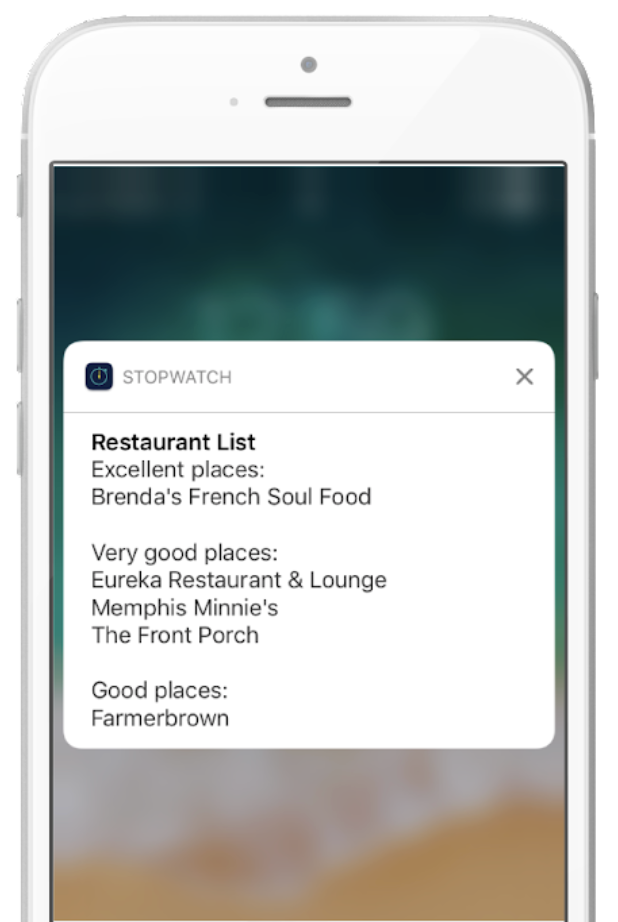
아래 스크린샷에서 사용자 기기에 응답이 표시되는 방식의 예를 확인하세요.