オペレーター
Liquidは、条件文で使用できる多くのオペレーターをサポートしています。このページでは、Liquidがサポートするオペレーターと、メッセージでの使用方法のユースケースを紹介します。
以下の表は、サポートされているオペレーターの一覧です。Liquidではかっこは無効な文字であり、タグが正しく動作しなくなることに注意してください。
| 構文 | オペレーターの説明 |
|---|---|
| == | 等しい |
| != | 等しくない |
| > | より大きい |
| < | より小さい |
| >= | 以上 |
| <= | 以下 |
| or | 条件Aまたは条件B |
| and | 条件Aかつ条件B |
| contains | 文字列または文字列配列に特定の文字列が含まれているかを確認する |

オペレーターは条件文(if、elsif、unless)で使用できますが、assign 文、for ループ、配列アクセスの角かっこでは使用できません。case と when タグでは、各分岐は任意のオペレーター式ではなく、等価比較を使用して case 式を when 値と比較します。例については、条件付きメッセージングロジックを参照してください。詳細については、オペレーターとフィルターの使用場所を参照してください。
かっこを使わずに条件をグループ化する
Liquidは式のグループ化にかっこをサポートしていません。(a and b) or c のような複雑なブール論理を評価するには、ネストされた if 文または中間変数を使用します。
たとえば、値が複合条件を満たすかどうかを確認するには、中間変数を割り当てます。
{% assign qualifies = false %}
{% if points > 100 %}
{% assign qualifies = true %}
{% elsif points == 100 and member_level == 'gold' %}
{% assign qualifies = true %}
{% endif %}
{% if qualifies %}
You qualify for a reward!
{% endif %}
チュートリアル
マーケティングキャンペーンでこれらのオペレーターを使用する方法を、いくつかのチュートリアルで学びましょう。
整数カスタム属性でメッセージを選択する
購入したことがあるユーザーとないユーザーに、パーソナライズされたプロモーション割引付きのプッシュ通知を送信しましょう。このプッシュ通知では、total_spend という整数カスタム属性を使用して、ユーザーの合計支出額を確認します。
- 大なり(
>)オペレーターを使用して条件文を記述し、ユーザーの合計支出額が0より大きいかどうか(つまり購入したことがあるかどうか)を確認します。次に、そのユーザーに送信するメッセージを作成します。
{% if {{custom_attribute.${total_spend}}} >0 %}
Surprise! We added a 15% discount code to your account that automatically applies to your next order.
{% else %}タグを追加して、合計支出額が0であるか、存在しないユーザーを捕捉します。次に、そのユーザーに送信するメッセージを作成します。
{% else %}
Need a sign to update your wardrobe? We added a 15% discount code to your account that will automatically apply to your first order.
{% endif %}タグで条件ロジックを閉じます。
{% endif %}
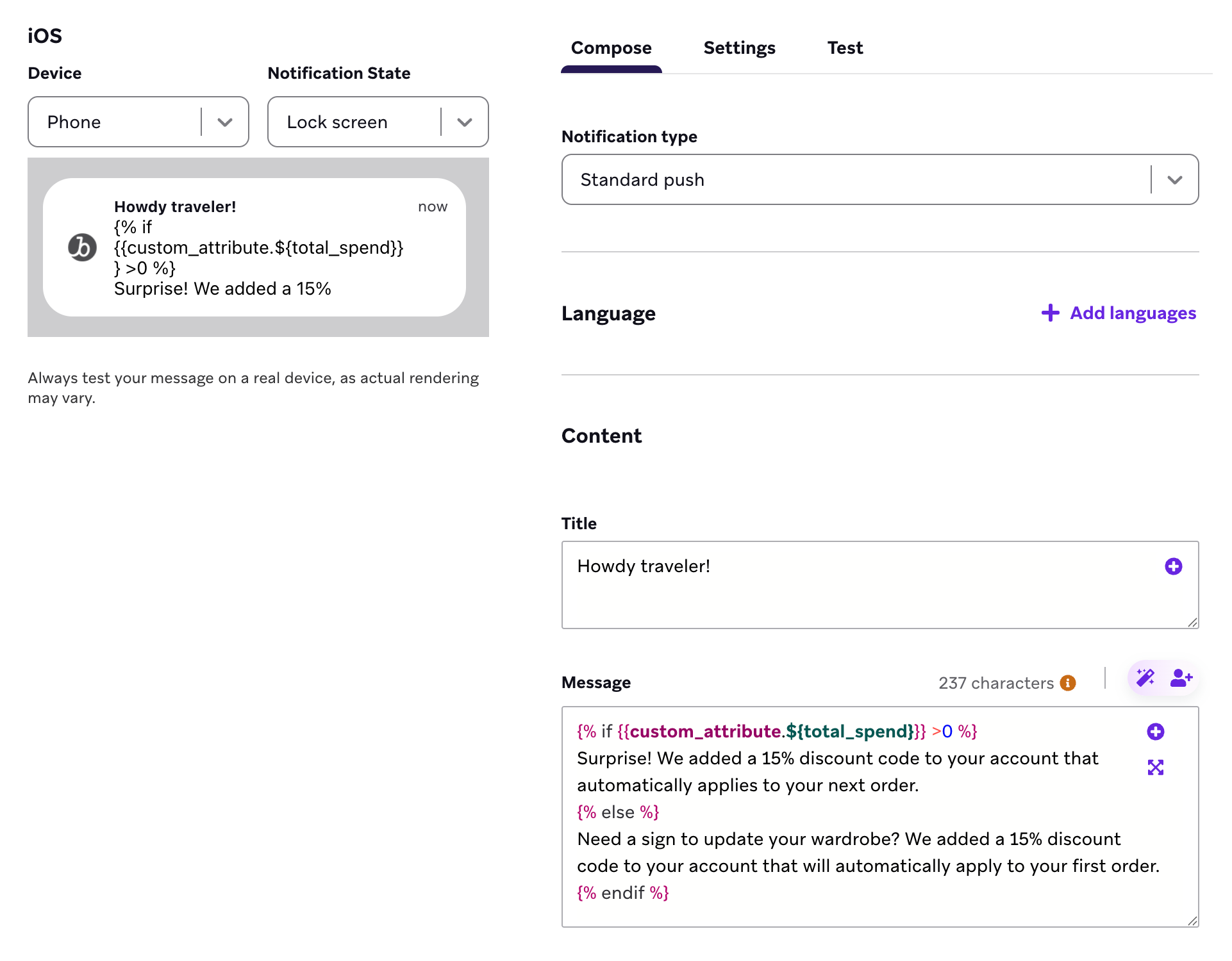
完全なLiquidコード
{% if {{custom_attribute.${total_spend}}} >0 %}
Surprise! We added a 15% discount code to your account that automatically applies to your next order.
{% else %}
Need a sign to update your wardrobe? We added a 15% discount code to your account that will automatically apply to your first order.
{% endif %}
これで、ユーザーの「Total Spend」カスタム属性が 0 より大きい場合、次のメッセージが届きます。
Surprise! We added a 15% discount code to your account that automatically applies to your next order.
ユーザーの「Total Spend」カスタム属性が存在しないか、0 に等しい場合、次のメッセージが届きます。
Need a sign to update your wardrobe? We added a 15% discount code to your account that will automatically apply to your first order.
文字列カスタム属性でメッセージを選択する
ユーザーにプッシュ通知を送信し、各ユーザーが最近プレイしたゲームに基づいてメッセージをパーソナライズしましょう。これには、recent_game という文字列カスタム属性を使用して、ユーザーが最後にプレイしたゲームを確認します。
- 等号(
==)オペレーターを使用して条件文を記述し、ユーザーの最近のゲームが Awkward Dinner Party かどうかを確認します。次に、そのユーザーに送信するメッセージを作成します。
{% if {{custom_attribute.${recent_game}}} == 'Awkward Dinner Party' %}
You are formally invited to our next dinner party. Log on next week for another round of delectable dishes and curious conversations.
elsifタグと等号(==)オペレーターを使用して、ユーザーの最近のゲームが Proxy War 3: War of Thirst かどうかを確認します。次に、そのユーザーに送信するメッセージを作成します。
{% elsif {{custom_attribute.${recent_game}}} == 'Proxy War 3: War of Thirst' %}
Your fleet awaits your next orders. Log on when you're ready to rejoin the war for hydration.
elsifタグと「等しくない」(!=)および「かつ」(and)オペレーターを使用して、ユーザーに最近のゲームがあるか(つまり値が空白でないか)、かつそのゲームが Awkward Dinner Party でも Proxy War 3: War of Thirst でもないかを確認します。次に、そのユーザーに送信するメッセージを作成します。
{% elsif {{custom_attribute.${recent_game}}} != blank and {{custom_attribute.${recent_game}}} != 'Awkward Dinner Party' and {{custom_attribute.${recent_game}}} != 'Proxy War 3: War of Thirst' %}
Limited Time Deal! Get 15% off our best-selling classics!
{% else %}タグを追加して、最近のゲームがないユーザーを捕捉します。次に、そのユーザーに送信するメッセージを作成します。
{% else %}
Hey! I've got a deal for you. Buy 2 of our newest releases and get 10% off!
{% endif %}タグで条件ロジックを閉じます。
{% endif %}
完全なLiquidコード
{% if {{custom_attribute.${recent_game}}} == 'Awkward Dinner Party' %}
You are formally invited to our next dinner party. Log on next week for another round of delectable dishes and curious conversations.
{% elsif {{custom_attribute.${recent_game}}} == 'Proxy War 3: War of Thirst' %}
Your fleet awaits your next orders. Log on when you're ready to rejoin the war for hydration.
{% elsif {{custom_attribute.${recent_game}}} != blank and {{custom_attribute.${recent_game}}} != 'Awkward Dinner Party' and {{custom_attribute.${recent_game}}} != 'Proxy War 3: War of Thirst' %}
Limited Time Deal! Get 15% off our best-selling classics!
{% else %}
Hey! I've got a deal for you. Buy 2 of our newest releases and get 10% off!
{% endif %}
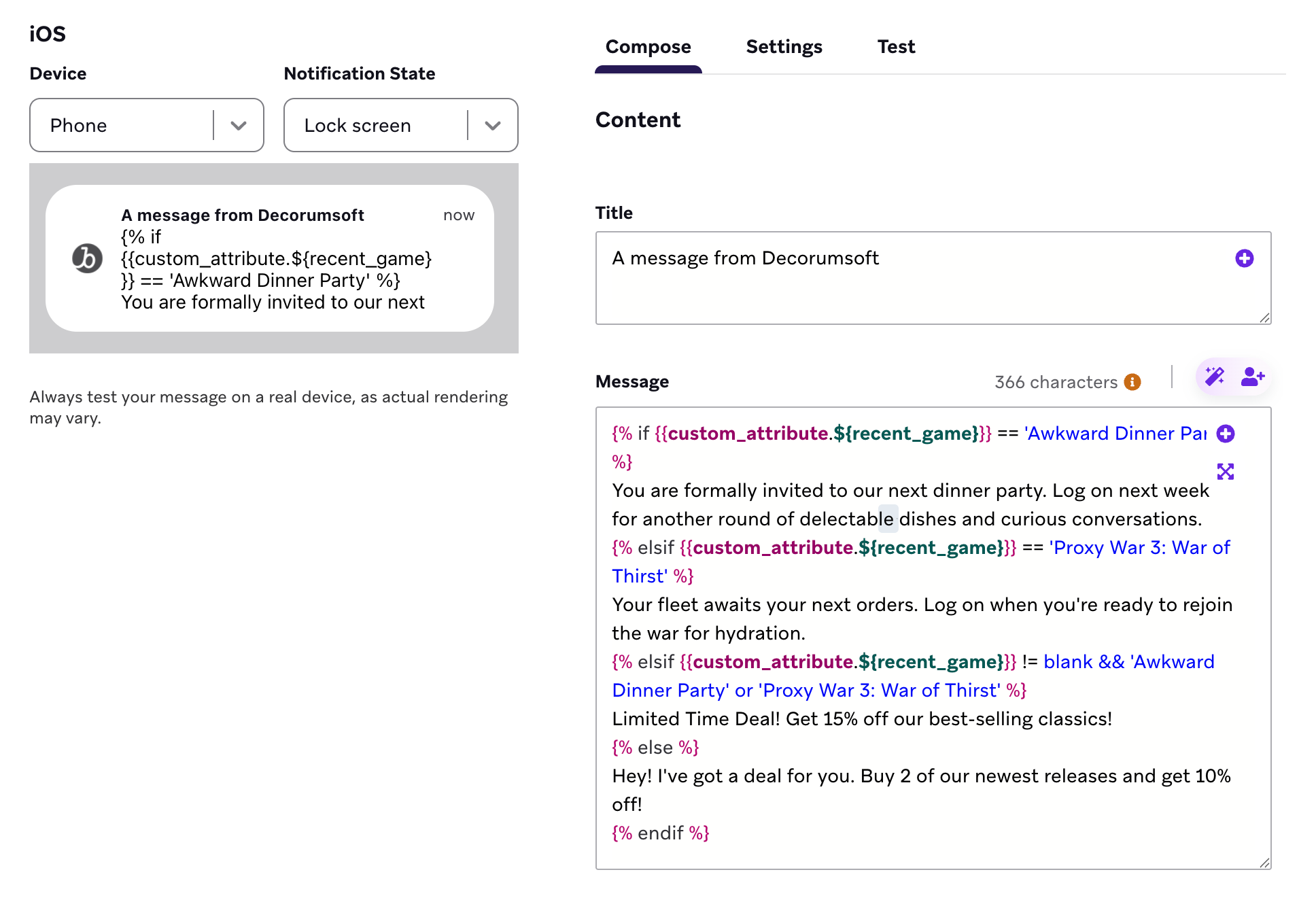
これで、ユーザーが最後に Awkward Dinner Party をプレイした場合、次のメッセージが届きます。
You are formally invited to our next dinner party. Log on next week for another round of delectable dishes and curious conversations.
ユーザーの最近のゲームが Proxy War 3: War of Thirst の場合、次のメッセージが届きます。
Your fleet awaits your next orders. Log on when you're ready to rejoin the war for hydration.
ユーザーが最近プレイしたゲームが Awkward Dinner Party でも Proxy War 3: War of Thirst でもない場合、次のメッセージが届きます。
Limited Time Deal! Get 15% off our best-selling classics!
ユーザーがゲームをプレイしたことがないか、そのカスタム属性がプロフィールに存在しない場合、次のメッセージが届きます。
Hey! I've got a deal for you. Buy 2 of our newest releases and get 10% off!
ロケーションに基づいてメッセージを中止する
ほぼあらゆる条件に基づいてメッセージを中止できます。ユーザーが指定されたエリアに拠点を置いていない場合にメッセージを中止しましょう。プロモーション、ショー、配送の対象外となる可能性があるためです。
- 等号(
==)オペレーターを使用して条件文を記述し、ユーザーのタイムゾーンがAmerica/Los_Angelesかどうかを確認し、そのユーザーに送信するメッセージを作成します。
{% if {{${time_zone}}} == 'America/Los_Angeles' %}
Stream now!
America/Los_Angelesタイムゾーン外のユーザーにメッセージを送信しないようにするため、{% else %}タグと{% endif %}タグで{% abort_message () %}タグを囲みます。
{% else %}
{% abort_message () %}
{% endif %}
完全なLiquidコード
{% if {{${time_zone}}} =='America/Los_Angeles' %}
Stream now!
{% else %}
{% abort_message () %}
{% endif %}
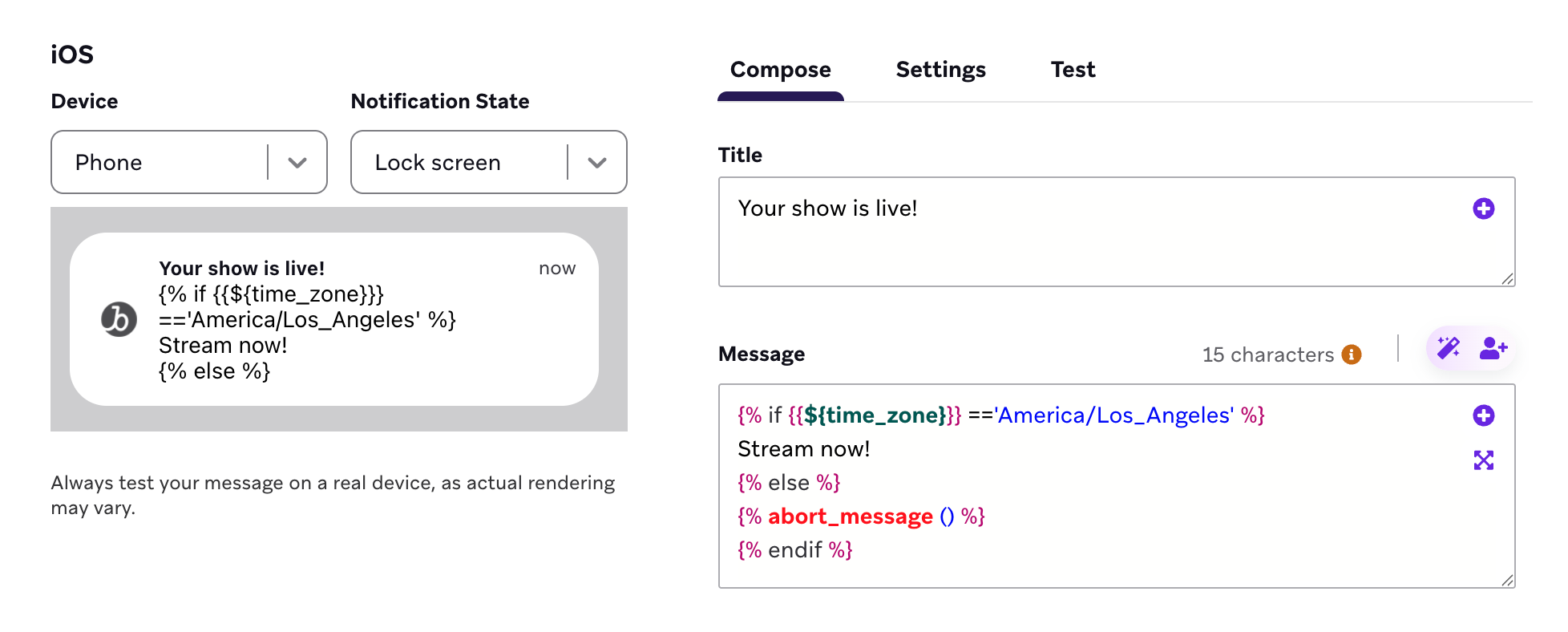
Connected Contentに基づいてメッセージを中止することもできます。
トラブルシューティング
abort_message 使用時にテスト送信が届かない
abort_messageを使用していてテスト送信が届かない場合、プレビューユーザーにLiquidが期待する属性が不足している可能性があります。中止ロジックはレンダリング中に実行され、発動するとBrazeはメッセージを送信しません。必要なプロフィールデータを持つユーザーでプレビューするか、ユーザーとしてプレビューを使用して、本番オーディエンスと同じ値を提供する受信者フィールドをテストしてください。
プレビューでプロパティの型が誤って変換される場合がある
ダッシュボードでメッセージをプレビューする際、ほとんどの変数(カスタム属性など)は正しい型に変換されます。ただし、一部の変数にはプレビューが参照できる定義済みの型がありません。
api_trigger_propertiescanvas_entry_propertiescontext
これらのプロパティについては、プレビューは値から型を推測しようとします。つまり、文字列として意図した値が数値として誤って解釈される可能性があります。たとえば、プロパティの値が文字列 "3" の場合、プレビューはそれを整数 3 に変換することがあり、contains や split などの文字列操作で予期しない動作が発生する可能性があります。
これらのプロパティタイプを使用する際にプレビューで予期しない結果が表示された場合、プレビューの型推測が送信時の動作と一致しない可能性があることに留意してください。送信時には、トリガーイベントまたはAPI呼び出しからの実際のデータ型が保持されます。
プレビューで特定の型を強制するには、値を明示的にキャストできます。
{% comment %} Force a value to be treated as a number {% endcomment %}
{% assign orders = {{canvas_entry_properties.${number_of_orders}}} | plus: 0 %}
{% comment %} Force a value to be treated as a string {% endcomment %}
{% assign code = {{api_trigger_properties.${promo_code}}} | append: "" %}