Email open pixel and click tracking
Open pixel tracking and click tracking can be turned on or off for each user profile. This flexibility helps you follow regional privacy laws, where an individual user profile might indicate they no longer want to be tracked.
How open and click tracking works
When Braze sends an email, your email service provider (ESP) adds the open-tracking pixel and click-tracking links before delivering the message. These tracking mechanisms use a two-step attribution process:
- Public pixel or click load: When a recipient opens the email or clicks a link, their email client loads the tracking pixel or click-tracking URL from the ESP. This public request does not include the recipient’s email address, Braze user ID, or external ID. The ESP generates the tracking URL as an opaque token.
- Private ESP webhook: After the open or click event, the ESP notifies Braze over a private HTTPS connection. This webhook includes the recipient’s email and internal Braze identifiers, so Braze can attribute the event to the user and campaign. This webhook is not visible in the email.
A third party inspecting the email or tracking URL cannot reverse the token to identify the recipient. Mapping the token to a user requires access to Braze or the ESP.
For Braze-managed email sending, the ESP is a Braze sub-processor.
Click tracking link requirements
Braze click tracking only rewrites links that use http:// or https:// URLs. Links that use other schemes, such as mailto: or tel:, are not click-tracked.
To track clicks on phone numbers or email addresses, use an https:// redirect URL that forwards to the tel: or mailto: destination instead.
Turning on open pixel or click tracking
When either importing or updating a user profile through API, CSV, or Cloud Data Ingestion (CDI), two fields are available for you to modify:
email_open_tracking_disabled: Acceptstrueorfalse. Set tofalseto add the open tracking pixel to all future emails sent to this user.email_click_tracking_disabled: Acceptstrueorfalse. Set tofalseto add click tracking to all links within a future email, sent to this user.
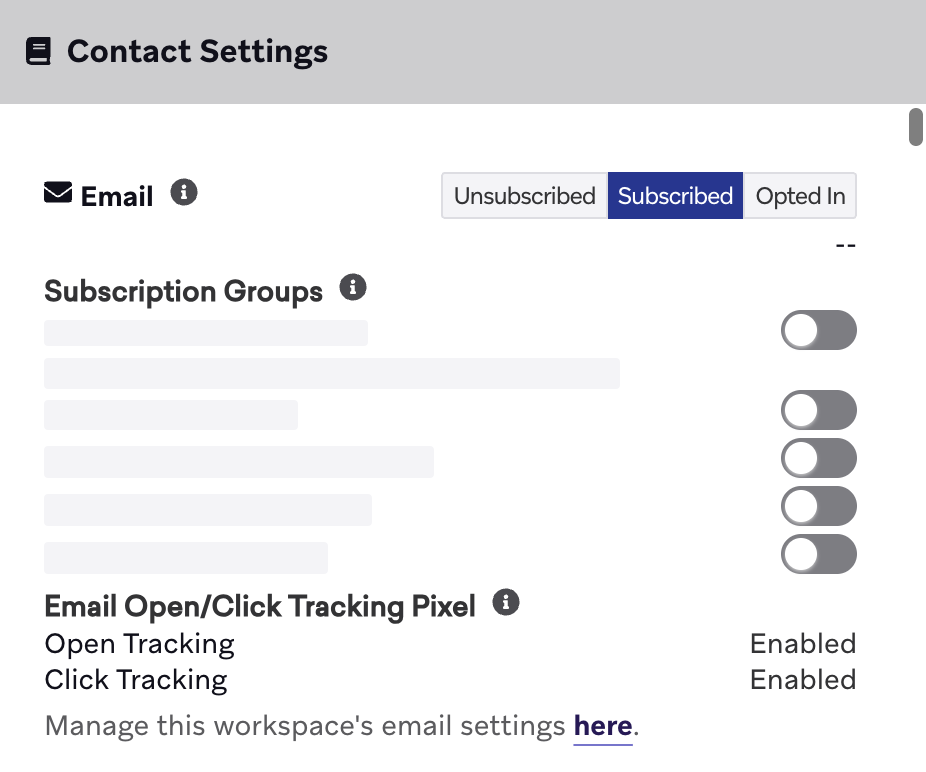
For reference, this information is reflected on the user profile in the email Contact Settings, located in the Engagement tab.
Click tracking URL patterns
When your email service provider (ESP) rewrites a link for click tracking, the resulting URL uses your click tracking domain and an ESP-specific path prefix. For the patterns each ESP generates, which you need for firewall rules and security allowlists, refer to Click and open tracking URL patterns.