Data types
This page consolidates the supported data types for custom attributes, event properties, and catalogs. Each custom data type has slightly different data type support and constraints.
Definitions
Use this table to see which data types you can use for user profile attributes, event data, or catalog items. Refer to the sections that follow for usage and constraints for each type.
| Data type | Definition | Custom attributes | Event properties | Catalogs |
|---|---|---|---|---|
| Boolean | Value true or false |
✅ Supported | ✅ Supported | ✅ Supported |
| Number | Whole number or decimal | ✅ Supported | ✅ Supported | ✅ Supported |
| String | Text; 255 characters or fewer | ✅ Supported | ✅ Supported | ✅ Supported |
| Time | Date and time in a standard format (ISO 8601) | ✅ Supported | ✅ Supported | ✅ Supported |
| Array | Ordered list of values | ✅ Supported | ✅ Supported | ✅ Supported |
| Object | Structured data with named fields (nested key-value) | ✅ Supported | ✅ Supported | ✅ Supported |
| Array of objects | List of objects | ✅ Supported | ❌ Not supported | ❌ Not supported |
Important considerations
- Array: Custom attributes and event properties have size limits. Datetimes are not supported inside arrays in event properties. Catalogs support only string arrays, with a maximum of 100 elements.
- Object: In Braze, this appears as “nested custom attributes” for custom attributes, “nested objects” for event properties, and “JSON object” for catalogs.
- Time: In event properties, this type is labeled “Datetime.”
Custom attribute data types
Custom attributes support the data types listed in the Definitions table. The following describes usage and segmentation for each supported data type.
You can blocklist custom attributes individually in the actions menu, or you can select and blocklist up to 100 attributes in bulk. If you block a custom attribute, no data is collected regarding that attribute, existing data is unavailable unless reactivated, and blocklisted attributes do not show up in filters or graphs. Additionally, if the attribute is currently referenced by filters or triggers in other areas of the Braze dashboard, a warning modal appears explaining that all instances of the filters or triggers that reference it are removed and archived.
Marking as personally identifiable information (PII)
Administrators can also create custom attributes and mark them as PII from this page. These attributes are visible only to admins and dashboard users with the “View Custom Attributes Marked as PII” permission.
Adding descriptions
You can add a description to a custom attribute after it’s created if you have the Manage Events, Attributes, Purchases user permission. Edit the custom attribute and input whatever you like, such as a note for your team.
Adding tags
You can add tags to a custom attribute after it’s created if you have the “Manage Events, Attributes, Purchases” user permission. You can then use the tags to filter the list of attributes.
Removing custom attributes
There are two ways you can remove custom attributes from user profiles:
- Select the custom attribute name to be removed in a User Update step.
- Set the
nullvalue in your API request to the/users/trackendpoint.
Setting the null value

Setting an attribute to null and setting it to "" (empty string) are not the same.
nullremoves the attribute from the user profile entirely. It does not appear in the profile or match any IS NOT BLANK filter.""sets the attribute to an empty string value. The attribute appears on the profile with an empty string value, but does not match IS NOT BLANK filters (it is treated as blank).
Additionally, "" is only valid for string-type attributes. If the attribute’s data type is set to a non-string type (such as Boolean, number, or time) in the dashboard, sending "" does not clear the value—use null instead.
Exporting data
To export the list of custom attributes as a CSV file, select Export all at the top of the page. The system generates a CSV file and emails you a download link.
Viewing usage reports
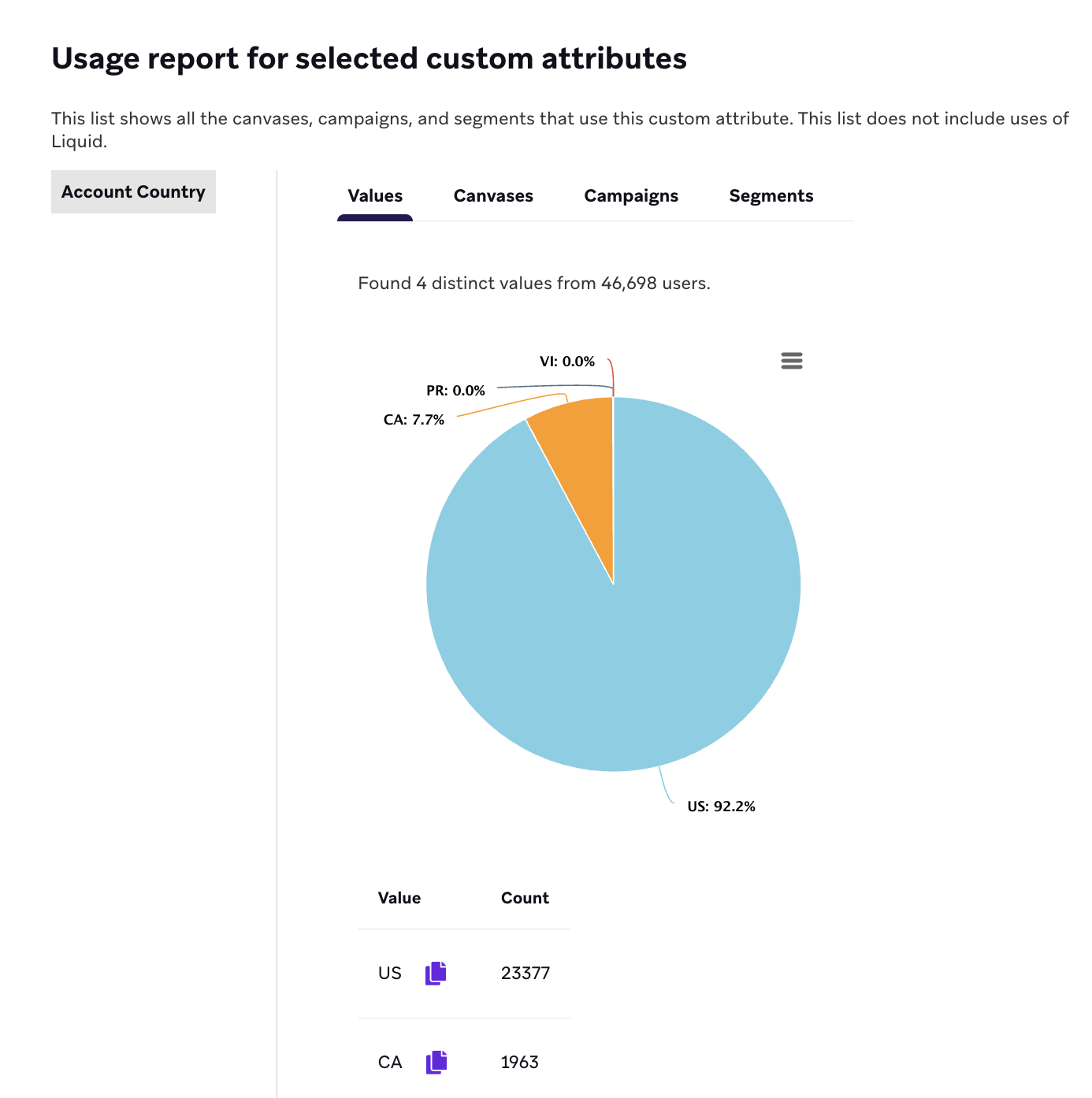
The usage report lists all the Canvases, campaigns, and segments using a specific custom attribute. This list doesn’t include uses of Liquid.
You can view up to 100 usage reports at a time by selecting the checkboxes next to the respective custom attributes and then selecting View usage report.
Values tab
When viewing a usage report, select the Values tab to view the top values of the selected custom attributes based on a sample of approximately 250,000 users. Note that because the results are sampled from a subset of users, the sample doesn’t include all existing values. This means the Values tab shouldn’t be used for troubleshooting or for use cases that require incorporating data from all users.
Setting custom attributes
The following lists methods across various platforms that are used to set custom attributes.
Expand for documentation by platform
Custom attribute storage
All data stored on the User Profile, including custom attribute data, is retained indefinitely as long as each profile is active.
Custom attribute data types
Custom attributes are extraordinarily flexible tools that allow for great targeting.
The following data types may be stored as custom attributes:
Booleans (true/false)
Boolean attributes are useful for storing simple binary data about your users, like subscription statuses. You can find users that explicitly have a variable set to a true or false value, in addition to those that don’t have any record of that attribute recorded yet.
For Boolean attributes, the following segmentation options are available.
| Segmentation options | Dropdown filter | Input options | Examples |
|---|---|---|---|
| Check if the boolean value is either true, false, true or not set, or false or not set | IS | TRUE, FALSE, TRUE OR NOT SET, or FALSE OR NOT SET | If this filter specifies coffee_drinker, a user will match this filter in the following circumstances:
|
| Check if the boolean value exists on a user’s profile and is not null | IS NOT BLANK | N/A | If this filter specifies coffee_drinker and a user has a value for the attribute coffee_drinker, the user will match this filter. |
| Check if the boolean value does not exist on a user’s profile or is null | IS BLANK | N/A | If this filter specifies coffee_drinker and a user either doesn’t have the attribute coffee_drinker or the value for coffee_drinker is null, the user will match this filter. |

Money spent should not be recorded by this method. Rather it should be recorded via purchase events.
For Number attributes, the following segmentation options are available.
| Segmentation options | Dropdown filter | Input options | Examples |
|---|---|---|---|
| Check if the numeric attribute is exactly a number | EXACTLY | NUMBER | If this filter specifies 10 and a user profile has the value 10, the user will match this filter. |
| Check if the numeric attribute does not equal a number | DOES NOT EQUAL | NUMBER | If this filter specifies 10 and a user profile doesn’t have the value 10, the user will match this filter. |
| Check if the numeric attribute is more than a number | MORE THAN | NUMBER | If this filter specifies 10 and a user profile has a value greater than 10, the user will match this filter. |
| Check if the numeric attribute is less than a number | LESS THAN | NUMBER | If this filter specifies 10 and a user profile has a value lesser than 10, the user will match this filter. |
| Check if the numeric attribute exists on a user’s profile and is not null | IS NOT BLANK | N/A | If a user profile contains the specified numeric attribute, regardless of value, the user will match this filter. |
| Check if the numeric attribute does not exist on a user’s profile or is null | IS BLANK | N/A | If a user profile doesn’t contain the specified numeric attribute or the attribute’s value is null, the user will match this filter. |
Number attribute details
- “Exactly 0” and “Less Than” filters include users with NULL fields
- To exclude users without a value for custom attributes, you need to include the is not blank filter.
String attributes can be up to 255 characters long. Note that if you input any values with spaces in between, before, or after words, Braze will also check for the same spaces.
For String attributes, the following segmentation options are available.
| Segmentation options | Dropdown filter | Input options | Examples |
|---|---|---|---|
| Check if the string attribute partially matches an inputted string OR Regular Expression | MATCHES REGEX | STRING OR REGULAR EXPRESSION Not case sensitive; maximum of 32,764 characters |
|
| Check if the string attribute does not partially match an inputted string OR Regular Expression | DOES NOT MATCH REGEX * | STRING OR REGULAR EXPRESSION Not case sensitive; maximum of 32,764 characters |
|
| Check if the string attribute exists on a user’s profile and is not an empty string | IS NOT BLANK | N/A | If this filter specifies favorite_genre and a user profile has the attribute favorite_genre, the user will match this filter regardless of their attribute value. For example, the user can have sci-fi, romance, or another value. |
| Check if the string attribute does not exist on a user’s profile | BLANK | N/A | If this filter specifies favorite_genre and a user profile doesn’t have the attribute favorite_genre, the user will match this filter. |
| Check if the string exactly matches any of the inputted strings | IS ANY OF | STRING Case sensitive; multiple strings allowed (256 maximum) |
If this filter specifies book, bookmark, and reading light, and a user profile has at least one of those strings, the user will match this filter. |
| Check if the string attribute does not exactly match any of the inputted strings | IS NONE OF | STRING Case sensitive; multiple strings allowed (256 maximum) |
If this filter specifies book, bookmark, and reading light, and a user profile doesn’t contain any of those strings, the user will match the filter. |
| Check if the string attribute partially matches any of the inputted strings | CONTAINS ANY OF | STRING Case sensitive; multiple strings allowed (256 maximum) |
If this filter specifies gold and a user profile contains gold in any string, such as gold_tier or former_gold_tier, the user will match the filter. |
| Check if the string attribute does not partially match any of the inputted strings | DOESN’T CONTAIN ANY OF | STRING Case sensitive; multiple strings allowed (256 maximum) |
If this filter specifies gold and a user profile doesn’t contain gold in any string, the user will match this filter. |

A date string such as “12-1-2021” or “12/1/2021” will be converted to a datetime object and treated as a time attribute.
When segmenting using the DOES NOT MATCH REGEX filter, you must already have a custom attribute with a value assigned in that user profile. Braze suggests using “OR” logic to check if a custom attribute is blank to ensure users are being targeted properly.
Arrays have a maximum size of 100 KB. The default length for an attribute is up to 500 items (for example, if you’re sending an attribute such as “Movies Watched” set to 500, when a user watches a 501st movie, the first movie is removed and the most recent is added). Note that if you input any values with spaces in between, before, or after words, Braze will also check for the same spaces.
Array-type custom attributes cannot be imported via CSV import. To upload array values, use the /users/track endpoint or Cloud Data Ingestion.
The option to increase the maximum length will not be available if the attribute is set to automatically detect the data type; the data type must be set to array.
For Array attributes, the following segmentation options are available.
| Segmentation options | Dropdown filter | Input options | Examples |
|---|---|---|---|
| Check if the array attribute includes a value which exactly matches an inputted value | INCLUDES VALUE | STRING | If this filter specifies sci-fi and a user profile has the value sci-fi, the user will match this filter. |
| Check if the array attribute does not include a value which exactly matches an inputted value | DOESN’T INCLUDE VALUE | STRING | If this filter specifies sci-fi and a user profile doesn’t have the value sci-fi, the user will match this filter. |
| Check if the array attribute contains a value which partially matches an inputted value OR Regular Expression | MATCHES REGEX | STRING OR REGULAR EXPRESSION Maximum of 32,764 characters |
|
| Check if the array attribute has any value or is not empty | HAS A VALUE | N/A | If this filter specifies favorite_genres and a user profile contains favorite_genres with any value, the user will match this filter. |
| Check if the array attribute is empty or does not exist | IS EMPTY | N/A | If this filter specifies favorite_genres and a user profile doesn’t contain favorite_genres or contains favorite_genres but has no values, the user will match this filter. |
| Check if the array attribute includes a value which exactly matches any of the inputted values | INCLUDES ANY OF | STRING Case sensitive; multiple values allowed (256 maximum) |
If this filter specifies sci-fi, fantasy, romance and a user profile has any combination of sci-fi, fantasy, or romance, including only one of them (such as only sci-fi). A user can have horror or another value in their string if they also have any of sci-fi, fantasy, and romance. |
| Check if the array attribute does not include a value which exactly match any of the inputted values | INCLUDES NONE OF | STRING Case sensitive; multiple values allowed (256 maximum) |
If this filter specifies sci-fi, fantasy, romance and a user profile doesn’t have any combination of sci-fi, fantasy, or romance, the user will match this filter. The user can have horror or another value if they don’t have any of sci-fi, fantasy, or romance. |
| Check if the array attribute contains a value which partially matches any of the inputted values | VALUES CONTAIN ANY OF | STRING Case sensitive; multiple values allowed (256 maximum) |
If this filter specifies gold and a user profile array contains gold in at least one string, the user will match this filter. This includes string values like gold_tier, former_gold_tier, and others. |
| Check if the array attribute does not include a value which partially match any of the inputted values | VALUES DON’T CONTAIN ANY OF | STRING Case sensitive; multiple values allowed (256 maximum) |
If this filter specifies gold and a user profile array doesn’t contain gold in any strings, the user will match this filter. This means users with string values like gold_tier and former_gold_tier won’t match this filter. |
| Check if the array attribute includes all of the inputted values | IS ALL OF | STRING Case sensitive; multiple values allowed (256 maximum) |
If this filter specifies sci-fi, fantasy, romance and a user profile has all of those values, the user will match this filter. The user can also have horror or other values and match this filter. |
| Check if the array attribute does not include all of the inputted values | ISN’T ALL OF | STRING Case sensitive; multiple values allowed (256 maximum) |
If this filter specifies sci-fi, fantasy, romance and a user profile doesn’t have all of those values, the user will match this filter. |
For more on how to use regular expressions (regex), check out these resources:
Time attributes are useful for storing the last time a specific action was taken, so you can offer content specific re-engagement messaging to your users.
Time filters using relative dates (for example, more than 1 day ago, less than 2 days ago) measure 1 day as 24 hours. Any campaign that you run using these filters will include all users in 24-hour increments. For example, last used app more than 1 day ago will capture all users who “last used the app more than 24 hours” from the exact time the campaign runs. The same will be true for campaigns set with longer date ranges—so five days from activation will mean the prior 120 hours.
To target users who have a time attribute that falls within a time range, use two audience filters: in more than for the lower bound and in less than for the upper bound. A single filter can’t express both sides of that range. For example, to target users with a time attribute in the next 24 hours (between now and one day from now), apply in more than 0 days and in less than 1 day.

The last date a custom event or purchase event occurred is automatically recorded and shouldn’t be recorded again through a custom time attribute.
For Time attributes, the following segmentation options are available.
| Segmentation options | Dropdown filter | Input options | Examples |
|---|---|---|---|
| Check if the time attribute is before a selected date | BEFORE | CALENDAR DATE SELECTOR | If this filter specifies 2024-01-31 and a user profile has a date before 2024-1-31, the user will match this filter. |
| Check if the time attribute is after a selected date | AFTER | CALENDAR DATE SELECTOR | If this filter specifies 2024-01-31 and a user profile has a date after 2024-1-31, the user will match this filter. |
| Check if the time attribute is more than X number of days ago | MORE THAN | NUMBER OF DAYS AGO | If this filter specifies 7 and a user profile has a date that is more than seven days ago, the user will match this filter. |
| Check if the time attribute is less than X number of days ago | LESS THAN | NUMBER OF DAYS AGO | If this filter specifies 7 and a user profile has a date that is less than seven days ago, the user will match this filter. |
| Check if the time attribute is in more than X number of days in the future | IN MORE THAN | NUMBER OF DAYS IN FUTURE | If this filter specifies 7 and a user profile has a date that is more than seven days in the future, the user will match this filter. |
| Check if the time attribute is less than X number of days in the future | IN LESS THAN | NUMBER OF DAYS IN FUTURE | If this filter specifies 7 and a user profile has a date that is less than seven days in the future, the user will match this filter. |
| Check if the time attribute exists on a user’s profile and is not null | IS NOT BLANK | N/A | If this filter specifies a time attribute that is on a user profile, the user will match this filter. |
| Check if the time attribute does not exist on a user’s profile or is null | IS BLANK | N/A | If this filter specifies a time attribute that isn’t on a user profile, the user will match this filter. |
Time attribute details
- Day of Recurring Event
- When using the “Day of Recurring Event” filter, and are then prompted to select the “Calendar Day of Recurring Event”, if you select
IS LESS THANorIS MORE THAN, the current date will be counted for that segmentation filter. - For example, if on March 10, 2020, you selected the date of the attribute to be
LESS THAN ... March 10, 2020, attributes will be considered for the days up to, and including March 10, 2020.
- When using the “Day of Recurring Event” filter, and are then prompted to select the “Calendar Day of Recurring Event”, if you select
- Less than X Days Ago: The “Less than X Days Ago” filter includes dates between X days ago and the current date/time.
- Less than X Days in the Future: Includes dates between the current date/time and X days in the future.
You can use nested custom attributes to send objects as a data type for custom attributes. For more information, refer to Nested custom attributes.
Use an array of objects to group related attributes. For more details, refer to Array of objects.
You can change the data type of your custom attribute, but you should be aware of the impacts. Refer to Changing custom attribute or event data type for more.
Consolidated operators
We’ve consolidated the list of operators available to use in attribute filters, custom attribute filters, and nested custom attribute filters. If you have existing filters using these operators, they will be automatically updated to use the new operators.
| Data type | Old operator | New operator | Value |
|---|---|---|---|
| String | equals | is any of | At least 1 value |
| String | does not equal | is none of | At least 1 value |
| Array | includes value | includes any of | At least 1 value |
| Array | doesn’t include value | includes none of | At least 1 value |
Event property data types
When you log an event, you can attach extra information (for example, product name or price) as event properties. Each property has a name and a value. Event property values support the data types in the Definitions table (Time is labeled “Datetime” in event properties).
Expected format
Property values are sent as an object: keys are the property names, and values are the property values. Property names must be non-empty strings, 255 characters or fewer, with no leading dollar signs ($).
Event-property-specific rules:
- Time (Datetime): Use ISO 8601 or
yyyy-MM-dd'T'HH:mm:ss:SSSZformat. Not supported within arrays. - Array: Datetimes are not supported within arrays.
- Nested object: See Nested objects.
- Payload: Event property objects that contain array or object values can be up to 102,400 bytes (100 KiB).
You can change the data type of your custom event property, but be aware of the impacts of changing data types after data has been collected.
For full event property behavior, reserved keys, and usage in triggers and personalization, see Custom event properties.
Purchase events and revenue
Purchase and revenue data is recorded through purchase events or recommended eCommerce events.
Recommended events have pre-defined schemas with set data types. For details, refer to eCommerce recommended events.
Logging purchase events establishes the Lifetime Value (LTV) for each user profile, and this data is viewable on the revenue page in time-series. You can segment on money spent, last purchase date, number of purchases in a time window, and more.
Purchase event property data types
Purchase event property values (the properties object on a purchase) support the data types in the Definitions table, with the same structure and naming rules as event properties.
The properties values must be an object up to 50 KB where the keys are the property names and the values are the property values. Property names must be strings, 255 characters or fewer, with no leading dollar signs ($).
Property values can be any of the following data types:
| Data type | Description |
|---|---|
| Number | Integer or float |
| Boolean | Value true or false |
| Datetime | String in ISO 8601 or yyyy-MM-dd'T'HH:mm:ss:SSSZ format. Not supported within arrays. |
| String | 255 characters or fewer |
| Array | Supported; datetimes are not supported within arrays. |
| Object | Ingested as strings (not nested objects). For nested data, use a string value (for example, JSON serialized). |
The following keys are reserved and cannot be used as property names: time, product_id, quantity, event_name, price, and currency. Using a reserved key in the properties object returns the error “Invalid ‘properties’ field”.
For the full purchase object schema and examples, see Purchase object. For logging purchase events, segmentation filters, and full details, refer to Purchase events.
Changing custom attribute or event data type
To change the data type of a custom attribute or event:
- Go to Data Settings and select either Custom Attributes or Custom Events.
- Find your attribute or event from the list, and select More actions.
- Select a new Data type from the dropdown.
- Select Save.
If you change the data type of a custom attribute or event (for example, changing time to string), consider the following:
- Filters are not automatically updated. Segments, campaigns, Canvases, or other locations that use the changed attribute or event are not updated. Before you change the data type, stop any campaigns or Canvases that use the attribute in segments or filters, and remove the attribute from filters that reference it.
- Existing user data is not retroactively updated. If the changed attribute was on a user profile before the change, that value remains the old data type. Users can fall out of segments that contain the changed attribute because the filter looks for the new data type. Update those user profiles (for example, with the
/users/trackendpoint) so they match the new type and re-enter the segment if needed. - New data must match the new type. API calls that send the previous data type for the changed attribute are not accepted. Send the new data type.
The ability to prevent automatic detection from updating the custom attribute data type is currently in early access. Contact your customer success manager if you’re interested in participating.
Catalog data types
Catalogs support the types listed in the Definitions table. The following table lists each type, how it can be created or updated, and format and examples.
| Data type | Description | Available via CSV upload | Available via API and CDI |
|---|---|---|---|
| String | A sequence of characters (for example, names, descriptions, IDs). | ✅ Yes | ✅ Yes |
| Number | A numeric value, either integer or float (for example, prices, quantities, ratings). | ✅ Yes | ✅ Yes |
| Boolean | A true or false value. |
✅ Yes | ✅ Yes |
| Time | Date and time in ISO 8601 format or Unix timestamp in seconds. | ✅ Yes | ✅ Yes |
| JSON object (Object) | Nested object with key-value pairs. Displayed in the platform but can only be created or updated through the API or CDI. | ❌ No | ✅ Yes |
| String array (Array) | A list of strings. Displayed in the platform but can only be created or updated through the API or CDI. Maximum of 100 elements. | ❌ No | ✅ Yes |
Format and examples
| Data type | Format | Example |
|---|---|---|
| String | Text | "Hello World" |
| Time | ISO 8601 or Unix timestamp (seconds) | "2024-03-15T14:30:00Z" |
| Boolean | true or false |
true |
| Number | Integer or decimal | 42 or 19.99 |
| Object | JSON object | {"key": "value", "price": 10} |
| Array | Array of strings | ["red", "blue", "green"] |
For creating and updating catalogs, see Create a catalog.