RFM SQL segments
You can create an RFM (recency, frequency, monetary) Segment Extension to target your best users by measuring their purchasing habits.
RFM analysis is a marketing technique that identifies your best users by scoring users on a scale from 0—3 for each category (recency, frequency, monetary), where 3 is the best score and 0 is the worst. Recency, frequency, and monetary values are all based on data from a specific time range of your choosing.
RFM categories
| Category | Definition |
|---|---|
| Recency | How recently a customer made a purchase. A higher score means more recent purchases. |
| Frequency | How frequently a customer made a purchase. A higher score means higher frequency. |
| Monetary value | Total amount of money a customer spent. A higher score means higher spending. |

Purchase events must be enabled to use RFM SQL segments because the monetary value for your users is determined by the revenue they’ve generated through Braze purchase events.
Creating an RFM segment
- Go to Audience > Segment Extensions.
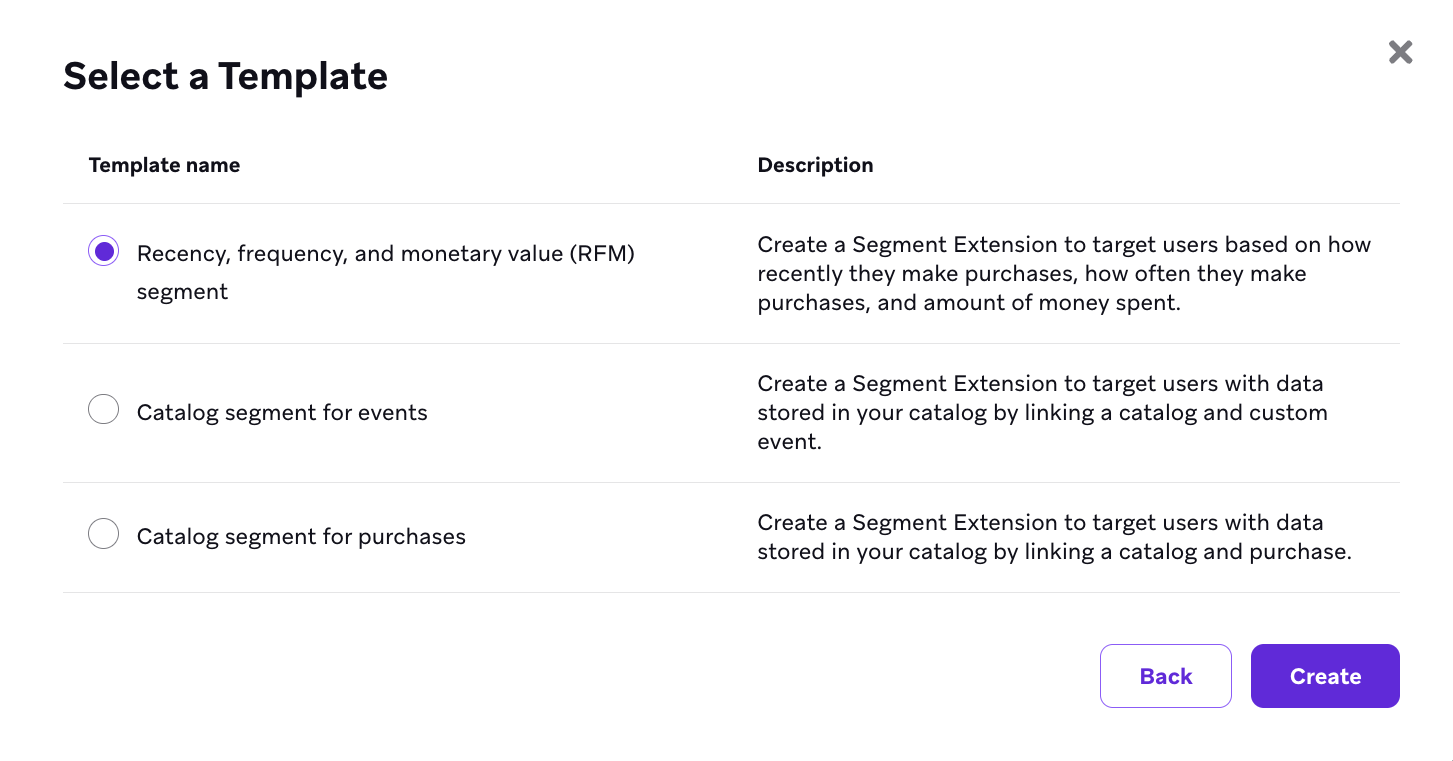
- Select New Extension, and then select Recency, frequency, and monetary value (RFM) segment.
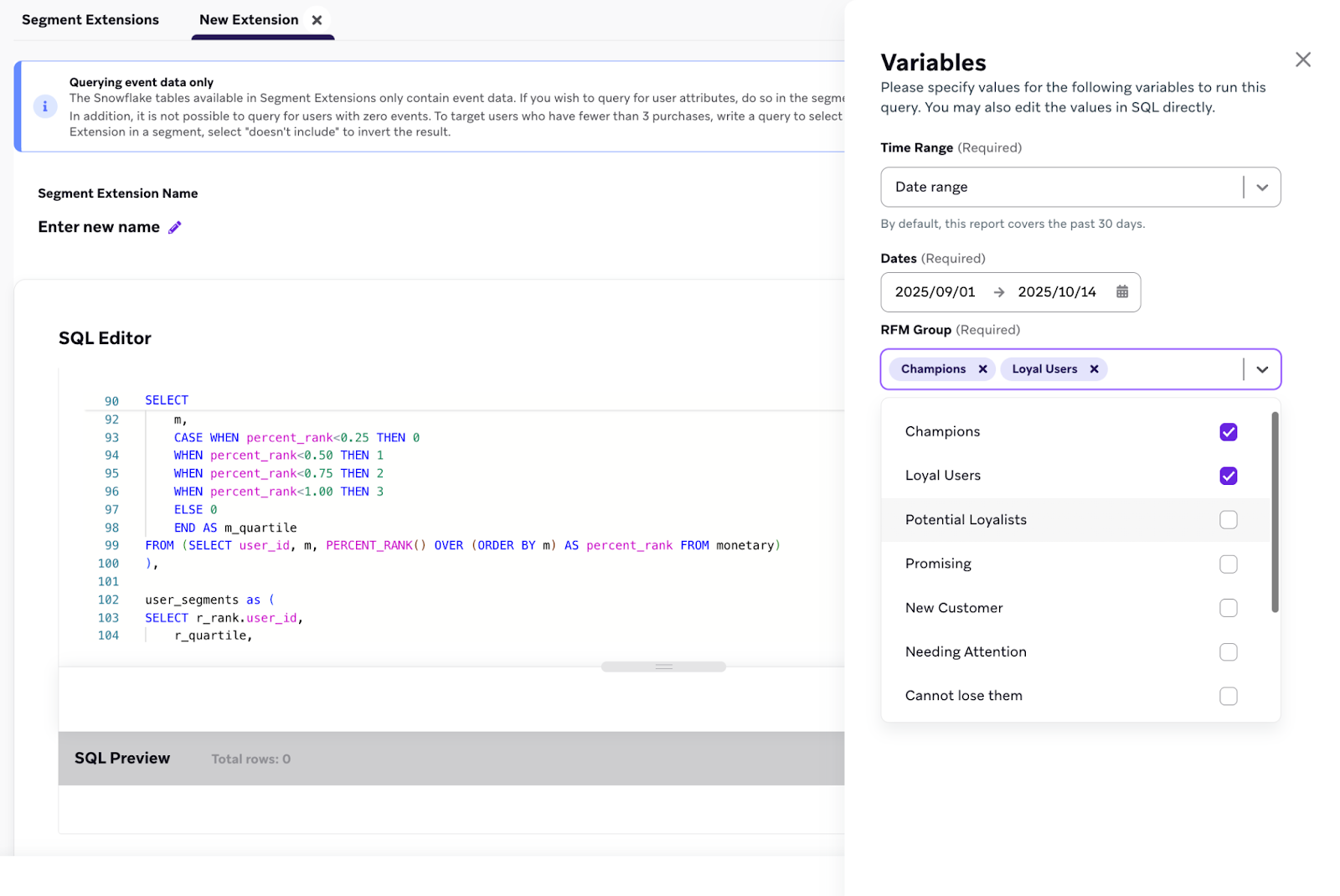
- In the Variables panel, select your Time Range to specify the time period of purchase data to analyze. You can specify up to the past 60 days. The time range you select is the time range that user behavior data gets pulled from and depends on your campaign goals.
| Time range field | Description | Use case |
|---|---|---|
| Relative | Specify activity within the past X days | Analyze the most recent user behavior with a rolling window. |
| Start date | Specify a fixed starting point for your analysis | Analyze user activity from a specific date onward, such as after a campaign launch. |
| End date | Specify a fixed ending point for your analysis | Analyze user activity up to a specific date, such as before a product update. |
| Date range | Specify both a start and end date for a custom period | Analyze user behavior during a defined period, such as a promotional event. |
- Select the generated RFM groups to include in your segment. If you select multiple groups, your segment includes users who are part of any of the selected groups.
- Run a preview and then save your segment
You don’t need to edit the SQL code in the template to create an RFM segment. You can exclusively use the Variables panel to customize your segment.
RFM groups
RFM segments are evaluated in a specific order. Users are assigned to the first segment whose criteria they meet from the top of the prioritization list down. For example, a user who qualifies for both “Champions” and “Loyal Users” is assigned to the “Champions” segment because it has a higher priority.
| RFM group | Segment description | Recency (R) rank | Frequency (F) rank | Monetary (M) rank |
|---|---|---|---|---|
| Champions | The most valuable user segment with top scores in all categories. | 3 | 2-3 | 2-3 |
| Loyal Users | Users who have high recency and high frequency. May have lower monetary value than Champions. | 2-3 | 2-3 | 1-3 |
| Potential Loyalists | Users who purchased recently with moderate frequency and moderate monetary value. | 3 | 1-3 | 1-3 |
| Promising | Users who made a recent, high-value initial purchase but have not yet established a high purchase frequency. | 3 | 0-3 | 1-3 |
| New Customer | Users who made their first purchase very recently. | 3 | 0-3 | 0-3 |
| Needing Attention | Users with higher-than-average recency, but their purchase frequency or monetary value are lower than average. | 2-3 | 0-3 | 0-3 |
| Cannot lose them | Users who were previously high-value with good frequency and monetary scores, but have not purchased in a long time. | 0-1 | 2-3 | 2-3 |
| At Risk | Users who have historically had moderate frequency and monetary scores, but have not purchased in a long time. | 0-1 | 1-3 | 1-3 |
| About to Sleep | Users who have low scores across all metrics. | 1 | 0-3 | 0-3 |
| Hibernating | Users who have moderate frequency but have been inactive for an extended period. | 0 | 0-2 | 0-3 |