Export Canvas data
User data can be exported to a CSV. This page covers how to export data for your entire Canvas or a specific Canvas component.
Prerequisites
To export Canvas user data as a CSV, you need these permissions for your workspace:
| Permission | What it allows |
|---|---|
| “Export User Data” | Export Canvas user data as a CSV |
| “View PII” | Export email addresses (email-only CSV exports also include first and last name fields) |
Exporting data for a Canvas
To export data for a Canvas, do the following:
- Go to Messaging > Canvas and select your Canvas.
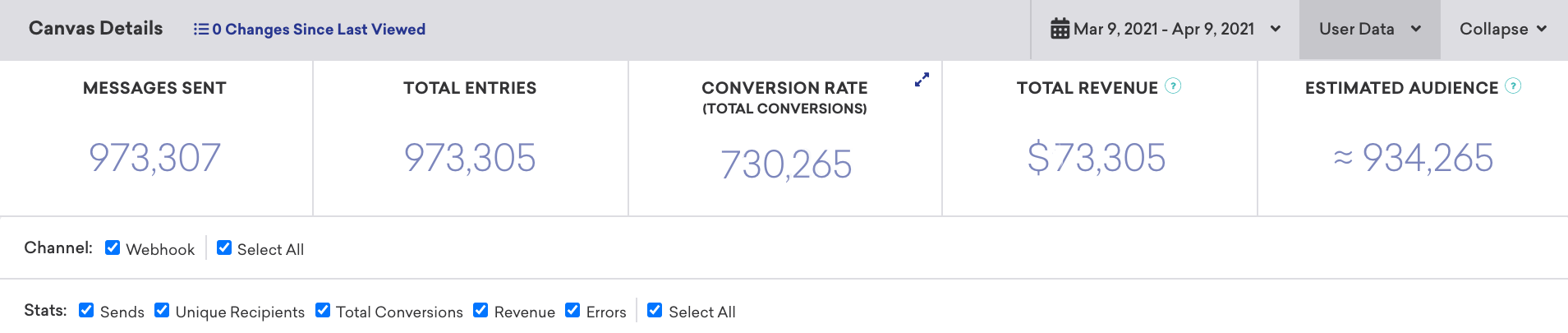
- Select the User Data dropdown in the Canvas Details section.
- Select one of the following export options:
- CSV Export User Data or
- CSV Export Email Address.
You can also export user data for all the entrants of a Canvas as a CSV file.
Export users who entered or re-entered a Canvas
When re-eligibility is enabled, users can enter the same Canvas more than once. The CSV Export User Data option on the Canvas details page exports users who entered the Canvas, but it doesn’t include how many times each user entered or each entry timestamp.
To analyze when users entered or re-entered a Canvas, use one of the following options:
- Most recent entry per user: Export a segment with the
canvases_receivedfield using the/users/export/segmentendpoint. For each Canvas, the export includes alast_enteredtimestamp for that user. Thecanvases_receivedfield contains data from the last 90 days. - Every entry, including re-entries: Use Canvas Entry events in Braze Currents or Snowflake Data Sharing. Each
users.canvas.Entryevent represents one Canvas entry and includes atimetimestamp. Count events per user to determine how many times they entered. - Build a user list in the dashboard: Create a segment with an Entered Canvas Variation filter, then export the segment to CSV. See Canvas troubleshooting.

If you don’t have Currents integrated and need every historical entry timestamp, contact your Braze customer success manager.
For a specific Canvas step in the original workflow, use CSV Export User Data on the step’s details page.
Exporting data for a component (original workflow only)
Canvas results can be exported on an individual component basis for the original Canvas workflow. To do this, select the specific component, then select the User Data dropdown in the Canvas Step Details page.