Recommended events
Recommended events are built on a framework that sends standardized custom events with defined JSON schemas. When you send a recommended event, Braze validates it against its schema on ingestion and applies specialized processing, like automatic field calculations or cart management, that generic custom events don’t receive. For certain industry event sets, Braze also supports special handling such as dedicated action-based triggers for campaigns and Canvases.
eCommerce recommended events
eCommerce recommended events cover six steps in the purchase journey: product_viewed, cart_updated, checkout_started, order_placed, order_cancelled, and order_refunded. When you successfully send these events, Braze validates the data and makes it available to a growing set of platform features.
These features include Canvas templates for abandoned browse, abandoned cart, abandoned checkout, and order confirmation flows; eCommerce reporting; and calculated user profile fields for Total Revenue, Total Orders, and Total Refunds. You can also build segments using nested product property filtering through Segment Extensions, personalize abandoned cart messages with the {% shopping_cart %} Liquid tag, and feed BrazeAITM capabilities like Predictive Events, Predictive Churn, and item recommendations, along with other capabilities.
Because these events follow a defined schema, each supported feature can read the structured data without custom property mapping or per-feature configuration on your end.

The legacy purchase event is entering maintenance mode. Existing Braze customers can continue using legacy purchase events. They’ll keep working as expected, but new functionality will be built on eCommerce recommended events going forward. Braze will provide advance notice well before any end-of-life date is set. New Braze customers should use eCommerce recommended events, as legacy purchase events will not be available.
How eCommerce events work
eCommerce events are custom events with predefined names and property schemas. You send them using the Braze SDK, the /users/track REST API endpoint, or Cloud Data Ingestion (CDI), and Braze validates each event against its schema on ingestion. When validation passes, Braze automatically applies post-processing specific to that event type, such as calculating revenue fields and managing cart state on user profiles.

CSV uploads don’t support eCommerce events. Use the SDK, /users/track, or CDI to send these events.
eCommerce events work everywhere other custom events do: triggers and filters for performed custom events, custom events reporting, and more. However, their schema validation unlocks additional capabilities, including:
- “Places order” trigger actions in campaigns, Canvases, Action Paths steps, in-app message triggers, and Content Card removal
- Calculated eCommerce user profile fields (Total Revenue, Total Orders, Total Refunds)
- Cart state management for abandoned cart flows
- Richer data for BrazeAITM features like Predictive Events, Predictive Churn, and item recommendations
You can also reference eCommerce events by name anywhere the platform supports custom events. For example, you can trigger an action-based campaign with ecommerce.product_viewed events, build a segment filtering on ecommerce.checkout_started events, or export ecommerce.order_placed events through Currents.
Event naming
Event names are exact, case-sensitive, and dot-delimited. Always use the canonical format. If an event name does not exactly match one of the six canonical names, Braze treats it as a standard custom event and no eCommerce post-processing occurs.
You cannot customize or rename events.
- Correct:
ecommerce.order_placed - Incorrect:
order.placed,eCommerce_order_placed,Order_Placed
Event schemas
The six eCommerce recommended events map to stages of the purchase journey. Fire each event at the moment the user completes the corresponding action.
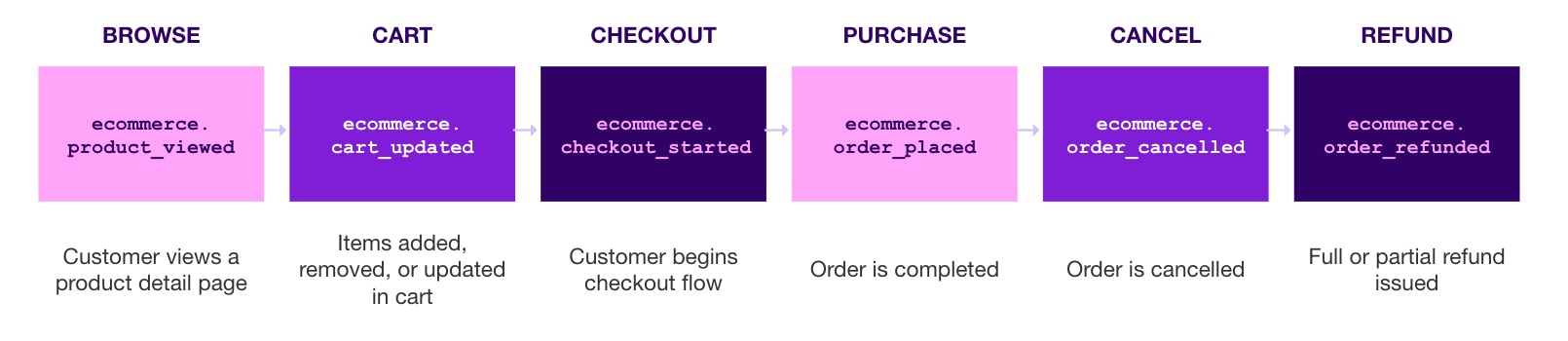

The examples in the following tabs show the REST API payload for each event.
For client-side logging, ecommerce.product_viewed, ecommerce.cart_updated, ecommerce.checkout_started, and ecommerce.order_placed use SDK eCommerce event APIs where available, while ecommerce.order_cancelled and ecommerce.order_refunded use logCustomEvent.
Refund and cancellation events are typically sent from your server through the Braze REST API because they tend to rely on server-side logic completion, such as your refund flow. For platform-specific implementation examples, see Log eCommerce events through the Braze SDK.
Trigger when a user views a product detail page. This event is compatible with Braze catalog back-in-stock notifications and price drop notifications.
Client-side implementation
Use SDK eCommerce event APIs where available. For platform-specific implementation examples, refer to Log eCommerce events through the Braze SDK.
Event properties
| Property name | Data type | Required | Description |
|---|---|---|---|
product_id |
String | Yes | Unique product identifier (for example, SKU or item ID). |
product_name |
String | Yes | Product display name. |
variant_id |
String | Yes | Product variant identifier (for example, shirt_medium_blue). |
image_url |
String | No | Product image URL. |
product_url |
String | No | URL to the product page for more details. |
price |
Float | Yes | Variant unit price at the time of viewing. |
currency |
String | Yes | Three-letter ISO 4217 code (for example, USD or EUR). |
source |
String | Yes | Source the event originates from (for example, web, ios, or android). |
type |
Array of strings | No | Required to use Braze’s catalog trigger features for back-in-stock and price-drop alerts. Accepted values: "price_drop", "back_in_stock" |
metadata |
Object | No | Flexible key-value pairs (for example, category or brand). |
REST API example
{
"events": [
{
"external_id": "user_98765",
"name": "ecommerce.product_viewed",
"time": "2026-04-28T14:22:11Z",
"properties": {
"product_id": "SKU-RUN-4821",
"product_name": "Ultraboost Running Shoe",
"variant_id": "UB-BLK-11",
"image_url": "https://cdn.example.com/shoes/ub-blk-11.jpg",
"product_url": "https://www.example.com/products/ultraboost-running-shoe?variant=UB-BLK-11",
"price": 189.99,
"currency": "USD",
"source": "web",
"type": ["price_drop", "back_in_stock"],
"metadata": {
"category": "Running Shoes",
"brand": "Shoe Brand"
}
}
}
]
}
Trigger every time the contents of a user’s cart change.
Client-side implementation
Use SDK eCommerce event APIs where available. For platform-specific implementation examples, refer to Log eCommerce events through the Braze SDK.
You can send this event in one of two ways:
- Full cart replacement: Omit
actionor setactiontoreplace. Include the full set of line items inproductswith absolute quantities (total units per variant in the cart). You must includetotal_value. - Incremental cart updates: Set
actiontoaddorremove. Include only the line items that changed. Eachquantityis the number of units to add or remove, not the total quantity in the cart. Foradd, Braze increases the line quantity or adds a new line. Forremove, Braze decreases the line quantity and removes the line when the quantity reaches0.total_valueis optional foraddandremove.

Use either incremental cart updates (add or remove) or full replacement (no action or replace) for a given cart. Mixing both approaches for the same cart_id is not recommended and may lead to an inconsistent cart state in Braze.
To trigger messaging from this event, use the Perform Cart Updated Event trigger in Canvas and campaigns. This trigger includes special handling to stop the cart from progressing through the shopping funnel.
The cart creates a carts mapping object on the user profile that powers the {% shopping_cart %} Liquid tag. The cart expires after 30 days without an update. If two user profiles merge, Braze preserves both carts.
Event properties
| Property | Data type | Required | Description |
|---|---|---|---|
cart_id |
String | Yes | Unique identifier for the cart. Shared across cart, checkout, and order events for the user’s cart mapping. |
action |
String | No | add (increment quantity or add a line), remove (decrement quantity; line removed at 0), or replace (full cart replacement, same as omitting action). |
total_value |
Float | Conditional | Required when action is omitted or replace. Optional when action is add or remove. |
subtotal_value |
Float | No | Subtotal value of the cart (post-discount, pre-tax/shipping). |
tax |
Float | No | Total tax applied to the cart. |
shipping |
Float | No | Total shipping cost for the cart. |
currency |
String | Yes | Three-letter ISO 4217 code. |
products |
Array | Yes | Line items for this update. For full replacement (no action or replace), include the full cart with absolute quantities. For add or remove, include only changed lines; see product properties. |
source |
String | Yes | Source the event originates from. |
metadata |
Object | No | Flexible key-value pairs for additional event-level data. |
Product properties (products[])
| Property | Data type | Required | Description |
|---|---|---|---|
product_id |
String | Yes | Unique product identifier. |
product_name |
String | Yes | Product display name. |
variant_id |
String | Yes | Variant identifier. |
image_url |
String | No | Product image URL. |
product_url |
String | No | URL to the product page. |
quantity |
Integer | Yes | For full replacement (no action or replace), units in the cart for this line. For add or remove, how many units to add or remove. |
price |
Float | Yes | Variant unit price. |
metadata |
Object | No | Flexible key-value pairs (for example, color or size). |
Trigger when the user initiates the checkout flow (for example, selects “Checkout” or lands on the checkout page).
Client-side implementation
Use SDK eCommerce event APIs where available. For platform-specific implementation examples, refer to Log eCommerce events through the Braze SDK.
Event properties
| Property | Type | Required | Description |
|---|---|---|---|
| checkout_id | String | Yes | Unique identifier for the checkout session. |
| cart_id | String | No | Cart identifier. Shared across cart, checkout, and order events for the user’s cart mapping. |
| total_value | Float | Yes | Total monetary value of the checkout. |
| subtotal_value | Float | No | Subtotal value (post-discount, pre-tax/shipping). |
| tax | Float | No | Total tax applied to the checkout. |
| shipping | Float | No | Total shipping cost. |
| currency | String | Yes | Three-letter ISO 4217 code. |
| products | Array | Yes | Items being checked out. See product properties sub-table. |
| source | String | Yes | Source the event originates from. |
| metadata | Object | No | Flexible key-value pairs. Recognized sub-property: checkout_url (String) |
Product properties (products[])
| Property | Data type | Required | Description |
|---|---|---|---|
product_id |
String | Yes | Unique product identifier. |
product_name |
String | Yes | Product display name. |
variant_id |
String | Yes | Variant identifier. |
image_url |
String | No | Product image URL. |
product_url |
String | No | URL to the product page. |
quantity |
Integer | Yes | Number of units in the cart. |
price |
Float | Yes | Variant unit price. |
metadata |
Object | No | Flexible key-value pairs (e.g., color, size). |
REST API example
{
"events": [
{
"external_id": "user_98765",
"name": "ecommerce.checkout_started",
"time": "2026-04-28T14:30:05Z",
"properties": {
"checkout_id": "chk_88291",
"cart_id": "cart_abc123",
"total_value": 234.96,
"subtotal_value": 219.97,
"tax": 9.0,
"shipping": 5.99,
"currency": "USD",
"products": [
{
"product_id": "SKU-RUN-4821",
"product_name": "Ultraboost Running Shoe",
"variant_id": "UB-BLK-11",
"image_url": "https://cdn.example.com/shoes/ub-blk-11.jpg",
"product_url": "https://www.example.com/products/ultraboost-running-shoe?variant=UB-BLK-11",
"quantity": 1,
"price": 189.99,
"metadata": {
"color": "Core Black",
"size": "11"
}
},
{
"product_id": "SKU-SOC-1102",
"product_name": "Performance Running Socks",
"variant_id": "SOC-WHT-L",
"image_url": "https://cdn.example.com/socks/soc-wht-l.jpg",
"product_url": "https://www.example.com/products/performance-running-socks?variant=SOC-WHT-L",
"quantity": 2,
"price": 14.99,
"metadata": {
"color": "White",
"size": "L"
}
}
],
"source": "web",
"metadata": {
"checkout_url": "https://www.example.com/checkout/chk_88291",
"checkout_type": "express"
}
}
}
]
}
Trigger when an order is successfully completed or payment is confirmed.
Client-side implementation
Use SDK eCommerce event APIs where available. For platform-specific implementation examples, refer to Log eCommerce events through the Braze SDK.
This event is the primary revenue driver. It increments total_revenue by the value in total_value and increments total_orders by 1 on the user profile.
Event properties
| Property | Data type | Required | Description |
|---|---|---|---|
order_id |
String | Yes | Unique identifier for the order. |
cart_id |
String | No | Cart identifier. Shared across cart, checkout, and order events for the user’s cart mapping. |
total_value |
Float | Yes | Total monetary value of the order. |
subtotal_value |
Float | No | Subtotal value (post-discount, pre-tax/shipping). |
tax |
Float | No | Total tax applied to the order. |
shipping |
Float | No | Total shipping cost. |
currency |
String | Yes | Three-letter ISO 4217 code. |
total_discounts |
Float | No | Total amount of discounts applied to the order. |
discounts |
Array | No | Detailed list of discounts applied. |
products |
Array | Yes | Items in the order. See product properties sub-table. |
source |
String | Yes | Source the event originates from. |
metadata |
Object | No | Flexible key-value pairs. Recognized sub-property: order_status_url (String) |
Product properties (products[])
| Property | Data type | Required | Description |
|---|---|---|---|
product_id |
String | Yes | Unique product identifier. |
product_name |
String | Yes | Product display name. |
variant_id |
String | Yes | Variant identifier. |
image_url |
String | No | Product image URL. |
product_url |
String | No | URL to the product page. |
quantity |
Integer | Yes | Number of units in the cart. |
price |
Float | Yes | Variant unit price. |
metadata |
Object | No | Flexible key-value pairs (for example, color or size). |
REST API example
{
"events": [
{
"external_id": "user_98765",
"name": "ecommerce.order_placed",
"time": "2026-04-28T14:35:42Z",
"properties": {
"order_id": "ord_77821",
"cart_id": "cart_abc123",
"total_value": 224.96,
"subtotal_value": 209.97,
"tax": 9.0,
"shipping": 5.99,
"currency": "USD",
"total_discounts": 10.0,
"discounts": [
{
"code": "SPRING10",
"amount": 10.0,
"type": "percentage"
}
],
"products": [
{
"product_id": "SKU-RUN-4821",
"product_name": "Ultraboost Running Shoe",
"variant_id": "UB-BLK-11",
"image_url": "https://cdn.example.com/shoes/ub-blk-11.jpg",
"product_url": "https://www.example.com/products/ultraboost-running-shoe?variant=UB-BLK-11",
"quantity": 1,
"price": 189.99,
"metadata": {
"color": "Core Black",
"size": "11"
}
},
{
"product_id": "SKU-SOC-1102",
"product_name": "Performance Running Socks",
"variant_id": "SOC-WHT-L",
"image_url": "https://cdn.example.com/socks/soc-wht-l.jpg",
"product_url": "https://www.example.com/products/performance-running-socks?variant=SOC-WHT-L",
"quantity": 2,
"price": 14.99,
"metadata": {
"color": "White",
"size": "L"
}
}
],
"source": "web",
"metadata": {
"order_status_url": "https://www.example.com/orders/ord_77821/status"
}
}
}
]
}
Trigger when an order is cancelled.
Client-side implementation
Use logCustomEvent. For platform-specific implementation examples, refer to Log eCommerce events through the Braze SDK.
This event decrements total_orders by 1 on the user profile. It does not affect total_revenue; use order_refunded to adjust revenue.
Event properties
| Property | Type | Required | Description |
|---|---|---|---|
order_id |
String | Yes | Unique identifier for the order. |
total_value |
Float | Yes | Total monetary value of the order being cancelled. Must be ≥ 0 — send the absolute amount; Braze handles the decrement. |
subtotal_value |
Float | No | Subtotal value (post-discount, pre-tax/shipping). |
tax |
Float | No | Total tax applied to the order. |
shipping |
Float | No | Total shipping cost. |
currency |
String | Yes | Three-letter ISO 4217 code. |
total_discounts |
Float | No | Total amount of discounts applied to the order. |
discounts |
Array | No | Detailed list of discounts applied. |
cancel_reason |
String | Yes | Reason the order was cancelled. |
products |
Array | Yes | Items in the cancelled order. See product properties sub-table. |
source |
String | Yes | Source the event originates from. |
metadata |
Object | No | Flexible key-value pairs. Recognized sub-property: order_status_url (String) |
Product properties (products[])
| Property | Data type | Required | Description |
|---|---|---|---|
product_id |
String | Yes | Unique product identifier. |
product_name |
String | Yes | Product display name. |
variant_id |
String | Yes | Variant identifier. |
image_url |
String | No | Product image URL. |
product_url |
String | No | URL to the product page. |
quantity |
Integer | Yes | Number of units in the cart. |
price |
Float | Yes | Variant unit price. |
metadata |
Object | No | Flexible key-value pairs (for example, color or size). |
REST API example
{
"events": [
{
"external_id": "user_98765",
"name": "ecommerce.order_cancelled",
"time": "2026-04-28T16:10:00Z",
"properties": {
"order_id": "ord_77821",
"total_value": 224.96,
"subtotal_value": 209.97,
"tax": 9.0,
"shipping": 5.99,
"currency": "USD",
"total_discounts": 10.0,
"cancel_reason": "customer_request",
"products": [
{
"product_id": "SKU-RUN-4821",
"product_name": "Ultraboost Running Shoe",
"variant_id": "UB-BLK-11",
"quantity": 1,
"price": 189.99,
"metadata": {
"color": "Core Black",
"size": "11"
}
},
{
"product_id": "SKU-SOC-1102",
"product_name": "Performance Running Socks",
"variant_id": "SOC-WHT-L",
"quantity": 2,
"price": 14.99,
"metadata": {
"color": "White",
"size": "L"
}
}
],
"source": "web",
"metadata": {
"order_status_url": "https://www.example.com/orders/ord_77821/status"
}
}
}
]
}
Trigger when a full or partial refund is issued.
Client-side implementation
Use logCustomEvent. For platform-specific implementation examples, refer to Log eCommerce events through the Braze SDK.
This event decrements total_revenue by the value in total_value and increments total_refunds on the user profile. For partial refunds, set total_value to the refunded amount only, not the original order total.
Event properties
| Property | Data type | Required | Description |
|---|---|---|---|
order_id |
String | Yes | Unique identifier for the original order. |
total_value |
Float | Yes | Total monetary value of the refund. Must be ≥ 0 — send the absolute amount; Braze handles the increment to total_refunds. |
currency |
String | Yes | Three-letter ISO 4217 code. |
total_discounts |
Float | No | Total amount of discounts originally applied. |
discounts |
Array | No | Detailed list of discounts. |
products |
Array | Yes | Items being refunded. See product properties sub-table. |
source |
String | Yes | Source the event originates from. |
metadata |
Object | No | Flexible key-value pairs. Recognized sub-property: order_status_url (String). |
Product properties (products[])
| Property | Data type | Required | Description |
|---|---|---|---|
product_id |
String | Yes | Unique product identifier. |
product_name |
String | Yes | Product display name. |
variant_id |
String | Yes | Variant identifier. |
image_url |
String | No | Product image URL. |
product_url |
String | No | URL to the product page. |
quantity |
Integer | Yes | Number of units in the cart. |
price |
Float | Yes | Variant unit price. |
metadata |
Object | No | Flexible key-value pairs (for example, color or size). |
REST API examples
{
"events": [
{
"external_id": "user_98765",
"name": "ecommerce.order_refunded",
"time": "2026-04-29T10:05:00Z",
"properties": {
"order_id": "ord_77821",
"total_value": 189.99,
"currency": "USD",
"total_discounts": 0,
"products": [
{
"product_id": "SKU-RUN-4821",
"product_name": "Ultraboost Running Shoe",
"variant_id": "UB-BLK-11",
"quantity": 1,
"price": 189.99,
"metadata": {
"color": "Core Black",
"size": "11",
"refund_reason": "size_mismatch"
}
}
],
"source": "web",
"metadata": {
"order_status_url": "https://www.example.com/orders/ord_77821/status"
}
}
}
]
}
{
"events": [
{
"external_id": "user_98765",
"name": "ecommerce.order_refunded",
"time": "2026-05-02T11:08:30Z",
"properties": {
"order_id": "ORD-20260428-7891",
"total_value": 29.98,
"currency": "USD",
"products": [
{
"product_id": "SKU-SOC-1102",
"product_name": "Performance Running Socks",
"variant_id": "SOC-WHT-L",
"image_url": "https://cdn.example.com/socks/soc-wht-l.jpg",
"product_url": "https://www.example.com/products/performance-running-socks?variant=SOC-WHT-L",
"quantity": 2,
"price": 14.99,
"metadata": {
"color": "White",
"size": "L"
}
}
],
"source": "web",
"metadata": {
"refund_method": "store_credit",
"initiated_by": "customer"
}
}
}
]
}
eCommerce event post-processing
When you send an eCommerce event, Braze validates it against the expected schema for that event name.
The following table summarizes what Braze automatically does for each event when validation passes. For what happens when validation fails, see Event validation and troubleshooting.
| Event | What Braze does automatically |
|---|---|
ecommerce.order_placed |
Increments Total Revenue by total_value and Total Orders by 1 on the user profile. |
ecommerce.order_cancelled |
Decrements Total Orders by 1. |
ecommerce.order_refunded |
Decrements Total Revenue by total_value and increments Total Refund Value. |
ecommerce.cart_updated |
Creates or updates the carts mapping object on the user profile (full cart payloads, or incremental cart updates with optional action: add, remove, or replace). The cart expires after 30 days without an update. |
ecommerce.product_viewed |
No user profile changes. Available for segmentation, triggering, and BrazeAITM features (like item recommendations). |
ecommerce.checkout_started |
No user profile changes. Available for segmentation and triggering (for example, abandoned checkout flows). |
Non-USD currency values are automatically converted to USD using the exchange rate on the date the event is reported. If you already report in USD, hardcode USD as the currency to avoid unintended conversion.
Implementation details
Data points and billing
eCommerce events don’t consume data points. You can log them without any impact to your data point usage.
Event size limit
Event properties sent to /users/track are capped at 102,400 bytes (100 KB) per event. For triggered campaign and Canvas messages, the trigger_properties sent to /campaigns/trigger/send and /canvas/trigger/send have a stricter default limit of 51,200 bytes (50 KB).
For a best practice, send only the product information you need for triggering, personalizing, or attributing the event. Store richer product details—such as descriptions, full variant lists, inventory, or alternate images—in Braze Catalogs. Reference these details by product_id or variant_id when sending messages. Use the metadata object selectively for order or product-specific context that messaging will use.
Currency handling
Braze automatically converts non-USD currency values to USD using the exchange rate on the date the event is reported. This converted value is what appears in revenue metrics.
If you only operate in USD, hardcode "currency": "USD" in every event to avoid unnecessary conversion.
Source field
The source property is a required string that identifies where the event originated. For example, shopify, in-store POS, or custom_api. This helps you distinguish integration sources when analyzing data in Currents exports or debugging validation issues.
Metadata flexibility
Both the event-level and product-level metadata objects accept arbitrary key-value pairs, so you can attach custom dimensions without modifying the core schema. Common examples include order_status_url, gift_wrapped, loyalty_points_earned, or warehouse_id. These properties are available in Liquid personalization, Currents exports, and segmentation through Segment Extensions.
Recommended events use a strict schema. As a result, adding custom properties at the top level of properties will fail validation. Put all custom properties inside the event-level metadata object or the product-level metadata object inside products[]. These remain available for Liquid, Currents, and segmentation just like top-level fields.
Event validation and troubleshooting
When you send a recommended eCommerce event through /users/track or any Braze SDKs, Braze validates the payload against the event’s JSON schema during the processing of the recommended event. Validation runs automatically on every event whose name exactly matches a recommended event (for example, ecommerce.order_placed or ecommerce.cart_updated).
What we validate
For each event whose name matches an eCommerce recommended event, Braze checks:
| Check | Example |
|---|---|
| Event name | Must be exact. For example, ecommerce.cart_updated is correct—not ecommerce.Cart_Updated, cartupdated, or cart_updated. |
| Required properties present | order_placed requires order_id, total_value, currency, products, and source. |
| Correct data types | total_value must be a number; currency must be a string; products must be an array. |
| No extra top-level properties | Custom fields under properties cause failure. Use the metadata object instead. |
| Value constraints | Monetary fields must be ≥ 0. currency must be a valid ISO 4217 string. |
| Per-product fields | Each item in products[] must include product_id, product_name, variant_id, quantity, and price. |
Why we validate
eCommerce events power features that depend on consistent, predictable data including revenue tracking, the {% shopping_cart %} Liquid tag, the abandoned cart trigger, and reporting. When payloads diverge from the schema, these features produce silent inaccuracies (wrong revenue totals, missing carts, broken triggers). Validation enforces the contract upfront so downstream features behave predictably.
When validation passes
The event is processed as an eCommerce recommended event with all associated post-processing. See eCommerce recommended events for the full list of behaviors triggered by each event type.
Verify a successful event
After sending an event, you can confirm it was accepted and processed correctly using any of the following:
- Event User Log: Open the user’s profile in the dashboard and review their activity. Recommended events appear with their full property payload, so you can confirm the event landed and the values match what you sent.
- Custom events report: Go to Analytics > Custom Events Report to see aggregate counts of each recommended event over time. This is useful for confirming production traffic is flowing as expected when your integration is live.
- Test users: Mark a user in your development workspace as a test user, then trigger events from your integration against that user. Test users are flagged in the dashboard, making it easy to isolate and inspect end-to-end behavior.
When validation fails
The event is not processed as a recommended event. Specifically:
- The event is dropped entirely. Invalid recommended eCommerce events do not land on the user profile, do not appear in Currents, and are not available for segmentation.
- Downstream recommended-event features do not run, including:
- Revenue tracking (revenue reporting, user calculated fields like
total_revenue) - Cart object updates on the user profile
- Update Cart or Place Order triggers in Canvas and campaigns
- Revenue tracking (revenue reporting, user calculated fields like
How errors are reported depends on the ingestion path:
- REST API (
/users/track): Each invalid event is reported in the response’s errors array. Every entry tells you which event failed (index) and why (type). The top-level message field still says “success” which just means your request reached Braze, not that every event was valid. Always check for an errors array in the response. - Braze SDKs: SDK calls return immediately and validation runs in the background, so errors aren’t sent back to your app. To find out about eCommerce event validation failures, watch for the failure summary email (see Find failures).
Example API error response
The /users/track endpoint returns field-level errors indicating which properties failed and why. Note that the top-level message may return "success" because the event was accepted into the pipeline; the errors array tells you which fields failed schema validation. See the following example error response for an example.
{
"message": "success",
"errors": [{ "index": 0, "input_array": "purchases", "type": "'currency' must be an ISO 4217 currency" }]
}
Failures are also classified internally and aggregated for the failure summary email:
| Failure type | Meaning | Example |
|---|---|---|
missing_property |
A required field is absent. | order_placed sent without order_id. |
extra_property |
A field was added that the schema doesn’t define. | A custom gift_wrapped field at the top of properties instead of inside metadata. |
unexpected_data_type |
A field is the wrong type. | total_value: "29.99" (string) instead of 29.99 (number). |
Event names that don’t exactly match a recommended event (for example, ecommerce.OrderPlaced) skip validation entirely and are recorded as ordinary custom events. They appear in Currents and segmentation under the name you sent, but receive no recommended-event processing and no errors entry in the response.
Find failures
Braze emails your workspace admins a summary of recommended event validation failures so you can identify and fix integration issues without manually monitoring every event.
The summary email includes:
- Total error count: Error counts for the reporting period.
- Errors by event: A breakdown of how many events failed for each recommended event type (for example,
ecommerce.cart_updatedandecommerce.order_placed). Use this to identify which events in your integration need attention first. - Errors by source: A split between API and SDK, so you can pinpoint which integration is generating the failures.
If you’re not receiving these emails or want to verify the recipient list, contact your Braze account team.
Diagnose and fix failures
When you receive a failure summary email:
- Identify the failing event and source. The email separates failures by event name and integration source (
sdkversusrest_api), so you can pinpoint which integration needs the fix. If you have multiple sources sending the same event (for example, your storefront SDK and a backend webhook both sendingcart_updated), tackle them independently. - Compare your payload to the schema in Event schemas. Most failures fall into one of three patterns:
missing_property: A required field is absent. To solve this, add the required field.extra_property: A custom field is at the top level ofproperties. To solve this, move the custom field insidemetadata(event-level) orproducts[].metadata(per product).unexpected_data_type: A value is the wrong type (for example,total_valuesent as a string). To solve this, convert the value before sending.
- Test the fixed payload in a development workspace before rolling out to production. Send a known test event for a test user, then verify the expected recommended-event behavior on that user’s profile (for example, the cart object updates, revenue increments, or the abandoned-cart trigger fires).
- Monitor the next failure email to confirm the failure count for that event, source, and type drops to zero.
For full property requirements per event, see Event schemas.