LINE user management
The LINE user ID is stored on the user profile attribute called
native_line_id, which is used to send messages to a user on the LINE channel. This article covers how to set and find thenative_line_idattribute.
Customer user data is represented in a Braze user profile. A user profile stores information and attributes about a company’s users, such as first names and email addresses.
When you send LINE messages through Braze, Braze uses the native_line_id attribute to identify which users to send the message to. When LINE sends Braze webhook events, such as when a user follows a channel or replies to a message, the native_line_id is used to look up the corresponding user profile.

LINE user IDs are distinct by LINE provider. A specific user has a different LINE user ID for each LINE provider. Users are unlikely to know their LINE user ID (unlike their email or phone number).
Setting the native_line_id attribute
The native_line_id attribute is set in the following scenarios. For each scenario, the table shows what happens depending on whether Braze finds a matching user profile.
| Scenario | How Braze finds a matching profile | If no profile matches | If a profile matches |
|---|---|---|---|
| A user follows your LINE channel | A profile with the same native_line_id |
Braze creates an anonymous user profile (you must merge it later): - Sets native_line_id to the user’s LINE user ID- Sets the line_id user alias to the user’s LINE user ID- Subscribes the user to the channel’s subscription group |
Braze subscribes all profiles with that native_line_id to the channel’s subscription group. |
| A user sends a message to your LINE channel | A profile with the same native_line_id |
Braze creates an anonymous user profile (you must merge it later): - Sets native_line_id to the user’s LINE user ID- Sets the line_id user alias to the user’s LINE user ID- Subscribes the user to the channel’s subscription group |
Braze doesn’t change the subscription status. If multiple profiles have that native_line_id, Braze selects one profile, in this order:1. The profile in an open conversation (for subscription groups with conversational agents enabled) 2. The profile that most recently received the campaign the message is attributed to 3. The profile that most recently received a campaign sent from the channel’s subscription group in the past 7 days 4. The profile with the line_id user alias5. The first profile found, which can differ between messages |
You upload a CSV with a native_line_id column |
The identifier in the CSV row (external_id, braze_id, user alias, email, or phone) |
Depends on how the CSV row identifies the user: - external_id, email, or phone: Braze creates the profile unless _update_existing_only is true.- User alias only: Braze creates the profile only if _update_existing_only is false.- braze_id only: Braze doesn’t create the profile.When Braze creates the profile, it sets native_line_id to the CSV value and sets all other attributes in the CSV row. |
Braze updates the profile: - Sets native_line_id to the CSV value- Sets all other attributes in the CSV row |
You send a /users/track request with the native_line_id attribute |
The identifier in the request (external_id, user_alias, braze_id, or email) |
Depends on how the request identifies the user: - external_id or email: Braze creates the profile unless _update_existing_only is true.- user_alias only: Braze creates the profile only if _update_existing_only is false.- braze_id only: Braze doesn’t create the profile.When Braze creates the profile, it sets native_line_id to the specified value and sets all other attributes in the request. |
Braze updates the profile: - Sets native_line_id to the specified value- Sets all other attributes in the request |
| The LINE subscription status sync runs | A profile with the same native_line_id as a follower ID returned by LINE |
Depends on why the sync runs: - Initial LINE channel connection: Braze creates an anonymous profile with native_line_id and the line_id user alias set to the follower’s LINE user ID, and subscribes it to the channel’s subscription group.- Channel secret or channel access token update: Braze skips the follower. |
Braze subscribes the profile to the channel’s subscription group if it isn’t already subscribed. Braze skips profiles that were unsubscribed after the sync started. |
Things to know
- A valid LINE user ID is the letter
Ufollowed by 32 lowercase hexadecimal characters. Braze can’t match a profile whosenative_line_idhas a different format when processing follow events, subscription status syncs, or incoming messages. - The
native_line_iddoesn’t have to be unique. If you set anative_line_idthrough a CSV upload or/users/trackrequest, and other profiles already have the same value, multiple profiles share it. This applies whether Braze creates or updates the profile. These profiles aren’t merged automatically, and subscription changes apply to all profiles with thatnative_line_id. For example, if you set a LINE user ID that already exists on an anonymous profile, you have duplicate users that both have the correct LINE subscription status. User merging can clean these up. - When a user unfollows your LINE channel, their subscription state in the channel’s subscription group is set to unsubscribed.
- The subscription status sync runs automatically when you first connect a LINE channel and creates missing user profiles. When you update the channel secret or channel access token, the sync runs but doesn’t create missing user profiles.

By default, CSV uploads and /users/track requests can set native_line_id but can’t directly change a user’s LINE subscription group status. Braze ignores subscription updates for LINE subscription groups in these requests without returning an error. To change LINE subscription status directly, contact your customer success manager.
Finding the native_line_id
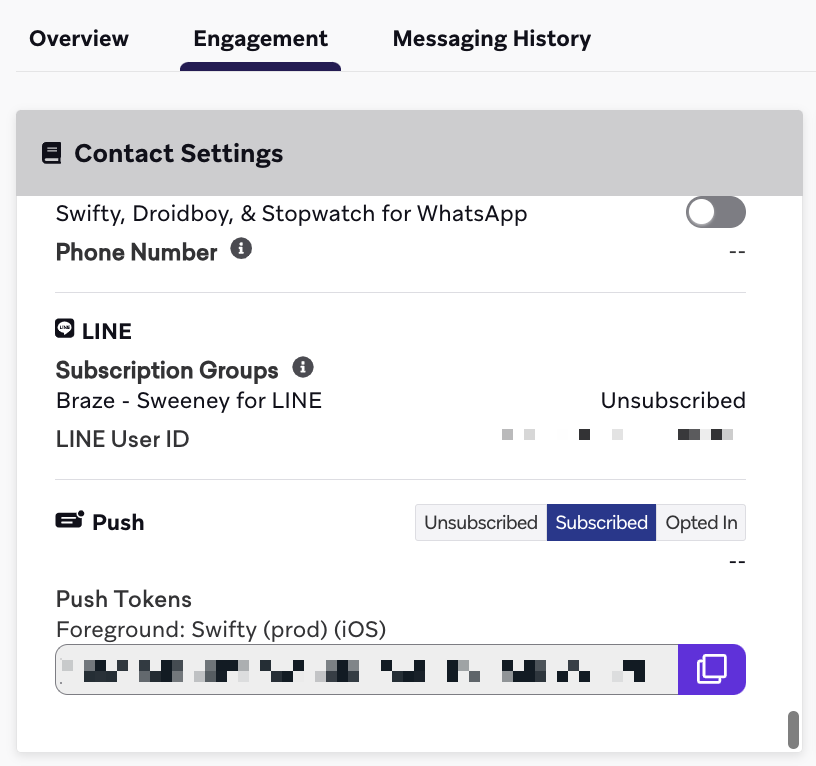
When viewing a user profile in the Braze dashboard, you can see whether it has the native_line_id attribute set by going to the Engagement tab > Contact Settings section > LINE section.
If the native_line_id has been set, it’s shown under LINE User ID. Otherwise, LINE User ID shows --. If LINE User ID is designated as PII in Security Settings and you don’t have the View PII permission, LINE User ID is always masked as **********, whether or not the attribute is set.