BrazeAI Decisioning Studio™ Pro
Get started with BrazeAI Decisioning Studio™ Pro (formerly OfferFit by Braze) to make 1:1 AI decisions that maximize your business metrics.
What is BrazeAI Decisioning Studio™ Pro?
BrazeAI Decisioning Studio™ Pro uses decisioning agents that personalize for each individual and can maximize any business metric.
Audience-level tests such as Optimize with BrazeAI, Winning Paths, and Content Optimizer find one winner for everyone. Decisioning Studio Pro finds a different answer for each person.
BrazeAI™ decisioning agents automatically discover the optimal action for every customer. Using your first-party data, BrazeAI™ can maximize any business KPI for a wide range of use cases, including cross-sell, upsell, repurchase, retention, renewal, referral, winback, and more.
To learn more or get started with Decisioning Studio Pro, contact your customer success manager.
Looking for a self-service option for recurring email programs? See Decisioning Studio Go.
Key features
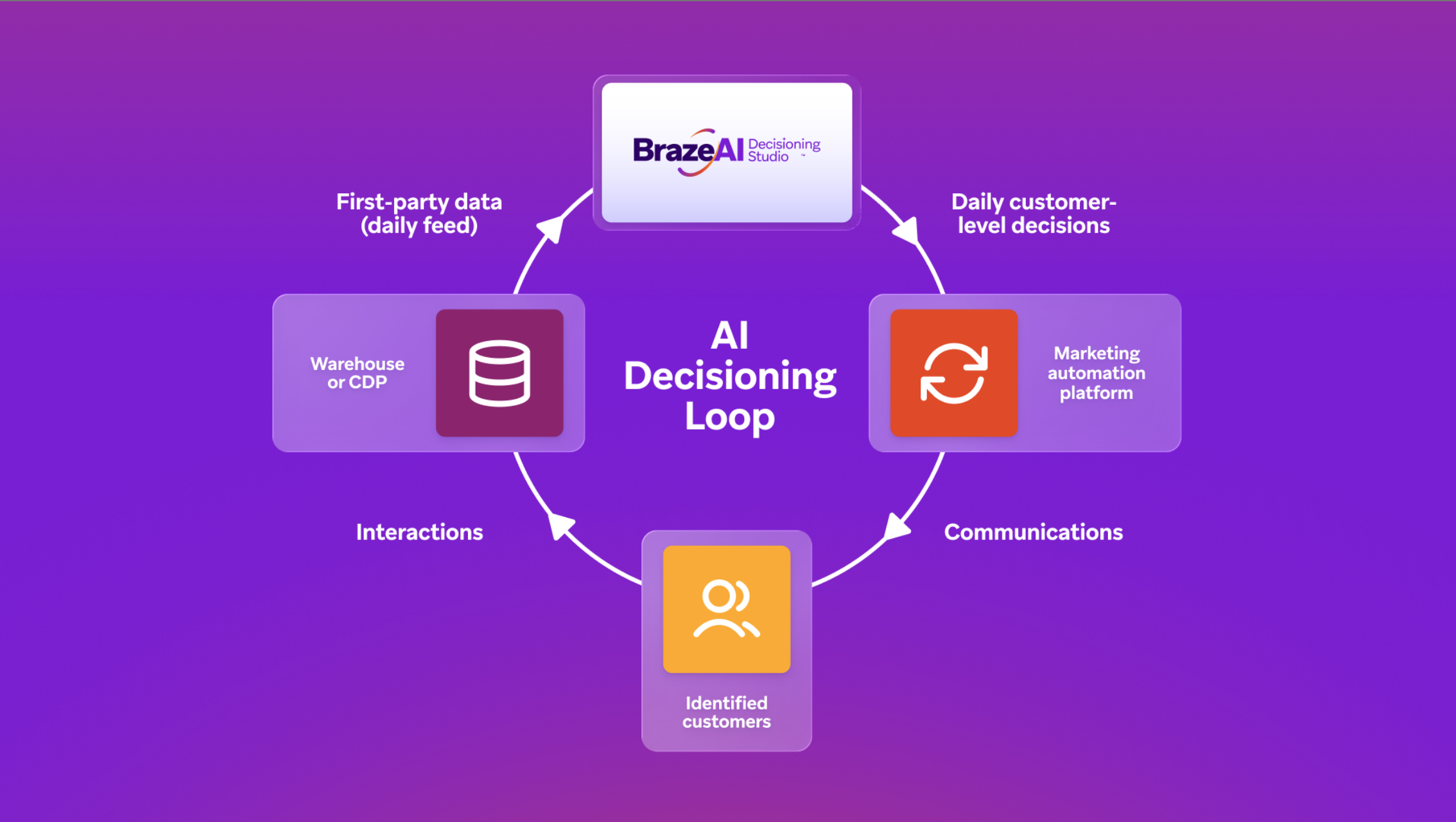
- Works with your existing tech stack: BrazeAI™ plugs in as a decisioning layer between your data systems and your customer engagement platform. While Decisioning Studio Pro works best with Braze, a variety of other platforms are supported.
- Individual-level decisions: Use all your first-party data to make the optimal 1:1 decision for each individual.
- Personalization across dimensions: AI decisioning agents find the best message, product, incentive, channel, timing, and frequency for each individual customer.
- Any business metric: Use BrazeAI™ to choose the offers or incentives that maximize revenue, profit, customer lifetime value (CLV), or another business KPI.
- Insights into customer behavior: See how AI decisioning agents personalize for deep insights into the drivers of customer behavior.
- Dedicated expert support: Decisioning Studio Pro includes support from the AI Decisioning Services team, which tailors your decisioning agents to the specific needs of your business.
About Decisioning Studio Pro
How it works
BrazeAI Decisioning Studio™ Pro allows you to design and deploy decisioning agents that optimize any business metric.
To set up Decisioning Studio Pro:
- Connect data sources that tell the Agent how a customer reacts to its decisions.
- Configure orchestration to carry out the decisioning agent’s actions.
- Design your decisioning agent to define what outcome you want to maximize, and what actions the agent can take to do so.
- Launch your decisioning agent and let it continuously learn and optimize for your business outcomes.
You work with the AI Decisioning Services team through each of these steps to design and configure an agent that maximizes your business outcomes.
For more details, see Get started with Decisioning Studio Pro.
Decisioning agents versus Braze Agents
While both are powered by BrazeAI™, decisioning agents and Braze Agents serve different purposes.
Decisioning agents learn from outcomes across your population. They run experiments across dimensions like offer, channel, timing, and frequency to maximize a business metric such as revenue, conversions, or ARPU. A decisioning agent manages an entire use case—such as winback, cross-sell, or renewal—and finds what works best for each individual over time.
Braze Agents reason over one user’s context. They live in Canvas steps or catalog fields and use large language models (LLMs) to generate content, make routing decisions, or enrich catalogs. They don’t learn from whether their output worked.
You can use them together: let a decisioning agent choose the offer and channel, then use a Braze Agent to write the copy. For a full comparison, see Braze Agent versus decisioning agent.
Decide between Decisioning Studio Go and Pro
Decisioning Studio Go and Pro are two tiers of the same decisioning engine. This guide helps you pick the right one for your use case.
Decisioning Studio Go is the self-serve tier: you set it up yourself inside Braze, it optimizes email for clicks, and it works with the options you configure. Decisioning Studio Pro is the full-service tier: the same engine, opened up to any channel, data source, and business metric, with support from the Braze AI Decisioning Services team.
Everything you can do in Decisioning Studio Go, you can also do in Decisioning Studio Pro. The question is whether your use case fits inside Decisioning Studio Go’s scope or needs Decisioning Studio Pro.
Overview
Choose Decisioning Studio Go for a recurring email program where clicks are a meaningful signal and you can provide subject line, CTA, image, and base creative options yourself. Choose Decisioning Studio Pro when you need a custom metric, first-party data, multiple channels, offer or product decisioning, or custom constraints.
| Capability | Decisioning Studio Go | Decisioning Studio Pro |
|---|---|---|
| Channel | Any channel | |
| Optimizes for | Genuine clicks (engagement) | Any business metric, including revenue, conversions, and lifetime value |
| Learns from | Your audience, its email engagement, and the agent’s understanding of your content | All Go data, plus your first-party data, such as custom attributes, warehouse or Cloud Data Ingestion (CDI) data, and custom conversion events |
| Offers and product decisioning | Not supported | Supported |
| Constraints and guardrails | Productized frequency, repeat-content limits, and quiet hours | Custom constraints and logic |
| Setup | Self-serve in the Braze dashboard | Designed and configured with the AI Decisioning Services team |
Common triage examples
As a general rule, Decisioning Studio Pro uses custom data and can optimize a custom conversion metric. Decisioning Studio Go optimizes clicks using your audience and its engagement.
If you’re not sure which tier fits your program, your customer success manager or solutions consultant can help you decide.
| Goal | What to use |
|---|---|
| Personalize a recurring email program for engagement with self-serve setup | Decisioning Studio Go |
| Optimize the same program for conversions or revenue | Decisioning Studio Pro |
| Choose which product or offer to feature for each user | Decisioning Studio Pro |
| Use CDI or custom attribute data to drive decisions | Decisioning Studio Pro |
| Personalize across email, push, and SMS together | Decisioning Studio Pro |
| Start with self-serve email personalization and get expert help later if you outgrow it | Decisioning Studio Go, then Decisioning Studio Pro |
About this guide
In this guide, you first learn what decisioning agents are and how they work. Next, you work with the AI Decisioning Services team to design your agent, prepare your data, define your audience, set up orchestration, and launch. Finally, you review reports and insights to understand the performance of your decisioning agents.