Troubleshoot Predictive Churn
Use this page to resolve Predictive Churn training and audience errors. For analytics and model quality, see Predictive Churn analytics.
Predictive Churn (and any machine learning model) is only as good as the data available to the model. It also depends on having sufficient user volume in the workspace.
Start here: Match your symptom
Match the error message, warning, or outcome you see when building a prediction to the section that explains how to fix it.
| Symptom | Go to |
|---|---|
| “Not enough data to train” error | Not enough data to train |
| “Not enough past non-churners” warning | Prediction audience too small |
| Prediction audience exceeds size limit | Prediction audience too large |
| Prediction quality below 40% | Prediction has poor quality |
| Unsure whether your data fits the model | Data considerations |
Standard investigation path
Use this workflow when building a prediction fails or you’re blocked by data or audience requirements. Start at step 1.
- Confirm Predictive Churn is turned on for your company and the workspace has sufficient Monthly Active Users (MAU)—typically 300,000 MAU in a single workspace.
- Review your churn definition. Overly restrictive filters reduce the number of churned users available for training.
- Review your prediction audience definition. Too few historic non-churners blocks model training.
- Confirm custom events (not custom attributes alone) capture the high-value actions that indicate churn risk.
- If errors persist after broadening definitions, contact Braze Support.
Not enough data to train
Symptom: You see a “Not enough data to train” error when building a prediction.
This error appears when your churn definition is too limiting and returns too few churned users.
To fix this, change either the number of days, actions that define churn to capture more users, or both. Make sure you are using AND/OR filters correctly so you don’t create overly restrictive definitions.

While Predictive Churn is turned on at a company level, some workspaces may not have enough users to build predictions. Typically, you need 300,000 Monthly Active Users in a single workspace.
Problems with prediction audience size
Symptom: You see “Not enough past non-churners to reliably build the Prediction.”
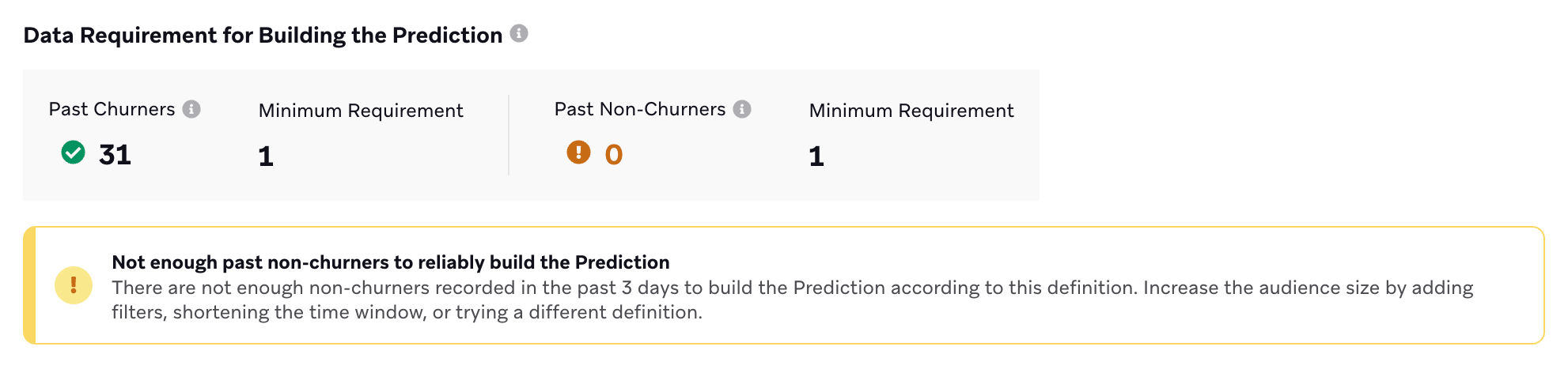
When building your prediction audience to fine-tune the kind of use you want your model trained against, you might encounter this message notifying you that your prediction audience has too few users.
If your prediction audience definition is too strict, you might not have a large enough pool of both historic and active users to work with. To fix this, change either the number of days and type of attributes used in this definition, switch up the actions that define churn, or both.
If your prediction audience continues to be a problem even after switching up your definitions, you may have too few users to support this optional feature. Try building a prediction without the extra layers and filters instead.
Prediction audience size is too big
Symptom: Your prediction audience definition exceeds the maximum allowed size.
A prediction audience definition cannot exceed 100 million users. If you see a message saying your audience is too large, add more layers to your audience or change the window of time it’s based on.
Prediction has poor quality
Symptom: Prediction quality is 39% or lower.
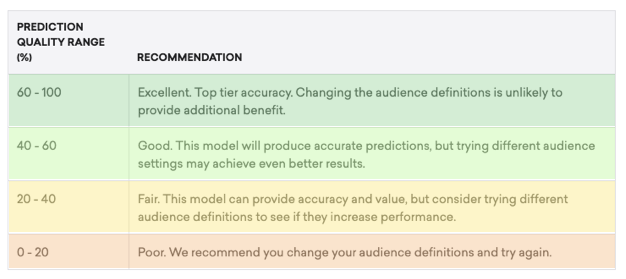
If your model has a prediction quality of 40% or greater, you are in a great place. But if your prediction quality drops to 39% or less, you may need to edit your churn and prediction audience definitions to be more specific or have different time windows.
If you are unable to meet both the audience size requirement while building your prediction definitions and achieve a prediction quality of greater than 40%, it likely means that the data sent to Braze is not ideal for this use case, that there are not enough users with which to build a model against, or that your product life cycle is longer than our current 60-day lookback window supports.
Data considerations
The following are questions to ask yourself as you set up Predictive Churn. Machine learning models are only as good as the data that trains them, so having good data hygiene practices and understanding what goes into the model will make a big difference.
- What High-Value Actions lead to retention and loyalty?
- Have you set up custom events that map back to these specific actions? Predictive Churn works with custom events as opposed to custom attributes.
- Are you thinking in windows of time within which you’ll define churn? You can define churn as something that happens in up to 60 days.
- Have you considered times of the year that lead to atypical user behaviors such as holidays? Rapid shifts in consumer behavior will impact your predictions.