WhatsApp usernames and business-scoped user IDs
WhatsApp usernames are an optional privacy feature that hides user phone numbers when messaging businesses. Braze handles this automatically; for most customers, nothing in your campaigns or Canvases needs to change.
When WhatsApp users adopt a username, their phone number is no longer automatically shared with the businesses they message. Instead, WhatsApp provides businesses with a business-scoped user ID (BSUID), a unique identifier that is specific to each business portfolio and user pair.
Braze handles BSUIDs automatically. Users who adopt a username continue to appear in your Braze workspace, receive messages, trigger Canvases, and generate events. Some customers may need to prepare for the change.
Business-scoped user ID (BSUID)
A BSUID is a unique, persistent identifier that WhatsApp assigns to represent a user within your specific business portfolio. Think of it as an alternate phone number for users who choose to keep their phone number private.
BSUIDs have three key characteristics:
| Characteristic | Description |
|---|---|
| Unique | No two users share the same BSUID within your business portfolio. |
| Business-scoped | The same user has a different BSUID with each business they message. BSUIDs can’t be shared or compared across different business portfolios. |
| Available in webhooks | BSUIDs are included in all the same webhook payloads that carry the user’s phone number. |
Changes to WhatsApp user types
There are two types of WhatsApp users:
| User type | WhatsApp identification | What Braze receives |
|---|---|---|
| Users without a username | Phone number (no change) | Phone number (no change) |
| Users with a username | Username (displayed), BSUID (backend) | BSUID, phone number for users who have an existing conversation with your business |
The key difference is that a user who adopts a username shares only their phone number with your business if you had a prior conversation with them or if they appear in your WhatsApp Contact Book.
How Braze handles BSUIDs
Braze stores BSUIDs as a user alias with the label whats_app_bsuid on the user profile. This means BSUID-only users have full Braze user profiles and can enter Canvases, receive messages, generate events, and be updated through the API.
Send messages
When Braze sends a WhatsApp message, it uses the phone number if one is available. If the user has only a BSUID (such as a user who first messages you after adopting a username), Braze sends using the BSUID instead. No changes to your message templates, campaigns, or Canvas steps are needed.
Inbound messages and Canvas triggers
When a user with a username sends you an inbound WhatsApp message, Braze:
- Looks up the user by BSUID or phone number (whichever is available in the webhook).
- If no matching user is found, creates a new anonymous user profile with the BSUID stored as a user alias.
- Triggers any Canvas or campaign configured to start on an inbound WhatsApp message.
User profile
You can see a user’s BSUID on their Braze user profile in the WhatsApp section.
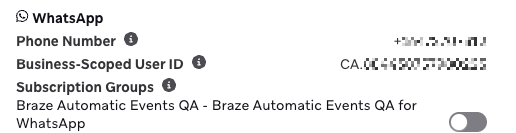
Subscription groups
Subscription group management works the same way for BSUID users as it does for any user identified by a user alias. You can update subscription status for BSUID users through:
- The users/track endpoint using
user_alias - The User Update Canvas step (works automatically)
- CSV upload

The subscription/status/set endpoint doesn’t support user_alias. Use the users/track endpoint to update subscription state for BSUID-only users.
Currents and event data
All WhatsApp Currents events (send, delivery, read, failure, inbound received, abort, retry) include a BSUID field. For users who have both a phone number and a BSUID, both fields are included. For users with only a BSUID, only the BSUID field is included (the phone number field is empty).
How to prepare for the change
For most customers, no action is required. Braze automatically handles BSUID routing, user creation, and event tracking. However, we recommend enabling WhatsApp Contact Book, and linking business portfolios if you use multiple WhatsApp Business Accounts (WABAs).
Enable WhatsApp Contact Book
The Contact Book is a Meta feature that records phone numbers for users you have already conversed with. When a user adopts a username, their phone number remains visible to your business if they appear in your Contact Book. This means Braze can continue to identify users by phone number even after they enable a username.
To enable the Contact Book:
- Go to Meta Business Suite > Business settings > Business info.
- Confirm that the Contact Book feature is enabled.

The Contact Book feature is on by default, but we recommend confirming this in your Meta Business settings. If Contact Book is disabled, users who adopt usernames appear as new BSUID-only users even if you’ve previously messaged them.
Link business portfolios if you use multiple WABAs
BSUIDs are scoped to a single business portfolio. If your organization manages WABAs from multiple business portfolios within the same Braze workspace, the same user has a different BSUID for each portfolio. This can result in duplicate Braze user profiles.
To prevent this, contact your Meta point-of-contact to check if your business is eligible to link portfolios. See Link business portfolios and parent BSUIDs for details.
If your WABAs are all within the same business portfolio, no action is needed.
Link business portfolios and parent BSUIDs
If your organization operates multiple WhatsApp Business Accounts (WABAs) across different business portfolios, you can ask your Meta point-of-contact to check whether your business is eligible to link those portfolios together. Eligibility is determined by Meta and is available to managed businesses.
Linked portfolio behavior
When your business portfolios are linked, WhatsApp includes a parent BSUID in all message webhooks alongside the regular BSUID. The parent BSUID is assigned to a new parent_user_id property in the webhook payload.
Parent BSUIDs have the same properties as regular BSUIDs, but are shared across all business phone numbers within your set of linked portfolios. This means the same user has a single consistent identifier regardless of the WABA they message, avoiding the risk of duplicate user profiles.
A parent BSUID includes ENT between the country code and the alphanumeric identifier. For example:
US.ENT.11815799212886844830
A regular BSUID does not include ENT.
How Braze uses parent BSUIDs
When a webhook contains both a regular BSUID and a parent BSUID, Braze uses the parent BSUID as the primary identifier. This allows a user who messages across multiple WABAs in your linked portfolios to be consistently matched to the same Braze user profile.
If no parent BSUID is present (for example, because your portfolios are not linked or the user is messaging a non-linked WABA), Braze uses the regular BSUID. Regular BSUIDs continue to work normally in all cases.
Meta manages the process of linking business portfolios. To get started, contact your Meta point-of-contact. You can still message users using their regular BSUID even if your portfolios are linked; parent BSUIDs are additive, not a replacement.
| Scenario | Identifier used by Braze |
|---|---|
| Single business portfolio | Regular BSUID |
| Multiple linked portfolios | Parent BSUID (preferred). If no parent BSUID exists, uses the regular BSUID |
| Multiple unlinked portfolios | Regular BSUID (may result in duplicate user profiles per portfolio) |
Frequently asked questions
Do my existing campaigns and Canvases break?
No. Existing campaigns and Canvases continue to work. Users who don’t adopt a username are completely unaffected. For users who do adopt a username and have an existing conversation history with your business, Braze continues to use their phone number as the primary identifier.
What happens to a user who adopts a username but has already messaged my business?
If your WhatsApp Contact Book is enabled and you had a prior conversation with the user (or you sent them a message) within the last 30 days, their phone number continues to appear in webhook payloads alongside the BSUID. Braze matches them to their existing user profile. No duplicate profile is created.
What if a user adopts a username and has no prior conversation with my business?
Braze receives the user’s BSUID in the inbound webhook and either matches them to an existing user profile (if you previously stored their BSUID) or creates a new anonymous user profile with the BSUID stored as a user alias. That user can then enter Canvases, receive outbound messages, and be identified or merged with other profiles using Braze standard identity resolution tools.
Can I target BSUID users in segments?
BSUID users are full Braze user profiles, so you can target them through standard audience filters (such as “has received a WhatsApp message” or subscription group membership). However, segmenting specifically on BSUID values (such as “BSUID exists” or “BSUID equals X”) is not supported.
How does WhatsApp pricing work for BSUID users?
WhatsApp conversation pricing is determined by the user’s country. For phone-number-identified users, Meta derives the country from the phone number’s country code. For BSUID-identified users, the country is encoded directly in the BSUID itself; for example, a BSUID beginning with US represents a user in the United States.
This means pricing behavior is consistent whether a user is identified by phone number or BSUID. The country used to calculate conversation rates is determined by the identifier Meta provides, and Braze passes this through without modification. You do not need to do anything differently, but be aware that when messaging BSUID-only users, Meta’s country-based pricing is based on the country encoded in the user’s BSUID rather than a phone number.
How do I reference a BSUID user in API calls?
Use the user_alias parameter with alias_label: "whats_app_bsuid" and alias_name set to the user’s BSUID value. For example:
{
"user_alias": {
"alias_label": "whats_app_bsuid",
"alias_name": "DDC91135R"
}
}
This works with users/track, users/identify, CSV upload, and the User Update Canvas step.
Do my Currents data pipelines break?
Currents events for WhatsApp include a bsuid field alongside the existing phone number field. For users with only a BSUID, the phone number field is empty. If your downstream pipelines have strict requirements on the phone number field, confirm they can handle a null or empty value.
I have multiple WABAs across different business portfolios. Does the same user appear as two different profiles in Braze?
Without linked portfolios, yes. The same WhatsApp user has a different BSUID per business portfolio, and Braze creates separate profiles for each.
To resolve this, contact your Meta point-of-contact to check eligibility for portfolio linking. When linked, Meta provides a parent BSUID shared across all portfolios, and Braze uses this to consistently identify the user across your WABAs. See Link business portfolios and parent BSUIDs for more detail.
Can I disable the Contact Book?
We strongly recommend keeping the Contact Book enabled. If the Contact Book is disabled, all historical phone number records for your users are lost. Users who adopt usernames then appear as new BSUID-only users, even if you had previously messaged them.