WhatsApp subscription groups
WhatsApp subscription groups are created upon integrating WhatsApp with your app through the Technology Partner Portal.
You can add up to 350 subscription groups per workspace.
WhatsApp subscription states
There are two subscription states for WhatsApp users: subscribed and unsubscribed.
| State | Definition |
|---|---|
| Subscribed | User has explicitly confirmed that they want to receive WhatsApp messages from a specific company. Users can be subscribed by having their subscription state updated through the Braze subscription API or by deploying an opt-in strategy, as per WhatsApp’s guidelines. |
| Unsubscribed | User either hasn’t explicitly given consent for opt-in or their opt-in status has been explicitly removed. Users unsubscribed from a WhatsApp subscription group will no longer receive any WhatsApp messages from sending phone numbers that belong to the subscription group. |
Setting users’ WhatsApp subscription groups
- Rest API: User profiles can be programmatically set by the
/subscription/status/setendpoint using the Braze REST API. - Web SDK: Users can be added to an email, SMS, or WhatsApp subscription group using the
addToSubscriptionGroupmethod for Android, iOS, or Web. - User import: Users can be added to email or SMS subscription groups via Import Users. When updating the subscription group status, you must have these two columns in your CSV:
subscription_group_idandsubscription_state. Refer to User import for more information.
Checking a user’s WhatsApp subscription group
-
User Profile: Individual user profiles can be accessed through the Braze dashboard from Audience > Search Users. Here, you can look up user profiles by email address, phone number, or external user ID. When you’re inside a user profile, under the Engagement tab, you can view a user’s WhatsApp subscription group and their status.
-
Rest API: Individual user profiles subscription group can be viewed by the List user’s subscription groups endpoint or List user’s subscription group status endpoint by using Braze’s REST API.
WhatsApp opt-in and opt-out process
Currently, users can subscribe and opt-in and opt-out to WhatsApp messaging in various ways, including SMS, through a website, a WhatsApp thread, phone, or in person. Note that opt-ins are required.
Opt-in keywords are not currently supported for the WhatsApp channel, so it will be up to you to maintain a user list. WhatsApp has a retrospective approach to opt-ins and rate limits, where if users start reporting or blocking you, your rate limit will be lowered.
Updating a user’s subscription status to a WhatsApp Canvas
Regardless of the opt-in and opt-out methods you use, you can update the subscription status of user profiles with one of the following update methods:
- Create a Braze-to-Braze webhook that updates the subscription status via REST API, such as in the following example:
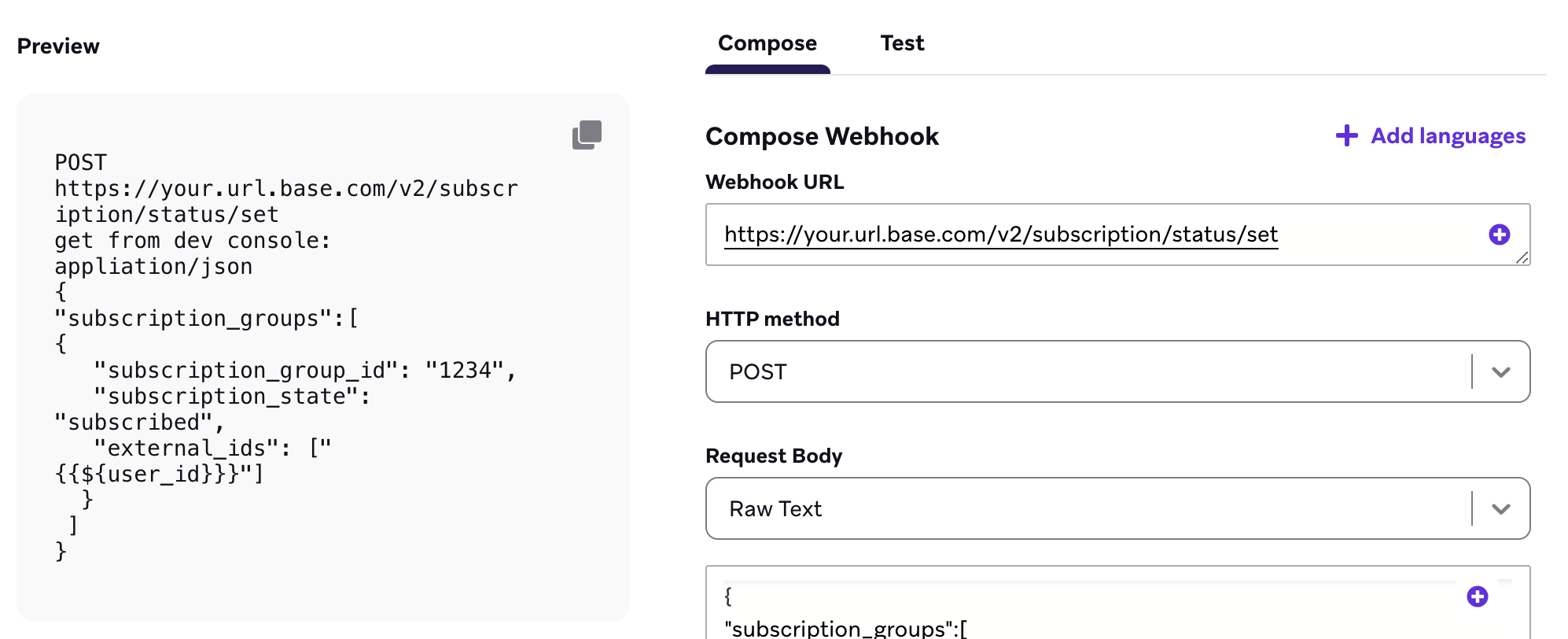
To avoid race conditions, any follow-up messaging after the webhook should be contained in a second Canvas that is triggered by outcomes from the first Canvas (such as a user has entered a Canvas variation and is in a WhatsApp subscription group).
-
Use the advanced JSON editor to update the user profile with the following template:
1
2
3
4
5
6
7
8
9
10
11
12
13
14
15
16
17
18
19
  {
    "attributes": [
    {
    	"subscription_groups": [{
    	  "subscription_group_id": "subscription_group_identifier_1",
    	  "subscription_state": "unsubscribed"
    	   },
    	   {
    	     "subscription_group_id": "subscription_group_identifier_2",
    	     "subscription_state": "subscribed"
    	     },
    	     {
    	       "subscription_group_id": "subscription_group_identifier_3",
    	       "subscription_state": "subscribed"
    	    }
    	  ]
    	}
    ]
  }
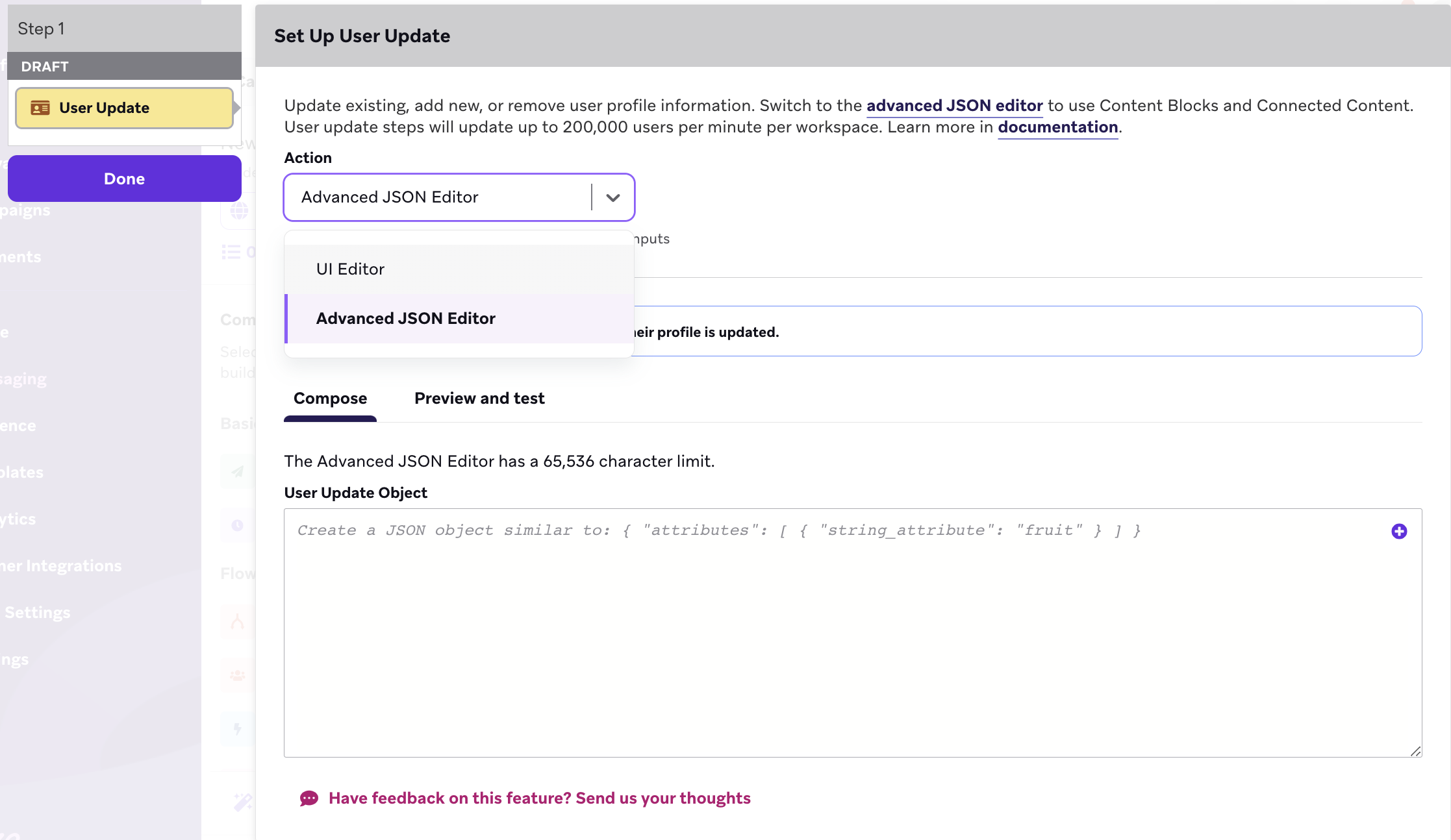
Updates to a user’s subscription status may take up to 60 seconds.
 Edit this page on GitHub