Channels
Reach your users through the right channel at the right time. Choose from in-product channels like in-app messages, Content Cards, and Banners, or out-of-product channels like push, email, SMS, and WhatsApp.
In-product channels


Out-of-product channels



Choosing a message channel
When determining what message channel is best for your campaigns and Canvases, always think about the content and urgency of your message:
- Content is how visually engaging your message is. You can add multimedia and other assets to your copy to make your content more rich.
- Urgency is a measure of how quickly a message is able to notify your user and attract their attention. Notifications the user can immediately view have a high urgency, whereas messages that need the user to log in to your app have a low urgency.
The Braze Messaging Matrix streamlines channel selection by mapping Content Complexity against Delivery Urgency. By balancing these two factors, you can help your message resonate rather than interrupt.
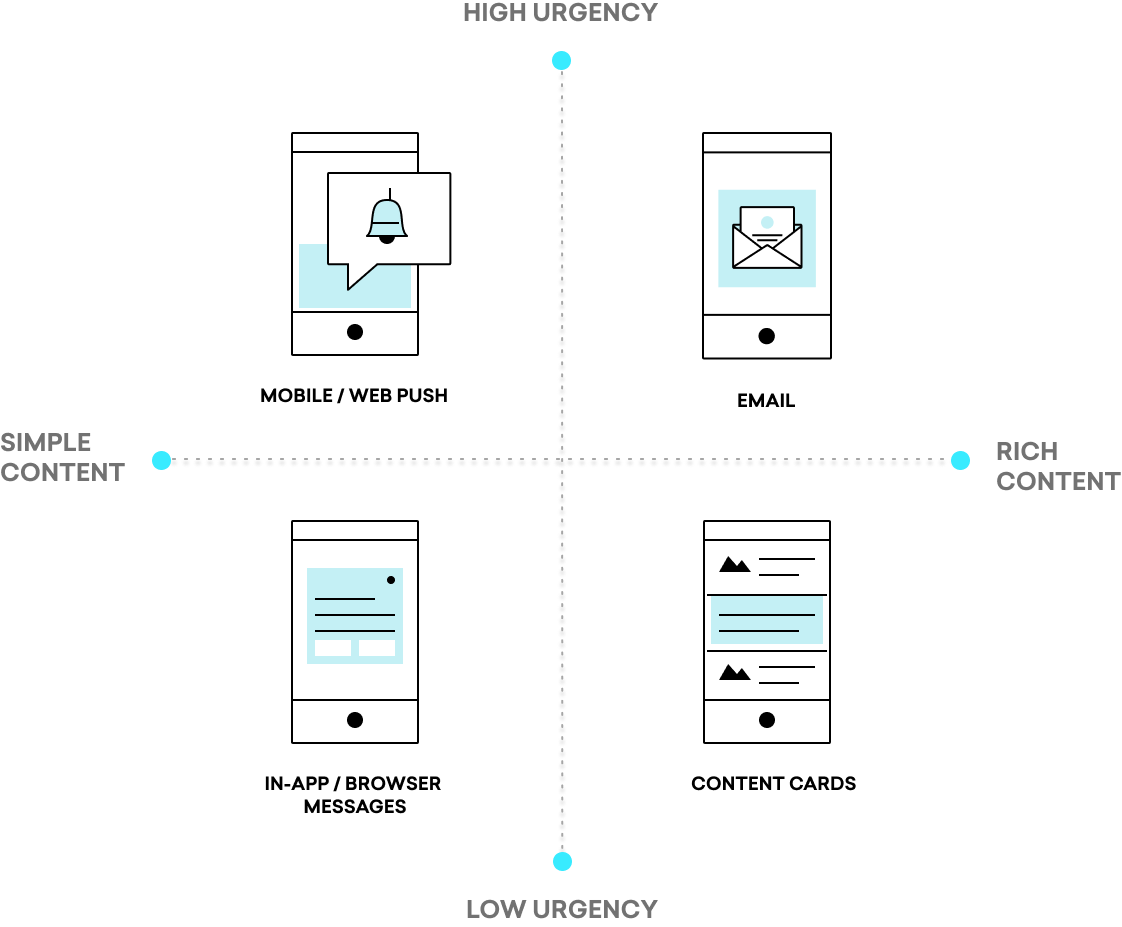
While the matrix highlights core channels, it is adaptable: SMS and WhatsApp, for instance, are high-urgency tools that scale into rich content when utilizing multimedia formats. To learn more about how you can leverage this matrix, check out our Braze Learning course on Cross-Channel Messaging.
Accessibility resources
You can use Braze to create accessible messaging campaigns across each channel. Work with your engineers to ensure that you meet accessibility standards in your implementation. If you’d like additional guidance, we recommend:
- Accessible Messaging Foundations: Learn fundamental accessibility principles that apply to brand communications in this Braze Learning course.
- Building Accessible Messages: Learn how to add alt text and structure your content for assistive technologies directly within Braze.
If you have feedback about the accessibility of Braze or messages sent from Braze, we’d love to hear from you. Open the Support menu in the global header and select Share feedback to send us your thoughts.