Typeform
Typeform es una herramienta fácil de usar para recopilar datos, opiniones y mucho más.
Integrando Braze y Typeform, puedes:
- Actualizar los perfiles de usuario en Braze con los datos recogidos de su respuesta a Typeform.
- Desencadenar mensajería en Braze en función de la interacción de un usuario con una forma tipográfica
- Personalización de la mensajería Braze en función de las respuestas de un usuario a Typeform
Requisitos previos
| Requisito | Descripción |
|---|---|
| Cuenta Typeform | Se requiere una cuenta Typeform con acceso a webhooks para aprovechar esta asociación. |
| Transformación de datos Braze | Es necesaria una URL de Transformación de Datos para recibir datos de Typeform. |
Integración
Paso 1: Configura la transformación de datos Braze para que acepte los webhooks de Typeform
En el panel de Braze, ve a Configuración de Datos > Transformación de Datos.
Selecciona Crear transformación para darle un nombre a tu transformación y, a continuación, elige tu experiencia de edición.
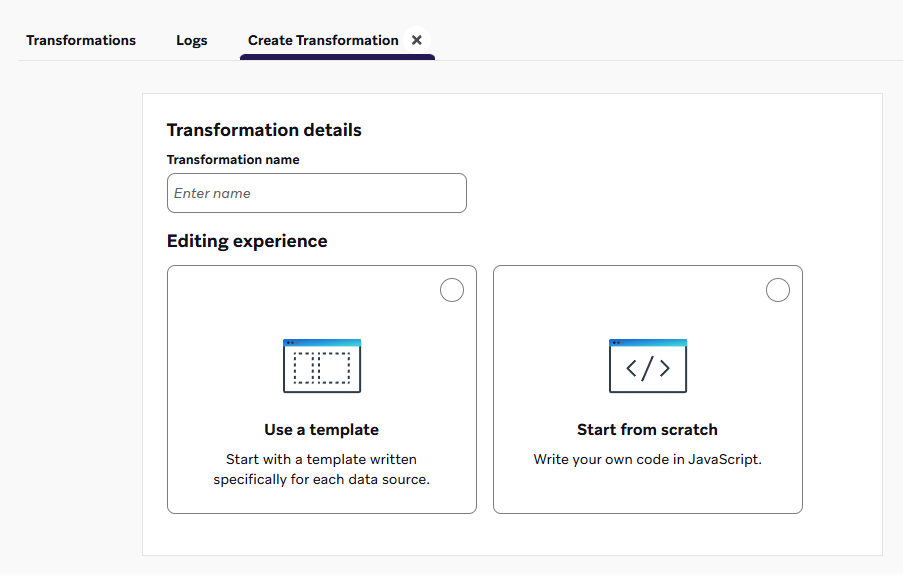
Selecciona Utilizar una plantilla para examinar una biblioteca de plantillas, incluidos los casos de uso de Transformación de datos. O bien, selecciona Empezar de cero para cargar una plantilla de código predeterminada.
Si empiezas de cero, elige un destino para tu transformación. Todavía puedes insertar una plantilla de código de la biblioteca de plantillas.
More on destinations
- POST: Seguimiento de usuarios: Transforma los webhooks de una plataforma de origen en actualizaciones del perfil de usuario, como atributos, eventos o compras.
- PUT: Actualiza varios elementos del catálogo: Transforma los webhooks de una plataforma de origen en actualizaciones de elementos del catálogo.
- DELETE: Eliminar varios elementos del catálogo: Transforma los webhooks de una plataforma de origen en eliminaciones de elementos del catálogo.
- PATCH: Edita varios elementos del catálogo: Transforma los webhooks de una plataforma de origen en ediciones de elementos del catálogo.
- POST: Envía mensajes inmediatamente solo a través de la API: Transforma webhooks de una plataforma de origen para enviar mensajes inmediatos a usuarios designados.
¿Quieres solicitar plantillas o destinos adicionales? Considera la posibilidad de dejar una opinión sobre el producto.
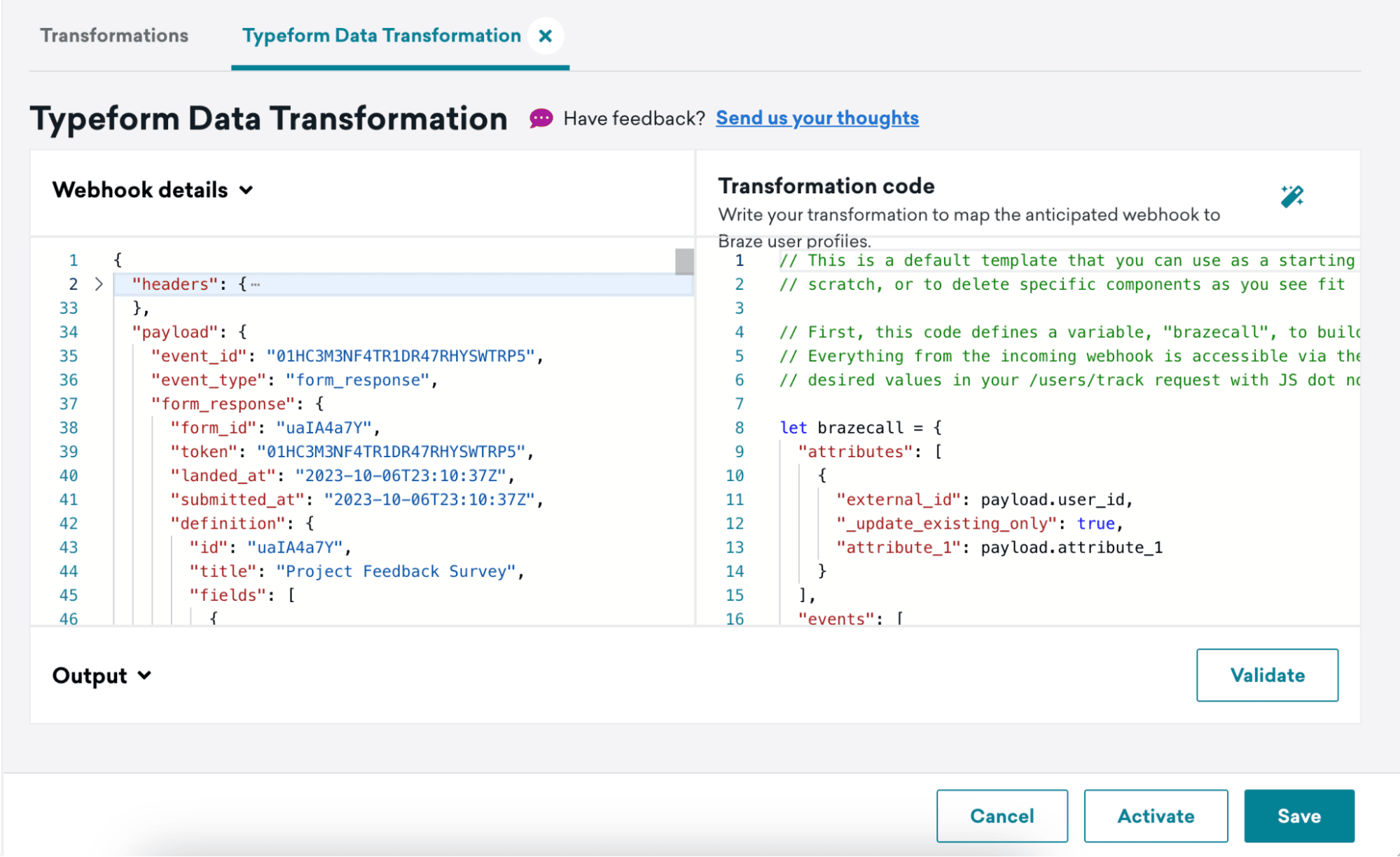
Después de crear tu transformación, verás la vista detallada de la transformación. Aquí, puedes ver el webhook más reciente recibido para esta transformación en Detalles del webhook y un espacio para escribir tu código de transformación en Código de transformación.
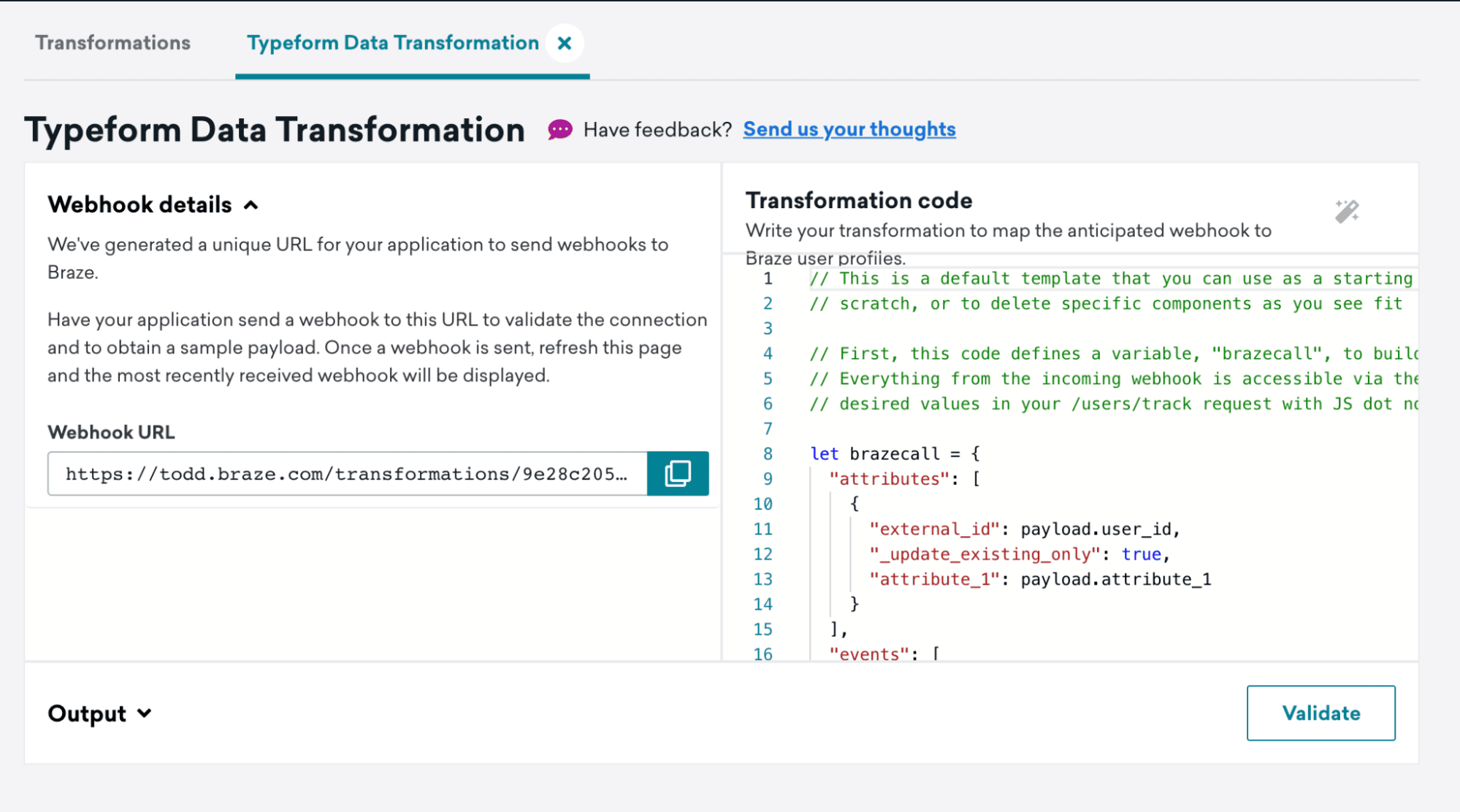
Captura la URL de tu webhook para utilizarla en el siguiente paso.
Paso 2: Configurar webhooks de Typeform
Sigue los pasos de la documentación sobre webhooks de Typeform para configurar un webhook.
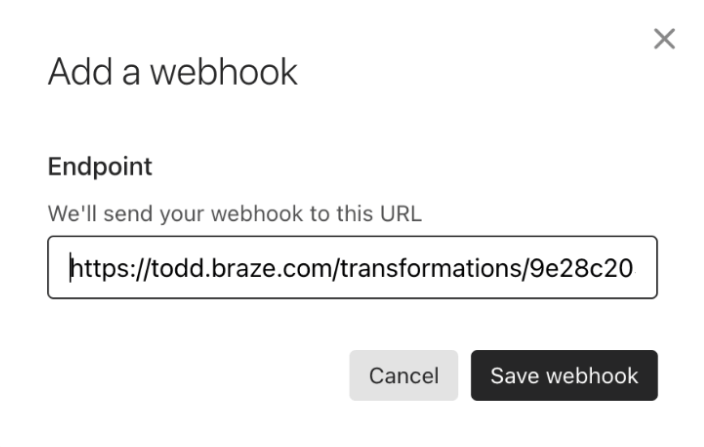
Para el paso 4, añade la URL de tu webhook de Transformación de Datos como URL de Destino
Envía un evento de prueba a tu Transformación de Datos haciendo clic en Ver entregas y luego en Enviar solicitud de prueba.
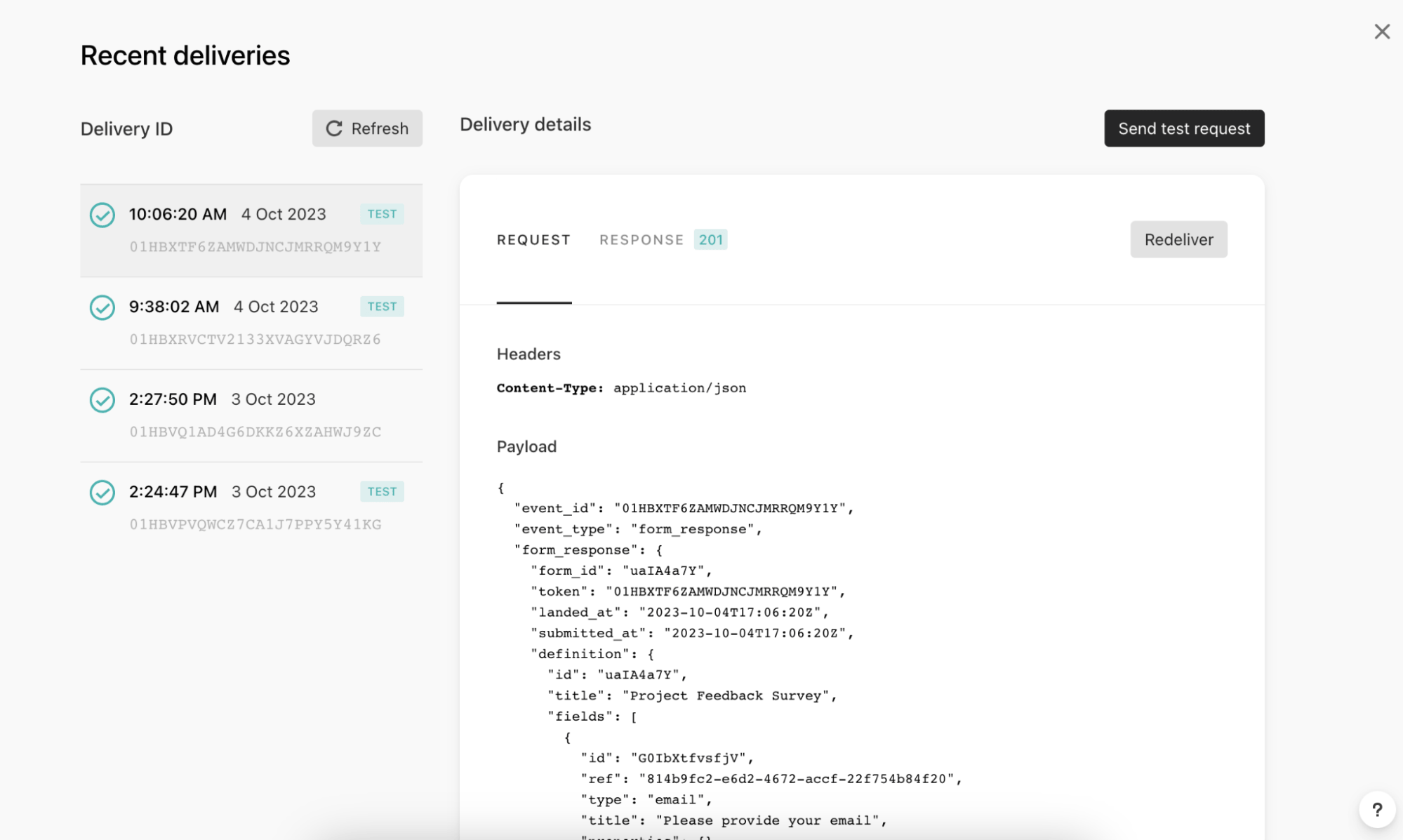
Paso 3: Escribe el código de transformación para aceptar los eventos Typeform que elijas
En este paso, transformas la carga útil del webhook que se envía desde Typeform en un valor de retorno de objeto JavaScript.
- Actualiza tu Transformación de datos y asegúrate de que puedes ver la carga útil de prueba de Typeform en los Detalles del webhook.
- Actualiza tu código de Transformación de Datos para que sea compatible con los eventos de Typeform que hayas elegido.
- Haz clic en Validar para obtener una vista previa de la salida de tu código y comprobar si se trata de una solicitud aceptable de
/users/track. - Guarda y activa tu Transformación de Datos.
Formato del cuerpo de la solicitud
Este valor de retorno debe ajustarse al formato del cuerpo de la solicitud de Braze /users/track:
- El código de transformación se acepta en el lenguaje de programación JavaScript. Se admite cualquier flujo de control estándar de JavaScript, como la lógica if/else.
- El código de transformación accede al cuerpo de la petición del webhook a través de la variable payload. Esta variable es un objeto poblado por el análisis del cuerpo de la solicitud JSON.
- Se admite cualquier característica de nuestro punto final
/users/track, incluidos:- Objetos de atributos de usuario, objetos de evento y objetos de compra
- Atributos anidados y propiedades anidadas de eventos personalizados
- Actualizaciones de grupos de suscripción
- Dirección de correo electrónico como identificador
Ejemplo de carga útil de webhook de Typeform
1
2
3
4
5
6
7
8
9
10
11
12
13
14
15
16
17
18
19
20
21
22
23
24
25
26
27
28
29
30
31
32
33
34
35
36
37
38
39
40
41
42
43
44
45
46
47
48
49
50
51
52
53
54
55
56
57
58
59
60
61
62
63
64
65
66
67
68
69
70
71
72
73
74
75
76
77
78
79
80
81
82
83
84
85
86
87
88
89
90
91
92
93
94
95
96
97
98
99
100
101
102
103
104
105
106
107
108
109
110
111
112
113
114
115
116
117
118
119
120
121
122
123
124
125
126
127
128
129
130
131
132
133
134
135
136
137
138
139
140
141
142
143
144
145
146
147
148
149
150
151
152
153
154
155
156
157
158
159
160
161
162
163
164
165
166
167
168
169
170
171
172
173
174
175
176
177
178
179
180
181
182
183
184
185
186
187
188
189
190
191
192
193
194
195
196
197
198
199
200
201
202
203
204
205
206
207
208
209
210
211
212
213
214
215
216
217
218
219
220
221
222
223
224
225
226
227
228
229
230
231
232
233
234
235
236
237
238
239
240
241
242
243
244
245
246
247
248
249
250
251
Content-Type: application/json

{
  "event_id": "01HC3PTZN05GJWT0QDXXB2QV8F",
  "event_type": "form_response",
  "form_response": {
    "form_id": "uaIA4a7Y",
    "token": "7pctqdoqxg41to97pctqdibhqn6hqvto",
    "landed_at": "2023-10-06T23:57:52Z",
    "submitted_at": "2023-10-06T23:58:18Z",
    "hidden": {
		"user_id": "hidden_value"
    },
    "definition": {
      "id": "uaIA4a7Y",
      "title": "Project Feedback Survey",
      "fields": [
        {
          "id": "G0IbXtfvsfjV",
          "ref": "814b9fc2-e6d2-4672-accf-22f754b84f20",
          "type": "email",
          "title": "Please provide your email",
          "properties": {}
        },
        {
          "id": "lg82q3t0rK03",
          "ref": "e1503b62-0241-4269-9902-5c539abf305e",
          "type": "short_text",
          "title": "What was your role in the project?",
          "properties": {}
        },
        {
          "id": "UXftY0tSmuDV",
          "ref": "5b839dbb-566b-47de-a47e-b0914d9ccf7c",
          "type": "opinion_scale",
          "title": "How would you rate the overall performance of the team?",
          "properties": {}
        },
        {
          "id": "fE17bXVUEB4E",
          "ref": "fd6be99d-1ed1-4a4d-b811-f6ecdd8fa9b6",
          "type": "yes_no",
          "title": "Did the project meet its intended outcomes?",
          "properties": {}
        },
        {
          "id": "NmVOQFuI0vv9",
          "ref": "cd2b4176-db9a-49bb-a918-4463720bbc79",
          "type": "multiple_choice",
          "title": "Which area of the project do you think went well?",
          "properties": {},
          "choices": [
            {
              "id": "RvV3LaMEQ2eK",
              "ref": "2d5e0913-afe9-491c-b31c-0648dd397d56",
              "label": "Communication"
            },
            {
              "id": "7iXmfpPMeQvz",
              "ref": "7a7749d2-5cd6-4bf7-9726-65c7ab11ec83",
              "label": "Planning"
            },
            {
              "id": "1No85DZlvP6f",
              "ref": "d7b7304a-776b-4630-8bee-7dc7ef9c9404",
              "label": "Execution"
            },
            {
              "id": "ruMnsZWjyalW",
              "ref": "41dc926a-85af-4625-8a61-725fda35afda",
              "label": "Problem Solving"
            },
            {
              "id": "CexnFN3roprG",
              "ref": "cfdd2da4-8c57-4ff1-b4c0-1a5262e2ff84",
              "label": "Other"
            }
          ]
        },
        {
          "id": "ZJop9pvoObzk",
          "ref": "ce903cda-7e27-4b4c-9fa8-0623c47c61b4",
          "type": "multiple_choice",
          "title": "Which area of the project do you think could be improved?",
          "properties": {},
          "choices": [
            {
              "id": "YQLArFf0Wks5",
              "ref": "09fa30c7-7bdc-4753-971e-0d922638d023",
              "label": "Communication"
            },
            {
              "id": "iGjaELgfnChw",
              "ref": "61820c89-3426-464d-b031-c06de5125fd5",
              "label": "Planning"
            },
            {
              "id": "2EyI5tozFxro",
              "ref": "c35f71b2-2a6d-4488-a1ba-87c2e711ce19",
              "label": "Execution"
            },
            {
              "id": "VGtsIHBLAhME",
              "ref": "6c171a9a-9324-4f7d-adb9-290bd701efe9",
              "label": "Problem Solving"
            },
            {
              "id": "lVdV7MIL1anS",
              "ref": "faba551f-4e6b-4377-9f74-11ca4fcc8ed5",
              "label": "Other"
            }
          ]
        },
        {
          "id": "hcCNsLUHGXgv",
          "ref": "d1ae8537-0d5a-4ca8-bb6b-f8057f04d7e2",
          "type": "opinion_scale",
          "title": "How satisfied were you with the level of communication during the project?",
          "properties": {}
        },
        {
          "id": "dBqPlgeKejN2",
          "ref": "e2c884c1-0d92-4f18-9833-79dff0b3eef2",
          "type": "nps",
          "title": "How likely are you to recommend Braze for customer engagement services?",
          "properties": {}
        },
        {
          "id": "vLdpFmCmulF5",
          "ref": "a86e48ec-6d10-49fc-ac03-4ac1aad4bfec",
          "type": "dropdown",
          "title": "In which country was the project executed?",
          "properties": {}
        }
      ],
      "endings": [
        {
          "id": "LUpVm67y72vb",
          "ref": "30c03bdf-80b3-45f5-8307-df8ca49046b1",
          "title": "Thank you for taking the time to complete our survey!",
          "type": "thankyou_screen",
          "properties": {
            "button_text": "Create a typeform",
            "show_button": true,
            "share_icons": true,
            "button_mode": "default_redirect"
          }
        }
      ]
    },
    "answers": [
      {
        "type": "email",
        "email": "[email protected]",
        "field": {
          "id": "G0IbXtfvsfjV",
          "type": "email",
          "ref": "814b9fc2-e6d2-4672-accf-22f754b84f20"
        }
      },
      {
        "type": "text",
        "text": "Project",
        "field": {
          "id": "lg82q3t0rK03",
          "type": "short_text",
          "ref": "e1503b62-0241-4269-9902-5c539abf305e"
        }
      },
      {
        "type": "number",
        "number": 9,
        "field": {
          "id": "UXftY0tSmuDV",
          "type": "opinion_scale",
          "ref": "5b839dbb-566b-47de-a47e-b0914d9ccf7c"
        }
      },
      {
        "type": "boolean",
        "boolean": true,
        "field": {
          "id": "fE17bXVUEB4E",
          "type": "yes_no",
          "ref": "fd6be99d-1ed1-4a4d-b811-f6ecdd8fa9b6"
        }
      },
      {
        "type": "choice",
        "choice": {
          "id": "ruMnsZWjyalW",
          "label": "Problem Solving",
          "ref": "41dc926a-85af-4625-8a61-725fda35afda"
        },
        "field": {
          "id": "NmVOQFuI0vv9",
          "type": "multiple_choice",
          "ref": "cd2b4176-db9a-49bb-a918-4463720bbc79"
        }
      },
      {
        "type": "choice",
        "choice": {
          "id": "lVdV7MIL1anS",
          "label": "Other",
          "ref": "faba551f-4e6b-4377-9f74-11ca4fcc8ed5"
        },
        "field": {
          "id": "ZJop9pvoObzk",
          "type": "multiple_choice",
          "ref": "ce903cda-7e27-4b4c-9fa8-0623c47c61b4"
        }
      },
      {
        "type": "number",
        "number": 8,
        "field": {
          "id": "hcCNsLUHGXgv",
          "type": "opinion_scale",
          "ref": "d1ae8537-0d5a-4ca8-bb6b-f8057f04d7e2"
        }
      },
      {
        "type": "number",
        "number": 6,
        "field": {
          "id": "dBqPlgeKejN2",
          "type": "nps",
          "ref": "e2c884c1-0d92-4f18-9833-79dff0b3eef2"
        }
      },
      {
        "type": "choice",
        "choice": {
          "id": "KESjdqLseWmC",
          "label": "Brazil",
          "ref": "250210d9-33f6-4734-8ec6-06005a8ef66d"
        },
        "field": {
          "id": "vLdpFmCmulF5",
          "type": "dropdown",
          "ref": "a86e48ec-6d10-49fc-ac03-4ac1aad4bfec"
        }
      }
    ],
    "ending": {
      "id": "LUpVm67y72vb",
      "ref": "30c03bdf-80b3-45f5-8307-df8ca49046b1"
    }
  }
}
Casos de uso de la Transformación de Datos
Las siguientes son plantillas de ejemplo creadas utilizando nuestro ejemplo de carga útil de webhook de Typeform. Estas plantillas pueden servirte de punto de partida. Puedes empezar desde cero o eliminar componentes específicos según te convenga.
En estas plantillas de ejemplo, estamos registrando un evento personalizado en el perfil Braze. El título del Typeform se pasa como nombre del evento personalizado, y los resultados del Typeform se pasan como propiedades del evento. Estas plantillas de ejemplo no tienen en cuenta los tipos de pregunta Calendly, Carga de archivos o Pago en Typeform.
Casos de uso: Correo electrónico como identificador
En esta plantilla de ejemplo, estamos utilizando una dirección de correo electrónico (capturada de una pregunta de dirección de correo electrónico dentro del formulario) como identificador.
Si tienes intención de utilizar una dirección de correo electrónico como identificador, consulta nuestras preguntas frecuentes sobre el punto final /users/track para obtener más información sobre el comportamiento esperado.
1
2
3
4
5
6
7
8
9
10
11
12
13
14
15
16
17
18
19
20
21
22
23
24
25
26
27
28
29
30
31
32
33
34
35
36
37
38
39
40
41
42
43
44
45
46
47
48
49
50
51
52
53
54
55
56
57
58
59
60
61
62
63
64
65
66
/* In the Typeform webhook payload each question is stored as a “title” within each object of the “fields” array. Our code defines a “title” variable where we store the value of each field title. */
const titles = payload.form_response.definition.fields.map(field => field.title);

/* The answers array is saved to a “tfAnswers” variable so this can be iterated through */
const tfAnswers = payload.form_response.answers;

/* The value of a response will change based on the type of question, to account for this we have created a function that iterates through the answers, determines what the answer type is and then, based on the type, adds the associated response to an extractedValues array. */
const extractValues = (tfAnswers) => {
	const extractedValues = [];

	tfAnswers.forEach((tfAnswer) => {
		let result = null;

		if (tfAnswer.type === 'choices') {
			if (tfAnswer.choices) {
				// Multiple choices
				let labels = tfAnswer.choices.labels || [];
				if (tfAnswer.choices.other) {
					labels.push(tfAnswer.choices.other);
				}
				result = labels;
			}
		} else if (tfAnswer.type === 'choice' && Object.keys(tfAnswer.choice).length > 1) {
			// Single choice
			result = tfAnswer.choice && tfAnswer.choice.other ?
				tfAnswer.choice.other.toString() :
				tfAnswer.choice.label.toString();
		} else if (tfAnswer.type === 'dropdown') {
			// Dropdown
			result = tfAnswer.text;
		} else {
			// For other types, use the type-specific value
			result = tfAnswer[tfAnswer.type];
		}

		extractedValues.push(result);
	});

	return extractedValues;
};

/* We use the above defined function, passing it the “tfAnswers” variable that holds the answers portion of the Typeform webhook payload and save the output to a ”values” variable */
const values = extractValues(tfAnswers);

/* Finally, the values within the previously assigned “titles” variable and “values” variable are paired together in an object as the values to a “question” key and “answer” key in a “responses” array of objects variable. */
const results = titles.map((title, index) => {
	return {
		question: title,
		answer: values[index],
	};
});

/* The code defines a variable, "brazecall", to build a /users/track request. Within the request, the typeform title is populated as the event name, and our “results” variable (where all of our question/answer pairs are stored), is assigned as the event’s properties. */
let brazecall = {
	"events": [{
		"email": payload.form_response.answers.find(answer => answer.type === 'email').email,
		"name": payload.form_response.definition.title,
		"time": new Date().toISOString(),
		"properties": {
			"responses": results
		}
	}]
};

// After the /users/track request is assigned to brazecall, you will want to explicitly return “brazecall” to create an output
return brazecall;
1
2
3
4
5
6
7
8
9
10
11
12
13
14
15
16
17
18
19
20
21
22
23
24
25
26
27
28
29
30
31
32
33
34
35
36
37
38
39
40
41
42
43
44
45
46
47
48
49
50
51
52
53
{
  "events": [
    {
      "email": "[email protected]",
      "name": "Project Feedback Survey",
      "time": "2023-10-17T18:21:39.527Z",
      "properties": {
        "responses": [
          {
            "question": "Please provide your email",
            "answer": "[email protected]"
          },
          {
            "question": "What was your role in the project?",
            "answer": "Lorem ipsum dolor"
          },
          {
            "question": "How would you rate the overall performance of the team?",
            "answer": 5
          },
          {
            "question": "Did the project meet its intended outcomes?",
            "answer": true
          },
          {
            "question": "If you answered \"No\" to the previous question, please explain why. If you answered \"Yes\", skip this question.",
            "answer": "Lorem ipsum dolor"
          },
          {
            "question": "Which area of the project do you think went well?",
            "answer": "Communication"
          },
          {
            "question": "Which area of the project do you think could be improved?",
            "answer": "Communication"
          },
          {
            "question": "How satisfied were you with the level of communication during the project?",
            "answer": 5
          },
          {
            "question": "How likely are you to recommend Braze for customer engagement services?",
            "answer": 5
          },
          {
            "question": "In which country was the project executed?",
            "answer": "United States"
          }
        ]
      }
    }
  ]
}
Casos de uso: Utilizar identificador pasado en Campos ocultos
Puedes utilizar los campos ocultos de Typeform para pasar datos en la carga útil del webhook de Typeform, como el ID de un usuario, sin tener que pasar esta información en la respuesta de Typeform.
En esta plantilla de ejemplo, utilizamos un campo oculto “user_id” y lo pasamos a la carga útil de la solicitud /users/track como external_id. Aunque utilizamos “user_id”,, los campos pueden modificarse para adaptarlos a tus necesidades.
1
2
3
4
5
6
7
8
9
10
11
12
13
14
15
16
17
18
19
20
21
22
23
24
25
26
27
28
29
30
31
32
33
34
35
36
37
38
39
40
41
42
43
44
45
46
47
48
49
50
51
52
53
54
55
56
57
58
59
60
61
62
63
64
65
66
/* In the Typeform webhook payload each question is stored as a “title” within each object of the “fields” array. Our code defines a “title” variable where we store the value of each field title. */
const titles = payload.form_response.definition.fields.map(field => field.title);

/* The answers array is saved to a “tfAnswers” variable so this can be iterated through */
const tfAnswers = payload.form_response.answers;

/* The value of a response will change based on the type of question, to account for this we have created a function that iterates through the answers, determines what the answer type is and then, based on the type, adds the associated response to an extractedValues array. */
const extractValues = (tfAnswers) => {
	const extractedValues = [];

	tfAnswers.forEach((tfAnswer) => {
		let result = null;

		if (tfAnswer.type === 'choices') {
			if (tfAnswer.choices) {
				// Multiple choices
				let labels = tfAnswer.choices.labels || [];
				if (tfAnswer.choices.other) {
					labels.push(tfAnswer.choices.other);
				}
				result = labels;
			}
		} else if (tfAnswer.type === 'choice' && Object.keys(tfAnswer.choice).length > 1) {
			// Single choice
			result = tfAnswer.choice && tfAnswer.choice.other ?
				tfAnswer.choice.other.toString() :
				tfAnswer.choice.label.toString();
		} else if (tfAnswer.type === 'dropdown') {
			// Dropdown
			result = tfAnswer.text;
		} else {
			// For other types, use the type-specific value
			result = tfAnswer[tfAnswer.type];
		}

		extractedValues.push(result);
	});

	return extractedValues;
};

/* We use the above defined function, passing it the “tfAnswers” variable that holds the answers portion of the Typeform webhook payload and save the output to a ”values” variable */
const values = extractValues(tfAnswers);

/* Finally, the values within the previously assigned “titles” variable and “values” variable are paired together in an object as the values to a “question” key and “answer” key in a “responses” array of objects variable. */
const results = titles.map((title, index) => {
	return {
		question: title,
		answer: values[index],
	};
});

/* The code defines a variable, "brazecall", to build a /users/track request. Within the request, the typeform title is populated as the event name, and our “results” variable (where all of our question/answer pairs are stored), is assigned as the event’s properties. */
let brazecall = {
	"events": [{
		"external_id": payload.form_response.hidden.user_id,
		"name": payload.form_response.definition.title,
		"time": new Date().toISOString(),
		"properties": {
			"responses": results
		}
	}]
};

// After the /users/track request is assigned to brazecall, you will want to explicitly return “brazecall” to create an output
return brazecall;
1
2
3
4
5
6
7
8
9
10
11
12
13
14
15
16
17
18
19
20
21
22
23
24
25
26
27
28
29
30
31
32
33
34
35
36
37
38
39
40
41
42
43
44
45
46
47
48
49
50
51
52
53
{
  "events": [
    {
      "external_id": "hidden_value",
      "name": "Project Feedback Survey",
      "time": "2023-10-17T18:27:22.209Z",
      "properties": {
        "responses": [
          {
            "question": "Please provide your email",
            "answer": "[email protected]"
          },
          {
            "question": "What was your role in the project?",
            "answer": "Lorem ipsum dolor"
          },
          {
            "question": "How would you rate the overall performance of the team?",
            "answer": 5
          },
          {
            "question": "Did the project meet its intended outcomes?",
            "answer": true
          },
          {
            "question": "If you answered \"No\" to the previous question, please explain why. If you answered \"Yes\", skip this question.",
            "answer": "Lorem ipsum dolor"
          },
          {
            "question": "Which area of the project do you think went well?",
            "answer": "Communication"
          },
          {
            "question": "Which area of the project do you think could be improved?",
            "answer": "Communication"
          },
          {
            "question": "How satisfied were you with the level of communication during the project?",
            "answer": 5
          },
          {
            "question": "How likely are you to recommend Braze for customer engagement services?",
            "answer": 5
          },
          {
            "question": "In which country was the project executed?",
            "answer": "United States"
          }
        ]
      }
    }
  ]
}
Paso 4: Publica tu webhook de Typeform
Después de haber escrito tu transformación de datos, haz clic en Validar para asegurarte de que tu código de Transformación de Datos está formateado correctamente y funcionará como se espera. A continuación, guarda y activa tu Transformación de Datos.
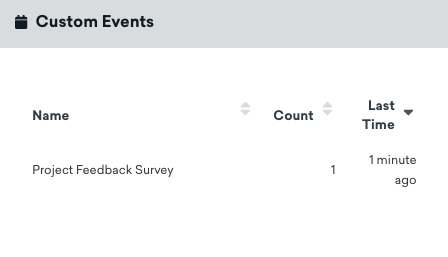
Cuando se activa, los datos del evento personalizado se registran en el perfil de un usuario cuando completa tu formulario.
Supervisión y solución de problemas
Consulta la sección Supervisar tu transformación para obtener más información sobre la supervisión y solución de problemas de tu transformación.
 Editar esta página en GitHub