eCommerce recommended events
This page covers eCommerce recommended events and properties. These events are created to capture key shopping behaviors that marketers need to trigger effective messaging, such as targeting abandoned carts.
eCommerce recommended events are currently in early access. Contact your Braze customer success manager if you’re interested in participating in this early access.
If you’re using the new Shopify connector, these recommended events will be automatically available through the integration.
Braze recognizes that data planning takes time. We encourage our customers to familiarize their development teams and begin sending these events now. While some features may not be available immediately with the eCommerce recommended events, you can look forward to the introduction of new products throughout 2025 that will enhance your eCommerce capabilities.
Types of eCommerce recommended events
The plans to phase out the purchase event will be announced in 2026. The purchase event will eventually be replaced by new eCommerce recommended events, which will come with enhanced features for segmentation, reporting, analytics, and more. However, the new eCommerce events will not support existing features related to the purchase event, such as Lifetime Value (LTV) or revenue reporting in Canvases or campaigns. For a complete list of features related to purchase events, refer to Logging purchase events.
Any non-USD currency reported will display in Braze in USD based on the exchange rate on the date it was reported. To prevent currency conversion, hardcode the currency to USD.
You can use the product viewed event to trigger when a customer views a product detail page.
Properties
| Property name | Required | Data type | Description |
|---|---|---|---|
product_id |
Yes | String | A unique identifier for the product that was viewed. For non-Shopify customers, this will be the value you set for catalog item IDs like SKUs. |
product_name |
Yes | String | The name of the product that was viewed. |
variant_id |
Yes | String | A unique identifier for the product variant. An example is shirt_medium_blue |
image_url |
No | String | URL of the product image. |
product_url |
No | String | URL to the product page for more details. |
price |
Yes | Float | The variant unit price of the product at the time of viewing. |
currency |
Yes | String | The currency in which the product price is listed (such as “USD” or “EUR”) in ISO 4217 format. |
source |
Yes | String | Source the event is derived from. (For Shopify, this is storefront). |
metadata |
No | Object | |
type |
No | Object | Works with back-in-stock notifications and price drop notifications. |
sku |
No | String | (Shopify only) Shopify SKU. This can be configured as the catalog ID field. |
Example objects
1
2
3
4
5
6
7
8
9
10
11
12
13
14
15
16
braze.logCustomEvent("ecommerce.product_viewed", {
    "product_id": "4111176",
    "product_name": "Torchie runners",
    "variant_id": "4111176700",
    "image_url": "https://braze-apparel.com/images/products/large/torchie-runners.jpg",
    "product_url": "https://braze-apparel.com/footwear-categories/sneakers/braze-orange-torchie-runners/",
    "price": 85,
    "currency": "GBP",
    "source": "https://braze-apparel.com/",
    "metadata": {
        "sku": "",
        "color": "ORANGE",
        "size": "6",
        "brand": "Braze"
    }
});
1
2
3
4
5
6
7
8
9
10
11
12
13
14
15
16
BrazeProperties properties = new BrazeProperties()
    .addProperty("product_id", "4111176")
    .addProperty("product_name", "Torchie runners")
    .addProperty("variant_id", "4111176700")
    .addProperty("image_url", "https://braze-apparel.com/images/products/large/torchie-runners.jpg")
    .addProperty("product_url", "https://braze-apparel.com/footwear-categories/sneakers/braze-orange-torchie-runners/")
    .addProperty("price", 85)
    .addProperty("currency", "GBP")
    .addProperty("source", "https://braze-apparel.com/")
    .addProperty("metadata", new JSONObject()
        .put("sku", "")
        .put("color", "ORANGE")
        .put("size", "6")
        .put("brand", "Braze"));

Braze.getInstance(context).logCustomEvent("ecommerce.product_viewed", properties);
1
2
3
4
5
6
7
8
9
10
11
12
13
14
15
16
17
18
let properties: [String: Any] = [
    "product_id": "4111176",
    "product_name": "Torchie runners",
    "variant_id": "4111176700",
    "image_url": "https://braze-apparel.com/images/products/large/torchie-runners.jpg",
    "product_url": "https://braze-apparel.com/footwear-categories/sneakers/braze-orange-torchie-runners/",
    "price": 85,
    "currency": "GBP",
    "source": "https://braze-apparel.com/",
    "metadata": [
        "sku": "",
        "color": "ORANGE",
        "size": "6",
        "brand": "Braze"
    ]
]

AppDelegate.braze?.logCustomEvent(name: "ecommerce.product_viewed", properties: properties)
1
2
3
4
5
6
7
8
9
10
11
12
13
14
15
16
17
18
19
20
21
22
23
24
25
26
27
28
29
30
{
  "events": [
    {
      "external_id": "user_id",
      "app_id": "your_app_identifier",
      "name": "ecommerce.product_viewed",
      "time": "2024-01-15T09:03:45Z",
      "properties": {
        "product_id": "4111176",
        "product_name": "Torchie runners",
        "variant_id": "4111176700",
        "image_url": "https://braze-apparel.com/images/products/large/torchie-runners.jpg",
        "product_url": "https://braze-apparel.com/footwear-categories/sneakers/braze-orange-torchie-runners/",
        "price": 85,
        "currency": "GBP",
        "source": "https://braze-apparel.com/",
        "metadata": {
          "sku": "",
          "color": "ORANGE",
          "size": "6",
          "brand": "Braze"
        },
        "type": [
          "price_drop",
          "back_in_stock"
        ]
      }
    }
  ]
}
You can use the cart updated event to track when products are added, removed, or updated in the cart. The ecommerce.cart_updated event verifies the following information before triggering:
- The event time is greater than the
updated_attime for the user’s specific cart. - The cart hasn’t proceeded to the checkout process.
- The
productsarray isn’t empty.
Carts mapping object
The ecommerce.cart_updated event has a carts mapping object. This object is created for the user profile that contains a mapping of carts, which contain all products in the shopper’s cart. You can access the products in their shopping cart through the Liquid tag:
1
2
3
{% shopping_cart {{context_properties.${cart_id}}} %}
{% for item in shopping_cart.products %}
{% catalog_items <add_your_catalog> {{item.variant_id}} %}
If a cart hasn’t been updated and progressed to an order placed event in 10 days, we’ll delete the cart and associated products.
Products per cart aren’t limited on Braze. However, Shopify’s limit is 500.
Cart behavior when merging user profiles
If there are two carts, add both to the merged user. Re-enqueue the Canvas if it’s the same or different cart to send a message with the most recent cart information. The ecommerce.cart_updated event will contain the lasted cart ID and the lasted products in the cart.
Properties
| Property name | Required | Data type | Description |
|---|---|---|---|
cart_id |
Yes | String | If you are not using a third-party platform that provides a cart_id, you can use the Braze session ID. |
total_value |
Yes | Float | Total monetary value of the cart. |
currency |
Yes | String | The currency in which the product price is listed (such as “USD” or “EUR”) in ISO 4217 format. |
products |
Yes | Array | |
product_id |
Yes | String | A unique identifier for the product that was viewed. This value be can be the product ID or SKU. |
product_name |
Yes | String | The name of the product that was viewed. |
variant_id |
Yes | String | A unique identifier for the product variant. An example is shirt_medium_blue |
image_url |
No | String | URL of the product image. |
product_url |
No | String | URL to the product page for more details. |
quantity |
Yes | Integer | Number of units of the product in the cart. |
price |
Yes | Float | The variant unit price of the product at the time of viewing. |
metadata |
No | Object | Additional metadata field about the product that the customer wants to add for their use cases. For Shopify, we will add SKU. This will have a limit based on our general event properties limit of 50kb. |
sku |
No | String | (Shopify only) Shopify SKU. This can be configured as the catalog ID field. |
source |
Yes | String | Source the event is derived from. (For Shopify, this is storefront). |
metadata |
No | Object | Additional metadata field about the product that the customer wants to add for their use cases. For Shopify, we will add SKU. This will have a limit based on our general event properties limit of 50kb. |
Example objects
1
2
3
4
5
6
7
8
9
10
11
12
13
14
15
16
17
18
19
20
21
22
23
24
braze.logCustomEvent("ecommerce.cart_updated", {
    "cart_id": "cart_12345",
    "currency": "USD",
    "total_value": 199.98,
    "products": [
        {
            "product_id": "8266836345064",
            "product_name": "Classic T-Shirt",
            "variant_id": "44610569208040",
            "image_url": "https://braze-apparel.com/images/tshirt-blue-medium.jpg",
            "product_url": "https://braze-apparel.com/products/classic-tshirt?variant=44610569208040",
            "quantity": 2,
            "price": 99.99,
            "metadata": {
                "sku": "TSH-BLU-M",
                "color": "BLUE",
                "size": "Medium",
                "brand": "Braze"
            }
        }
    ],
    "source": "https://braze-apparel.com",
    "metadata": {}
});
1
2
3
4
5
6
7
8
9
10
11
12
13
14
15
16
17
18
19
20
21
22
23
24
25
JSONArray products = new JSONArray();
JSONObject product = new JSONObject()
    .put("product_id", "8266836345064")
    .put("product_name", "Classic T-Shirt")
    .put("variant_id", "44610569208040")
    .put("image_url", "https://braze-apparel.com/images/tshirt-blue-medium.jpg")
    .put("product_url", "https://braze-apparel.com/products/classic-tshirt?variant=44610569208040")
    .put("quantity", 2)
    .put("price", 99.99)
    .put("metadata", new JSONObject()
        .put("sku", "TSH-BLU-M")
        .put("color", "BLUE")
        .put("size", "Medium")
        .put("brand", "Braze"));
products.put(product);

BrazeProperties properties = new BrazeProperties()
    .addProperty("cart_id", "cart_12345")
    .addProperty("currency", "USD")
    .addProperty("total_value", 199.98)
    .addProperty("products", products)
    .addProperty("source", "https://braze-apparel.com")
    .addProperty("metadata", new JSONObject());

Braze.getInstance(context).logCustomEvent("ecommerce.cart_updated", properties);
1
2
3
4
5
6
7
8
9
10
11
12
13
14
15
16
17
18
19
20
21
22
23
24
25
26
27
28
let products: [[String: Any]] = [
    [
        "product_id": "8266836345064",
        "product_name": "Classic T-Shirt",
        "variant_id": "44610569208040",
        "image_url": "https://braze-apparel.com/images/tshirt-blue-medium.jpg",
        "product_url": "https://braze-apparel.com/products/classic-tshirt?variant=44610569208040",
        "quantity": 2,
        "price": 99.99,
        "metadata": [
            "sku": "TSH-BLU-M",
            "color": "BLUE",
            "size": "Medium",
            "brand": "Braze"
        ]
    ]
]

let properties: [String: Any] = [
    "cart_id": "cart_12345",
    "currency": "USD",
    "total_value": 199.98,
    "products": products,
    "source": "https://braze-apparel.com",
    "metadata": [:]
]

AppDelegate.braze?.logCustomEvent(name: "ecommerce.cart_updated", properties: properties)
1
2
3
4
5
6
7
8
9
10
11
12
13
14
15
16
17
18
19
20
21
22
23
24
25
26
27
28
29
30
31
32
33
34
{
  "events": [
    {
      "external_id": "user_id",
      "app_id": "your_app_identifier",
      "name": "ecommerce.cart_updated",
      "time": "2024-01-15T09:15:30Z",
      "properties": {
        "cart_id": "cart_12345",
        "currency": "USD",
        "total_value": 199.98,
        "products": [
          {
            "product_id": "8266836345064",
            "product_name": "Classic T-Shirt",
            "variant_id": "44610569208040",
            "image_url": "https://braze-apparel.com/images/tshirt-blue-medium.jpg",
            "product_url": "https://braze-apparel.com/products/classic-tshirt?variant=44610569208040",
            "quantity": 2,
            "price": 99.99,
            "metadata": {
              "sku": "TSH-BLU-M",
              "color": "BLUE",
              "size": "Medium",
              "brand": "Braze"
            }
          }
        ],
        "source": "https://braze-apparel.com",
        "metadata": {}
      }
    }
  ]
}
You can use the checkout started event to retarget customers who have started the checkout process but haven’t placed an order.
Similar to the ecommerce.cart_updated event, this event allows you to leverage the shopping cart Liquid tag to access all products within their cart for abandoned checkout messages:
1
2
3
{% shopping_cart {{context_properties.${cart_id}}} :abort_if_not_abandoned false %}
{% for item in shopping_cart.products %}
{% catalog_items <add_your_catalog> {{item.variant_id}} %}
Properties
| Property name | Required | Data type | Description |
|---|---|---|---|
checkout_id |
Yes | String | Unique identifier for the checkout. |
cart_id |
No | String | If you are not using a third-party platform that provides a cart_id, you can use the Braze session ID. |
total_value |
Yes | Float | Total monetary value of the cart. |
currency |
Yes | String | Currency in which the cart is valued. |
products |
Yes | Array of objects | |
product_id |
Yes | String | A unique identifier for the product that was viewed. For example, this value could be the product ID or SKU. |
product_name |
Yes | String | The name of the product that was viewed. |
variant_id |
Yes | String | A unique identifier for the product variant. An example is shirt_medium_blue |
image_url |
No | String | URL of the product image. |
product_url |
No | String | URL to the product page for more details. |
quantity |
Yes | Integer | Number of units of the product in the cart. |
price |
Yes | Float | The variant unit price of the product at the time of viewing. |
metadata |
No | Object | Additional metadata field about the product that the customer wants to add for their use cases. For Shopify, we will add SKU. This will have a limit based on our general event properties limit of 50kb. |
sku |
No | String | (Shopify only) Shopify SKU. This can be configured as the catalog ID field. |
source |
Yes | String | Source the event is derived from. (For Shopify, this is storefront). |
metadata |
No | Object | |
checkout_url |
No | String | URL for the checkout page. |
Example objects
1
2
3
4
5
6
7
8
9
10
11
12
13
14
15
16
17
18
19
20
21
22
23
24
braze.logCustomEvent("ecommerce.checkout_started", {
    "checkout_id": "checkout_abc123",
    "cart_id": "cart_12345",
    "total_value": 199.98,
    "currency": "USD",
    "products": [
        {
            "product_id": "632910392",
            "product_name": "Wireless Headphones",
            "variant_id": "808950810",
            "quantity": 1,
            "price": 199.98,
            "metadata": {
                "sku": "WH-BLK-PRO",
                "color": "Black",
                "brand": "BrazeAudio"
            }
        }
    ],
    "source": "https://braze-audio.com",
    "metadata": {
        "checkout_url": "https://checkout.braze-audio.com/abc123"
    }
});
1
2
3
4
5
6
7
8
9
10
11
12
13
14
15
16
17
18
19
20
21
22
23
24
JSONArray products = new JSONArray();
JSONObject product = new JSONObject()
    .put("product_id", "632910392")
    .put("product_name", "Wireless Headphones")
    .put("variant_id", "808950810")
    .put("quantity", 1)
    .put("price", 199.98)
    .put("metadata", new JSONObject()
        .put("sku", "WH-BLK-PRO")
        .put("color", "Black")
        .put("brand", "AudioTech"));
products.put(product);

BrazeProperties properties = new BrazeProperties()
    .addProperty("checkout_id", "checkout_abc123")
    .addProperty("cart_id", "cart_12345")
    .addProperty("total_value", 199.98)
    .addProperty("currency", "USD")
    .addProperty("products", products)
    .addProperty("source", "https://braze-audio.com")
    .addProperty("metadata", new JSONObject()
        .put("checkout_url", "https://checkout.braze-audio.com/abc123"));

Braze.getInstance(context).logCustomEvent("ecommerce.checkout_started", properties);
1
2
3
4
5
6
7
8
9
10
11
12
13
14
15
16
17
18
19
20
21
22
23
24
25
26
27
28
let products: [[String: Any]] = [
    [
        "product_id": "632910392",
        "product_name": "Wireless Headphones",
        "variant_id": "808950810",
        "quantity": 1,
        "price": 199.98,
        "metadata": [
            "sku": "WH-BLK-PRO",
            "color": "Black",
            "brand": "BrazeAudio"
        ]
    ]
]

let properties: [String: Any] = [
    "checkout_id": "checkout_abc123",
    "cart_id": "cart_12345",
    "total_value": 199.98,
    "currency": "USD",
    "products": products,
    "source": "https://braze-audio.com",
    "metadata": [
        "checkout_url": "https://checkout.braze-audio.com/abc123"
    ]
]

AppDelegate.braze?.logCustomEvent(name: "ecommerce.checkout_started", properties: properties)
1
2
3
4
5
6
7
8
9
10
11
12
13
14
15
16
17
18
19
20
21
22
23
24
25
26
27
28
29
30
31
32
33
34
{
  "events": [
    {
      "external_id": "user_id",
      "app_id": "your_app_identifier",
      "name": "ecommerce.checkout_started",
      "time": "2024-01-15T09:25:45Z",
      "properties": {
        "checkout_id": "checkout_abc123",
        "cart_id": "cart_12345",
        "total_value": 199.98,
        "currency": "USD",
        "products": [
          {
            "product_id": "632910392",
            "product_name": "Wireless Headphones",
            "variant_id": "808950810",
            "quantity": 1,
            "price": 199.98,
            "metadata": {
              "sku": "WH-BLK-PRO",
              "color": "Black",
              "brand": "BrazeAudio"
            }
          }
        ],
        "source": "https://braze-audio.com",
        "metadata": {
          "checkout_url": "https://checkout.braze-audio.com/abc123"
        }
      }
    }
  ]
}
You can use the order placed event to trigger when a customer successfully completes the checkout process and places an order.
Properties
| Property name | Required | Data type | Description |
|---|---|---|---|
order_id |
Yes | String | Unique identifier for the order placed. |
cart_id |
No | String | If you are not using a third-party platform that provides a cart_id, you can use the Braze session ID. |
total_value |
Yes | Float | Total monetary value of the cart. |
currency |
Yes | String | Currency in which the cart is valued. |
total_discounts |
No | Float | Total amount of discounts applied to the order. |
discounts |
No | Array of objects | Detailed list of discounts applied to the order. |
products |
Yes | Array of objects | |
product_id |
Yes | String | A unique identifier for the product that was viewed. This value be can be the product ID or SKU. |
product_name |
Yes | String | The name of the product that was viewed. |
variant_id |
Yes | String | A unique identifier for the product variant. An example is shirt_medium_blue |
image_url |
No | String | URL of the product image. |
product_url |
No | String | URL to the product page for more details. |
quantity |
Yes | Integer | Number of units of the product in the cart. |
price |
Yes | Float | The variant unit price of the product at the time of viewing. |
metadata |
No | Object | Additional metadata field about the product that the customer wants to add for their use cases. For Shopify, we will add SKU. This will have a limit based on our general event properties limit of 50kb. |
sku |
No | String | (Shopify only) Shopify SKU. This can be configured as the catalog ID field. |
source |
Yes | String | Source the event is derived from. (For Shopify, this is storefront). |
order_status_url |
No | String | URL to view the status of the order. |
order_number |
No | String | (Shopify only) Unique order number for the order placed. |
tags |
No | Array | (Shopify only) Order tags |
referring_site |
No | String | (Shopify only) The site the order originated from (such as Meta). |
payment_gateway_names |
No | Array | (Shopify only) Payment system source (such as point of sale or mobile). |
Example objects
1
2
3
4
5
6
7
8
9
10
11
12
13
14
15
16
17
18
19
20
21
22
23
24
25
26
27
28
29
30
31
32
33
34
35
braze.logCustomEvent("ecommerce.order_placed", {
    "order_id": "order_67890",
    "cart_id": "cart_12345",
    "total_value": 189.98,
    "currency": "USD",
    "total_discounts": 10.00,
    "discounts": [
        {
            "code": "SAVE10",
            "amount": 10.00
        }
    ],
    "products": [
        {
            "product_id": "632910392",
            "product_name": "Wireless Headphones",
            "variant_id": "808950810",
            "quantity": 1,
            "price": 199.98,
            "metadata": {
                "sku": "WH-BLK-PRO",
                "color": "Black",
                "brand": "BrazeAudio"
            }
        }
    ],
    "source": "https://braze-audio.com",
    "metadata": {
        "order_status_url": "https://braze-audio.com/orders/67890/status",
        "order_number": "ORD-2024-001234",
        "tags": ["electronics", "audio"],
        "referring_site": "https://www.e-referrals.com",
        "payment_gateway_names": ["tap2pay", "dotcash"]
    }
});
1
2
3
4
5
6
7
8
9
10
11
12
13
14
15
16
17
18
19
20
21
22
23
24
25
26
27
28
29
30
31
32
33
34
35
JSONArray discounts = new JSONArray();
discounts.put(new JSONObject()
    .put("code", "SAVE10")
    .put("amount", 10.00));

JSONArray products = new JSONArray();
JSONObject product = new JSONObject()
    .put("product_id", "632910392")
    .put("product_name", "Wireless Headphones")
    .put("variant_id", "808950810")
    .put("quantity", 1)
    .put("price", 199.98)
    .put("metadata", new JSONObject()
        .put("sku", "WH-BLK-PRO")
        .put("color", "Black")
        .put("brand", "AudioTech"));
products.put(product);

BrazeProperties properties = new BrazeProperties()
    .addProperty("order_id", "order_67890")
    .addProperty("cart_id", "cart_12345")
    .addProperty("total_value", 189.98)
    .addProperty("currency", "USD")
    .addProperty("total_discounts", 10.00)
    .addProperty("discounts", discounts)
    .addProperty("products", products)
    .addProperty("source", "https://braze-audio.com")
    .addProperty("metadata", new JSONObject()
        .put("order_status_url", "https://braze-audio.com/orders/67890/status")
        .put("order_number", "ORD-2024-001234")
        .put("tags", new JSONArray().put("electronics").put("audio"))
        .put("referring_site", "https://www.e-referrals.com")
        .put("payment_gateway_names", new JSONArray().put("tap2pay").put("dotcash")));

Braze.getInstance(context).logCustomEvent("ecommerce.order_placed", properties);
1
2
3
4
5
6
7
8
9
10
11
12
13
14
15
16
17
18
19
20
21
22
23
24
25
26
27
28
29
30
31
32
33
34
35
36
37
38
39
40
41
let discounts: [[String: Any]] = [
    [
        "code": "SAVE10",
        "amount": 10.00
    ]
]

let products: [[String: Any]] = [
    [
        "product_id": "632910392",
        "product_name": "Wireless Headphones",
        "variant_id": "808950810",
        "quantity": 1,
        "price": 199.98,
        "metadata": [
            "sku": "WH-BLK-PRO",
            "color": "Black",
            "brand": "BrazeAudio"
        ]
    ]
]

let properties: [String: Any] = [
    "order_id": "order_67890",
    "cart_id": "cart_12345",
    "total_value": 189.98,
    "currency": "USD",
    "total_discounts": 10.00,
    "discounts": discounts,
    "products": products,
    "source": "https://braze-audio.com",
    "metadata": [
        "order_status_url": "https://braze-audio.com/orders/67890/status",
        "order_number": "ORD-2024-001234",
        "tags": ["electronics", "audio"],
        "referring_site": "https://www.e-referrals.com",
        "payment_gateway_names": ["tap2pay", "dotcash"]
    ]
]

AppDelegate.braze?.logCustomEvent(name: "ecommerce.order_placed", properties: properties)
1
2
3
4
5
6
7
8
9
10
11
12
13
14
15
16
17
18
19
20
21
22
23
24
25
26
27
28
29
30
31
32
33
34
35
36
37
38
39
40
41
42
43
44
45
{
  "events": [
    {
      "external_id": "user_id",
      "app_id": "your_app_identifier",
      "name": "ecommerce.order_placed",
      "time": "2024-01-15T09:35:20Z",
      "properties": {
        "order_id": "order_67890",
        "cart_id": "cart_12345",
        "total_value": 189.98,
        "currency": "USD",
        "total_discounts": 10.00,
        "discounts": [
          {
            "code": "SAVE10",
            "amount": 10.00
          }
        ],
        "products": [
          {
            "product_id": "632910392",
            "product_name": "Wireless Headphones",
            "variant_id": "808950810",
            "quantity": 1,
            "price": 199.98,
            "metadata": {
              "sku": "WH-BLK-PRO",
              "color": "Black",
              "brand": "BrazeAudio"
            }
          }
        ],
        "source": "https://braze-audio.com",
        "metadata": {
          "order_status_url": "https://braze-audio.com/orders/67890/status",
          "order_number": "ORD-2024-001234",
          "tags": ["electronics", "audio"],
          "referring_site": "https://www.e-referrals.com",
          "payment_gateway_names": ["tap2pay", "dotcash"]
        }
      }
    }
  ]
}
You can use the order refunded event to trigger when an order is partially or entirely refunded.
Properties
| Property Name | Required | Data Type | Description |
|---|---|---|---|
order_id |
Yes | String | Unique identifier for the order placed. |
total_value |
Yes | Float | Total monetary value of the cart. |
currency |
Yes | String | Currency in which the cart is valued. |
total_discounts |
No | Float | Total amount of discounts applied to the order. |
discounts |
No | Array of objects | Detailed list of discounts applied to the order. |
products |
Yes | Array of objects | |
product_id |
Yes | String | A unique identifier for the product that was viewed. This value can be the product ID, SKU, or similar. If a partial refund is issued and there is no product_id assigned to the refund (for example, an order-level refund), provide a generalized product_id. |
product_name |
Yes | String | The name of the product that was viewed. |
variant_id |
Yes | String | A unique identifier for the product variant (such as shirt_medium_blue). |
image_url |
No | String | URL of the product image. |
product_url |
No | String | URL to the product page for more details. |
quantity |
Yes | Integer | Number of units of the product in the cart. |
price |
Yes | Float | The variant unit price of the product at the time of viewing. |
metadata |
No | Object | Additional metadata field about the product that the customer wants to add for their use cases. For Shopify, we will add SKU. This will have a limit based on our general event properties limit of 50kb. |
sku |
No | String | (Shopify only) Shopify SKU. This can be configured as the catalog ID field. |
source |
Yes | String | Source the event is derived from. (For Shopify, this is storefront). |
metadata |
No | Object | |
order_status_url |
No | String | URL to view the status of the order. |
order_note |
No | String | (Shopify only) Note appended to the order by the merchant. |
order_number |
No | String | (Shopify only) Unique order number for the order placed. |
tags |
No | Array | (Shopify only) Order tags. |
Example objects
1
2
3
4
5
6
7
8
9
10
11
12
13
14
15
16
17
18
19
20
21
22
23
24
25
26
27
28
29
30
31
32
33
braze.logCustomEvent("ecommerce.order_refunded", {
    "order_id": "order_67890",
    "total_value": 99.99,
    "currency": "USD",
    "total_discounts": 5.00,
    "discounts": [
        {
            "code": "SAVE5",
            "amount": 5.00
        }
    ],
    "products": [
        {
            "product_id": "632910392",
            "product_name": "Wireless Headphones",
            "variant_id": "808950810",
            "quantity": 1,
            "price": 99.99,
            "metadata": {
                "sku": "WH-BLK-PRO",
                "color": "Black",
                "brand": "BrazeAudio"
            }
        }
    ],
    "source": "https://braze-audio.com",
    "metadata": {
        "order_status_url": "https://braze-audio.com/orders/67890/status",
        "order_note": "Customer requested refund due to defective item",
        "order_number": "ORD-2024-001234",
        "tags": ["refund", "defective"]
    }
});
1
2
3
4
5
6
7
8
9
10
11
12
13
14
15
16
17
18
19
20
21
22
23
24
25
26
27
28
29
30
31
32
33
JSONArray discounts = new JSONArray();
discounts.put(new JSONObject()
    .put("code", "SAVE5")
    .put("amount", 5.00));

JSONArray products = new JSONArray();
JSONObject product = new JSONObject()
    .put("product_id", "632910392")
    .put("product_name", "Wireless Headphones")
    .put("variant_id", "808950810")
    .put("quantity", 1)
    .put("price", 99.99)
    .put("metadata", new JSONObject()
        .put("sku", "WH-BLK-PRO")
        .put("color", "Black")
        .put("brand", "AudioTech"));
products.put(product);

BrazeProperties properties = new BrazeProperties()
    .addProperty("order_id", "order_67890")
    .addProperty("total_value", 99.99)
    .addProperty("currency", "USD")
    .addProperty("total_discounts", 5.00)
    .addProperty("discounts", discounts)
    .addProperty("products", products)
    .addProperty("source", "https://braze-audio.com")
    .addProperty("metadata", new JSONObject()
        .put("order_status_url", "https://braze-audio.com/orders/67890/status")
        .put("order_note", "Customer requested refund due to defective item")
        .put("order_number", "ORD-2024-001234")
        .put("tags", new JSONArray().put("refund").put("defective")));

Braze.getInstance(context).logCustomEvent("ecommerce.order_refunded", properties);
1
2
3
4
5
6
7
8
9
10
11
12
13
14
15
16
17
18
19
20
21
22
23
24
25
26
27
28
29
30
31
32
33
34
35
36
37
38
39
let discounts: [[String: Any]] = [
    [
        "code": "SAVE5",
        "amount": 5.00
    ]
]

let products: [[String: Any]] = [
    [
        "product_id": "632910392",
        "product_name": "Wireless Headphones",
        "variant_id": "808950810",
        "quantity": 1,
        "price": 99.99,
        "metadata": [
            "sku": "WH-BLK-PRO",
            "color": "Black",
            "brand": "BrazeAudio"
        ]
    ]
]

let properties: [String: Any] = [
    "order_id": "order_67890",
    "total_value": 99.99,
    "currency": "USD",
    "total_discounts": 5.00,
    "discounts": discounts,
    "products": products,
    "source": "https://braze-audio.com",
    "metadata": [
        "order_status_url": "https://braze-audio.com/orders/67890/status",
        "order_note": "Customer requested refund due to defective item",
        "order_number": "ORD-2024-001234",
        "tags": ["refund", "defective"]
    ]
]

AppDelegate.braze?.logCustomEvent(name: "ecommerce.order_refunded", properties: properties)
1
2
3
4
5
6
7
8
9
10
11
12
13
14
15
16
17
18
19
20
21
22
23
24
25
26
27
28
29
30
31
32
33
34
35
36
37
38
39
40
41
42
43
{
  "events": [
    {
      "external_id": "user_id",
      "app_id": "your_app_identifier",
      "name": "ecommerce.order_refunded",
      "time": "2024-01-15T10:15:30Z",
      "properties": {
        "order_id": "order_67890",
        "total_value": 99.99,
        "currency": "USD",
        "total_discounts": 5.00,
        "discounts": [
          {
            "code": "SAVE5",
            "amount": 5.00
          }
        ],
        "products": [
          {
            "product_id": "632910392",
            "product_name": "Wireless Headphones",
            "variant_id": "808950810",
            "quantity": 1,
            "price": 99.99,
            "metadata": {
              "sku": "WH-BLK-PRO",
              "color": "Black",
              "brand": "BrazeAudio"
            }
          }
        ],
        "source": "https://braze-audio.com",
        "metadata": {
          "order_status_url": "https://braze-audio.com/orders/67890/status",
          "order_note": "Customer requested refund due to defective item",
          "order_number": "ORD-2024-001234",
          "tags": ["refund", "defective"]
        }
      }
    }
  ]
}
You can use the order cancelled event to trigger when a customer cancels an order.
Properties
| Property Name | Required | Data Type | Description |
|---|---|---|---|
order_id |
Yes | String | Unique identifier for the order placed. |
cancel_reason |
Yes | String | Reason why the order was cancelled. |
total_value |
Yes | Float | Total monetary value of the cart. |
currency |
Yes | String | Currency in which the cart is valued. |
total_discounts |
No | Float | Total amount of discounts applied to the order. |
discounts |
No | Array of objects | Detailed list of discounts applied to the order. |
products |
Yes | Array of objects | |
product_id |
Yes | String | A unique identifier for the product that was viewed. This value can be the product ID, SKU, or similar. |
product_name |
Yes | String | The name of the product that was viewed. |
variant_id |
Yes | String | A unique identifier for the product variant (such as shirt_medium_blue). |
image_url |
No | String | URL of the product image. |
product_url |
No | String | URL to the product page for more details. |
quantity |
Yes | Integer | Number of units of the product in the cart. |
price |
Yes | Float | The variant unit price of the product at the time of viewing. |
metadata |
No | Object | Additional metadata field about the product that the customer wants to add for their use cases. For Shopify, we will add SKU. This will have a limit based on our general event properties limit of 50kb. |
sku |
No | String | (Shopify only) Shopify SKU. This can be configured as the catalog ID field. |
source |
Yes | String | Source the event is derived from. (For Shopify, this is storefront). |
metadata |
No | Object | |
order_status_url |
No | String | URL to view the status of the order. |
order_number |
No | String | (Shopify only) Unique order number for the order placed. |
tags |
No | Array | (Shopify only) Order tags. |
Example objects
1
2
3
4
5
6
7
8
9
10
11
12
13
14
15
16
17
18
19
20
21
22
23
24
25
26
27
28
29
30
31
32
33
braze.logCustomEvent("ecommerce.order_cancelled", {
    "order_id": "order_67890",
    "cancel_reason": "customer changed mind",
    "total_value": 189.98,
    "currency": "USD",
    "total_discounts": 10.00,
    "discounts": [
        {
            "code": "SAVE10",
            "amount": 10.00
        }
    ],
    "products": [
        {
            "product_id": "632910392",
            "product_name": "Wireless Headphones",
            "variant_id": "808950810",
            "quantity": 1,
            "price": 199.98,
            "metadata": {
                "sku": "WH-BLK-PRO",
                "color": "Black",
                "brand": "BrazeAudio"
            }
        }
    ],
    "source": "https://braze-audio.com",
    "metadata": {
        "order_status_url": "https://braze-audio.com/orders/67890/status",
        "order_number": "ORD-2024-001234",
        "tags": ["cancelled", "customer_request"]
    }
});
1
2
3
4
5
6
7
8
9
10
11
12
13
14
15
16
17
18
19
20
21
22
23
24
25
26
27
28
29
30
31
32
33
JSONArray discounts = new JSONArray();
discounts.put(new JSONObject()
    .put("code", "SAVE10")
    .put("amount", 10.00));

JSONArray products = new JSONArray();
JSONObject product = new JSONObject()
    .put("product_id", "632910392")
    .put("product_name", "Wireless Headphones")
    .put("variant_id", "808950810")
    .put("quantity", 1)
    .put("price", 199.98)
    .put("metadata", new JSONObject()
        .put("sku", "WH-BLK-PRO")
        .put("color", "Black")
        .put("brand", "AudioTech"));
products.put(product);

BrazeProperties properties = new BrazeProperties()
    .addProperty("order_id", "order_67890")
    .addProperty("cancel_reason", "customer changed mind")
    .addProperty("total_value", 189.98)
    .addProperty("currency", "USD")
    .addProperty("total_discounts", 10.00)
    .addProperty("discounts", discounts)
    .addProperty("products", products)
    .addProperty("source", "https://braze-audio.com")
    .addProperty("metadata", new JSONObject()
        .put("order_status_url", "https://braze-audio.com/orders/67890/status")
        .put("order_number", "ORD-2024-001234")
        .put("tags", new JSONArray().put("cancelled").put("customer_request")));

Braze.getInstance(context).logCustomEvent("ecommerce.order_cancelled", properties);
1
2
3
4
5
6
7
8
9
10
11
12
13
14
15
16
17
18
19
20
21
22
23
24
25
26
27
28
29
30
31
32
33
34
35
36
37
38
39
let discounts: [[String: Any]] = [
    [
        "code": "SAVE10",
        "amount": 10.00
    ]
]

let products: [[String: Any]] = [
    [
        "product_id": "632910392",
        "product_name": "Wireless Headphones",
        "variant_id": "808950810",
        "quantity": 1,
        "price": 199.98,
        "metadata": [
            "sku": "WH-BLK-PRO",
            "color": "Black",
            "brand": "BrazeAudio"
        ]
    ]
]

let properties: [String: Any] = [
    "order_id": "order_67890",
    "cancel_reason": "customer changed mind",
    "total_value": 189.98,
    "currency": "USD",
    "total_discounts": 10.00,
    "discounts": discounts,
    "products": products,
    "source": "https://braze-audio.com",
    "metadata": [
        "order_status_url": "https://braze-audio.com/orders/67890/status",
        "order_number": "ORD-2024-001234",
        "tags": ["cancelled", "customer_request"]
    ]
]

AppDelegate.braze?.logCustomEvent(name: "ecommerce.order_cancelled", properties: properties)
1
2
3
4
5
6
7
8
9
10
11
12
13
14
15
16
17
18
19
20
21
22
23
24
25
26
27
28
29
30
31
32
33
34
35
36
37
38
39
40
41
42
43
{
  "events": [
    {
      "external_id": "user_id",
      "app_id": "your_app_identifier",
      "name": "ecommerce.order_cancelled",
      "time": "2024-01-15T10:45:15Z",
      "properties": {
        "order_id": "order_67890",
        "cancel_reason": "customer changed mind",
        "total_value": 189.98,
        "currency": "USD",
        "total_discounts": 10.00,
        "discounts": [
          {
            "code": "SAVE10",
            "amount": 10.00
          }
        ],
        "products": [
          {
            "product_id": "632910392",
            "product_name": "Wireless Headphones",
            "variant_id": "808950810",
            "quantity": 1,
            "price": 199.98,
            "metadata": {
              "sku": "WH-BLK-PRO",
              "color": "Black",
              "brand": "BrazeAudio"
            }
          }
        ],
        "source": "https://braze-audio.com",
        "metadata": {
          "order_status_url": "https://braze-audio.com/orders/67890/status",
          "order_number": "ORD-2024-001234",
          "tags": ["cancelled", "customer_request"]
        }
      }
    }
  ]
}
eCommerce Canvas templates
Braze has created pre-built Canvas templates that are powered by eCommerce recommended events, such as targeting customers who started the checkout process but left before placing their order. You can use these events to make informed decisions to enhance your user journey by personalizing messaging and targeting specific audiences.
Check out our dedicated eCommerce use cases for more ways on how you can use these events with Canvas templates.
User calculated fields
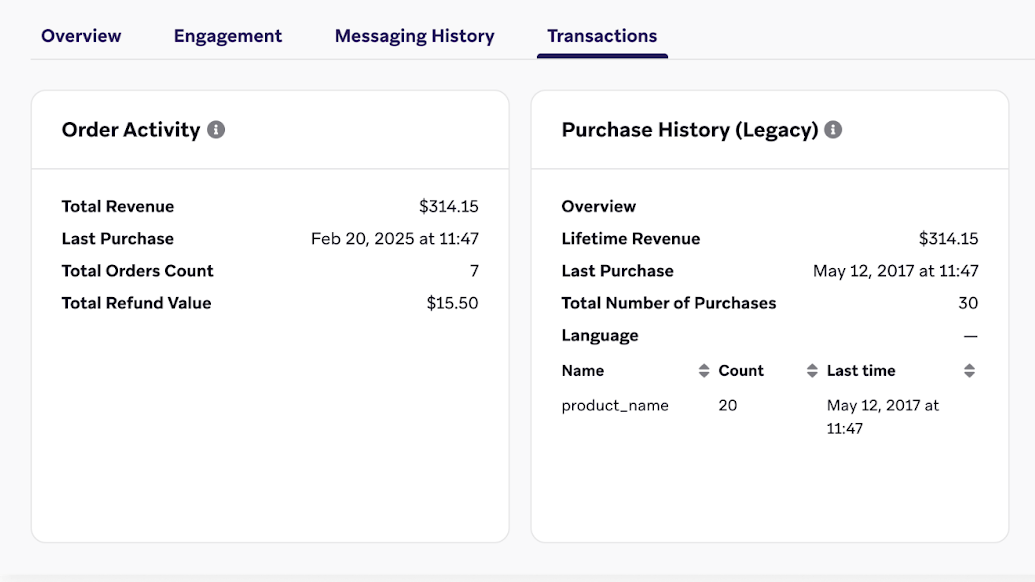
We use standardized user field calculations for the following fields:
- Total Revenue = sum of total order placed value - sum of total order refunded value
- Total Orders count = count of distinct order placed events - count of distinct order cancellations
- Total Refund Value = sum of total order refunded value
These user field calculations are also included on the Transactions tab of user profiles.
Frequently asked questions
Where can I view product-level purchase data?
The user profile’s Transactions tab shows high-level calculated fields (such as total revenue and total orders). To view product-level detail for a specific user, use the Query Builder to query eCommerce event data, or export event data through Currents.
Unlike legacy purchase events, eCommerce recommended events store product details as nested event properties within the products array. These properties are available in messaging through Liquid and in segmentation through Segment Extensions.
How do I segment users by a specific product?
The segmenter allows you to filter by the number of times a user performed an eCommerce event. To filter by specific product properties (such as product_id or product_name), use Segment Extensions, which support nested event property filtering. For example, you can find all users who purchased product “SKU-123” in the last 90 days.
What’s the difference between legacy purchase events and eCommerce recommended events?
Legacy purchase events use the Braze purchase object and record individual product purchases with a product_id and price. eCommerce recommended events (such as ecommerce.order_placed) use custom event properties and capture the full order context, including multiple products, discounts, and metadata in a single event.
With the launch of eCommerce recommended events, Braze will phase out the legacy purchase event in the future. If you’re currently using purchase events, you will receive advance notice. In the meantime, you can continue using purchase events until the official deprecation date. Refer to the recommended events overview for more details.
Can I add custom properties to eCommerce recommended events?
eCommerce recommended events have a defined schema with required and optional fields. You can include additional custom data within the metadata object for each event. However, custom order-level tags or proprietary fields (such as purchase channel or retail store information) are not supported as top-level properties. If you need these fields for segmentation, continue sending them as separate custom events alongside your eCommerce events.
Do I need to include external_id when sending eCommerce events?
It depends on how you’re sending the events:
- Via the SDK: No. When you use a Braze SDK, events are automatically associated with the SDK’s current user context (anonymous or identified). You don’t need to pass a user identifier with each event call; instead, you can identify the user for that context using methods such as
changeUser. - Via the REST API (
/users/track): Yes. Each API request must include a user identifier, such asexternal_id,braze_id,user_alias,email, orphone, because the API has no “current user” context.
Why don’t nested product properties appear in the AI Recommendations setup dropdown?
When configuring AI item recommendations, the Property name dropdown only lists top-level event properties (such as order_id, total_value, and currency). Nested properties within the products array (for example, products.product_id or products.variant_id) may not appear in this list, but you can type them manually using dot notation in the field. For most eCommerce implementations, Braze recommends using products.product_id as the item identifier and pairing it with a catalog whose item IDs match your product_id or variant_id values.
Why are some of my eCommerce events not appearing in Braze?
If events are not showing in user profiles or logs, check the following:
- SDK data flush timing: The Braze SDK caches data locally and uploads it periodically (typically within 10–60 seconds). Call
requestImmediateDataFlush()afterlogCustomEvent()to force an immediate upload. - Required properties: eCommerce events have required properties. If a required property is missing or has an invalid data type, the event may be rejected. Verify that your event payload matches the required schema.
- Event name accuracy: eCommerce event names are case-sensitive and must match exactly (for example,
ecommerce.checkout_started, notecommerce.checkoutStarted).
 Edit this page on GitHub