Design your agent
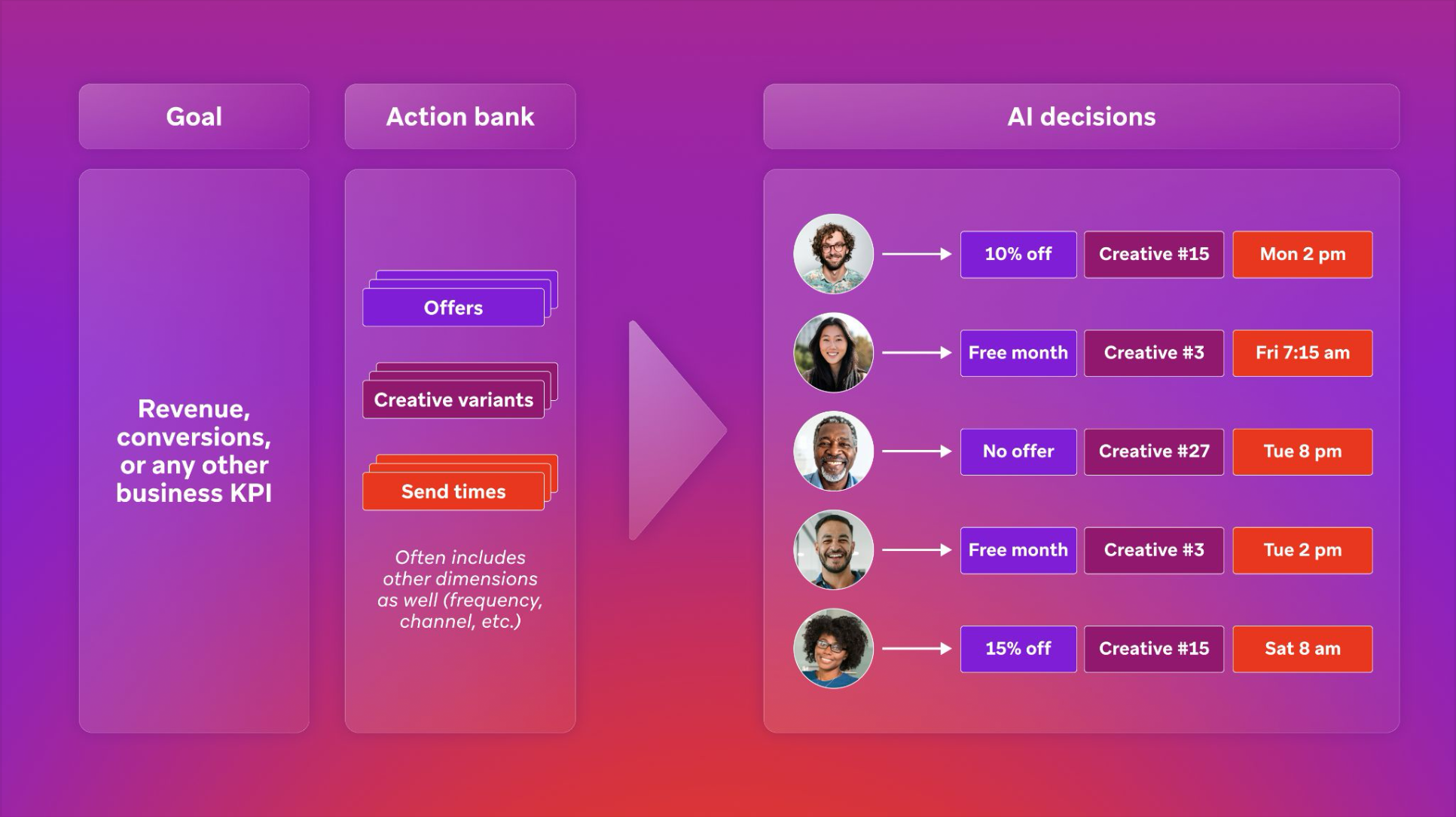
The first step of agent setup is working with our AI Decisioning Services team to design your agent. This article covers the key design decisions and how to define your audience.
For foundational concepts about decisioning agents—including success metrics, dimensions, action banks, and constraints—see Designing Decisioning Agents.
Key design decisions
Working with the AI Decisioning Services team, you’ll make the following decisions:
| Decision | Description | Examples |
|---|---|---|
| Success metric | What will the agent maximize when personalizing customer engagement? | Revenue, LTV, ARPU, conversions, retention |
| Audience | For whom will the Decisioning Studio agent make customer engagement decisions? | All customers, loyalty members, at-risk subscribers |
| Experiment groups | How should Decisioning Studio’s randomized controlled trials be structured? | Decisioning Studio, Random Control, BAU, Holdout |
| Dimensions | What decisions should the agent personalize? | Time of day, subject line, frequency, offers, channel |
| Options | What options does the agent have to work with? | Specific templates, offers, time windows |
| Constraints | What decisions should the agent never make? | Geographic restrictions, budget limits, eligibility rules |
Each of these decisions has implications for how much incremental uplift the agent may be able to generate, and how quickly. Our AI Decisioning Services team will work with you to design an agent that generates maximum value while respecting all of your business rules.
Defining your audience
Use case audiences are typically defined in a Customer Engagement Platform (such as Braze or Salesforce Marketing Cloud), then sent to the Decisioning Studio agent. The agent then divides customers into treatment groups in order to conduct randomized controlled trials.
Treatment groups
| Group | Description |
|---|---|
| Decisioning Studio | Customers who receive AI-optimized recommendations |
| Random Control | Customers who receive randomly selected options (baseline comparison) |
| Business-as-Usual (optional) | Customers who receive the current marketing journey (for comparing against existing performance) |
| Holdout (optional) | Customers who receive no communications (to measure overall campaign impact) |
Configuring your audience
Configure audience in Braze:
- Create a segment for your audience that you would like to target.
- Provide the Segment ID to your AI Decisioning Services team.
For Braze, we can ingest multiple segments and combine them to create the audience. Decisioning Studio can ingest a segment for a Business-as-Usual comparator campaign. All of these patterns are acceptable.
Configure audience in Salesforce Marketing Cloud:
- Configure an SFMC Data Extension(s) for your audience and provide the data extension ID
- Set up SFMC Installed Package for API integration with the appropriate permissions required by Decisioning Studio
- Ensure that this data extension is refreshed daily, as Decisioning Studio will pull from the latest incremental data available
Provide the extension ID and API key to the Braze services team. They will assist with next steps in ingesting customer data.
Define the audience in Klaviyo:
- Create an audience segment
- Generate a private API key and provide this to the Braze AI Decisioning team
- Provide the segment ID and API key to the Braze services team
See the Klaviyo documentation for more information on how to take these steps.
Google Cloud Storage
If the audience is not currently stored in Braze, SFMC, or Klaviyo, then the next best step is to configure an automated export directly to a Braze-controlled Google Cloud Services bucket.
To determine whether this is feasible, refer to the documentation for your Martech platform. For example, mParticle offers a native integration with Google Cloud Storage. If this is the case, we can provide a GCS bucket to export audience data to.
There are similar pages for:
Pro capabilities
Decisioning Studio Pro offers the full power of AI decisioning:
| Capability | Details |
|---|---|
| Any success metric | Optimize for revenue, conversions, ARPU, LTV, or any business KPI |
| Unlimited dimensions | Personalize across offer, channel, timing, frequency, creative, and more |
| Any CEP | Native integrations with Braze, SFMC, Klaviyo + custom integrations for any platform |
| AI Decisioning Services | Dedicated support from Braze’s data science team |
| Advanced experiment design | Fully customizable treatment groups and holdouts |
Best practices
A few best practices for designing Decisioning Studio agents:
- Maximize data richness: The more information agents have about your customers, the better they will perform.
- Diversify actions: The more diverse the set of actions the agent can take, the more it can personalize its strategy for each user.
- Minimize constraints: The fewer constraints on your agents, the better. Constraints should be designed to respect business rules while freeing agent-led experimentation as much as possible.
Next steps
Once key design decisions are made, we can proceed to launch:
 Edit this page on GitHub