Uninstall tracking
This article shows how you can view aggregate app uninstalls over time to locate trends and anomalies, and track campaign-level uninstalls to determine if a specific campaign is driving or preventing app installs.
Uninstall tracking in Braze provides the following details:
- Daily app-level uninstall statistics in a time series graph on the Home page.
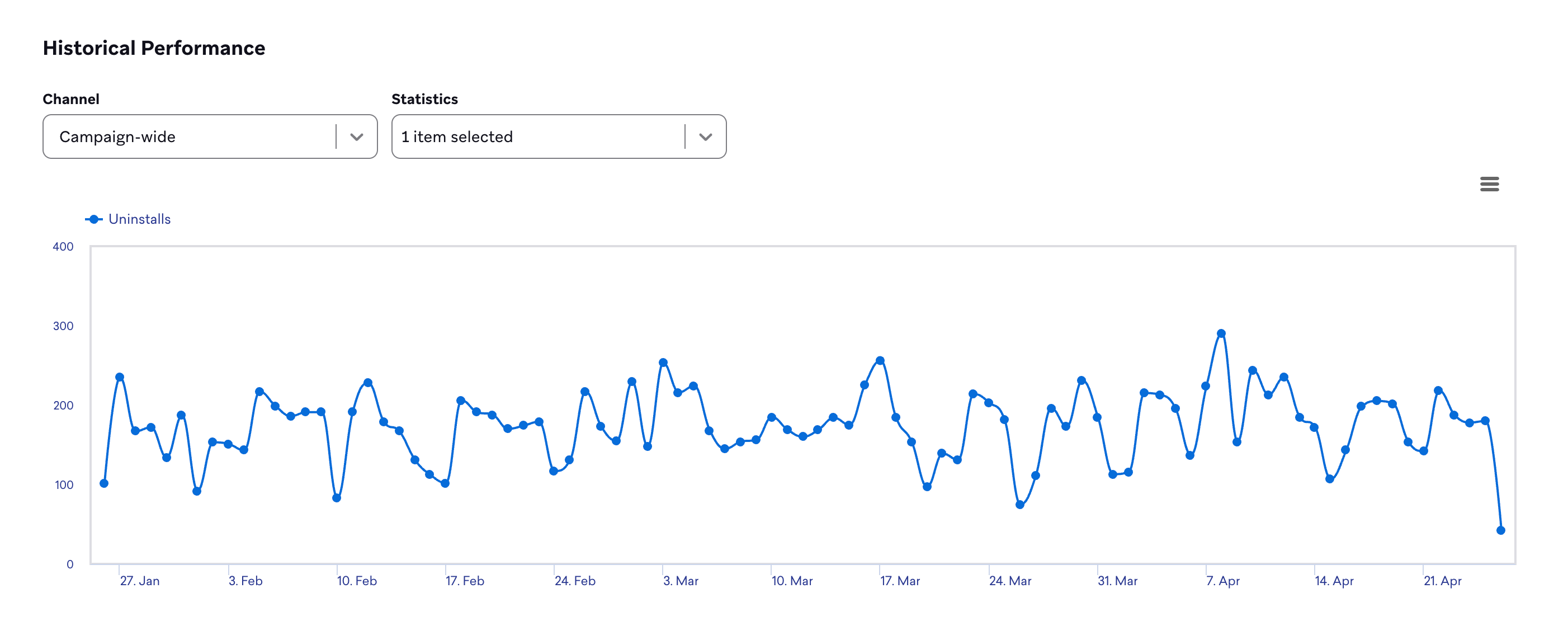
- Campaign-level uninstall statistics in a time series graph on the Campaign Details page of a specific campaign. This statistic specifies the number of campaign recipients that uninstall each day.

You must opt in to uninstall tracking on your Braze dashboard. This feature is available for apps on iOS, Android, and Fire OS.
How it works
Braze automatically collects a base level of uninstall information from your regular push campaigns. However, because the frequency with which different users receive push campaigns may vary, we offer uninstall tracking to provide a more accurate snapshot of uninstall activity among your users.
When Braze detects an uninstall, the user is tagged as having uninstalled. If you use the Has Not Uninstalled filter in a campaign, these tagged users are excluded. If a user reinstalls the app but does not open it, the uninstall tag remains on their profile. The tag is removed only when the user starts a new session in the reinstalled app. This means a user who reinstalls but never opens the app continues to appear as uninstalled.
For more on using uninstall tracking, see our blog post Uninstall Tracking: An Industry Look at its Strengths and Limitations.
Turning on uninstall tracking
You can turn on uninstall tracking on the App Settings page, under Settings, for each app you want to track.
When you turn on uninstall tracking for an app, Braze sends a nightly background push message to users who haven’t recorded a session or received a push in 24 hours.
Configuration
To configure uninstall tracking for your iOS application, use a utility method. For your Android application, use isUninstallTrackingPush(). When Braze detects an uninstall, whether from uninstall tracking or normal push campaign delivery, we will record the best estimated time of the uninstall on the user. This time is stored in the user profile as a standard attribute and can be used to define a segment of users for win-back campaigns.
Filtering segments by uninstalls
The Uninstalled filter selects users who uninstalled your app within a time range. Because it’s difficult to determine the exact time of an uninstall, we recommend that uninstall filters have wider time ranges to make sure everyone who uninstalls falls into the segment at some point.
Daily statistics on uninstalls are on the Home page.
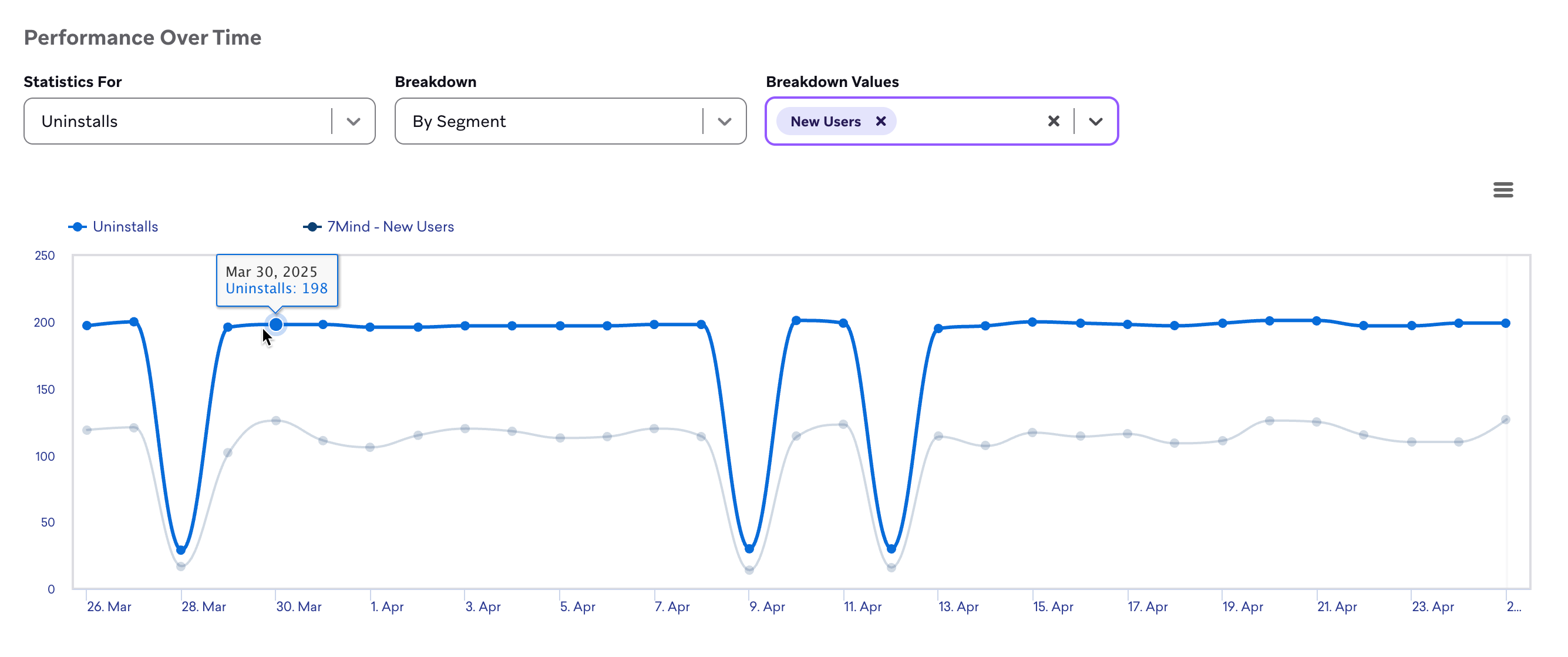
The graph can be broken down by app and segment, similar to other statistics Braze provides. In the Performance overview section, select your date range and, if desired, an app. Then, scroll down to the Performance Over Time graph and do the following:
- In the Statistics For dropdown, select Uninstalls.
- In the Breakdown dropdown, select By segment.
- In the Breakdown Values dropdown, select the segments to include in the graph.
Apps without uninstall tracking enabled will report uninstalls from only a subset of their users (those who were targeted with push notifications), so daily uninstall totals may be higher than what is shown.
Uninstall tracking for campaigns
Campaign uninstall tracking shows the number of users who received a specific campaign and subsequently uninstalled your app within the selected time frame. This tool gives insight into how campaigns may be encouraging unintended negative user behaviors and helps to measure overall campaign efficacy.
Uninstall statistics for campaigns are located on a specific campaign’s Campaign Analytics page. For multichannel and multivariate campaigns, uninstalls can be broken down by channel and variant, respectively.
How it works
Braze tracks uninstalls by observing when push messages sent to users’ devices return a signal from either Firebase Cloud Messaging (FCM) or Apple Push Notification Service (APNs) that the app is no longer installed. If you turn on Global Uninstall Tracking for an app, Braze sends a daily silent push message to users to detect whether they have uninstalled. Braze sends this “silent” push to all users (unless the user has disabled silent pushes in their app settings); the push does not appear to users. If Braze detects that a user has uninstalled, we:
- Increment the app’s total uninstall count by one.
- Increment the uninstall count for every campaign that the user successfully received in the past 24 hours by one.
- If a user receives three campaigns in a 24-hour period and then uninstalls, we increment the count of “uninstalls” for all three campaigns.
FCM and APNs place restrictions on uninstall tracking. Braze increments only the uninstall count when FCM or APNs tell us that a user has uninstalled, but these third-party systems can notify us of uninstalls at any point. Use uninstall tracking to detect directional trends rather than precise statistics.
Braze treats the following FCM responses as token removal (uninstall) responses: DEVICE_UNREGISTERED, BAD_REGISTRATION, and SENDER_ID_MISMATCH.
For more on using uninstall tracking, see our blog post Uninstall Tracking: An Industry Look at its Strengths and Limitations.
Troubleshooting
When is a user’s profile flagged as uninstalled? When is the uninstall tag cleared?
Braze flags a user as having uninstalled when we detect that the app is no longer on the device (see How it works for detection with regular push and optional uninstall tracking). After someone reinstalls your app, the uninstall tag can stay on their profile until they open the app and start a new session—reinstalling alone does not clear the tag. Until that session, segments and filters that use uninstall state (for example Has Not Uninstalled) still treat the user as uninstalled.
Why am I suddenly seeing a spike in uninstalls?
If you see a spike in app uninstalls, it may be due to Firebase Cloud Messaging (FCM) and Apple Push Notification Service (APNS) revoking old tokens at a different frequency.
For privacy reasons, Braze’s push providers may revoke tokens at irregular intervals, meaning uninstall counts can sometimes spike in a given time period.
To validate these changes, monitor uninstall tracking alongside a user-action metric, such as direct push open rate. If uninstalls increase sharply but direct push opens remain stable, the spike likely reflects a partner revoking old tokens rather than actual user behavior.
How do I determine if a specific campaign caused uninstalls?
Check the analytics for the campaigns that sent messages around the same time the uninstall spike occurred. If a particular message correlates with a rise in uninstalls, it may be influencing users to uninstall.
To view uninstalls by segment:
- Go to the Home page of the dashboard.
- In the Performance Over Time section, select Uninstalls for Statistics For and By Segment for Breakdown.
If you have a segment tracking lapsing users with analytics tracking enabled, compare its uninstall trend to the overall app trend.
How do I confirm uninstalls are genuine?
For APNs, check user profiles for the BadDeviceToken push error. If you see this error in bulk around the same time frame as the uninstall spike, the uninstalls are likely genuine. BadDeviceToken indicates the device’s push token is no longer valid, which typically happens when the app is uninstalled.
Why are the number of app uninstalls different from what’s in APNs?
The difference is expected.
Apple uses a randomized schedule to delay reporting when a push token becomes invalid, meaning that even after a user uninstalls an app, APNs may continue to return successful responses to push notifications for a period of time. This delay is intentional and designed to protect user privacy. No bounce or failure will be reported until APNs returns a 410 status for an invalid token.