Blocklist custom data
Use blocklisting to stop tracking custom data that is no longer useful. Use deletion to permanently remove custom events and attributes from user profiles after blocklisting. For pre-populating, managing properties, and configuring data types, see Manage custom data.
Blocklisting custom data
You may occasionally identify custom attributes, custom events, or purchase events that either log too many data points, are no longer useful to your marketing strategy, or were recorded in error.
To stop this data from being sent to Braze, you can blocklist a custom data object while your engineering team works to remove it from the backend of your app or website. Blocklisting prevents a particular custom data object from being recorded by Braze going forward, meaning it won’t show up when searching for a specific user.
To blocklist custom data, you need the user permissions in the following dropdown for your workspace.
User permissions for blocklisting custom data
Braze is transitioning to granular user permissions. If you are using the legacy permissions, refer to the definitions in List of permissions. Early access to the granular permissions is available for select customers. All customers will be migrated to the new permissions in March 2026.
- View Campaigns
- Edit Campaigns
- Archive Campaigns
- View Canvases
- Edit Canvases
- Archive Canvases
- View Frequency Capping Rules
- Edit Frequency Capping Rules
- View Message Prioritization
- Edit Message Prioritization
- View Content Blocks
- View Feature Flags
- Edit Feature Flags
- Archive Feature Flags
- View Segments
- Edit Segments
- View IAM Templates
- Edit IAM Templates
- Archive IAM Templates
- View Email Templates
- Edit Email Templates
- Archive Email Templates
- View Webhook Templates
- Edit Webhook Templates
- View Link Templates
- Edit Link Templates
- View Media Library Assets
- Edit Media Library Assets
- Delete Media Library Assets
- View Locations
- Edit Locations
- Archive Locations
- View Promotion Codes
- Edit Promotion Codes
- Export Promotion Codes
- View Preference Centers
- Edit Preference Centers
- View Reports
- Edit Reports
Blocklisted data is not sent by the SDK, and the Braze dashboard doesn’t process blocklisted data from other sources (for example, the API). However, blocklisting doesn’t remove data from user profiles or retroactively decrease the amount of data points incurred for that custom data object. Blocklisted data is hidden and can still be used for Liquid templating.
Blocklisting custom attributes, custom events, and products
When an event or attribute is blocklisted, any segment, campaign, or Canvas using that event or attribute is archived.
To stop tracking a specific custom attribute, event, or product, follow these steps:
- Search for it in the Custom Attributes, Custom Events, or Products pages.
- Select the custom attribute, event, or product. For custom attributes and events, you can select up to 100 to blocklist at a time.
- Select Blocklist.
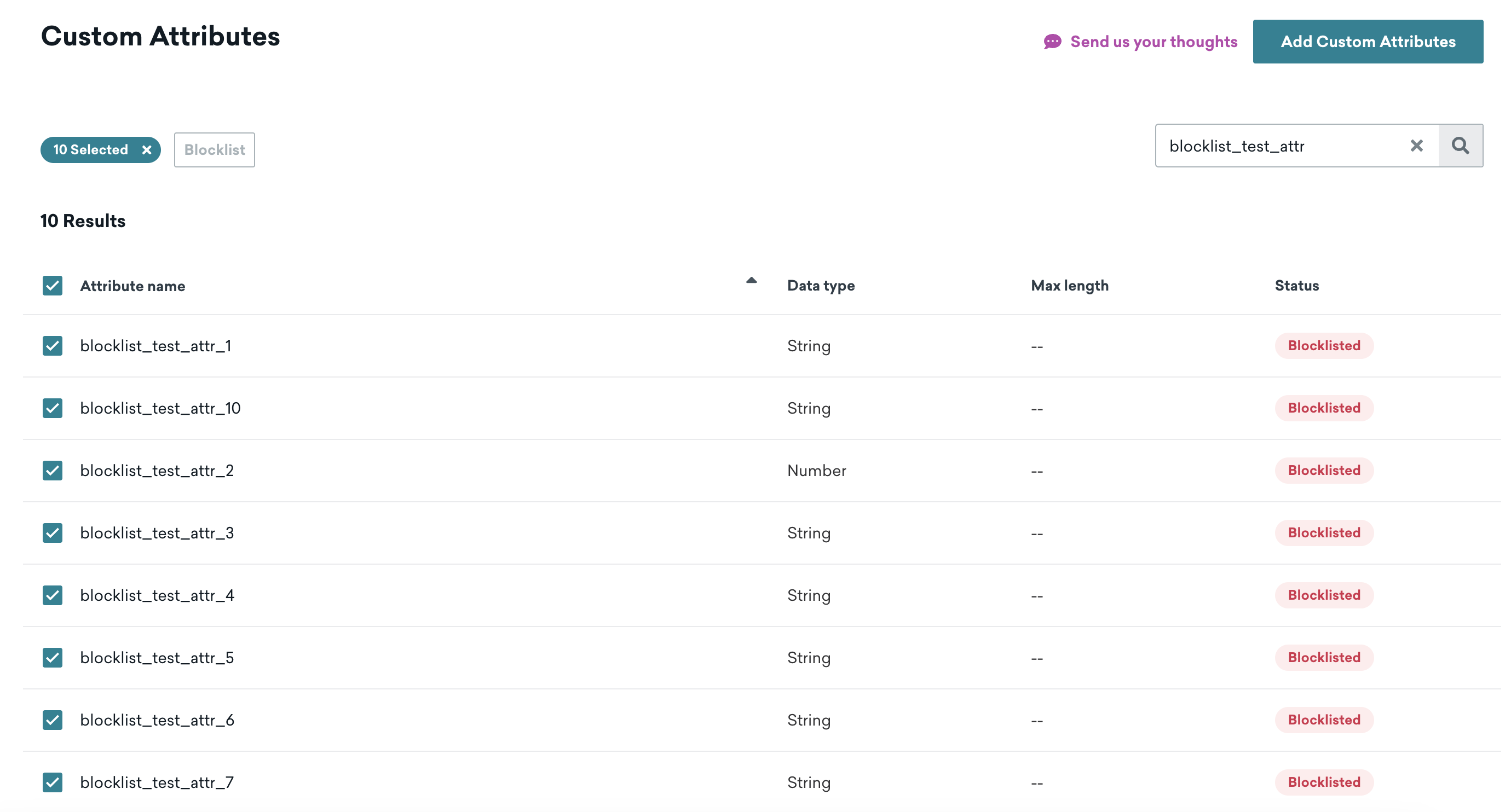
You can blocklist up to 300 custom attributes and 300 custom events. To prevent collecting certain device attributes, see our SDK guide.
Custom attributes or custom events with a Trashed status count towards the blocklisting limit until they’re deleted.
When a custom event or attribute is blocklisted, the following applies:
- No data sent to Braze is processed, and blocklisted events and attributes no longer count as data points
- Existing data is unavailable unless reactivated
- Blocklisted events and attributes don’t show up in filters or graphs
- References to blocklisted data within drafts of active Canvases load as invalid values, which may cause errors
- Anything using the blocklisted event or attribute is archived
To accomplish this, Braze sends the blocklisting information down to each device. This is important when thinking about blocklisting a huge number of events and attributes (hundreds of thousands or millions) as it would be a data-intensive operation.
Considerations for blocklisting
Blocklisting a high number of events and attributes is possible, but not advisable. This is because each time an event is performed or an attribute is (potentially) sent up to Braze, this event or attribute has to be checked against the entire blocklist.
Up to 300 items are sent to the SDK for blocklisting. If you blocklist more than 300 items, this data is sent from the SDK. If you don’t need to use the event or attribute in the future, consider removing it from your app code during your next release. Changes to the blocklist may take a few minutes to propagate. You can re-enable any blocklist event or attribute at any time.
Deleting custom data
As you build targeted campaigns and segments, you may find that you no longer need a custom event or custom attribute. For example, if you used a specific custom attribute as part of a one-time campaign, you can delete this data after blocklisting it and remove its references from your app. You can delete any data types (such as strings, numbers, and nested custom attributes).
You must be a Braze admin to delete custom data.
To delete a custom event or custom attribute, do the following:
- Go to Data Settings > Custom Attributes or Custom Events, depending on which data type you want to delete.
- Go to the custom data and select Actions > Blocklist.
- After your custom data has been blocklisted for 7 days, select Actions > Delete.
How deletion works
When you delete custom data, the following occurs:
- For custom attributes: Permanently removes the attribute data from every user’s profile.
- For custom events: Permanently removes the event metadata from every user’s profile.
When an attribute or event is selected for deletion, its status is changed to Trashed. For the next seven days, it’s possible to restore the attribute or event. If you don’t restore it after seven days, the data is permanently deleted. If you restore the attribute or event, it is set back to the blocklisted state.
Deleting doesn’t prevent additional recording of the custom data objects on user profiles, so make sure the custom data is no longer being recorded before deleting the event or attribute.
Things to know
When deleting custom data, keep in mind the following details:
- Deletion is permanent. Data cannot be recovered.
- Data is removed from the Braze platform and from user profiles.
- You can “reuse” the custom attribute name or custom event name after deletion. This means if you notice that custom data “reappears” in Braze after deletion, this may be caused by an integration that hasn’t been stopped and is sending data with the same custom data name.
- You may need to blocklist an item again if your deletion results in custom data reappearing. Blocklisting status isn’t preserved because the custom data is deleted.
- Deleting custom data doesn’t log any data points and also doesn’t generate new data points to use.
 Edit this page on GitHub