Abort messages
Optionally, you can use the
abort_message("optional reason for aborting")Liquid message tag within conditionals to prevent sending a message to a user. This reference article lists some examples of how this feature can be used in marketing campaigns.
If a message step is aborted in a Canvas, the user will not exit the Canvas and will proceed to the next step.
Abort message if “Number Games Attended” = 0
For example, let’s say that you did not want to send a message to customers who have not attended a game:
1
2
3
4
5
6
7
{% if custom_attribute.${Number_Game_Attended} == 1 %}
Loved the game? Get 10% off your second one with code SAVE10.
{% elsif custom_attribute.${Number_Game Attended} > 1 %}
Love the games? Get 10% off your next one with code SAVE10.
{% else %}
{% abort_message() %}
{% endif %}
This message will only send to customers who are known to have attended a game.
Message English speaking customers only
You can message English-speaking customers only by creating an “if” statement that’ll match when a customer’s language is English and an “else” statement that will abort the message for anyone who does not speak English or does not have a language on their profile.
1
2
3
4
5
6

{% if ${language} == 'en' %}
Send this message in English!
{% else %}
{% abort_message() %}
{% endif %}
By default Braze will log a generic error message to your Message Activity Log:
1
{% abort_message %} called
You can also have the abort message log something to your Message Activity Log by including a string inside the parentheses:
1
{% abort_message('language was nil') %}
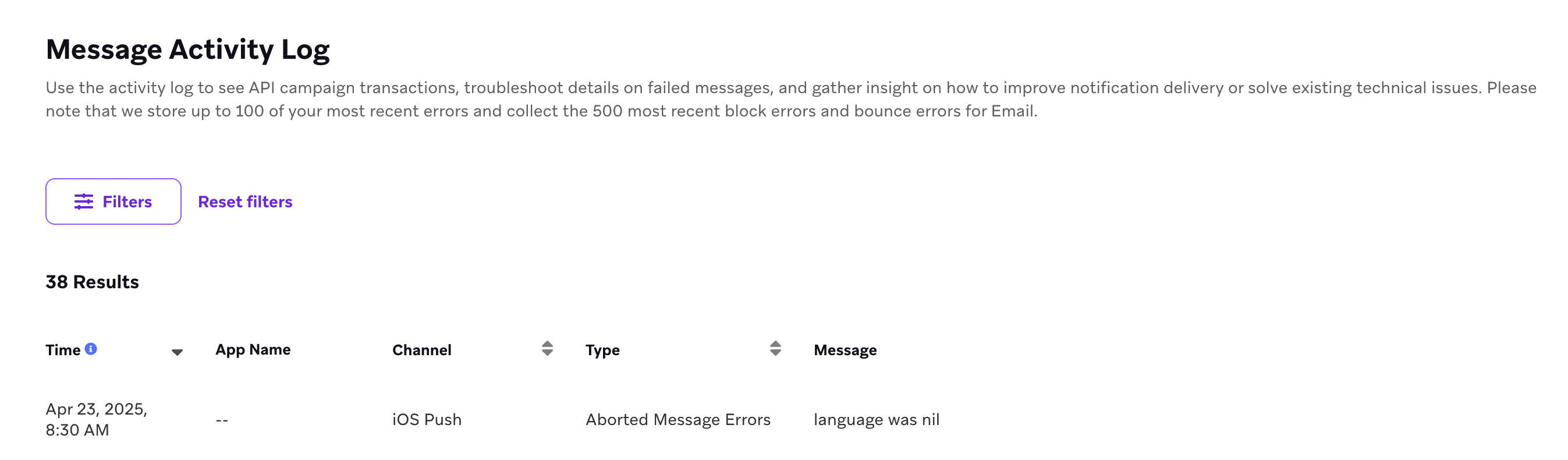
Query for abort messages
You can use Query Builder or your own data warehouse, if it’s connected to Braze, to query for specific abort messages that are triggered when Liquid logic causes a message to abort.
When abort logic is evaluated
The timing of abort logic evaluation depends on the message channel.
Push, email, SMS, webhooks, and Content Cards
Abort logic is evaluated at send time, when Braze processes the message for delivery.
In-app messages
Abort logic is evaluated at the time the in-app message is triggered (for example, when the user performs the trigger event or starts a session), not when the message is initially sent to the device. In-app messages are delivered to the SDK on session start and cached locally; the Liquid—including any abort_message() calls—is executed when the trigger condition is met.
Considerations
The abort_message() Liquid message tag prevents messages from sending to users, meaning the message won’t display on user profiles, and won’t count toward deliveries or frequency capping.
 Edit this page on GitHub