Typeform
Typeform est un outil facile à utiliser pour collecter des données, des commentaires et plus encore.
En intégrant Braze et Typeform, vous pouvez :
- Mettre à jour les profils utilisateurs dans Braze avec les données collectées à partir de leur réponse Typeform
- Déclencher l’envoi de messages dans Braze en fonction de l’engagement d’un utilisateur avec un typeform
- Personnaliser les messages de Braze en fonction des réponses Typeform d’un utilisateur
Conditions préalables
| Condition | Description |
|---|---|
| Compte Typeform | Un compte Typeform avec accès aux webhooks est nécessaire pour profiter de ce partenariat. |
| Transformation des données Braze | Une URL de Transformation des données est nécessaire pour recevoir des données de Typeform. |
Intégration
Étape 1 : Configurer la Transformation des données Braze pour accepter les webhooks de Typeform
Dans le tableau de bord de Braze, sélectionnez Paramètres des données > Transformation des données.
Sélectionnez Créer une transformation pour nommer votre transformation, puis choisissez votre expérience de modification.
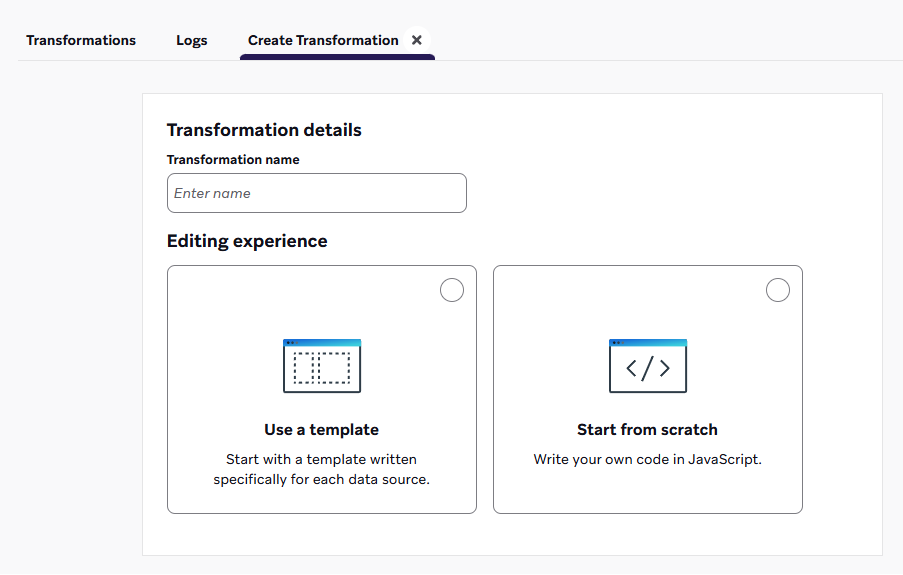
Sélectionnez Utiliser un modèle pour parcourir une bibliothèque de modèles, y compris les cas d’utilisation de la transformation des données. Vous pouvez également choisir de partir de zéro pour charger un modèle de code par défaut.
Si vous démarrez de zéro, choisissez une destination pour votre transformation. Vous pouvez toujours insérer un modèle de code à partir de la bibliothèque de modèles.
More on destinations
- POST : Suivre les utilisateurs : Transforme les webhooks d’une plateforme source en mises à jour du profil utilisateur, telles que les attributs, les événements ou les achats.
- PUT : Mettez à jour plusieurs éléments du catalogue : Transforme les webhooks d’une plateforme source en mises à jour d’éléments du catalogue.
- DELETE : Supprimez plusieurs éléments du catalogue : Transforme les webhooks d’une plateforme source en suppressions d’éléments du catalogue.
- PATCH : Modifiez plusieurs éléments du catalogue : Transforme les webhooks d’une plateforme source en modifications d’éléments de catalogue.
- POST : Envoyez des messages immédiatement via l’API uniquement : Transforme les webhooks d’une plateforme source pour envoyer des messages immédiats à des utilisateurs désignés.

Vous souhaitez demander des modèles ou des destinations supplémentaires ? Pensez à donner votre avis sur le produit.
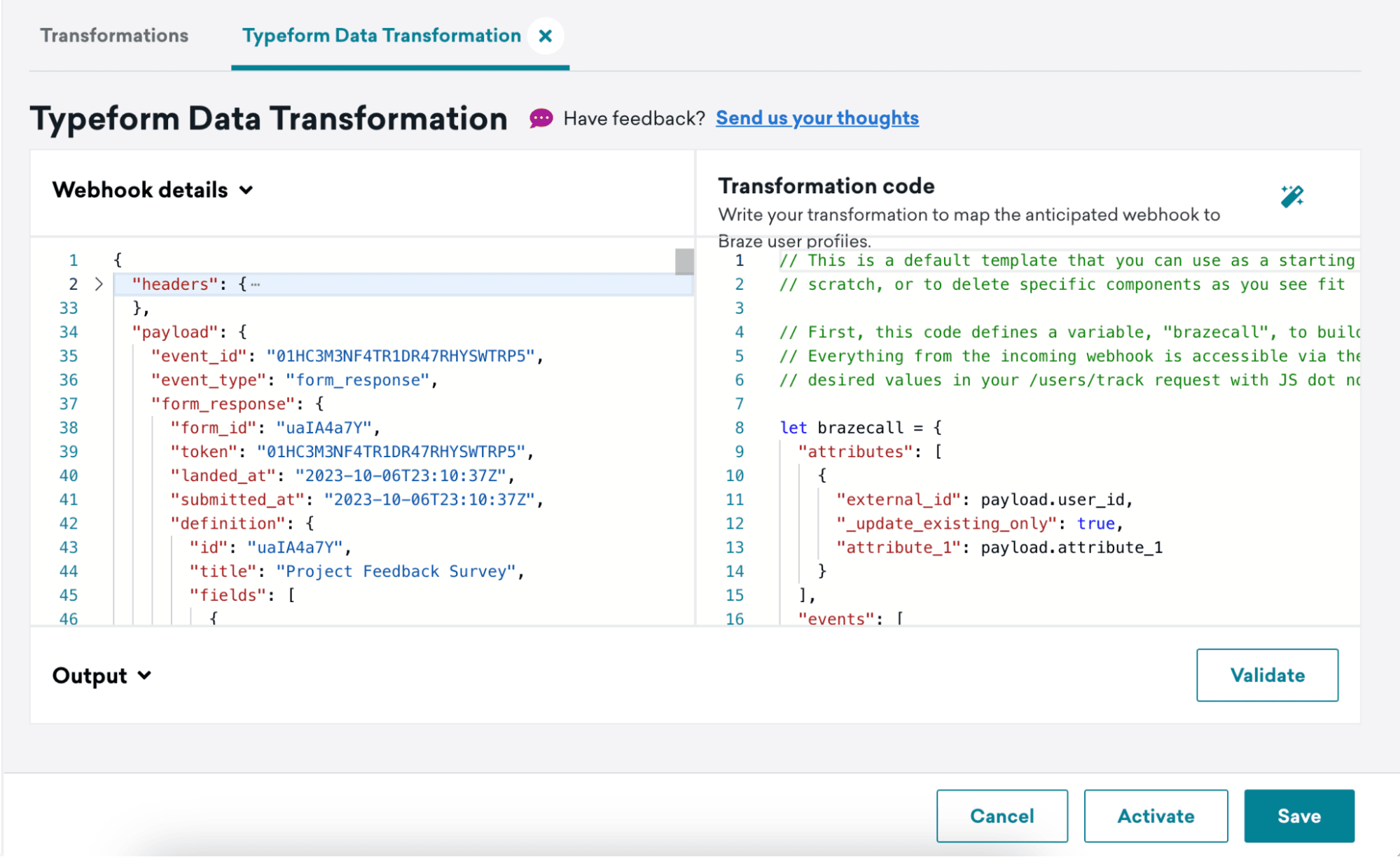
Après avoir créé votre transformation, vous verrez la vue détaillée de la transformation. Ici, vous pouvez voir le webhook le plus récent reçu pour cette transformation sous Détails du webhook et un espace pour écrire votre code de transformation sous Code de transformation.
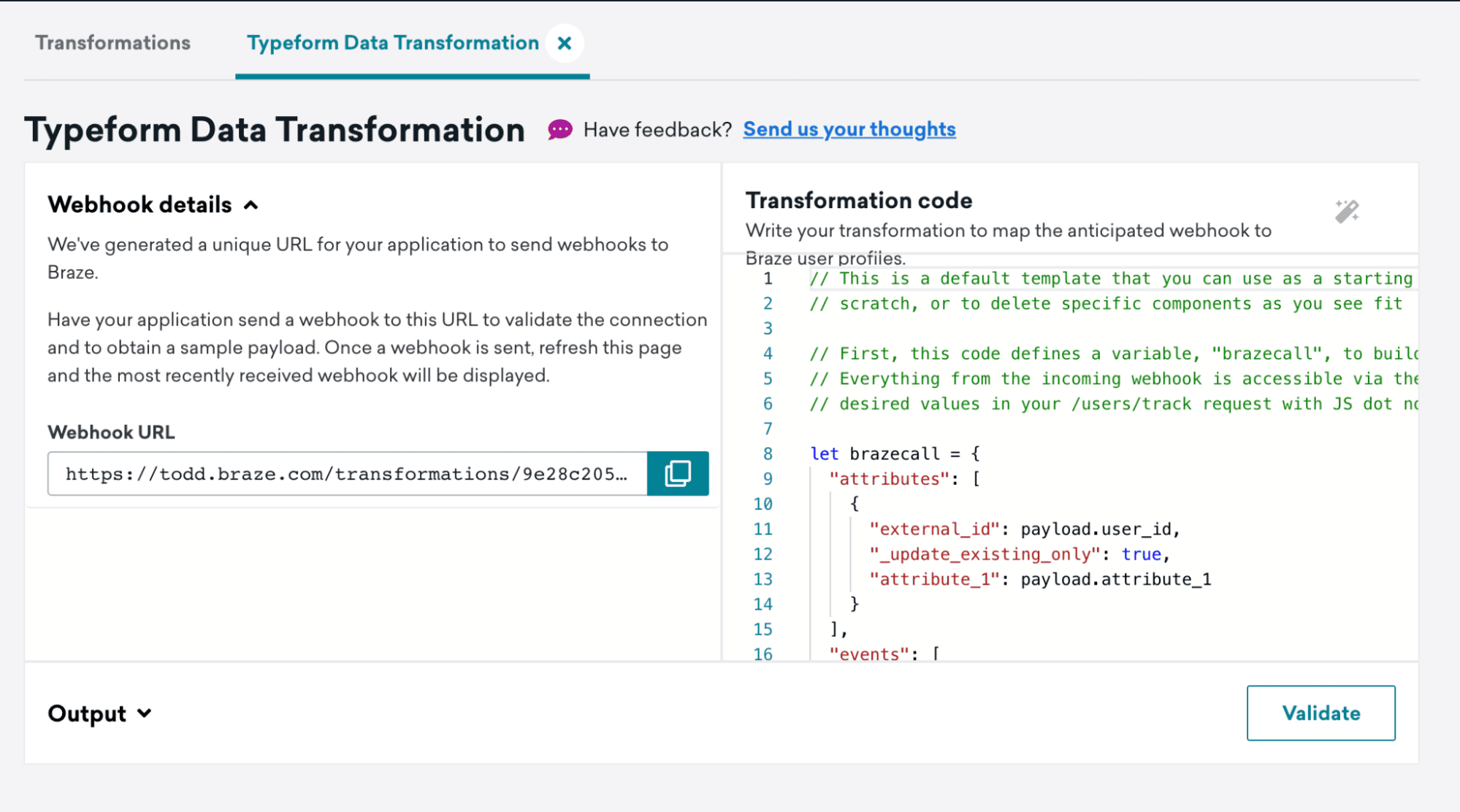
Capturez l’URL de votre webhook pour l’utiliser à l’étape suivante.
Étape 2 : Configurer les webhooks de Typeform
Suivez les étapes de la documentation sur les webhooks de Typeform pour configurer un webhook.
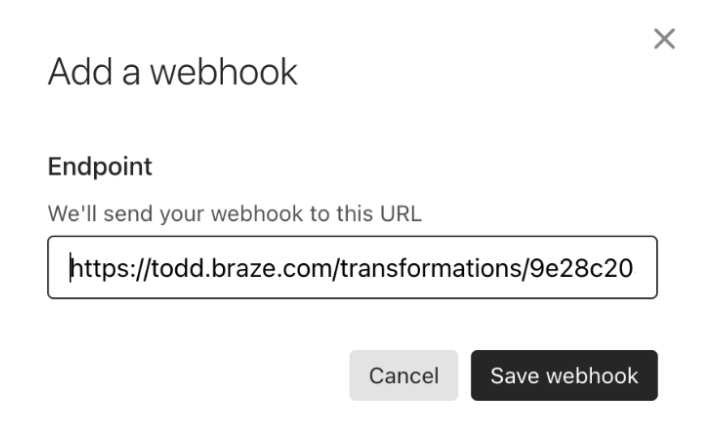
À l’étape 4, ajoutez l’URL de votre webhook de Transformation des données en tant qu’URL de destination.
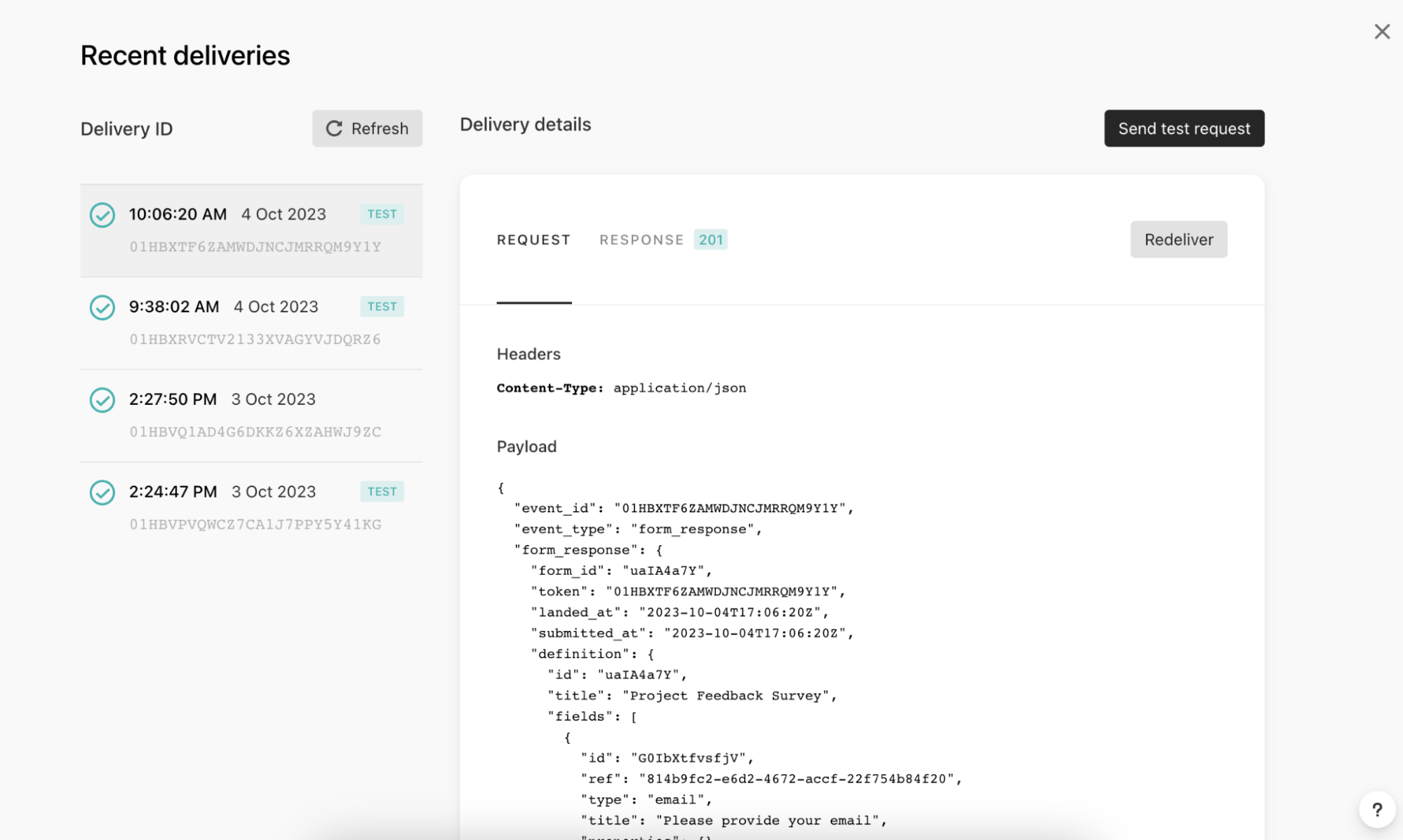
Envoyez un événement de test à votre Transformation des données en cliquant sur View deliveries, puis sur Send test request.
Étape 3 : Écrire le code de transformation pour accepter les événements Typeform choisis
Dans cette étape, vous transformez le payload du webhook envoyé par Typeform en une valeur de retour sous forme d’objet JavaScript.
- Actualisez votre Transformation des données et assurez-vous que vous pouvez voir le payload de test Typeform dans les détails du webhook.
- Mettez à jour votre code de Transformation des données pour prendre en charge les événements Typeform que vous avez choisis.
- Cliquez sur Validate pour obtenir un aperçu de la sortie de votre code et vérifier s’il s’agit d’une requête
/users/trackacceptable. - Enregistrez et activez votre Transformation des données.
Format du corps de la requête
Cette valeur de retour doit respecter le format du corps de la requête /users/track de Braze :
- Le code de transformation est accepté dans le langage de programmation JavaScript. Tout flux de contrôle JavaScript standard, tel que la logique if/else, est pris en charge.
- Le code de transformation accède au corps de la requête du webhook via la variable payload. Cette variable est un objet rempli en analysant le JSON du corps de la requête.
- Toutes les fonctionnalités prises en charge dans notre endpoint
/users/tracksont prises en charge, y compris :- Objets d’attributs utilisateur, objets d’événements et objets d’achat
- Attributs imbriqués et propriétés d’événements personnalisés imbriquées
- Mises à jour des groupes d’abonnement
- L’adresse e-mail comme identifiant
Exemple de payload de webhook Typeform
1
2
3
4
5
6
7
8
9
10
11
12
13
14
15
16
17
18
19
20
21
22
23
24
25
26
27
28
29
30
31
32
33
34
35
36
37
38
39
40
41
42
43
44
45
46
47
48
49
50
51
52
53
54
55
56
57
58
59
60
61
62
63
64
65
66
67
68
69
70
71
72
73
74
75
76
77
78
79
80
81
82
83
84
85
86
87
88
89
90
91
92
93
94
95
96
97
98
99
100
101
102
103
104
105
106
107
108
109
110
111
112
113
114
115
116
117
118
119
120
121
122
123
124
125
126
127
128
129
130
131
132
133
134
135
136
137
138
139
140
141
142
143
144
145
146
147
148
149
150
151
152
153
154
155
156
157
158
159
160
161
162
163
164
165
166
167
168
169
170
171
172
173
174
175
176
177
178
179
180
181
182
183
184
185
186
187
188
189
190
191
192
193
194
195
196
197
198
199
200
201
202
203
204
205
206
207
208
209
210
211
212
213
214
215
216
217
218
219
220
221
222
223
224
225
226
227
228
229
230
231
232
233
234
235
236
237
238
239
240
241
242
243
244
245
246
247
248
249
250
251
Content-Type: application/json

{
  "event_id": "01HC3PTZN05GJWT0QDXXB2QV8F",
  "event_type": "form_response",
  "form_response": {
    "form_id": "uaIA4a7Y",
    "token": "7pctqdoqxg41to97pctqdibhqn6hqvto",
    "landed_at": "2023-10-06T23:57:52Z",
    "submitted_at": "2023-10-06T23:58:18Z",
    "hidden": {
		"user_id": "hidden_value"
    },
    "definition": {
      "id": "uaIA4a7Y",
      "title": "Project Feedback Survey",
      "fields": [
        {
          "id": "G0IbXtfvsfjV",
          "ref": "814b9fc2-e6d2-4672-accf-22f754b84f20",
          "type": "email",
          "title": "Please provide your email",
          "properties": {}
        },
        {
          "id": "lg82q3t0rK03",
          "ref": "e1503b62-0241-4269-9902-5c539abf305e",
          "type": "short_text",
          "title": "What was your role in the project?",
          "properties": {}
        },
        {
          "id": "UXftY0tSmuDV",
          "ref": "5b839dbb-566b-47de-a47e-b0914d9ccf7c",
          "type": "opinion_scale",
          "title": "How would you rate the overall performance of the team?",
          "properties": {}
        },
        {
          "id": "fE17bXVUEB4E",
          "ref": "fd6be99d-1ed1-4a4d-b811-f6ecdd8fa9b6",
          "type": "yes_no",
          "title": "Did the project meet its intended outcomes?",
          "properties": {}
        },
        {
          "id": "NmVOQFuI0vv9",
          "ref": "cd2b4176-db9a-49bb-a918-4463720bbc79",
          "type": "multiple_choice",
          "title": "Which area of the project do you think went well?",
          "properties": {},
          "choices": [
            {
              "id": "RvV3LaMEQ2eK",
              "ref": "2d5e0913-afe9-491c-b31c-0648dd397d56",
              "label": "Communication"
            },
            {
              "id": "7iXmfpPMeQvz",
              "ref": "7a7749d2-5cd6-4bf7-9726-65c7ab11ec83",
              "label": "Planning"
            },
            {
              "id": "1No85DZlvP6f",
              "ref": "d7b7304a-776b-4630-8bee-7dc7ef9c9404",
              "label": "Execution"
            },
            {
              "id": "ruMnsZWjyalW",
              "ref": "41dc926a-85af-4625-8a61-725fda35afda",
              "label": "Problem Solving"
            },
            {
              "id": "CexnFN3roprG",
              "ref": "cfdd2da4-8c57-4ff1-b4c0-1a5262e2ff84",
              "label": "Other"
            }
          ]
        },
        {
          "id": "ZJop9pvoObzk",
          "ref": "ce903cda-7e27-4b4c-9fa8-0623c47c61b4",
          "type": "multiple_choice",
          "title": "Which area of the project do you think could be improved?",
          "properties": {},
          "choices": [
            {
              "id": "YQLArFf0Wks5",
              "ref": "09fa30c7-7bdc-4753-971e-0d922638d023",
              "label": "Communication"
            },
            {
              "id": "iGjaELgfnChw",
              "ref": "61820c89-3426-464d-b031-c06de5125fd5",
              "label": "Planning"
            },
            {
              "id": "2EyI5tozFxro",
              "ref": "c35f71b2-2a6d-4488-a1ba-87c2e711ce19",
              "label": "Execution"
            },
            {
              "id": "VGtsIHBLAhME",
              "ref": "6c171a9a-9324-4f7d-adb9-290bd701efe9",
              "label": "Problem Solving"
            },
            {
              "id": "lVdV7MIL1anS",
              "ref": "faba551f-4e6b-4377-9f74-11ca4fcc8ed5",
              "label": "Other"
            }
          ]
        },
        {
          "id": "hcCNsLUHGXgv",
          "ref": "d1ae8537-0d5a-4ca8-bb6b-f8057f04d7e2",
          "type": "opinion_scale",
          "title": "How satisfied were you with the level of communication during the project?",
          "properties": {}
        },
        {
          "id": "dBqPlgeKejN2",
          "ref": "e2c884c1-0d92-4f18-9833-79dff0b3eef2",
          "type": "nps",
          "title": "How likely are you to recommend Braze for customer engagement services?",
          "properties": {}
        },
        {
          "id": "vLdpFmCmulF5",
          "ref": "a86e48ec-6d10-49fc-ac03-4ac1aad4bfec",
          "type": "dropdown",
          "title": "In which country was the project executed?",
          "properties": {}
        }
      ],
      "endings": [
        {
          "id": "LUpVm67y72vb",
          "ref": "30c03bdf-80b3-45f5-8307-df8ca49046b1",
          "title": "Thank you for taking the time to complete our survey!",
          "type": "thankyou_screen",
          "properties": {
            "button_text": "Create a typeform",
            "show_button": true,
            "share_icons": true,
            "button_mode": "default_redirect"
          }
        }
      ]
    },
    "answers": [
      {
        "type": "email",
        "email": "[email protected]",
        "field": {
          "id": "G0IbXtfvsfjV",
          "type": "email",
          "ref": "814b9fc2-e6d2-4672-accf-22f754b84f20"
        }
      },
      {
        "type": "text",
        "text": "Project",
        "field": {
          "id": "lg82q3t0rK03",
          "type": "short_text",
          "ref": "e1503b62-0241-4269-9902-5c539abf305e"
        }
      },
      {
        "type": "number",
        "number": 9,
        "field": {
          "id": "UXftY0tSmuDV",
          "type": "opinion_scale",
          "ref": "5b839dbb-566b-47de-a47e-b0914d9ccf7c"
        }
      },
      {
        "type": "boolean",
        "boolean": true,
        "field": {
          "id": "fE17bXVUEB4E",
          "type": "yes_no",
          "ref": "fd6be99d-1ed1-4a4d-b811-f6ecdd8fa9b6"
        }
      },
      {
        "type": "choice",
        "choice": {
          "id": "ruMnsZWjyalW",
          "label": "Problem Solving",
          "ref": "41dc926a-85af-4625-8a61-725fda35afda"
        },
        "field": {
          "id": "NmVOQFuI0vv9",
          "type": "multiple_choice",
          "ref": "cd2b4176-db9a-49bb-a918-4463720bbc79"
        }
      },
      {
        "type": "choice",
        "choice": {
          "id": "lVdV7MIL1anS",
          "label": "Other",
          "ref": "faba551f-4e6b-4377-9f74-11ca4fcc8ed5"
        },
        "field": {
          "id": "ZJop9pvoObzk",
          "type": "multiple_choice",
          "ref": "ce903cda-7e27-4b4c-9fa8-0623c47c61b4"
        }
      },
      {
        "type": "number",
        "number": 8,
        "field": {
          "id": "hcCNsLUHGXgv",
          "type": "opinion_scale",
          "ref": "d1ae8537-0d5a-4ca8-bb6b-f8057f04d7e2"
        }
      },
      {
        "type": "number",
        "number": 6,
        "field": {
          "id": "dBqPlgeKejN2",
          "type": "nps",
          "ref": "e2c884c1-0d92-4f18-9833-79dff0b3eef2"
        }
      },
      {
        "type": "choice",
        "choice": {
          "id": "KESjdqLseWmC",
          "label": "Brazil",
          "ref": "250210d9-33f6-4734-8ec6-06005a8ef66d"
        },
        "field": {
          "id": "vLdpFmCmulF5",
          "type": "dropdown",
          "ref": "a86e48ec-6d10-49fc-ac03-4ac1aad4bfec"
        }
      }
    ],
    "ending": {
      "id": "LUpVm67y72vb",
      "ref": "30c03bdf-80b3-45f5-8307-df8ca49046b1"
    }
  }
}
Cas d’utilisation de la Transformation des données
Voici des exemples de modèles créés à l’aide de notre exemple de payload de webhook Typeform. Ces modèles peuvent servir de point de départ. Vous pouvez repartir de zéro ou supprimer des composants spécifiques selon vos besoins.
Dans ces exemples de modèles, nous enregistrons un événement personnalisé dans le profil Braze. Le titre du Typeform est transmis comme nom de l’événement personnalisé, et les résultats du Typeform sont transmis comme propriétés d’événement. Ces exemples de modèles ne prennent pas en charge les types de questions Calendly, Téléchargement de fichier ou Paiement dans Typeform.
Cas d’utilisation : l’e-mail comme identifiant
Dans cet exemple de modèle, nous utilisons une adresse e-mail (capturée à partir d’une question d’adresse e-mail dans le typeform) comme identifiant.
Si vous avez l’intention d’utiliser une adresse e-mail comme identifiant, consultez notre foire aux questions pour l’endpoint /users/track afin d’obtenir plus d’informations sur le comportement attendu.
1
2
3
4
5
6
7
8
9
10
11
12
13
14
15
16
17
18
19
20
21
22
23
24
25
26
27
28
29
30
31
32
33
34
35
36
37
38
39
40
41
42
43
44
45
46
47
48
49
50
51
52
53
54
55
56
57
58
59
60
61
62
63
64
65
66
/* In the Typeform webhook payload each question is stored as a “title” within each object of the “fields” array. Our code defines a “title” variable where we store the value of each field title. */
const titles = payload.form_response.definition.fields.map(field => field.title);

/* The answers array is saved to a “tfAnswers” variable so this can be iterated through */
const tfAnswers = payload.form_response.answers;

/* The value of a response will change based on the type of question, to account for this we have created a function that iterates through the answers, determines what the answer type is and then, based on the type, adds the associated response to an extractedValues array. */
const extractValues = (tfAnswers) => {
	const extractedValues = [];

	tfAnswers.forEach((tfAnswer) => {
		let result = null;

		if (tfAnswer.type === 'choices') {
			if (tfAnswer.choices) {
				// Multiple choices
				let labels = tfAnswer.choices.labels || [];
				if (tfAnswer.choices.other) {
					labels.push(tfAnswer.choices.other);
				}
				result = labels;
			}
		} else if (tfAnswer.type === 'choice' && Object.keys(tfAnswer.choice).length > 1) {
			// Single choice
			result = tfAnswer.choice && tfAnswer.choice.other ?
				tfAnswer.choice.other.toString() :
				tfAnswer.choice.label.toString();
		} else if (tfAnswer.type === 'dropdown') {
			// Dropdown
			result = tfAnswer.text;
		} else {
			// For other types, use the type-specific value
			result = tfAnswer[tfAnswer.type];
		}

		extractedValues.push(result);
	});

	return extractedValues;
};

/* We use the above defined function, passing it the “tfAnswers” variable that holds the answers portion of the Typeform webhook payload and save the output to a ”values” variable */
const values = extractValues(tfAnswers);

/* Finally, the values within the previously assigned “titles” variable and “values” variable are paired together in an object as the values to a “question” key and “answer” key in a “responses” array of objects variable. */
const results = titles.map((title, index) => {
	return {
		question: title,
		answer: values[index],
	};
});

/* The code defines a variable, "brazecall", to build a /users/track request. Within the request, the typeform title is populated as the event name, and our “results” variable (where all of our question/answer pairs are stored), is assigned as the event’s properties. */
let brazecall = {
	"events": [{
		"email": payload.form_response.answers.find(answer => answer.type === 'email').email,
		"name": payload.form_response.definition.title,
		"time": new Date().toISOString(),
		"properties": {
			"responses": results
		}
	}]
};

// After the /users/track request is assigned to brazecall, you will want to explicitly return “brazecall” to create an output
return brazecall;
1
2
3
4
5
6
7
8
9
10
11
12
13
14
15
16
17
18
19
20
21
22
23
24
25
26
27
28
29
30
31
32
33
34
35
36
37
38
39
40
41
42
43
44
45
46
47
48
49
50
51
52
53
{
  "events": [
    {
      "email": "[email protected]",
      "name": "Project Feedback Survey",
      "time": "2023-10-17T18:21:39.527Z",
      "properties": {
        "responses": [
          {
            "question": "Please provide your email",
            "answer": "[email protected]"
          },
          {
            "question": "What was your role in the project?",
            "answer": "Lorem ipsum dolor"
          },
          {
            "question": "How would you rate the overall performance of the team?",
            "answer": 5
          },
          {
            "question": "Did the project meet its intended outcomes?",
            "answer": true
          },
          {
            "question": "If you answered \"No\" to the previous question, please explain why. If you answered \"Yes\", skip this question.",
            "answer": "Lorem ipsum dolor"
          },
          {
            "question": "Which area of the project do you think went well?",
            "answer": "Communication"
          },
          {
            "question": "Which area of the project do you think could be improved?",
            "answer": "Communication"
          },
          {
            "question": "How satisfied were you with the level of communication during the project?",
            "answer": 5
          },
          {
            "question": "How likely are you to recommend Braze for customer engagement services?",
            "answer": 5
          },
          {
            "question": "In which country was the project executed?",
            "answer": "United States"
          }
        ]
      }
    }
  ]
}
Cas d’utilisation : utilisation d’un identifiant transmis via les champs cachés
Vous pouvez utiliser les champs cachés de Typeform pour transmettre des données dans le payload du webhook Typeform, comme l’ID d’un utilisateur, sans avoir à inclure ces informations dans la réponse Typeform.
Dans cet exemple de modèle, nous utilisons un champ caché « user_id » et le transmettons dans le payload de la requête /users/track en tant qu’external_id. Bien que nous utilisions « user_id », les champs peuvent être modifiés pour répondre à vos besoins.
1
2
3
4
5
6
7
8
9
10
11
12
13
14
15
16
17
18
19
20
21
22
23
24
25
26
27
28
29
30
31
32
33
34
35
36
37
38
39
40
41
42
43
44
45
46
47
48
49
50
51
52
53
54
55
56
57
58
59
60
61
62
63
64
65
66
/* In the Typeform webhook payload each question is stored as a “title” within each object of the “fields” array. Our code defines a “title” variable where we store the value of each field title. */
const titles = payload.form_response.definition.fields.map(field => field.title);

/* The answers array is saved to a “tfAnswers” variable so this can be iterated through */
const tfAnswers = payload.form_response.answers;

/* The value of a response will change based on the type of question, to account for this we have created a function that iterates through the answers, determines what the answer type is and then, based on the type, adds the associated response to an extractedValues array. */
const extractValues = (tfAnswers) => {
	const extractedValues = [];

	tfAnswers.forEach((tfAnswer) => {
		let result = null;

		if (tfAnswer.type === 'choices') {
			if (tfAnswer.choices) {
				// Multiple choices
				let labels = tfAnswer.choices.labels || [];
				if (tfAnswer.choices.other) {
					labels.push(tfAnswer.choices.other);
				}
				result = labels;
			}
		} else if (tfAnswer.type === 'choice' && Object.keys(tfAnswer.choice).length > 1) {
			// Single choice
			result = tfAnswer.choice && tfAnswer.choice.other ?
				tfAnswer.choice.other.toString() :
				tfAnswer.choice.label.toString();
		} else if (tfAnswer.type === 'dropdown') {
			// Dropdown
			result = tfAnswer.text;
		} else {
			// For other types, use the type-specific value
			result = tfAnswer[tfAnswer.type];
		}

		extractedValues.push(result);
	});

	return extractedValues;
};

/* We use the above defined function, passing it the “tfAnswers” variable that holds the answers portion of the Typeform webhook payload and save the output to a ”values” variable */
const values = extractValues(tfAnswers);

/* Finally, the values within the previously assigned “titles” variable and “values” variable are paired together in an object as the values to a “question” key and “answer” key in a “responses” array of objects variable. */
const results = titles.map((title, index) => {
	return {
		question: title,
		answer: values[index],
	};
});

/* The code defines a variable, "brazecall", to build a /users/track request. Within the request, the typeform title is populated as the event name, and our “results” variable (where all of our question/answer pairs are stored), is assigned as the event’s properties. */
let brazecall = {
	"events": [{
		"external_id": payload.form_response.hidden.user_id,
		"name": payload.form_response.definition.title,
		"time": new Date().toISOString(),
		"properties": {
			"responses": results
		}
	}]
};

// After the /users/track request is assigned to brazecall, you will want to explicitly return “brazecall” to create an output
return brazecall;
1
2
3
4
5
6
7
8
9
10
11
12
13
14
15
16
17
18
19
20
21
22
23
24
25
26
27
28
29
30
31
32
33
34
35
36
37
38
39
40
41
42
43
44
45
46
47
48
49
50
51
52
53
{
  "events": [
    {
      "external_id": "hidden_value",
      "name": "Project Feedback Survey",
      "time": "2023-10-17T18:27:22.209Z",
      "properties": {
        "responses": [
          {
            "question": "Please provide your email",
            "answer": "[email protected]"
          },
          {
            "question": "What was your role in the project?",
            "answer": "Lorem ipsum dolor"
          },
          {
            "question": "How would you rate the overall performance of the team?",
            "answer": 5
          },
          {
            "question": "Did the project meet its intended outcomes?",
            "answer": true
          },
          {
            "question": "If you answered \"No\" to the previous question, please explain why. If you answered \"Yes\", skip this question.",
            "answer": "Lorem ipsum dolor"
          },
          {
            "question": "Which area of the project do you think went well?",
            "answer": "Communication"
          },
          {
            "question": "Which area of the project do you think could be improved?",
            "answer": "Communication"
          },
          {
            "question": "How satisfied were you with the level of communication during the project?",
            "answer": 5
          },
          {
            "question": "How likely are you to recommend Braze for customer engagement services?",
            "answer": 5
          },
          {
            "question": "In which country was the project executed?",
            "answer": "United States"
          }
        ]
      }
    }
  ]
}
Étape 4 : Publier votre webhook Typeform
Après avoir écrit votre transformation de données, cliquez sur Validate pour vous assurer que votre code de Transformation des données est correctement formaté et fonctionnera comme prévu. Ensuite, enregistrez et activez votre Transformation des données.
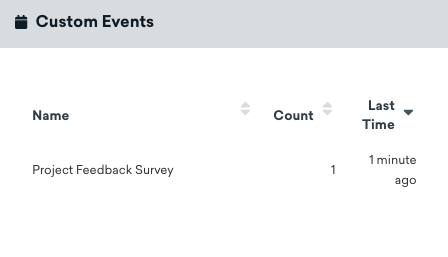
Une fois activée, les données d’événements personnalisés sont enregistrées dans le profil de l’utilisateur lorsqu’il remplit votre formulaire.
Surveillance et résolution des problèmes
Consultez la section Surveiller votre transformation pour plus d’informations sur la surveillance et la résolution des problèmes liés à votre transformation.