ViralSweep
ViralSweep은 브랜드가 경품 행사, 콘테스트, 즉석 당첨, 대기자 명단, 추천 프로모션 등 디지털 마케팅 프로모션을 구축, 실행 및 관리할 수 있는 소프트웨어 서비스입니다.
이 통합은 ViralSweep에서 유지 관리합니다.
통합 소개
Braze와 ViralSweep 통합을 사용하면 ViralSweep 플랫폼에서 경품 행사와 콘테스트를 진행하여 이메일 및 SMS 목록을 확장하고, 경품 행사 또는 콘테스트 참가 정보를 Braze로 전송하여 Campaigns 또는 Canvases에서 활용할 수 있습니다.
필수 조건
| 요구 사항 | 설명 |
|---|---|
| ViralSweep 계정 | 이 파트너십을 활용하려면 비즈니스 플랜을 사용하는 ViralSweep 계정이 필요합니다. |
| Braze REST API 키 | 모든 사용자 데이터 및 이메일 권한이 있는 Braze REST API 키. Braze 대시보드의 설정 > API 키에서 생성할 수 있습니다. |
| Braze REST 엔드포인트 | REST 엔드포인트 URL. 엔드포인트는 인스턴스의 Braze URL에 따라 달라집니다. |
통합
1단계: ViralSweep에서 Braze에 연결하기
ViralSweep에서 Integrations > Email & SMS > Add Service로 이동하여 Braze를 선택합니다.
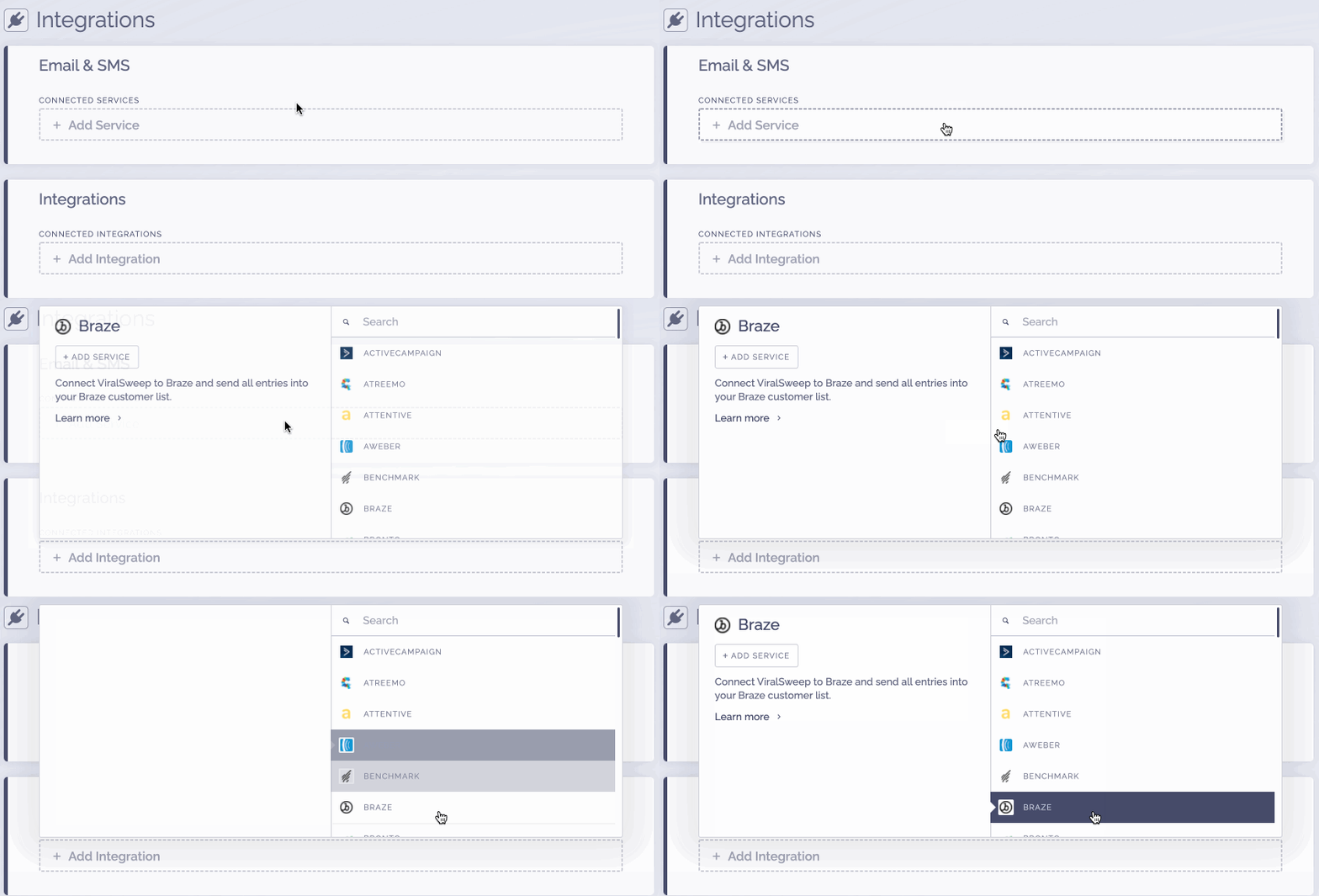
2단계: Braze 자격 증명 추가하기
통합 구성 창에서 Braze REST API 키와 REST 엔드포인트를 입력합니다. 제공하는 엔드포인트에 https://가 포함되지 않도록 해야 합니다. 예를 들어 dashboard-03.braze.com과 같이 입력합니다.
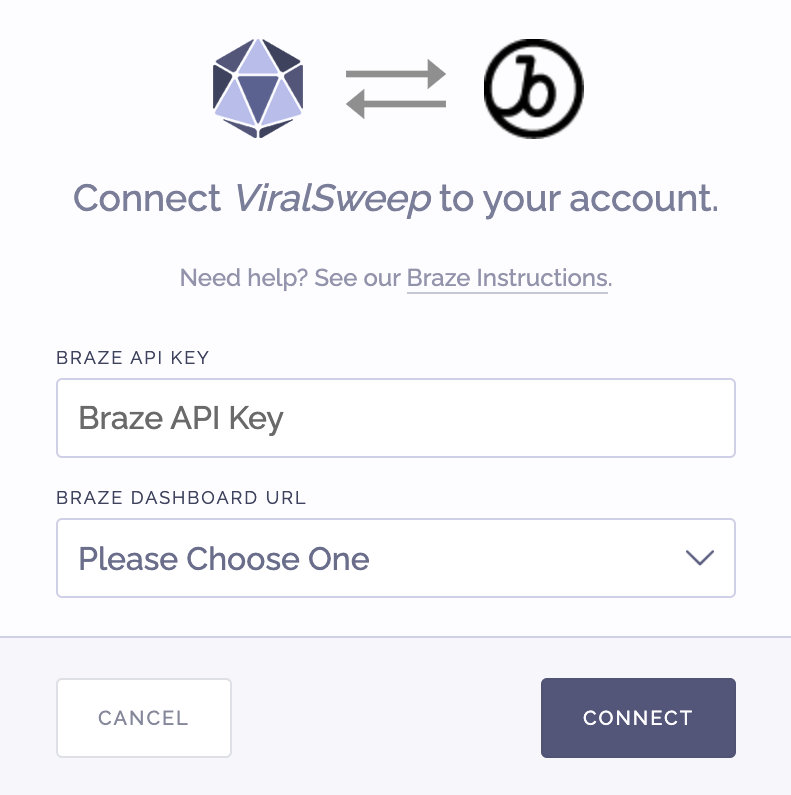
Connect를 클릭합니다.
3단계: Braze 자격 증명 추가하기
연결이 완료되었습니다! 이제 프로모션이 Braze에 연결되었으며, ViralSweep에서 수집한 모든 참가 정보가 자동으로 Braze로 전송됩니다.
자주 묻는 질문
ViralSweep은 어떤 필드를 Braze로 전달하나요?
- First name
- Last name
- Email address
- Address
- Address 2
- City
- State
- Zip
- Country
- Birthdate
- Phone
- Promotion ID
- Referral link
- Tracking campaign name
ViralSweep은 가입자 정보를 업데이트하나요?
네. 프로모션을 실행하여 ViralSweep이 누군가를 Braze로 전달한 후, 나중에 다른 프로모션을 실행했을 때 같은 사람이 참가하면 해당 사용자의 정보가 Braze에서 자동으로 업데이트됩니다(새로운 정보가 제공된 경우). 주로 추천 URL이 참가한 각 프로모션의 최신 URL로 업데이트되며, 프로모션 ID 필드에는 참가한 모든 프로모션의 ID가 포함됩니다.
문제 해결
Braze에 연결했는데 데이터가 계정에 추가되지 않는 경우, 다음과 같은 이유일 수 있습니다:
- 이메일이 이미 Braze에 존재하는 경우
프로모션에 입력한 이메일 주소가 이미 Braze 계정에 존재할 수 있으며, 이 경우 다시 추가되지 않습니다. 해당 연락처에 대해 새로운 정보가 제공된 경우에만 업데이트됩니다. - 이메일이 이미 ViralSweep에 입력된 경우
프로모션에 입력한 이메일 주소가 이전에 이미 입력된 적이 있어 Braze로 다시 전달되지 않습니다. 이는 프로모션에 이미 참가한 후에 Braze 통합을 설정한 경우에 발생할 수 있습니다.