AppsFlyer
AppsFlyer는 마케팅 분석, 모바일 기여도, 딥링킹을 통해 앱을 분석하고 최적화할 수 있도록 도와주는 모바일 마케팅 분석 및 기여도 플랫폼입니다.
Braze와 AppsFlyer 통합을 통해 AppsFlyer의 모바일 설치 기여도 데이터를 활용하여 Campaign을 최적화하고 보다 전체적인 Campaign을 구축하는 방법을 더 잘 이해할 수 있습니다.
또한 AppsFlyer Audiences 통합을 통해 AppsFlyer 오디언스(코호트)를 Braze로 직접 전달하여, 적절한 시점에 적절한 사용자를 타겟으로 하는 강력한 고객 참여 Campaign을 만들 수 있습니다.
필수 조건
| 요구 사항 | 설명 |
|---|---|
| AppsFlyer 계정 | 이 파트너십을 활용하려면 AppsFlyer 계정이 필요합니다. |
| iOS 또는 Android 앱 | 이 통합은 iOS 및 Android 앱을 지원합니다. 플랫폼에 따라 애플리케이션에 코드 스니펫이 필요할 수 있습니다. 이러한 요구 사항에 대한 자세한 내용은 통합 프로세스의 1단계에서 확인할 수 있습니다. |
| AppsFlyer SDK | 필수 Braze SDK 외에도 AppsFlyer SDK를 설치해야 합니다. |
| 이메일 도메인 설정 완료 | Braze 온보딩 중 이메일 설정의 IP 및 도메인 설정 단계를 완료해야 합니다. |
| SSL 인증서 | SSL 인증서가 구성되어 있어야 합니다. |
통합
1단계: 기기 ID 매핑
Android 앱이 있는 경우, AppsFlyer에 고유한 Braze 기기 ID를 전달해야 합니다.
다음 코드 줄이 올바른 위치에 삽입되었는지 확인합니다. 즉, Braze SDK가 실행된 후와 AppsFlyer SDK의 초기화 코드 앞에 삽입되어야 합니다. 자세한 내용은 AppsFlyer Android SDK 통합 가이드를 참조하세요.
1
2
3
4
5
val customData = HashMap<String, Any>()
Braze.getInstance(context).getDeviceIdAsync { deviceId ->
   customData["brazeCustomerId"] = deviceId
   setAdditionalData(customData)
}

2023년 2월 이전에는 AppsFlyer 기여도 통합에서 IDFV(Identifier for Vendor)를 기본 식별자로 사용하여 iOS 기여도 데이터를 매칭했습니다. Objective-C를 사용하는 Braze 고객은 서비스 중단이 발생하지 않으므로 설치 시 Braze device_id를 가져와서 AppsFlyer로 전송할 필요가 없습니다.
Swift SDK v5.7.0+를 사용하는 경우 IDFV를 상호 식별자로 계속 사용하려면 useUUIDAsDeviceId 필드가 false로 설정되어 있는지 확인하여 통합이 중단되지 않도록 해야 합니다.
true로 설정된 경우, Braze가 iOS 기여도를 적절히 매칭할 수 있도록 앱 설치 시 Braze device_id를 AppsFlyer에 전달하기 위해 Swift용 iOS 기기 ID 매핑을 구현해야 합니다.
1
2
3
4
5
6
let configuration = Braze.Configuration(
    apiKey: "<BRAZE_API_KEY>",
    endpoint: "<BRAZE_ENDPOINT>")
configuration.useUUIDAsDeviceId = false
let braze = Braze(configuration: configuration)
AppsFlyerLib.shared().customData = ["brazeDeviceId": braze.deviceId]
1
2
3
4
5
6
BRZConfiguration *configurations = [[BRZConfiguration alloc] initWithApiKey:@"BRAZE_API_KEY" endpoint:@"BRAZE_END_POINT"];
[configurations setUseUUIDAsDeviceId:NO];
Braze *braze = [[Braze alloc] initWithConfiguration:configurations];
[[AppsFlyerLib shared] setAdditionalData:@{
    @"brazeDeviceId": braze.deviceId
}];
Unity에서 기기 ID를 매핑하려면 다음을 사용합니다:
1
2
3
4
Appboy.AppboyBinding.getDeviceId()
Dictionary<string, string> customData = new Dictionary<string, string>();
customData.Add("brazeCustomerId", Appboy.AppboyBinding.getDeviceId());
AppsFlyer.setAdditionalData(customData);
2단계: Braze 데이터 가져오기 키 받기
Braze에서 파트너 통합 > 기술 파트너로 이동하여 AppsFlyer를 선택합니다.
여기에서 REST 엔드포인트를 찾아 Braze 데이터 가져오기 키를 생성합니다. 키가 생성되면 새 키를 만들거나 기존 키를 무효화할 수 있습니다. 데이터 가져오기 키와 REST 엔드포인트는 AppsFlyer 대시보드에서 포스트백을 설정할 때 다음 단계에서 사용됩니다.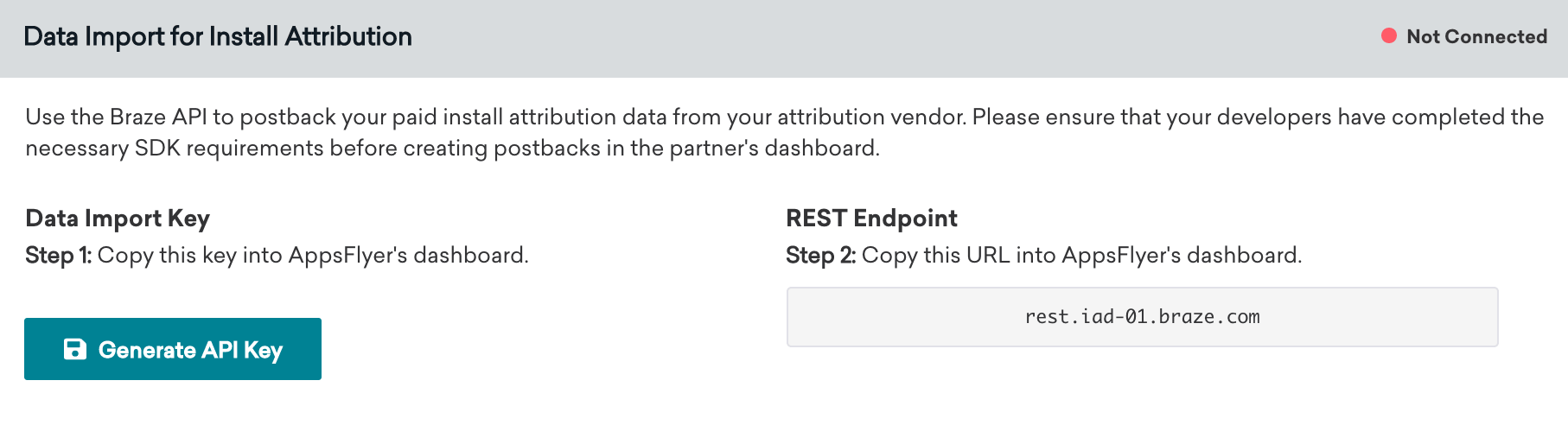
3단계: AppsFlyer 대시보드에서 Braze 구성
- AppsFlyer에서 왼쪽 바의 Integrated Partners 페이지로 이동합니다. 그런 다음 Braze를 검색하고 Braze 로고를 선택하여 구성 창을 엽니다.
- Integration 탭에서 Activate Partner를 켭니다.
- Braze 대시보드에서 찾은 데이터 가져오기 키와 REST 엔드포인트를 입력합니다.
- Advanced Privacy를 끄고 구성을 저장합니다.
AppsFlyer의 Integration 탭에서 Braze REST 엔드포인트를 입력할 때 https:// 프로토콜이나 /attribution/appsflyer 경로 없이 도메인만 입력하세요(예: rest.fra-02.braze.eu). AppsFlyer가 자동으로 프로토콜을 앞에 추가하고 경로를 뒤에 추가합니다. 둘 중 하나라도 입력에 포함하면 포스트백 실패가 발생합니다.
이 지침에 대한 추가 정보는 AppsFlyer 설명서에서 확인할 수 있습니다.
4단계: 통합 확인
Braze의 AppsFlyer 기술 파트너 페이지에서 연결 표시기는 2단계에서 데이터 가져오기 API 키를 생성할 때까지 Not Connected로 표시됩니다. 키를 생성하면 표시기가 Connected로 변경되고 타임스탬프가 표시됩니다. 이 타임스탬프는 AppsFlyer가 마지막으로 포스트백을 보낸 시점이 아니라, Braze에서 통합이 처음 설정된 시점(데이터 가져오기 키가 생성된 시점)을 나타냅니다.
AppsFlyer에서 설치 기여도 데이터가 전달되고 있는지 확인하려면 5단계를 사용하여 비오가닉 설치 데이터가 Braze Segment 필터에 표시되는지 확인합니다. Braze는 AppsFlyer 포스트백에서 오가닉 설치를 무시하며 기여 설치 데이터로 저장하지 않습니다.
5단계: 사용자 기여도 데이터 보기
사용 가능한 데이터 필드
통합에 성공하면 Braze는 모든 비오가닉 설치 데이터를 Segment 필터에 매핑합니다.
| AppsFlyer 데이터 필드 | Braze Segment 필터 |
|---|---|
media_source |
Attributed Source |
campaign |
Attributed Campaign |
af_adset |
Attributed Adgroup |
af_ad |
Attributed Ad |
설치 기여도 필터를 사용하여 Braze 대시보드에서 기여도 데이터를 기준으로 사용자 기반을 세분화할 수 있습니다.
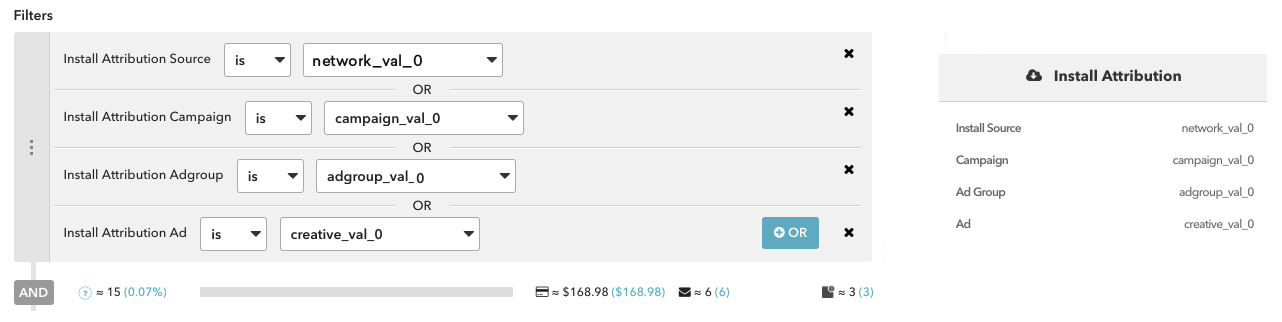
또한 특정 사용자의 기여도 데이터는 Braze 대시보드의 각 사용자 프로필에서 확인할 수 있습니다.

Facebook 및 X(구 Twitter) Campaign의 기여도 데이터는 파트너를 통해 제공되지 않습니다. 이러한 미디어 소스는 파트너가 서드파티와 기여도 데이터를 공유하는 것을 허용하지 않으므로, 파트너는 해당 데이터를 Braze로 전송할 수 없습니다.
딥링킹을 위한 AppsFlyer와 Braze 통합
딥링크—사용자를 앱이나 웹사이트 내의 특정 페이지 또는 위치로 안내하는 링크—는 맞춤형 사용자 경험을 만드는 데 사용됩니다.
널리 사용되고 있지만, 사용자 데이터 수집에 사용되는 또 다른 중요한 기능인 클릭 추적과 함께 이메일 딥링크를 사용할 때 문제가 발생할 수 있습니다. 이러한 문제는 이메일 서비스 공급자(ESP)가 클릭 기록 도메인에 딥링크를 래핑하여 원래 링크를 끊어버리기 때문에 발생합니다. 따라서 딥링크를 지원하려면 추가 설정이 필요합니다.
AppsFlyer는 이러한 문제를 방지하는 서비스를 제공하여 ESP 서버와 도메인 이름 사이에서 AppsFlyer가 중개자 역할을 할 수 있도록 합니다. 프록시 역할은 딥링킹을 용이하게 하는 연결 파일(AASA/자산 링크)의 제공을 가능하게 합니다.
1단계 - 클릭 추적 도메인 만들기
Braze의 이메일 설정 안내의 초기 요소에 따라 이메일 전송 도메인과 클릭 추적 도메인을 만듭니다. 지원을 받으려면 Braze 대시보드를 통해 티켓을 제기하여 Braze 이메일 팀과 함께 새 CTD에 대한 설정을 시작할 수 있습니다.
이미 기존 CTD를 사용 중이더라도 새 CTD를 생성해야 합니다. 이렇게 하면 현재 진행 중인 라이브 이메일 Campaign의 트래픽에 영향을 미치지 않습니다.
AppsFlyer가 SSL 인증서를 생성합니다. 이 단계에서는 이메일 링크가 보안되지 않았을 가능성이 높으며, 이는 URL 접두사가 HTTPS가 아닌 HTTP라는 의미입니다. 이 문제는 이후 단계에서 해결됩니다.
2단계 - AppsFlyer에서 OneLink 템플릿 만들기
OneLink 템플릿을 생성하고 “When app is installed”에서 유니버설 링크/앱 링크를 구성합니다. 이 템플릿은 나중에 이메일 Campaign용 OneLink 링크를 만드는 데 사용됩니다.
유니버설 링크/앱 링크를 활성화하는 기존 OneLink 템플릿이 이미 구성되어 있는 경우 이를 사용할 수 있습니다.
3단계 - AppsFlyer에서 Braze 통합 설정하기
이제 AppsFlyer에서 Braze 통합을 설정할 차례입니다. 이 단계와 다음 단계(“앱 구성”)를 동시에 설정할 수 있습니다. AppsFlyer에서 Braze 통합을 설정하려면:
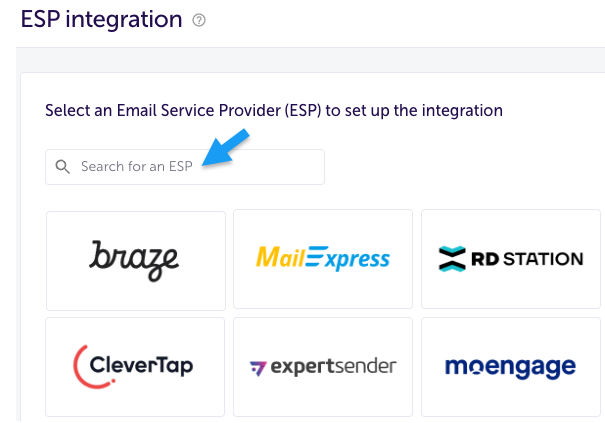
1. AppsFlyer의 사이드 메뉴에서 Engage > ESP Integration을 선택합니다. {#1-in-appsflyer-from-the-side-menu-select-engage-esp-integration}
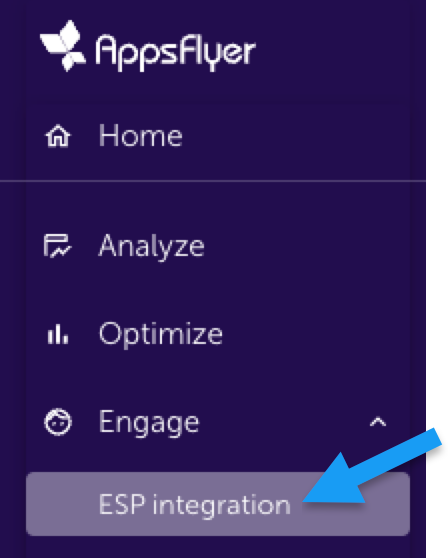
2. Braze를 선택합니다. {#2-select-braze}
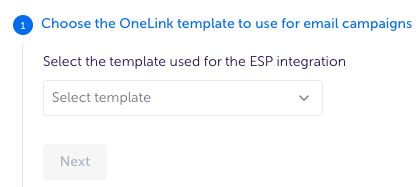
3. 이메일 Campaign에 사용할 OneLink 템플릿을 선택한 후 Next를 클릭합니다. {#3-select-the-onelink-template-you-want-to-use-for-email-campaigns-then-click-next}
4. 클릭 추적 도메인과 1단계에서 생성한 새 CTD와 함께 제공된 “Braze endpoint” 값을 입력한 다음 Validate connection을 클릭합니다. {#4-enter-your-click-tracking-domain-and-braze-endpoint-value-which-was-provided-with-the-new-ctd-created-in-step-1-then-click-validate-connection}
이렇게 하면 클릭 추적 도메인이 입력한 엔드포인트를 가리키는지 확인합니다.
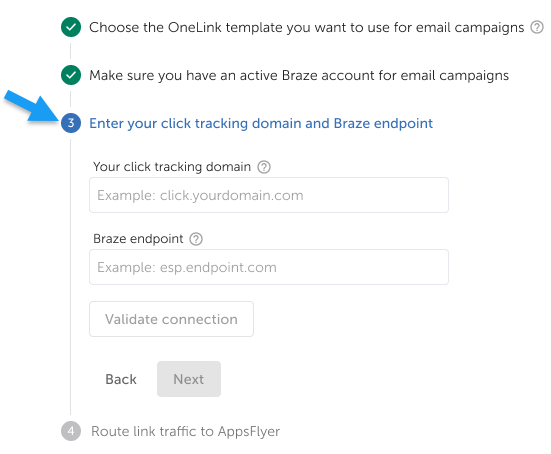
AppsFlyer는 “Braze Endpoint”를 통해 이 가이드의 1단계에서 Braze가 제공한 세부 정보, 특히 새로운 CTD를 요청하고 있습니다.
그런 다음 Validate connection을 클릭하여 클릭 추적 도메인이 입력한 엔드포인트를 가리키는지 확인합니다. 완료했으면 Next를 클릭합니다.
5. 링크 트래픽을 AppsFlyer로 라우팅합니다: {#5-route-link-traffic-to-appsflyer}
a. AppsFlyer에서 미리 제작된 커스텀 지침을 복사하여 IT 또는 도메인 관리자에게 전송하세요.
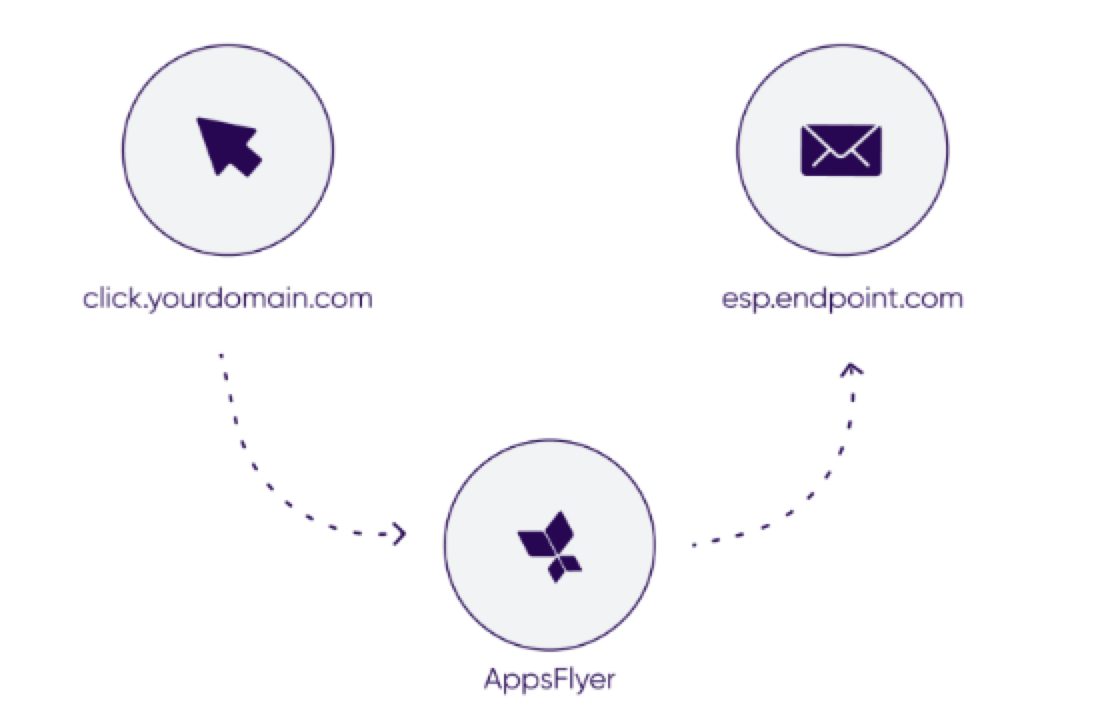
관리자는 AppsFlyer가 제공한 새 도메인으로 DNS CNAME 레코드를 업데이트하여 ESP 서버에서 AppsFlyer 서버로 이메일 Campaign 트래픽을 리라우팅해야 합니다.
그 결과, 링크를 클릭할 때마다 클릭이 AppsFlyer로 리디렉션되고, AppsFlyer는 다시 ESP 엔드포인트로 리디렉션합니다.
b. 지침을 복사하여 전송한 후 Done을 클릭합니다.
Braze 통합이 완료되었습니다.
Braze 통합 상태는 보류 중이며 CNAME 레코드가 매핑된 후에만 작동을 시작합니다. 매핑 후 새 통합이 작동을 시작하고 활성화되려면 최대 24시간이 걸릴 수 있습니다.
4단계: 앱 구성(개발자 작업)
AppsFlyer는 유니버설 링킹을 지원하기 위해 웹 또는 앱 팀이 따라야 하는 올바른 앱 구성에 대한 지침을 제공합니다.
5단계: Braze에서 SSL 클릭 추적 활성화 확인
이 단계에서는 AppsFlyer에서 CTD 세부 정보를 공유하고 유효성을 검사한 후 테스트 전송을 수행하여 OneLink 전송 도메인에 SSL 인증서가 있는지 확인하는 것이 좋습니다. 이는 이메일 설정 가이드와 일치합니다.
OneLink를 사용하여 딥링크를 전송하여 품질 보증 및 문제 해결을 수행할 수 있습니다. OneLink 사용에 대한 자세한 내용은 AppsFlyer 설명서를 참조하세요.
CTD 링크가 HTTP로 식별되는 경우 Braze의 이메일 운영팀에 문의하여 SSL 클릭 추적을 활성화하세요. 이렇게 하면 모든 HTTP 링크가 자동으로 HTTPS로 변환됩니다. 고객 성공 매니저에게 연락할 때 다음 샘플 메시지 텍스트를 사용하거나 1단계에서와 같이 Braze 대시보드에 다시 티켓을 올리면 됩니다:
1
2
Hi Team,
Could you please enable SSL click tracking for CTD XXX? It is currently set to HTTP instead of HTTPS.
Braze에서 AppsFlyer 클릭 추적 URL 사용하기(선택 사항)
푸시, 이메일 등 Braze Campaign 전반에서 AppsFlyer의 OneLink 기여도 링크를 사용할 수 있습니다. 이를 통해 Braze Campaign의 설치 또는 재참여 기여도 데이터를 AppsFlyer로 다시 전송할 수 있습니다. 결과적으로 마케팅 활동을 보다 효과적으로 측정하고 데이터 중심 의사 결정을 내릴 수 있습니다.
AppsFlyer에서 OneLink 추적 URL을 간단히 생성하여 Braze Campaign에 직접 삽입할 수 있습니다. 그런 다음 AppsFlyer는 확률적 기여도 방법론을 사용하여 링크를 클릭한 사용자의 기여도를 측정합니다. Braze Campaign에서 기여도의 정확성을 높이기 위해 AppsFlyer 추적 링크에 기기 식별자를 추가하는 것을 권장합니다. 이는 링크를 클릭한 사용자에게 결정적인 기여도를 부여합니다.
Android의 경우, Braze를 통해 고객은 Google 광고 ID 수집(GAID)을 옵트인할 수 있습니다. AppsFlyer SDK 통합도 GAID를 수집합니다. 다음 Liquid 로직을 사용하여 AppsFlyer 클릭 추적 링크에 GAID를 포함시킬 수 있습니다:
1
2
3
{% if most_recently_used_device.${platform} == 'android' %}
aifa={{most_recently_used_device.${google_ad_id}}}
{% endif %}
iOS의 경우, Braze와 AppsFlyer 모두 SDK 통합을 통해 기본적으로 IDFV를 자동 수집합니다. IDFV를 기기 식별자로 사용할 수 있습니다. 다음 Liquid 로직을 사용하여 AppsFlyer 클릭 추적 링크에 IDFV를 포함시킬 수 있습니다:
1
2
3
{% if most_recently_used_device.${platform} == 'ios' %}
idfv={{most_recently_used_device.${id}}}
{% endif %}