이 페이지는 AI로 자동 번역되었으며 부정확한 내용이 포함될 수 있습니다. 번역 오류를 신고하려면 페이지 오른쪽 목차 아래에 있는 피드백 기능을 사용하세요.
Adobe for Currents
Adobe는 브랜드가 Adobe 데이터(커스텀 속성 및 Segments)를 실시간으로 Braze에 연결하고 매핑할 수 있는 고객 데이터 플랫폼입니다.
Braze와 Adobe 통합을 통해 두 시스템 간의 정보 흐름을 원활하게 제어할 수 있습니다. Currents를 사용하면 데이터를 Adobe에 연결하여 전체 성장 스택에서 활용할 수도 있습니다.
필수 조건
| 요구 사항 | 설명 |
|---|---|
| Currents | 데이터를 Adobe로 다시 내보내려면 계정에 Braze 커런츠가 설정되어 있어야 합니다. |
| Adobe Experience Platform 계정 | 이 파트너십을 활용하려면 Adobe Experience Platform 계정이 필요합니다. |
| 커넥터 생성 권한 | 이 통합을 사용하려면 스트리밍 소스 연결을 생성할 수 있는 권한이 필요합니다. |
통합
1단계: Adobe에서 XDM 스키마 생성
- Adobe Experience Platform에서 Schemas > Create schema 선택 > Experience Event 선택 > Next 선택으로 이동합니다.
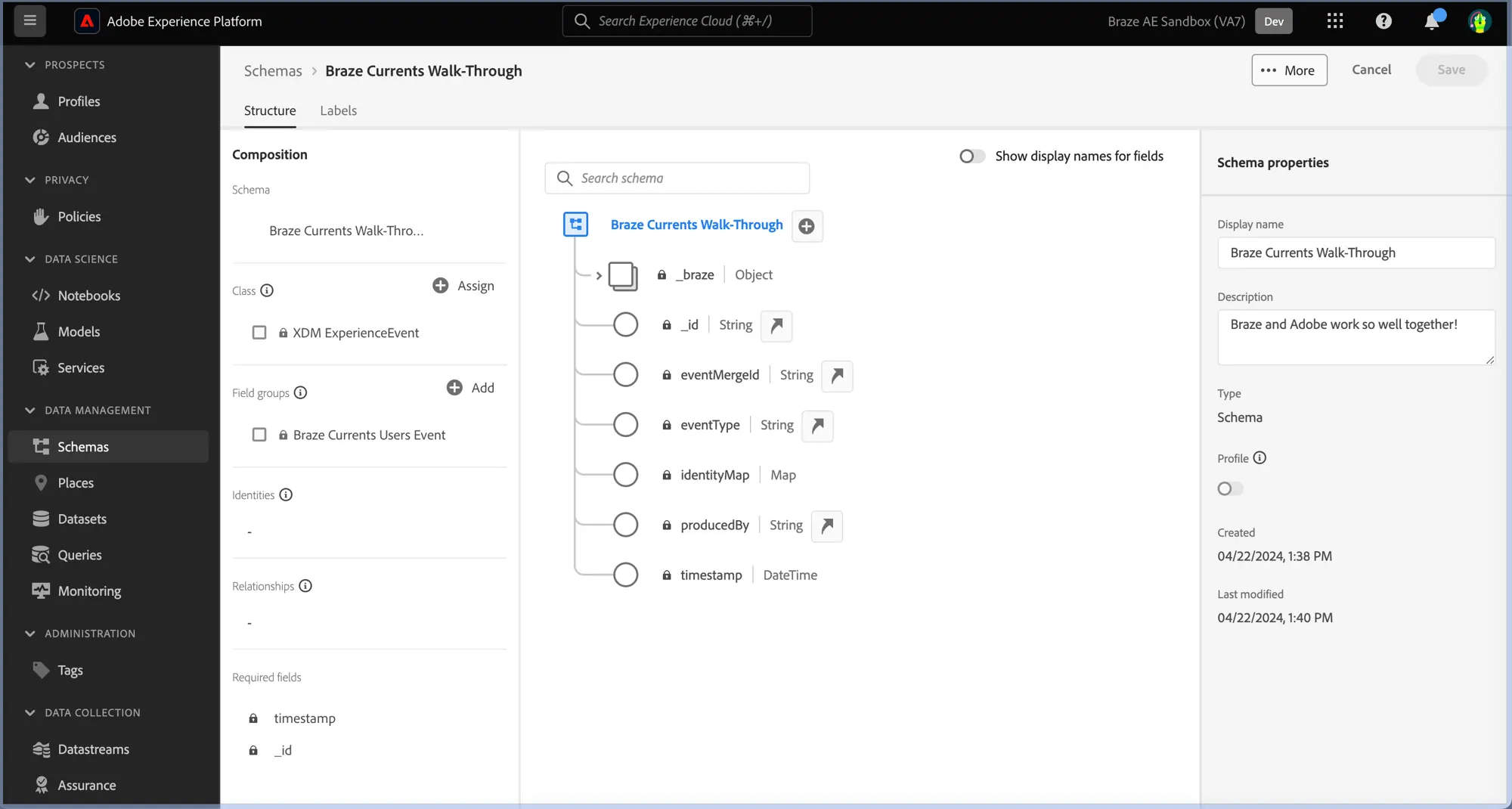
- 스키마의 이름과 설명을 입력합니다.
- Composition 패널에서 스키마 속성을 구성합니다:
- Field groups에서 Add를 선택한 다음 Braze Currents User Event 필드 그룹을 추가합니다.
- Save를 선택합니다.
스키마에 대한 자세한 내용은 Adobe의 스키마 생성 설명서를 참조하세요.
2단계: Braze를 Adobe Experience Platform에 연결
- Adobe Experience Platform에서 Sources > Catalog > Marketing automation으로 이동합니다.
- Braze 커런츠에 대해 Add data를 선택합니다.
- Braze 커런츠 샘플 파일을 업로드합니다.
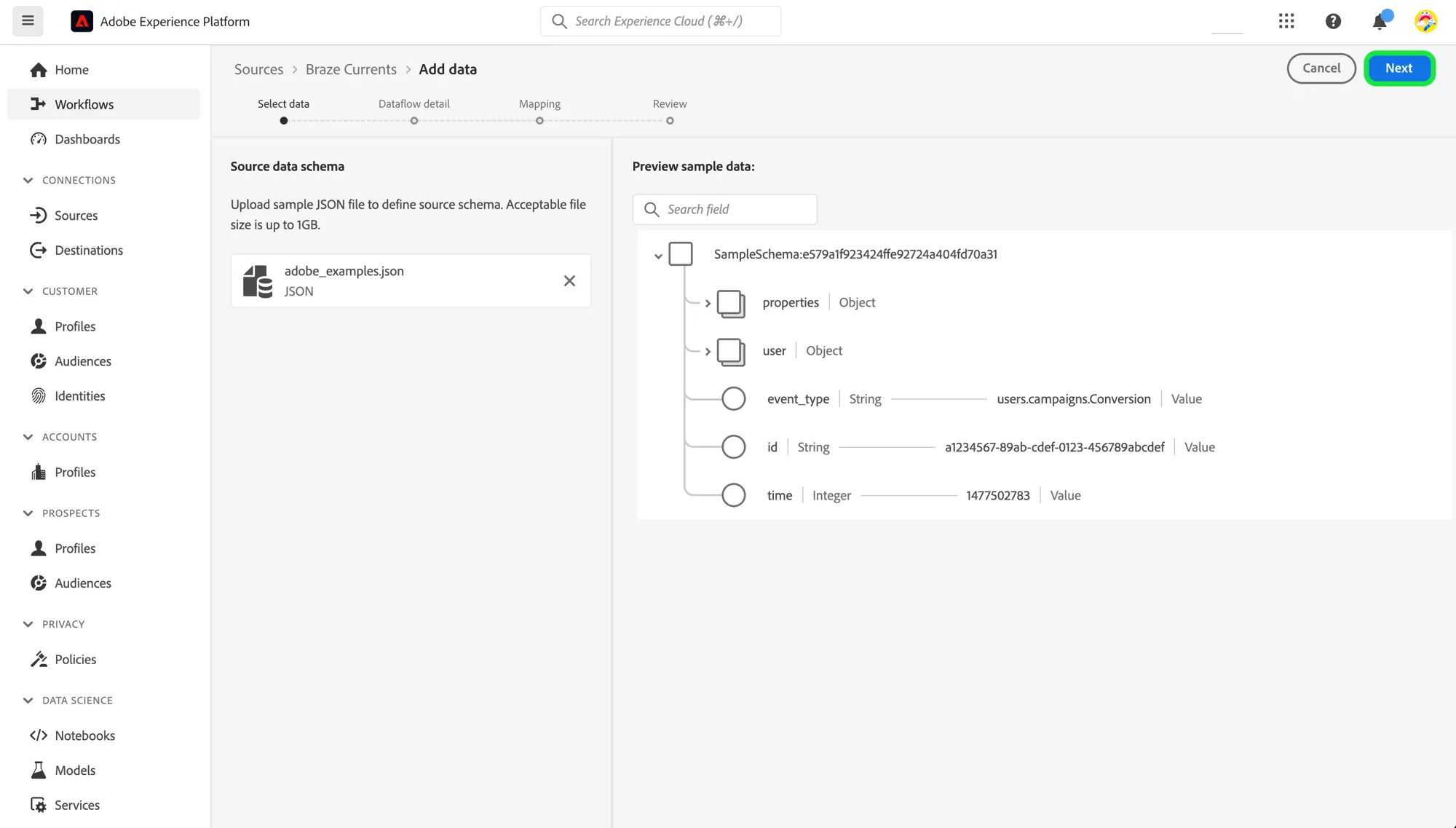
- 파일이 업로드된 후, 데이터셋 및 매핑할 스키마에 대한 정보를 포함하여 데이터 흐름 세부 정보를 입력합니다.
- Braze 커런츠 소스를 처음 연결하는 경우, 새 데이터셋을 생성하고 1단계에서 생성한 스키마를 사용해야 합니다.
- 처음이 아닌 경우, Braze 스키마를 참조하는 기존 데이터셋을 사용합니다.
- 데이터에 대한 매핑을 구성하고 문제를 해결합니다.
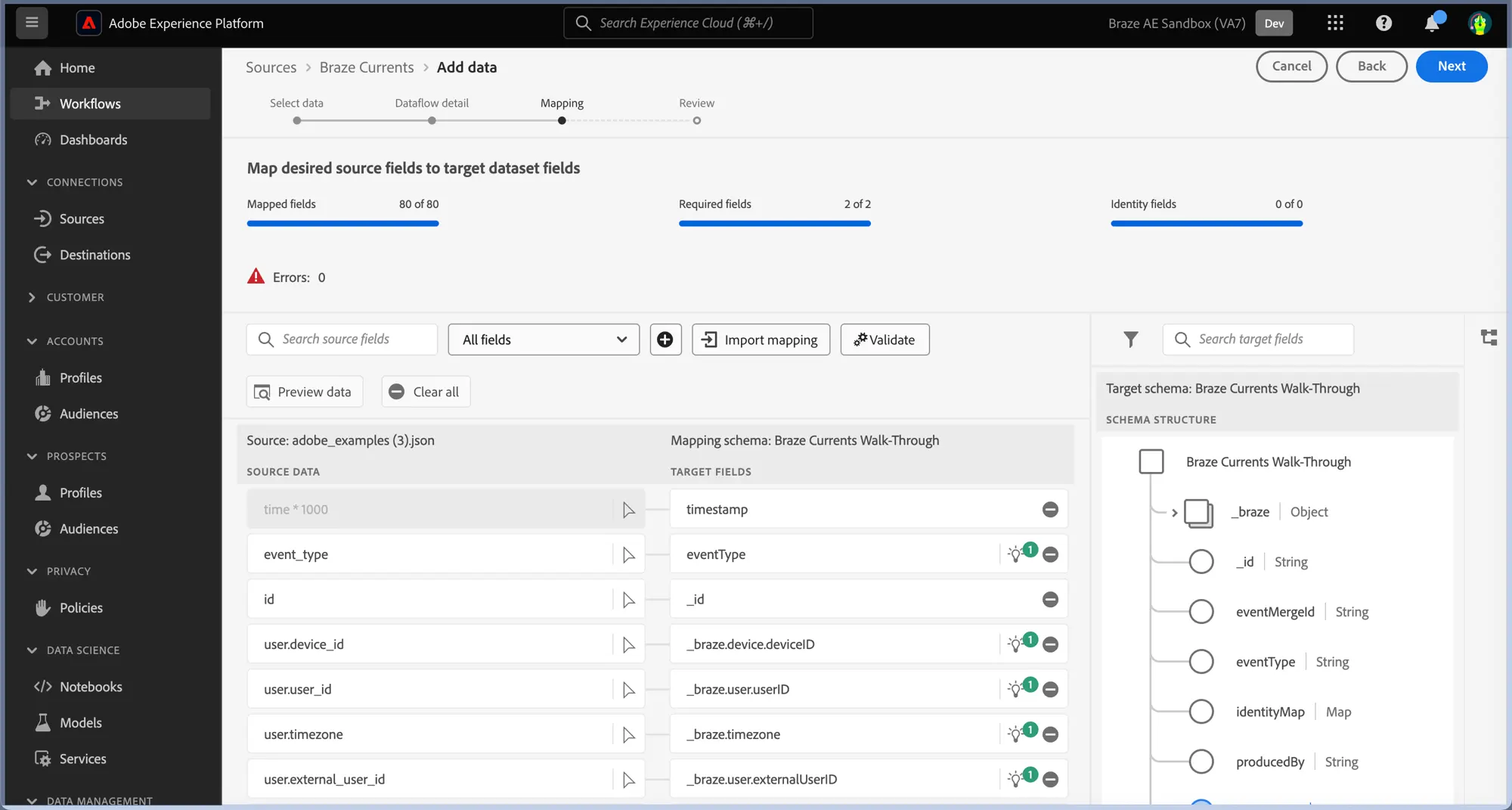
id의 매핑을to _braze.appID에서 스키마의 루트 수준에 있는_id로 변경합니다.properties.is_amp가_braze.messaging.email.isAMP에 매핑되어 있는지 확인합니다.time및timestamp매핑을 삭제한 다음, 추가 아이콘 > Add calculated field를 선택하고 time * 1000을 입력합니다. Save를 선택합니다.- 새로운 소스 필드 옆에 있는 Map target field를 선택하고 스키마의 루트 수준에서 timestamp에 매핑합니다.
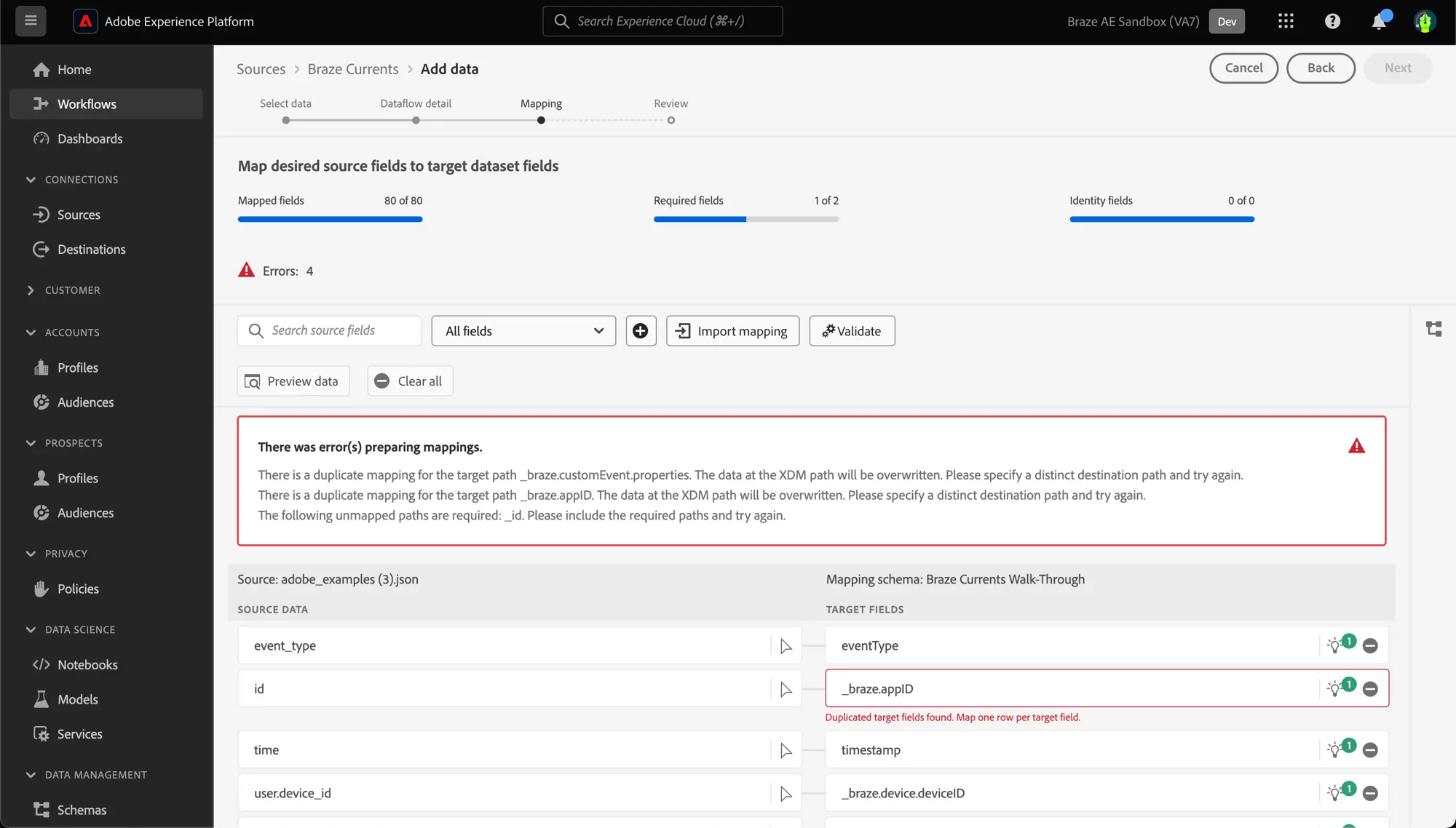
- Validate를 선택하여 문제가 해결되었는지 확인합니다.

중요
Braze 타임스탬프는 초 단위로 표현됩니다. Adobe Experience Platform에서 타임스탬프를 정확하게 반영하려면 계산 필드가 밀리초 단위여야 합니다. 초를 밀리초로 변환하려면 time * 1000 계산을 사용합니다.
- Next를 선택하고, 데이터 흐름 세부 정보를 검토한 후 Finish를 선택합니다.
3단계: 자격 증명 수집
Braze가 Adobe Experience Platform으로 데이터를 전송할 수 있도록 다음 자격 증명을 수집하여 Braze에 입력합니다.
| 필드 | 설명 |
|---|---|
| Client ID | Adobe Experience Platform 소스와 연결된 클라이언트 ID입니다. |
| Client Secret | Adobe Experience Platform 소스와 연결된 클라이언트 시크릿입니다. |
| Tenant ID | Adobe Experience Platform 소스와 연결된 테넌트 ID입니다. |
| Sandbox Name | Adobe Experience Platform 소스와 연결된 샌드박스입니다. |
| Dataflow ID | Adobe Experience Platform 소스와 연결된 데이터 흐름 ID입니다. |
| Streaming Endpoint | Adobe Experience Platform 소스와 연결된 스트리밍 엔드포인트입니다. Braze는 이를 자동으로 배치 스트리밍 엔드포인트로 변환합니다. |
4단계: 데이터 소스로 데이터를 스트리밍하도록 Currents 구성
- Braze에서 Partner Integrations > Data Export로 이동한 다음 Create New Current를 선택합니다.
- 다음 정보를 입력합니다:
- 커넥터 이름
- 커넥터에 대한 알림을 위한 연락처 정보
- 3단계에서 수집한 자격 증명
- 수신할 이벤트를 선택합니다.
- 필요에 따라 원하는 필드 제외 또는 변환을 구성합니다.
- Launch Current를 선택합니다.
New Stuff!