Treasure Data for Currents
Treasure Data는 여러 소스에서 정보를 수집하고 마케팅 스택의 다양한 위치로 라우팅하는 고객 데이터 플랫폼(CDP)입니다.
Braze와 Treasure Data 통합을 사용하면 두 시스템 간의 정보 흐름을 원활하게 제어할 수 있습니다. Currents를 사용하면 데이터를 Treasure Data에 연결하여 전체 성장 스택에서 활용할 수도 있습니다.
필수 조건
| 요구 사항 | 설명 |
|---|---|
| Treasure Data | 이 파트너십을 활용하려면 Treasure Data 계정이 필요합니다. |
| Currents | 데이터를 Treasure Data로 다시 내보내려면 계정에 Braze 커런츠가 설정되어 있어야 합니다. |
| Treasure Data URL | Treasure Data 대시보드로 이동하여 수집 URL을 복사하면 얻을 수 있습니다. |

Treasure Data는 각 이벤트를 배치 단위로 기록합니다. 이벤트 수를 얻기 위해 Treasure Data를 쿼리하는 방법에 대한 자세한 내용은 데이터 쿼리하기를 참조하세요.
Treasure Data의 새로운 Braze 스트리밍 커넥터와 통합하려는 경우, Braze Currents 스트리밍 가져오기 통합의 자세한 설정 단계를 참조하세요. Braze 내 통합 또는 설정에 대해 궁금한 점이 있으면 Braze 계정 팀에 문의하세요.
통합
Treasure Data에 연결하는 권장 방법은 Postback API를 사용하는 것입니다. 이 방법은 기본 커넥터가 필요하지 않으며 푸시 방식으로 데이터를 수신할 수 있습니다. 하나의 데이터 배치로 전송된 모든 이벤트는 JSON 배열의 한 행에 있는 하나의 필드 안에 포함되며, 필요한 데이터를 얻으려면 구문 분석해야 합니다.

이벤트 수집기를 통한 Treasure Data 수집은 현재 실시간으로 이루어지지 않으며 최대 5분이 소요될 수 있습니다.
1단계: Braze와 함께 Treasure Data Postback API 설정
Postback API 생성 방법은 Treasure Data 웹사이트에서 확인할 수 있습니다. Braze는 이벤트 수집기를 통한 수집을 제외하고 업데이트된 이벤트를 실시간으로 Treasure Data에 직접 전송합니다. 완료되면 Treasure Data에서 다음 단계에서 사용할 데이터 소스 URL을 제공합니다.
2단계: Current 생성
Braze에서 Currents > + Create Current > Treasure Data Export로 이동합니다. 통합 이름, 연락처 이메일, Treasure Data URL을 입력합니다. 그런 다음 사용 가능한 이벤트 목록에서 추적할 항목을 선택하고 Launch Current을 클릭합니다.
Treasure Data로 전송되는 모든 이벤트에는 사용자의 external_user_id가 포함됩니다. 현재 Braze는 external_user_id를 설정하지 않은 사용자에 대해서는 Treasure Data에 이벤트 데이터를 전송하지 않습니다.
Treasure Data URL을 최신 상태로 유지하세요. 커넥터의 URL이 올바르지 않으면 Braze에서 이벤트를 전송할 수 없습니다. 이 상태가 5일 이상 지속되면 커넥터의 이벤트가 삭제되고 데이터가 영구적으로 손실됩니다.
이벤트 필드 값 예시
1
2
3
4
5
6
7
8
9
10
11
12
13
14
15
16
17
18
19
20
21
22
{
    "events": [
        {
            "event_type": "users.message.email.Open",
            "id": "a1234567-89ab-cdef-0123-456789abcdef",
            "time": 1477502783,
            "user": {
                "user_id": "user_id",
                "timezone": "America/Chicago"
        },
            "properties": {
                "campaign_id": "11234567-89ab-cdef-0123-456789abcdef",
                "campaign_name": "Test Campaign",
                "dispatch_id": "12345qwert",
                "message_variation_id": "c1234567-89ab-cdef-0123-456789abcdef",
                "email_address": "[email protected]",
                "send_id": "f123456789abcdef01234567",
                "user_agent": "Mozilla/5.0 (Macintosh; Intel Mac OS X 10_13_5) AppleWebKit/537.36 (KHTML, like Gecko) Chrome/67.0.3396.99 Safari/537.36"
            }
        }
    ]
}
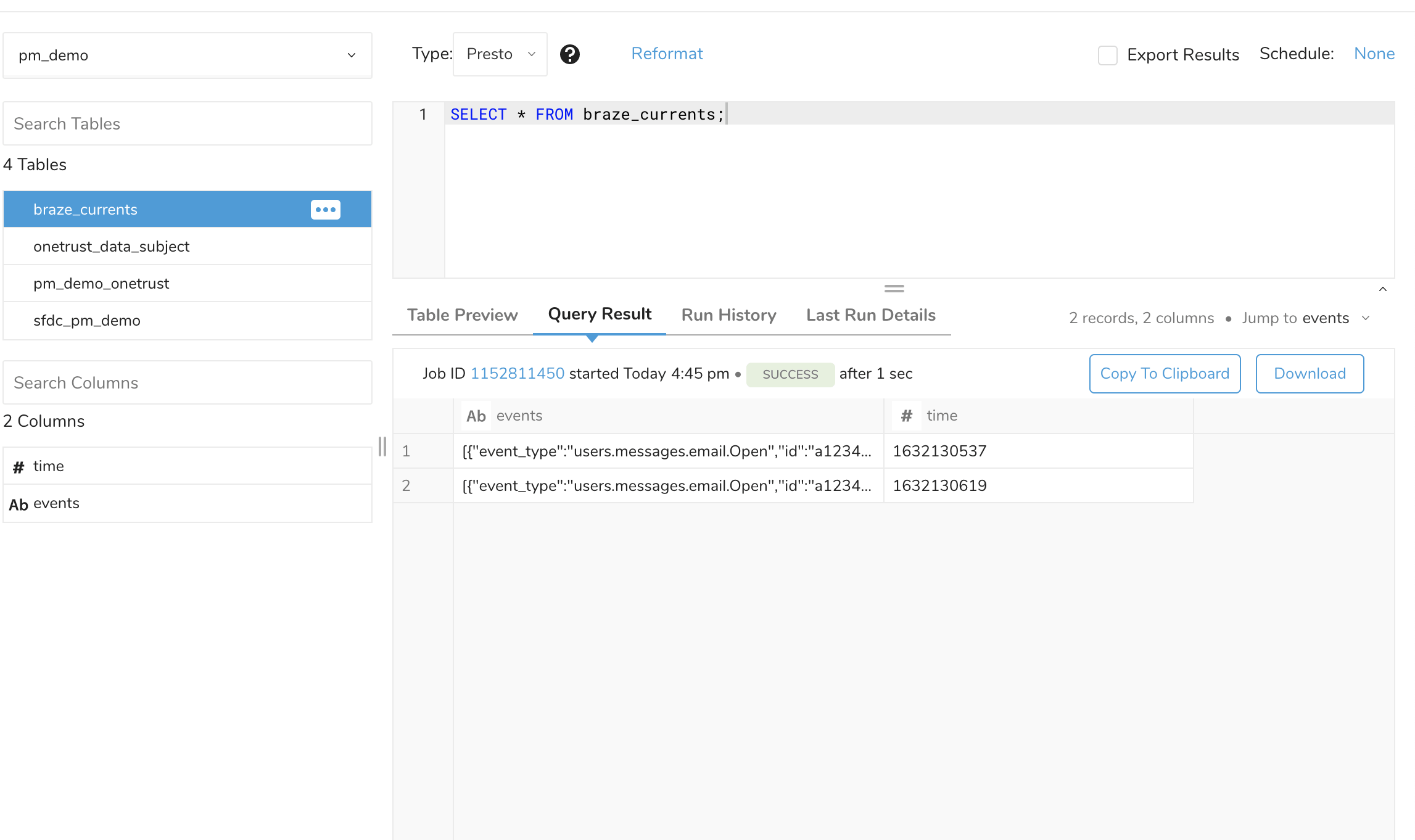
수집된 뷰 예시
통합 세부 정보
Braze는 Currents 이벤트 용어집에 나열된 모든 데이터(메시지 참여 및 고객 행동 이벤트의 모든 등록정보 포함)를 Treasure Data로 내보내는 것을 지원합니다.
내보낸 데이터의 페이로드 구조는 커스텀 HTTP 커넥터의 페이로드 구조와 동일하며, 커스텀 HTTP 커넥터 예시 리포지토리에서 확인할 수 있습니다.