Typeform
Typeform은 데이터, 피드백 등을 쉽게 수집할 수 있는 도구입니다.
Braze와 Typeform을 통합하면 다음을 수행할 수 있습니다.
- Typeform 응답에서 수집한 데이터로 Braze의 고객 프로필을 업데이트합니다
- 사용자의 Typeform 참여를 기반으로 Braze에서 메시징을 트리거합니다
- 사용자의 Typeform 응답을 기반으로 Braze 메시징을 개인화합니다
필수 조건
| 요구 사항 | 설명 |
|---|---|
| Typeform 계정 | 이 파트너십을 이용하려면 웹훅에 액세스할 수 있는 Typeform 계정이 필요합니다. |
| Braze 데이터 변환 | Typeform에서 데이터를 수신하려면 데이터 변환 URL이 필요합니다. |
통합
1단계: Typeform 웹훅을 수신하도록 Braze 데이터 변환 설정하기
Braze 대시보드에서 데이터 설정 > 데이터 변환로 이동합니다.
변환 이름을 지정하려면 Create Transformation을 선택한 다음 편집 경험을 선택하세요.
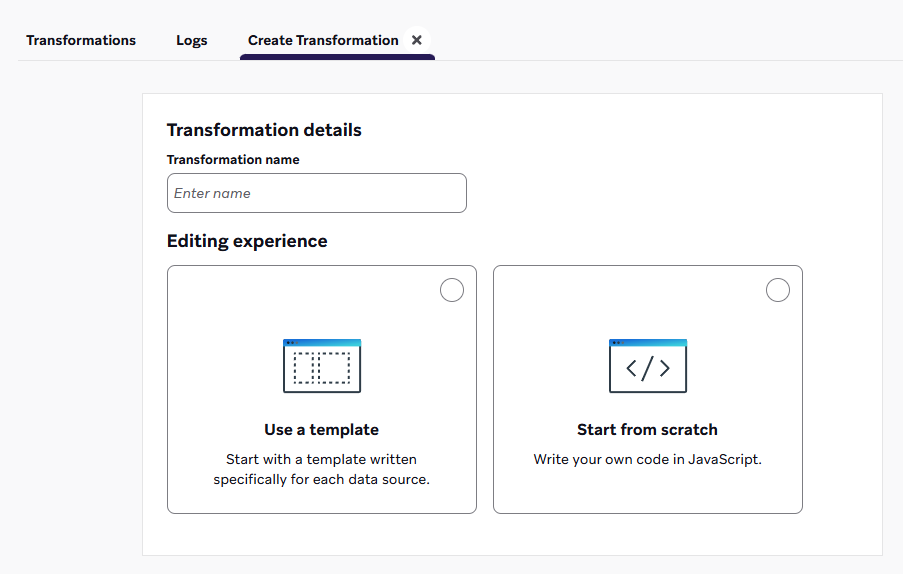
템플릿 사용을 선택하여 데이터 변환 사용 사례를 포함한 템플릿 라이브러리를 탐색합니다. 또는 시작하기를 선택하여 기본값 코드 템플릿을 로드합니다.
아무것도 없는 상태에서 시작한다면, 변화를 위한 대상을 선택하세요. 템플릿 라이브러리에서 코드 템플릿을 여전히 삽입할 수 있습니다.
More on destinations
- 게시: 사용자 추적: 소스 플랫폼의 웹훅을 고객 프로필 업데이트로 변환합니다. 예를 들어 속성, 이벤트 또는 구매와 같은 것입니다.
- 넣기: 여러 카탈로그 항목 업데이트: 소스 플랫폼의 웹후크를 카탈로그 항목 업데이트로 변환합니다.
- 삭제: 여러 카탈로그 항목 삭제: 소스 플랫폼의 웹후크를 카탈로그 항목 삭제로 변환합니다.
- 패치: 여러 카탈로그 항목 편집: 소스 플랫폼의 웹후크를 카탈로그 항목 편집으로 변환합니다.
- 게시: API만을 통해 즉시 메시지를 전송하세요. 소스 플랫폼에서 웹후크를 변환하여 지정된 사용자에게 즉시 메시지를 전송합니다.

추가 템플릿이나 목적지를 요청하시겠습니까? 제품 피드백을 남겨 보세요.
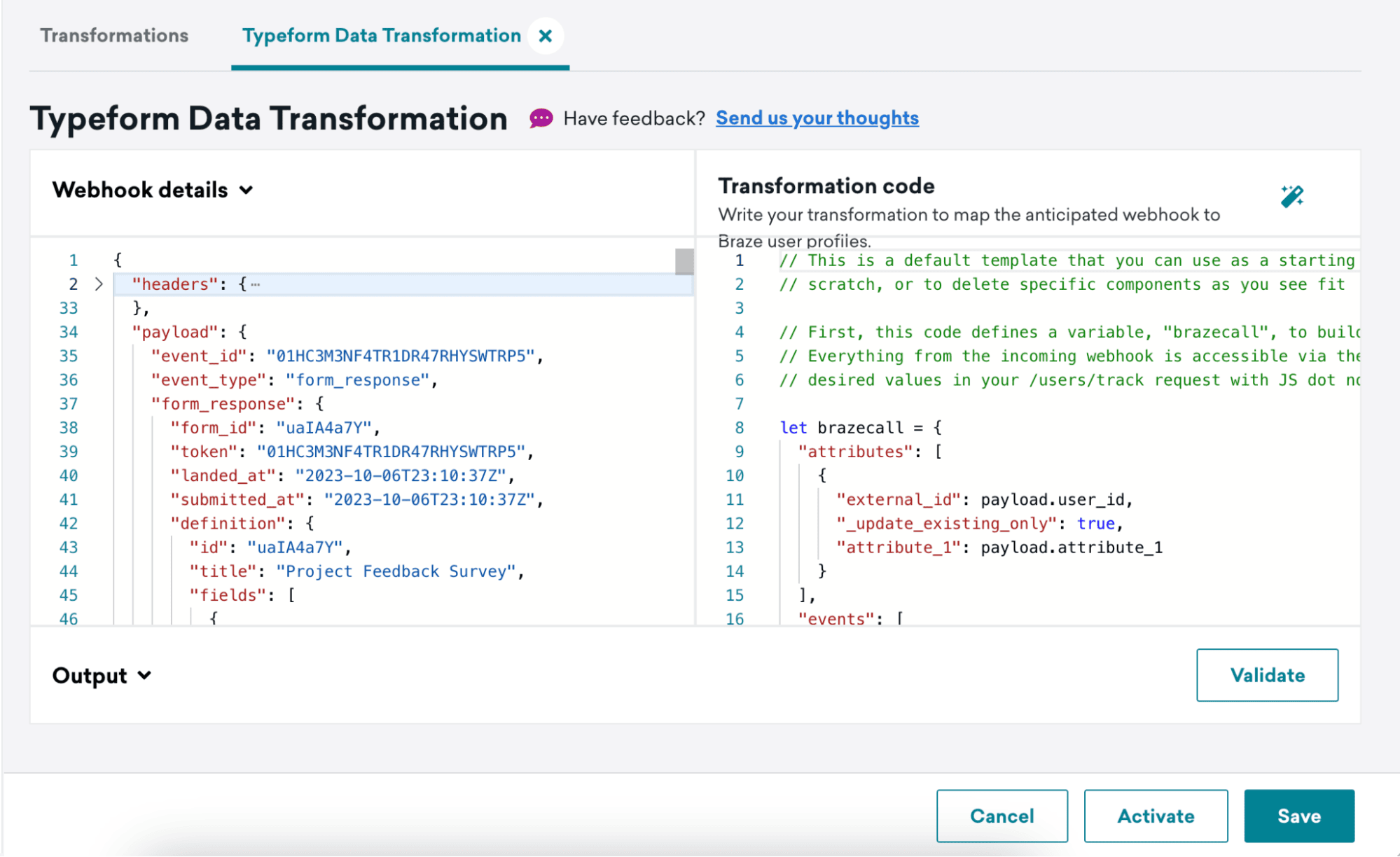
변환을 생성한 후 변환의 세부 정보를 볼 수 있습니다. 여기에서 웹훅 세부정보 아래에서 이 변환을 위해 수신된 가장 최근의 웹훅을 볼 수 있으며, 변환 코드 아래에 변환 코드를 작성할 수 있는 공간이 있습니다.
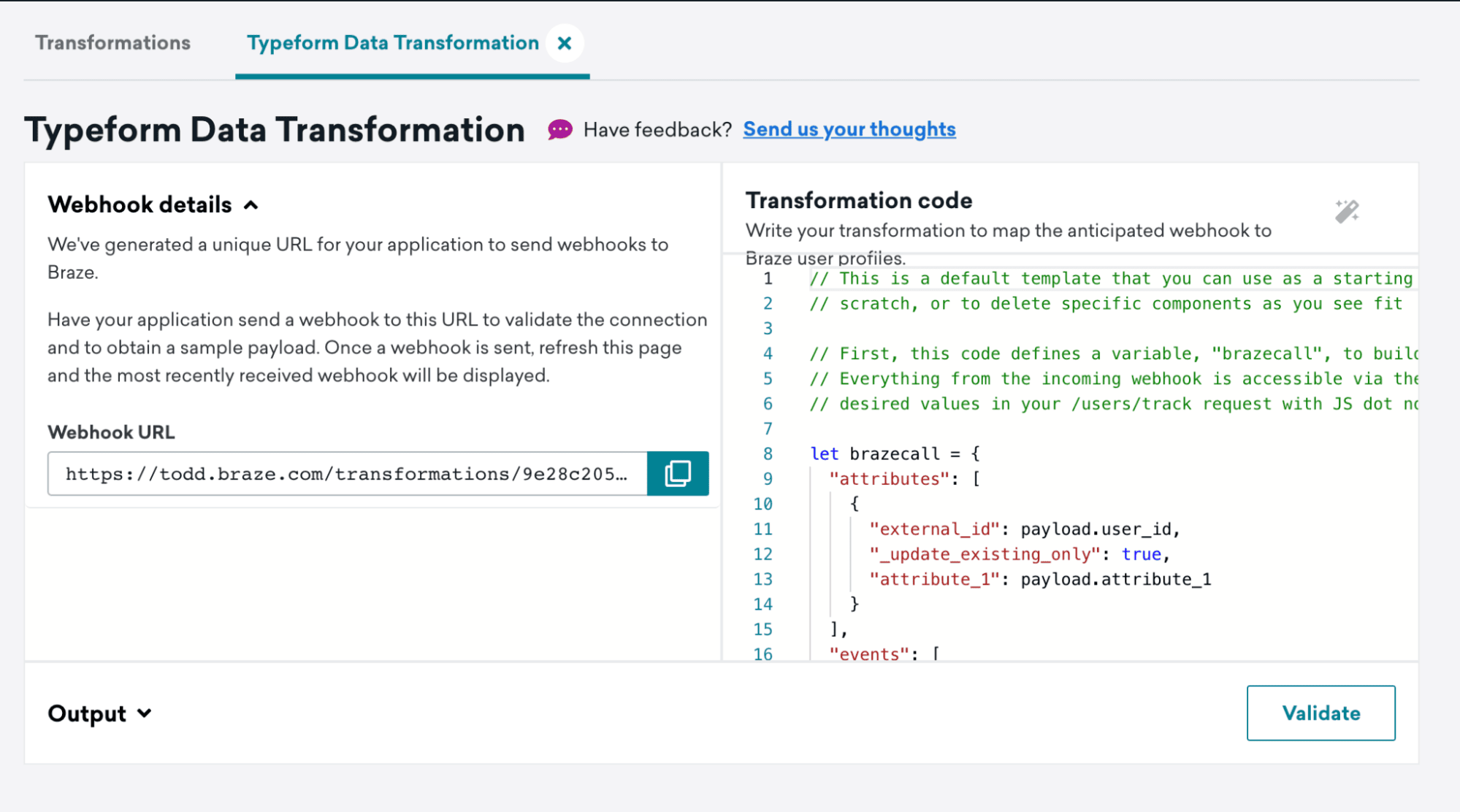
다음 단계에서 사용할 웹훅 URL을(를) 캡처하세요.
2단계: Typeform 웹훅 설정하기
Typeform 웹훅 설명서의 단계를 따라 웹훅을 설정합니다.
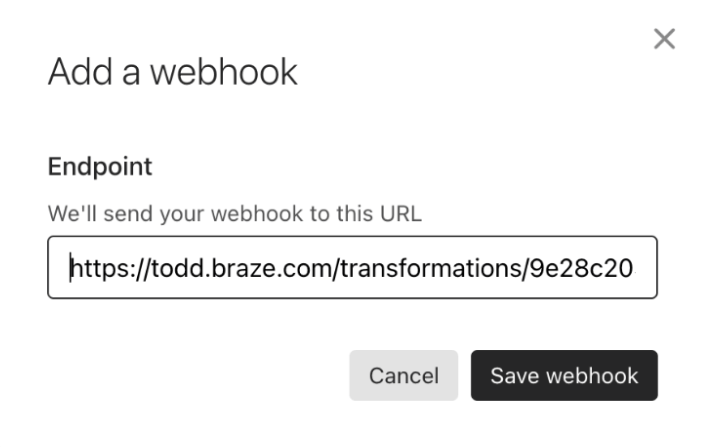
4단계에서 데이터 변환 웹훅 URL을 Destination URL로 추가합니다.
View deliveries를 클릭한 다음 Send test request를 클릭하여 데이터 변환에 테스트 이벤트를 전송합니다.
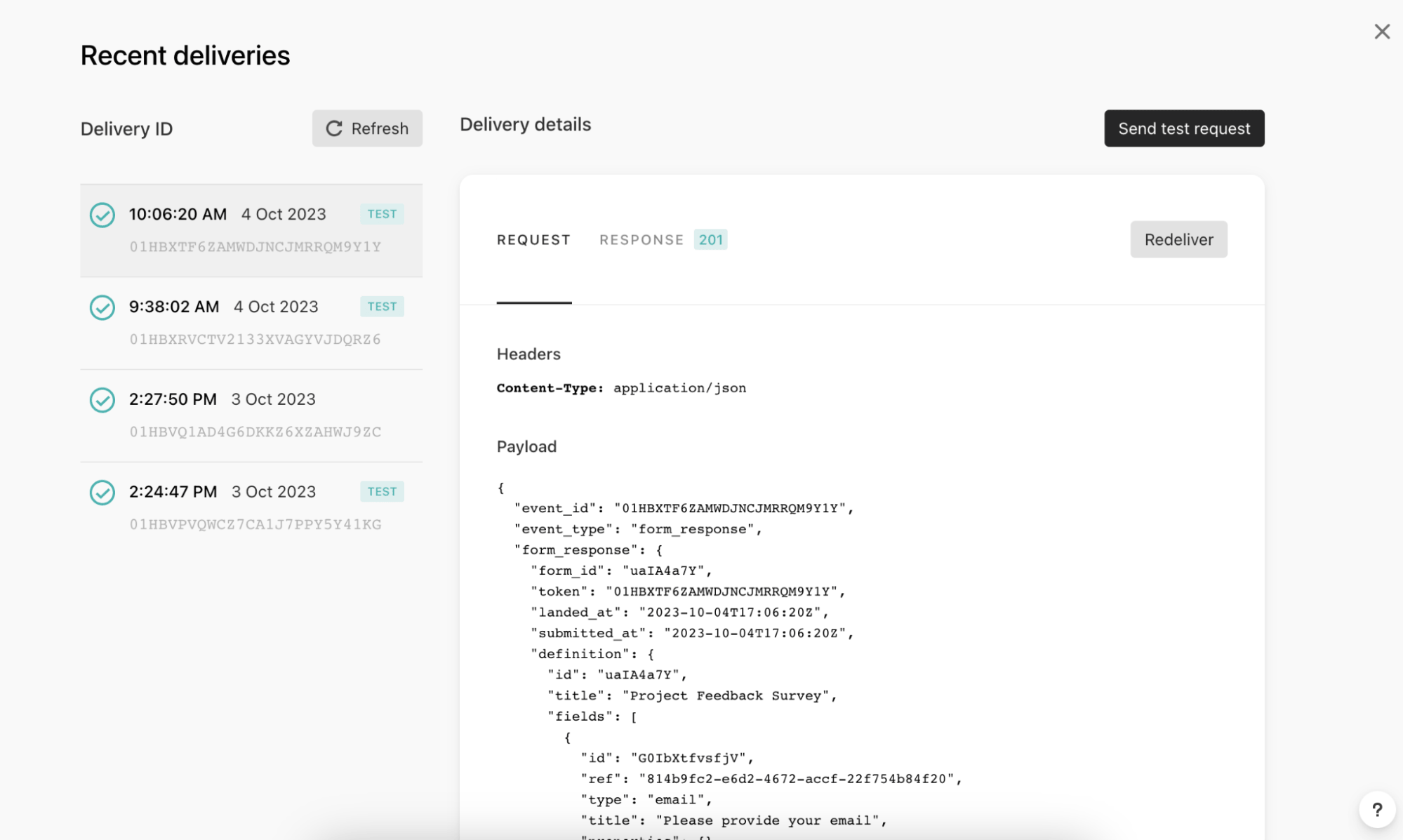
3단계: 선택한 Typeform 이벤트를 수신하는 변환 코드 작성하기
이 단계에서는 Typeform에서 전송된 웹훅 페이로드를 JavaScript 오브젝트 반환 값으로 변환합니다.
- 데이터 변환을 새로고침하고 Webhook Details에서 Typeform 테스트 페이로드를 확인할 수 있는지 확인합니다.
- 선택한 Typeform 이벤트를 지원하도록 데이터 변환 코드를 업데이트합니다.
- Validate를 클릭하여 코드 출력의 미리보기를 반환하고 유효한
/users/track요청인지 확인합니다. - 데이터 변환을 저장하고 활성화합니다.
요청 본문 형식
이 반환 값은 Braze의 /users/track 요청 본문 형식을 준수해야 합니다.
- 변환 코드는 JavaScript 프로그래밍 언어로 작성됩니다. if/else 로직과 같은 모든 표준 JavaScript 제어 흐름이 지원됩니다.
- 변환 코드는 payload 변수를 통해 웹훅 요청 본문에 액세스합니다. 이 변수는 요청 본문 JSON을 파싱하여 채워진 오브젝트입니다.
/users/track엔드포인트에서 지원하는 모든 기능이 지원되며, 여기에는 다음이 포함됩니다.- 사용자 속성 오브젝트, 이벤트 오브젝트 및 구매 오브젝트
- 중첩 속성 및 중첩 커스텀 이벤트 등록정보
- 구독 그룹 업데이트
- 식별자로서의 이메일 주소
Typeform 웹훅 페이로드 예시
1
2
3
4
5
6
7
8
9
10
11
12
13
14
15
16
17
18
19
20
21
22
23
24
25
26
27
28
29
30
31
32
33
34
35
36
37
38
39
40
41
42
43
44
45
46
47
48
49
50
51
52
53
54
55
56
57
58
59
60
61
62
63
64
65
66
67
68
69
70
71
72
73
74
75
76
77
78
79
80
81
82
83
84
85
86
87
88
89
90
91
92
93
94
95
96
97
98
99
100
101
102
103
104
105
106
107
108
109
110
111
112
113
114
115
116
117
118
119
120
121
122
123
124
125
126
127
128
129
130
131
132
133
134
135
136
137
138
139
140
141
142
143
144
145
146
147
148
149
150
151
152
153
154
155
156
157
158
159
160
161
162
163
164
165
166
167
168
169
170
171
172
173
174
175
176
177
178
179
180
181
182
183
184
185
186
187
188
189
190
191
192
193
194
195
196
197
198
199
200
201
202
203
204
205
206
207
208
209
210
211
212
213
214
215
216
217
218
219
220
221
222
223
224
225
226
227
228
229
230
231
232
233
234
235
236
237
238
239
240
241
242
243
244
245
246
247
248
249
250
251
Content-Type: application/json

{
  "event_id": "01HC3PTZN05GJWT0QDXXB2QV8F",
  "event_type": "form_response",
  "form_response": {
    "form_id": "uaIA4a7Y",
    "token": "7pctqdoqxg41to97pctqdibhqn6hqvto",
    "landed_at": "2023-10-06T23:57:52Z",
    "submitted_at": "2023-10-06T23:58:18Z",
    "hidden": {
		"user_id": "hidden_value"
    },
    "definition": {
      "id": "uaIA4a7Y",
      "title": "Project Feedback Survey",
      "fields": [
        {
          "id": "G0IbXtfvsfjV",
          "ref": "814b9fc2-e6d2-4672-accf-22f754b84f20",
          "type": "email",
          "title": "Please provide your email",
          "properties": {}
        },
        {
          "id": "lg82q3t0rK03",
          "ref": "e1503b62-0241-4269-9902-5c539abf305e",
          "type": "short_text",
          "title": "What was your role in the project?",
          "properties": {}
        },
        {
          "id": "UXftY0tSmuDV",
          "ref": "5b839dbb-566b-47de-a47e-b0914d9ccf7c",
          "type": "opinion_scale",
          "title": "How would you rate the overall performance of the team?",
          "properties": {}
        },
        {
          "id": "fE17bXVUEB4E",
          "ref": "fd6be99d-1ed1-4a4d-b811-f6ecdd8fa9b6",
          "type": "yes_no",
          "title": "Did the project meet its intended outcomes?",
          "properties": {}
        },
        {
          "id": "NmVOQFuI0vv9",
          "ref": "cd2b4176-db9a-49bb-a918-4463720bbc79",
          "type": "multiple_choice",
          "title": "Which area of the project do you think went well?",
          "properties": {},
          "choices": [
            {
              "id": "RvV3LaMEQ2eK",
              "ref": "2d5e0913-afe9-491c-b31c-0648dd397d56",
              "label": "Communication"
            },
            {
              "id": "7iXmfpPMeQvz",
              "ref": "7a7749d2-5cd6-4bf7-9726-65c7ab11ec83",
              "label": "Planning"
            },
            {
              "id": "1No85DZlvP6f",
              "ref": "d7b7304a-776b-4630-8bee-7dc7ef9c9404",
              "label": "Execution"
            },
            {
              "id": "ruMnsZWjyalW",
              "ref": "41dc926a-85af-4625-8a61-725fda35afda",
              "label": "Problem Solving"
            },
            {
              "id": "CexnFN3roprG",
              "ref": "cfdd2da4-8c57-4ff1-b4c0-1a5262e2ff84",
              "label": "Other"
            }
          ]
        },
        {
          "id": "ZJop9pvoObzk",
          "ref": "ce903cda-7e27-4b4c-9fa8-0623c47c61b4",
          "type": "multiple_choice",
          "title": "Which area of the project do you think could be improved?",
          "properties": {},
          "choices": [
            {
              "id": "YQLArFf0Wks5",
              "ref": "09fa30c7-7bdc-4753-971e-0d922638d023",
              "label": "Communication"
            },
            {
              "id": "iGjaELgfnChw",
              "ref": "61820c89-3426-464d-b031-c06de5125fd5",
              "label": "Planning"
            },
            {
              "id": "2EyI5tozFxro",
              "ref": "c35f71b2-2a6d-4488-a1ba-87c2e711ce19",
              "label": "Execution"
            },
            {
              "id": "VGtsIHBLAhME",
              "ref": "6c171a9a-9324-4f7d-adb9-290bd701efe9",
              "label": "Problem Solving"
            },
            {
              "id": "lVdV7MIL1anS",
              "ref": "faba551f-4e6b-4377-9f74-11ca4fcc8ed5",
              "label": "Other"
            }
          ]
        },
        {
          "id": "hcCNsLUHGXgv",
          "ref": "d1ae8537-0d5a-4ca8-bb6b-f8057f04d7e2",
          "type": "opinion_scale",
          "title": "How satisfied were you with the level of communication during the project?",
          "properties": {}
        },
        {
          "id": "dBqPlgeKejN2",
          "ref": "e2c884c1-0d92-4f18-9833-79dff0b3eef2",
          "type": "nps",
          "title": "How likely are you to recommend Braze for customer engagement services?",
          "properties": {}
        },
        {
          "id": "vLdpFmCmulF5",
          "ref": "a86e48ec-6d10-49fc-ac03-4ac1aad4bfec",
          "type": "dropdown",
          "title": "In which country was the project executed?",
          "properties": {}
        }
      ],
      "endings": [
        {
          "id": "LUpVm67y72vb",
          "ref": "30c03bdf-80b3-45f5-8307-df8ca49046b1",
          "title": "Thank you for taking the time to complete our survey!",
          "type": "thankyou_screen",
          "properties": {
            "button_text": "Create a typeform",
            "show_button": true,
            "share_icons": true,
            "button_mode": "default_redirect"
          }
        }
      ]
    },
    "answers": [
      {
        "type": "email",
        "email": "[email protected]",
        "field": {
          "id": "G0IbXtfvsfjV",
          "type": "email",
          "ref": "814b9fc2-e6d2-4672-accf-22f754b84f20"
        }
      },
      {
        "type": "text",
        "text": "Project",
        "field": {
          "id": "lg82q3t0rK03",
          "type": "short_text",
          "ref": "e1503b62-0241-4269-9902-5c539abf305e"
        }
      },
      {
        "type": "number",
        "number": 9,
        "field": {
          "id": "UXftY0tSmuDV",
          "type": "opinion_scale",
          "ref": "5b839dbb-566b-47de-a47e-b0914d9ccf7c"
        }
      },
      {
        "type": "boolean",
        "boolean": true,
        "field": {
          "id": "fE17bXVUEB4E",
          "type": "yes_no",
          "ref": "fd6be99d-1ed1-4a4d-b811-f6ecdd8fa9b6"
        }
      },
      {
        "type": "choice",
        "choice": {
          "id": "ruMnsZWjyalW",
          "label": "Problem Solving",
          "ref": "41dc926a-85af-4625-8a61-725fda35afda"
        },
        "field": {
          "id": "NmVOQFuI0vv9",
          "type": "multiple_choice",
          "ref": "cd2b4176-db9a-49bb-a918-4463720bbc79"
        }
      },
      {
        "type": "choice",
        "choice": {
          "id": "lVdV7MIL1anS",
          "label": "Other",
          "ref": "faba551f-4e6b-4377-9f74-11ca4fcc8ed5"
        },
        "field": {
          "id": "ZJop9pvoObzk",
          "type": "multiple_choice",
          "ref": "ce903cda-7e27-4b4c-9fa8-0623c47c61b4"
        }
      },
      {
        "type": "number",
        "number": 8,
        "field": {
          "id": "hcCNsLUHGXgv",
          "type": "opinion_scale",
          "ref": "d1ae8537-0d5a-4ca8-bb6b-f8057f04d7e2"
        }
      },
      {
        "type": "number",
        "number": 6,
        "field": {
          "id": "dBqPlgeKejN2",
          "type": "nps",
          "ref": "e2c884c1-0d92-4f18-9833-79dff0b3eef2"
        }
      },
      {
        "type": "choice",
        "choice": {
          "id": "KESjdqLseWmC",
          "label": "Brazil",
          "ref": "250210d9-33f6-4734-8ec6-06005a8ef66d"
        },
        "field": {
          "id": "vLdpFmCmulF5",
          "type": "dropdown",
          "ref": "a86e48ec-6d10-49fc-ac03-4ac1aad4bfec"
        }
      }
    ],
    "ending": {
      "id": "LUpVm67y72vb",
      "ref": "30c03bdf-80b3-45f5-8307-df8ca49046b1"
    }
  }
}
데이터 변환 활용 사례
다음은 Typeform 웹훅 페이로드 예시를 사용하여 구축한 예시 템플릿입니다. 이 템플릿은 시작점으로 사용할 수 있습니다. 처음부터 시작하거나 필요에 따라 특정 구성요소를 삭제할 수 있습니다.
이 예시 템플릿에서는 Braze 프로필에 커스텀 이벤트를 기록합니다. Typeform의 제목이 커스텀 이벤트 이름으로 전달되고, Typeform 결과가 이벤트 등록정보로 전달됩니다. 이 예시 템플릿은 Typeform의 Calendly, 파일 업로드 또는 결제 질문 유형을 지원하지 않습니다.
활용 사례: 이메일을 식별자로 사용
이 예시 템플릿에서는 Typeform 내 이메일 주소 질문에서 캡처한 이메일 주소를 식별자로 사용합니다.
이메일 주소를 식별자로 사용하려는 경우, 예상 동작에 대한 자세한 내용은 /users/track 엔드포인트의 자주 묻는 질문을 참조하세요.
1
2
3
4
5
6
7
8
9
10
11
12
13
14
15
16
17
18
19
20
21
22
23
24
25
26
27
28
29
30
31
32
33
34
35
36
37
38
39
40
41
42
43
44
45
46
47
48
49
50
51
52
53
54
55
56
57
58
59
60
61
62
63
64
65
66
/* In the Typeform webhook payload each question is stored as a “title” within each object of the “fields” array. Our code defines a “title” variable where we store the value of each field title. */
const titles = payload.form_response.definition.fields.map(field => field.title);

/* The answers array is saved to a “tfAnswers” variable so this can be iterated through */
const tfAnswers = payload.form_response.answers;

/* The value of a response will change based on the type of question, to account for this we have created a function that iterates through the answers, determines what the answer type is and then, based on the type, adds the associated response to an extractedValues array. */
const extractValues = (tfAnswers) => {
	const extractedValues = [];

	tfAnswers.forEach((tfAnswer) => {
		let result = null;

		if (tfAnswer.type === 'choices') {
			if (tfAnswer.choices) {
				// Multiple choices
				let labels = tfAnswer.choices.labels || [];
				if (tfAnswer.choices.other) {
					labels.push(tfAnswer.choices.other);
				}
				result = labels;
			}
		} else if (tfAnswer.type === 'choice' && Object.keys(tfAnswer.choice).length > 1) {
			// Single choice
			result = tfAnswer.choice && tfAnswer.choice.other ?
				tfAnswer.choice.other.toString() :
				tfAnswer.choice.label.toString();
		} else if (tfAnswer.type === 'dropdown') {
			// Dropdown
			result = tfAnswer.text;
		} else {
			// For other types, use the type-specific value
			result = tfAnswer[tfAnswer.type];
		}

		extractedValues.push(result);
	});

	return extractedValues;
};

/* We use the above defined function, passing it the “tfAnswers” variable that holds the answers portion of the Typeform webhook payload and save the output to a ”values” variable */
const values = extractValues(tfAnswers);

/* Finally, the values within the previously assigned “titles” variable and “values” variable are paired together in an object as the values to a “question” key and “answer” key in a “responses” array of objects variable. */
const results = titles.map((title, index) => {
	return {
		question: title,
		answer: values[index],
	};
});

/* The code defines a variable, "brazecall", to build a /users/track request. Within the request, the typeform title is populated as the event name, and our “results” variable (where all of our question/answer pairs are stored), is assigned as the event’s properties. */
let brazecall = {
	"events": [{
		"email": payload.form_response.answers.find(answer => answer.type === 'email').email,
		"name": payload.form_response.definition.title,
		"time": new Date().toISOString(),
		"properties": {
			"responses": results
		}
	}]
};

// After the /users/track request is assigned to brazecall, you will want to explicitly return “brazecall” to create an output
return brazecall;
1
2
3
4
5
6
7
8
9
10
11
12
13
14
15
16
17
18
19
20
21
22
23
24
25
26
27
28
29
30
31
32
33
34
35
36
37
38
39
40
41
42
43
44
45
46
47
48
49
50
51
52
53
{
  "events": [
    {
      "email": "[email protected]",
      "name": "Project Feedback Survey",
      "time": "2023-10-17T18:21:39.527Z",
      "properties": {
        "responses": [
          {
            "question": "Please provide your email",
            "answer": "[email protected]"
          },
          {
            "question": "What was your role in the project?",
            "answer": "Lorem ipsum dolor"
          },
          {
            "question": "How would you rate the overall performance of the team?",
            "answer": 5
          },
          {
            "question": "Did the project meet its intended outcomes?",
            "answer": true
          },
          {
            "question": "If you answered \"No\" to the previous question, please explain why. If you answered \"Yes\", skip this question.",
            "answer": "Lorem ipsum dolor"
          },
          {
            "question": "Which area of the project do you think went well?",
            "answer": "Communication"
          },
          {
            "question": "Which area of the project do you think could be improved?",
            "answer": "Communication"
          },
          {
            "question": "How satisfied were you with the level of communication during the project?",
            "answer": 5
          },
          {
            "question": "How likely are you to recommend Braze for customer engagement services?",
            "answer": 5
          },
          {
            "question": "In which country was the project executed?",
            "answer": "United States"
          }
        ]
      }
    }
  ]
}
활용 사례: 숨겨진 필드에 전달된 식별자 사용
Typeform 숨겨진 필드를 사용하면 사용자의 ID와 같은 데이터를 Typeform 응답에 포함하지 않고도 Typeform 웹훅 페이로드에 전달할 수 있습니다.
이 예시 템플릿에서는 “user_id” 숨겨진 필드를 사용하고 이를 /users/track 요청 페이로드에 external_id로 전달합니다. “user_id”를 사용하고 있지만 필요에 따라 필드를 수정할 수 있습니다.
1
2
3
4
5
6
7
8
9
10
11
12
13
14
15
16
17
18
19
20
21
22
23
24
25
26
27
28
29
30
31
32
33
34
35
36
37
38
39
40
41
42
43
44
45
46
47
48
49
50
51
52
53
54
55
56
57
58
59
60
61
62
63
64
65
66
/* In the Typeform webhook payload each question is stored as a “title” within each object of the “fields” array. Our code defines a “title” variable where we store the value of each field title. */
const titles = payload.form_response.definition.fields.map(field => field.title);

/* The answers array is saved to a “tfAnswers” variable so this can be iterated through */
const tfAnswers = payload.form_response.answers;

/* The value of a response will change based on the type of question, to account for this we have created a function that iterates through the answers, determines what the answer type is and then, based on the type, adds the associated response to an extractedValues array. */
const extractValues = (tfAnswers) => {
	const extractedValues = [];

	tfAnswers.forEach((tfAnswer) => {
		let result = null;

		if (tfAnswer.type === 'choices') {
			if (tfAnswer.choices) {
				// Multiple choices
				let labels = tfAnswer.choices.labels || [];
				if (tfAnswer.choices.other) {
					labels.push(tfAnswer.choices.other);
				}
				result = labels;
			}
		} else if (tfAnswer.type === 'choice' && Object.keys(tfAnswer.choice).length > 1) {
			// Single choice
			result = tfAnswer.choice && tfAnswer.choice.other ?
				tfAnswer.choice.other.toString() :
				tfAnswer.choice.label.toString();
		} else if (tfAnswer.type === 'dropdown') {
			// Dropdown
			result = tfAnswer.text;
		} else {
			// For other types, use the type-specific value
			result = tfAnswer[tfAnswer.type];
		}

		extractedValues.push(result);
	});

	return extractedValues;
};

/* We use the above defined function, passing it the “tfAnswers” variable that holds the answers portion of the Typeform webhook payload and save the output to a ”values” variable */
const values = extractValues(tfAnswers);

/* Finally, the values within the previously assigned “titles” variable and “values” variable are paired together in an object as the values to a “question” key and “answer” key in a “responses” array of objects variable. */
const results = titles.map((title, index) => {
	return {
		question: title,
		answer: values[index],
	};
});

/* The code defines a variable, "brazecall", to build a /users/track request. Within the request, the typeform title is populated as the event name, and our “results” variable (where all of our question/answer pairs are stored), is assigned as the event’s properties. */
let brazecall = {
	"events": [{
		"external_id": payload.form_response.hidden.user_id,
		"name": payload.form_response.definition.title,
		"time": new Date().toISOString(),
		"properties": {
			"responses": results
		}
	}]
};

// After the /users/track request is assigned to brazecall, you will want to explicitly return “brazecall” to create an output
return brazecall;
1
2
3
4
5
6
7
8
9
10
11
12
13
14
15
16
17
18
19
20
21
22
23
24
25
26
27
28
29
30
31
32
33
34
35
36
37
38
39
40
41
42
43
44
45
46
47
48
49
50
51
52
53
{
  "events": [
    {
      "external_id": "hidden_value",
      "name": "Project Feedback Survey",
      "time": "2023-10-17T18:27:22.209Z",
      "properties": {
        "responses": [
          {
            "question": "Please provide your email",
            "answer": "[email protected]"
          },
          {
            "question": "What was your role in the project?",
            "answer": "Lorem ipsum dolor"
          },
          {
            "question": "How would you rate the overall performance of the team?",
            "answer": 5
          },
          {
            "question": "Did the project meet its intended outcomes?",
            "answer": true
          },
          {
            "question": "If you answered \"No\" to the previous question, please explain why. If you answered \"Yes\", skip this question.",
            "answer": "Lorem ipsum dolor"
          },
          {
            "question": "Which area of the project do you think went well?",
            "answer": "Communication"
          },
          {
            "question": "Which area of the project do you think could be improved?",
            "answer": "Communication"
          },
          {
            "question": "How satisfied were you with the level of communication during the project?",
            "answer": 5
          },
          {
            "question": "How likely are you to recommend Braze for customer engagement services?",
            "answer": 5
          },
          {
            "question": "In which country was the project executed?",
            "answer": "United States"
          }
        ]
      }
    }
  ]
}
4단계: Typeform 웹훅 게시하기
데이터 변환 작성을 완료한 후 Validate를 클릭하여 데이터 변환 코드가 올바르게 포맷되었는지, 예상대로 작동하는지 확인합니다. 그런 다음 데이터 변환을 저장하고 활성화합니다.
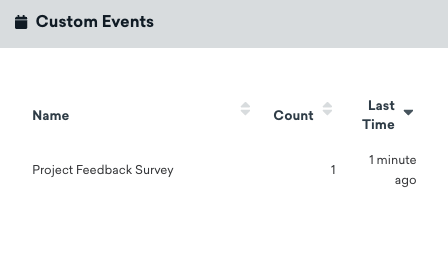
활성화하면 사용자가 양식을 작성할 때 커스텀 이벤트 데이터가 사용자 프로필에 기록됩니다.
모니터링 및 문제 해결
변환 모니터링 및 문제 해결에 대한 자세한 내용은 변환 모니터링 섹션을 참조하세요.