Segment for Currents
Segment is a customer data platform that helps you collect, clean, and activate your customer data. This reference article will give an overview of the connection between Braze Currents and Segment and describe requirements and processes for proper implementation and usage.
The Braze and Segment integration allows you to leverage Braze Currents to export your Braze events to Segment to drive deeper analytics into conversions, retention, and product usage.
Prerequisites
| Requirement | Description |
|---|---|
| Segment account | A Segment account is required to take advantage of this partnership. |
| Braze destination | You must have already set up Braze as a destination in your Segment integration. This includes providing the correct Braze data center and REST API key in your connection settings. |
| Currents | In order to export data back into Segment, you need to have Braze Currents set up for your account. |
Integration
Step 1: Obtain Segment write key
In your Segment dashboard, select your Segment source. Next, go to Settings > API keys. Here you will find the Segment Write Key.
It’s important to keep your Segment write key up to date. If your connector’s credentials expire, the connector will stop sending events. 이 상태가 5일 이상 지속되면 커넥터의 이벤트가 삭제되고 데이터가 영구적으로 손실됩니다.
Step 2: Create a new Currents connector
- In Braze, navigate to Partner Integrations > Data Export.
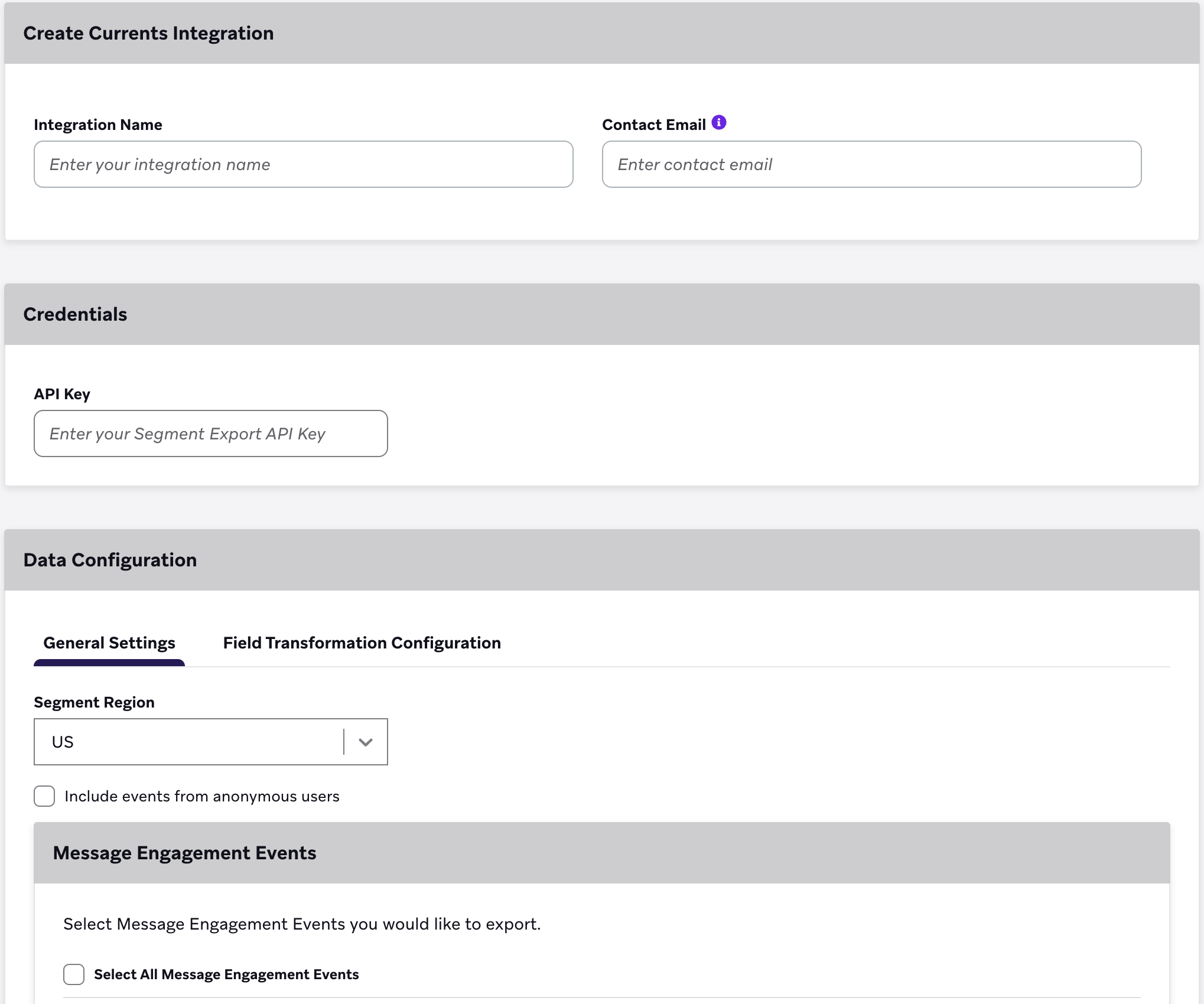
- Click + Create New Current > Segment Data Export.
- Next, provide an integration name, contact email, Segment write key, and Segment region.

3단계: Export message engagement events
Next, select the message engagement events you would like to export. Reference the following export events and properties table listed. All events sent to Segment will include the user’s external_user_id as the userId and the user’s braze_id as the anonymousId.
Keep in mind, Braze only sends event data for users without an external_user_id if Include events from anonymous users is checked.
Anonymous user export is currently in early access. Contact your Braze account manager if you’re interested in participating in the early access.
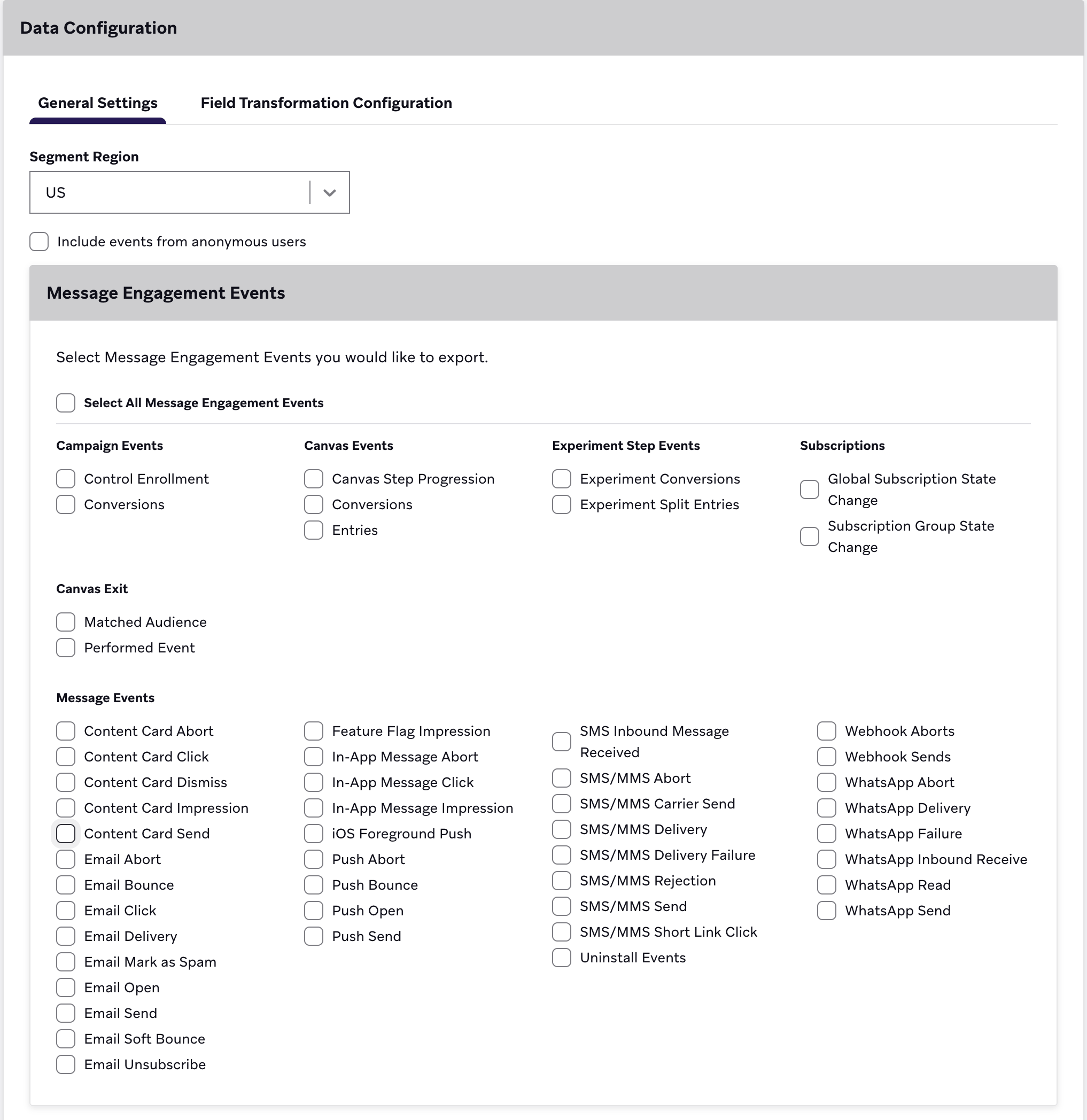
마지막으로, 현재 실행을 선택합니다.
If you intend to create more than one of the same Currents connectors (for example, two message engagement event connectors), they must be in different workspaces. Because the Braze Segment Currents integration cannot isolate events by different apps in a single workspace, failure to do this will lead to unnecessary data deduping and lost data.
To read more, visit Segment documentation.
Updating your Current
실행 후 커런츠 커넥터를 업데이트하려면 다음과 같이 하세요.
- Braze에서 파트너 통합 > 데이터 내보내기로 이동합니다.
- 목록에서 커런츠 커넥터를 찾습니다.
- 편집을 선택합니다.
- 변경 사항을 만드세요.
- 현재 업데이트를 선택합니다.
이렇게 해도 기존 내보내기가 중지되지 않으며 새 선택 항목에 따라 이벤트 전송이 시작됩니다.

변경 사항이 적용되려면 다소 시간이 걸릴 수 있습니다.
Supported Currents events
Braze supports exporting the following data listed in the Currents user behavior and message engagement event glossaries to Segment:
Behaviors
- Uninstall:
users.behaviors.Uninstall - Subscription (global state change):
users.behaviors.subscription.GlobalStateChange - Subscription group (state change):
users.behaviors.subscriptiongroup.StateChange
Campaigns
- Abort:
users_campaigns_abort - Conversion:
users.campaigns.Conversion - EnrollinControl:
users.campaigns.EnrollInControl
Canvas
- Abort:
users_canvas_abort - Conversion:
users.canvas.Conversion - Entry:
users.canvas.Entry - Exit (matched audience, performed event)
users.canvas.exit.MatchedAudienceusers.canvas.exit.PerformedEvent
- Experiment Step (conversion, split entry)
users.canvas.experimentstep.Conversionusers.canvas.experimentstep.SplitEntry
Messages
- Content Card (abort, click, dismiss, impression, send)
users.messages.contentcard.Abortusers.messages.contentcard.Clickusers.messages.contentcard.Dismissusers.messages.contentcard.Impressionusers.messages.contentcard.Send
- Email (abort, bounce, click, delivery, markasspam, open, send, softbounce, unsubscribe)
users.messages.email.Abortusers.messages.email.Bounceusers.messages.email.Clickusers.messages.email.Deliveryusers.messages.email.MarkAsSpamusers.messages.email.Openusers.messages.email.Sendusers.messages.email.SoftBounceusers.messages.email.Unsubscribe
- In-app message (abort, click, impression)
users.messages.inappmessage.Abortusers.messages.inappmessage.Clickusers.messages.inappmessage.Impression
- Push notification (abort, bounce, iOSforeground, open, send)
users.messages.pushnotification.Abortusers.messages.pushnotification.Bounceusers.messages.pushnotification.IosForegroundusers.messages.pushnotification.Openusers.messages.pushnotification.Send
- SMS (abort, carrier send, delivery, delivery failure, inbound receive, rejection, send, short link click)
users.messages.sms.Abortusers.messages.sms.Deliveryusers.messages.sms.DeliveryFailureusers.messages.sms.InboundReceiveusers.messages.sms.Rejectionusers.messages.sms.Sendusers.messages.sms.ShortLinkClick
- Webhook (abort, send)
users.messages.webhook.Abortusers.messages.webhook.Send
- WhatsApp (abort, delivery, failure, inbound receive, read, send)
users.messages.whatsapp.Abortusers.messages.whatsapp.Deliveryusers.messages.whatsapp.Failureusers.messages.whatsapp.InboundReceiveusers.messages.whatsapp.Readusers.messages.whatsapp.Send
GitHub 에서 이 페이지를 편집합니다.