MyPostcard
MyPostcard는 세계적인 엽서 앱으로, 다이렉트 메일 캠페인을 간편하게 실행할 수 있도록 지원하며, 고객과 원활하고 수익성 있는 방식으로 연결할 수 있는 방법을 제공합니다.
MyPostcard와 Braze 통합을 사용하여 고객에게 인쇄 우편물을 손쉽게 발송하세요.
필수 조건
| 요구 사항 | 설명 |
|---|---|
| MyPostcard B2B 계정 | 이 통합을 활용하려면 MyPostcard에 등록해야 합니다. |
| B2B API 키 및 자격 증명 | MyPostcard B2B 관리 도구에서 API 키와 자격 증명을 확인할 수 있습니다. |
| 승인된 MyPostcard B2B 캠페인 | 이 통합을 활용하려면 MyPostcard B2B 도구에서 인쇄 우편 캠페인을 설정해야 합니다. |
활용 사례
다이렉트 메일 캠페인을 한 단계 끌어올리려면 기존의 대량 우편 발송을 넘어 인쇄 우편을 워크플로에 원활하게 통합하는 것이 중요합니다. 이 접근 방식을 통해 이메일 뉴스레터 수신을 거부했거나 이메일이 스팸으로 표시된 특정 고객에게 도달할 수 있습니다. MyPostcard를 사용하면 Braze를 통해 인쇄 우편 캠페인을 손쉽게 발송할 수 있습니다.
- 기술 전문 지식 없이도 Braze에서 직관적인 워크플로를 구축하고, 인쇄 우편을 강력한 새 채널로 활용할 수 있습니다.
- 몇 가지 간단한 단계만으로 개인화된 인쇄 우편의 잠재력을 발휘할 수 있습니다.
- 전담 팀의 개인화된 지원을 바탕으로 간편한 구현의 이점을 누릴 수 있습니다.
통합
MyPostcard와 통합하려면 로그인하거나 가입한 후 첫 번째 캠페인을 생성하여 Braze 웹훅을 통해 사용하세요.
1단계: Braze 웹훅 템플릿 생성
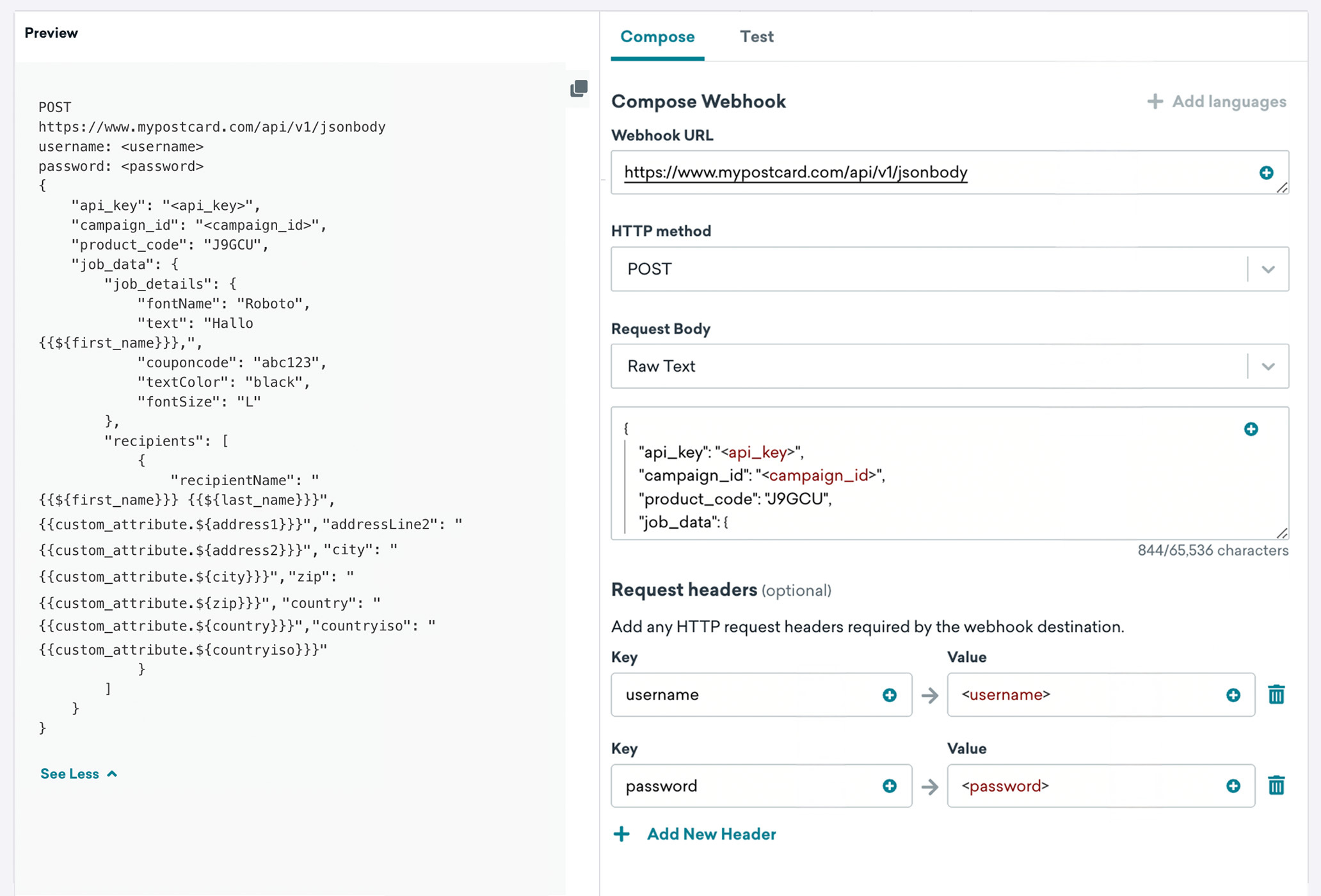
향후 Campaigns 또는 Canvases에서 사용할 MyPostcard 웹훅 템플릿을 생성하려면 Braze 플랫폼에서 콘텐츠 > 웹훅으로 이동하세요. 그런 다음 웹훅 템플릿 생성을 선택합니다.
일회성 MyPostcard 웹훅 캠페인을 생성하거나 기존 템플릿을 사용하려면, 새 캠페인을 생성할 때 Braze에서 Webhook을 선택하세요. 다음 필드를 작성합니다:
| 필드 | 설명 |
|---|---|
| Webhook URL | B2B 관리 도구에 표시된 웹훅 URL입니다. |
| Request Body | 원시 텍스트(B2B 관리 도구에서 확인할 수 있는 JSON 형식)입니다. |
요청 메서드 및 헤더
MyPostcard는 템플릿에 HTTP 메서드와 함께 다음 HTTP 헤더를 포함해야 합니다.
| 필드 | 세부 정보 |
|---|---|
| HTTP Method | POST |
| Username | {{ '<username>' }} |
| Password | {{ '<password>' }} |
| Content-Type | application/json |
요청 본문
B2B 관리 도구에 표시되는 요청 본문을 복사한 다음 Liquid 개인화 태그를 사용하여 입력 안내를 콘텐츠로 채웁니다.
2단계: 요청 미리보기
다음으로, 미리보기 패널에서 요청을 미리 보거나 테스트 탭으로 이동하여 무작위 사용자, 기존 사용자를 선택하거나 커스텀 사용자를 생성하여 웹훅을 테스트할 수 있습니다. 페이지를 떠나기 전에 템플릿을 저장하는 것을 잊지 마세요!
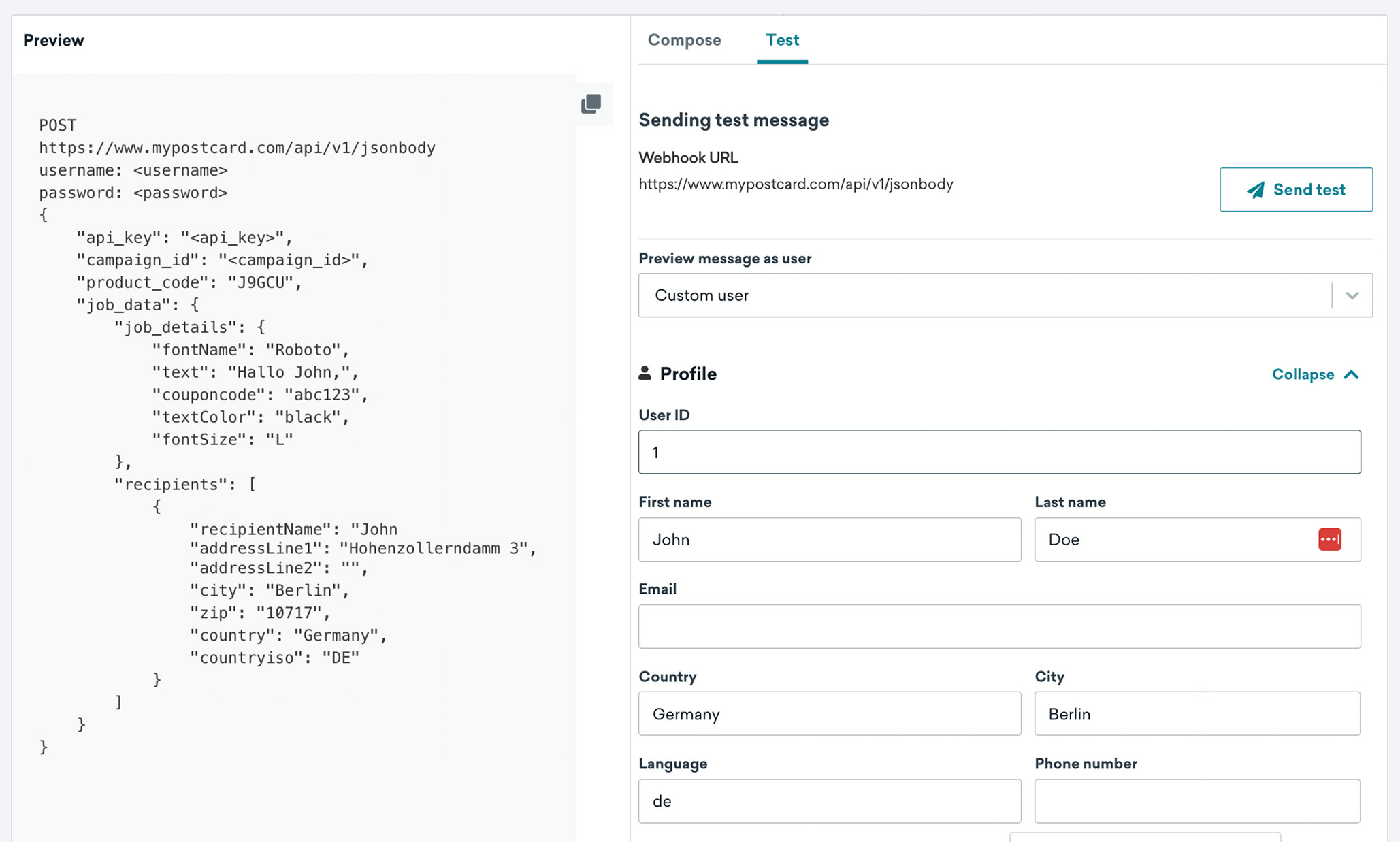

페이지를 떠나기 전에 템플릿을 저장하세요!
업데이트된 웹훅 템플릿은 새 웹훅 캠페인을 생성할 때 저장된 웹훅 템플릿 목록에서 확인할 수 있습니다.