Typeform
Typeformは、データやフィードバックなどを収集するための使いやすいツールです。
BrazeとTypeformを統合することで、以下のことが可能になります。
- Typeformの回答から収集したデータでBrazeのユーザープロファイルを更新する
- ユーザーのTypeformへのエンゲージメントに基づいてBrazeでメッセージングをトリガーする
- ユーザーのTypeformの回答に基づいてBrazeのメッセージをパーソナライズする
前提条件
| 必要条件 | 説明 |
|---|---|
| Typeformアカウント | このパートナーシップを利用するには、webhookにアクセスできるTypeformアカウントが必要です。 |
| Brazeデータ変換 | Typeformからデータを受信するには、データ変換URLが必要です。 |
統合
ステップ1: TypeformのWebhookを受け入れるようにBrazeデータ変換を設定する
Braze ダッシュボードで、[データ設定] > [データ変換] に移動します。
[変換を作成] を選択して変換に名前を付け、編集エクスペリエンスを選択します。
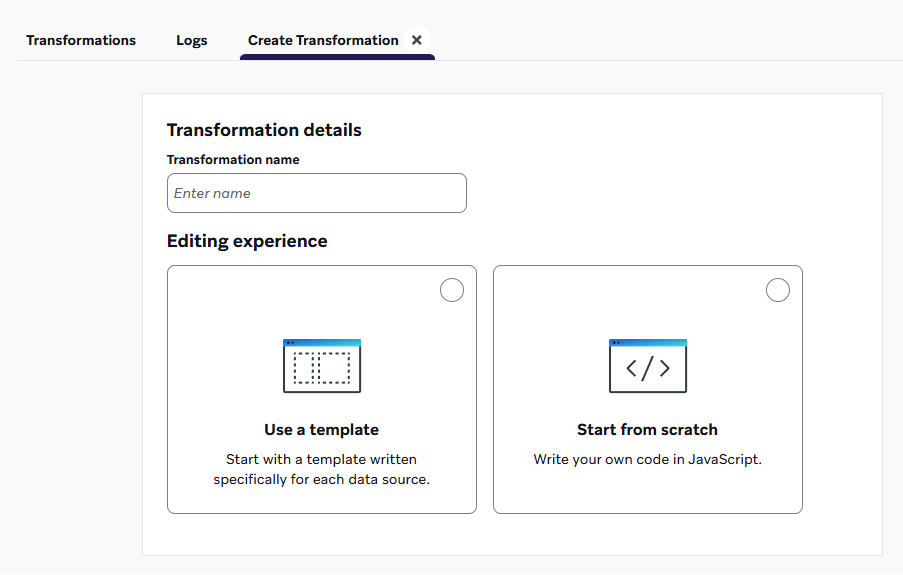
データ変換のユースケースを含むテンプレート・ライブラリを参照するには、[テンプレートの使用] を選択します。または、”Start from scratch “を選択してデフォルトのコードテンプレートを読み込む。
ゼロから作成するのであれば、変換先を選択します。テンプレートライブラリからコードテンプレートを挿入することもできます。
More on destinations
- POST: ユーザーを追跡:ソースプラットフォームからのWebhookを、属性、イベント、購入などのユーザープロファイル更新に変換する。
- PUT: 複数のカタログ項目を更新する:ソースプラットフォームからのWebhookをカタログアイテムの更新に変換する。
- DELETE: 複数のカタログ項目を削除する:ソースプラットフォームからのWebhookをカタログアイテムの削除に変換する。
- PATCH:複数のカタログ項目を編集する:ソースプラットフォームからのWebhookをカタログアイテムの編集に変換する。
- POST: APIのみでメッセージを即座に送信する:ソースプラットフォームからのWebhookを変換し、指定したユーザーに即座にメッセージを送信する。

追加のテンプレートや送信先をご希望ですか?製品フィードバックを残すことを検討してください。
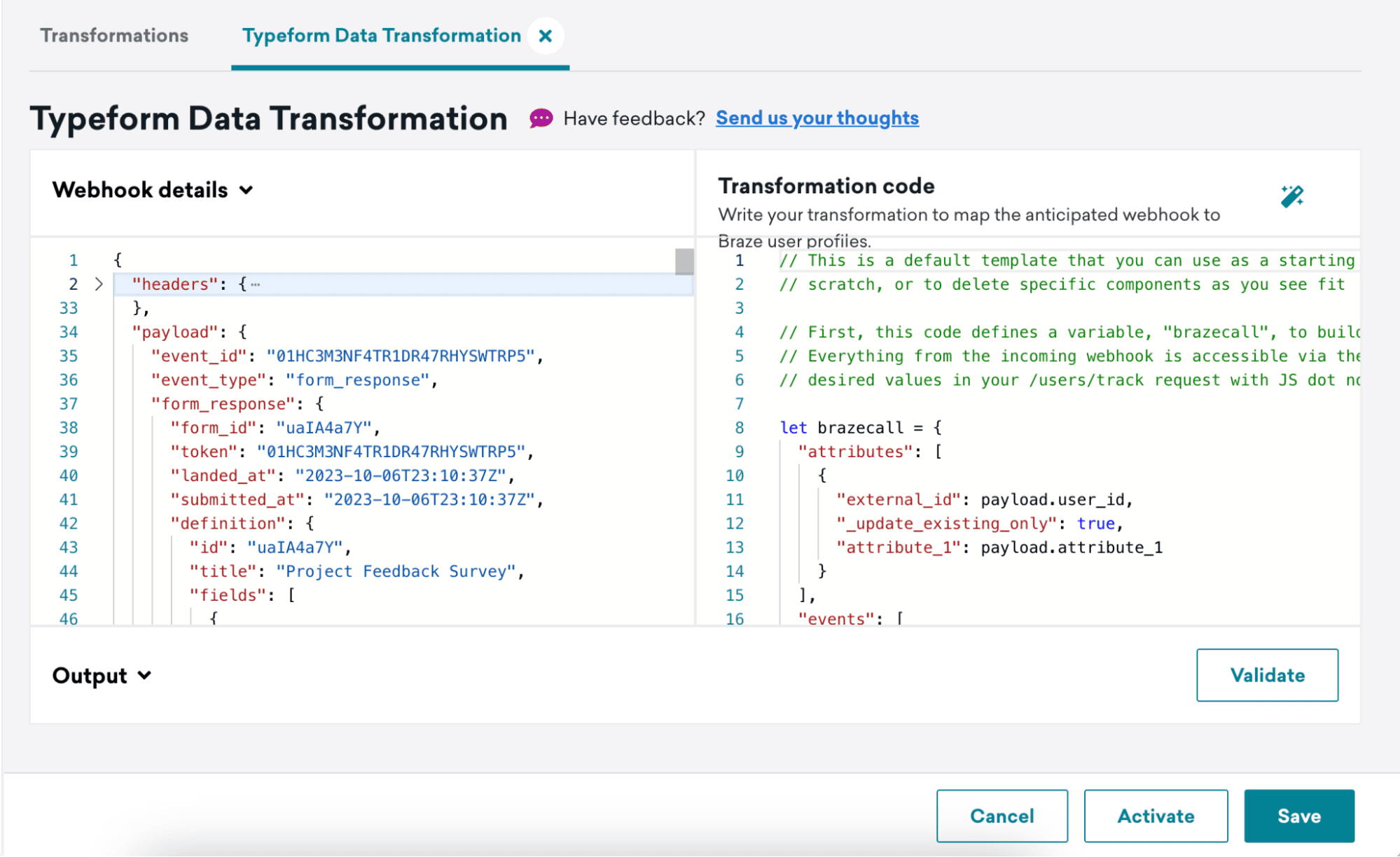
変換を作成すると、変換の詳細ビューが表示されます。ここでは、[Webhook の詳細] の下にこの変換に対して受信した最新の Webhook が表示され、[変換コード] の下に変換コードを記述するスペースが表示されます。
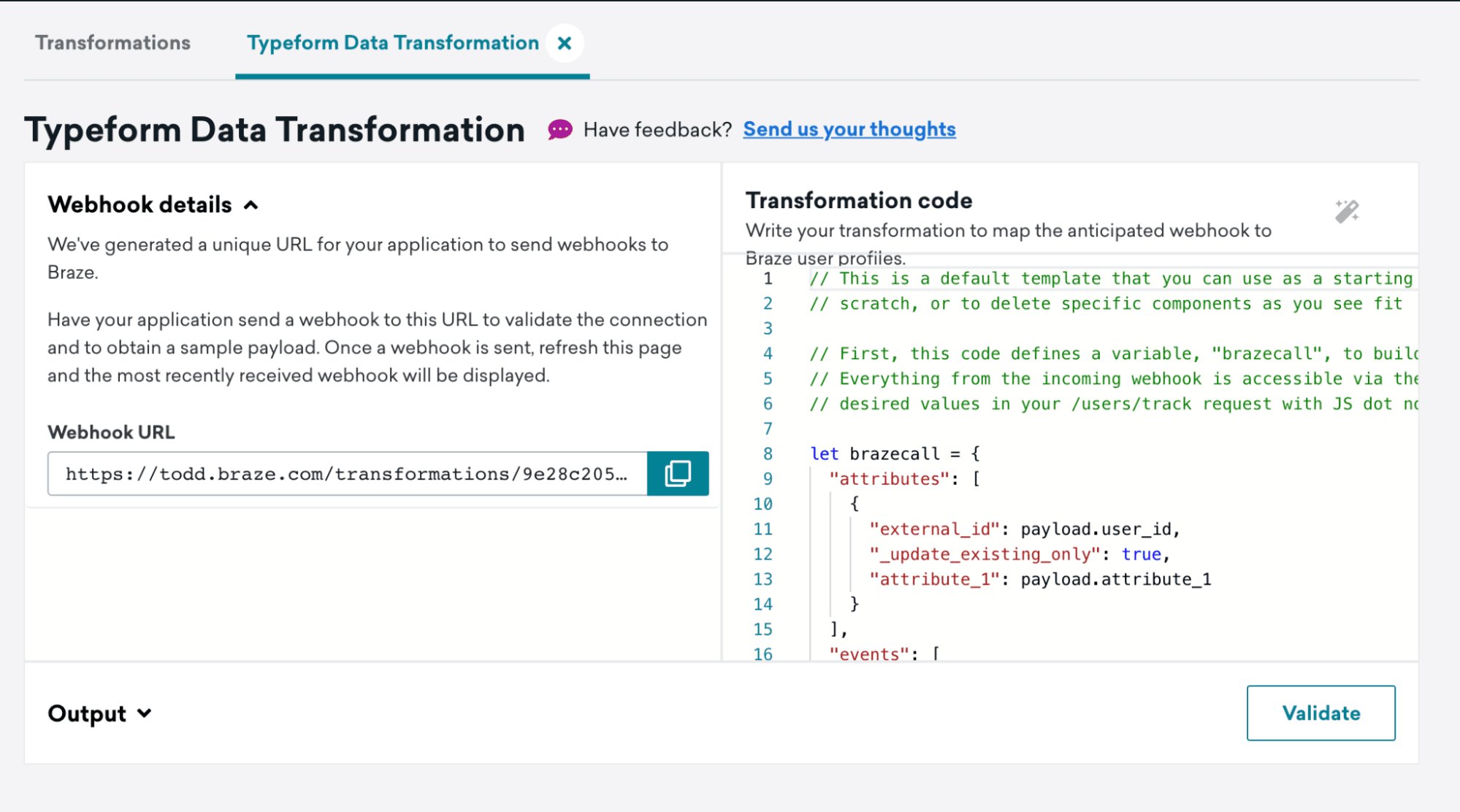
次のステップで使用するWebhook URLをキャプチャする。
ステップ2: TypeformのWebhookを設定する
TypeformのWebhookドキュメントの手順に従ってWebhookを設定します。
ステップ4で、Destination URLとしてデータ変換のWebhook URLを追加します。
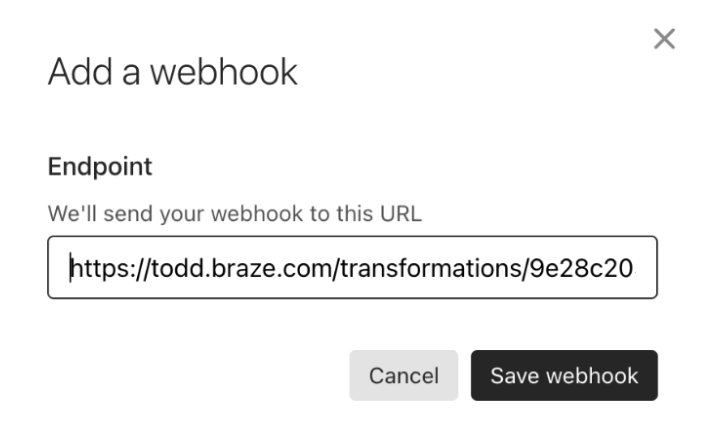
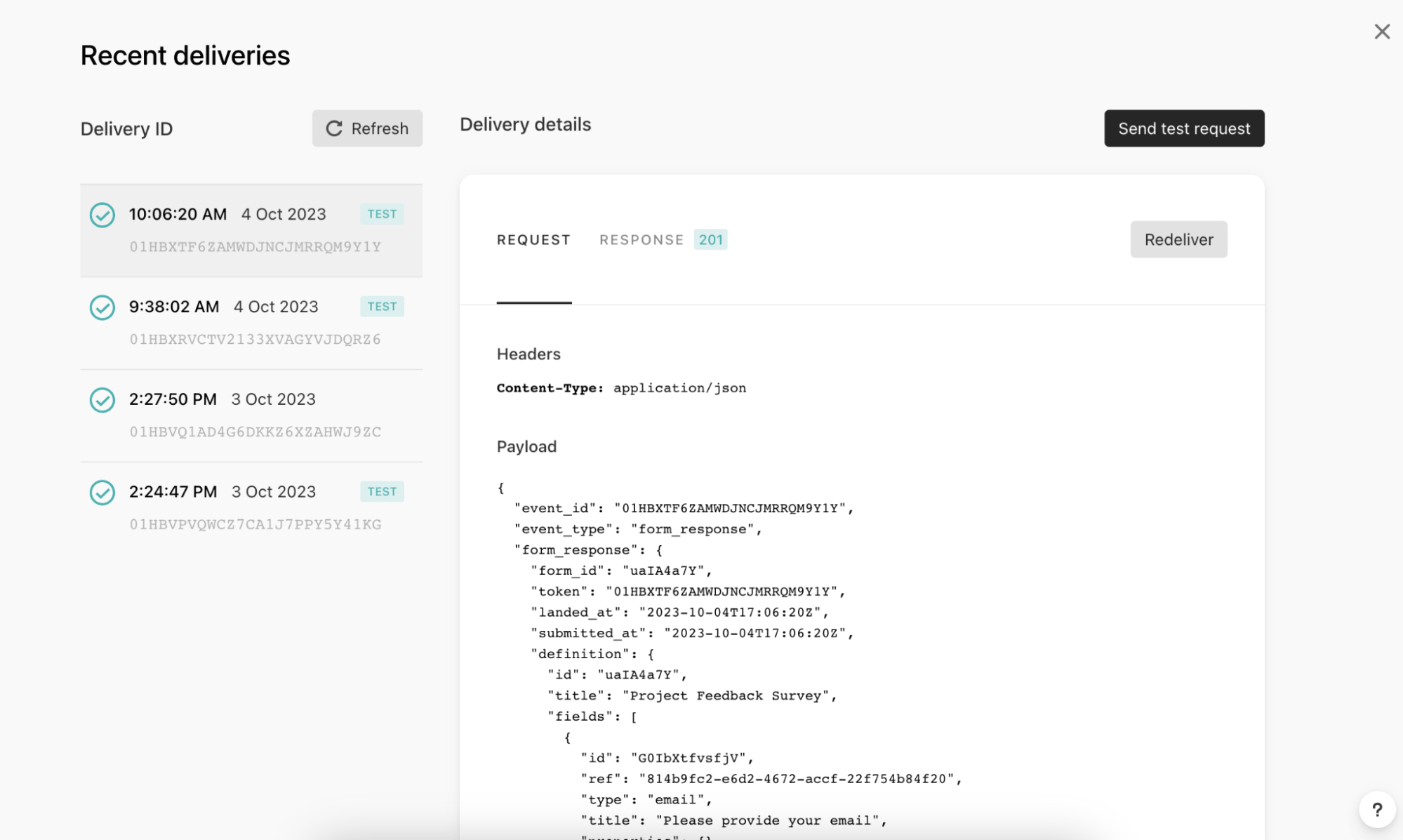
View deliveriesをクリックし、次にSend test requestをクリックして、データ変換にテストイベントを送信します。
ステップ3: 選択したTypeformイベントを受け入れる変換コードを書く
このステップでは、Typeformから送信されるWebhookペイロードをJavaScriptオブジェクトの戻り値に変換します。
- データ変換を更新し、Webhook DetailsにTypeformのテストペイロードが表示されていることを確認します。
- 選択したTypeformイベントをサポートするようにデータ変換コードを更新します。
- Validateをクリックして、コード出力のプレビューを返し、受け入れ可能な
/users/trackリクエストであるかどうかを確認します。 - データ変換を保存して有効化します。
リクエスト本文の形式
この戻り値は、Brazeの/users/trackリクエスト本文の形式に準拠する必要があります。
- 変換コードはJavaScriptプログラミング言語で記述します。if/elseロジックなど、標準的なJavaScript制御フローがすべてサポートされています。
- 変換コードは、payload変数を通じてWebhookリクエスト本文にアクセスします。この変数は、リクエスト本文のJSONを解析して生成されたオブジェクトです。
/users/trackエンドポイントでサポートされるすべての機能がサポートされています。以下が含まれます。- ユーザー属性オブジェクト、イベントオブジェクト、購入オブジェクト
- ネストされた属性とネストされたカスタムイベントプロパティ
- サブスクリプショングループの更新
- 識別子としてのメールアドレス
TypeformのWebhookペイロードの例
1
2
3
4
5
6
7
8
9
10
11
12
13
14
15
16
17
18
19
20
21
22
23
24
25
26
27
28
29
30
31
32
33
34
35
36
37
38
39
40
41
42
43
44
45
46
47
48
49
50
51
52
53
54
55
56
57
58
59
60
61
62
63
64
65
66
67
68
69
70
71
72
73
74
75
76
77
78
79
80
81
82
83
84
85
86
87
88
89
90
91
92
93
94
95
96
97
98
99
100
101
102
103
104
105
106
107
108
109
110
111
112
113
114
115
116
117
118
119
120
121
122
123
124
125
126
127
128
129
130
131
132
133
134
135
136
137
138
139
140
141
142
143
144
145
146
147
148
149
150
151
152
153
154
155
156
157
158
159
160
161
162
163
164
165
166
167
168
169
170
171
172
173
174
175
176
177
178
179
180
181
182
183
184
185
186
187
188
189
190
191
192
193
194
195
196
197
198
199
200
201
202
203
204
205
206
207
208
209
210
211
212
213
214
215
216
217
218
219
220
221
222
223
224
225
226
227
228
229
230
231
232
233
234
235
236
237
238
239
240
241
242
243
244
245
246
247
248
249
250
251
Content-Type: application/json

{
  "event_id": "01HC3PTZN05GJWT0QDXXB2QV8F",
  "event_type": "form_response",
  "form_response": {
    "form_id": "uaIA4a7Y",
    "token": "7pctqdoqxg41to97pctqdibhqn6hqvto",
    "landed_at": "2023-10-06T23:57:52Z",
    "submitted_at": "2023-10-06T23:58:18Z",
    "hidden": {
		"user_id": "hidden_value"
    },
    "definition": {
      "id": "uaIA4a7Y",
      "title": "Project Feedback Survey",
      "fields": [
        {
          "id": "G0IbXtfvsfjV",
          "ref": "814b9fc2-e6d2-4672-accf-22f754b84f20",
          "type": "email",
          "title": "Please provide your email",
          "properties": {}
        },
        {
          "id": "lg82q3t0rK03",
          "ref": "e1503b62-0241-4269-9902-5c539abf305e",
          "type": "short_text",
          "title": "What was your role in the project?",
          "properties": {}
        },
        {
          "id": "UXftY0tSmuDV",
          "ref": "5b839dbb-566b-47de-a47e-b0914d9ccf7c",
          "type": "opinion_scale",
          "title": "How would you rate the overall performance of the team?",
          "properties": {}
        },
        {
          "id": "fE17bXVUEB4E",
          "ref": "fd6be99d-1ed1-4a4d-b811-f6ecdd8fa9b6",
          "type": "yes_no",
          "title": "Did the project meet its intended outcomes?",
          "properties": {}
        },
        {
          "id": "NmVOQFuI0vv9",
          "ref": "cd2b4176-db9a-49bb-a918-4463720bbc79",
          "type": "multiple_choice",
          "title": "Which area of the project do you think went well?",
          "properties": {},
          "choices": [
            {
              "id": "RvV3LaMEQ2eK",
              "ref": "2d5e0913-afe9-491c-b31c-0648dd397d56",
              "label": "Communication"
            },
            {
              "id": "7iXmfpPMeQvz",
              "ref": "7a7749d2-5cd6-4bf7-9726-65c7ab11ec83",
              "label": "Planning"
            },
            {
              "id": "1No85DZlvP6f",
              "ref": "d7b7304a-776b-4630-8bee-7dc7ef9c9404",
              "label": "Execution"
            },
            {
              "id": "ruMnsZWjyalW",
              "ref": "41dc926a-85af-4625-8a61-725fda35afda",
              "label": "Problem Solving"
            },
            {
              "id": "CexnFN3roprG",
              "ref": "cfdd2da4-8c57-4ff1-b4c0-1a5262e2ff84",
              "label": "Other"
            }
          ]
        },
        {
          "id": "ZJop9pvoObzk",
          "ref": "ce903cda-7e27-4b4c-9fa8-0623c47c61b4",
          "type": "multiple_choice",
          "title": "Which area of the project do you think could be improved?",
          "properties": {},
          "choices": [
            {
              "id": "YQLArFf0Wks5",
              "ref": "09fa30c7-7bdc-4753-971e-0d922638d023",
              "label": "Communication"
            },
            {
              "id": "iGjaELgfnChw",
              "ref": "61820c89-3426-464d-b031-c06de5125fd5",
              "label": "Planning"
            },
            {
              "id": "2EyI5tozFxro",
              "ref": "c35f71b2-2a6d-4488-a1ba-87c2e711ce19",
              "label": "Execution"
            },
            {
              "id": "VGtsIHBLAhME",
              "ref": "6c171a9a-9324-4f7d-adb9-290bd701efe9",
              "label": "Problem Solving"
            },
            {
              "id": "lVdV7MIL1anS",
              "ref": "faba551f-4e6b-4377-9f74-11ca4fcc8ed5",
              "label": "Other"
            }
          ]
        },
        {
          "id": "hcCNsLUHGXgv",
          "ref": "d1ae8537-0d5a-4ca8-bb6b-f8057f04d7e2",
          "type": "opinion_scale",
          "title": "How satisfied were you with the level of communication during the project?",
          "properties": {}
        },
        {
          "id": "dBqPlgeKejN2",
          "ref": "e2c884c1-0d92-4f18-9833-79dff0b3eef2",
          "type": "nps",
          "title": "How likely are you to recommend Braze for customer engagement services?",
          "properties": {}
        },
        {
          "id": "vLdpFmCmulF5",
          "ref": "a86e48ec-6d10-49fc-ac03-4ac1aad4bfec",
          "type": "dropdown",
          "title": "In which country was the project executed?",
          "properties": {}
        }
      ],
      "endings": [
        {
          "id": "LUpVm67y72vb",
          "ref": "30c03bdf-80b3-45f5-8307-df8ca49046b1",
          "title": "Thank you for taking the time to complete our survey!",
          "type": "thankyou_screen",
          "properties": {
            "button_text": "Create a typeform",
            "show_button": true,
            "share_icons": true,
            "button_mode": "default_redirect"
          }
        }
      ]
    },
    "answers": [
      {
        "type": "email",
        "email": "[email protected]",
        "field": {
          "id": "G0IbXtfvsfjV",
          "type": "email",
          "ref": "814b9fc2-e6d2-4672-accf-22f754b84f20"
        }
      },
      {
        "type": "text",
        "text": "Project",
        "field": {
          "id": "lg82q3t0rK03",
          "type": "short_text",
          "ref": "e1503b62-0241-4269-9902-5c539abf305e"
        }
      },
      {
        "type": "number",
        "number": 9,
        "field": {
          "id": "UXftY0tSmuDV",
          "type": "opinion_scale",
          "ref": "5b839dbb-566b-47de-a47e-b0914d9ccf7c"
        }
      },
      {
        "type": "boolean",
        "boolean": true,
        "field": {
          "id": "fE17bXVUEB4E",
          "type": "yes_no",
          "ref": "fd6be99d-1ed1-4a4d-b811-f6ecdd8fa9b6"
        }
      },
      {
        "type": "choice",
        "choice": {
          "id": "ruMnsZWjyalW",
          "label": "Problem Solving",
          "ref": "41dc926a-85af-4625-8a61-725fda35afda"
        },
        "field": {
          "id": "NmVOQFuI0vv9",
          "type": "multiple_choice",
          "ref": "cd2b4176-db9a-49bb-a918-4463720bbc79"
        }
      },
      {
        "type": "choice",
        "choice": {
          "id": "lVdV7MIL1anS",
          "label": "Other",
          "ref": "faba551f-4e6b-4377-9f74-11ca4fcc8ed5"
        },
        "field": {
          "id": "ZJop9pvoObzk",
          "type": "multiple_choice",
          "ref": "ce903cda-7e27-4b4c-9fa8-0623c47c61b4"
        }
      },
      {
        "type": "number",
        "number": 8,
        "field": {
          "id": "hcCNsLUHGXgv",
          "type": "opinion_scale",
          "ref": "d1ae8537-0d5a-4ca8-bb6b-f8057f04d7e2"
        }
      },
      {
        "type": "number",
        "number": 6,
        "field": {
          "id": "dBqPlgeKejN2",
          "type": "nps",
          "ref": "e2c884c1-0d92-4f18-9833-79dff0b3eef2"
        }
      },
      {
        "type": "choice",
        "choice": {
          "id": "KESjdqLseWmC",
          "label": "Brazil",
          "ref": "250210d9-33f6-4734-8ec6-06005a8ef66d"
        },
        "field": {
          "id": "vLdpFmCmulF5",
          "type": "dropdown",
          "ref": "a86e48ec-6d10-49fc-ac03-4ac1aad4bfec"
        }
      }
    ],
    "ending": {
      "id": "LUpVm67y72vb",
      "ref": "30c03bdf-80b3-45f5-8307-df8ca49046b1"
    }
  }
}
データ変換のユースケース
以下は、TypeformのWebhookペイロードの例を使用して作成したテンプレートの例です。これらのテンプレートは出発点として使用できます。ゼロから作成するか、必要に応じて特定のコンポーネントを削除することができます。
これらのテンプレート例では、Brazeプロファイルにカスタムイベントを記録しています。Typeformのタイトルがカスタムイベント名として渡され、Typeformの結果がイベントプロパティとして渡されます。これらのテンプレート例では、TypeformのCalendly、File Upload、Paymentの質問タイプは考慮されていません。
ユースケース: 識別子としてのメール
このテンプレート例では、メールアドレス(Typeform内のメールアドレスの質問から取得)を識別子として使用しています。
メールアドレスを識別子として使用する場合は、/users/trackエンドポイントのよくある質問を参照して、期待される動作の詳細を確認してください。
/* In the Typeform webhook payload each question is stored as a “title” within each object of the “fields” array. Our code defines a “title” variable where we store the value of each field title. */
const titles = payload.form_response.definition.fields.map(field => field.title);

/* The answers array is saved to a “tfAnswers” variable so this can be iterated through */
const tfAnswers = payload.form_response.answers;

/* The value of a response will change based on the type of question, to account for this we have created a function that iterates through the answers, determines what the answer type is and then, based on the type, adds the associated response to an extractedValues array. */
const extractValues = (tfAnswers) => {
	const extractedValues = [];

	tfAnswers.forEach((tfAnswer) => {
		let result = null;

		if (tfAnswer.type === 'choices') {
			if (tfAnswer.choices) {
				// Multiple choices
				let labels = tfAnswer.choices.labels || [];
				if (tfAnswer.choices.other) {
					labels.push(tfAnswer.choices.other);
				}
				result = labels;
			}
		} else if (tfAnswer.type === 'choice' && Object.keys(tfAnswer.choice).length > 1) {
			// Single choice
			result = tfAnswer.choice && tfAnswer.choice.other ?
				tfAnswer.choice.other.toString() :
				tfAnswer.choice.label.toString();
		} else if (tfAnswer.type === 'dropdown') {
			// Dropdown
			result = tfAnswer.text;
		} else {
			// For other types, use the type-specific value
			result = tfAnswer[tfAnswer.type];
		}

		extractedValues.push(result);
	});

	return extractedValues;
};

/* We use the above defined function, passing it the “tfAnswers” variable that holds the answers portion of the Typeform webhook payload and save the output to a ”values” variable */
const values = extractValues(tfAnswers);

/* Finally, the values within the previously assigned “titles” variable and “values” variable are paired together in an object as the values to a “question” key and “answer” key in a “responses” array of objects variable. */
const results = titles.map((title, index) => {
	return {
		question: title,
		answer: values[index],
	};
});

/* The code defines a variable, "brazecall", to build a /users/track request. Within the request, the typeform title is populated as the event name, and our “results” variable (where all of our question/answer pairs are stored), is assigned as the event’s properties. */
let brazecall = {
	"events": [{
		"email": payload.form_response.answers.find(answer => answer.type === 'email').email,
		"name": payload.form_response.definition.title,
		"time": new Date().toISOString(),
		"properties": {
			"responses": results
		}
	}]
};

// After the /users/track request is assigned to brazecall, you will want to explicitly return “brazecall” to create an output
return brazecall;
1
2
3
4
5
6
7
8
9
10
11
12
13
14
15
16
17
18
19
20
21
22
23
24
25
26
27
28
29
30
31
32
33
34
35
36
37
38
39
40
41
42
43
44
45
46
47
48
49
50
51
52
53
{
  "events": [
    {
      "email": "[email protected]",
      "name": "Project Feedback Survey",
      "time": "2023-10-17T18:21:39.527Z",
      "properties": {
        "responses": [
          {
            "question": "Please provide your email",
            "answer": "[email protected]"
          },
          {
            "question": "What was your role in the project?",
            "answer": "Lorem ipsum dolor"
          },
          {
            "question": "How would you rate the overall performance of the team?",
            "answer": 5
          },
          {
            "question": "Did the project meet its intended outcomes?",
            "answer": true
          },
          {
            "question": "If you answered \"No\" to the previous question, please explain why. If you answered \"Yes\", skip this question.",
            "answer": "Lorem ipsum dolor"
          },
          {
            "question": "Which area of the project do you think went well?",
            "answer": "Communication"
          },
          {
            "question": "Which area of the project do you think could be improved?",
            "answer": "Communication"
          },
          {
            "question": "How satisfied were you with the level of communication during the project?",
            "answer": 5
          },
          {
            "question": "How likely are you to recommend Braze for customer engagement services?",
            "answer": 5
          },
          {
            "question": "In which country was the project executed?",
            "answer": "United States"
          }
        ]
      }
    }
  ]
}
ユースケース: 隠しフィールドで渡された識別子を使用する
Typeformの隠しフィールドを使用して、Typeformの回答でこの情報を渡すことなく、TypeformのWebhookペイロードにユーザーのIDなどのデータを含めることができます。
このテンプレート例では、「user_id」隠しフィールドを使用し、これを/users/trackリクエストペイロードにexternal_idとして渡しています。ここでは「user_id」を使用していますが、必要に応じてフィールドを変更できます。
/* In the Typeform webhook payload each question is stored as a “title” within each object of the “fields” array. Our code defines a “title” variable where we store the value of each field title. */
const titles = payload.form_response.definition.fields.map(field => field.title);

/* The answers array is saved to a “tfAnswers” variable so this can be iterated through */
const tfAnswers = payload.form_response.answers;

/* The value of a response will change based on the type of question, to account for this we have created a function that iterates through the answers, determines what the answer type is and then, based on the type, adds the associated response to an extractedValues array. */
const extractValues = (tfAnswers) => {
	const extractedValues = [];

	tfAnswers.forEach((tfAnswer) => {
		let result = null;

		if (tfAnswer.type === 'choices') {
			if (tfAnswer.choices) {
				// Multiple choices
				let labels = tfAnswer.choices.labels || [];
				if (tfAnswer.choices.other) {
					labels.push(tfAnswer.choices.other);
				}
				result = labels;
			}
		} else if (tfAnswer.type === 'choice' && Object.keys(tfAnswer.choice).length > 1) {
			// Single choice
			result = tfAnswer.choice && tfAnswer.choice.other ?
				tfAnswer.choice.other.toString() :
				tfAnswer.choice.label.toString();
		} else if (tfAnswer.type === 'dropdown') {
			// Dropdown
			result = tfAnswer.text;
		} else {
			// For other types, use the type-specific value
			result = tfAnswer[tfAnswer.type];
		}

		extractedValues.push(result);
	});

	return extractedValues;
};

/* We use the above defined function, passing it the “tfAnswers” variable that holds the answers portion of the Typeform webhook payload and save the output to a ”values” variable */
const values = extractValues(tfAnswers);

/* Finally, the values within the previously assigned “titles” variable and “values” variable are paired together in an object as the values to a “question” key and “answer” key in a “responses” array of objects variable. */
const results = titles.map((title, index) => {
	return {
		question: title,
		answer: values[index],
	};
});

/* The code defines a variable, "brazecall", to build a /users/track request. Within the request, the typeform title is populated as the event name, and our “results” variable (where all of our question/answer pairs are stored), is assigned as the event’s properties. */
let brazecall = {
	"events": [{
		"external_id": payload.form_response.hidden.user_id,
		"name": payload.form_response.definition.title,
		"time": new Date().toISOString(),
		"properties": {
			"responses": results
		}
	}]
};

// After the /users/track request is assigned to brazecall, you will want to explicitly return “brazecall” to create an output
return brazecall;
1
2
3
4
5
6
7
8
9
10
11
12
13
14
15
16
17
18
19
20
21
22
23
24
25
26
27
28
29
30
31
32
33
34
35
36
37
38
39
40
41
42
43
44
45
46
47
48
49
50
51
52
53
{
  "events": [
    {
      "external_id": "hidden_value",
      "name": "Project Feedback Survey",
      "time": "2023-10-17T18:27:22.209Z",
      "properties": {
        "responses": [
          {
            "question": "Please provide your email",
            "answer": "[email protected]"
          },
          {
            "question": "What was your role in the project?",
            "answer": "Lorem ipsum dolor"
          },
          {
            "question": "How would you rate the overall performance of the team?",
            "answer": 5
          },
          {
            "question": "Did the project meet its intended outcomes?",
            "answer": true
          },
          {
            "question": "If you answered \"No\" to the previous question, please explain why. If you answered \"Yes\", skip this question.",
            "answer": "Lorem ipsum dolor"
          },
          {
            "question": "Which area of the project do you think went well?",
            "answer": "Communication"
          },
          {
            "question": "Which area of the project do you think could be improved?",
            "answer": "Communication"
          },
          {
            "question": "How satisfied were you with the level of communication during the project?",
            "answer": 5
          },
          {
            "question": "How likely are you to recommend Braze for customer engagement services?",
            "answer": 5
          },
          {
            "question": "In which country was the project executed?",
            "answer": "United States"
          }
        ]
      }
    }
  ]
}
ステップ4: TypeformのWebhookを公開する
データ変換の作成が完了したら、Validateをクリックしてデータ変換コードが正しくフォーマットされており、期待通りに動作することを確認します。その後、データ変換を保存してアクティブ化します。
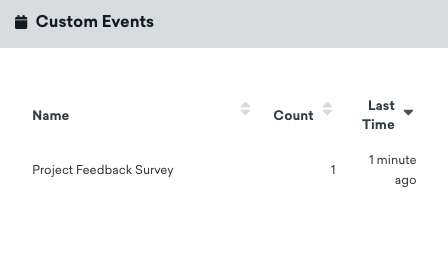
アクティブ化すると、ユーザーがフォームへの入力を完了した際にカスタムイベントデータがユーザーのプロファイルに記録されます。
モニタリングとトラブルシューティング
変換のモニタリングとトラブルシューティングの詳細については、「変換のモニタリング」セクションを参照してください。