SalesWings
SalesWings는 B2B SaaS 영업 및 마케팅 운영 솔루션으로, 전체적인 리드 스코어링 및 등급을 통해 리드 및 계정 자격을 관리하고 영업 인사이트 및 알림, B2B 기여도 보고와 함께 긴밀한 Salesforce CRM 통합을 제공합니다. Digioh와 유사한 웹사이트 참여 애드온을 통해 웹사이트에서 리드를 생성할 수 있습니다. Canvas와 세분화에서 개인화를 위해 Braze 내부의 관심사와 참여를 활용할 수 있습니다.
이 통합은 SalesWings에서 유지 관리합니다.
통합 소개
SalesWings를 사용하면 마케팅 팀과 마케팅 운영 매니저가 영업 팀을 위해 리드와 계정을 검증할 수 있으며, 이는 영업과 마케팅의 정렬 및 운영 효율성에 필수적입니다. 또한 SalesWings는 Braze와 함께 리드 및 계정의 전체 고객 여정과 Braze 마케팅 Campaign 참여 데이터를 영업 담당자에게 보여줄 수 있어, 보다 교육적인 대화를 통해 리드 검증 전환율을 높일 수 있습니다. SalesWings는 다른 신호와 함께 필요와 관심사를 식별하여 자격을 갖춘 구매자를 CRM 내부의 영업 팀에 자동화된 방식으로 전달할 수 있습니다. 식별된 니즈, 관심사, 판매 준비도를 Braze 사용자 속성으로 사용하여 개인화 및 세분화에 활용할 수 있습니다.
필수 조건
| 요구 사항 | 설명 |
|---|---|
| SalesWings 계정 | 이 파트너십을 활용하려면 SalesWings 계정이 필요합니다. |
| Braze REST API 키 | users.export.ids 권한이 있는 Braze REST API 키(SalesWings 인사이트 푸시 기능을 사용하는 경우 users.track도 필요). Braze 대시보드의 설정 > API 키에서 생성할 수 있습니다. |
| Braze REST 엔드포인트 | REST 엔드포인트 URL. 엔드포인트는 인스턴스의 Braze URL에 따라 달라집니다. |
| Segment.com 계정(선택 사항) | Segment.com 사용자인 경우 리드 프로파일링을 위해 Segment.com을 통해 모든 리드 참여 및 프로필 데이터와 식별 이벤트를 전송할 수 있습니다. |
사용 사례
SalesWings는 Braze 고객에게 최첨단 리드 스코어링 및 리드 등급 기능을 통해 리드, 연락처, 계정을 유연하게 검증하는 방법을 제공합니다. 모든 리드 검증 데이터는 Salesforce CRM 및 리드, 연락처, 계정, 기회를 관리하고 보고하려는 기타 시스템에 기본적으로 푸시됩니다.
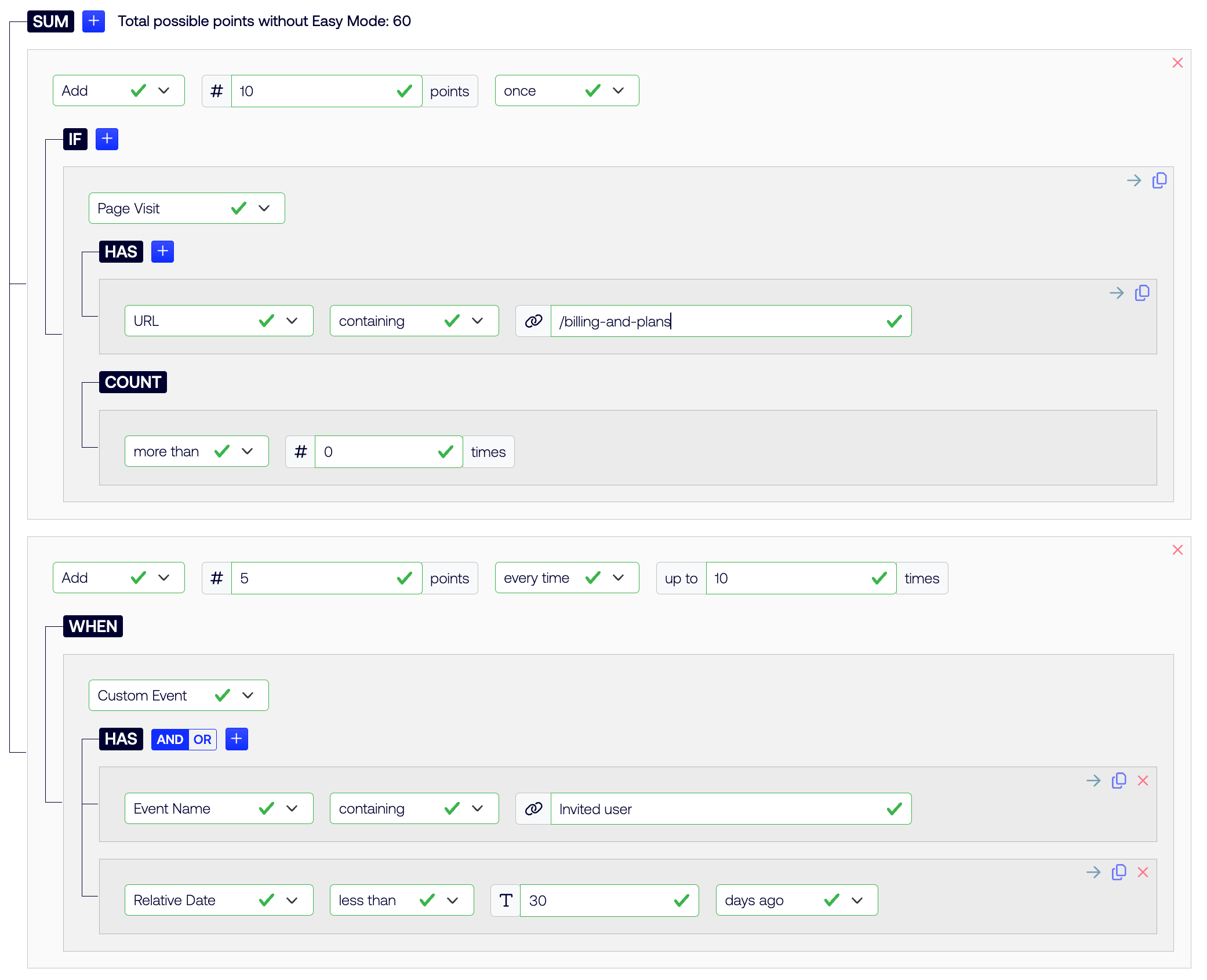
SalesWings의 간단한 코드 없는 클릭 리드 스코어링 모델 예시
SalesWings를 사용하면 마케팅 팀이 마케팅 검증 리드를 추적, 검증하고 영업 팀에 전달할 수 있습니다. 모든 SalesWings 데이터는 Salesforce에 기본적으로 푸시되며, 기존 프로세스를 미세 조정하거나 목록, 보고서, 플로우 등을 통해 새로운 프로세스를 생성하는 데 활용할 수 있습니다.
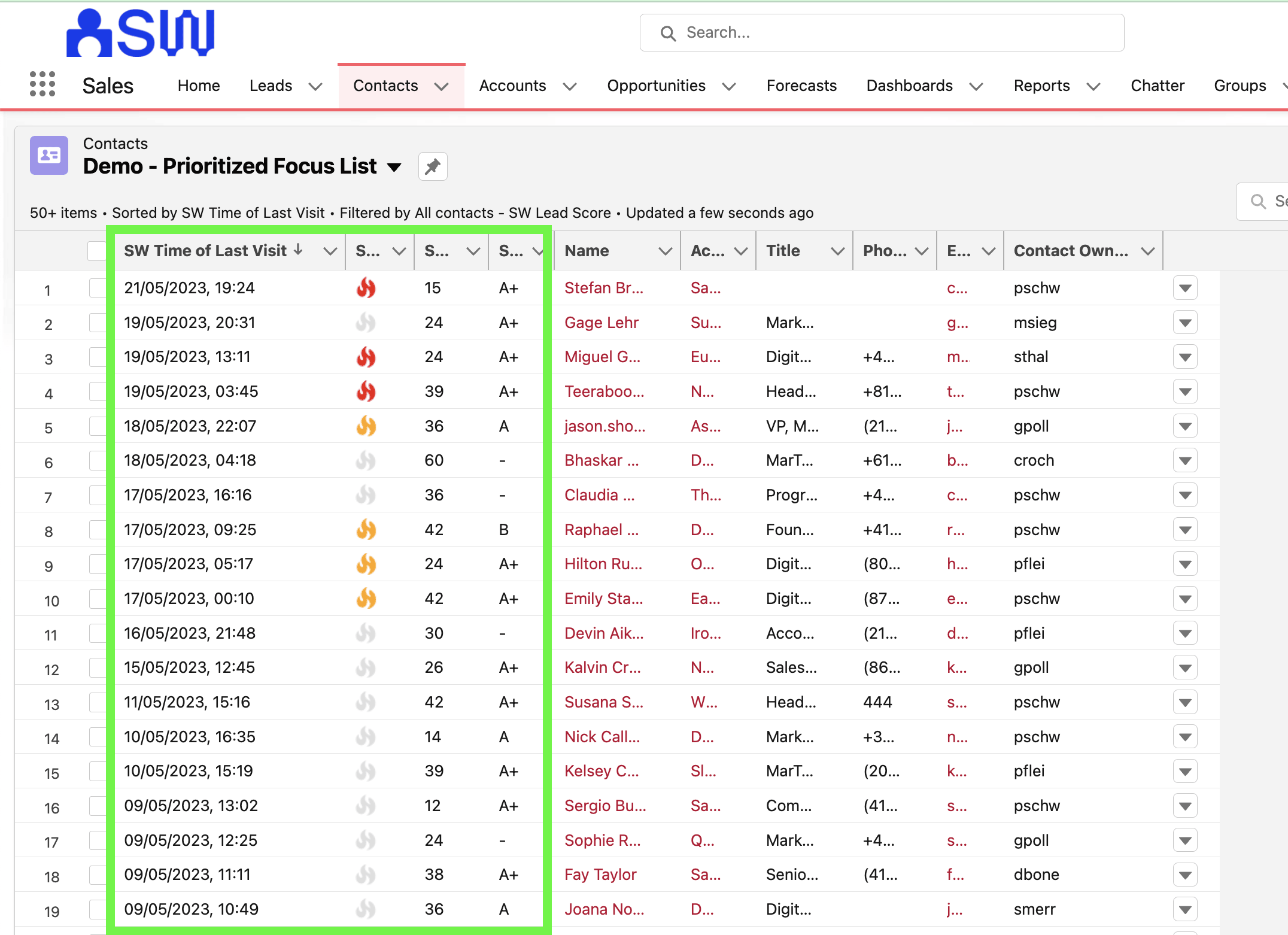
SalesWings 리드 스코어링이 Salesforce 내에서 기본적으로 리드 또는 연락처 목록의 우선순위를 정하는 방법의 예시
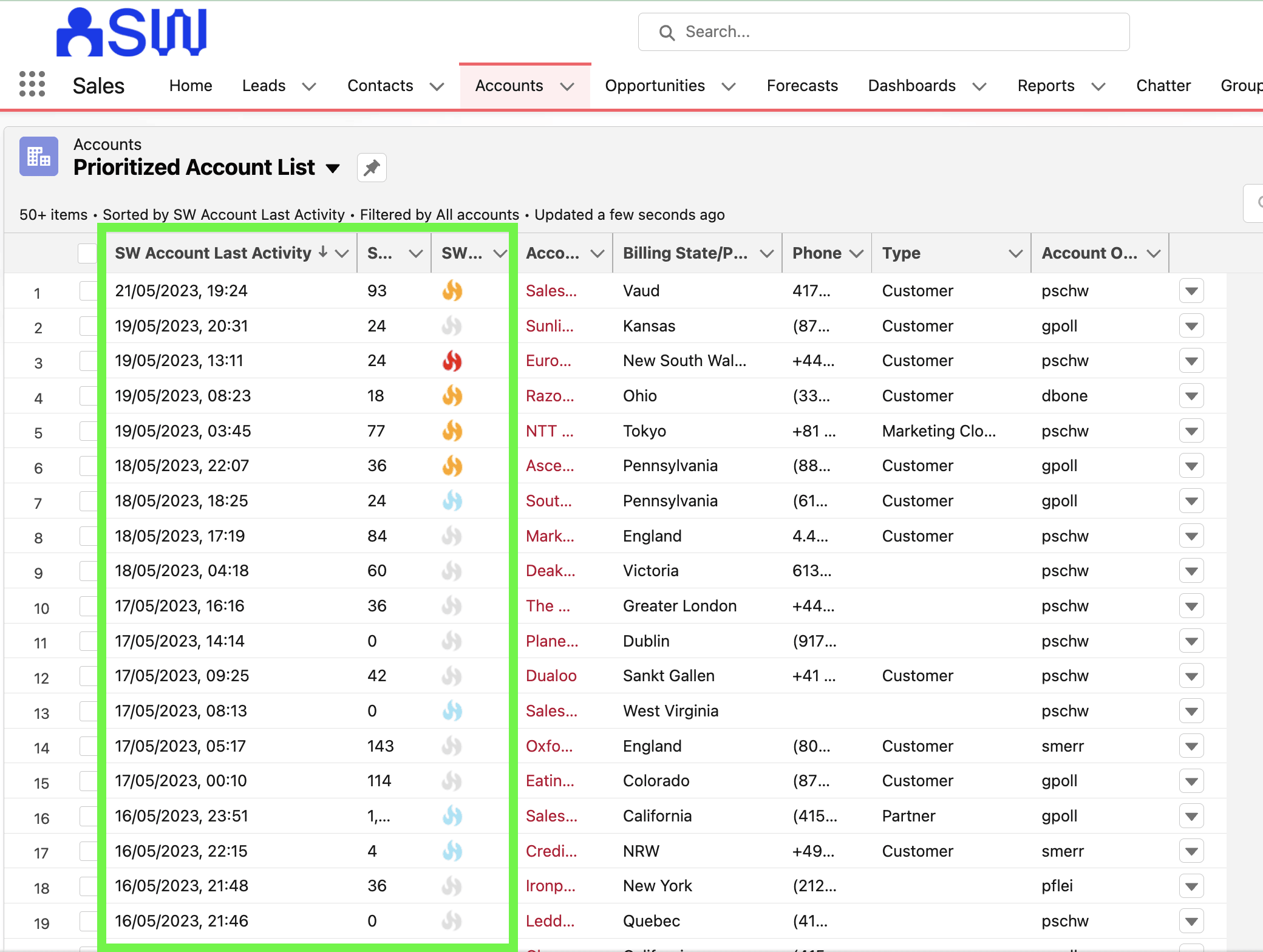
SalesWings 리드 스코어링이 Salesforce 내에서 기본적으로 계정 목록의 우선순위를 정하는 방법의 예시
SalesWings를 사용하면 Braze 고객이 프로필 데이터(일반적으로 CRM 데이터)를 기반으로 리드와 계정을 검증할 수 있습니다. 이를 “리드 등급”, “적합도 스코어링” 또는 “기업 통계 스코어링”이라고도 합니다. Braze 고객은 속성 데이터를 SalesWings에 직접 전송할 수 있으며, SalesWings는 전체적인 프로필 스코어링을 위해 Salesforce CRM의 표준 또는 커스텀 오브젝트 데이터와 레코드를 읽을 수 있습니다.
SalesWings를 사용하면 영업 담당자에게 리드, 연락처, 계정에 대한 영업 인사이트를 보여줄 수 있습니다(Marketo Sales Insights 대안). 기본적으로 모든 Braze 및 웹 참여 데이터를 영업 팀에 표시할 수 있습니다. 인사이트는 Salesforce CRM에 기본적으로 내장되어 있으며, 다른 CRM이나 시스템으로 푸시하거나 Braze 이메일을 통해 “영업 알림”으로 전송할 수 있습니다.
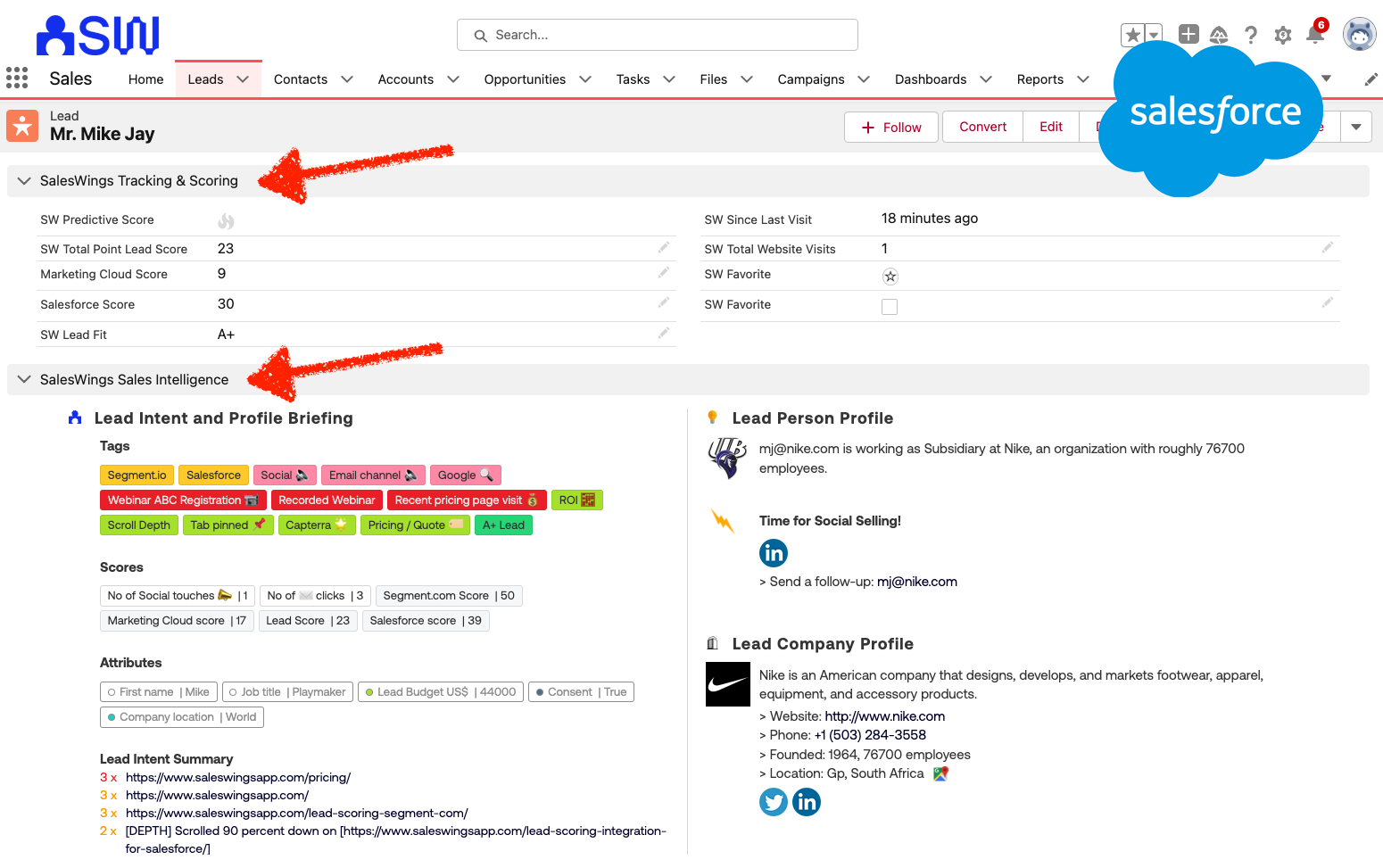
Salesforce 내 영업 담당자를 위한 영업 인사이트 보기의 예(다른 고객 관계 관리 시스템에서도 사용 가능)
SalesWings는 기본 이메일 및 Slack 알림을 제공하며, Salesforce에서 영업 팀이 일간, 주간, 월간 이메일 보고서를 받을 수 있도록 보고서 구독을 설정할 수 있습니다. 또한 Zapier 통합을 통해 SalesWings 리드 검증 데이터를 기반으로 추가 워크플로를 구축할 수 있습니다.
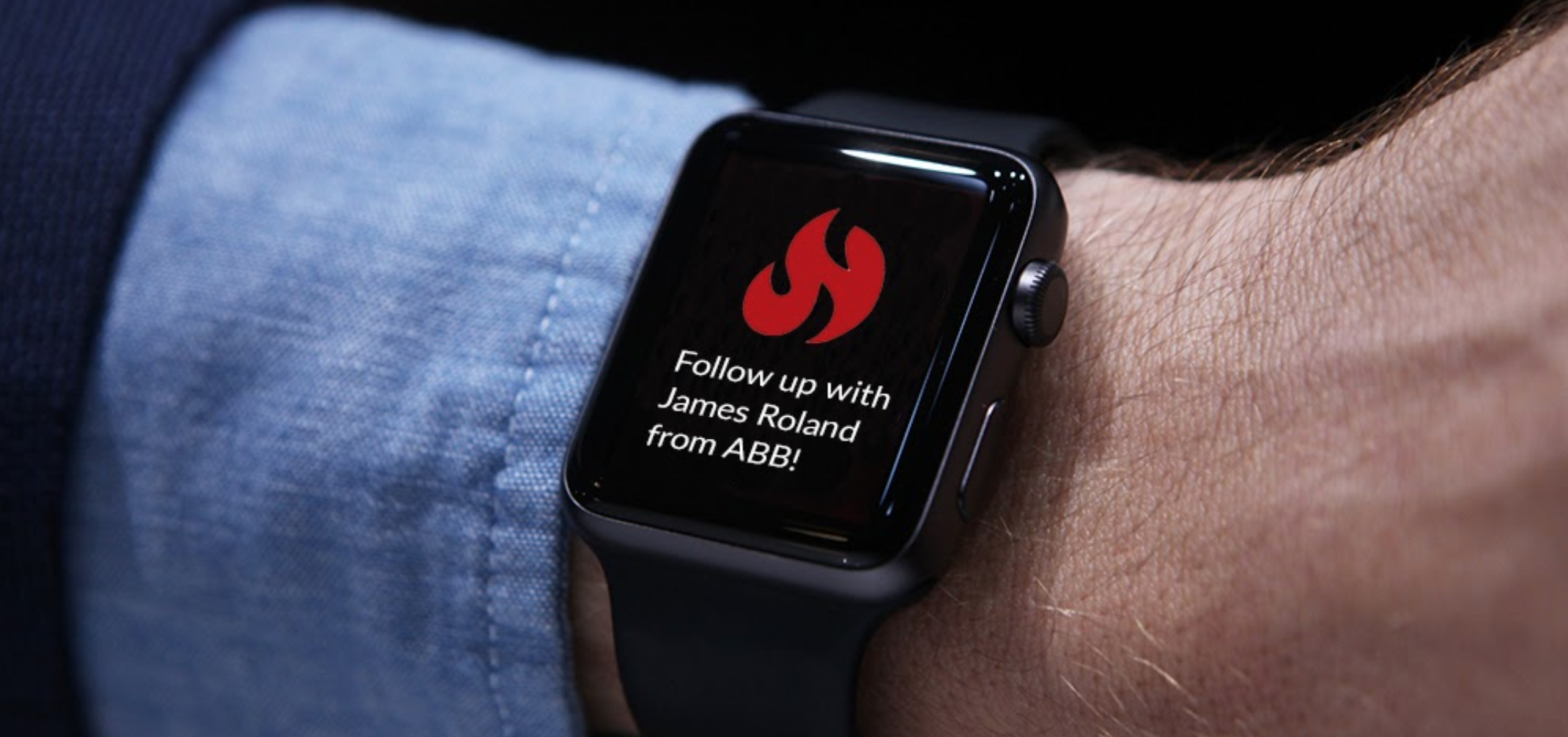
Slack 채널을 통한 영업 알림 예시
SalesWings와 Salesforce의 기본 통합을 통해 웹 참여 데이터와 기본 Braze 커런츠 통합을 사용한 모든 Braze Campaign 참여를 기반으로 리드, 연락처, 계정, 기회에 대한 자동화된 보고를 구축할 수 있습니다. 예를 들어, 특정 이메일 Campaign을 클릭하거나 앱 또는 웹사이트에서 특정 동작을 수행한 모든 사람이 포함된 핫 리드 목록을 영업 팀에 표시할 수 있습니다.
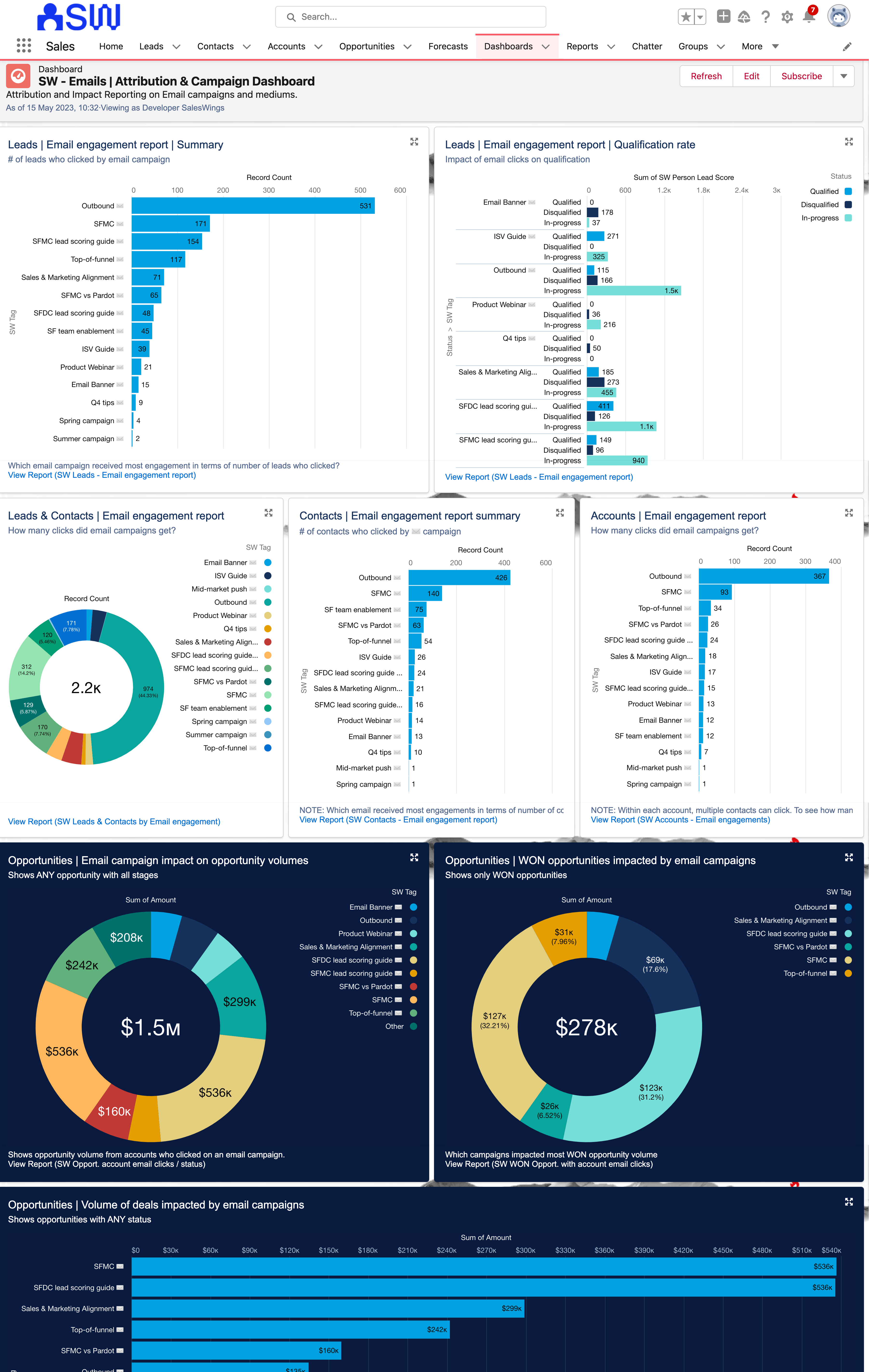
영업 결과 및 성과에 대한 Braze Campaign의 영향을 살펴보는 Salesforce 내 이메일 및 마케팅 참여에 연결된 대시보드의 예
통합
1단계: SalesWings 계정 및 구성
SalesWings에 대해 자세히 알아보려면 친절한 SalesWings 팀과 데모를 예약하세요.
2단계: 웹사이트 또는 앱에 행동 추적 설치
리드 및 계정 스코어링, 구매자 의도 식별, 영업 인사이트를 위해 SalesWings에서 행동 데이터를 수집하는 방법은 여러 가지가 있습니다:
- 리드를 추적하고 식별하려는 웹사이트와 앱에 SalesWings 추적 JavaScript를 배포합니다
- Braze Currents를 통해 이벤트 속성정보와 함께 Braze 이벤트를 SalesWings에 수집합니다
- SalesWings와 Segment 통합을 통해 행동 리드 활동 데이터(및 리드 프로필 데이터)를 전송합니다
- 서드파티 솔루션에서 SalesWings API로 직접 데이터를 전송합니다
3단계: SalesWings를 Braze에 연결
SalesWings 통합 페이지로 이동하여 Braze Integration 섹션을 확장합니다.
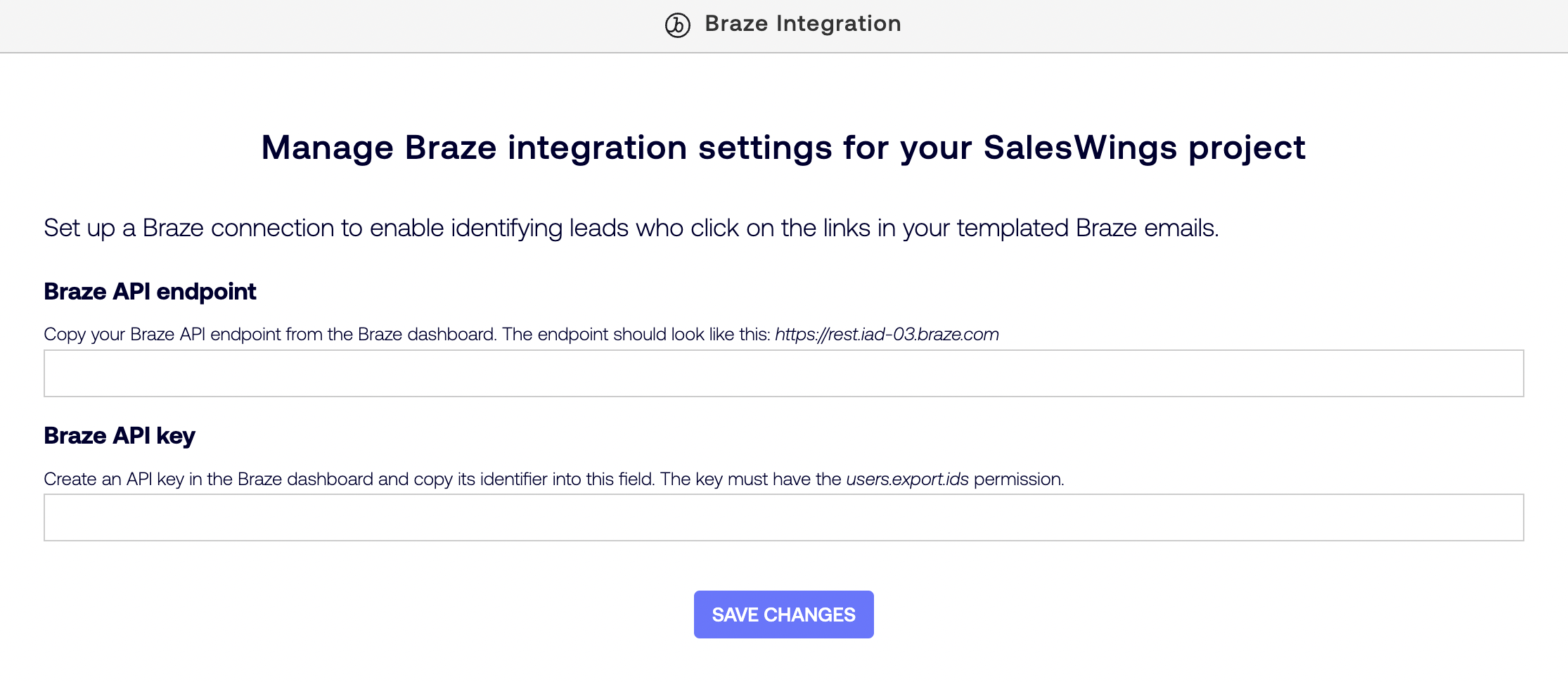
새로 생성된 키의 Identifier 열 값을 복사하여 SalesWings Braze Integration 섹션의 Braze API key 필드에 붙여넣습니다.
API 및 SDK 엔드포인트 문서에 설명된 대로 Braze API 엔드포인트를 추가하고 Braze API endpoint 필드에 입력합니다. REST Endpoint 열의 값을 복사하여 SalesWings Braze Integration 섹션의 Braze API endpoint 필드에 입력합니다.
그런 다음 Save를 선택합니다.
4단계: SalesWings 인사이트 푸시를 Braze에 활성화(선택 사항)
세분화, 개인화 또는 Canvas 여정 오케스트레이션을 위해 Braze 고객 프로필에서 SalesWings 인사이트를 사용하려면 SalesWings 통합 페이지를 방문하여 Braze Integration 섹션을 확장하세요.
SalesWings-to-Braze insights data push 아래에서 Start data push를 클릭합니다.
5단계: SalesWings로의 커스텀 Currents 내보내기 설정(선택 사항)
행동 인텔리전스, 리드 및 계정 스코어링, 영업 인사이트 생성 또는 CRM에서 보고서를 생성하기 위해 사용자 행동 및 메시지 참여 이벤트를 사용하려면 SalesWings 통합 페이지로 이동하여 Braze Integration 섹션을 확장합니다.
Generate an API token to setup a Custom Currents Export 아래에서 Generate를 선택합니다.
그런 다음 새 Current를 생성하고 Current 유형으로 Custom Currents Export를 선택합니다.
Current 생성 양식의 Credentials 섹션에서 SalesWings 통합 페이지에서 생성한 API 토큰을 Bearer Token에 입력하고, Endpoint에 https://helium.saleswings.pro/api/braze/currents/events를 입력합니다.
6단계: Braze, CRM 통합 등을 위한 SalesWings 리드 및 계정 스코어링 구성
전체 온보딩 지원을 받으려면 웹사이트를 통해 SalesWings 서비스 팀에 문의하세요.
이 통합 사용하기
행동 데이터 및 기타 데이터를 리드와 계정에 연결하려면 SalesWings가 웹사이트나 앱에서 또는 서드파티 통합을 통해 사용자를 식별해야 합니다. 이는 다음과 같은 방법으로 수행할 수 있습니다:
- 양식 제출: 사용자가 웹 양식을 제출하면 SalesWings가 모든 웹 양식 유형(로그인, 다운로드, 문의하기 등)을 자동으로 식별하고 양식을 제출할 때 사용자의 신원을 확인합니다.
- Braze ID 또는 외부 ID가 포함된 URL 클릭: 사용자가 Braze 마케팅 동작(일반적으로 이메일 클릭, 배너 클릭 등)을 클릭하여 SalesWings로 추적 중인 페이지로 이동합니다.
- Braze Currents 이벤트(선택 사항): SalesWings로의 커스텀 Currents 내보내기가 구성된 경우, SalesWings는 Current로 이벤트가 전송된 이메일이 있는 모든 Braze 사용자에 대해 식별된 프로필을 생성합니다.
- Gmail 및 Outlook 플러그인을 통한 영업 이메일 추적(선택 사항): 영업 담당자에게 이메일 추적 플러그인을 제공하기로 결정한 경우, 추적 가능한 링크를 전송하여 사용자의 전체 웹사이트 추적을 트리거할 수 있습니다.
- Segment.com 식별 이벤트(선택 사항): Segment.com 사용자인 경우 Segment.com 통합으로 사용자의 신원을 확인할 수도 있습니다.
URL 클릭으로 사용자 식별
사용자가 추적 가능한 URL(예: 이메일 대량 발송, URL이 포함된 배너)을 클릭할 때 자동으로 사용자를 식별할 수 있습니다. URL을 추적 가능하게 만들려면 이메일, 배너 또는 SMS에서 링크 끝에 매개변수와 ID를 추가하여 웹사이트 URL을 수정하는 두 가지 방법이 있습니다.
?braze_id=뒤에{{${braze_id}}}를 추가- 링크 예시:
https://www.your-website.com?braze_id={{${braze_id}}}
- 링크 예시:
?br_user_id=뒤에{{${user_id}}}를 추가- 링크 예시:
https://www.client-website.com?br_user_id={{${user_id}}}
- 링크 예시:
braze_id 변수는 Braze에서 생성한 사용자 식별자로 설정되며 항상 사용할 수 있습니다. br_user_id 변수는 시스템에서의 사용자 식별자로 설정되며 특정 시나리오(예: Braze SDK에서 생성한 익명 사용자)에서는 누락될 수 있습니다. 링크에 braze_id와 br_user_id를 모두 사용하는 경우 SalesWings는 braze_id 매개변수만 고려합니다.
SalesWings 인사이트를 Braze에 푸시하기
SalesWings 인사이트 푸시를 Braze에 활성화하면 SalesWings는 다음과 같은 커스텀 속성으로 Braze 고객 프로필을 업데이트합니다:
| 커스텀 속성 | 유형 | 설명 |
|---|---|---|
sw_favorite |
부울 | 리드가 SalesWings 또는 Salesforce CRM에서 즐겨찾기로 표시되었는지 여부 |
sw_last_active_at |
날짜 | 웹사이트에서 리드가 마지막으로 활동한 시점 |
sw_lead_link_open |
문자열 | SalesWings의 리드 프로필에 액세스하는 링크(SalesWings 대시보드 계정 없이) |
sw_lead_link_protected |
문자열 | SalesWings의 리드 프로필에 액세스하는 링크(SalesWings 대시보드 계정 포함) |
sw_lead_owner |
문자열 | SalesWings 또는 Salesforce CRM에서 리드에 대해 설정된 소유자 |
sw_lead_score |
플로트 | SalesWings 규칙 엔진에 구성된 기본 SalesWings 리드 점수의 값 |
sw_predictive_score |
문자열 | 추적된 활동의 수와 최근성을 기반으로 리드의 참여를 평가하는 SalesWings 예측 점수의 값. 가능한 값은 HOT, WARM, NORMAL, COLD 또는 FROZEN |
sw_salesforce_record_id |
문자열 | Salesforce CRM에 있는 리드 또는 연락처 레코드의 ID |
sw_salesforce_record_url |
문자열 | Salesforce CRM에서 리드 또는 연락처 레코드의 URL |
sw_session_count |
정수 | 이 리드에 대해 웹사이트에서 추적된 세션 수 |
sw_tags |
문자열 배열 | SalesWings가 식별한 고객의 니즈와 관심사로, “태그”로 표시됩니다. 이 리드에 적용되는 SalesWings 규칙 엔진에 구성된 SalesWings 태그의 이름 |
| 추가 리드 점수 속성 | 플로트 | SalesWings 규칙 엔진에서 구성된 추가 리드 점수마다 하나의 커스텀 속성이 추가됩니다. 속성 이름은 SalesWings 점수 이름에서 파생되며, 예를 들어 Likeliness to meet라는 이름의 점수는 커스텀 속성 sw_likeliness_to_meet으로 전송됩니다. 시스템에서 점수를 생성한 후 이름을 변경하면 SalesWings는 초기 커스텀 속성 이름과 계속 동기화됩니다. |
푸시를 활성화하면 SalesWings 리드 프로필의 기본 데이터 포인트가 변경되는 즉시 SalesWings가 커스텀 속성을 Braze에 전송하기 시작하며, 새로운 업데이트가 없더라도 기존 리드를 모두 점진적으로 동기화합니다.
SalesWings는 SalesWings 리드 프로필 이메일 주소와 일치하는 이메일을 가진 모든 Braze 사용자를 업데이트합니다. Braze에 일치하는 사용자가 없는 경우 SalesWings는 새 사용자를 생성하지 않습니다.
CRM에서 Braze Currents 이벤트 사용
Braze Current를 SalesWings에 연결하면 SalesWings는 이메일이 있는 모든 Braze 사용자에 대해 식별된 리드 프로필을 생성하고 지원되는 Braze 이벤트를 리드 활동으로 기록합니다. CRM에서 모든 데이터는 리드의 계정 수준에서 자동으로 집계될 수 있습니다. 기록된 활동과 데이터는 SalesWings 추적 스크립트 또는 Segment.com으로 수집된 행동 데이터와 추가로 결합하거나, SalesWings API로 다른 데이터를 전송하여 리드 및 계정 관리 프로세스를 위한 잠재 고객의 니즈와 판매 준비도를 식별하는 데 사용할 수 있습니다.
다음 표는 SalesWings에서 지원하는 Braze 이벤트 유형과 SalesWings 리드 활동 기록 및 규칙 엔진에서의 표현을 보여줍니다:
| 이벤트 카테고리 | 이벤트 유형 | SalesWings에서의 이벤트 이름 |
|---|---|---|
| Canvas 이벤트 | 진입 | [Nurturing] Added by marketing team onto the journey $canvas_name |
| 고객 행동 이벤트 | 커스텀 이벤트 | [Custom Event tracked] $name |
| 고객 행동 이벤트 | 첫 번째 세션 | [User Action] Today marks the user's first session |
| 고객 행동 이벤트 | 설치 경로 | [User Action] User installed app from $source |
| 고객 행동 이벤트 | 구매 이벤트 | [Purchase] Customer purchased $product_id for $price $currency |
| 메시지 이벤트 | 콘텐츠 카드 클릭 | [Content Card engagement] Clicked on $campaign_name content card |
| 메시지 이벤트 | 이메일 반송 | [Alerting or negative] Email hard-bounced. This person's email appears to be no longer valid |
| 메시지 이벤트 | 이메일 클릭 | [Email campaign engagement] Clicked in email $campaign_name on $url |
| 메시지 이벤트 | 이메일 전달 | [Nurturing] Received email $campaign_name |
| 메시지 이벤트 | 이메일 열기 | [Email campaign engagement] Opened email $campaign_name |
| 메시지 이벤트 | 이메일 구독 취소 | [Subscription status change] Unsubscribed from $campaign_name |
| 메시지 이벤트 | 인앱 메시지 클릭 | [In-app campaign engagement] Clicked on message $campaign_name |
| 메시지 이벤트 | 푸시 열기 | [Push notification engagement] Clicked on notification $campaign_name |
| 메시지 이벤트 | SMS/MMS 인바운드 수신 | [SMS/mobile campaign engagement] We received a message from this person to our internal number $inbound_phone_number: $message_body |
| 메시지 이벤트 | SMS/MMS 짧은 링크 클릭 | [SMS/mobile campaign engagement] Clicked on $short_url |
| 메시지 이벤트 | WhatsApp 인바운드 수신 | [WhatsApp engagement] We received a message from this person to our WhatsApp number $inbound_phone_number: $message_body |
| 메시지 이벤트 | WhatsApp 읽음 | [WhatsApp engagement] Lead read our message from the $campaign_name campaign |
| 구독 | 글로벌 구독 상태 변경 | [Subscription status change] Global marketing subscription setting set to $subscription_status |
| 구독 | 구독 그룹 상태 변경 | [Subscription status change] $subscription_status to/from $campaign_name |
그런 다음 위 표의 SalesWings 이벤트 이름에 대해 SalesWings 태그 및 점수에 대한 Custom Event > Event Name 및 Custom Event > Event Property 조건을 구성할 수 있습니다. 조건에 사용할 수 있는 이벤트 속성정보 목록은 일반적으로 사용되는 항목으로 미리 채워져 있으며, 규칙 엔진 구성 페이지의 Event Property 섹션에서 언제든지 새 항목을 추가할 수 있습니다.
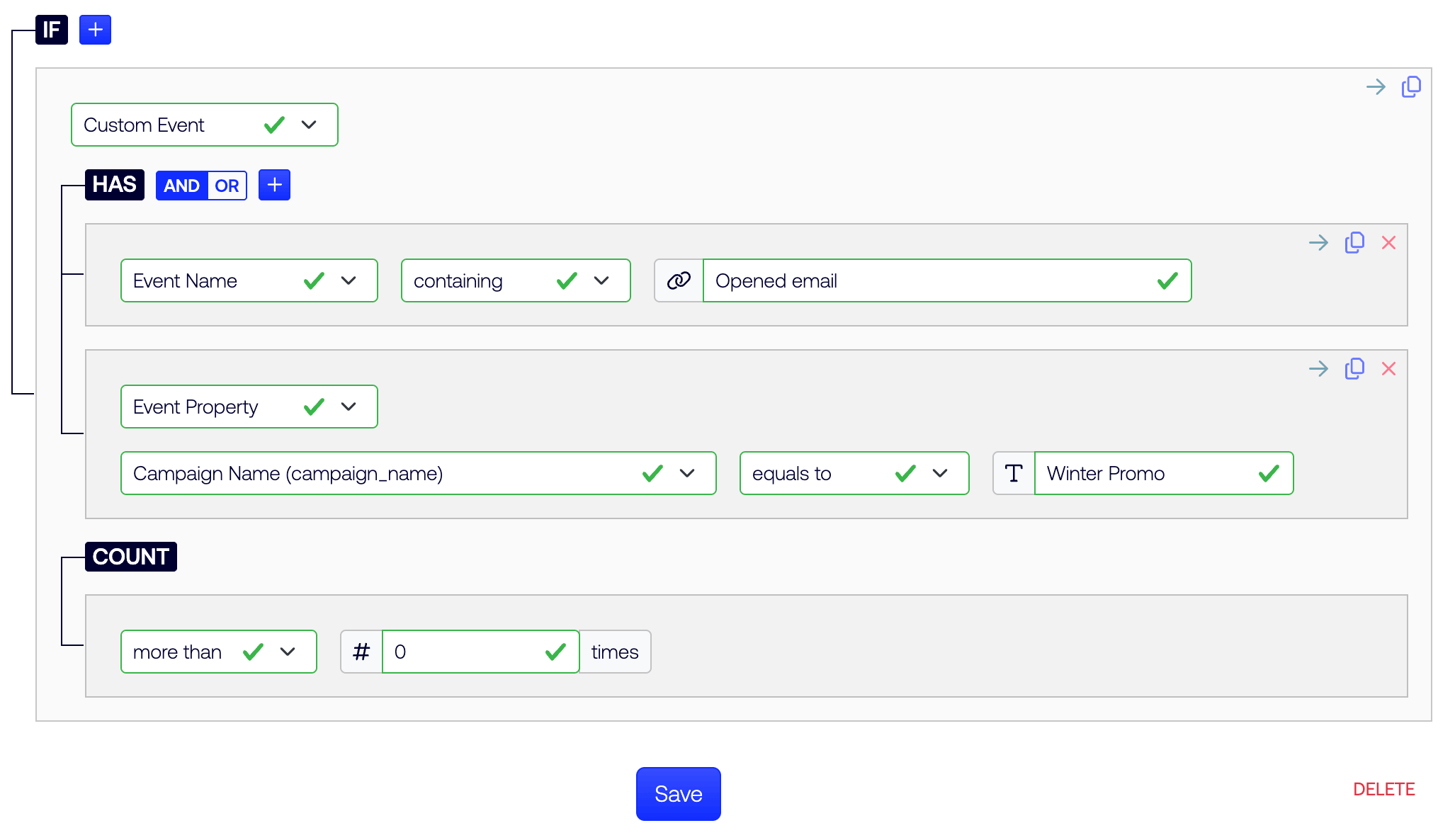
구성 및 추가 문제 해결에 대해서는 온보딩 지원을 위해 SalesWings 서비스 팀에 문의하세요.