What is a trigger campaign? Types, examples, and how to build one
Published on June 23, 2026/Last edited on June 23, 2026/14 min read

Madison Tiemtoré
Content Marketing Lead, BrazeContents
Picture two emails hitting someone's inbox on the same day. One is an abandoned cart campaign with a reminder that arrived an hour after they left your site. The other is your monthly newsletter, which went out because it was the first Tuesday of the month. They could have the same subject line, the same product, the same offer. One was written for this person at this moment. The other wasn't.
Trigger campaigns are the first type of message. They send in response to what customers actually do, which is what makes them some of the most effective sends in any marketing program.
This guide covers what trigger campaigns are, how to build them at each stage of the customer lifecycle, what results they drive, and where AI is starting to change how the best programs optimize.
TL;DR
- A trigger campaign is an automated message that sends in response to a specific user action, behavioral event, or time-based condition, rather than on a fixed schedule
- They outperform scheduled sends because timing is tied to fresh behavior, making each message more relevant to each individual customer
- Trigger campaigns map across the full customer lifecycle: acquisition and onboarding, engagement and conversion, retention and loyalty, and win-back and reactivation
- Building one well involves six steps: defining the trigger event, setting targeting criteria, designing with contextual personalization, adding delays and exception events, setting frequency caps, and connecting to multi-step journeys
- Real-world examples from Grove Collaborative, Kayo Sports, Stori, and Joe & the Juice show strong results across retail, media, fintech, and QSR
- AI decisioning is the next evolution, replacing static rules and manual A/B testing with a system that experiments and optimizes automatically per individual
Key takeaways
- Timing is the core advantage: a message that arrives in response to what a customer just did will always be more relevant than one sent on a fixed schedule
- Mapping trigger types to lifecycle stages turns a collection of individual campaigns into a coherent, always-on program
- Exception events and frequency caps matter as much as the trigger itself—without them, well-built campaigns can still create poor experiences
- AI decisioning is moving trigger campaigns from rules-based marketing automation to adaptive programs that optimize channel, timing, and content per individual automatically
What is a trigger campaign?
A trigger campaign is an automated marketing campaign that sends messages in direct response to a specific user action, behavioral event, or time-based condition. Messages can be delivered across email, push notifications, SMS, in-app messages, or webhooks, sending the moment a qualifying event occurs without manual intervention.
A scheduled campaign, in comparison, goes to a defined audience at a fixed time. For example, a weekly promotional email, a monthly newsletter, or a Black Friday send.
Where scheduled campaigns treat everyone or segments of people exactly the same, trigger campaigns can produce thousands of different send moments, each one tied to a different person's behavior.
Why trigger campaigns outperform scheduled sends
Trigger campaigns outperform scheduled sends because they're more relevant for each individual customer. Sending based on fresh behavior, rather than waiting until your next scheduled batch, means responding at the right moment, when your customer either needs something or is more open to engaging.
This helps with real-time personalization at scale too. Each customer gets a different experience based on their own actions, and you'd never be able to do that manually at scale.
Triggered campaigns can also be set up to run continuously without manual intervention, making them far more efficient and abandoned cart, browse abandonment, and reactivation campaigns all recover lost revenue directly, so the impact on revenue is tangible.
Scheduled campaigns | Trigger campaigns | |
|---|---|---|
Timing | Fixed send time set in advance | Real time, based on individual behavior |
Personalization | Audience or segment level | Individual behavior level |
Ongoing effort | Manual scheduling and updates | Runs continuously once built |
Performance | Baseline open and conversion rates | 4.5X higher conversion rate on action-based delivery |
Types of trigger-based campaigns across the customer lifecycle
From onboarding a new customer to following up post-purchase, trigger campaigns are essential to a personalized relationship with your audience. At each stage of the lifecycle, there are ways to connect, anticipate what your customers need, and drive their next action.
Lifecycle stage: Acquisition and onboarding
Trigger type | Description | Example scenario | Best channels |
|---|---|---|---|
Welcome series | A sequence that starts when someone signs up, introducing the brand and guiding them toward a first key action | A new app user gets three emails over their first week, each pointing them to a feature worth trying | Email, in-app |
Onboarding walkthroughs | Send as users work through defined setup steps, nudging them toward full activation | A SaaS product surfaces a prompt the moment someone completes their profile, pointing them to the next thing to do | In-app |
Permission-priming campaigns | An in-app message that makes the case for push notifications before the system prompt appears | A delivery app explains that opting in means getting real-time order updates, making the value clear before the ask | In-app |
Early activation nudges | Send after a defined window when someone signs up but goes quiet, bringing them back to a key action | A fitness app triggers an email after 48 hours if a user hasn't logged their first workout | Push, email, SMS |
Welcome series: A sequence that starts when someone signs up, introducing the brand and guiding them toward a first key action. A new app user might get three emails over their first week, each pointing them to a feature worth trying. Email is standard, often paired with an in-app message on first login.
Onboarding walkthroughs: Send as users work through defined setup steps, nudging them toward full activation. Think a SaaS product surfacing a prompt the moment someone completes their profile, pointing them straight to the next thing to do. In-app messages work best here, meeting users inside the product as they progress.
Permission-priming campaigns: An in-app message that makes the case for push notifications before the system prompt appears. A delivery app might use one to explain that opting in means getting real-time order updates—making the value clear before the ask. A small step with a significant impact on how many users you can reach later. Push notification triggers can only reach users who've opted in.
Early activation nudges: When someone signs up but goes quiet, these send after a defined window to bring them back to a key action. A fitness app might trigger an email after 48 hours if a user hasn't logged their first workout. Push, email, or SMS depending on what's available.
Lifecycle stage: Event-triggered campaigns for engagement and conversion
Trigger type | Description | Example scenario | Best channels |
|---|---|---|---|
Abandoned cart and browse recovery | When a customer leaves without purchasing, a follow-up sends to bring them back | A shopper adds trainers to their cart, doesn't complete the purchase, and gets an email an hour later featuring exactly what they left behind | Email (cart), push (browse) |
Cross-sell and upsell triggers | Send after a completed purchase while buying intent is still fresh, surfacing related products or higher-tier options | Someone buys a camera and gets an email the next day recommending a compatible lens or carry case | Email, in-app, push |
Transactional confirmations | Send on any completed action: purchase, booking, deposit. Among the most-opened messages any brand sends, and most underuse them | A restaurant booking confirmation that also suggests adding a bottle of wine or a set menu upgrade | Email, SMS |
Real-time event triggers | Send the moment a specific action registers in your data, like a feature being used or an in-product milestone being hit | A user opens an advanced feature for the first time and gets an in-app tip on how to get the most from it | In-app, push |
Abandoned cart campaign and browse recovery: When a customer leaves without purchasing, a follow-up sends to bring them back. A shopper adds trainers to their cart, doesn't complete the purchase, and gets an email an hour later featuring exactly what they left behind. Email leads for cart abandonment; push works well for browse recovery.
Cross-sell and upsell triggers: Send after a completed purchase while buying intent is still fresh, surfacing related products or higher-tier options. Someone buys a camera and gets an email the next day recommending a compatible lens or carry case. Email, in-app, or push depending on context.
Transactional confirmations: Send on any completed action: purchase, booking, deposit. Among the most-opened messages any brand sends, and most underuse them. A restaurant booking confirmation that also suggests adding a bottle of wine or a set menu upgrade is a simple example of doing more with what's already there. Email and SMS are the standard channels.
Real-time event triggers: Event-based messaging at this level sends the moment a specific action registers in your data, like a feature being used or an in-product milestone being hit. A user opens an advanced feature for the first time and gets an in-app tip on how to get the most from it. In-app and push are the natural channels for these moments.
Lifecycle stage: Retention and loyalty
Trigger type | Description | Example scenario | Best channels |
|---|---|---|---|
Milestone recognition | When a user reaches a threshold, a message goes out to mark it | A customer places their 10th order and gets a push notification with a thank you and a loyalty reward attached | Push, in-app, email |
Loyalty program triggers | Send when points are earned, tiers are reached, or rewards are approaching expiry | A customer with points expiring in seven days gets a push notification before they lose them | Push, in-app (updates), email (tier changes) |
Personal event celebrations | Birthday and anniversary messages, consistently among the best-performing trigger types on open rates | A customer receives a birthday email with a discount code valid for the week | Email, push |
Milestone recognition: When a user reaches a threshold like their 10th order or first anniversary, a message goes out to mark it. A customer who just placed their 10th order might get a push notification with a thank you and a loyalty reward attached. Push or in-app for immediate moments; email for something more considered.
Loyalty program triggers: Points earned, tiers reached, rewards approaching expiry. A customer with points expiring in seven days gets a push notification before they lose them. Push and in-app for quick updates; email for bigger changes or significant expiry alerts.
Personal event celebrations: Birthday and anniversary messages. A customer wakes up on their birthday to an email with a discount code valid for the week. Simple to set up and consistently among the best-performing trigger types on open rates.
Lifecycle stage: Win-back and reactivation
Trigger type | Description | Example scenario | Best channels |
|---|---|---|---|
Inactivity triggers | When a customer goes quiet for a defined period, a message sends to re-engage them | A user who hasn't opened a retail app in 30 days gets an email with a "we've missed you" offer | Email, push |
Time-sensitive deadline campaigns | Send when a customer is approaching a consequence, while there's still time to act | A customer with a loyalty balance about to expire gets an SMS reminding them they have five days left to use it | SMS, push, email |
Lapsed-user re-engagement campaigns | When earlier triggers haven't worked, these go further with a stronger incentive or a different message entirely | A customer who hasn't purchased in six months gets a personalized email with a discount and a direct ask to come back | Email, push, SMS |
Inactivity triggers: When a customer goes quiet for a defined period, a message sends to re-engage them. A user who hasn't opened a retail app in 30 days gets an email with a "we've missed you" offer. The right window varies—a few days for a daily-use app, 30 to 60 for e-commerce. Email and push are standard.
Time-sensitive deadline campaigns: When a customer is approaching a consequence—expiring rewards, a subscription renewal—a message goes out while there's still time to act. A customer with a loyalty balance about to expire gets an SMS reminding them they have five days left to use it. SMS works well here given open rates; push and email add reach.
Lapsed-user re-engagement campaigns: When earlier triggers haven't worked, these go further with a stronger incentive or a different message entirely. A customer who hasn't purchased in six months gets a personalized email with a meaningful discount and a direct ask to come back. The re-engagement strategy behind the trigger matters as much as the trigger itself. Email leads, with push and SMS supporting.
How to build a triggered marketing campaign
A trigger campaign has more moving parts than a scheduled send. Here’s what goes into building a successful one.
1. Define the trigger event
The trigger event is the specific action or condition that starts the campaign, such as behavioral (a product viewed, a cart abandoned), transactional (a booking confirmed, a payment processed), or time-based (30 days inactive, a subscription renewal approaching). The more specific the trigger, the more relevant the message. Action-based campaigns and triggered delivery in Braze let you define events at this level of precision.
2. Set targeting and segmentation criteria
Not everyone who meets the trigger condition should receive the message. A first-time visitor who browses a product needs a different treatment from a loyal customer doing the same thing. Layering segmentation on top of the trigger, like purchase history, loyalty status, lifecycle stage, keeps the message going to the right people.
3. Design the message with contextual personalization
The message should reflect what the person just did. An abandoned cart email showing the exact product left behind will always outperform a generic reminder. Dynamic content tied to the trigger event is what makes a triggered message feel personal rather than automated.
4. Add delays and exception events
Timing is important. A cart abandonment message sent 30 seconds after someone leaves is too fast; an hour later is more considered. Exception events matter too. A customer completes the purchase before the campaign sends, the message shouldn't go out. Building logic in prevents the awkward experience of receiving a "come back and buy" email for something already in the post.
5. Set frequency caps and delivery windows
A well-configured trigger campaign can still frustrate users if too many run at once. Frequency capping limits how many messages a user receives in a given window, regardless of how many triggers they've activated. Delivery windows respect time zones and quiet hours.
6. Connect to multi-step journeys
The most effective trigger campaigns are the first step in a longer sequence. An abandoned cart email followed by a browse recovery push for example, or a welcome message that unfolds into a full onboarding journey. Journey orchestration tools connect trigger events to multi-step flows that branch based on what the user does or doesn't do next.
Trigger campaign examples in action
Trigger campaigns look different depending on the industry, the trigger event, and the channel. These examples show the outcomes of four different campaigns across retail/eCommerce, media/streaming, fintech and QSR/food delivery.
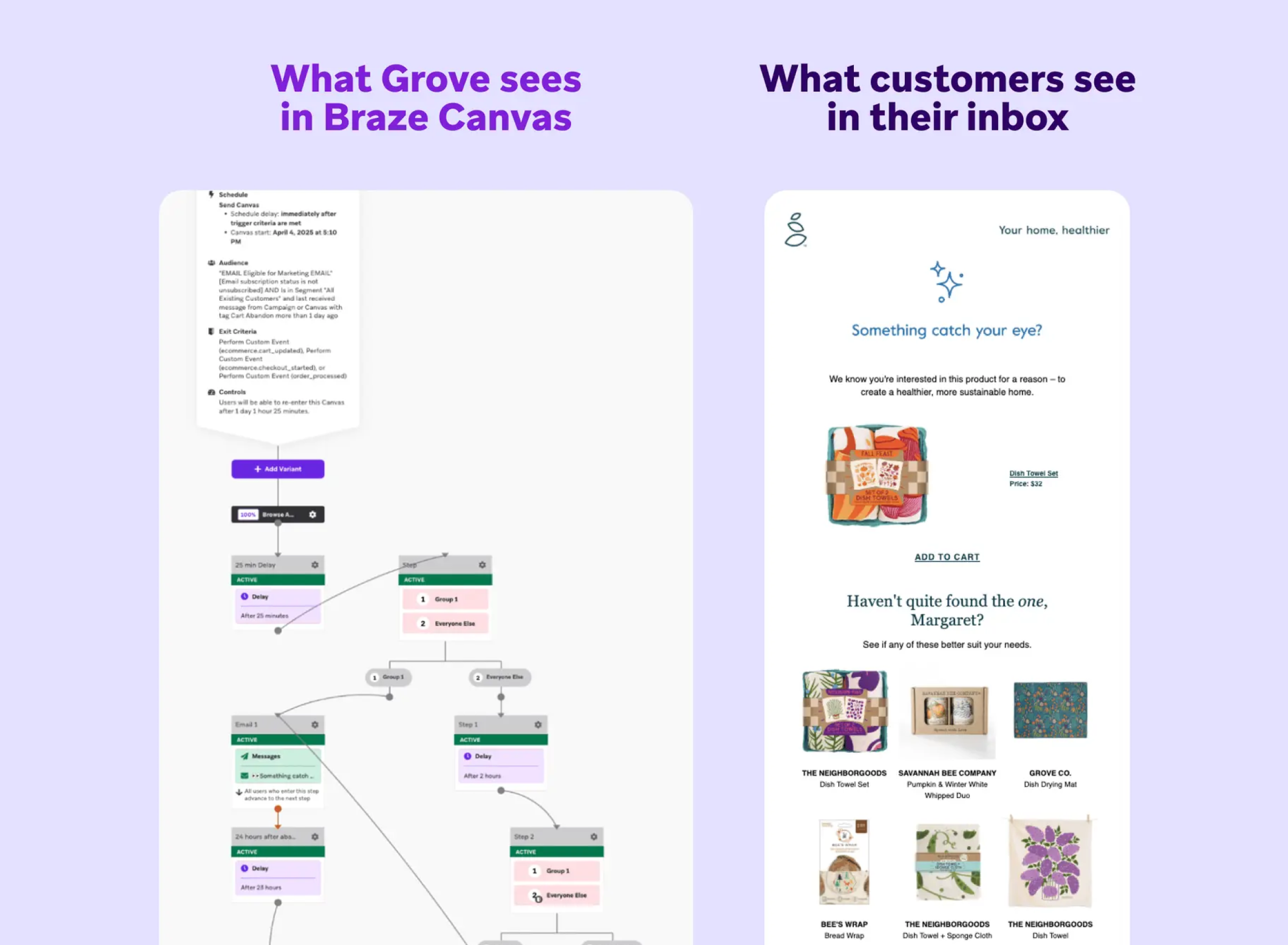
1. Grove's browse abandonment campaign bears fruit
Grove Collaborative is a sustainable consumer goods retailer selling natural home and personal care products online.
The challenge
Customers were browsing products without completing a purchase. Grove needed a way to re-engage them with something more personal than a generic reminder.
The trigger event
Browse abandon event detected via a custom Shopify integration
The channels
Personalized email featuring the exact product viewed, populated using Braze Catalogs and Constructor.io recommendations
The timing
Canvas branching logic tested multiple timing windows to find the optimal send time
The outcome
- 10% checkout rate
- 41% add-to-cart rate
- Highest CTR of any triggered email in their program
2. Kayo keeps subscribers off the bench with behavioral trigger campaigns
Kayo Sports is an Australian sports streaming service offering live and on-demand access to more than 50 sports.
The challenge
Generic content recommendations weren't working. Kayo needed to respond to each subscriber's individual viewing behavior rather than sending the same content to everyone.
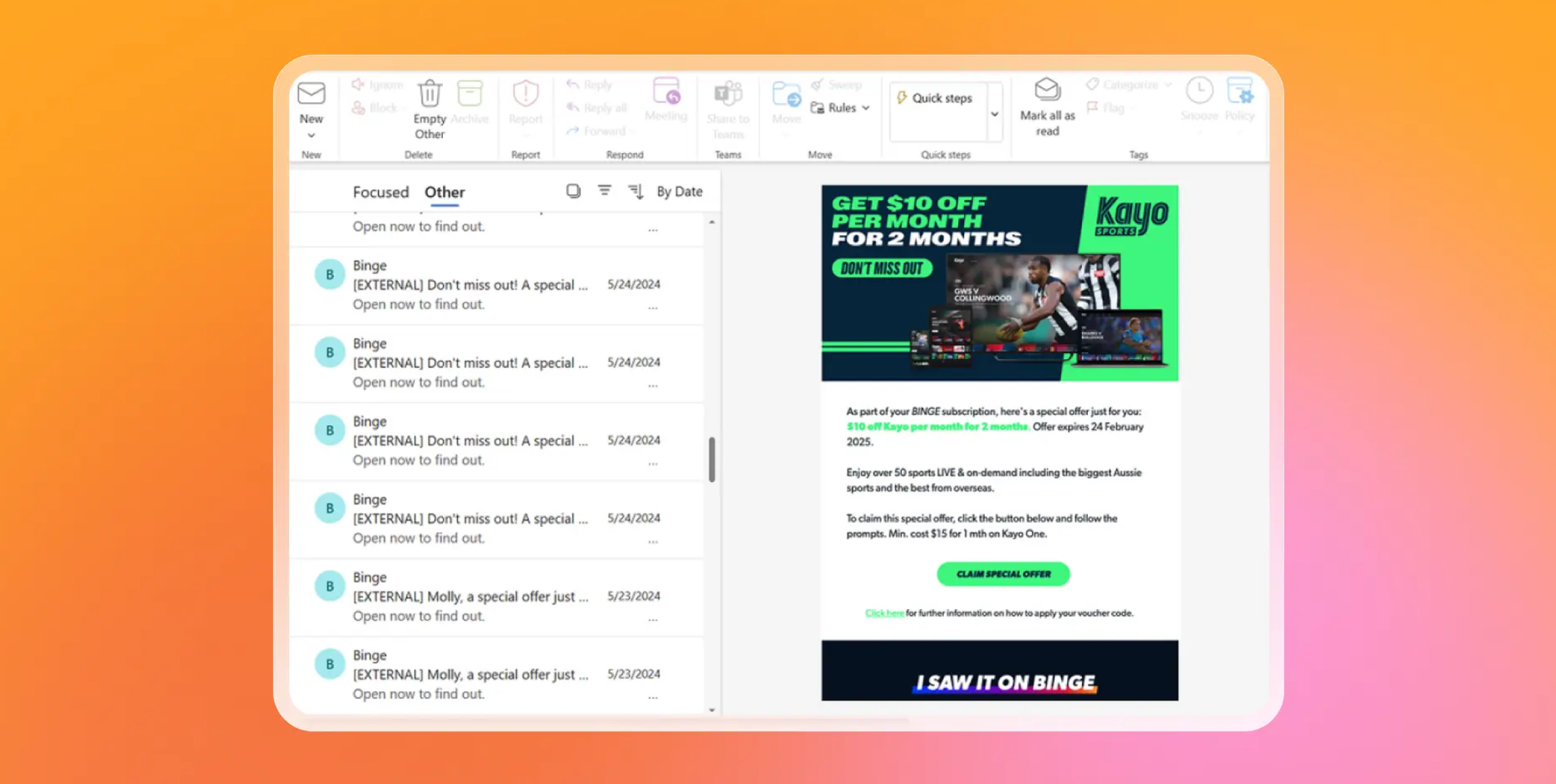
The trigger event
Individual sports viewing behavior
The channels
Personalized content recommendations via push, powered by BrazeAI Decisioning Studio
The timing
Behavioral triggers activated in real time based on each subscriber's viewing patterns
The outcome
- 14% increase in reactivation within 12 months
- 105% increase in cross-selling
- 8% increase in average annual occupancy
3. Stori rewrites real-time engagement with WhatsApp triggers
Stori is a Mexican fintech company providing credit cards to underserved consumers across Latin America.
The challenge
Push notifications weren't delivering the engagement Stori needed for high-priority transactional communications, where timing and open rates really matter.
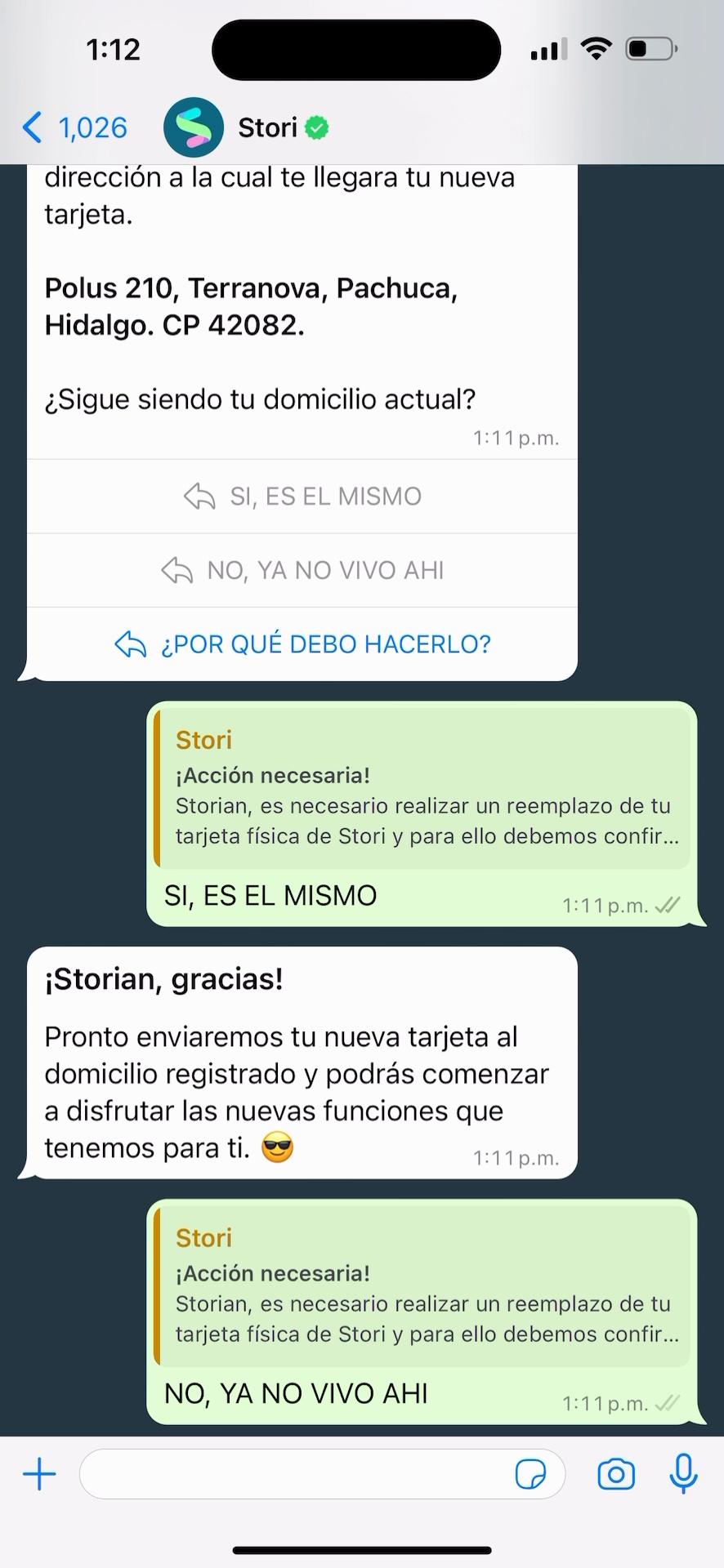
The trigger event
Key transactional events including payment reminders and address verification steps
The channels
WhatsApp and in-app messages
The timing
Real time, sending at the moment the transactional event occurs
The outcome
- 3X more engagement with WhatsApp versus push notifications
4. Joe & the Juice squeezes 56% more revenue from purchase triggers
Joe & the Juice is a global coffee and juice brand with a strong loyalty program and more than 300 locations worldwide.
The challenge
The team needed the loyalty experience to feel immediate after a purchase, particularly around point updates—a key driver of loyalty card sign-ups and repeat visits.
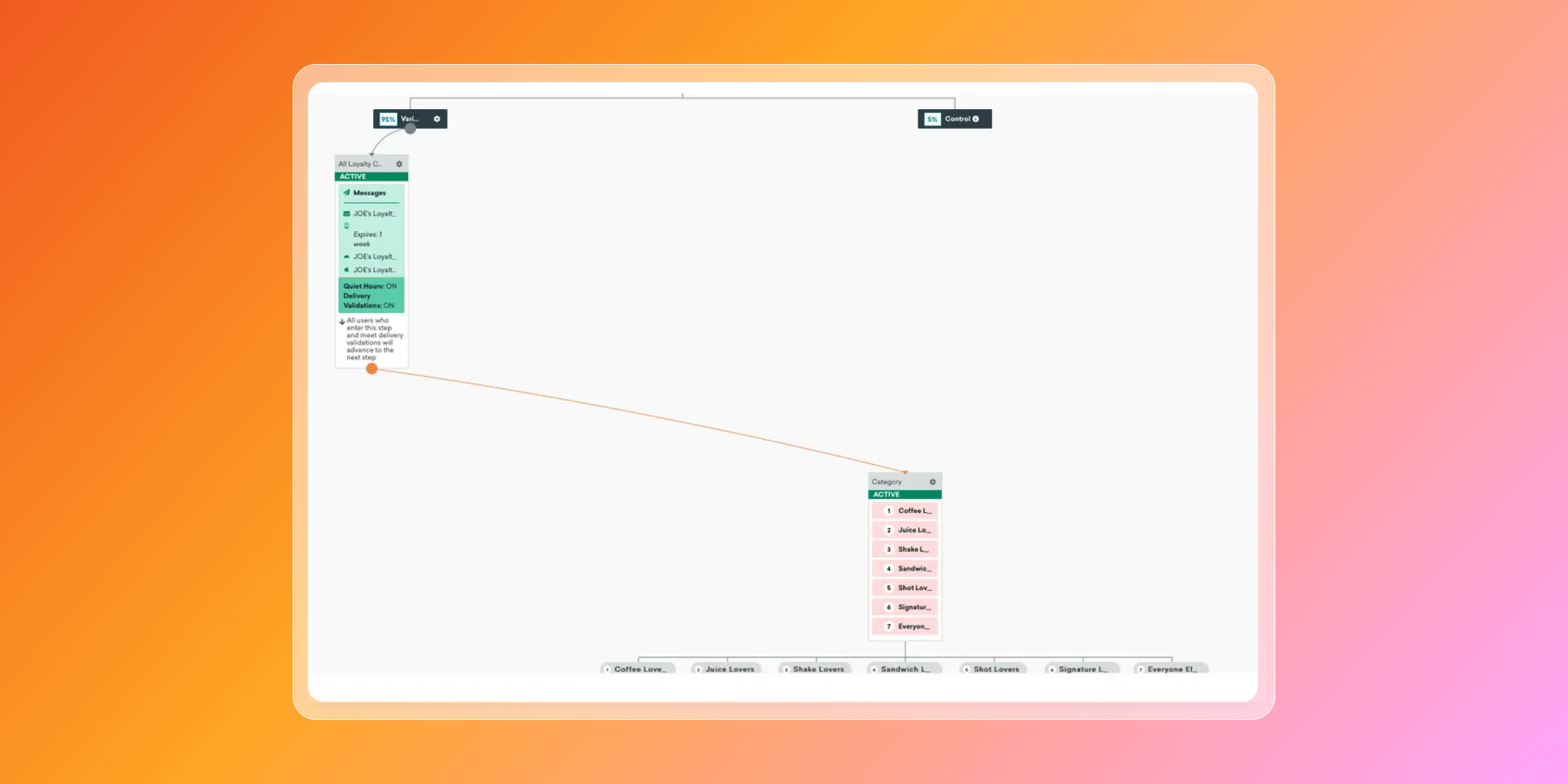
The trigger event
Purchase completion, with exception event logic preventing sends if the desired action is already completed
The channels
Email, in-app messages, and push
The timing
Action-based, triggering in real time on purchase completion
The outcome
- 56% increase in revenue
- 75% increase in loyalty card sales
- 81% average open rate
Best practices for trigger campaign marketing optimization
Once your trigger campaigns are live, these practices are worth building in.
Coordinate across channels, not within them
A trigger campaign that sends one email and stops is doing half the job. The same event can drive a sequence across email, push, in-app, and SMS, with each channel playing a different role at a different moment.
Build in exception events
If a customer completes the action before the campaign sends, the message shouldn't go out. Exception events prevent an abandoned cart email arriving after someone already bought, or a reactivation push reaching someone who just logged back in. Easy to overlook and costly to ignore.
Test timing, not just content
Most A/B testing focuses on subject lines and creative. Timing is often more impactful. Test whether an abandoned cart message sent 30 minutes after exit outperforms one sent three hours later. The delay matters.
Layer segmentation on top of triggers
A trigger event tells you what someone did. Behavioral segmentation tells you who they are. Combining the two keeps messages going to the right people. Filter by purchase history, lifecycle stage, or past behavior on top of the trigger condition.
Watch for trigger fatigue
Rising unsubscribes and falling open rates on triggered sends are usually a sign of over-messaging, not underperforming content. If multiple triggers are activating for the same users at once, frequency caps and delivery windows need reviewing.
Move from rules to AI decisioning
Rules-based logic gets a trigger program off the ground. At scale, choosing the optimal channel, timing, and content for each individual is too complex for static rules. AI decisioning lets the system make those choices dynamically. At that point, trigger campaigns start to operate at a different level.
From trigger campaigns to AI-powered orchestration
Traditional trigger campaigns work on rules. If X happens, send Y. That works, and for a lot of teams, it works well. But someone still has to set every rule—which channel, which timing, which content. The more campaigns you run, the more decisions pile up.
AI decisioning takes a different approach. The system experiments on its own, working out which channel, timing, and content drives the best result for each individual. It doesn't need manual A/B tests to find what works because it's always testing, always adjusting, replacing static rules with something that learns.
So instead of deciding "abandoned cart, email, one hour," you have a system that already knows this particular customer responds better to push, later in the day, with a different message. That decision happens automatically, at the individual level, every time.
It's the bridge from a trigger program built on fixed rules to one that's autonomous and adaptive. The marketer sets the parameters. The system optimizes within them. That's also where re-engagement and every other stage of the lifecycle starts to improve without more manual effort behind it.
Trigger campaign FAQs
What is a trigger campaign in marketing?
A trigger campaign in marketing is an automated campaign that sends messages in direct response to a specific user action, behavioral event, or time-based condition. Unlike scheduled campaigns, trigger campaigns activate in real time—when someone abandons a cart or goes inactive—making them more relevant and timely.
What is the difference between a trigger campaign and marketing automation?
A trigger campaign is a specific message or series of messages sent in response to a particular user action or event (e.g., a welcome email after sign-up or a cart abandonment reminder). Marketing automation is the broader system and technology that enables that can enable those triggers. It encompasses the entire workflow logic, audience segmentation, scheduling, and multi-channel orchestration that makes trigger campaigns (and many other automated communications) possible.
What is the difference between a trigger campaign and a scheduled campaign?
A scheduled campaign sends to a defined audience at a fixed time. A trigger campaign sends to an individual in response to something they did. The difference is timing and relevance: trigger campaigns respond to fresh behavior, while scheduled campaigns go out regardless of what the customer is doing.
What are the most common types of trigger campaigns?
The most common trigger campaigns include welcome series, abandoned cart and browse abandonment campaigns, post-purchase follow-ups, milestone recognition, loyalty program triggers, and win-back or reactivation campaigns. Each type responds to a specific customer behavior or lifecycle marketing event, making the message relevant to where the customer is in their journey.
How do you set up a trigger campaign?
Setting up a trigger campaign involves defining the trigger event, setting targeting and segmentation criteria, designing the message with contextual personalization, adding delays and exception events, configuring frequency caps and delivery windows, and connecting to multi-step journeys where relevant. Getting the trigger conditions and logic right matters as much as the message itself.
What are best practices for trigger campaign optimization?
Best practices for trigger campaign optimization include coordinating across channels rather than siloing, using exception events to prevent irrelevant sends, A/B testing timing as well as content, layering behavioral segmentation on top of triggers, monitoring for trigger fatigue, and using AI decisioning to replace static rules with automated optimization.
Related Tags
Be Absolutely Engaging.™
Sign up for regular updates from Braze.