기여도 분석을 위한 Branch
Branch는 모바일 링킹 플랫폼으로, 모든 사용자 터치포인트에 대한 전체적인 뷰를 제공하여 모든 기기, 채널, 플랫폼에서 사용자 확보, 참여, 측정을 지원합니다.
이 통합은 Branch에서 유지 관리합니다.
통합 소개
Braze와 Branch 통합을 통해 사용자가 언제 어디서 확보되었는지 정확히 파악하고, 강력한 기여도 분석 및 딥링킹을 통해 사용자 여정을 개인화하는 방법을 이해할 수 있습니다.
필수 조건
| 요구 사항 | 설명 |
|---|---|
| Branch 계정 | 이 파트너십을 활용하려면 Branch 계정이 필요합니다. |
| iOS 또는 Android 앱 | 이 통합은 iOS 및 Android 앱을 지원합니다. 플랫폼에 따라 애플리케이션에 코드 스니펫이 필요할 수 있습니다. 이러한 요구 사항에 대한 세부 정보는 통합 프로세스의 1단계에서 확인할 수 있습니다. |
| Branch SDK | 필수 Braze SDK 외에도 Branch SDK를 설치해야 합니다. |
통합
1단계: 기기 ID 매핑
Android
Android 앱이 있는 경우 고유한 Braze 기기 ID를 Branch에 전달해야 합니다. 이 ID는 Branch SDK의 setRequestMetadataKey() 메서드에서 설정할 수 있습니다. 다음 코드 스니펫은 initSession을 호출하기 전에 포함해야 합니다. 또한 Branch SDK에서 요청 메타데이터를 설정하기 전에 Braze SDK를 초기화해야 합니다.
1
Branch.getInstance().setRequestMetadata("$braze_install_id", Braze.getInstance(context).deviceId);
1
Branch.getInstance().setRequestMetadata("$braze_install_id", Braze.getInstance(context).deviceId)
iOS

2023년 2월 이전에는 Branch 기여도 분석 통합에서 공급업체 식별자(IDFV)를 기본 식별자로 사용하여 iOS 기여도 데이터를 매칭했습니다. Objective-C를 사용하는 Braze 고객은 서비스 중단이 없으므로 설치 시 Braze device_id를 가져와서 Branch로 전송할 필요가 없습니다.
Swift SDK v5.7.0 이상을 사용하는 경우 IDFV를 상호 식별자로 계속 사용하려면 useUUIDAsDeviceId 필드가 false로 설정되어 있는지 확인하여 통합이 중단되지 않도록 해야 합니다.
true로 설정된 경우 Braze가 iOS 기여도를 적절히 매칭할 수 있도록 앱 설치 시 Braze device_id를 Branch에 전달하기 위해 Swift용 iOS 기기 ID 매핑을 구현해야 합니다.
1
2
3
4
[braze deviceIdOnQueue:dispatch_get_main_queue() completion:^(NSString * _Nonnull deviceId) {
  [[Branch getInstance] setRequestMetadataKey:@"$braze_install_id" value:deviceId];
  // Branch init
}];
1
2
3
4
braze.deviceId { deviceId in
  Branch.getInstance.setRequestMetadata("$braze_install_id", deviceId)
  // Branch init
}
2단계: Braze 데이터 가져오기 키 받기
Braze에서 파트너 통합 > 기술 파트너로 이동하여 Branch를 선택합니다.
여기에서 REST 엔드포인트를 확인하고 Braze 데이터 가져오기 키를 생성할 수 있습니다. 키가 생성되면 새 키를 만들거나 기존 키를 무효화할 수 있습니다. 데이터 가져오기 키와 REST 엔드포인트는 Branch 대시보드에서 포스트백을 설정할 때 다음 단계에서 사용됩니다.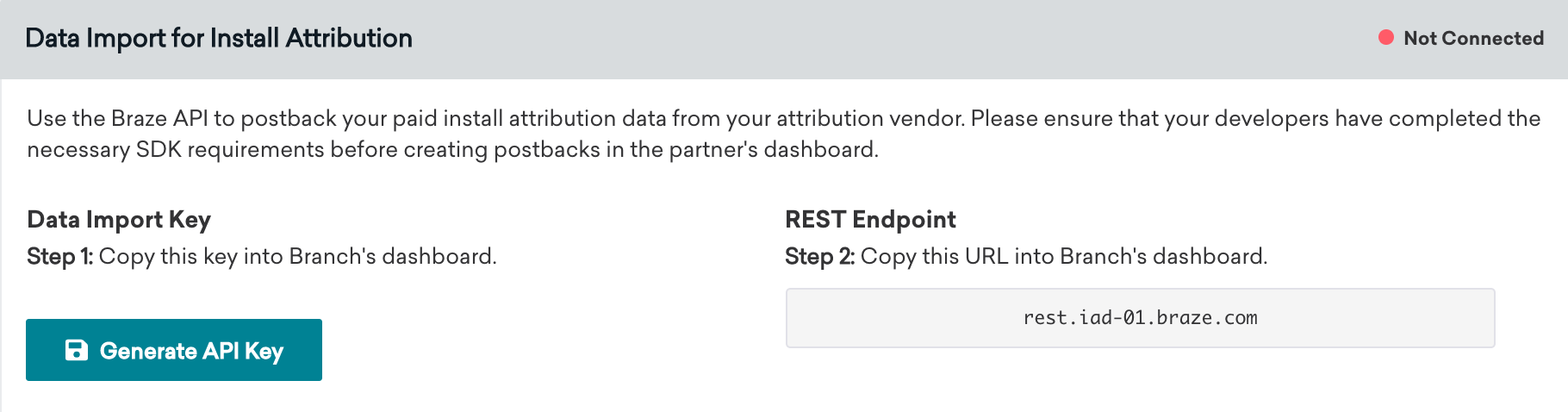
3단계: 데이터 피드 설정
- Branch에서 Exports 섹션 아래의 Data Feeds를 선택합니다.
- Data Feeds Manager 페이지에서 페이지 상단의 Data Integrations 탭을 선택합니다.
- 사용 가능한 데이터 파트너 목록에서 Braze를 선택합니다.
- Braze 내보내기 페이지에서 Braze 대시보드에서 확인한 데이터 가져오기 키와 REST 엔드포인트를 입력하고 Enable을 선택합니다.
4단계: 통합 확인
Braze가 Branch로부터 기여도 데이터를 수신하면, Braze의 Branch 기술 파트너 페이지에서 연결 상태 표시기가 “Not Connected”에서 “Connected”로 변경되고 마지막으로 성공한 요청의 타임스탬프가 포함됩니다.
이 상태는 Braze가 기여도 설치에 대한 데이터를 수신한 후에만 변경됩니다. Braze는 오가닉 설치를 무시하고(Branch 포스트백에서 제외) 연결 성공 여부를 판단할 때 이를 계산하지 않습니다.
Facebook 및 X(구 Twitter) 기여도 데이터
Facebook 및 X(구 Twitter) Campaign의 기여도 데이터는 파트너를 통해 제공되지 않습니다. 이러한 미디어 소스는 파트너가 기여도 데이터를 서드파티와 공유하는 것을 허용하지 않으므로, 파트너가 해당 데이터를 Braze에 전송할 수 없습니다.
Braze에서 Branch 클릭 추적 URL 사용(선택 사항)
Braze Campaign에서 클릭 추적 링크를 사용하면 어떤 Campaign이 앱 설치 및 재참여를 유도하는지 쉽게 확인할 수 있습니다. 그 결과 마케팅 활동을 더 효과적으로 측정하고, 최대 ROI를 위해 어디에 더 많은 리소스를 투자할지 데이터 중심의 의사결정을 내릴 수 있습니다.
Branch 클릭 추적 링크를 시작하려면 해당 설명서를 방문하세요. Branch 클릭 추적 링크를 Braze Campaign에 직접 삽입할 수 있습니다. 그러면 Branch는 확률적 기여도 분석 방법론을 사용하여 링크를 클릭한 사용자를 기여도 분석합니다. Braze Campaign에서 기여도 분석의 정확도를 높이기 위해 Branch 추적 링크에 기기 식별자를 추가하는 것을 권장합니다. 이렇게 하면 링크를 클릭한 사용자를 결정론적으로 기여도 분석할 수 있습니다.
Android의 경우 Braze는 고객이 Google 광고 ID 수집(GAID)에 옵트인할 수 있도록 합니다. GAID는 Branch SDK 통합을 통해서도 네이티브로 수집됩니다. 다음 Liquid 로직을 활용하여 Branch 클릭 추적 링크에 GAID를 포함할 수 있습니다:
1
2
3
{% if most_recently_used_device.${platform} == 'android' %}
user_data_aaid={{most_recently_used_device.${google_ad_id}}}
{% endif %}
iOS의 경우 Braze와 Branch 모두 SDK 통합을 통해 IDFV를 네이티브로 자동 수집합니다. 이를 기기 식별자로 사용할 수 있습니다. 다음 Liquid 로직을 활용하여 Branch 클릭 추적 링크에 IDFV를 포함할 수 있습니다:
1
2
3
{% if most_recently_used_device.${platform} == 'ios' %}
user_data_idfv={{most_recently_used_device.${id}}}
{% endif %}

이 권장 사항은 전적으로 선택 사항입니다
현재 클릭 추적 링크에 IDFV 또는 GAID와 같은 기기 식별자를 사용하지 않거나 향후 사용할 계획이 없는 경우에도, Branch는 확률적 모델링을 통해 이러한 클릭을 기여도 분석할 수 있습니다.