오라클 크라우드 트위스트
오라클 크라우드트위스트는 브랜드가 개인화된 고객 경험을 제공할 수 있도록 지원하는 선도적인 클라우드 네이티브 고객 로열티 솔루션입니다. 이 솔루션은 100개 이상의 즉시 사용 가능한 고객 참여 경로를 제공하여 마케터가 고객에 대한 보다 완전한 시각을 개발할 수 있도록 빠른 가치 창출 시간을 제공합니다.
오라클 크라우드트위스트의 데이터 푸시 기능을 사용하면 크라우드트위스트 플랫폼에서 업데이트가 발생할 때마다 사용자 또는 이벤트 메타데이터를 전달할 수 있습니다.
이 가이드는 오라클 크라우드 트위스트의 고객 프로필, 사용자 활동 및 사용자 리뎀션 라이브 푸시 피드를 Braze 환경에 통합하는 방법을 간략하게 설명합니다. 이 설명서에서 명시적으로 다루지 않은 두 가지 추가 데이터 푸시 유형을 사용할 수 있지만 설정은 아래에 설명된 것과 동일한 원칙을 따릅니다.
-
라이브 푸시 고객 프로필: 새 프로필 생성 및 기존 프로필 업데이트가 포함됩니다.
-
실시간 푸시 사용자 활동: 사용자 활동 완료에 대한 데이터를 포함합니다.
-
실시간 푸시 사용자 상환: 사용자 보상 사용 데이터를 포함합니다.
Braze 데이터 변환 템플릿을 사용하면 데이터 푸시의 요소 중 Braze와 관련이 없는 요소를 필터링하고, 사용 가능한 ‘대상’에서 활용할 수 있도록 Braze에서 필요한 값을 할당할 수 있습니다.
예를 들어, 데이터 푸시를 사용하여 사용자가 로열티 등급을 변경하거나 보상을 받을 때와 같이 관련 커스텀 이벤트 및 속성을 Braze에 전달할 수 있습니다. 또한 회원의 포인트 잔액과 같은 데이터가 회원의 고객 프로필에 업데이트되는 즉시 이를 사용하여 Braze에 커스텀 속성을 기록할 수 있습니다.
필수 조건
| Requirement | 설명 |
|---|---|
| 오라클 크라우드 트위스트 계정 | 이 파트너십을 활용하려면 오라클 크라우드 트위스트 계정이 필요합니다. |
| Braze 데이터 트랜스포메이션 엔드포인트 | 이 통합은 Braze의 데이터 변환 도구에 의존합니다. 데이터 트랜스포메이션을 생성하면 Braze는 고유한 엔드포인트를 생성하며, 이를 Crowdtwist의 데이터 푸시 대상에 추가할 수 있습니다. |
Integration
Braze와 오라클 크라우드 트위스트는 고객이 사용자 프로필, 사용자 사용 및 사용자 활동 이벤트를 활용하는 자체 데이터 변환을 개발할 수 있도록 데이터 변환 템플릿을 만들었습니다.
1단계: 오라클 크라우드 트위스트 템플릿에서 데이터 변환 만들기
데이터 설정 > 데이터 변환 > 변환 만들기 > 템플릿 사용으로 이동하여 원하는 “Braze <> 크라우드 트위스트” 템플릿을 선택합니다.
사용자 프로필, 사용자 활동, 사용자 사용 이벤트 변환을 위한 템플릿과 조건 로직을 사용하여 다양한 데이터 푸시 이벤트에 적용할 수 있는 마스터 템플릿이 각각 하나씩 총 네 개 제공됩니다.
오라클 크라우드 트위스트의 데이터 푸시 설명서에 나와 있듯이, 데이터 푸시 객체에는 서로 다른 메타데이터가 포함되어 있으므로 적절한 Braze 객체를 생성하려면 각각 고유한 변환 코드가 필요합니다. 마스터 템플릿은 세 가지 유형의 개체를 각각 받아들이도록 단일 데이터 변환을 설정하고 각 개체의 값으로 적절한 출력을 생성하는 방법을 보여줍니다.
2단계: 템플릿 업데이트 및 테스트
아래에서 주석이 달린 템플릿을 확인할 수 있습니다. 이 템플릿의 본문은 /users/track 대상에 적용하도록 설계되었습니다. 주석은 // 줄 시작과 녹색 텍스트로 표시되며, 변환 코드의 작동에 영향을 주지 않고 삭제할 수 있습니다.
이 변환은 자바스크립트를 사용하여 “brazecall”이라는 객체를 구축합니다. 이 객체는 Braze REST API 엔드포인트로 전송되는 요청 본문을 생성하는 곳입니다. 이러한 대상에 대한 요청의 필수 구조에 대한 지침은 ‘대상’ 섹션의 링크를 참조하세요.
각 ‘키’의 ‘값’이 payload. 으로 시작한다는 점에 유의하세요. 페이로드는 오라클 크라우드 트위스트에서 수신한 데이터 개체를 담당합니다. JavaScript 점 표기법을 사용하여 Braze 객체의 요소를 채울 데이터를 선택할 수 있습니다. 예를 들어 external_id: payload.thirdPartyId 이 표시되는 경우, 이는 Braze 외부 ID가 오라클 크라우드 트위스트에 저장된 third_party_id 값으로 설정되어 있음을 의미합니다. 오라클 크라우드 트위스트에서 제공되는 스키마 또는 객체 구성에 대한 자세한 내용은 오라클 설명서를 참조하세요.
오라클 크라우드 트위스트에서 전송된 개체를 사용하여 Braze에서 사용자를 생성합니다. false 값과 함께 update_existing_only 키를 포함하면 속성 또는 이벤트 객체에 Braze에 존재하지 않는 식별자가 포함된 경우 이벤트 또는 속성 객체에 포함된 속성으로 고객 프로필을 생성합니다. Braze에 이미 존재하는 프로필만 업데이트하도록 하려면 각 속성 또는 이벤트 개체에서 이 속성을 true 으로 설정하세요.
데이터 변환 템플릿
1
2
3
4
5
6
7
8
9
10
11
12
13
14
15
16
17
18
19
20
21
22
23
24
25
26
27
28
29
30
31
32
33
34
35
36
37
38
39
40
41
42
43
44
45
let brazecall = {
 "attributes": [
   {
     //You must include an appropriate identifier for your attribute or event object from data available in Oracle Crowdtwist. This could be an external ID, Braze ID, user alias, phone, or email address for attribute or event objects.
     "external_id": payload.thirdPartyId,
     "email": payload.emailAddress,
   // **Important** To allow Oracle Crowdtwist events to create users in Braze, set the value of "_update_existing_only" to false. Otherwise, set this value to true in your event and attribute objects.
     "_update_existing_only": false,
     "crowdtwist_loyalty_points": payload.redeemablePoints,
 //In this example, the "tierInfo" object from Crowdtwist is transformed into a Braze Nested Custom Attribute. Use the "_merge_objects" value to avoid duplications in a data point efficient manner.
 //The "tierinfo_current_level" attribute is a flat Braze custom attribute, while "tierInfo" below is a nested object mirroring the Crowdtwist payload; the difference in capitalization is intentional.
     "tierinfo_current_level": payload.tierInfo.currentLevel,
     "_merge_objects" : true,
     "tierInfo" : {
       "resetDate": payload.tierInfo.resetDate,
       "dateReached":payload.tierInfo.dateReached,
        "scoreNeededToReach": payload.tierInfo.scoreNeededToReach,
        "nextLevel":{
        "minValue":payload.tierInfo.nextLevel.minValue,
        "maxValue":payload.tierInfo.nextLevel.maxValue,
        "title":payload.tierInfo.nextLevel.title
     }
     }
   }
 ]
,
//Below we show how to create both custom attributes and events from a single Crowdtwist User Profile object.
 "events": [
   {
     "external_id": payload.thirdPartyId,
     "email": payload.emailAddress,
     "name": "assignedByEvent",
//Below we can see how to write a timestamp in your object, which is a required value for some objects, like the Event Object.
     "time": new Date().toISOString(),
     "properties": {
       "assigned_by_event": payload.tierInfo.assignedByEvent,
       "date_assigned": payload.tierInfo.dateAssigned
     },
           "_update_existing_only": false
   }
 ]
};
// After the /users/track request is assigned to brazecall, return brazecall to create an output.
return brazecall;
1
2
3
4
5
6
7
8
9
10
11
12
13
14
15
16
let brazecall = {
"events": [
   {
     "external_id": payload.thirdPartyId,
     "_update_existing_only": false,
     "activityId": payload.activityId,
     "name": payload.activityName,
     "time": new Date().toISOString(),
     "properties": {
       "description": payload.description,
       "date_assigned": payload.dateAwarded
     }
   }
 ]
};
return brazecall;
1
2
3
4
5
6
7
8
9
10
11
12
13
14
let brazecall = {
 "attributes": [
   {
   "external_id": payload.thirdPartyId,
   //A user redemption event may not have a third party id, in which case you can instead provide the opportunity to include a user alias.
   "user_alias": { "alias_name" : "crowdtwist_redemption_username", "alias_label" : payload.userName},
   "_update_existing_only": false,
   "redeemed_coupon": payload.couponCode,
   "total_points_redeemed": payload.totalPointsRedeemed
      }
]
}
return brazecall;
1
2
3
4
5
6
7
8
9
10
11
12
13
14
15
16
17
18
19
20
21
22
23
24
25
26
27
28
29
30
31
32
33
34
35
36
37
38
39
40
41
42
43
44
45
46
47
48
49
50
51
52
53
54
55
56
57
58
59
60
61
62
63
64
65
66
67
68
69
70
71
72
73
74
75
76
77
78
//The master template uses JavaScript's conditional operators to determine the output of the Data Transformation. This example shows how to apply JavaScript to your transformation to allow for a dynamic range of sources or inputs.

 // We open the transformation with a simple "if" function. We're checking if the value "payload.tierInfo" is present. "tierInfo" is a value that is always populated in the User Profile Live Push object, but is not present in the others.

if (payload.tierInfo) {
let brazecall = {
 "attributes": [
   {
     "external_id": payload.thirdPartyId,
     "email": payload.emailAddress,
     "_update_existing_only": false,
     "crowdtwist_loyalty_points": payload.redeemablePoints,
     "tierinfo_current_level": payload.tierInfo.currentLevel,
     "_merge_objects" : true,
     "tierInfo" : {
       "resetDate": payload.tierInfo.resetDate,
       "dateReached":payload.tierInfo.dateReached,
        "scoreNeededToReach": payload.tierInfo.scoreNeededToReach,
        "nextLevel":{
        "minValue":payload.tierInfo.nextLevel.minValue,
        "maxValue":payload.tierInfo.nextLevel.maxValue,
        "title":payload.tierInfo.nextLevel.title
     }
     }
   }
 ]
,
 "events": [
   {
     "external_id": payload.thirdPartyId,
     "email": payload.emailAddress,
     "name": "assignedByEvent",
     "time": new Date().toISOString(),
     "properties": {
       "assigned_by_event": payload.tierInfo.assignedByEvent,
       "date_assigned": payload.tierInfo.dateAssigned
     },
           "_update_existing_only": false
   }
 ]
};
return brazecall;
//Now we use an "else if" operator to change the "brazecall" body if the object is a User Activity event by checking if the unique key "activityId" has been populated.
} else if (payload.activityId) {
 let brazecall = {
"events": [
   {
     "external_id": payload.thirdPartyId,
     "_update_existing_only": false,
     "activityId": payload.activityId,
     "name": payload.activityName,
     "time": new Date().toISOString(),
     "properties": {
       "description": payload.description,
       "date_assigned": payload.dateAwarded
     }
   }
 ]
};
return brazecall;
//Finally, this conditional statement triggers if the Data Push object is a User Redemption event, based on whether a value populates in the key "rewardId".
} else if (payload.rewardId) {
 let brazecall = {
 "attributes": [
   {
   "external_id": payload.thirdPartyId,
   "_update_existing_only": false,
   "redeemed_coupon": payload.couponCode,
   "total_points_redeemed": payload.totalPointsRedeemed
      }
]
}
return brazecall;
} else {
 //Include this error message to help with troubleshooting in the log if a call fails. Replace the text in the parentheses with anything that might be clearer to your team based on your Data Transformation.
 throw new Error("No appropriate Identifiers found");
}
대상
이 가이드의 템플릿은 ‘사용자 추적’ 대상으로 전송하도록 만들어졌지만, 관련 REST API 설명서의 지원을 받아 Braze의 데이터 변환 가이드에 나열된 모든 엔드포인트로 전송하도록 템플릿을 디자인할 수 있습니다.
테스트
템플릿을 원하는 대로 수정한 후에는 템플릿이 올바르게 작동하는지 확인해야 합니다. “유효성 검사”를 클릭하여 코드 출력의 미리 보기를 반환하고 선택한 대상에 대해 허용되는 요청인지 확인합니다.
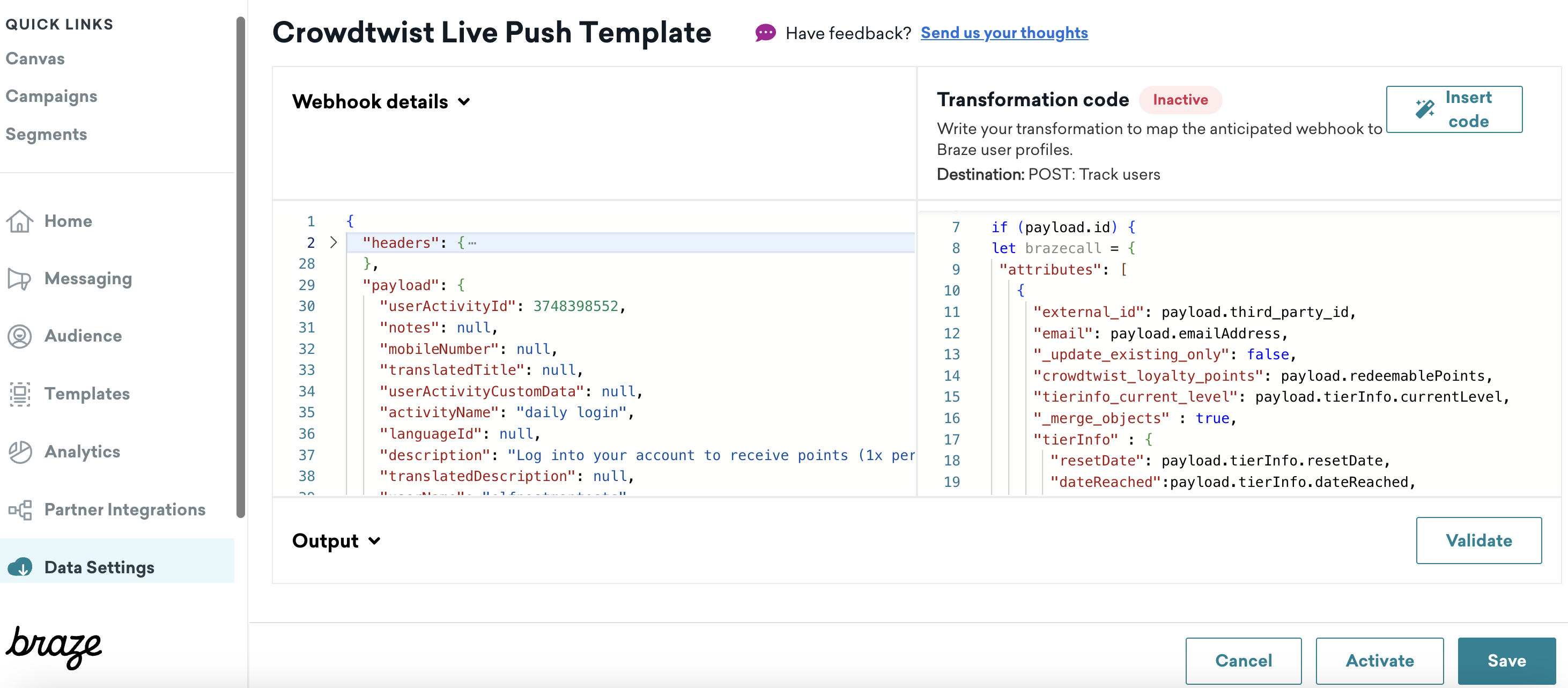
‘출력’ 필드에 표시되는 개체가 마음에 들면 활성화를 클릭하여 데이터 변환 엔드포인트가 데이터를 받아들일 준비가 되도록 합니다.
왼쪽 패널에서 데이터 트랜스포메이션의 웹훅 URL을 찾을 수 있습니다. 이를 복사하여 오라클 크라우드 트위스트의 통합 허브 내에서 구성에 사용하세요.
Braze 데이터 트랜스포메이션 엔드포인트는 분당 1,000건의 요청으로 속도 제한이 있습니다. 이 데이터를 Braze에서 사용할 수 있는 속도를 고려하고, 더 높은 데이터 변환 속도 제한이 필요한 경우 Braze 계정 매니저에게 문의하세요.
데이터 변환은 매우 역동적인 도구이며, JavaScript에 대한 이해와 REST API 설명서의 안내를 통해 이 문서에 설명된 것 이상의 목적으로 데이터 변환을 설계할 수 있습니다. 데이터 변환 템플릿의 복잡한 변경 사항에 대한 지원이나 문제 해결이 필요한 경우 고객 성공 매니저에게 문의하여 사용 가능한 지침에 대해 알아보세요.
 GitHub 에서 이 페이지를 편집합니다.