How AWS Auto Scaling Enables Braze to Efficiently Send 2 Billion Messages Each Day
Published on February 10, 2020/Last edited on February 10, 2020/7 min read

Jon Hyman
CTO, BrazeBraze helps consumer brands use data to deliver personalized messaging, such as emails, in-app messages, push notifications, and SMS messages. Braze runs at a massive scale: Each day we send billions of messages to more than two billion monthly active users around the world. Given this scale and the performance requirements of these messages, processing speed is of crucial importance. In this post, I’m going to offer some background on how we use AWS Auto Scaling to process as quickly as possible while saving on cost.
To start, there are two main categories for processing at Braze: Data processing and message sending. When our customers integrate with Braze, they typically install an SDK in their mobile applications or websites. Each time someone uses an app or visits a webpage that Braze is integrated with, our servers process data to learn more about the end user’s preferences and behaviors. Braze also ingests data from partners, such as Segment, mParticle, Amplitude, and AppsFlyer. Each of these pieces of data needs to be processed as quickly as possible because each data point can impact customer messaging—an action a user takes may cause a message to be sent or a scheduled message to be canceled. Data also tells us if a customer converts on a campaign goal, which could move the customer along in their life cycle.
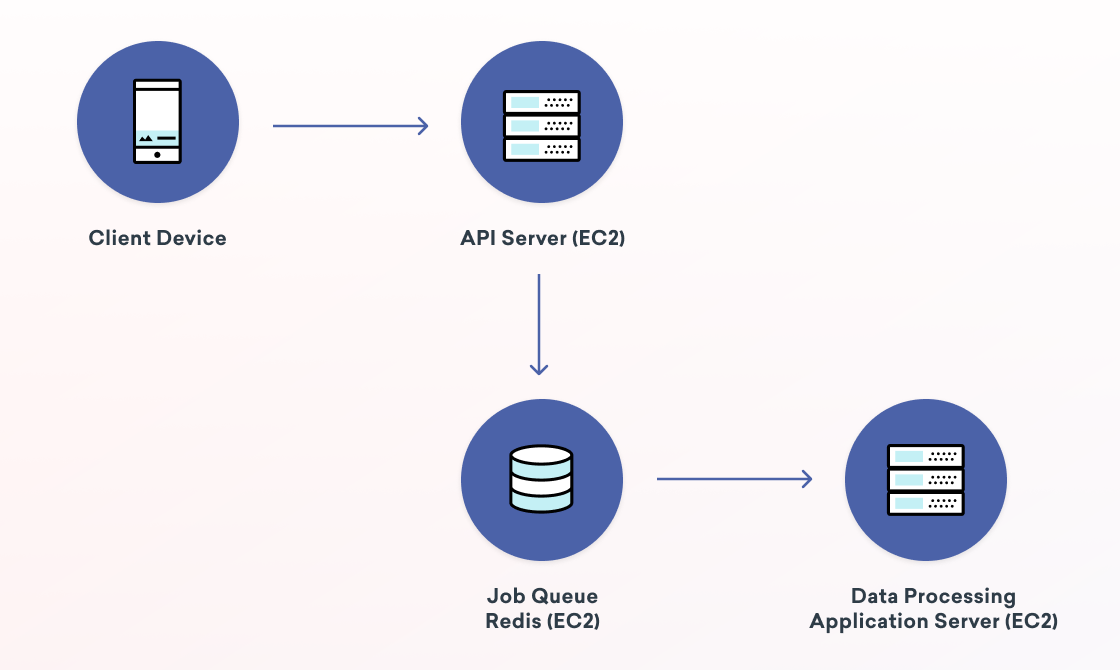
The second category is message sending. Braze’s customers can send various types of messages, which we call Campaigns. Campaigns can be single messages or compose entire lifecycle strategies consisting of multiple messages across multiple days or weeks. Campaigns can be scheduled to go out at a certain time, sent immediately, triggered by user behaviors or API calls, or more. Our customers expect us to send their messages very quickly. Performance will always be a requirement that has increasing expectations. Braze sends about two billion messages each day, meaning that on average we’re sending nearly 1.4 million messages every single minute!
The big question for us then is, how can Braze process data and send messages as fast as possible without breaking the bank? That is, while we could always add more hardware to scale up and process faster, we need to ensure we’re running a cost-efficient business for ourselves and our customers. To explain how we do this, let’s start by learning a little bit about our data infrastructure.
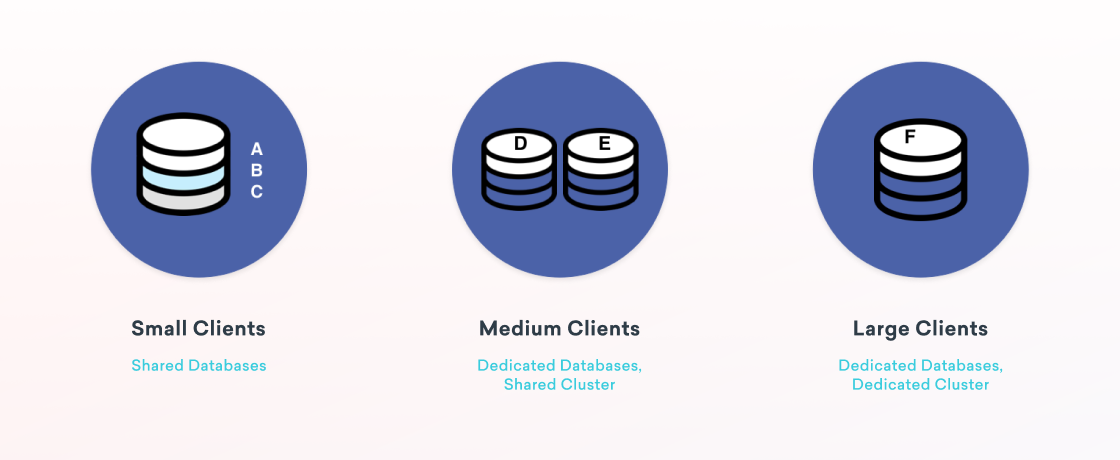
Braze deploys its databases for customers in three different models. Small clients go on shared databases. Medium-sized clients have their data stored on dedicated databases on shared servers. Our largest clients have their own dedicated databases on dedicated servers. This approach allows Braze to provision different sized databases on a per-customer basis, and move customers around as they grow.
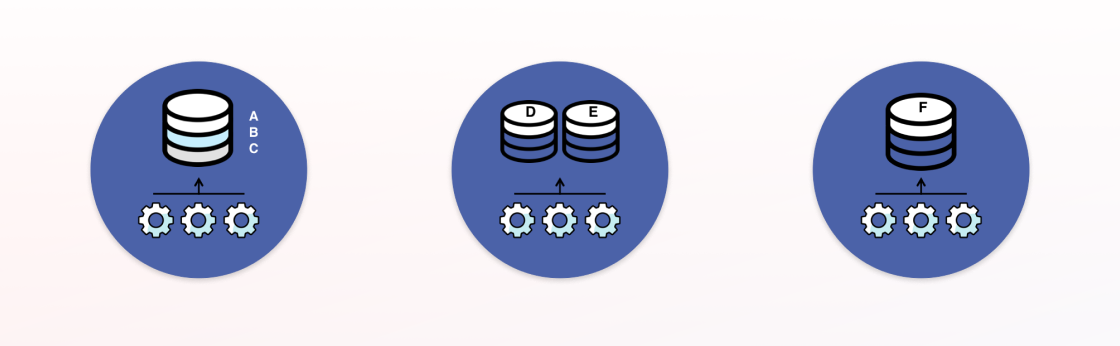
With this approach, we then build application servers that are prioritized to work on specific database clusters. These application servers process data and send messages for the cluster they are assigned to first before attempting to process for other clusters.
Underpinning this design is our use of job queues. We actually have an entirely separate blog post on our job queue system, but I’ll summarize what they are here. Job queues are an architectural pattern for asynchronous processing. An application submits a “job” that is put on a queue. Then, “worker” processes fetch from the queues and operate on them. The job queue pattern helps increase concurrency, reliability and scalability. Braze uses different types of queues and has workers consuming from many different queues. In total, Braze processes billions of jobs each day across dozens of Redis database shards. Each shard handles nearly 200k operations per second at peak load!
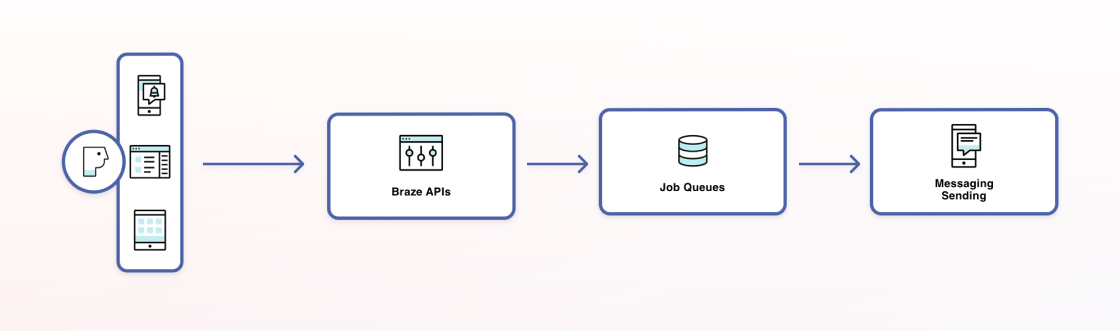
The way in which we support associating different application servers with database clusters is through our queue deployment: each database has its own set of queues and its own set of worker application servers.
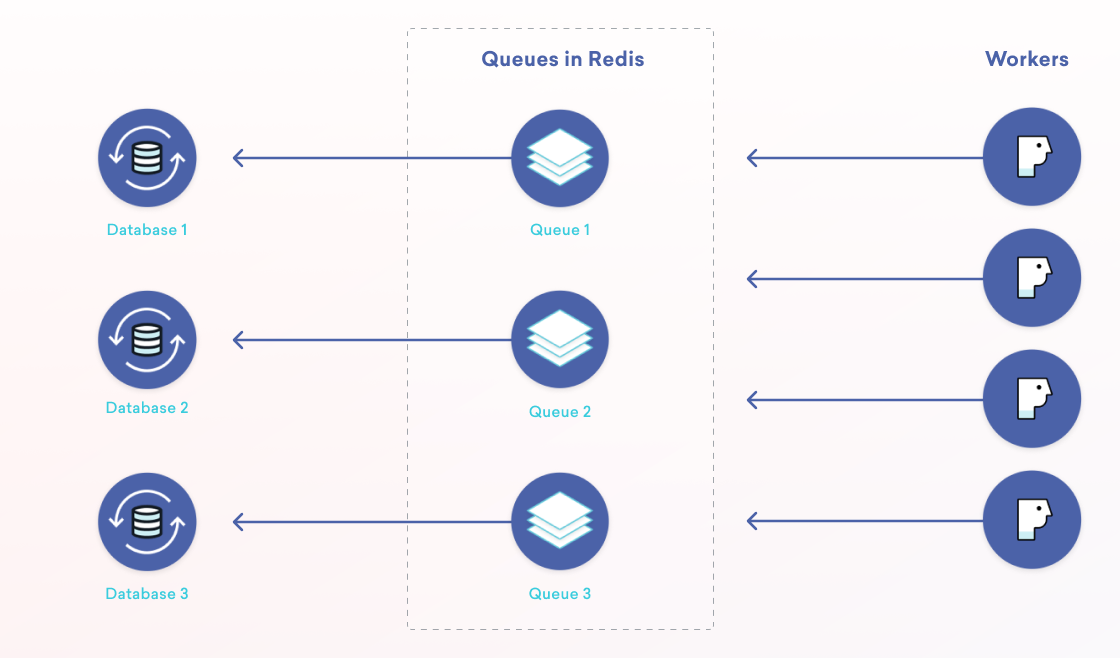
There are some great benefits to this. First, we get isolation for a particular customer which can help with security and compliance needs. Our queue deployment model also improves scalability by allowing us to increase throughput with the addition of more Redis databases, job queues, and application servers. There are other benefits as well worth checking out in our blog post on our queuing system.
Returning back to messaging, let’s take a quick look at the message-sending pipeline at Braze.
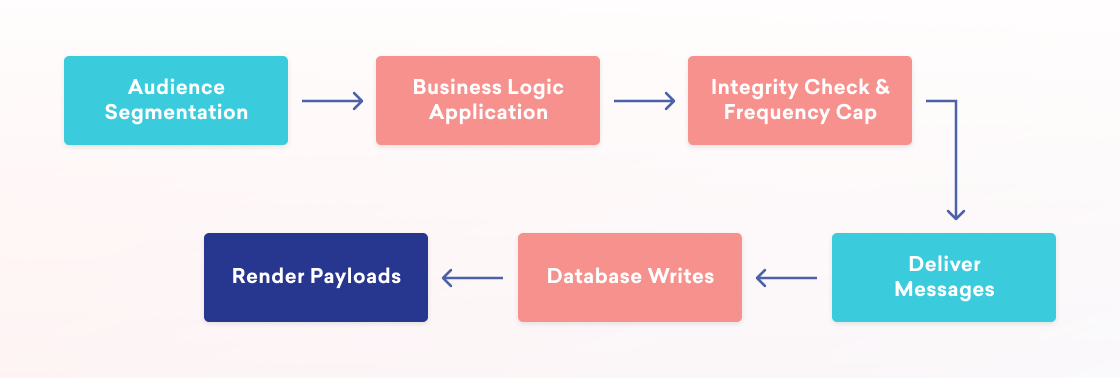
At a high level, to send a message we first determine the user audience. Then, some business logic runs to figure out who in that audience should receive a message. For example, let’s say we are sending an email but a given user in the audience has unsubscribed or does not have an email address. Or we’re sending a push notification to iOS users alerting them about an update, and a particular user in the audience is only an Android user. In that case, we’ll want to filter those users out. Next, we perform an integrity check on the resulting audience against any global frequency caps. To avoid sending too many messages to end users, Braze customers can configure rules such as “no more than three emails a week, and no more than one message of any type per day.” Once we know to whom Braze is going to send the Campaign, the message is rendered, the database state is updated, and the messages are sent out.
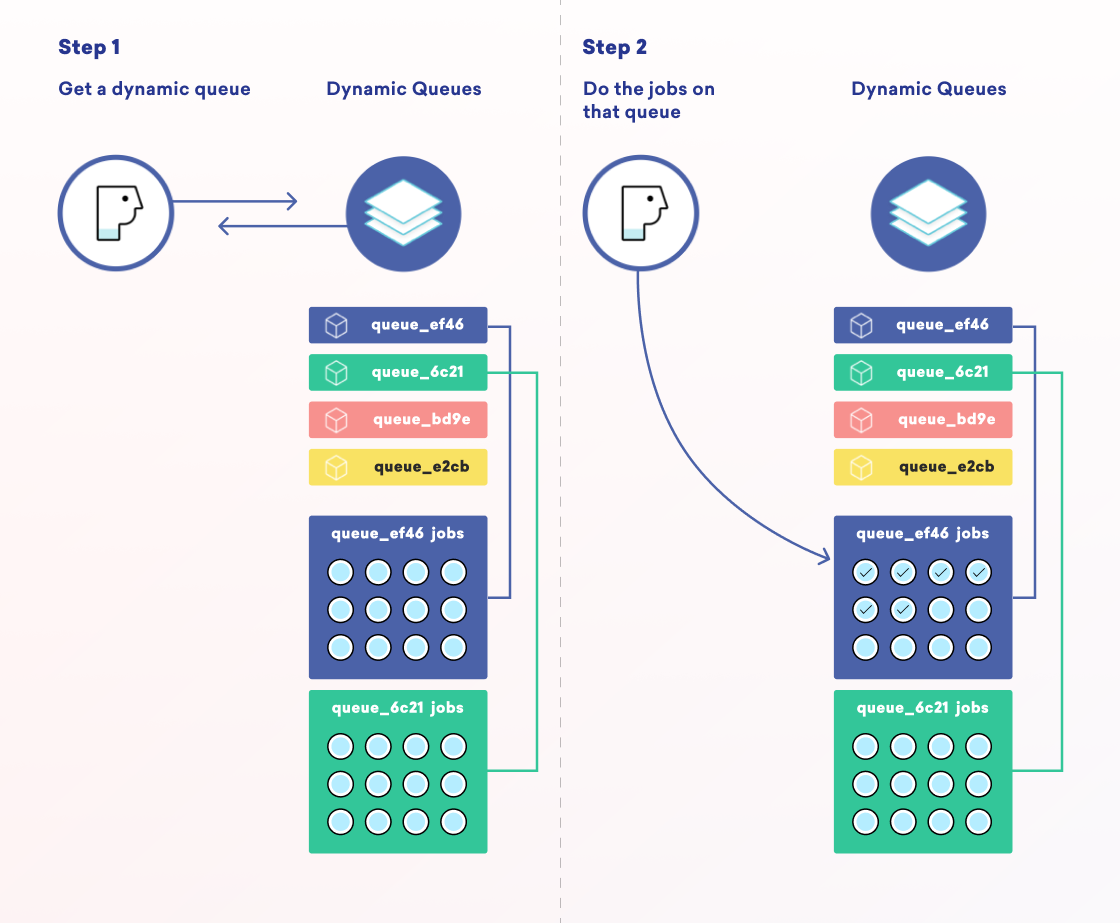
In a multi-step pipeline, job queues can pose a bit of a challenge because of what is called “queue starvation.” Queues are inherently first-in, first-out. That means that if we have 100 jobs for Customer A ahead of one job for Customer B on the same queue, nothing will be processed for Customer B until all 100 jobs are processed for Customer A. To resolve this problem, we built our own dynamic queue system that creates short-lived job queues for each part of the message-sending pipeline. The worker servers then do weighted selection on dynamic queues specific to the database to which they are assigned.
With that background in mind, let’s discuss how Braze’s processing infrastructure is provisioned. Returning to the question of how to send as fast as possible in a cost-efficient manner, this means that we need to be able to automatically scale capacity up or down based on current or anticipated needs. To do this, we use AWS Auto Scaling. AWS Auto Scaling is a technology that lets us tell AWS how many servers we want, and they will automatically scale up or scale down servers to match that desired amount.
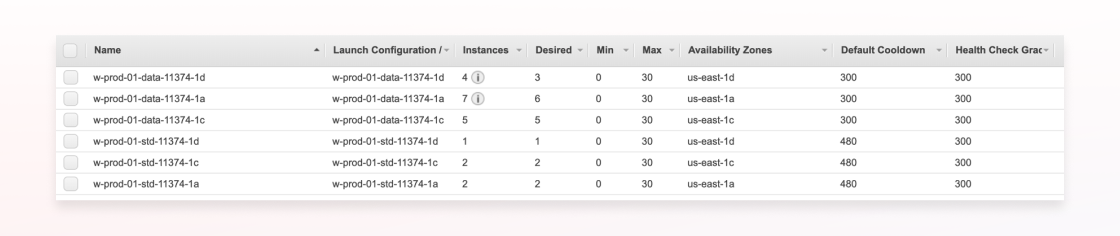
For Braze customers whose data is hosted in the US, we run in three availability zones: us-east-1a, us-east-1c, and us-east-1d. We use Terraform to create two AWS Auto Scaling Groups (ASGs) per database cluster, per availability zone. One ASG is for data processing only, whereas another is for message sending and other types of work.
For each group and cluster, we collect a set of job queue metrics, such as the number of jobs enqueued per availability zone, latency stats, and how many jobs we are scheduled to process in the future.
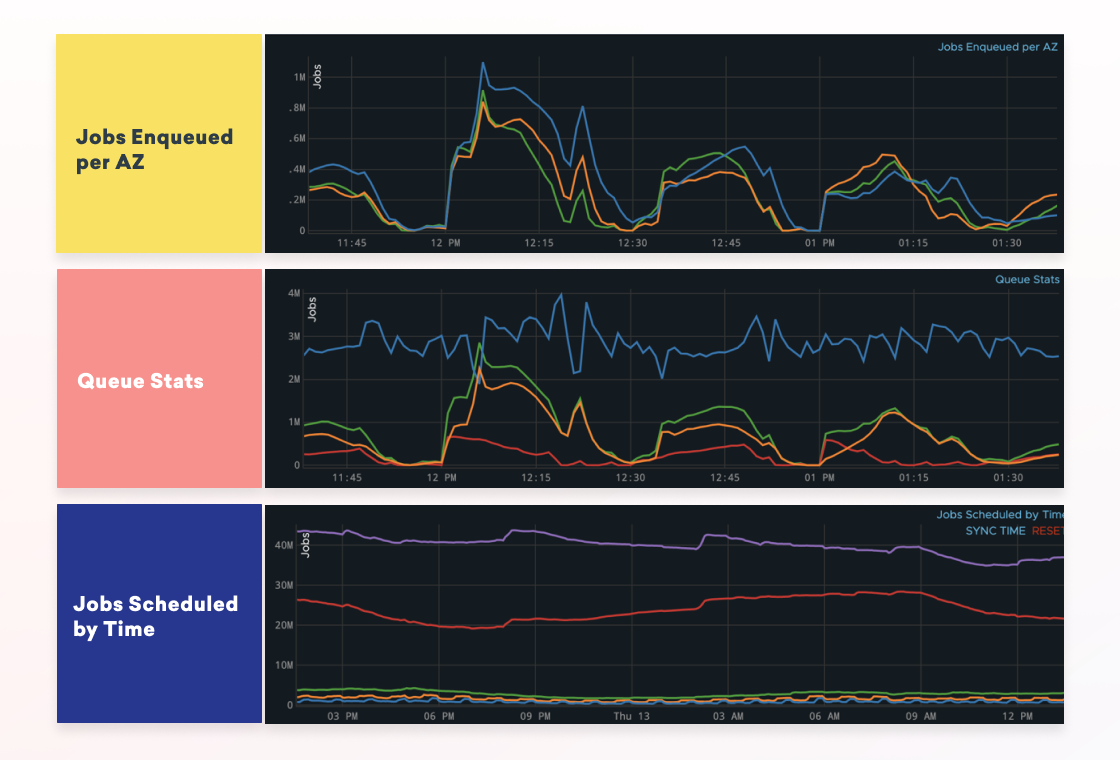
These metrics are published to Amazon CloudWatch, a monitoring and observability service. The reason we rely on CloudWatch is because it provides performance and consistency guarantees for reading the metrics in real-time for production use cases. Braze runs processes which monitor the job queue statistics and posts them to CloudWatch each minute.
From there, Braze uses AWS Lambda to read the CloudWatch metrics about existing and future anticipated job queue state. This “asg-lambda” then does some math to figure out how many servers we need per database cluster and per availability zone then continuously spins up or scales down servers. The result is that throughout the day we’re constantly changing the different types of worker processes and servers that we have online.
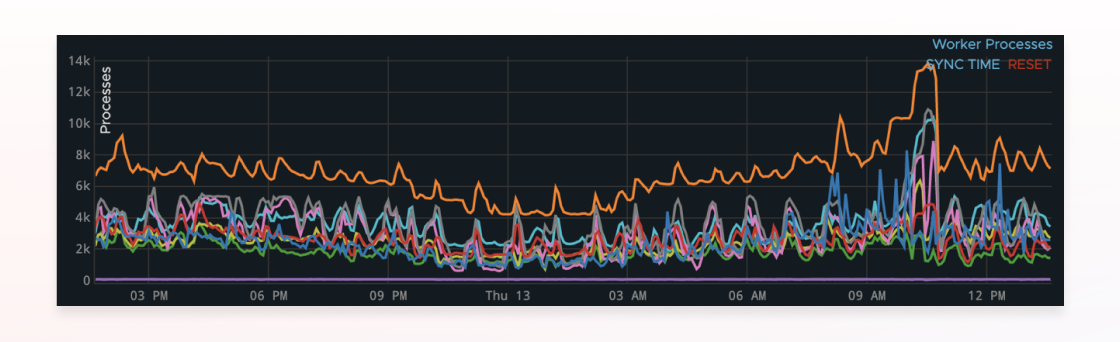
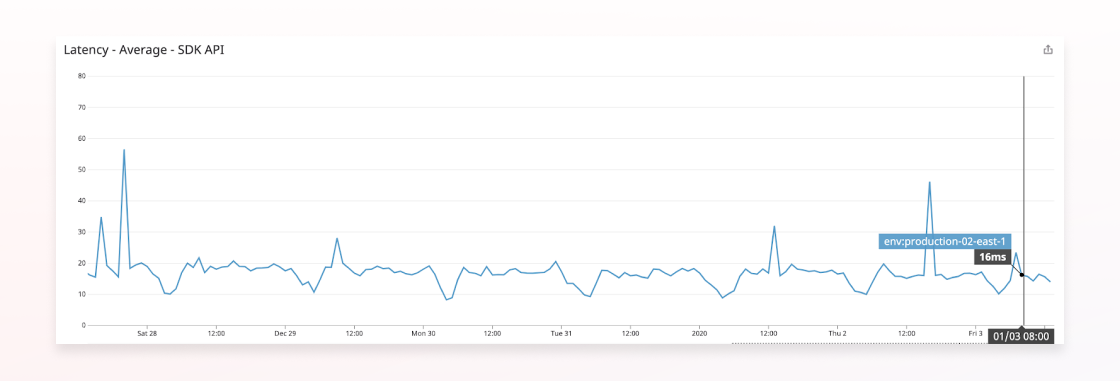
As a result, Braze’s performance is consistently high and we save tens of thousands of dollars each month with this technique.
There are lots of ways for us to improve how we auto scale at Braze; check out our jobs page to join our team!
Related Tags
Be Absolutely Engaging.™
Sign up for regular updates from Braze.
Related Content
 Article5 min read
Message Prioritization: Make your most important messages win
October 20, 2026 Article37 min read
SMS marketing examples: Use cases for B2C brands, by industry
October 19, 2026 Article11 min read
BrazeAI Operator™ Use Cases: How Marketers Launch Campaigns, Build Segments, And QA In Minutes
October 19, 2026