메시지 보관
메시지 보관 기능을 사용하면 보관 또는 규정 준수 목적으로 사용자에게 전송된 메시지의 사본을 AWS S3 버킷, Azure Blob Storage 컨테이너 또는 Google Cloud Storage 버킷에 저장할 수 있습니다.
본 문서에서는 메시지 보관 설정 방법, JSON 페이로드 참조 및 자주 묻는 질문을 다룹니다.
메시지 보관은 추가 기능으로 제공됩니다. 메시지 보관을 시작하려면 Braze 고객 성공 매니저에게 문의하세요.
작동 방식
이 기능이 활성화되면, Braze는 선택한 채널(이메일, SMS/MMS 또는 푸시)을 통해 사용자에게 전송되는 각 메시지에 대해 gzip 압축된 JSON 파일을 작성합니다. Braze는 이 파일을 기본 데이터 내보내기 대상에 기록합니다. 여기에는 트랜잭션 이메일 API를 통해 전송된 트랜잭션 이메일 캠페인 등 각 채널의 모든 캠페인 유형이 포함됩니다.
이 파일은 파일 참조에 정의된 필드를 포함하며, 사용자에게 전송된 최종 템플릿 메시지를 반영합니다. 캠페인에 정의된 모든 템플릿 값(예: {{${first_name}}})은 사용자의 프로필 정보를 기반으로 수신한 최종 값을 표시합니다. 이를 통해 규정 준수, 감사 또는 고객지원 요건을 충족하기 위해 전송된 메시지의 사본을 보관할 수 있습니다.
여러 클라우드 스토리지 제공업체에 대한 자격 증명을 설정한 경우, 메시지 보관은 기본 데이터 내보내기 대상으로 표시된 제공업체에만 내보냅니다. 명시적인 기본값을 설정하지 않았고 AWS S3 버킷이 연결된 경우, 메시지 보관은 해당 버킷에 업로드됩니다.
이 기능을 활성화하면 메시지 전달 속도에 영향을 미칩니다. 정확성을 유지하기 위해 메시지가 전송되기 직전에 파일 업로드가 수행되기 때문입니다. 메시지 보관으로 인한 지연 시간은 클라우드 스토리지 제공업체와 저장되는 문서의 처리량 및 크기에 따라 달라집니다.
JSON은 다음 키 구조를 사용하여 스토리지 버킷에 저장됩니다:
sent_messages/{channel, one of: email, push, sms}/{MD5 digest of downcased: email address, push token, or E.164 phone number}/{campaign or Canvas step API ID}/{dispatch ID}.json.gz
예시 파일은 다음과 같습니다:
sent_messages/email/819baa08d8d7e77e19d4666f5fc6050b/ee965cb2-8934-4b0a-acf1-91c899c2f915/651fd10b282850b39e1169c13975234b.json.gz
MD5 다이제스트는 알려진 소문자 이메일 주소, 푸시 토큰 또는 E.164 전화번호를 사용해서만 계산할 수 있습니다. 알려진 MD5 다이제스트를 역으로 변환하여 소문자 이메일 주소, 푸시 토큰 또는 E.164 전화번호를 얻을 수는 없습니다.
버킷에서 푸시 토큰을 찾는 데 문제가 있나요?
Braze는 푸시 토큰을 해시하기 전에 소문자로 변환합니다. 이로 인해 푸시 토큰 Test_Push_Token12345는 키 경로에서 해시 32b802170652af2b5624b695f34de089와 함께 test_push_token12345로 소문자 변환됩니다.
메시지 보관 설정
이 섹션에서는 워크스페이스에 대한 메시지 보관 설정 방법을 안내합니다. 진행하기 전에 회사에서 메시지 보관을 구매하고 활성화했는지 확인하세요.
1단계: 클라우드 스토리지 버킷 연결
아직 연결하지 않았다면, 클라우드 스토리지 버킷을 Braze에 연결하세요. 단계별 안내는 Amazon S3, Azure Blob Storage 또는 Google Cloud Storage에 대한 파트너 설명서를 참조하세요.
메시지 보관을 위해 커런츠를 설정할 필요는 없으므로, 파트너 설명서의 해당 전제 조건은 건너뛸 수 있습니다.
2단계: 메시지 보관을 위한 채널 선택
메시지 보관 설정 페이지에서 전송된 메시지의 사본을 클라우드 스토리지 버킷에 저장할 채널을 제어할 수 있습니다.
채널을 선택하려면:
- 설정 > 메시지 보관으로 이동합니다.
- 채널을 선택합니다.
- 변경 사항 저장을 선택합니다.
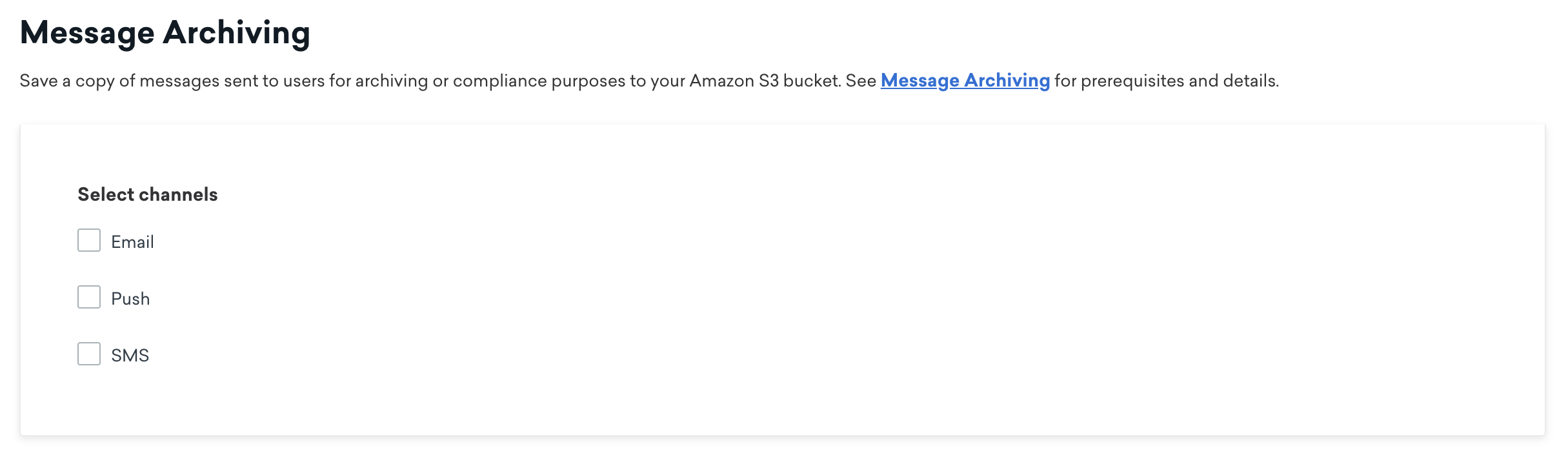
설정에 메시지 보관이 표시되지 않으면 회사에서 메시지 보관을 구매하고 활성화했는지 확인하세요.
파일 참조
다음은 메시지가 전송될 때마다 클라우드 스토리지 버킷으로 전달되는 JSON 페이로드에 대한 참조입니다. 코드 예제 리포지토리에서 메시지 아카이브 샘플 파일을 참조하세요.
1
2
3
4
5
6
7
8
9
10
11
12
13
14
15
16
17
18
19
20
21
22
23
24
25
{
  "version": 1, //numerical version of the JSON structure
  "to": ToAddress, ("[email protected]")
  "subject": SubjectLine ("20% off coupon inside!"),
  "from_name": DisplayName ("Braze"),
  "from_address": FromAddress ("[email protected]"),
  "html_body": HtmlBody,
  "plaintext_body": PlainTextBody,
  "amp_body": AMPEmailBody,
  "extras": Hash of key-value pairs from Email Extras configured in the email editor,
  "headers": HashOfHeaders,
  "sent_at": UnixTimestamp,
  "dispatch_id": DispatchIdFromBraze,
  "campaign_id": CampaignApiId, // may not be available
  "canvas_id": CanvasApiId, // may not be available
  "canvas_step_id": CanvasStepApiId, // may not be available
  "canvas_variation_id" : CanvasVariationApiId, // may not be available
  "message_variation_id": MessageVariationApiId, // may not be available,
  "attachments": Array of JSON Objects containing 'bytes' and 'file_name', // may not be available
  "user_id": String,
  "campaign_name": String, // will only be available if the message is from a campaign
  "canvas_name": String, // will only be available if the message is from Canvas
  "canvas_step_name": String, // will only be available if the message is from a Canvas
  "external_id": String
}
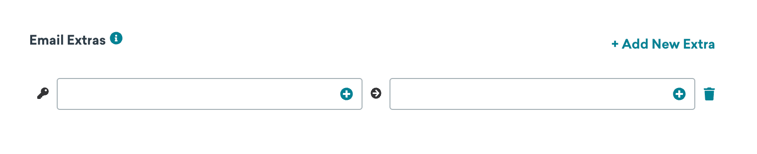
extras 필드는 HTML 편집기에서 이메일을 작성할 때 이메일 추가 정보 필드에 구성된 키-값 페어를 포함합니다. 이메일 추가 기능은 모든 이메일 서비스 공급자(SendGrid 및 Sparkpost 포함)에서 작동하며, 사용 중인 공급자와 관계없이 보관된 메시지에 포함됩니다. 이메일 추가 기능 설정에 대한 자세한 내용은 이메일 캠페인 생성을 참조하세요. 커런츠로 데이터를 보내려면 메시지 추가 정보를 참조하세요.
1
2
3
4
5
6
7
8
9
10
11
12
13
14
15
16
17
18
19
20
{
  "version": 1 //numerical version of the JSON structure
  "to": PhoneNumber, ("+15555555555"),
  "body": Body ("Hi there!"),
  "subscription_group": SubscriptionGroupExternalId,
  "provider": StringOfProviderName,
  "media_urls": ArrayOfString, // indicates a message is MMS
  "sent_at": UnixTimestamp,
  "dispatch_id": DispatchIdFromBraze,
  "campaign_id": CampaignApiId, // may not be available
  "canvas_id": CanvasApiId, // may not be available
  "canvas_step_id": CanvasStepApiId, // may not be available
  "canvas_variation_id" : CanvasVariationApiId, // may not be available
  "message_variation_id": MessagVariationApiId, // may not be available
  "user_id": String,
  "campaign_name": String, // will only be available if the message is from a campaign
  "canvas_name": String, // will only be available if the message is from Canvas
  "canvas_step_name": String, // will only be available if the message is from a Canvas
  "external_id": String
}
1
2
3
4
5
6
7
8
9
10
11
12
13
14
15
16
17
18
19
{
  "version": 1, //numerical version of the JSON structure
  "to": PushToken,
  "payload": JsonOfEntirePushPayload,
  "platform": one of "android_push" | "ios_push" | "kindle_push" | "web_push",
  "app_id": ApiKeyOfApp,
  "sent_at": UnixTimestamp,
  "dispatch_id": DispatchIdFromBraze,
  "campaign_id": CampaignApiId, // may not be available
  "canvas_id": CanvasApiApiId, // may not be available
  "canvas_step_id": CanvasStepApiId, // may not be available
  "canvas_variation_id" : CanvasVariationApiId, // may not be available
  "message_variation_id": MessagVariationApiId, // may not be available
  "user_id": String,
  "campaign_name": String, // will only be available if the message is from a campaign
  "canvas_name": String, // will only be available if the message is from a Canvas
  "canvas_step_name": String, // will only be available if the message is from a Canvas
  "external_id": String
}
푸시 페이로드 구조 변형
푸시 알림 아카이브의 최상위 payload 필드에는 기기로 전송된 전체 제공자 페이로드가 포함됩니다. 이 JSON 내에서 aps(APNs용) 또는 notification 및 data(FCM용)와 같은 키는 메시지 유형, 플랫폼 및 구성에 따라 크게 달라질 수 있습니다.
메시지 보관은 메시지 페이로드 자체를 캡처하지만, FCM 또는 APNs로 전송되는 전달 메타데이터는 포함하지 않습니다. 전달 메타데이터에는 다음이 포함됩니다:
- 기기 토큰
- 우선순위 설정
- TTL(Time-to-Live)
- 축소 ID
- APNs 헤더
- 만료 타임스탬프
- 기타 전달 구성 필드
이러한 필드는 푸시 제공자에 대한 전달 지침 역할을 하며, 일반적으로 메시지 콘텐츠의 일부로 간주되지 않습니다.
예를 들어:
- iOS 푸시 알림은 리치 알림(
aps.alert가title및body등의 필드를 포함하는 오브젝트인 경우)과 단순 알림(aps.alert가 문자열인 경우)에 따라 구조가 다를 수 있습니다. - Android 푸시 알림(예: FCM)은 커스텀 키가 포함된 데이터 메시지를 사용합니다. 페이로드 구조는 메시지 구성에 따라 푸시 버튼, 캐러셀 또는 추가 메타데이터와 같은 다양한 선택적 필드를 포함할 수 있습니다.
또한, 대시보드에서 수행하는 테스트 전송은 프로덕션 메시지와 다른 페이로드 구조를 생성할 수 있습니다.
JSON 페이로드 형식은 메시지마다 다를 수 있으며 시간이 지남에 따라 변경될 수 있습니다. 아카이브된 푸시 페이로드를 파싱할 때 고정된 구조를 가정하거나 동일한 필드가 항상 존재할 것이라고 기대하지 마세요. 다양한 페이로드 형식을 처리할 수 있는 유연한 파싱 로직을 구현하세요.
자주 묻는 질문
페이로드에 포함되지 않는 템플릿은 무엇인가요?
메시지가 Braze를 떠난 후 수정된 내용은 클라우드 스토리지 버킷에 저장된 파일에 반영되지 않습니다. 여기에는 클릭 추적을 위한 링크 래핑 및 추적 픽셀 삽입과 같이 메일 전달 파트너가 수행하는 수정 사항이 포함됩니다.
캠페인 경로에서 “unassociated” 값 아래의 메시지는 무엇인가요?
메시지가 캠페인 또는 캔버스 외부에서 전송되면, 파일 이름의 캠페인 ID는 “unassociated”가 됩니다. 이는 대시보드에서 테스트 메시지를 보내거나, Braze가 SMS/MMS 자동 응답을 보내거나, API를 통해 전송된 메시지에 캠페인 ID가 지정되지 않은 경우에 발생합니다.
이 발송에 대한 추가 정보를 어떻게 찾을 수 있나요?
external_id 또는 dispatch_id를 user_id와 함께 사용하여 템플릿 메시지를 커런츠 데이터와 교차 참조하면 전달 타임스탬프, 사용자가 메시지를 열었는지 또는 클릭했는지 등의 추가 정보를 확인할 수 있습니다.
재시도는 어떻게 처리되나요?
클라우드 스토리지 버킷에 연결할 수 없는 경우, Braze는 백오프 지터를 사용하여 최대 세 번 재시도합니다. AWS S3 사용량 제한 재시도는 Braze에 의해 자동으로 처리됩니다.
자격 증명이 유효하지 않으면 어떻게 되나요?
클라우드 스토리지 자격 증명이 어느 시점에서든 유효하지 않게 되면, Braze는 클라우드 스토리지 버킷에 메시지를 저장할 수 없으며 해당 메시지는 손실됩니다. Amazon Web Services, Google Cloud Services 또는 Azure(Microsoft Cloud Services)에 대한 알림 환경설정을 구성하여 자격 증명 관련 문제 발생 시 알림을 받을 수 있도록 하는 것을 권장합니다.
아카이브 파일의 sent_at 타임스탬프가 커런츠의 전송 타임스탬프와 약간 다른 이유는 무엇인가요?
렌더링된 사본은 사용자에게 메시지를 보내기 직전에 업로드됩니다. 클라우드 스토리지 업로드 시간으로 인해 렌더링된 사본의 sent_at 타임스탬프와 실제 전송이 발생한 시간 사이에 몇 초의 지연이 있을 수 있습니다.
커런츠 데이터에 사용하는 현재 버킷을 유지하면서 메시지 보관 전용 새 버킷을 만들 수 있나요?
아니요. 이러한 전용 버킷 생성에 관심이 있다면 제품 피드백을 제출해 주세요.
아카이브된 데이터는 커런츠 데이터 내보내기 구조와 유사하게 기존 버킷의 전용 폴더에 기록되나요?
데이터는 버킷의 sent_messages 섹션에 기록됩니다. 자세한 내용은 작동 방식을 참조하세요.
메시지 보관을 사용하여 파일을 서로 다른 워크스페이스별로 그룹화할 수 있나요?
아니요. 메시지 보관은 워크스페이스를 기준으로 파일을 그룹화하는 기능을 지원하지 않습니다. 대신 캠페인 또는 캔버스 단계 API ID가 속한 워크스페이스를 확인한 후, 해당 정보를 기준으로 그룹화할 수 있습니다.
 GitHub 에서 이 페이지를 편집합니다.