객체 배열
이 페이지에서는 객체 배열을 사용하여 관련 속성을 그룹화하는 방법을 설명합니다. 예를 들어, 한 사용자에게 속하는 애완동물 객체, 노래 객체, 계정 객체 그룹이 있을 수 있습니다. 이러한 객체 배열을 사용하여 Liquid로 메시지를 개인화하거나, 객체 내의 요소가 기준과 일치하는 경우 오디언스 세그먼트를 만들 수 있습니다.
Supported data types
다음 데이터 유형이 지원됩니다:
| Data Type | 설명 |
|---|---|
| 숫자 | 숫자 값, 예를 들어 1 또는 5.5. |
| 문자열 | 텍스트 값, 예를 들어 "Hello" 또는 "The Hobbit". |
| 부울 | 참 또는 거짓으로 평가되는 값 true 또는 false. |
| 배열 | 값의 목록, 예를 들어 ["red", "blue", "green"]. |
| Time |
날짜 및 시간 비교에 사용되는 타임스탬프 값입니다. 중첩된 시간 커스텀 속성을 필터링할 때 선택할 수 있습니다:
|
| 객체 | 키-값 쌍이 있는 구조화된 값, 예를 들어 {"author": "Tolkien"}. |
| 객체 배열 |
객체의 목록, 예를 들어 [{"title": "The Hobbit"}, {"title": "Dune"}].
자세한 내용은 참조하십시오
객체의 배열.
|
제한 사항
- 객체 배열은 API를 통해 전송되는 커스텀 속성을 위한 것입니다. CSV 업로드는 지원되지 않습니다. CSV 파일의 쉼표가 열 구분 기호로 해석되어 값에 포함된 쉼표가 구문 분석 오류를 유발하기 때문입니다.
- 객체 배열은 항목 수에 제한이 없지만 최대 크기는 100 KB입니다.
- 모든 Braze 파트너가 객체 배열을 지원하는 것은 아닙니다. 통합에서 이 기능을 지원하는지 확인하려면 파트너 설명서를 참조하세요.
배열의 항목을 업데이트하거나 제거하려면 키와 값으로 항목을 식별해야 하므로 배열의 각 항목에 고유 식별자를 포함하는 것이 좋습니다. 고유성은 해당 배열 범위로만 한정되며, 배열에서 특정 객체를 업데이트하거나 제거하려는 경우에 유용합니다. 이는 Braze에서 강제하지 않습니다.
요청 내 중첩 고객 속성에 유효하지 않은 값(예: 잘못된 시간 형식 또는 null 값)이 포함된 경우, Braze는 해당 요청의 모든 중첩 고객 속성 업데이트를 처리에서 제외합니다. 이는 해당 특정 속성 내의 모든 중첩 구조에 적용됩니다. 전송하기 전에 중첩 고객 속성 내의 모든 값이 유효한지 확인하세요. 자세한 내용은 사용자 생성 및 업데이트를 참조하세요.
사용자 속성 객체에 대한 객체 배열 사용 방법에 대해 자세히 알아보려면 사용자 속성 객체를 참조하세요.
API 예제
다음은 pets 배열을 사용한 /users/track 예제입니다. 펫의 등록정보를 캡처하려면 pets를 객체 배열로 나열하는 API 요청을 보내세요. 각 객체에는 나중에 업데이트할 때 참조할 수 있는 고유한 id가 할당되어 있습니다.
1
2
3
4
5
6
7
8
9
10
11
12
13
14
15
16
17
18
19
20
21
{
  "attributes": [
    {
      "external_id": "user_id",
      "pets": [
        {
          "id": 1,
          "type": "dog",
          "breed": "beagle",
          "name": "Gus"
        },
        {
          "id": 2,
          "type": "cat",
          "breed": "calico",
          "name": "Gerald"
        }
      ]
    }
  ]
}
$add 연산자를 사용하여 배열에 항목을 추가합니다. 다음 예제는 사용자의 pets 배열에 3개의 펫 객체를 추가하는 방법을 보여줍니다.
1
2
3
4
5
6
7
8
9
10
11
12
13
14
15
16
17
18
19
20
21
22
23
24
25
26
27
28
29
{
  "attributes": [
    {
      "external_id": "user_id",
      "pets": {
        "$add": [
          {
            "id": 3,
            "type": "dog",
            "breed": "corgi",
            "name": "Doug"
          },
          {
            "id": 4,
            "type": "fish",
            "breed": "salmon",
            "name": "Larry"
          },
           {
            "id": 5,
            "type": "bird",
            "breed": "parakeet",
            "name": "Mary"
          }
        ]
      }
    }
  ]
}
_merge_objects 매개변수와 $update 연산자를 사용하여 배열 내 특정 객체의 값을 업데이트합니다. 단순 중첩 커스텀 속성 객체에 대한 업데이트와 마찬가지로 심층 병합을 수행합니다.
$update는 배열 내부 객체에서 중첩된 등록정보를 제거하는 데 사용할 수 없습니다. 이를 수행하려면 배열에서 해당 항목을 제거한 다음 특정 키 없이 객체를 다시 추가해야 합니다($remove와 $add의 조합 사용).
다음 예제는 id가 4인 객체의 breed 등록정보를 goldfish로 업데이트하는 것을 보여줍니다. 이 요청 예제는 id가 5인 객체의 name도 Annette로 업데이트합니다. _merge_objects 매개변수가 true로 설정되어 있으므로 이 두 객체의 다른 모든 필드는 동일하게 유지됩니다.
1
2
3
4
5
6
7
8
9
10
11
12
13
14
15
16
17
18
19
20
21
22
23
24
25
26
{
  "attributes": [
    {
      "external_id": "user_id",
      "_merge_objects": true,
      "pets": {
        "$update": [
          {
            "$identifier_key": "id",
            "$identifier_value": 4,
            "$new_object": {
              "breed": "goldfish"
            }
          },
          {
            "$identifier_key": "id",
            "$identifier_value": 5,
            "$new_object": {
              "name": "Annette"
            }
          }
        ]
      }
    }
  ]
}
_merge_objects를 true로 설정해야 합니다. 그렇지 않으면 객체가 덮어쓰기됩니다. _merge_objects는 기본적으로 false입니다.
일치하는 키($identifier_key)와 값($identifier_value)을 조합하여 $remove 연산자로 배열에서 객체를 제거합니다.
다음 예제는 pets 배열에서 id 값이 1인 객체, id 값이 2인 객체, type 값이 dog인 객체를 제거하는 것을 보여줍니다. type 값이 dog인 객체가 여러 개 있는 경우 일치하는 모든 객체가 제거됩니다.
1
2
3
4
5
6
7
8
9
10
11
12
13
14
15
16
17
18
19
20
21
22
23
24
25
{
  "attributes": [
    {
      "external_id": "user_id",
      "pets": {
        "$remove": [
          // Remove by ID
          {
            "$identifier_key": "id",
            "$identifier_value": 1
          },
          {
            "$identifier_key": "id",
            "$identifier_value": 2
          },
          // Remove any dog
          {
            "$identifier_key": "type",
            "$identifier_value": "dog"
          }
        ]
      }
    }
  ]
}
처리 순서
동일한 배열 속성에 대해 단일 /users/track 요청에 $add, $remove, $update 작업이 포함된 경우, Braze는 다음 순서로 처리합니다:
$add$remove$update
$add가 $remove보다 먼저 실행되므로, 단일 요청 내에서 $remove 후 $add를 업서트 메커니즘으로 사용할 수 없습니다. $add가 먼저 처리된 후 $remove가 해당 항목을 삭제합니다. 업서트하려면 $remove를 $add보다 먼저 별도의 요청으로 전송하세요.
타임스탬프
객체 배열에 타임스탬프와 같은 필드를 포함할 때는 일반 문자열이나 Unix 에포크 정수 대신 $time 형식을 사용하세요.
1
2
3
4
5
6
7
8
9
10
11
12
13
14
15
16
{
  "attributes": [
    {
      "external_id": "user123",
      "purchases": [
        {
          "item_name": "T-shirt",
          "price": 19.99,
          "purchase_time": {
            "$time": "2020-05-28"
          }
        }
      ]
    }
  ]
}
자세한 내용은 중첩 고객 속성을 참조하세요.
SDK 예제
1
2
3
4
5
6
7
8
9
10
11
12
13
14
15
16
val json = JSONArray()
    .put(JSONObject()
        .put("id", 1)
        .put("type", "dog")
        .put("breed", "beagle")
        .put("name", "Gus"))
    .put(JSONObject()
        .put("id", 2)
        .put("type", "cat")
        .put("breed", "calico")
        .put("name", "Gerald")
    )

braze.getCurrentUser { user ->
    user.setCustomUserAttribute("pets", json)
}
1
2
3
4
5
6
7
8
9
10
11
12
13
14
15
16
17
18
19
20
21
22
23
val json = JSONObject()
    .put("\$add", JSONArray()
        .put(JSONObject()
            .put("id", 3)
            .put("type", "dog")
            .put("breed", "corgi")
            .put("name", "Doug"))
        .put(JSONObject()
            .put("id", 4)
            .put("type", "fish")
            .put("breed", "salmon")
            .put("name", "Larry"))
        .put(JSONObject()
            .put("id", 5)
            .put("type", "bird")
            .put("breed", "parakeet")
            .put("name", "Mary")
        )
    )

braze.getCurrentUser { user ->
    user.setCustomUserAttribute("pets", json, true)
}
1
2
3
4
5
6
7
8
9
10
11
12
13
14
15
16
17
18
19
20
21
val json = JSONObject()
    .put("\$update", JSONArray()
        .put(JSONObject()
            .put("\$identifier_key", "id")
            .put("\$identifier_value", 4)
            .put("\$new_object", JSONObject()
                .put("breed", "goldfish")
            )
        )
        .put(JSONObject()
            .put("\$identifier_key", "id")
            .put("\$identifier_value", 5)
            .put("\$new_object", JSONObject()
                .put("name", "Annette")
            )
        )
    )

braze.getCurrentUser { user ->
    user.setCustomUserAttribute("pets", json, true)
}
1
2
3
4
5
6
7
8
9
10
11
12
13
14
15
16
17
18
19
val json = JSONObject()
    .put("\$remove", JSONArray()
        .put(JSONObject()
            .put("\$identifier_key", "id")
            .put("\$identifier_value", 1)
        )
        .put(JSONObject()
            .put("\$identifier_key", "id")
            .put("\$identifier_value", 2)
        )
        .put(JSONObject()
            .put("\$identifier_key", "type")
            .put("\$identifier_value", "dog")
        )
    )

braze.getCurrentUser { user ->
    user.setCustomUserAttribute("pets", json, true)
}
1
2
3
4
5
6
7
8
9
10
11
12
13
14
15
16
let json: [[String: Any?]] = [
  [
    "id": 1,
    "type": "dog",
    "breed": "beagle",
    "name": "Gus"
  ],
  [
    "id": 2,
    "type": "cat",
    "breed": "calico",
    "name": "Gerald"
  ]
]

braze.user.setCustomAttribute(key: "pets", array: json)
1
2
3
4
5
6
7
8
9
10
11
12
13
14
15
16
17
18
19
20
21
22
23
24
let json: [String: Any?] = [
  "$add": [
    [
      "id": 3,
      "type": "dog",
      "breed": "corgi",
      "name": "Doug"
    ],
    [
      "id": 4,
      "type": "fish",
      "breed": "salmon",
      "name": "Larry"
    ],
    [
      "id": 5,
      "type": "bird",
      "breed": "parakeet",
      "name": "Mary"
    ]
  ]
]

braze.user.setCustomAttribute(key: "pets", dictionary: json, merge: true)
1
2
3
4
5
6
7
8
9
10
11
12
13
14
15
16
17
18
19
20
let json: [String: Any?] = [
  "$update": [
    [
      "$identifier_key": "id",
      "$identifier_value": 4,
      "$new_object": [
        "breed": "goldfish"
      ]
    ],
    [
      "$identifier_key": "id",
      "$identifier_value": 5,
      "$new_object": [
        "name": "Annette"
      ]
    ]
  ]
]

braze.user.setCustomAttribute(key: "pets", dictionary: json, merge: true)
1
2
3
4
5
6
7
8
9
10
11
12
13
14
15
16
17
18
let json: [String: Any?] = [
  "$remove": [
    [
      "$identifier_key": "id",
      "$identifier_value": 1,
    ],
    [
      "$identifier_key": "id",
      "$identifier_value": 2,
    ],
    [
      "$identifier_key": "type",
      "$identifier_value": "dog",
    ]
  ]
]

braze.user.setCustomAttribute(key: "pets", dictionary: json, merge: true)
AppboyKit에서는 중첩 커스텀 속성이 지원되지 않습니다.
1
2
3
4
5
6
7
8
9
10
11
12
13
import * as braze from "@braze/web-sdk";
const json = [{
  "id": 1,
  "type": "dog",
  "breed": "beagle",
  "name": "Gus"
}, {
  "id": 2,
  "type": "cat",
  "breed": "calico",
  "name": "Gerald"
}];
braze.getUser().setCustomUserAttribute("pets", json);
1
2
3
4
5
6
7
8
9
10
11
12
13
14
15
16
17
18
19
20
import * as braze from "@braze/web-sdk";
const json = {
  "$add": [{
    "id":  3,
    "type":  "dog",
    "breed":  "corgi",
    "name":  "Doug",
  }, {
    "id":  4,
    "type":  "fish",
    "breed":  "salmon",
    "name":  "Larry",
  }, {
    "id":  5,
    "type":  "bird",
    "breed":  "parakeet",
    "name":  "Mary",
  }]
};
braze.getUser().setCustomUserAttribute("pets", json, true);
1
2
3
4
5
6
7
8
9
10
11
12
13
14
15
16
17
18
19
20
import * as braze from "@braze/web-sdk";
const json = {
  "$update": [
    {
      "$identifier_key": "id",
      "$identifier_value": 4,
      "$new_object": {
        "breed": "goldfish"
      }
    },
    {
      "$identifier_key": "id",
      "$identifier_value": 5,
      "$new_object": {
        "name": "Annette"
      }
    }
  ]
};
braze.getUser().setCustomUserAttribute("pets", json, true);
1
2
3
4
5
6
7
8
9
10
11
12
13
14
15
16
17
18
import * as braze from "@braze/web-sdk";
const json = {
  "$remove": [
    {
      "$identifier_key": "id",
      "$identifier_value": 1,
    },
    {
      "$identifier_key": "id",
      "$identifier_value": 2,
    },
    {
      "$identifier_key": "type",
      "$identifier_value": "dog",
    }
  ]
};
braze.getUser().setCustomUserAttribute("pets", json, true);
Liquid 템플릿
이 pets 배열을 사용하여 메시지를 개인화할 수 있습니다. 다음 Liquid 템플릿 예제에서는 앞의 API 요청에서 저장된 커스텀 속성 객체 등록정보를 참조하여 메시징에 사용하는 방법을 보여줍니다.
1
2
3
4
5
{% assign pets = {{custom_attribute.${pets}}} %}

{% for pet in pets %}
I have a {{pet.type}} named {{pet.name}}! They are a {{pet.breed}}.
{% endfor %}
이 시나리오에서는 Liquid를 사용하여 pets 배열을 반복하고 각 애완동물에 대한 문장을 출력할 수 있습니다. pets 커스텀 속성에 변수를 할당하고 점 표기법을 사용하여 객체의 등록정보에 액세스합니다. 객체 이름 뒤에 마침표 .를 붙인 다음 등록정보 이름을 지정합니다.
세분화
객체 배열을 기반으로 사용자를 세분화할 때, 배열의 객체가 조건과 일치하면 해당 사용자는 세그먼트에 포함됩니다.
새 세그먼트를 만들고 중첩 커스텀 속성을 필터로 선택합니다. 그런 다음 객체 배열의 이름을 검색하고 선택합니다.
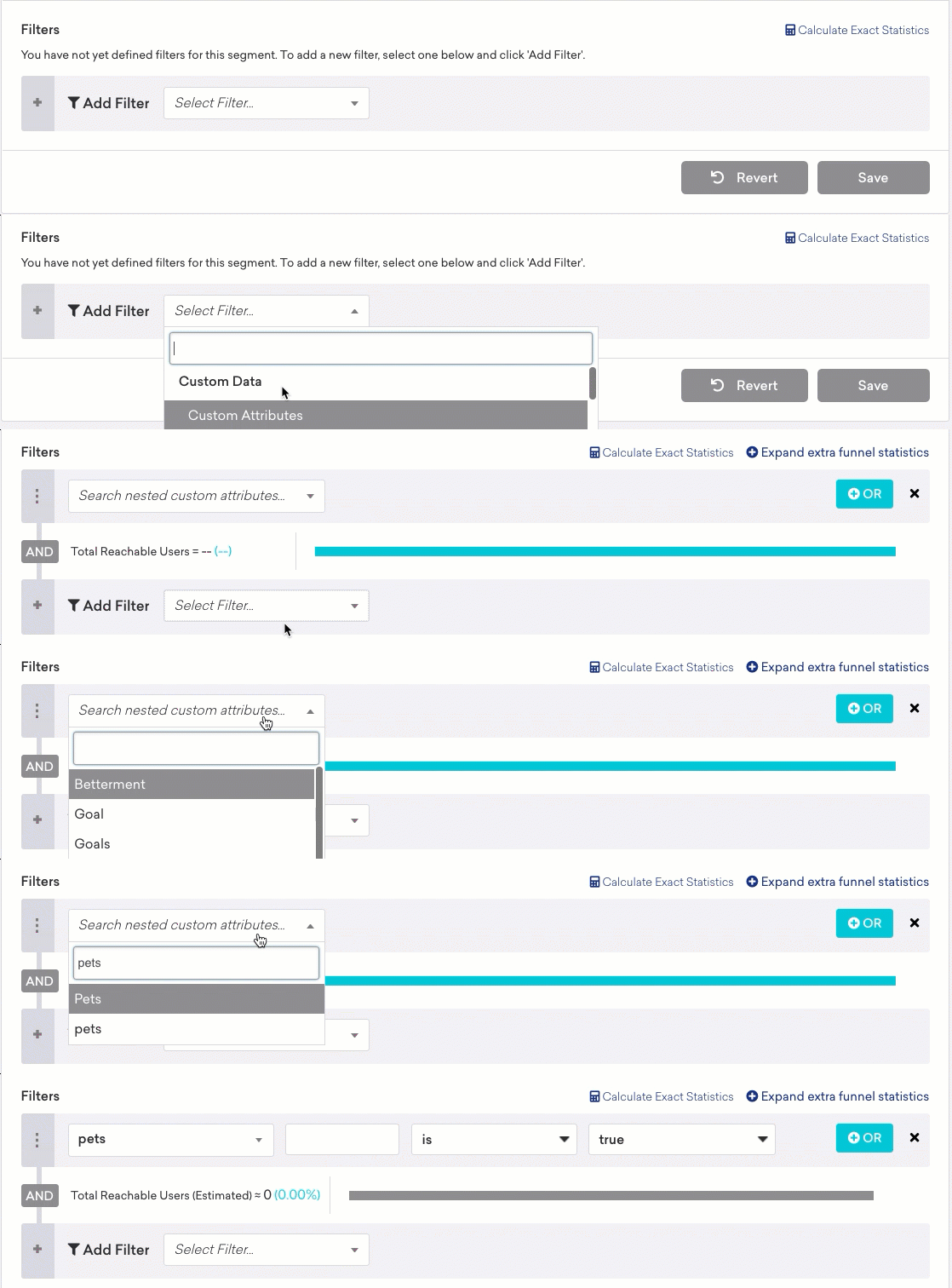
점 표기법을 사용하여 객체 배열에서 사용할 필드를 지정합니다. 빈 대괄호([])로 텍스트 필드를 시작하여 Braze에 객체 배열 내부를 조회하고 있음을 알립니다. 그런 다음 마침표 .를 추가하고 사용하려는 필드 이름을 입력합니다.
예를 들어 type 필드를 기준으로 top_3_movies 객체 배열을 필터링하려면 [].type을 입력하고 필터링할 영화(예: Fantasy Movie)를 선택합니다.
중첩 수준
최대 한 단계의 배열 중첩(다른 배열 내의 배열)으로 세그먼트를 만들 수 있습니다. 예를 들어 다음 속성이 주어지면 pets[].name에 Gus가 포함된 세그먼트는 만들 수 있지만, pets[].nicknames[]에 Gugu가 포함된 세그먼트는 만들 수 없습니다.
1
2
3
4
5
6
7
8
9
10
11
12
13
14
15
16
17
18
19
20
21
22
23
24
25
26
27
28
29
{
  "attributes": [
    {
      "external_id": "user_id",
      "pets": [
        {
          "id": 1,
          "type": "dog",
          "breed": "beagle",
          "name": "Gus",
          "nicknames": [
            "Gugu",
            "Gusto"
          ]
        },
        {
          "id": 2,
          "type": "cat",
          "breed": "calico",
          "name": "Gerald",
          "nicknames": [
            "GeGe",
            "Gerry"
          ]
        }
      ]
    }
  ]
}
데이터 포인트
데이터 포인트는 등록정보를 생성, 업데이트 또는 제거하는지에 따라 다르게 기록됩니다.
새로운 배열을 생성하면 객체의 각 속성에 대해 하나의 데이터 포인트가 기록됩니다. 이 예제는 8개의 데이터 포인트가 소비됩니다. 각 펫 객체에 4개의 속성이 있고 객체가 2개이기 때문입니다.
1
2
3
4
5
6
7
8
9
10
11
12
13
14
15
16
17
18
19
20
21
{
  "attributes": [
    {
      "external_id": "user_id",
      "pets": [
        {
          "id": 1,
          "type": "dog",
          "breed": "beagle",
          "name": "Gus"
        },
        {
          "id": 2,
          "type": "cat",
          "breed": "calico",
          "name": "Gerald"
        }
      ]
    }
  ]
}
기존 배열을 업데이트하면 추가된 각 등록정보마다 하나의 데이터 포인트가 기록됩니다. 이 예제에서는 두 객체에서 각각 하나의 등록정보만 업데이트하므로 2개의 데이터 포인트가 소비됩니다.
1
2
3
4
5
6
7
8
9
10
11
12
13
14
15
16
17
18
19
20
21
22
23
24
25
26
{
  "attributes": [
    {
      "external_id": "user_id",
      "_merge_objects": true,
      "pets": {
        "$update": [
          {
            "$identifier_key": "id",
            "$identifier_value": 4,
            "$new_object": {
              "breed": "goldfish"
            }
          },
          {
            "$identifier_key": "id",
            "$identifier_value": 5,
            "$new_object": {
              "name": "Annette"
            }
          }
        ]
      }
    }
  ]
}
배열에서 객체를 제거하면 전송한 제거 기준마다 하나의 데이터 포인트가 기록됩니다. 이 예제에서는 이 구문으로 여러 마리의 개를 제거하더라도 3개의 데이터 포인트가 소비됩니다.
1
2
3
4
5
6
7
8
9
10
11
12
13
14
15
16
17
18
19
20
21
22
23
24
25
{
  "attributes": [
    {
      "external_id": "user_id",
      "pets": {
        "$remove": [
          // Remove by ID
          {
            "$identifier_key": "id",
            "$identifier_value": 1
          },
          {
            "$identifier_key": "id",
            "$identifier_value": 2
          },
          // Remove any dog
          {
            "$identifier_key": "type",
            "$identifier_value": "dog"
          }
        ]
      }
    }
  ]
}
 GitHub 에서 이 페이지를 편집합니다.