 Intelligent Timing
Intelligent Timing을 사용하여 Braze가 최적의 전송 시간이라고 하는 사용자가 참여(열람 또는 클릭)할 가능성이 가장 높다고 판단되는 시간에 각 사용자에게 메시지를 전달합니다. 이렇게 하면 사용자가 원하는 시간에 메시지를 보내고 있는지 쉽게 확인할 수 있어 인게이지먼트를 높일 수 있습니다.
About Intelligent Timing
Braze는 사용자의 과거 앱과의 상호작용 및 각 메시징 채널과의 상호작용에 대한 통계 분석을 기반으로 최적의 전송 시간을 계산합니다. The following interaction data is used:
- Session times
- Push Direct Opens
- Push Influenced Opens
- Email Clicks
- Email Opens (excluding Machine Opens)
예를 들어, 샘은 아침에 정기적으로 이메일을 열람하지만 저녁에는 앱을 열고 알림과 상호 작용할 수 있습니다. 즉, 샘은 아침에 Intelligent Timing이 적용된 이메일 캠페인을 수신하고, 인게이지먼트 가능성이 높은 저녁에는 푸시 알림이 포함된 캠페인을 수신하게 됩니다.
사용자에게 최적의 전송 시간을 계산할 수 있는 관련 사용자 참여 데이터가 없는 경우, 대체 시간을 지정할 수 있습니다.
사용 사례
- 시간에 민감하지 않은 반복 캠페인 보내기
- 여러 시간대의 사용자를 대상으로 캠페인 자동화하기
- 인게이지먼트가 가장 높은 사용자에게 메시지를 보낼 때(인게이지먼트 데이터가 가장 많은 사용자)
Intelligent Timing 사용
이 섹션에서는 캠페인 및 캔버스에 대한 Intelligent Timing을 구성하는 방법에 대해 설명합니다.
1단계: Add intelligent timing
- 캠페인을 만들고 메시지를 작성합니다.
- Select the Scheduled Delivery as your delivery type.
- 시간 기반 예약 옵션에서 Intelligent Timing을 선택합니다.
- Set the entry frequency. For one-time sends, select Once and select a send date. For recurring sends, select Daily, Weekly, or Monthly and configure the recurrence options. See limitations for more guidance.
- Optionally, configure Quiet Hours.
- Specify a fallback time. 사용자 프로필에 최적의 시간을 계산할 수 있는 관련 이벤트가 없는 경우 메시징이 전송됩니다.
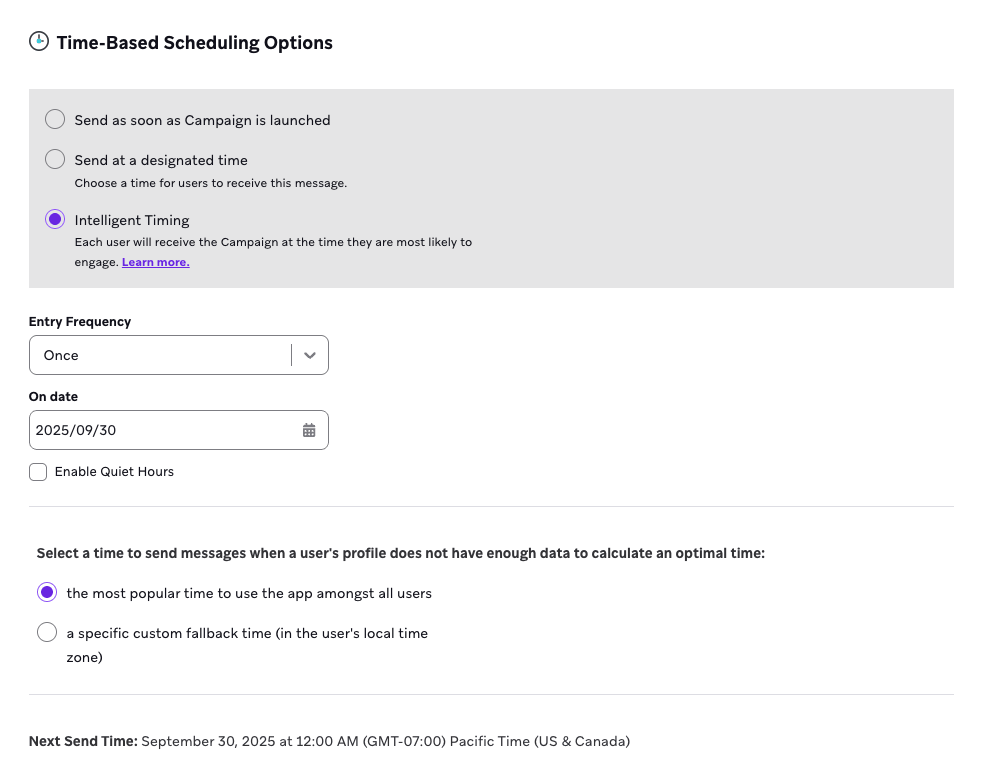
Quiet Hours
Use Quiet Hours to prevent messages from sending during specific hours. This is helpful when you want to avoid sending messages during early morning hours or overnight, while still allowing Intelligent Timing to determine the best delivery window.
Quiet Hours has replaced the Only send within specific hours setting. Instead of choosing when messages can be sent, you now choose when they shouldn’t be sent. For example, to send messages between 4 pm and 6 pm, set Quiet Hours from 6 pm to 4 pm the next day.
- Select Enable Quiet Hours.
- Select the start and end time when not to send messages.
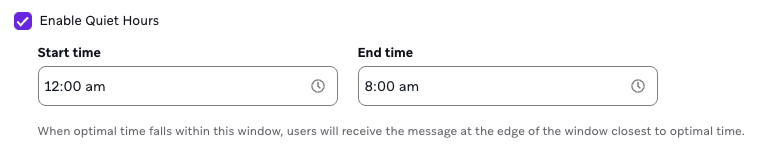
When Quiet Hours are turned on, Braze won’t send messages during the quiet period—even if that time matches a user’s optimal send time. If a user’s optimal time falls within the quiet window, the message will be sent instead at the nearest edge of the window.
For example, if Quiet Hours are set from 10:00 PM to 6:00 AM, and a user’s optimal time is 5:30 AM, Braze will hold the message and deliver it at 6:00 AM—the closest time outside the quiet window.
전달 시간 미리보기
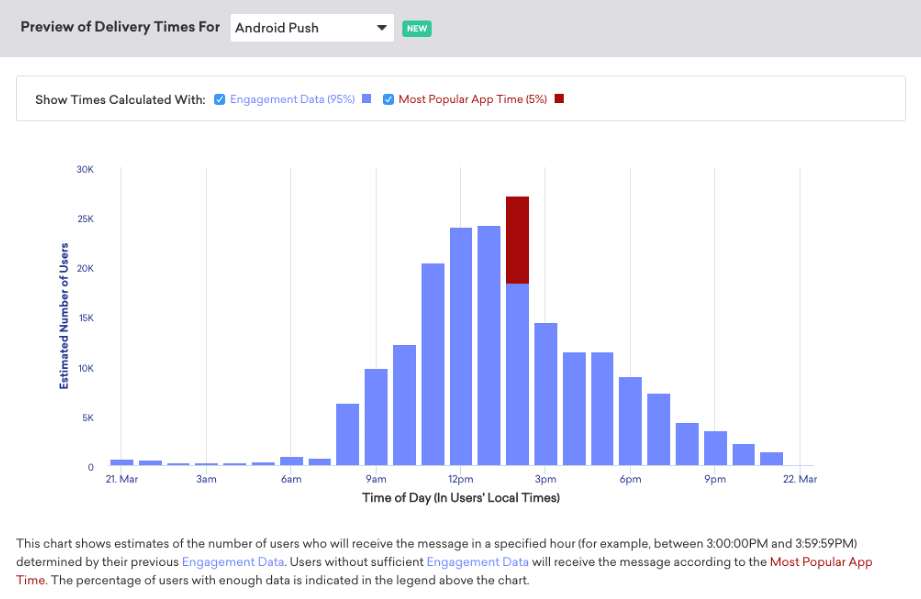
하루 중 시간대별로 얼마나 많은 사용자가 메시지를 받을지 예상하려면 미리 보기 차트(캠페인만 해당)를 사용하세요.
- 타겟 오디언스 단계에서 세그먼트 또는 필터를 추가합니다.
- 대상 전달 시간 미리보기 섹션(타겟 오디언스 및 전달 예약 단계 모두에 표시됨)에서 채널을 선택합니다.
- 데이터 새로 고침을 클릭합니다.
2단계: Choose a send date
Next, select a send date for your campaign. Keep the following in mind, when scheduling campaigns with Intelligent Timing:
Launch campaign 48 hours in advance
예정된 전송 날짜 최소 48시간 전에 캠페인을 시작하세요. 이는 시간대가 다르기 때문입니다. Braze는 세계에서 이른 표준 시간대 중 하나인 사모아 시간(UTC+13)의 자정을 기준으로 최적의 시간을 계산합니다. 하루는 전 세계적으로 약 48시간에 걸쳐 있으므로 이 48시간 버퍼 내에 캠페인을 시작하면 사용자의 시간대에서 최적의 시간이 이미 지나서 메시지가 전송되지 않을 수 있습니다.
캠페인이 시작되고 사용자의 최적 도달 시간이 과거 1시간 미만인 경우 메시지가 즉시 발송됩니다. 최적의 시간이 1시간 이상 지나면 메시지가 전혀 전송되지 않습니다.
3-day window for segment filters
특정 기간 동안 액션을 수행한 오디언스를 타겟팅하는 경우 세그먼트 필터에 최소 3일의 기간을 허용하세요. For example, instead of First used app more than 1 day ago and First used app less than 3 days ago, use 1 day and 4 days.
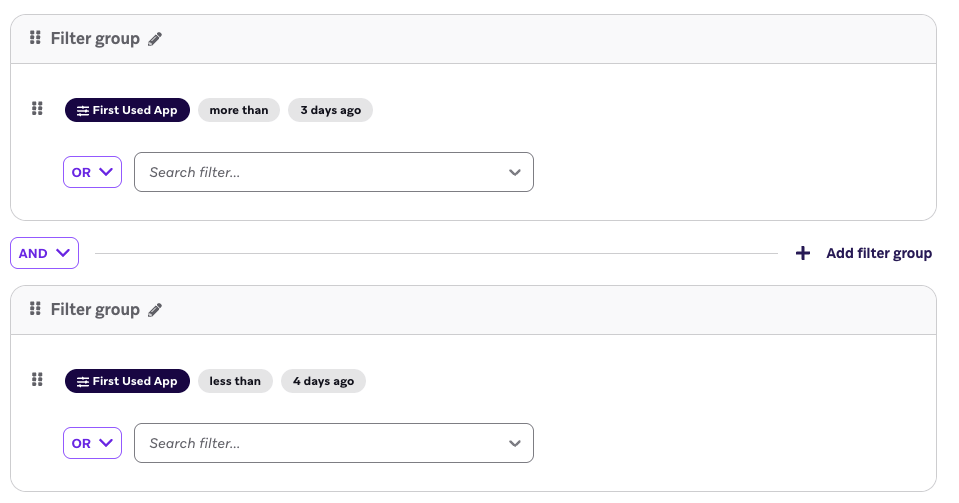
이는 시간대 때문이기도 합니다. 3일 미만의 기간을 선택하면 일부 사용자가 최적의 전송 시간에 도달하기 전에 세그먼트에서 제외될 수 있습니다.
For more information, refer to FAQ: Intelligent Timing.
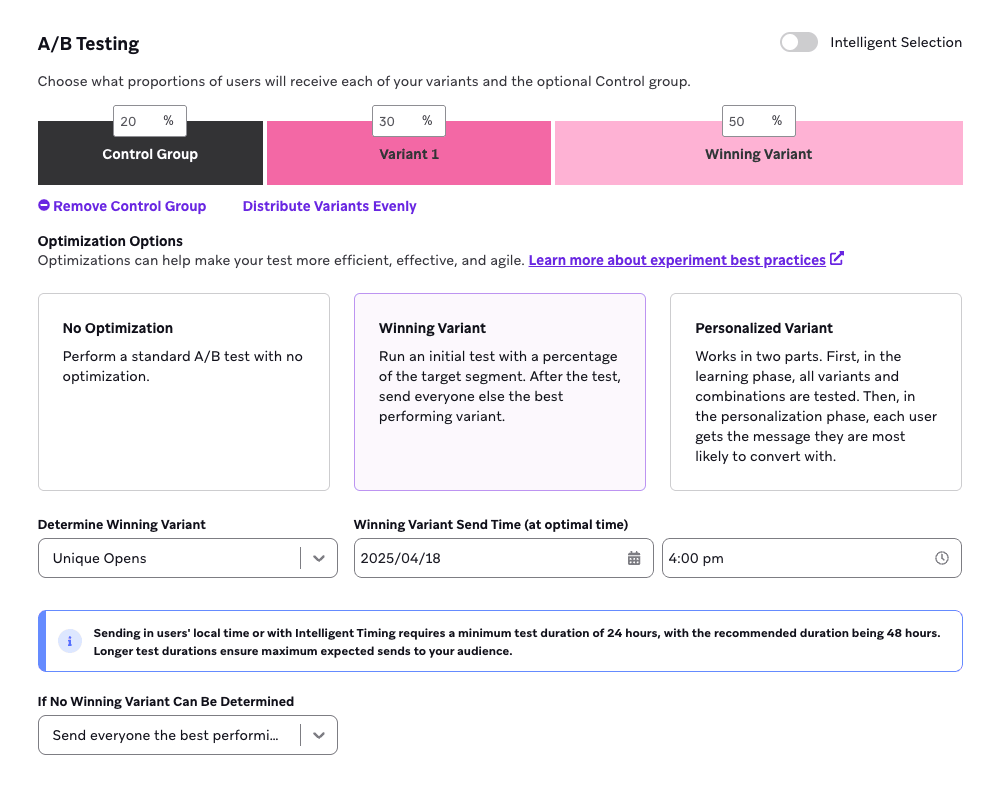
Schedule wining variants 2 days after A/B test
If you are leveraging A/B testing with an optimization, such as automatically sending the Winning Variant or using a Personalized Variant, Intelligent Timing may affect the duration and timing of your campaign.
When using Intelligent Timing, we recommend scheduling the Winning Variant send time at least 2 days after the A/B test begins. For example, if your A/B test starts on April 16 at 4:00 PM, schedule the Winning Variant to send no sooner than April 18 at 4:00 PM. This gives Braze enough time to evaluate user behavior and send messages at the optimal time.
3단계: Choose a delivery window (optional)
Optionally, you can choose to limit the delivery window. This may be useful if your campaign pertains to a specific event, sale, or promotion, but is generally not recommended when using Intelligent Timing. For more information, refer to limitations.
When specified, Braze only uses engagement data within that window to determine a user’s optimal delivery time. 해당 기간 내에 관련 이벤트가 없는 경우 설정한 대체 시간에 메시징이 전송됩니다.
To set a delivery window:
- Intelligent Timing을 구성할 때 특정 시간 내에만 메시지를 보내기를 선택합니다.
- 전달 기간의 시작 및 종료 시간을 입력합니다.

4단계: Choose a fallback time
사용자 프로필에 관련 이벤트가 없는 경우 최적의 전달 시간을 계산하기 위해 사용할 대체 시간을 선택합니다.
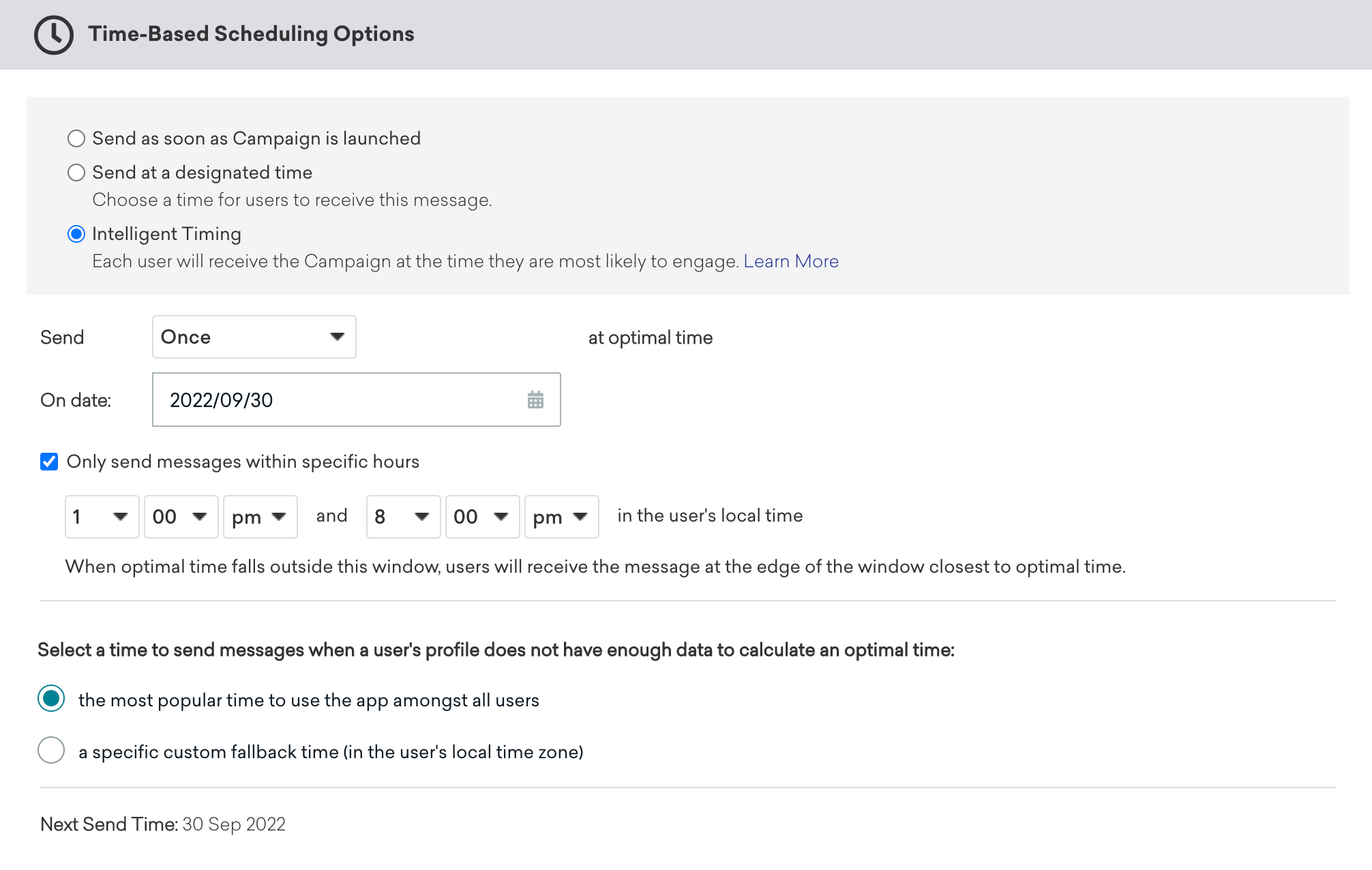
다음 옵션 중 하나를 선택할 수 있습니다:
- 가장 인기 있음: 전체 사용자 중 앱이 가장 많이 사용되는 시간입니다.
- 커스텀: 이것은 사용자가 선택한 커스텀 대체 기능입니다. 메시지는 각 개별 사용자의 현지 시간대를 기준으로 전달됩니다.
가장 인기 있는 앱 시간은 워크스페이스의 평균 세션 시작 시간(현지 시간 기준)에 따라 결정됩니다. 이 시간은 미리보기 차트에 빨간색으로 표시됩니다.
드물지만 앱이 가장 많이 사용되는 시간을 계산할 수 있는 세션 데이터가 충분하지 않은 경우(데이터가 없는 완전히 새로운 앱)에는 사용자 현지 시간대 오후 5시에 메시지가 전송됩니다. 사용자의 현지 시간을 알 수 없는 경우 회사 표준 시간대인 오후 5시에 전송됩니다.
사용 가능한 데이터가 제한되어 있는 사용자 생애주기 초기에 Intelligent Timing을 사용할 때의 한계를 인식하는 것이 중요합니다. 기록된 세션이 거의 없는 사용자도 자신의 행동에 대한 인사이트를 제공할 수 있으므로 여전히 유용할 수 있습니다. 그러나 Braze는 사용자 생애주기 후반에 최적의 전송 시간을 보다 효과적으로 계산할 수 있습니다.
커스텀 대체 시간을 사용하여 메시지를 보낼 다른 시간을 선택할 수 있습니다. 가장 인기 있는 앱 시간과 마찬가지로 사용자의 현지 표준 시간대의 대체 시간에 메시지가 전송됩니다. 사용자의 현지 표준 시간대를 알 수 없는 경우 회사 표준 시간대로 전송됩니다.
커스텀 대체 시간이 지정된 캠페인의 경우, 전송 날짜로부터 24시간 이내에 캠페인을 실행하면 최적 시간이 이미 지난 사용자에게 커스텀 대체 시간에 캠페인이 전송됩니다. 해당 시간대에서 커스텀 대체 시간이 이미 지난 경우에는 메시지가 즉시 전송됩니다.
5단계: 전달 시간 미리보기
To see an estimate of how many users will receive the message in each hour of the day, use the preview chart.
- 타겟 오디언스 단계에서 세그먼트 또는 필터를 추가합니다.
- 대상 전달 시간 미리보기 섹션(타겟 오디언스 및 전달 예약 단계 모두에 표시됨)에서 채널을 선택합니다.
- Select Refresh Data.
Intelligent Timing 또는 캠페인 오디언스에 대한 설정을 변경할 때마다 데이터를 다시 새로고침하여 업데이트된 차트를 확인합니다.
차트에는 최적의 시간을 계산할 수 있는 관련 이벤트가 있는 사용자를 파란색으로, 대체 시간을 사용할 사용자를 빨간색으로 표시합니다. 계산 필터를 사용하여 미리 보기 보기를 조정하여 두 사용자 그룹을 더 세밀하게 살펴볼 수 있습니다.
Step 1: Add Intelligent Timing
In your Canvas, add a Message step, then go to Delivery Settings and select Using Intelligent Timing.
Messages will be sent to users who entered the step that day at their optimal local time. However, if their optimal time has already passed that day, it’ll be delivered at that time during the following day instead. 여러 채널을 대상으로 하는 메시지 단계는 채널별로 서로 다른 시간에 메시지를 보내거나 보내려고 시도할 수 있습니다. 메시지 단계의 첫 번째 메시지가 전송을 시도하면 모든 사용자가 자동으로 고급 단계로 이동합니다.
Step 2: Choose a fallback time
Braze가 최적의 전송 시간을 계산할 수 있도록 관련 참여 데이터가 없는 오디언스의 사용자에게 보낼 메시징의 대체 시간을 선택합니다. 다음 옵션 중 하나를 선택할 수 있습니다:
- 가장 인기 있음: 전체 사용자 중 앱이 가장 많이 사용되는 시간입니다.
- 커스텀: 이것은 사용자가 선택한 커스텀 대체 기능입니다. 메시지는 각 개별 사용자의 현지 시간대를 기준으로 전달됩니다.
가장 인기 있는 앱 시간은 워크스페이스의 평균 세션 시작 시간(현지 시간 기준)에 따라 결정됩니다. 이 시간은 미리보기 차트에 빨간색으로 표시됩니다.
드물지만 앱이 가장 많이 사용되는 시간을 계산할 수 있는 세션 데이터가 충분하지 않은 경우(데이터가 없는 완전히 새로운 앱)에는 사용자 현지 시간대 오후 5시에 메시지가 전송됩니다. 사용자의 현지 시간을 알 수 없는 경우 회사 표준 시간대인 오후 5시에 전송됩니다.
사용 가능한 데이터가 제한되어 있는 사용자 생애주기 초기에 Intelligent Timing을 사용할 때의 한계를 인식하는 것이 중요합니다. 기록된 세션이 거의 없는 사용자도 자신의 행동에 대한 인사이트를 제공할 수 있으므로 여전히 유용할 수 있습니다. 그러나 Braze는 사용자 생애주기 후반에 최적의 전송 시간을 보다 효과적으로 계산할 수 있습니다.
커스텀 대체 시간을 사용하여 메시지를 보낼 다른 시간을 선택할 수 있습니다. 가장 인기 있는 앱 시간과 마찬가지로 사용자의 현지 표준 시간대의 대체 시간에 메시지가 전송됩니다. 사용자의 현지 표준 시간대를 알 수 없는 경우 회사 표준 시간대로 전송됩니다.
커스텀 대체 시간이 지정된 캠페인의 경우, 전송 날짜로부터 24시간 이내에 캠페인을 실행하면 최적 시간이 이미 지난 사용자에게 커스텀 대체 시간에 캠페인이 전송됩니다. 해당 시간대에서 커스텀 대체 시간이 이미 지난 경우에는 메시지가 즉시 전송됩니다.
4단계: Add a Delay step
Unlike with campaigns, you don’t need to launch your Canvas 48 hours before the send date because Intelligent Timing is set on the step level, not the Canvas level.
Instead, add a Delay step of at least a two calendar days between the user entering the Canvas and when they receive the Intelligent Timing step.
Calendar vs. 24-hour days
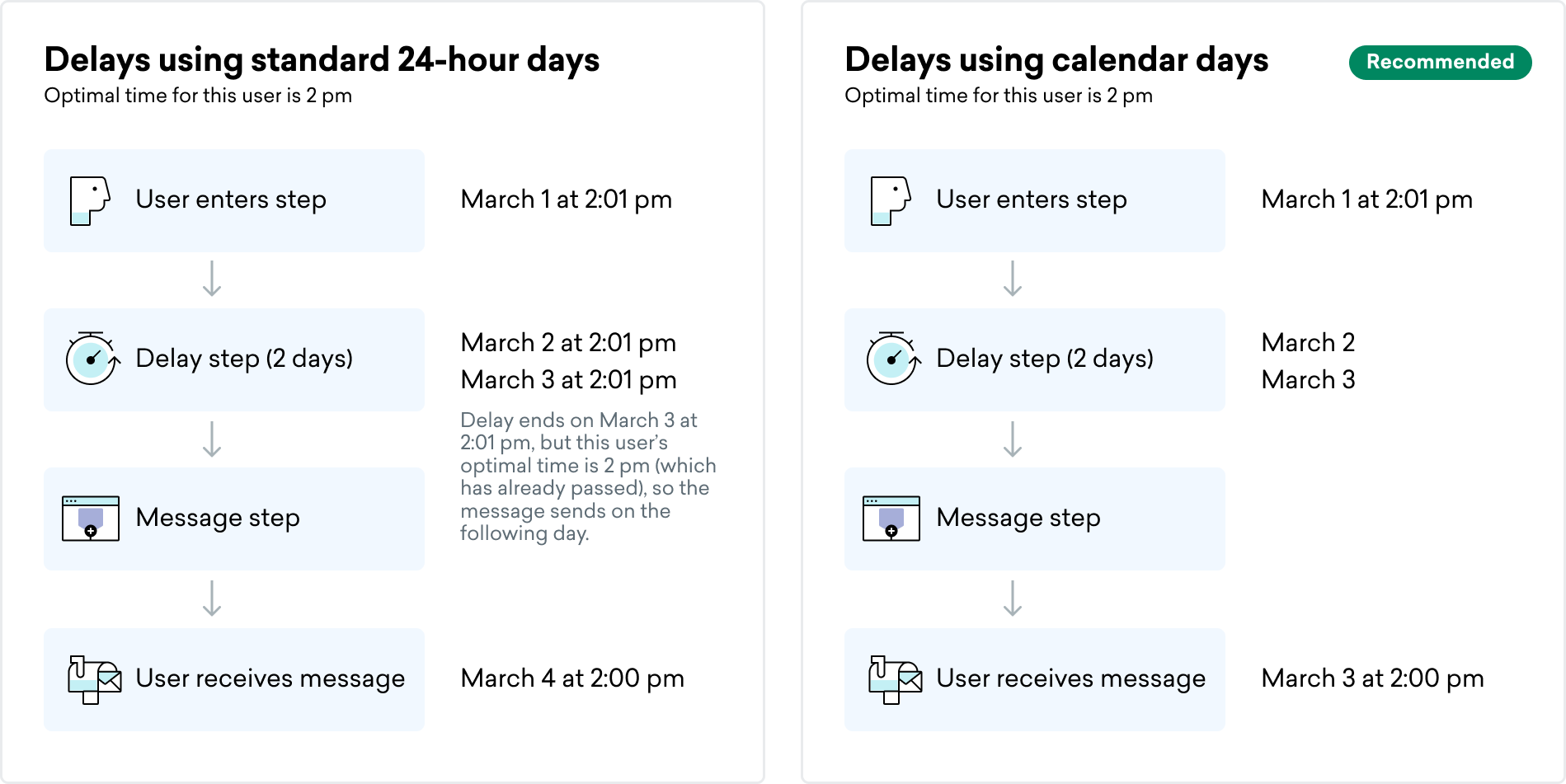
When using Intelligent Timing after a Delay step, the delivery date may vary depending on how you calculate your delay. This only applies when your delay is set to After a duration, as there is a difference between how “days” and “calendar days” are calculated.
- 일: 1일은 24시간이며, 사용자가 지연 단계에 진입한 시점부터 계산됩니다.
- 달력 일: 1일은 사용자가 지연 단계를 입력한 시점부터 해당 시간대의 자정까지의 기간입니다. 즉, 달력으로 하루가 몇 분처럼 짧을 수 있다는 뜻입니다.
Intelligent Timing을 사용할 때는 지연 시간을 24시간이 아닌 달력 날짜를 사용하는 것이 좋습니다. 달력 날짜를 사용하면 지연이 발생한 마지막 날에 최적 시간에 메시지가 전송되기 때문입니다. 24시간을 기준으로 하면 사용자의 최적 시간은 해당 단계에 진입하기 전이므로 지연 시간이 하루 더 추가될 수 있습니다.
예를 들어 루카의 최적 시간이 오후 2시라고 가정해 보겠습니다. 3월 1일 오후 2시 1분 지연 단계에 들어갔으며 지연은 2일로 설정되어 있습니다.
- 1일차는 3월 2일 오후 2시 1분에 종료됩니다.
- 2일차는 3월 3일 오후 2시 1분에 종료됩니다.
그러나 Intelligent Timing은 이미 시간이 지난 오후 2시에 전달되도록 설정되어 있습니다. 따라서 루카는 다음 날까지 메시지를 받지 못합니다. 3월 4일 오후 2시.
Limitations
- 인앱 메시지, 콘텐츠 카드 및 웹훅은 최적의 시간이 지정되지 않고 즉시 전달됩니다.
- 실행 기반 또는 API 트리거 캠페인에는 Intelligent Timing을 사용할 수 없습니다.
- 다음 시나리오에서는 Intelligent Timing을 사용해서는 안 됩니다.
- 사용량 제한조치: 사용량 제한조치와 Intelligent Timing을 모두 사용하는 경우 메시지가 언제 전달될지 보장할 수 없습니다. Intelligent Timing을 사용하는 일일 반복 캠페인은 총 메시지 전송 한도를 정확하게 지원하지 않습니다.
- IP 워밍 캠페인: 일부 Intelligent Timing 동작으로 인해 IP를 처음 워밍할 때 필요한 일일 볼륨을 달성하는 데 어려움을 겪을 수 있습니다. 이는 Intelligent Timing이 캠페인 또는 캔버스가 처음 생성될 때와 사용자에게 보내기 전에 세그먼트를 두 번 평가하여 사용자가 여전히 해당 세그먼트에 있어야 하는지 확인하기 때문입니다. 이로 인해 세그먼트가 이동하고 변경되어 일부 사용자가 두 번째 평가에서 세그먼트에서 탈락하는 경우가 종종 있습니다. 이러한 사용자는 교체되지 않으므로 달성할 수 있는 최대 사용자 수에 영향을 미칩니다.
문제 해결
최적의 시간을 가진 소수의 사용자를 보여주는 미리보기 차트
사용자에 대한 관련 이벤트가 없는 경우(예: 참여도가 거의 또는 전혀 없는 신규 사용자), Braze는 구성된 대체 설정(커스텀 대체 시간 또는 모든 사용자 중 가장 많이 앱을 사용하는 시간)을 사용합니다.
시간대가 Intelligent Timing 전달에 미치는 영향
Intelligent Timing은 각 사용자의 지정된 현지 시간대에 따라 달라지므로 예정된 전달 날짜와 시간은 사용자마다 다를 수 있습니다.
사용자가 예상대로 메시지를 받지 못하면 프로필의 시간대 필드가 올바르게 입력되었는지 확인하세요. 시간대 필드가 비어 있는 경우 사용자는 현지 시간 대신 회사의 시간대에 맞춘 메시지를 받을 수 있습니다.
예정된 날짜가 지나서 보내기
Your Intelligent Timing campaign might be sending past the scheduled date if you are leveraging A/B testing with an optimization. A/B 테스트 최적화를 사용하는 캠페인은 초기 테스트가 종료된 후 자동으로 위닝 배리언트를 전송하여 캠페인 기간을 늘릴 수 있습니다. 기본적으로 최적화가 적용된 캠페인은 초기 테스트 다음 날에 나머지 사용자에게 위닝 배리언트를 전송하지만, 이 전송 날짜를 변경할 수 있습니다.
Intelligent Timing을 사용하는 경우, A/B 테스트가 완료될 때까지 시간을 더 두고 위닝 배리언트를 초기 테스트 후 1일이 아닌 2일 동안 전송하도록 예약하는 것이 좋습니다.
Frequently Asked Questions (FAQ)
General
What does Intelligent Timing predict?
Intelligent Timing focuses on predicting when a user is most likely to open or click your messages to ensure your messages reach users at optimal engagement times.
Is Intelligent Timing calculated separately for each day of the week?
No, Intelligent Timing isn’t tied to specific days. Instead, it personalizes send times based on each user’s unique engagement patterns and the channel you’re using, such as email or push notifications. This ensures your messages reach users when they’re most receptive.
Calculations
What data is used to calculate the optimal time for each user?
To calculate the optimal time, Intelligent Timing:
- Analyzes the interaction data for each user recorded by the Braze SDK. This includes:
- Session times
- Push direct opens
- Push influenced opens
- Email clicks
- Email opens (excluding machine opens)
- Groups these events by time, identifying the optimal send time for each user.
Are Machine Opens included when calculating optimal time?
No, Machine Opens are excluded from calculations for optimal time. This means that send times are based solely on genuine user engagement, providing more accurate timing for your campaigns.
How precise is the optimal time?
Intelligent Timing schedules messages during each user’s “most engaged hour” based on their session starts and message open events. Within that hour, the message timing is rounded to the nearest five minutes. For example, if a user’s optimal time is calculated as 4:58 PM, the message will be scheduled for 5:00 PM. There may be slight delays in delivery due to system activity during busy periods.
관련 이벤트가 없는 경우 대체 계산은 어떻게 되나요?
사용자와 관련된 이벤트가 없는 경우 Intelligent Timing은 메시지 설정에서 구성된 대체 설정(커스텀 대체 시간 또는 모든 사용자 중에서 앱을 가장 많이 사용하는 시간)을 사용합니다.
캠페인
How far in advance should I launch an Intelligent Timing campaign to successfully deliver it to all users in all time zones?
Braze calculates the optimal time at midnight in Samoa time, one of the first time zones in the world. In a single day, it spans approximately 48 hours. For example, someone whose optimal time is 12:01 am and lives in Australia has already had their optimal time pass, and it’s “too late” to send to them. For these reasons, you need to schedule 48 hours in advance to successfully deliver to everyone in the world who uses your app.
Why is my Intelligent Timing campaign showing little to no sends?
사용자에 대한 관련 참여 이벤트가 없는 경우(예: 클릭 또는 실행 횟수가 거의 없거나 전혀 없는 신규 사용자) Intelligent Timing은 구성된 대체 설정(커스텀 대체 시간 또는 모든 사용자 중에서 앱을 가장 많이 사용하는 시간)을 사용합니다.
Why is my Intelligent Timing campaign sending past the scheduled date?
Your Intelligent Timing campaign might be sending past the scheduled date because you are leveraging A/B testing. Campaigns using A/B testing can automatically send the Winning Variant after the A/B test is over, increasing the duration of campaign sending. By default, Intelligent Timing campaigns will be scheduled to send out the Winning Variant to the remaining users for the following day, but you can change this send date.
We recommend that if you have Intelligent Timing campaigns, leave more time for the A/B test to finish and schedule the Winning Variant to send for two days out instead of one.
Functionality
When does Braze check the eligibility criteria for segment and audience filters?
Braze performs two checks when a campaign is launched:
- Initial check: At midnight in the first timezone on the day of send.
- Scheduled time check: Just before sending at the time Intelligent Timing selected for the user.
Be careful when filtering based on other campaign sends to avoid targeting ineligible segments. For example, if you were to send out two campaigns on the same day for different times, and add a filter that only allows users to receive the second campaign if they’ve received the first, users won’t receive the second campaign. This is because no one was eligible when the campaign was first created and segments were formed.
Can I use Quiet Hours in my Intelligent Timing campaign?
Quiet Hours can be used on a campaign that uses Intelligent Timing. The Intelligent Timing algorithm will avoid Quiet Hours so that it still sends the message to all eligible users. That said, we recommend turning Quiet Hours off unless there are policy, compliance, or other legal implications to when messages can and can’t be sent.
What happens if the optimal time for a user is within the Quiet Hours?
If the determined optimal time falls within Quiet Hours, Braze finds the nearest edge of the Quiet Hours and schedules the message for the next allowable hour before or after Quiet Hours. The message is enqueued to send at the closest boundary of Quiet Hours relative to the optimal time.
Can I use Intelligent Timing and rate-limiting?
Rate limiting can be used on a campaign that uses Intelligent Timing. 그러나 속도 제한의 특성상 일부 사용자는 관련 이벤트가 없어 대체 시간에 속도 제한 규모에 비해 많은 수의 사용자가 예약되어 있는 경우 최적이 아닌 시간에 메시지를 수신할 수 있습니다.
We recommend using rate limiting on an Intelligent Timing campaign only when there are technical requirements that must be met using rate limiting.
Can I use Intelligent Timing while IP warming?
Braze doesn’t recommend using Intelligent Timing when users are first IP warming, as some of its behaviors can cause difficulties hitting daily volumes. This is caused by Intelligent Timing evaluating campaign segments twice. Once when the campaign is first built, and a second time before sending to users to verify they should still be in that segment.
이로 인해 세그먼트가 이동하고 변경되어 일부 사용자가 두 번째 평가에서 세그먼트에서 탈락하는 경우가 종종 있습니다. These users don’t get replaced, impacting how close to the maximum user cap you can achieve.
How is the most popular app time determined?
The most popular app time is determined by the average session start time for the workspace (in local time). This metric can be found in the dashboard when previewing times for a campaign, shown in red.
Does Intelligent Timing account for machine opens?
Yes, machine opens are filtered out by Intelligent Timing, so they do not influence its output.
How can I make sure Intelligent Timing works as well as possible?
Intelligent Timing uses each user’s individual history of message engagement at whatever times they received messages. Before using Intelligent Timing, make sure that you have sent users messages at different times of the day. That way, you can “sample” when might be the best time for each user. Inadequately sampling different times of day may result in Intelligent Timing picking a suboptimal time of send for a user.
 GitHub 에서 이 페이지를 편집합니다.