Android용 라이브 업데이트
Braze SDK에서 Android 라이브 업데이트를 사용하는 방법을 알아보세요. 진행률 중심 알림이라고도 합니다. 이러한 알림은 대화형 잠금 화면 알림을 표시할 수 있는 Swift Braze SDK의 라이브 활동과 유사합니다. Android 16은 사용자가 시작한 시작부터 끝까지의 여정을 원활하게 추적할 수 있도록 진행률 중심 알림을 도입했습니다.
작동 방식
IBrazeNotificationFactory 인터페이스를 사용하여 Braze 푸시 알림이 표시되는 방식을 커스텀할 수 있습니다. BrazeNotificationFactory를 확장하면 사용자에게 알림이 표시되기 전에 Braze가 팩토리의 createNotification() 메서드를 호출합니다. 그런 다음 Braze 대시보드 또는 REST API를 통해 전송된 커스텀 키-값 페어가 포함된 페이로드를 전달합니다.
라이브 업데이트 표시
이 섹션에서는 야생동물 구조팀이 누가 가장 많은 올빼미를 구할 수 있는지 경쟁하는 새로운 게임 쇼의 호스트인 Superb Owl과 파트너가 됩니다. Android 앱에서 라이브 업데이트를 활용하여 진행 중인 경기의 상태를 표시하고 실시간으로 알림을 동적으로 업데이트할 수 있도록 하려고 합니다.
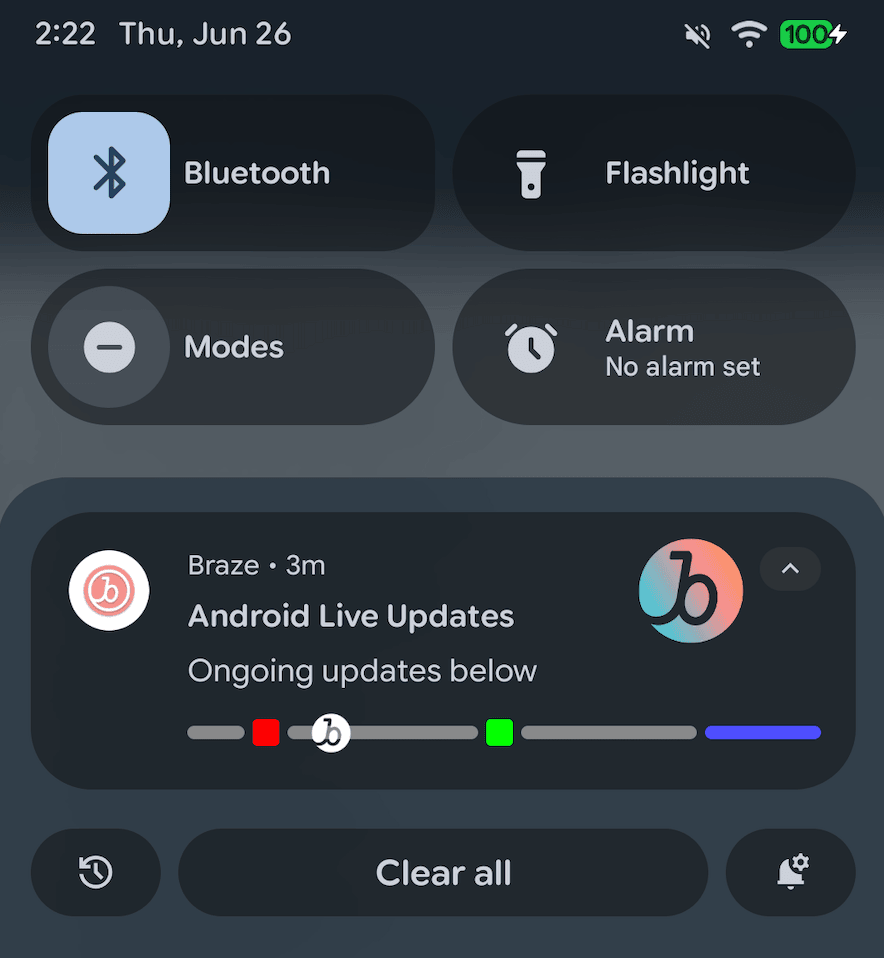
필수 조건
이 기능을 사용하려면 먼저 Android Braze SDK를 통합해야 합니다.
1단계: 커스텀 알림 팩토리 만들기
애플리케이션에서 BrazeNotificationFactory를 확장하는 MyCustomNotificationFactory.kt라는 새 파일을 생성하여 Braze 라이브 업데이트가 표시되는 방식을 처리합니다.
다음 예시에서 Superb Owl은 진행 중인 경기에 대한 라이브 업데이트를 표시하는 커스텀 알림 팩토리를 만들었습니다. 다음 단계에서는 getTeamInfo라는 새 메서드를 만들어 팀의 데이터를 활동에 매핑합니다.
1
2
3
4
5
6
7
8
9
10
11
12
13
14
15
16
17
18
19
20
21
22
23
24
25
26
27
28
29
30
31
32
33
34
35
class MyCustomNotificationFactory : IBrazeNotificationFactory {
    override fun createNotification(payload: BrazeNotificationPayload): Notification? {
        val notificationBuilder = populateNotificationBuilder(payload)
        val context = payload.context ?: return null

        if (notificationBuilder == null) {
            brazelog { "Notification could not be built. Returning null as created notification." }
            return null
        }
        notificationBuilder.setContentTitle("Android Live Updates").setContentText("Ongoing updates below")
        setProgressStyle(notificationBuilder, context)
        return notificationBuilder.build()
    }

    private fun setProgressStyle(notificationBuilder: NotificationCompat.Builder, context: Context) {
        val style = NotificationCompat.ProgressStyle()
            .setStyledByProgress(false)
            .setProgress(200)
            .setProgressTrackerIcon(IconCompat.createWithResource(context, R.drawable.notification_small_icon))
            .setProgressSegments(
                mutableListOf(
                    NotificationCompat.ProgressStyle.Segment(1000).setColor(Color.GRAY),
                    NotificationCompat.ProgressStyle.Segment(200).setColor(Color.BLUE),
                )
            )
            .setProgressPoints(
                mutableListOf(
                    NotificationCompat.ProgressStyle.Point(60).setColor(Color.RED),
                    NotificationCompat.ProgressStyle.Point(560).setColor(Color.GREEN)
                )
            )

        notificationBuilder.setStyle(style)
    }
}
2단계: 커스텀 데이터 매핑
MyCustomNotificationFactory.kt에서 라이브 업데이트가 표시될 때 데이터를 처리하는 새로운 메서드를 만듭니다.
Superb Owl은 각 팀의 이름과 로고를 확장된 라이브 업데이트에 매핑하기 위해 다음과 같은 메서드를 만들었습니다:
1
2
3
4
5
6
7
8
9
10
11
12
13
14
15
class CustomNotificationFactory : BrazeNotificationFactory() {
    override fun createNotification(payload: BrazeNotificationPayload): Notification? {
        // Your existing code
        return super.createNotification(payload)
    }

    // Your new method
    private fun getTeamInfo(team: String?): Pair<String, Int> {
        return when (team) {
            "WBF" -> Pair("Wild Bird Fund", R.drawable.team_wbf)
            "OWL" -> Pair("Owl Rehab", R.drawable.team_owl)
            else  -> Pair("Unknown", R.drawable.notification_small_icon)
        }
    }
}
3단계: 커스텀 알림 팩토리 설정
애플리케이션 클래스에서 customBrazeNotificationFactory를 사용하여 커스텀 알림 팩토리를 설정합니다.
1
2
3
4
5
6
7
8
class MyApplication : Application() {
    override fun onCreate() {
        super.onCreate()

        // Tell Braze to use your custom factory for notifications
        Braze.customBrazeNotificationFactory = MyCustomNotificationFactory()
    }
}
4단계: 활동 보내기
/messages/send REST API 엔드포인트를 사용하여 사용자의 Android 기기로 푸시 알림을 보낼 수 있습니다.
curl 명령 예시
Superb Owl은 다음 curl 명령을 사용하여 요청을 보냈습니다:
1
2
3
4
5
6
7
8
9
10
11
12
13
14
15
16
17
18
19
20
21
22
curl -X POST "https://BRAZE_REST_ENDPOINT/messages/send" \
  -H "Authorization: Bearer {REST_API_KEY}" \
  -H "Content-Type: application/json" \
  --data '{
    "external_user_ids": ["USER_ID"],
    "messages": {
      "android_push": {
        "title": "WBF vs OWL",
        "alert": "2 to 4 1:33 Q4",
        "extra": {
          "live_update": "true",
          "team1": "WBF",
          "team2": "OWL",
          "score1": "2",
          "score2": "4",
          "time": "1:33",
          "quarter": "Q4"
        },
        "notification_id": "ASSIGNED_NOTIFICATION_ID"
      }
    }
  }'

요청 매개변수
| 키 | 설명 |
|---|---|
REST_API_KEY |
messages.send 권한이 있는 Braze REST API 키입니다. Braze 대시보드의 설정 > API 키에서 생성할 수 있습니다. |
BRAZE_REST_ENDPOINT |
REST 엔드포인트 URL입니다. 엔드포인트는 인스턴스의 Braze URL에 따라 달라집니다. |
USER_ID |
알림을 보낼 사용자의 ID입니다. |
messages.android_push.title |
메시지 제목입니다. 기본적으로 커스텀 알림 팩토리의 라이브 알림에는 사용되지 않지만, 대체 용도로 사용할 수 있습니다. |
messages.android_push.alert |
메시지 본문입니다. 기본적으로 커스텀 알림 팩토리의 라이브 알림에는 사용되지 않지만, 대체 용도로 사용할 수 있습니다. |
messages.extra |
커스텀 알림 팩토리에서 라이브 알림에 사용하는 키-값 페어입니다. 이 값에는 어떤 문자열이든 할당할 수 있지만, 위의 예시에서는 live_updates를 사용하여 기본 푸시 알림인지 라이브 푸시 알림인지를 결정합니다. |
ASSIGNED_NOTIFICATION_ID |
선택한 사용자의 라이브 알림에 할당할 알림 ID입니다. 이 ID는 해당 게임에 고유해야 하며, 나중에 기존 알림을 업데이트할 때 사용해야 합니다. |
5단계: 활동 업데이트
기존 라이브 업데이트를 새 데이터로 업데이트하려면 messages.extra에 할당된 관련 키-값 페어를 수정한 다음 동일한 notification_id를 사용하여 /messages/send 엔드포인트를 다시 호출합니다.