Google Tag Manager와 Braze SDK 사용하기
Google Tag Manager(GTM)를 Braze SDK와 함께 사용하는 방법을 알아보세요. 이를 통해 코드 변경이나 새로운 앱 릴리스 없이 Braze 이벤트 추적 및 사용자 속성 업데이트를 원격으로 제어할 수 있습니다.
웹용 Google Tag Manager 정보
Google Tag Manager(GTM)를 사용하면 프로덕션 코드 릴리스나 엔지니어링 리소스 없이도 웹사이트에 원격으로 태그를 추가, 제거, 편집할 수 있습니다. Braze는 웹 SDK를 위해 다음과 같은 템플릿을 제공합니다:
| 태그 유형 | 사용 사례 |
|---|---|
| 초기화 태그 | 이 태그를 사용하면 사이트의 코드를 수정할 필요 없이 Web Braze SDK를 통합할 수 있습니다. |
| 동작 태그 | 이 태그를 사용하면 Content Cards를 생성하고, 사용자 속성을 설정하고, 데이터 수집을 관리할 수 있습니다. |
GTM으로 커스텀 이벤트 로깅하기
GTM에서 커스텀 HTML 태그를 사용하여 커스텀 이벤트를 로깅할 수 있습니다. 이 방법은 GTM 데이터 레이어를 사용하여 사이트에서 Braze 웹 SDK를 호출하는 GTM 태그로 이벤트 데이터를 전달합니다.
1단계: 데이터 레이어에 이벤트 푸시하기
사이트의 코드에서 커스텀 이벤트를 트리거하려는 위치에 이벤트를 데이터 레이어에 푸시합니다. 예를 들어, 버튼을 클릭할 때 커스텀 이벤트를 로깅하려면 다음과 같이 합니다:
1
<button onclick="dataLayer.push({'event': 'my_custom_event'});">Track Event</button>
2단계: GTM에서 트리거 생성하기
- GTM 컨테이너에서 Triggers로 이동하여 새 트리거를 생성합니다.
- Trigger Type을 Custom Event로 설정합니다.
- Event Name을 데이터 레이어에 푸시한 값과 동일하게 설정합니다(예:
my_custom_event). - 트리거가 실행될 시점을 선택합니다(예: All Custom Events).
3단계: 커스텀 HTML 태그 생성하기
- GTM에서 Tags로 이동하여 새 태그를 생성합니다.
- Tag Type을 Custom HTML로 설정합니다.
-
HTML 필드에 다음을 추가합니다:
1
2
3
 <script>
 window.braze.logCustomEvent("my_custom_event");
 </script>
- Triggering 아래에서 2단계에서 생성한 트리거를 선택합니다.
- 컨테이너를 저장하고 게시합니다.
이벤트 등록정보를 포함하려면 두 번째 인수로 전달합니다:
1
2
3
<script>
window.braze.logCustomEvent("my_custom_event", {"property_key": "property_value"});
</script>
Google의 EU 사용자 동의 정책

Google은 2024년 3월 6일부터 시행되는 디지털 시장법(DMA) 개정 사항에 따라 EU 사용자 동의 정책을 업데이트하고 있습니다. 이 새로운 변경 사항에 따라 광고주는 EEA 및 영국 최종 사용자에게 특정 정보를 공개하고 해당 사용자로부터 필요한 동의를 얻어야 합니다. 자세한 내용은 다음 설명서를 참조하세요.
Google의 EU 사용자 동의 정책의 일환으로 다음 부울 커스텀 속성을 고객 프로필에 기록해야 합니다:
$google_ad_user_data$google_ad_personalization
GTM 통합을 통해 설정하는 경우 커스텀 속성을 사용하려면 커스텀 HTML 태그를 생성해야 합니다. 다음은 이러한 값을 문자열이 아닌 부울 데이터 유형으로 기록하는 방법의 예시입니다:
1
2
3
<script>
window.braze.getUser().setCustomUserAttribute("$google_ad_personalization", true);
</script>
자세한 내용은 Google에 오디언스 동기화를 참조하세요.
필수 조건
이 기능을 사용하려면 먼저 Android Braze SDK를 통합해야 합니다.
Android용 Google 태그 관리자 사용
다음 예시에서는 음악 스트리밍 앱에서 사용자가 노래를 들을 때 다양한 이벤트를 기록하려고 합니다. Android용 Google Tag Manager를 사용하여 어떤 타사 공급업체가 이 이벤트를 수신할지 제어하고, Braze 전용 태그를 생성할 수 있습니다.
1단계: 커스텀 이벤트 트리거 만들기
커스텀 이벤트는 actionType이 logEvent로 설정되어 기록됩니다. 이 예제의 Braze 커스텀 태그 제공업체는 eventName 을 사용하여 커스텀 이벤트 이름을 설정할 것으로 예상합니다.
시작하려면 played song과 동일한 ‘이벤트 이름’을 찾는 트리거를 만듭니다.
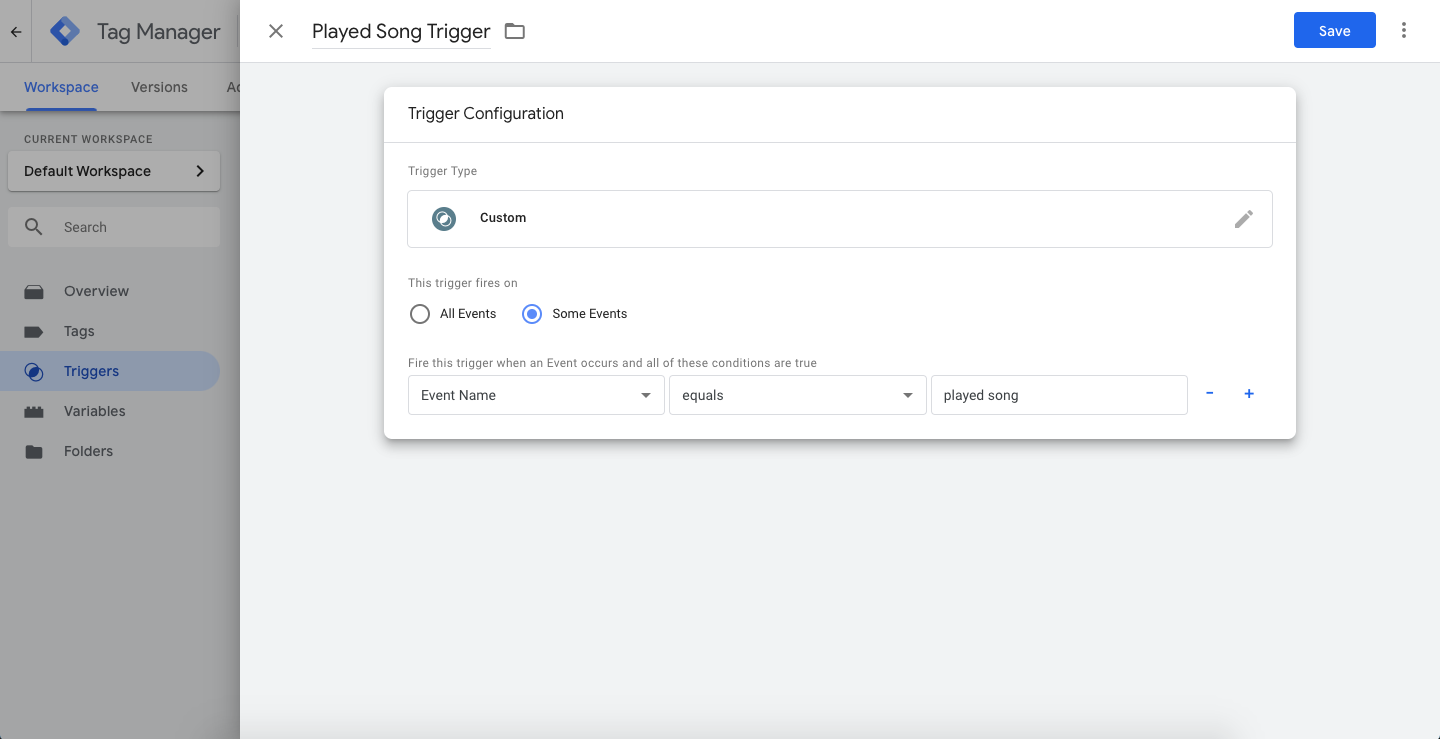
그런 다음 새 태그(“함수 호출”이라고도 함)를 만들고 이 글의 뒷부분에 설명된 커스텀 태그 제공업체의 클래스 경로를 입력합니다. 이 태그는 played song 이벤트를 기록할 때 트리거됩니다.
태그의 커스텀 파라미터(키-값 페어라고도 함)에서 eventName 을 played song 으로 설정합니다. Braze에 기록된 커스텀 이벤트 이름이 됩니다.
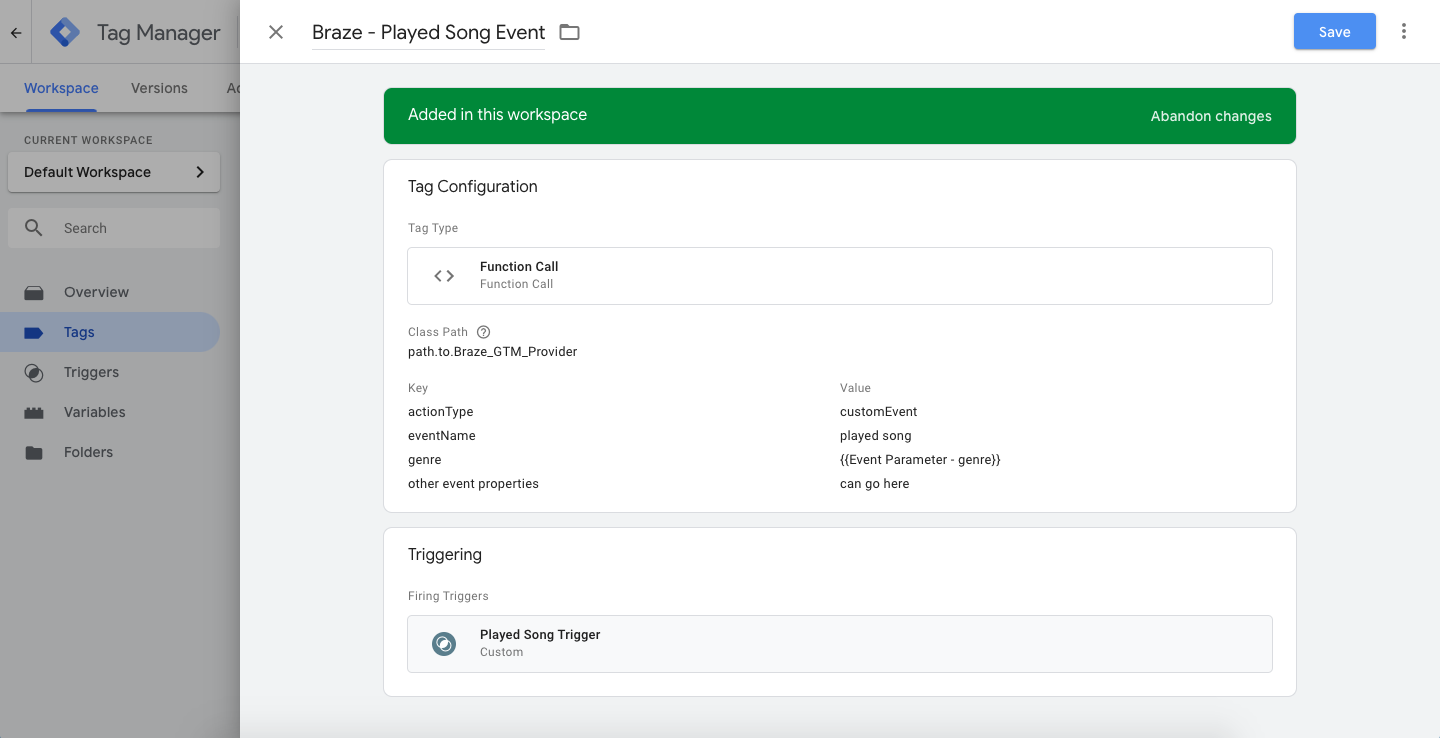
커스텀 이벤트를 보낼 때 actionType 을 logEvent 으로 설정하고 eventName 에 값을 설정하여 Braze가 올바른 이벤트 이름과 조치를 수신할 수 있도록 하세요.
태그에 추가적인 키-값 페어 인수를 포함할 수 있습니다. 그러면 Braze에 커스텀 이벤트 속성정보로 전송됩니다. eventName 및 actionType은 커스텀 이벤트 속성정보에 대해 무시되지 않습니다. 다음 예제 태그에서 genre 은 앱에 기록된 커스텀 이벤트에서 소싱된 Google Tag Manager의 태그 변수를 사용하여 전달되고 정의됩니다.
Android용 Google 태그 관리자는 데이터 계층으로 Firebase를 사용하므로 genre 이벤트 속성정보는 “Firebase - 이벤트 파라미터” 변수로 Google 태그 관리자에게 전송됩니다.
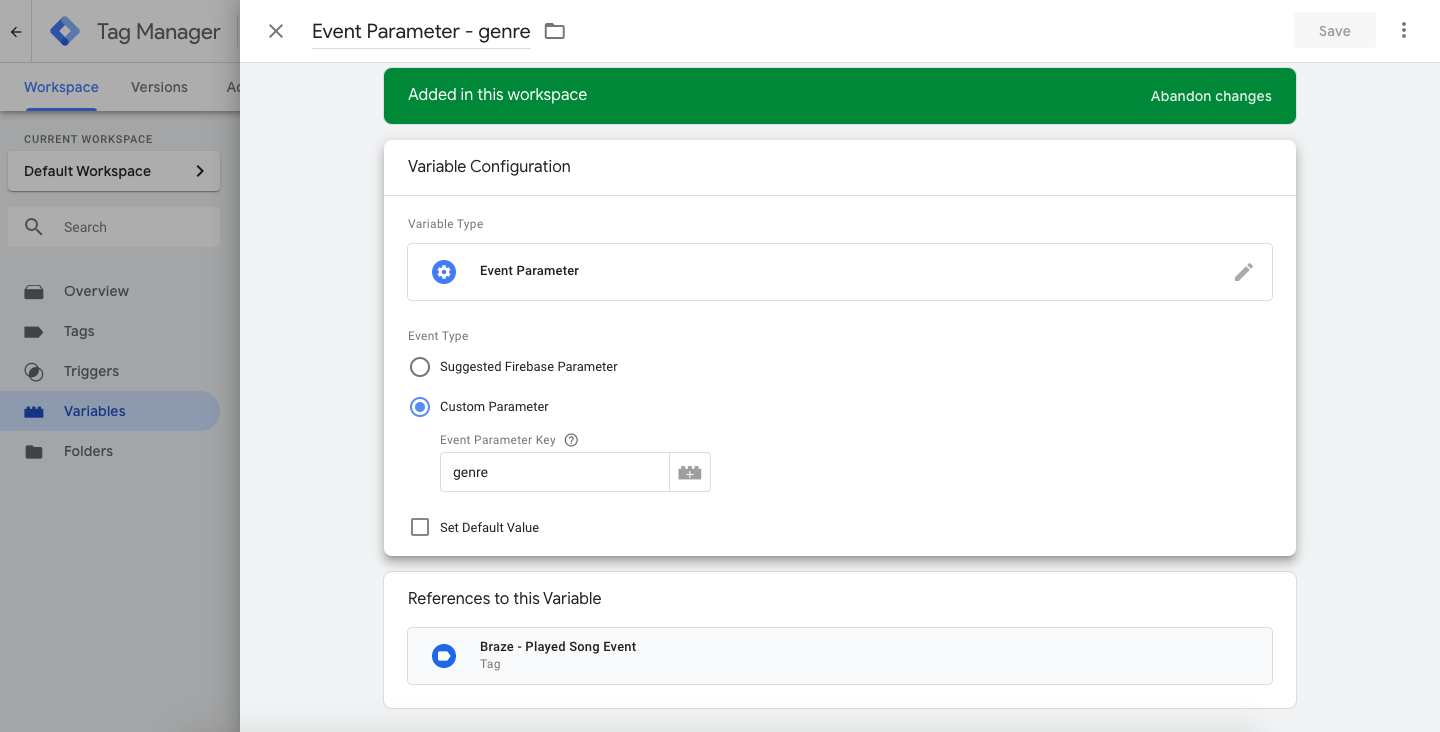
사용자가 앱에서 노래를 재생하면 태그의 트리거 이름( played song)과 일치하는 Firebase 분석 이벤트 이름을 사용하여 Firebase 및 Google Tag Manager를 통해 이벤트가 기록됩니다:
1
2
3
4
Bundle params = new Bundle();
params.putString("genre", "pop");
params.putInt("number of times listened", 42);
mFirebaseAnalytics.logEvent("played song", params);
1
2
3
4
val params = Bundle()
params.putString("genre", "pop")
params.putInt("number of times listened", 42);
mFirebaseAnalytics.logEvent("played song", params)
2단계: 커스텀 속성 기록하기
actionType을 customAttribute로 설정하여 커스텀 속성은 설정됩니다. Braze 커스텀 태그 공급자는 customAttributeKey 및 customAttributeValue를 통해 커스텀 속성 키-값을 설정한다고 예상합니다.
1
2
3
4
Bundle params = new Bundle();
params.putString("customAttributeKey", "favorite song");
params.putString("customAttributeValue", "Private Eyes");
mFirebaseAnalytics.logEvent("customAttribute", params);
1
2
3
4
val params = Bundle()
params.putString("customAttributeKey", "favorite song")
params.putString("customAttributeValue", "Private Eyes")
mFirebaseAnalytics.logEvent("customAttribute", params)
3단계: 통화 changeUser()
actionType을 changeUser로 설정하고 changeUser()에 대한 호출이 수행됩니다. Braze 커스텀 태그 공급자는 태그 내 externalUserId 키-값 페어를 통해 Braze 사용자 ID를 설정한다고 예상합니다.
1
2
3
Bundle params = new Bundle();
params.putString("externalUserId", userId);
mFirebaseAnalytics.logEvent("changeUser", params);
1
2
3
val params = Bundle()
params.putString("externalUserId", userId)
mFirebaseAnalytics.logEvent("changeUser", params)
4단계: 커스텀 태그 공급자 추가하기
태그 및 트리거를 설정한 상태에서 Google Tag Manager를 Android 앱에서도 구현해야 합니다(Google 설명서 참조).
앱에 Google 태그 매니저를 설치한 후 커스텀 태그 공급자를 추가하여 Google 태그 매니저 내에서 구성한 태그를 기반으로 Braze 소프트웨어 개발 키트 메서드를 호출하세요.
“클래스 경로”를 파일에 기록해 두십시오. 이는 Google Tag Manager 콘솔에서 태그를 설정할 때 입력할 내용입니다.
이 예는 커스텀 태그 공급자를 구성할 수 있는 여러 방법 중 하나를 강조합니다. 특히 GTM 태그에서 전송된 actionType 키-값 페어에 따라 호출할 Braze SDK 메서드를 결정하는 방법을 보여줍니다.
이 예제에 표시된 actionType 은 logEvent, customAttribute, changeUser 이지만 태그 제공업체가 Google Tag Manager에서 데이터를 처리하는 방식을 변경할 수 있습니다.
1
2
3
4
5
6
7
8
9
10
11
12
13
14
15
16
17
18
19
20
21
22
23
24
25
26
27
28
29
30
31
32
33
34
35
36
37
38
39
40
41
42
43
44
45
46
47
48
49
50
51
52
53
54
55
56
57
58
59
60
61
62
63
64
65
66
67
68
69
70
71
72
73
74
75
76
77
78
79
80
81
82
83
84
85
86
87
88
89
90
91
92
93
94
95
96
97
98
99
100
101
102
103
104
105
106
107
108
109
110
111
112
113
114
115
116
117
118
119
120
121
122
123
124
125
public class BrazeGtmTagProvider implements CustomTagProvider {
  private static final String TAG = BrazeLogger.getBrazeLogTag(BrazeGtmTagProvider.class);
  private static final String ACTION_TYPE_KEY = "actionType";

  // Custom Events
  private static final String LOG_EVENT_ACTION_TYPE = "logEvent";
  private static final String EVENT_NAME_VARIABLE = "eventName";

  // Custom Attributes
  private static final String CUSTOM_ATTRIBUTE_ACTION_TYPE = "customAttribute";
  private static final String CUSTOM_ATTRIBUTE_KEY = "customAttributeKey";
  private static final String CUSTOM_ATTRIBUTE_VALUE_KEY = "customAttributeValue";

  // Change User
  private static final String CHANGE_USER_ACTION_TYPE = "changeUser";
  private static final String CHANGE_USER_ID_VARIABLE = "externalUserId";

  private static Context sApplicationContext;

  /**
   * Must be set before calling any of the following methods
   * so that the proper application context is available when needed.
   *
   * Recommended to be called in your {@link Application#onCreate()}.
   */
  public static void setApplicationContext(Context applicationContext) {
    if (applicationContext != null) {
      sApplicationContext = applicationContext.getApplicationContext();
    }
  }

  @Override
  public void execute(Map<String, Object> map) {
    BrazeLogger.i(TAG, "Got google tag manager parameters map: " + map);

    if (sApplicationContext == null) {
      BrazeLogger.w(TAG, "No application context provided to this tag provider.");
      return;
    }

    if (!map.containsKey(ACTION_TYPE_KEY)) {
      BrazeLogger.w(TAG, "Map does not contain the Braze action type key: " + ACTION_TYPE_KEY);
      return;
    }
    String actionType = String.valueOf(map.remove(ACTION_TYPE_KEY));

    switch (actionType) {
      case LOG_EVENT_ACTION_TYPE:
        logEvent(map);
        break;
      case CUSTOM_ATTRIBUTE_ACTION_TYPE:
        setCustomAttribute(map);
        break;
      case CHANGE_USER_ACTION_TYPE:
        changeUser(map);
        break;
      default:
        BrazeLogger.w(TAG, "Got unknown action type: " + actionType);
        break;
    }
  }

  private void logEvent(Map<String, Object> tagParameterMap) {
    String eventName = String.valueOf(tagParameterMap.remove(EVENT_NAME_VARIABLE));
    Braze.getInstance(sApplicationContext).logCustomEvent(eventName, parseMapIntoProperties(tagParameterMap));
  }

  private BrazeProperties parseMapIntoProperties(Map<String, Object> map) {
    BrazeProperties brazeProperties = new BrazeProperties();
    for (Map.Entry<String, Object> entry : map.entrySet()) {
      final Object value = entry.getValue();
      final String key = entry.getKey();
      if (value instanceof Boolean) {
        brazeProperties.addProperty(key, (Boolean) value);
      } else if (value instanceof Integer) {
        brazeProperties.addProperty(key, (Integer) value);
      } else if (value instanceof Date) {
        brazeProperties.addProperty(key, (Date) value);
      } else if (value instanceof Long) {
        brazeProperties.addProperty(key, (Long) value);
      } else if (value instanceof String) {
        brazeProperties.addProperty(key, (String) value);
      } else if (value instanceof Double) {
        brazeProperties.addProperty(key, (Double) value);
      } else {
        BrazeLogger.w(TAG, "Failed to parse value into an BrazeProperties "
            + "accepted type. Key: '" + key + "' Value: '" + value + "'");
      }
    }

    return brazeProperties;
  }

  private void setCustomAttribute(Map<String, Object> tagParameterMap) {
    String key = String.valueOf(tagParameterMap.get(CUSTOM_ATTRIBUTE_KEY));
    Object value = tagParameterMap.get(CUSTOM_ATTRIBUTE_VALUE_KEY);

    Braze.getInstance(sApplicationContext).getCurrentUser(new IValueCallback<BrazeUser>() {
      @Override
      public void onSuccess(BrazeUser brazeUser) {
        if (value instanceof Boolean) {
          brazeUser.setCustomUserAttribute(key, (Boolean) value);
        } else if (value instanceof Integer) {
          brazeUser.setCustomUserAttribute(key, (Integer) value);
        } else if (value instanceof Long) {
          brazeUser.setCustomUserAttribute(key, (Long) value);
        } else if (value instanceof String) {
          brazeUser.setCustomUserAttribute(key, (String) value);
        } else if (value instanceof Double) {
          brazeUser.setCustomUserAttribute(key, (Double) value);
        } else if (value instanceof Float) {
          brazeUser.setCustomUserAttribute(key, (Float) value);
        } else {
          BrazeLogger.w(TAG, "Failed to parse value into a custom "
              + "attribute accepted type. Key: '" + key + "' Value: '" + value + "'");
        }
      }
    });
  }

  private void changeUser(Map<String, Object> tagParameterMap) {
    String userId = String.valueOf(tagParameterMap.get(CHANGE_USER_ID_VARIABLE));
    Braze.getInstance(sApplicationContext).changeUser(userId);
  }
}
1
2
3
4
5
6
7
8
9
10
11
12
13
14
15
16
17
18
19
20
21
22
23
24
25
26
27
28
29
30
31
32
33
34
35
36
37
38
39
40
41
42
43
44
45
46
47
48
49
50
51
52
53
54
55
56
57
58
59
60
61
62
63
64
65
66
67
68
69
70
71
72
73
74
75
76
77
78
79
80
81
82
83
84
85
86
87
88
89
90
91
92
93
94
95
96
97
98
99
100
101
102
103
104
105
106
class BrazeGtmTagProvider : CustomTagProvider {

  override fun execute(map: MutableMap<String, Any>) {
    BrazeLogger.i(TAG, "Got google tag manager parameters map: $map")

    if (sApplicationContext == null) {
      BrazeLogger.w(TAG, "No application context provided to this tag provider.")
      return
    }

    if (!map.containsKey(ACTION_TYPE_KEY)) {
      BrazeLogger.w(TAG, "Map does not contain the Braze action type key: $ACTION_TYPE_KEY")
      return
    }
    val actionType = map.remove(ACTION_TYPE_KEY).toString()

    when (actionType) {
      LOG_EVENT_ACTION_TYPE -> logEvent(map)
      CUSTOM_ATTRIBUTE_ACTION_TYPE -> setCustomAttribute(map)
      CHANGE_USER_ACTION_TYPE -> changeUser(map)
      else -> BrazeLogger.w(TAG, "Got unknown action type: $actionType")
    }
  }

  private fun logEvent(tagParameterMap: MutableMap<String, Any>) {
    val eventName = tagParameterMap.remove(EVENT_NAME_VARIABLE).toString()
    Braze.getInstance(sApplicationContext).logCustomEvent(eventName, parseMapIntoProperties(tagParameterMap))
  }

  private fun parseMapIntoProperties(map: Map<String, Any>): BrazeProperties {
    val brazeProperties = BrazeProperties()
    map.forEach { param ->
      val key = param.key
      val value = param.value
      when (value) {
        is Boolean -> brazeProperties.addProperty(key, value)
        is Int -> brazeProperties.addProperty(key, value)
        is Date -> brazeProperties.addProperty(key, value)
        is Long -> brazeProperties.addProperty(key, value)
        is String -> brazeProperties.addProperty(key, value)
        is Double -> brazeProperties.addProperty(key, value)
        else -> BrazeLogger.w(TAG, "Failed to parse value into an BrazeProperties "
            + "accepted type. Key: '" + key + "' Value: '" + value + "'")
      }
    }

    return brazeProperties
  }

  private fun setCustomAttribute(tagParameterMap: Map<String, Any>) {
    val key = tagParameterMap[CUSTOM_ATTRIBUTE_KEY].toString()
    val value = tagParameterMap[CUSTOM_ATTRIBUTE_VALUE_KEY]

    Braze.getInstance(sApplicationContext).getCurrentUser { brazeUser ->
      when (value) {
        is Boolean -> brazeUser.setCustomUserAttribute(key, value)
        is Int -> brazeUser.setCustomUserAttribute(key, value)
        is Long -> brazeUser.setCustomUserAttribute(key, value)
        is String -> brazeUser.setCustomUserAttribute(key, value)
        is Double -> brazeUser.setCustomUserAttribute(key, value)
        is Float -> brazeUser.setCustomUserAttribute(key, value)
        else -> BrazeLogger.w(
          TAG, "Failed to parse value into a custom "
            + "attribute accepted type. Key: '" + key + "' Value: '" + value + "'"
        )
      }
    }
  }

  private fun changeUser(tagParameterMap: Map<String, Any>) {
    val userId = tagParameterMap[CHANGE_USER_ID_VARIABLE].toString()
    Braze.getInstance(sApplicationContext).changeUser(userId)
  }

  companion object {
    private val TAG = BrazeLogger.getBrazeLogTag(BrazeGtmTagProvider::class.java)
    private val ACTION_TYPE_KEY = "actionType"

    // Custom Events
    private val LOG_EVENT_ACTION_TYPE = "logEvent"
    private val EVENT_NAME_VARIABLE = "eventName"

    // Custom Attributes
    private val CUSTOM_ATTRIBUTE_ACTION_TYPE = "customAttribute"
    private val CUSTOM_ATTRIBUTE_KEY = "customAttributeKey"
    private val CUSTOM_ATTRIBUTE_VALUE_KEY = "customAttributeValue"

    // Change User
    private val CHANGE_USER_ACTION_TYPE = "changeUser"
    private val CHANGE_USER_ID_VARIABLE = "externalUserId"

    private var sApplicationContext: Context? = null

    /**
     * Must be set before calling any of the following methods so
     * that the proper application context is available when needed.
     *
     * Recommended to be called in your [Application.onCreate].
     */
    fun setApplicationContext(applicationContext: Context?) {
      if (applicationContext != null) {
        sApplicationContext = applicationContext.applicationContext
      }
    }
  }
}
Application.onCreate()에서 이전 스니펫에 대해 다음 초기화를 추가합니다.
1
BrazeGtmTagProvider.setApplicationContext(this.getApplicationContext());
1
BrazeGtmTagProvider.setApplicationContext(this.applicationContext)
필수 조건
이 기능을 사용하려면 먼저 Swift Braze SDK를 통합해야 합니다.
Swift용 Google Tag Manager 사용하기
다음 예시에서는 음악 스트리밍 앱에서 사용자가 노래를 들을 때 다양한 이벤트를 기록하려고 합니다. iOS용 Google Tag Manager를 사용하여 이 이벤트를 수신할 Braze 타사 공급업체를 제어하고 Braze 전용 태그를 생성할 수 있습니다.
1단계: 커스텀 이벤트 트리거 만들기
커스텀 이벤트는 actionType이 logEvent로 설정되어 기록됩니다. 이 예제에서 Braze 커스텀 태그 제공업체는 eventName 을 사용하여 커스텀 이벤트 이름을 설정할 것으로 예상됩니다.
먼저 played song 과 동일한 eventName 을 찾는 트리거를 만듭니다.
그런 다음 새 태그(“함수 호출”이라고도 함)를 만들고 이 글의 뒷부분에 설명된 커스텀 태그 제공업체의 클래스 경로를 입력합니다. 이 태그는 played song 이벤트를 기록할 때 트리거됩니다. eventName 이 played song 으로 설정되어 있으므로 Braze에 기록되는 커스텀 이벤트 이름으로 사용됩니다.
커스텀 이벤트를 보낼 때 actionType 을 logEvent 으로 설정하고 eventName 에 값을 설정하여 Braze가 올바른 이벤트 이름과 수행할 작업을 수신하도록 합니다.
태그에 추가적인 키-값 페어 인수를 포함할 수 있습니다. 그러면 Braze에 커스텀 이벤트 속성정보로 전송됩니다. eventName 및 actionType은 커스텀 이벤트 속성정보에 대해 무시되지 않습니다. 다음 예제 태그에서는 Google Tag Manager에서 태그 변수를 사용하여 정의하고 앱에 기록된 커스텀 이벤트에서 소싱한 genre 을 전달합니다.
genre 이벤트 속성정보는 iOS용 Google Tag Manager가 데이터 레이어로 Firebase를 사용하기 때문에 ‘Firebase - 이벤트 매개변수’ 변수로 Google Tag Manager에 전송됩니다.
사용자가 앱에서 노래를 재생하면 태그의 트리거 이름과 일치하는 Firebase 분석 이벤트 이름( played song)을 사용하여 Firebase 및 Google Tag Manager를 통해 이벤트를 로그합니다:
1
2
3
let parameters: [String: Any] = ["genre": "pop",
                                 "number of times listened": 42]
Analytics.logEvent("played song", parameters: parameters)
1
2
3
NSDictionary *parameters = @{@"genre" : @"pop",
                             @"number of times listened" : @42};
[FIRAnalytics logEventWithName:@"played song" parameters:parameters];
2단계: 커스텀 속성 기록하기
actionType을 customAttribute로 설정하여 커스텀 속성은 설정됩니다. Braze 커스텀 태그 공급자는 customAttributeKey 및 customAttributeValue를 통해 커스텀 속성 키-값을 설정한다고 예상합니다.
1
2
3
let parameters: [String: Any] = ["customAttributeKey": "favoriteSong",
                                 "customAttributeValue": "Private Eyes"]
FIRAnalytics.logEvent(withName:"customAttribute", parameters: parameters)
1
2
3
NSDictionary *parameters = @{@"customAttributeKey" : @"favoriteSong",
                             @"customAttributeValue" : @"Private Eyes"};
[FIRAnalytics logEventWithName:@"customAttribute" parameters:parameters];
3단계: 통화 changeUser()
actionType을 changeUser로 설정하고 changeUser()에 대한 호출이 수행됩니다. Braze 커스텀 태그 공급자는 태그 내 externalUserId 키-값 페어를 통해 Braze 사용자 ID를 설정한다고 예상합니다.
1
2
let parameters: [String: Any] = ["externalUserId": "favorite userId"]
Analytics.logEvent(withName:"changeUser", parameters: parameters)
1
2
NSDictionary *parameters = @{@"externalUserId" : userId};
[FIRAnalytics logEventWithName:@"changeUser" parameters:parameters];
4단계: 커스텀 태그 공급자 추가하기
태그 및 트리거를 설정한 상태에서 Google Tag Manager를 iOS 앱에서도 구현해야 합니다(Google 설명서 참조).
앱에 Google 태그 매니저를 설치한 후 커스텀 태그 공급자를 추가하여 Google 태그 매니저 내에서 구성한 태그를 기반으로 Braze SDK 메서드를 호출하세요.
파일의 ‘클래스 경로’는 Google 태그 관리자 콘솔에서 태그를 설정할 때 입력하는 정보입니다.
이 예는 커스텀 태그 공급자를 구성할 수 있는 여러 방법 중 하나를 강조합니다. 특히 GTM 태그에서 전송된 actionType 키-값 페어에 따라 호출할 Braze SDK 메서드를 결정하는 방법을 보여줍니다. 이 예제에서는 AppDelegate에서 Braze 인스턴스를 변수로 할당했다고 가정합니다.
이 예제에서 지원되는 actionType 은 logEvent, customAttribute, changeUser 이지만 태그 제공업체가 Google Tag Manager에서 데이터를 처리하는 방식을 변경할 수 있습니다.
BrazeGTMTagManager.swift 파일에 다음 코드를 추가합니다.
1
2
3
4
5
6
7
8
9
10
11
12
13
14
15
16
17
18
19
20
21
22
23
24
25
26
27
28
29
30
31
32
33
34
35
36
37
38
39
40
41
42
43
44
45
46
47
48
49
50
51
52
53
54
55
56
57
58
59
60
61
62
63
64
65
66
67
68
69
import FirebaseAnalytics
import GoogleTagManager
import BrazeKit

let ActionTypeKey: String = "actionType"

// Custom Events
let LogEventAction: String = "logEvent"
let LogEventName: String = "eventName"

// Custom Attributes
let CustomAttributeAction: String = "customAttribute"
let CustomAttributeKey: String = "customAttributeKey"
let CustomAttributeValueKey: String = "customAttributeValue"

// Change User
let ChangeUserAction: String = "changeUser"
let ChangeUserExternalUserId: String = "externalUserId"

@objc(BrazeGTMTagManager)
final class BrazeGTMTagManager : NSObject, TAGCustomFunction {
  @objc func execute(withParameters parameters: [AnyHashable : Any]!) -> NSObject! {
    var parameters: [String : Any] = parameters as! [String : Any]
    guard let actionType: String = parameters[ActionTypeKey] as? String else {
      print("There is no Braze action type key in this call. Doing nothing.")
      return nil
    }
    parameters.removeValue(forKey: ActionTypeKey)
    if actionType == LogEventAction {
      logEvent(parameters: parameters)
    } else if actionType == CustomAttributeAction {
      logCustomAttribute(parameters: parameters)
    } else if actionType == ChangeUserAction {
      changeUser(parameters: parameters)
    }
    return nil
  }

  func logEvent(parameters: [String : Any]) {
    var parameters: [String : Any] = parameters
    guard let eventName: String = parameters[LogEventName] as? String else { return }
    parameters.removeValue(forKey: LogEventName)
    AppDelegate.braze?.logCustomEvent(name: eventName, properties: parameters)
  }

  func logCustomAttribute(parameters: [String: Any]) {
    guard let customAttributeKey = parameters[CustomAttributeKey] as? String else { return }
    let customAttributeValue = parameters[CustomAttributeValueKey]

    if let customAttributeValue = customAttributeValue as? String {
      AppDelegate.braze?.user.setCustomAttribute(key: customAttributeKey, value: customAttributeValue)
    } else if let customAttributeValue = customAttributeValue as? Date {
      AppDelegate.braze?.user.setCustomAttribute(key: customAttributeKey, value: customAttributeValue)
    } else if let customAttributeValue = customAttributeValue as? Double {
      AppDelegate.braze?.user.setCustomAttribute(key: customAttributeKey, value: customAttributeValue)
    } else if let customAttributeValue = customAttributeValue as? Bool {
      AppDelegate.braze?.user.setCustomAttribute(key: customAttributeKey, value: customAttributeValue)
    } else if let customAttributeValue = customAttributeValue as? Int {
      AppDelegate.braze?.user.setCustomAttribute(key: customAttributeKey, value: customAttributeValue)
    } else if let customAttibuteValue = customAttributeValue as? [String] {
      AppDelegate.braze?.user.setCustomAttributeArray(key: customAttributeKey, array: customAttibuteValue)
    }
  }

  func changeUser(parameters: [String: Any]) {
    guard let userId = parameters[ChangeUserExternalUserId] as? String else { return }
    AppDelegate.braze?.changeUser(userId: userId)
  }
}
BrazeGTMTagManager.h 파일에 다음 코드를 추가합니다:
1
2
3
4
5
6
@import Firebase;
@import GoogleTagManager;

@interface BrazeGTMTagManager : NSObject <TAGCustomFunction>

@end
그리고 BrazeGTMTagManager.m 파일에 다음 코드를 추가합니다:
1
2
3
4
5
6
7
8
9
10
11
12
13
14
15
16
17
18
19
20
21
22
23
24
25
26
27
28
29
30
31
32
33
34
35
36
37
38
39
40
41
42
43
44
45
46
47
48
49
50
51
52
53
54
55
56
57
58
59
60
61
62
63
64
65
66
67
68
69
70
71
72
73
74
75
76
77
78
79
80
81
82
83
84
85
86
87
88
89
90
#import <Foundation/Foundation.h>
#import "BrazeGTMTagManager.h"
#import "BrazeKit"
#import "AppDelegate.h"

static NSString *const ActionTypeKey = @"actionType";

// Custom Events
static NSString *const LogEventAction = @"logEvent";
static NSString *const LogEventEventName = @"eventName";

// Custom Attributes
static NSString *const CustomAttributeAction = @"customAttribute";
static NSString *const CustomAttributeKey = @"customAttributeKey";
static NSString *const CustomAttributeValueKey = @"customAttributeValue";

// Change User
static NSString *const ChangeUserAction = @"changeUser";
static NSString *const ChangeUserExternalUserId = @"externalUserId";

@implementation BrazeGTMTagManager

- (NSObject *)executeWithParameters:(NSDictionary *)parameters {
  NSMutableDictionary *mutableParameters = [parameters mutableCopy];

  NSString *actionType = mutableParameters[ActionTypeKey];
  if (!actionType) {
    NSLog(@"There is no Braze action type key in this call. Doing nothing.", nil);
    return nil;
  }

  [mutableParameters removeObjectForKey:ActionTypeKey];

  if ([actionType isEqualToString:LogEventAction]) {
    [self logEvent:mutableParameters];
  } else if ([actionType isEqualToString:CustomAttributeAction]) {
    [self logCustomAttribute:mutableParameters];
  } else if ([actionType isEqualToString:ChangeUserAction]) {
    [self changeUser:mutableParameters];
  } else {
    NSLog(@"Invalid action type. Doing nothing.");
  }
  return nil;
}

- (void)logEvent:(NSMutableDictionary *)parameters {
  NSString *eventName = parameters[LogEventEventName];
  [parameters removeObjectForKey:LogEventEventName];
  [AppDelegate.braze logCustomEvent:eventName
                         properties:parameters];
}

- (void)logCustomAttribute:(NSMutableDictionary *)parameters {
  NSString *customAttributeKey = parameters[CustomAttributeKey];
  id customAttributeValue = parameters[CustomAttributeValueKey];

  if ([customAttributeValue isKindOfClass:[NSString class]]) {
    [AppDelegate.braze logCustomEvent:customAttributeKey
                           properties:parameters];
  } else if ([customAttributeValue isKindOfClass:[NSDate class]]) {
    [AppDelegate.braze.user setCustomAttributeWithKey:customAttributeKey
                                            dateValue:customAttributeValue];
  } else if ([customAttributeValue isKindOfClass:[NSNumber class]]) {
    if (strcmp([customAttributeValue objCType], [@(YES) objCType]) == 0) {
      [AppDelegate.braze.user setCustomAttributeWithKey:customAttributeKey
                                              boolValue:[(NSNumber *)customAttributeValue boolValue]];
    } else if (strcmp([customAttributeValue objCType], @encode(short)) == 0 ||
               strcmp([customAttributeValue objCType], @encode(int)) == 0 ||
               strcmp([customAttributeValue objCType], @encode(long)) == 0) {
      [AppDelegate.braze.user setCustomAttributeWithKey:customAttributeKey
                                               intValue:[(NSNumber *)customAttributeValue integerValue]];
    } else if (strcmp([customAttributeValue objCType], @encode(float)) == 0 ||
               strcmp([customAttributeValue objCType], @encode(double)) == 0) {
      [AppDelegate.braze.user setCustomAttributeWithKey:customAttributeKey
                                            doubleValue:[(NSNumber *)customAttributeValue doubleValue]];
    } else {
      NSLog(@"Could not map NSNumber value to Braze custom attribute:%@", customAttributeValue);
    }
  } else if ([customAttributeValue isKindOfClass:[NSArray class]]) {
    [AppDelegate.braze.user setCustomAttributeArrayWithKey:customAttributeKey
                                                     array:customAttributeValue];
  }
}

- (void)changeUser:(NSMutableDictionary *)parameters {
  NSString *userId = parameters[ChangeUserExternalUserId];
  [AppDelegate.braze changeUser:userId];
}

@end
문제 해결
Braze가 초기화되지 않거나 이벤트가 예상대로 표시되지 않는 경우, GTM 컨테이너가 게시되었는지, 트리거 및 태그 실행 순서가 SDK 라이프사이클 및 초기화 전략과 일치하는지, 테스트 기기가 Braze 엔드포인트를 차단하고 있지 않은지 확인하세요.
초기화 실패의 경우, Braze 태그 또는 커스텀 태그 제공업체가 예상되는 actionType 및 파라미터를 수신하는지 확인하세요(이 페이지의 Android, Swift, 웹 탭 참조). GTM에서 실행된 이벤트를 검증하는 동안 상세 로깅을 활성화하려면 해당 탭에서 링크된 플랫폼 통합 가이드에 설명된 대로 플랫폼의 SDK 디버그 로깅을 활성화하세요.