푸시 분석 및 커스텀 이벤트 로깅
이 페이지에서는 네이티브 푸시 분석(열기, 영향받은 열기, Campaign 보고서)과 푸시 페이로드에서의 커스텀 데이터 로깅(커스텀 이벤트 및 속성) 워크플로를 다룹니다. 이 가이드를 통해 사용 사례에 해당하는 워크플로를 확인하고 플랫폼에 맞는 단계를 따르세요.
사전 요구 사항
시작하기 전에 플랫폼에 맞는 초기 푸시 알림 통합을 완료하세요:
네이티브 푸시 분석 vs. 커스텀 이벤트 로깅
다음 워크플로는 각각 다른 리포팅 표면을 갖습니다.
| 분석 카테고리 | 설명 | 표시 위치 |
|---|---|---|
| 네이티브 푸시 분석 | 열람 및 영향을 받은 열람과 같은 푸시 측정기준으로, Braze 푸시 Campaign에 연결됩니다 | 푸시 Campaign 분석, Currents 메시지 인게이지먼트 이벤트, 보고서 빌더 |
| 커스텀 이벤트 및 속성 | SDK 메서드 또는 /users/track 엔드포인트를 통해 정의하고 로그하는 분석 |
고객 프로필, 세분화, 액션 기반 Campaign 및 Canvases, 커스텀 이벤트 분석 |

커스텀 이벤트(예: push_notification_opened)를 로그하는 것은 Braze의 네이티브 푸시 열람 추적과 동일하지 않습니다. 커스텀 이벤트는 네이티브 푸시 Campaign 열람 측정기준이나 푸시 기여도 데이터를 채우지 않습니다.
Braze가 자동으로 기록하는 항목
SDK 통합이 구성되면, Braze는 푸시 열람 및 영향받은 열람을 포함한 핵심 채널 상호작용 데이터를 자동으로 기록합니다. 표준 푸시 분석을 위해 추가 코드는 필요하지 않습니다. 자동으로 수집되는 데이터의 전체 목록은 SDK 데이터 수집을 참조하세요.
자세한 내용은 다음을 참조하세요:
- SDK 데이터 수집 - 자동으로 수집되는 데이터와 선택적 데이터의 전체 목록을 확인할 수 있습니다.
- 영향받은 열람 - Braze가 영향받은 열람을 계산하는 방법을 확인할 수 있습니다.
- 메시지 인게이지먼트 이벤트 - Currents의 다운스트림 이벤트 스키마를 확인할 수 있습니다.
커스텀 푸시 처리 시 네이티브 푸시 분석 보존
여러 푸시 제공업체를 통합하거나, 추가 페이로드 데이터를 처리하거나, 커스텀 알림 표시 로직을 구현해야 하는 경우 커스텀 푸시 핸들러를 사용할 수 있습니다. 커스텀 푸시 핸들러를 사용하더라도 푸시 페이로드를 Braze SDK 메서드에 전달해야 합니다. 이렇게 하면 Braze가 내장된 추적 데이터를 추출하고 네이티브 푸시 분석(열람, 영향받은 열람, 전달 측정기준)을 기록할 수 있습니다.
커스텀 FirebaseMessagingService가 있는 경우, onMessageReceived 메서드 내에서 BrazeFirebaseMessagingService.handleBrazeRemoteMessage(...)를 호출하세요. FirebaseMessagingService 서브클래스는 호출 후 9초 이내에 실행을 완료해야 Android 시스템에 의해 플래그 지정 또는 종료되지 않는다는 점에 유의하세요.
public class MyFirebaseMessagingService extends FirebaseMessagingService {
@Override
public void onMessageReceived(RemoteMessage remoteMessage) {
super.onMessageReceived(remoteMessage);
if (BrazeFirebaseMessagingService.handleBrazeRemoteMessage(this, remoteMessage)) {
// Braze processed a Braze push payload.
} else {
// Non-Braze payload: pass to your other handlers.
}
}
}
전체 구현 예시는 Braze Android SDK Firebase 푸시 샘플 앱을 참조하세요.
수동 푸시 통합에서는 백그라운드 및 사용자 알림 콜백을 Braze에 전달합니다.
백그라운드 알림:
if let braze = AppDelegate.braze, braze.notifications.handleBackgroundNotification(
userInfo: userInfo,
fetchCompletionHandler: completionHandler
) {
return
}
completionHandler(.noData)
사용자 알림 응답:
if let braze = AppDelegate.braze, braze.notifications.handleUserNotification(
response: response,
withCompletionHandler: completionHandler
) {
return
}
completionHandler()
포그라운드 알림:
func userNotificationCenter(
_ center: UNUserNotificationCenter,
willPresent notification: UNNotification,
withCompletionHandler completionHandler: @escaping (UNNotificationPresentationOptions) -> Void
) {
if let braze = AppDelegate.braze {
braze.notifications.handleForegroundNotification(notification: notification)
}
if #available(iOS 14.0, *) {
completionHandler([.banner, .list, .sound])
} else {
completionHandler([.alert, .sound])
}
}
전체 구현 예시는 Braze Swift SDK 수동 푸시 샘플 (AppDelegate.swift)을 참조하세요.
웹 푸시의 경우, 웹 푸시 알림에 설명된 대로 서비스 워커와 SDK 초기화를 구성하세요.
더 많은 코드 샘플은 Braze 웹 SDK 리포지토리를 참조하세요.
푸시 페이로드에서 커스텀 데이터 기록
비즈니스 로직에 연결된 커스텀 이벤트나 속성과 같이 푸시 페이로드 키-값 페어에서 추가 데이터를 기록해야 할 때 이 섹션을 활용하세요.
커스텀 이벤트에 대한 자세한 내용은 커스텀 이벤트를 참조하세요. SDK 메서드를 통해 커스텀 이벤트를 기록하려면 커스텀 이벤트 기록을 참조하세요.
옵션 A: /users/track 엔드포인트로 기록
/users/track 엔드포인트를 호출하여 실시간으로 분석 데이터를 기록할 수 있습니다.
사용자 프로필을 식별하려면 푸시 페이로드 키-값 페어에 braze_id를 포함하세요.

braze_id를 전달하면 프로필만 식별됩니다. 페이로드 값을 읽고 기록하려는 이벤트 또는 속성과 함께 /users/track 요청을 전송하는 구현 로직은 별도로 필요합니다.
옵션 B: 앱 실행 후 SDK 메서드로 기록
페이로드 데이터를 로컬에 저장한 후, 앱이 초기화된 이후에 SDK 메서드를 통해 커스텀 이벤트와 속성을 기록할 수도 있습니다. 이 방식은 분석 데이터를 먼저 저장한 다음 앱이 다음에 실행될 때 전송하는 알림 콘텐츠 확장 플로우에서 흔히 사용됩니다.
분석 데이터는 앱이 실행될 때까지 Braze에 전송되지 않습니다. 해제 설정에 따라 사용자가 알림을 닫는 시점과 앱이 열려 분석 데이터를 전송하는 시점 사이에 지연이 발생할 수 있습니다.
알림 콘텐츠 확장에서 로깅하기 (Swift)
다음 단계는 Swift 알림 콘텐츠 확장에서 커스텀 이벤트, 커스텀 속성 및 사용자 속성을 저장하고 전송하는 방법을 설명합니다.
1단계: Xcode에서 앱 그룹 구성하기
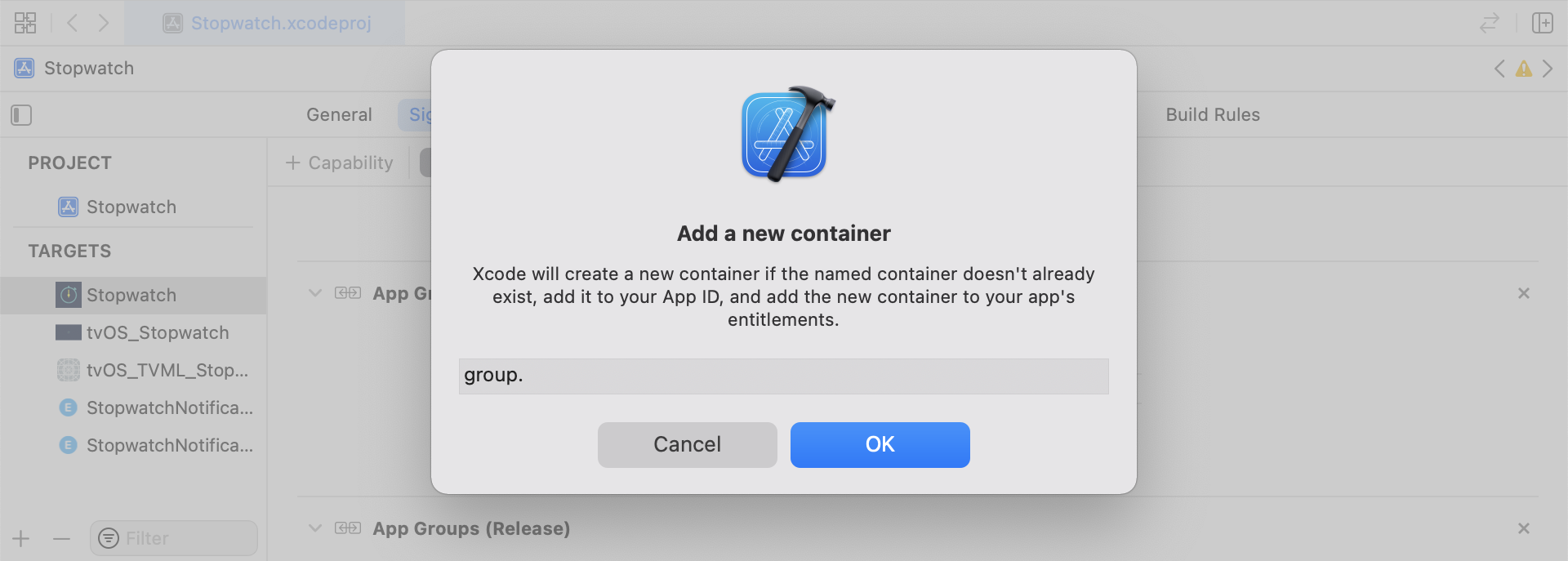
Xcode에서 메인 앱 타겟에 App Groups 기능을 추가합니다. App Groups를 켠 다음 +를 클릭하여 새 그룹을 추가합니다. 앱의 번들 ID를 사용하여 그룹 식별자를 생성합니다(예: group.com.company.appname.xyz). 메인 앱 타겟과 콘텐츠 확장 타겟 모두에서 App Groups를 켜세요.
2단계: 로깅할 항목 선택하기
스니펫을 구현하기 전에 로깅할 분석 카테고리를 선택하세요:
- 커스텀 이벤트: 사용자가 수행하는 동작입니다(예: 플로우 완료 또는 특정 UI 요소 탭하기). 커스텀 이벤트는 액션 기반 트리거, 세분화 및 이벤트 분석에 사용합니다. 자세한 내용은 커스텀 이벤트 및 커스텀 이벤트 로깅을 참조하세요.
- 커스텀 속성: 직접 정의하는 프로필 필드입니다(예:
plan_tier또는preferred_language). 시간이 지남에 따라 업데이트됩니다. 자세한 내용은 커스텀 속성 및 사용자 속성 설정을 참조하세요. - 사용자 속성: 표준 프로필 필드입니다(예: 이메일, 이름, 전화번호). 샘플 코드에서는 타입이 지정된
UserAttribute모델로 표현된 후 Braze 사용자 필드에 매핑됩니다.
이 섹션의 헬퍼 파일(RemoteStorage, UserAttribute, EventName Dictionary)은 이 샘플 구현에서 사용하는 로컬 유틸리티 파일입니다. 내장 SDK 클래스가 아닙니다. 이 파일들은 페이로드에서 파생된 데이터를 UserDefaults에 저장하고, 대기 중인 사용자 업데이트를 위한 타입 모델을 정의하며, 이벤트 페이로드 구성을 표준화합니다. 로컬 데이터 저장 동작에 대한 자세한 내용은 스토리지를 참조하세요.
커스텀 이벤트 저장하기
사전을 빌드하고, 메타데이터를 채운 다음, 헬퍼 파일로 저장하여 분석 페이로드를 생성합니다.
- 이벤트 메타데이터로 사전을 초기화합니다.
- 이벤트 데이터를 검색하고 저장하기 위해
userDefaults를 초기화합니다. - 기존 배열이 있으면 추가하고 저장합니다.
- 배열이 없으면 새 배열을 저장합니다.
func saveCustomEvent(with properties: [String: Any]? = nil) {
// 1
let customEventDictionary = Dictionary(eventName: "YOUR-EVENT-NAME", properties: properties)
// 2
let remoteStorage = RemoteStorage(storageType: .suite)
// 3
if var pendingEvents = remoteStorage.retrieve(forKey: .pendingCustomEvents) as? [[String: Any]] {
pendingEvents.append(contentsOf: [customEventDictionary])
remoteStorage.store(pendingEvents, forKey: .pendingCustomEvents)
} else {
// 4
remoteStorage.store([customEventDictionary], forKey: .pendingCustomEvents)
}
}
- (void)saveCustomEvent:(NSDictionary<NSString *, id> *)properties {
// 1
NSDictionary<NSString *, id> *customEventDictionary = [[NSDictionary alloc] initWithEventName:@"YOUR-EVENT-NAME" properties:properties];
// 2
RemoteStorage *remoteStorage = [[RemoteStorage alloc] initWithStorageType:StorageTypeSuite];
NSMutableArray *pendingEvents = [[remoteStorage retrieveForKey:RemoteStorageKeyPendingCustomEvents] mutableCopy];
// 3
if (pendingEvents) {
[pendingEvents addObject:customEventDictionary];
[remoteStorage store:pendingEvents forKey:RemoteStorageKeyPendingCustomEvents];
} else {
// 4
[remoteStorage store:@[ customEventDictionary ] forKey:RemoteStorageKeyPendingCustomEvents];
}
}
Braze에 커스텀 이벤트 전송하기
SDK 초기화 직후에 저장된 분석 데이터를 로깅합니다.
- 대기 중인 이벤트를 순회합니다.
- 각 이벤트의 키-값 페어를 순회합니다.
event_name키를 확인합니다.- 나머지 키-값 페어를
properties사전에 추가합니다. - 각 커스텀 이벤트를 로깅합니다.
- 스토리지에서 대기 중인 이벤트를 제거합니다.
func logPendingCustomEventsIfNecessary() {
let remoteStorage = RemoteStorage(storageType: .suite)
guard let pendingEvents = remoteStorage.retrieve(forKey: .pendingCustomEvents) as? [[String: Any]] else { return }
// 1
for event in pendingEvents {
var eventName: String?
var properties: [AnyHashable: Any] = [:]
// 2
for (key, value) in event {
if key == "event_name" {
// 3
if let eventNameValue = value as? String {
eventName = eventNameValue
} else {
print("Invalid type for event_name key")
}
} else {
// 4
properties[key] = value
}
}
// 5
if let eventName = eventName {
AppDelegate.braze?.logCustomEvent(name: eventName, properties: properties)
}
}
// 6
remoteStorage.removeObject(forKey: .pendingCustomEvents)
}
- (void)logPendingEventsIfNecessary {
RemoteStorage *remoteStorage = [[RemoteStorage alloc] initWithStorageType:StorageTypeSuite];
NSArray *pendingEvents = [remoteStorage retrieveForKey:RemoteStorageKeyPendingCustomEvents];
// 1
for (NSDictionary<NSString *, id> *event in pendingEvents) {
NSString *eventName = nil;
NSMutableDictionary *properties = [NSMutableDictionary dictionary];
// 2
for (NSString* key in event) {
if ([key isEqualToString:@"event_name"]) {
// 3
if ([[event objectForKey:key] isKindOfClass:[NSString class]]) {
eventName = [event objectForKey:key];
} else {
NSLog(@"Invalid type for event_name key");
}
} else {
// 4
properties[key] = event[key];
}
}
// 5
if (eventName != nil) {
[AppDelegate.braze logCustomEvent:eventName properties:properties];
}
}
// 6
[remoteStorage removeObjectForKey:RemoteStorageKeyPendingCustomEvents];
}
커스텀 속성 저장하기
분석 사전을 새로 생성한 다음 영속화합니다.
- 속성 메타데이터로 사전을 초기화합니다.
- 속성 데이터를 검색하고 저장하기 위해
userDefaults를 초기화합니다. - 기존 배열이 있으면 추가하고 저장합니다.
- 배열이 없으면 새 배열을 저장합니다.
func saveCustomAttribute() {
// 1
let customAttributeDictionary: [String: Any] = ["YOUR-CUSTOM-ATTRIBUTE-KEY": "YOUR-CUSTOM-ATTRIBUTE-VALUE"]
// 2
let remoteStorage = RemoteStorage(storageType: .suite)
// 3
if var pendingAttributes = remoteStorage.retrieve(forKey: .pendingCustomAttributes) as? [[String: Any]] {
pendingAttributes.append(contentsOf: [customAttributeDictionary])
remoteStorage.store(pendingAttributes, forKey: .pendingCustomAttributes)
} else {
// 4
remoteStorage.store([customAttributeDictionary], forKey: .pendingCustomAttributes)
}
}
- (void)saveCustomAttribute {
// 1
NSDictionary<NSString *, id> *customAttributeDictionary = @{ @"YOUR-CUSTOM-ATTRIBUTE-KEY": @"YOUR-CUSTOM-ATTRIBUTE-VALUE" };
// 2
RemoteStorage *remoteStorage = [[RemoteStorage alloc] initWithStorageType:StorageTypeSuite];
NSMutableArray *pendingAttributes = [[remoteStorage retrieveForKey:RemoteStorageKeyPendingCustomAttributes] mutableCopy];
// 3
if (pendingAttributes) {
[pendingAttributes addObject:customAttributeDictionary];
[remoteStorage store:pendingAttributes forKey:RemoteStorageKeyPendingCustomAttributes];
} else {
// 4
[remoteStorage store:@[ customAttributeDictionary ] forKey:RemoteStorageKeyPendingCustomAttributes];
}
}
Braze에 커스텀 속성 전송하기
SDK 초기화 직후에 저장된 분석 데이터를 로깅합니다.
- 대기 중인 속성을 순회합니다.
- 각 키-값 페어를 순회합니다.
- 각 커스텀 속성 키와 값을 로깅합니다.
- 스토리지에서 대기 중인 속성을 제거합니다.
func logPendingCustomAttributesIfNecessary() {
let remoteStorage = RemoteStorage(storageType: .suite)
guard let pendingAttributes = remoteStorage.retrieve(forKey: .pendingCustomAttributes) as? [[String: Any]] else { return }
// 1
pendingAttributes.forEach { setCustomAttributesWith(keysAndValues: $0) }
// 4
remoteStorage.removeObject(forKey: .pendingCustomAttributes)
}
func setCustomAttributesWith(keysAndValues: [String: Any]) {
// 2
for (key, value) in keysAndValues {
// 3
if let value = value as? [String] {
setCustomAttributeArrayWithKey(key, andValue: value)
} else {
setCustomAttributeWithKey(key, andValue: value)
}
}
}
- (void)logPendingCustomAttributesIfNecessary {
RemoteStorage *remoteStorage = [[RemoteStorage alloc] initWithStorageType:StorageTypeSuite];
NSArray *pendingAttributes = [remoteStorage retrieveForKey:RemoteStorageKeyPendingCustomAttributes];
// 1
for (NSDictionary<NSString*, id> *attribute in pendingAttributes) {
[self setCustomAttributeWith:attribute];
}
// 4
[remoteStorage removeObjectForKey:RemoteStorageKeyPendingCustomAttributes];
}
- (void)setCustomAttributeWith:(NSDictionary<NSString *, id> *)keysAndValues {
// 2
for (NSString *key in keysAndValues) {
// 3
[self setCustomAttributeWith:key andValue:[keysAndValues objectForKey:key]];
}
}
사용자 속성 저장하기
사용자 속성을 저장할 때 업데이트 중인 사용자 필드(email, first_name, phone_number 등)를 캡처하는 커스텀 오브젝트를 생성합니다. 이 오브젝트는 UserDefaults를 통해 저장하고 검색할 수 있어야 합니다. 하나의 예시는 헬퍼 파일 탭의 UserAttribute 헬퍼 파일을 참조하세요.
- 해당 타입으로 인코딩된
UserAttribute오브젝트를 초기화합니다. - 데이터를 검색하고 저장하기 위해
userDefaults를 초기화합니다. - 기존 배열이 있으면 추가하고 저장합니다.
- 배열이 없으면 새 배열을 저장합니다.
func saveUserAttribute() {
// 1
guard let data = try? PropertyListEncoder().encode(UserAttribute.email("USER-ATTRIBUTE-VALUE")) else { return }
// 2
let remoteStorage = RemoteStorage(storageType: .suite)
// 3
if var pendingAttributes = remoteStorage.retrieve(forKey: .pendingUserAttributes) as? [Data] {
pendingAttributes.append(contentsOf: [data])
remoteStorage.store(pendingAttributes, forKey: .pendingUserAttributes)
} else {
// 4
remoteStorage.store([data], forKey: .pendingUserAttributes)
}
}
- (void)saveUserAttribute {
// 1
UserAttribute *userAttribute = [[UserAttribute alloc] initWithUserField:@"USER-ATTRIBUTE-VALUE" attributeType:UserAttributeTypeEmail];
NSError *error;
NSData *data = [NSKeyedArchiver archivedDataWithRootObject:userAttribute requiringSecureCoding:YES error:&error];
if (error != nil) {
// log error
}
// 2
RemoteStorage *remoteStorage = [[RemoteStorage alloc] initWithStorageType:StorageTypeSuite];
NSMutableArray *pendingAttributes = [[remoteStorage retrieveForKey:RemoteStorageKeyPendingUserAttributes] mutableCopy];
// 3
if (pendingAttributes) {
[pendingAttributes addObject:data];
[remoteStorage store:pendingAttributes forKey:RemoteStorageKeyPendingUserAttributes];
} else {
// 4
[remoteStorage store:@[data] forKey:RemoteStorageKeyPendingUserAttributes];
}
}
Braze에 사용자 속성 전송하기
SDK 초기화 직후에 저장된 분석 데이터를 로깅합니다.
pendingAttributes데이터를 순회합니다.- 각
UserAttribute를 디코딩합니다. - 속성 타입에 따라 사용자 필드를 설정합니다.
- 스토리지에서 대기 중인 사용자 속성을 제거합니다.
func logPendingUserAttributesIfNecessary() {
let remoteStorage = RemoteStorage(storageType: .suite)
guard let pendingAttributes = remoteStorage.retrieve(forKey: .pendingUserAttributes) as? [Data] else { return }
// 1
for attributeData in pendingAttributes {
// 2
guard let userAttribute = try? PropertyListDecoder().decode(UserAttribute.self, from: attributeData) else { continue }
// 3
switch userAttribute {
case .email(let email):
AppDelegate.braze?.user.set(email: email)
}
}
// 4
remoteStorage.removeObject(forKey: .pendingUserAttributes)
}
- (void)logPendingUserAttributesIfNecessary {
RemoteStorage *remoteStorage = [[RemoteStorage alloc] initWithStorageType:StorageTypeSuite];
NSArray *pendingAttributes = [remoteStorage retrieveForKey:RemoteStorageKeyPendingUserAttributes];
// 1
for (NSData *attributeData in pendingAttributes) {
NSError *error;
// 2
UserAttribute *userAttribute = [NSKeyedUnarchiver unarchivedObjectOfClass:[UserAttribute class] fromData:attributeData error:&error];
if (error != nil) {
// log error
}
// 3
if (userAttribute) {
switch (userAttribute.attributeType) {
case UserAttributeTypeEmail:
[self user].email = userAttribute.userField;
break;
}
}
}
// 4
[remoteStorage removeObjectForKey:RemoteStorageKeyPendingUserAttributes];
}
RemoteStorage 헬퍼 파일
enum RemoteStorageKey: String, CaseIterable {
// MARK: - Notification Content Extension Analytics
case pendingCustomEvents = "pending_custom_events"
case pendingCustomAttributes = "pending_custom_attributes"
case pendingUserAttributes = "pending_user_attributes"
}
enum RemoteStorageType {
case standard
case suite
}
class RemoteStorage: NSObject {
private var storageType: RemoteStorageType = .standard
private lazy var defaults: UserDefaults = {
switch storageType {
case .standard:
return .standard
case .suite:
// Use the App Group identifier you created in Step 1.
return UserDefaults(suiteName: "group.com.company.appname.xyz")!
}
}()
init(storageType: RemoteStorageType = .standard) {
self.storageType = storageType
}
func store(_ value: Any, forKey key: RemoteStorageKey) {
defaults.set(value, forKey: key.rawValue)
}
func retrieve(forKey key: RemoteStorageKey) -> Any? {
return defaults.object(forKey: key.rawValue)
}
func removeObject(forKey key: RemoteStorageKey) {
defaults.removeObject(forKey: key.rawValue)
}
func resetStorageKeys() {
for key in RemoteStorageKey.allCases {
defaults.removeObject(forKey: key.rawValue)
}
}
}
@interface RemoteStorage ()
@property (nonatomic) StorageType storageType;
@property (nonatomic, strong) NSUserDefaults *defaults;
@end
@implementation RemoteStorage
- (id)initWithStorageType:(StorageType)storageType {
if (self = [super init]) {
self.storageType = storageType;
}
return self;
}
- (void)store:(id)value forKey:(RemoteStorageKey)key {
[[self defaults] setValue:value forKey:[self rawValueForKey:key]];
}
- (id)retrieveForKey:(RemoteStorageKey)key {
return [[self defaults] objectForKey:[self rawValueForKey:key]];
}
- (void)removeObjectForKey:(RemoteStorageKey)key {
[[self defaults] removeObjectForKey:[self rawValueForKey:key]];
}
- (void)resetStorageKeys {
[[self defaults] removeObjectForKey:[self rawValueForKey:RemoteStorageKeyPendingCustomEvents]];
[[self defaults] removeObjectForKey:[self rawValueForKey:RemoteStorageKeyPendingCustomAttributes]];
[[self defaults] removeObjectForKey:[self rawValueForKey:RemoteStorageKeyPendingUserAttributes]];
}
- (NSUserDefaults *)defaults {
if (!_defaults) {
switch (self.storageType) {
case StorageTypeStandard:
_defaults = [NSUserDefaults standardUserDefaults];
break;
case StorageTypeSuite:
_defaults = [[NSUserDefaults alloc] initWithSuiteName:@"group.com.company.appname.xyz"];
break;
}
}
return _defaults;
}
- (NSString*)rawValueForKey:(RemoteStorageKey)remoteStorageKey {
switch(remoteStorageKey) {
case RemoteStorageKeyPendingCustomEvents:
return @"pending_custom_events";
case RemoteStorageKeyPendingCustomAttributes:
return @"pending_custom_attributes";
case RemoteStorageKeyPendingUserAttributes:
return @"pending_user_attributes";
default:
[NSException raise:NSGenericException format:@"Unexpected FormatType."];
}
}
UserAttribute 헬퍼 파일
enum UserAttribute: Hashable {
case email(String?)
}
// MARK: - Codable
extension UserAttribute: Codable {
private enum CodingKeys: String, CodingKey {
case email
}
func encode(to encoder: Encoder) throws {
var values = encoder.container(keyedBy: CodingKeys.self)
switch self {
case .email(let email):
try values.encodeIfPresent(email, forKey: .email)
}
}
init(from decoder: Decoder) throws {
let values = try decoder.container(keyedBy: CodingKeys.self)
let email = try values.decodeIfPresent(String.self, forKey: .email)
self = .email(email)
}
}
@implementation UserAttribute
- (id)initWithUserField:(NSString *)userField attributeType:(UserAttributeType)attributeType {
if (self = [super init]) {
self.userField = userField;
self.attributeType = attributeType;
}
return self;
}
- (void)encodeWithCoder:(NSCoder *)encoder {
[encoder encodeObject:self.userField forKey:@"userField"];
[encoder encodeInteger:self.attributeType forKey:@"attributeType"];
}
- (id)initWithCoder:(NSCoder *)decoder {
if (self = [super init]) {
self.userField = [decoder decodeObjectForKey:@"userField"];
NSInteger attributeRawValue = [decoder decodeIntegerForKey:@"attributeType"];
self.attributeType = (UserAttributeType) attributeRawValue;
}
return self;
}
@end
EventName 사전 헬퍼 파일
extension Dictionary where Key == String, Value == Any {
init(eventName: String, properties: [String: Any]? = nil) {
self.init()
self[PushNotificationKey.eventName.rawValue] = eventName
if let properties = properties {
for (key, value) in properties {
self[key] = value
}
}
}
}
@implementation NSMutableDictionary (Helper)
+ (instancetype)dictionaryWithEventName:(NSString *)eventName
properties:(NSDictionary *)properties {
NSMutableDictionary *dict = [NSMutableDictionary dictionary];
dict[@"event_name"] = eventName;
if (properties) {
for (id key in properties) {
dict[key] = properties[key];
}
}
return dict;
}
@end
결과 분석
분석 카테고리에 맞는 리포팅 화면을 사용하세요:
| 분석 카테고리 | Braze에서 확인하는 방법 |
|---|---|
| 네이티브 푸시 분석 | Campaign 수준의 푸시 열람 측정기준을 확인하려면 푸시 Campaign의 Campaign 분석 페이지로 이동하세요. 측정기준 정의는 영향을 받은 열람을 참조하세요. 커스텀 분석 뷰를 만들려면 Analytics > 보고서 빌더(신규)로 이동하세요. 탐색 단계는 보고서 빌더를 참조하세요. 웨어하우스 수준의 이벤트 스키마는 메시지 인게이지먼트 이벤트를 참조하세요. |
| 커스텀 이벤트 및 속성 | 커스텀 이벤트 트렌드를 확인하려면 Analytics > 커스텀 이벤트 보고서로 이동하세요. 자세한 내용은 커스텀 이벤트를 참조하세요. 사용자 수준의 값을 검사하려면 사용자 검색 페이지로 이동하여 프로필을 여세요. 단계는 고객 프로필을 참조하세요. 이러한 값으로 오디언스를 필터링하려면 오디언스 > Segments로 이동하세요. 탐색 단계는 Segment 만들기 및 세분화 필터의 필터 옵션을 참조하세요. |
커스텀 보고서 생성에 대한 자세한 내용은 보고서 빌더를 참조하세요.