
AppboyKit(Objective-C SDK라고도 함)는 더 이상 지원되지 않으며 Swift SDK로 대체되었습니다. 더 이상 새로운 기능, 버그 수정, 보안 업데이트 또는 기술 지원이 제공되지 않지만, 메시징 및 분석은 정상적으로 계속 작동합니다. 자세한 내용은 새로운 Braze Swift SDK 소개를 참조하세요.

Content Cards 구현 가이드
이 고급 구현 가이드(선택 사항)에서는 Content Cards 코드 고려사항, 저희 팀이 구축한 세 가지 커스텀 사용 사례, 함께 제공되는 코드 스니펫, 노출 횟수, 클릭 및 해제 로깅에 대한 지침을 다룹니다. GitHub의 Braze 데모 리포지토리를 방문하세요! 이 구현 가이드는 Swift 구현을 중심으로 하지만 관심 있는 분을 위해 Objective-C 스니펫도 제공됩니다.
코드 고려사항
커스텀 오브젝트로서의 Content Cards
로켓에 부스터를 추가하는 것처럼 커스텀 오브젝트를 확장하여 Content Cards로 기능하도록 할 수 있습니다. 이처럼 제한된 API 표면은 다양한 데이터 백엔드를 서로 교환하여 사용할 수 있는 유연성을 제공합니다. 이는 ContentCardable 프로토콜을 준수하고 이니셜라이저를 구현하여(다음 코드 스니펫 참조) 수행할 수 있으며, ContentCardData 구조체를 사용하면 ABKContentCard 데이터에 접근할 수 있습니다. ABKContentCard 페이로드는 ContentCardData 구조체와 커스텀 오브젝트 자체를 초기화하는 데 사용되며, 모두 프로토콜이 제공하는 이니셜라이저를 통해 Dictionary 타입에서 생성됩니다.
이니셜라이저에는 ContentCardClassType 열거형도 포함됩니다. 이 열거형은 어떤 오브젝트를 초기화할지 결정하는 데 사용됩니다. Braze 대시보드에서 키-값 페어를 사용하여 초기화할 오브젝트를 결정하는 데 사용되는 명시적인 class_type 키를 설정할 수 있습니다. Content Cards의 이러한 키-값 페어는 ABKContentCard의 extras 변수를 통해 전달됩니다. 이니셜라이저의 또 다른 핵심 구성 요소는 metaData 사전 매개변수입니다. metaData에는 ABKContentCard에서 파싱된 모든 내용이 일련의 키와 값으로 포함됩니다. 관련 카드가 파싱되고 커스텀 오브젝트로 변환된 후에는 JSON이나 다른 소스에서 인스턴스화된 것처럼 작업할 수 있습니다.
이러한 코드 고려사항을 충분히 이해한 후, 사용 사례를 확인하여 커스텀 오브젝트 구현을 시작하세요.
ContentCardable 프로토콜
ABKContentCard 데이터를 나타내는 ContentCardData 오브젝트와 ContentCardClassType 열거형입니다. ABKContentCard 메타데이터로 커스텀 오브젝트를 인스턴스화하는 데 사용되는 이니셜라이저입니다.
protocol ContentCardable {
var contentCardData: ContentCardData? { get }
init?(metaData: [ContentCardKey: Any], classType contentCardClassType: ContentCardClassType)
}
extension ContentCardable {
var isContentCard: Bool {
return contentCardData != nil
}
func logContentCardClicked() {
BrazeManager.shared.logContentCardClicked(idString: contentCardData?.contentCardId)
}
func logContentCardDismissed() {
BrazeManager.shared.logContentCardDismissed(idString: contentCardData?.contentCardId)
}
func logContentCardImpression() {
BrazeManager.shared.logContentCardImpression(idString: contentCardData?.contentCardId)
}
}
Content Card 데이터 구조체
ContentCardData는 ABKContentCard에서 파싱된 값을 나타냅니다.
struct ContentCardData: Hashable {
let contentCardId: String
let contentCardClassType: ContentCardClassType
let createdAt: Double
let isDismissable: Bool
...
// other Content Card properties such as expiresAt, pinned, etc.
}
extension ContentCardData: Equatable {
static func ==(lhs: ContentCardData, rhs: ContentCardData) -> Bool {
return lhs.contentCardId == rhs.contentCardId
}
}
ContentCardable 프로토콜
ABKContentCard 데이터를 나타내는 ContentCardData 오브젝트와 ContentCardClassType 열거형, 그리고 ABKContentCard 메타데이터로 커스텀 오브젝트를 인스턴스화하는 데 사용되는 이니셜라이저입니다.
@protocol ContentCardable <NSObject>
@property (nonatomic, strong) ContentCardData *contentCardData;
- (instancetype __nullable)initWithMetaData:(NSDictionary *)metaData
classType:(enum ContentCardClassType)classType;
- (BOOL)isContentCard;
- (void)logContentCardImpression;
- (void)logContentCardClicked;
- (void)logContentCardDismissed;
@end
Content Card 데이터 구조체
ContentCardData는 ABKContentCard에서 파싱된 값을 나타냅니다.
@interface ContentCardData : NSObject
+ (ContentCardClassType)contentCardClassTypeForString:(NSString *)rawValue;
- (instancetype)initWithIdString:(NSString *)idString
classType:(ContentCardClassType)classType
createdAt:(double)createdAt isDismissible:(BOOL)isDismissible;
@property (nonatomic, readonly) NSString *contentCardId;
@property (nonatomic) ContentCardClassType classType;
@property (nonatomic, readonly) double *createdAt;
@property (nonatomic, readonly) BOOL isDismissible;
...
// other Content Card properties such as expiresAt, pinned, etc.
@end
커스텀 오브젝트 이니셜라이저
ABKContentCard의 메타데이터를 사용하여 오브젝트의 변수를 채웁니다. Braze 대시보드에서 설정한 키-값 페어는 “extras” 사전에 표현됩니다.
extension CustomObject: ContentCardable {
init?(metaData: [ContentCardKey: Any], classType contentCardClassType: ContentCardClassType) {
guard let idString = metaData[.idString] as? String,
let createdAt = metaData[.created] as? Double,
let isDismissable = metaData[.dismissable] as? Bool,
let extras = metaData[.extras] as? [AnyHashable: Any],
else { return nil }
let contentCardData = ContentCardData(contentCardId: idString, contentCardClassType: contentCardClassType, createdAt: createdAt, isDismissable: isDismissable)
let customObjectProperty = extras["YOUR-CUSTOM-OBJECT-PROPERTY"] as? String
self.init(contentCardData: contentCardData, property: customObjectProperty)
}
}
타입 식별
ContentCardClassType 열거형은 Braze 대시보드의 class_type 값을 나타냅니다. 이 값은 다양한 위치에 Content Cards를 표시하기 위한 필터 식별자로도 사용됩니다.
enum ContentCardClassType: Hashable {
case yourValue
case yourOtherValue
...
case none
init(rawType: String?) {
switch rawType?.lowercased() {
case "your_value": // these values much match the value set in the Braze dashboard
self = .yourValue
case "your_other_value": // these values much match the value set in the Braze dashboard
self = .yourOtherValue
...
default:
self = .none
}
}
}
커스텀 오브젝트 이니셜라이저
ABKContentCard의 메타데이터를 사용하여 오브젝트의 변수를 채웁니다. Braze 대시보드에서 설정한 키-값 페어는 “extras” 사전에 표현됩니다.
- (id _Nullable)initWithMetaData:(nonnull NSDictionary *)metaData classType:(enum ContentCardClassType)classType {
self = [super init];
if (self) {
if ([metaData objectForKey:ContentCardKeyIdString] && [metaData objectForKey:ContentCardKeyCreated] && [metaData objectForKey:ContentCardKeyDismissible] && [metaData objectForKey:ContentCardKeyExtras]) {
NSDictionary *extras = metaData[ContentCardKeyExtras];
NSString *idString = metaData[ContentCardKeyIdString];
double createdAt = [metaData[ContentCardKeyCreated] doubleValue];
BOOL isDismissible = metaData[ContentCardKeyDismissible];
if ([extras objectForKey: @"YOUR-CUSTOM-PROPERTY")
_customObjectProperty = extras[@"YOUR-CUSTOM-OBJECT-PROPERTY"];
self.contentCardData = [[ContentCardData alloc] initWithIdString:idString classType:classType createdAt:createdAt isDismissible:isDismissible];
return self;
}
}
return nil;
}
타입 식별
ContentCardClassType 열거형은 Braze 대시보드의 class_type 값을 나타냅니다. 이 값은 다양한 위치에 Content Cards를 표시하기 위한 필터 식별자로도 사용됩니다.
typedef NS_ENUM(NSInteger, ContentCardClassType) {
ContentCardClassTypeNone = 0,
ContentCardClassTypeYourValue,
ContentCardClassTypeYourOtherValue,
...
};
+ (NSArray *)contentCardClassTypeArray {
return @[ @"", @"your_value", @"your_other_value" ];
}
+ (ContentCardClassType)contentCardClassTypeForString:(NSString*)rawValue {
if ([[self contentCardClassTypeArray] indexOfObject:rawValue] == NSNotFound) {
return ContentCardClassTypeNone;
} else {
NSInteger value = [[self contentCardClassTypeArray] indexOfObject:rawValue];
return (ContentCardClassType) value;
}
}
Content Cards 요청
옵저버가 메모리에 유지되는 한 Braze SDK의 알림 콜백을 받을 수 있습니다.
func loadContentCards() {
BrazeManager.shared.addObserverForContentCards(observer: self, selector: #selector(contentCardsUpdated))
BrazeManager.shared.requestContentCardsRefresh()
}
Content Cards SDK 콜백 처리
알림 콜백을 헬퍼 파일로 전달하여 커스텀 오브젝트의 페이로드 데이터를 파싱합니다.
@objc func contentCardsUpdated(_ notification: Notification) {
guard let contentCards = BrazeManager.shared.handleContentCardsUpdated(notification, for: [.yourValue]) as? [CustomObject],!contentCards.isEmpty else { return }
// do something with your array of custom objects
}
Content Cards 작업
class_type이 필터로 전달되어 일치하는 class_type을 가진 Content Cards만 반환합니다.
func handleContentCardsUpdated(_ notification: Notification, for classTypes: [ContentCardClassType]) -> [ContentCardable] {
guard let updateIsSuccessful = notification.userInfo?[ABKContentCardsProcessedIsSuccessfulKey] as? Bool, updateIsSuccessful, let cards = contentCards else { return [] }
return convertContentCards(cards, for: classTypes)
}
Content Cards 요청
옵저버가 메모리에 유지되는 한 Braze SDK의 알림 콜백을 받을 수 있습니다.
- (void)loadContentCards {
[[BrazeManager shared] addObserverForContentCards:self selector:@selector(contentCardsUpdated:)];
[[BrazeManager shared] requestContentCardsRefresh];
}
Content Cards SDK 콜백 처리
알림 콜백을 헬퍼 파일로 전달하여 커스텀 오브젝트의 페이로드 데이터를 파싱합니다.
- (void)contentCardsUpdated:(NSNotification *)notification {
NSArray *classTypes = @[@(ContentCardClassTypeYourValue)];
NSArray *contentCards = [[BrazeManager shared] handleContentCardsUpdated:notification forClassTypes:classTypes];
// do something with your array of custom objects
}
Content Cards 작업
class_type이 필터로 전달되어 일치하는 class_type을 가진 Content Cards만 반환합니다.
- (NSArray *)handleContentCardsUpdated:(NSNotification *)notification forClassType:(ContentCardClassType)classType {
BOOL updateIsSuccessful = [notification.userInfo[ABKContentCardsProcessedIsSuccessfulKey] boolValue];
if (updateIsSuccessful) {
return [self convertContentCards:self.contentCards forClassType:classType];
} else {
return @[];
}
}
페이로드 데이터 작업
Content Cards 배열을 순회하며 일치하는 class_type을 가진 카드만 파싱합니다. ABKContentCard의 페이로드는 Dictionary로 파싱됩니다.
func convertContentCards(_ cards: [ABKContentCard], for classTypes: [ContentCardClassType]) -> [ContentCardable] {
var contentCardables: [ContentCardable] = []
for card in cards {
let classTypeString = card.extras?[ContentCardKey.classType.rawValue] as? String
let classType = ContentCardClassType(rawType: classTypeString)
guard classTypes.contains(classType) else { continue }
var metaData: [ContentCardKey: Any] = [:]
switch card {
case let banner as ABKBannerContentCard:
metaData[.image] = banner.image
case let captioned as ABKCaptionedImageContentCard:
metaData[.title] = captioned.title
metaData[.cardDescription] = captioned.cardDescription
metaData[.image] = captioned.image
case let classic as ABKClassicContentCard:
metaData[.title] = classic.title
metaData[.cardDescription] = classic.cardDescription
default:
break
}
metaData[.idString] = card.idString
metaData[.created] = card.created
metaData[.dismissible] = card.dismissible
metaData[.urlString] = card.urlString
metaData[.extras] = card.extras
...
// other Content Card properties such as expiresAt, pinned, etc.
if let contentCardable = contentCardable(with: metaData, for: classType) {
contentCardables.append(contentCardable)
}
}
return contentCardables
}
Content Card 페이로드 데이터에서 커스텀 오브젝트 초기화
class_type은 페이로드 데이터에서 어떤 커스텀 오브젝트를 초기화할지 결정하는 데 사용됩니다.
func contentCardable(with metaData: [ContentCardKey: Any], for classType: ContentCardClassType) -> ContentCardable? {
switch classType {
case .yourValue:
return CustomObject(metaData: metaData, classType: classType)
case .yourOtherValue:
return OtherCustomObject(metaData: metaData, classType: classType)
...
default:
return nil
}
}
페이로드 데이터 작업
Content Cards 배열을 순회하며 일치하는 class_type을 가진 카드만 파싱합니다. ABKContentCard의 페이로드는 Dictionary로 파싱됩니다.
- (NSArray *)convertContentCards:(NSArray<ABKContentCard*> *)cards forClassType:(ContentCardClassType)classType {
NSMutableArray *contentCardables = [[NSMutableArray alloc] init]; for (ABKContentCard *card in cards) {
NSString *classTypeString = [card.extras objectForKey:ContentCardKeyClassType];
ContentCardClassType cardClassType = [ContentCardData contentCardClassTypeForString: classTypeString];
if (cardClassType != classType) { continue; }
NSMutableDictionary *metaData = [[NSMutableDictionary alloc] init];
if ([card isKindOfClass:[ABKBannerContentCard class]]) {
ABKBannerContentCard *banner = (ABKBannerContentCard *)card;
metaData[ContentCardKeyImage] = banner.image;
} else if ([card isKindOfClass:[ABKCaptionedImageContentCard class]]) {
ABKCaptionedImageContentCard *captioned = (ABKCaptionedImageContentCard *)card;
metaData[ContentCardKeyTitle] = captioned.title;
metaData[ContentCardKeyCardDescription] = captioned.cardDescription;
metaData[ContentCardKeyImage] = captioned.image;
} else if ([card isKindOfClass:[ABKClassicContentCard class]]) {
ABKClassicContentCard *classic = (ABKClassicContentCard *)card;
metaData[ContentCardKeyCardDescription] = classic.title;
metaData[ContentCardKeyImage] = classic.image;
}
metaData[ContentCardKeyIdString] = card.idString;
metaData[ContentCardKeyCreated] = [NSNumber numberWithDouble:card.created];
metaData[ContentCardKeyDismissible] = [NSNumber numberWithBool:card.dismissible];
metaData[ContentCardKeyUrlString] = card.urlString;
metaData[ContentCardKeyExtras] = card.extras;
...
// other Content Card properties such as expiresAt, pinned, etc.
id<ContentCardable> contentCardable = [self contentCardableWithMetaData:metaData forClassType:classType];
if (contentCardable) {
[contentCardables addObject:contentCardable];
}
}
return contentCardables;
}
Content Card 페이로드 데이터에서 커스텀 오브젝트 초기화
class_type은 페이로드 데이터에서 어떤 커스텀 오브젝트를 초기화할지 결정하는 데 사용됩니다.
- (id<ContentCardable>)contentCardableWithMetaData:(NSDictionary *)metaData forClassType:(ContentCardClassType)classType {
switch (classType) {
case ContentCardClassTypeYourValue:
return [[CustomObject alloc] initWithMetaData:metaData classType:classType];
case ContentCardClassTypeYourOtherValue:
return nil;
...
default:
return nil;
}
}
사용 사례
다음 섹션에서는 세 가지 사용 사례를 제공합니다. 각 사용 사례에는 자세한 설명, 관련 코드 스니펫, 그리고 Content Cards 변수가 Braze 대시보드에서 어떻게 보이고 사용될 수 있는지에 대한 안내가 포함되어 있습니다:
보충 콘텐츠로서의 Content Cards
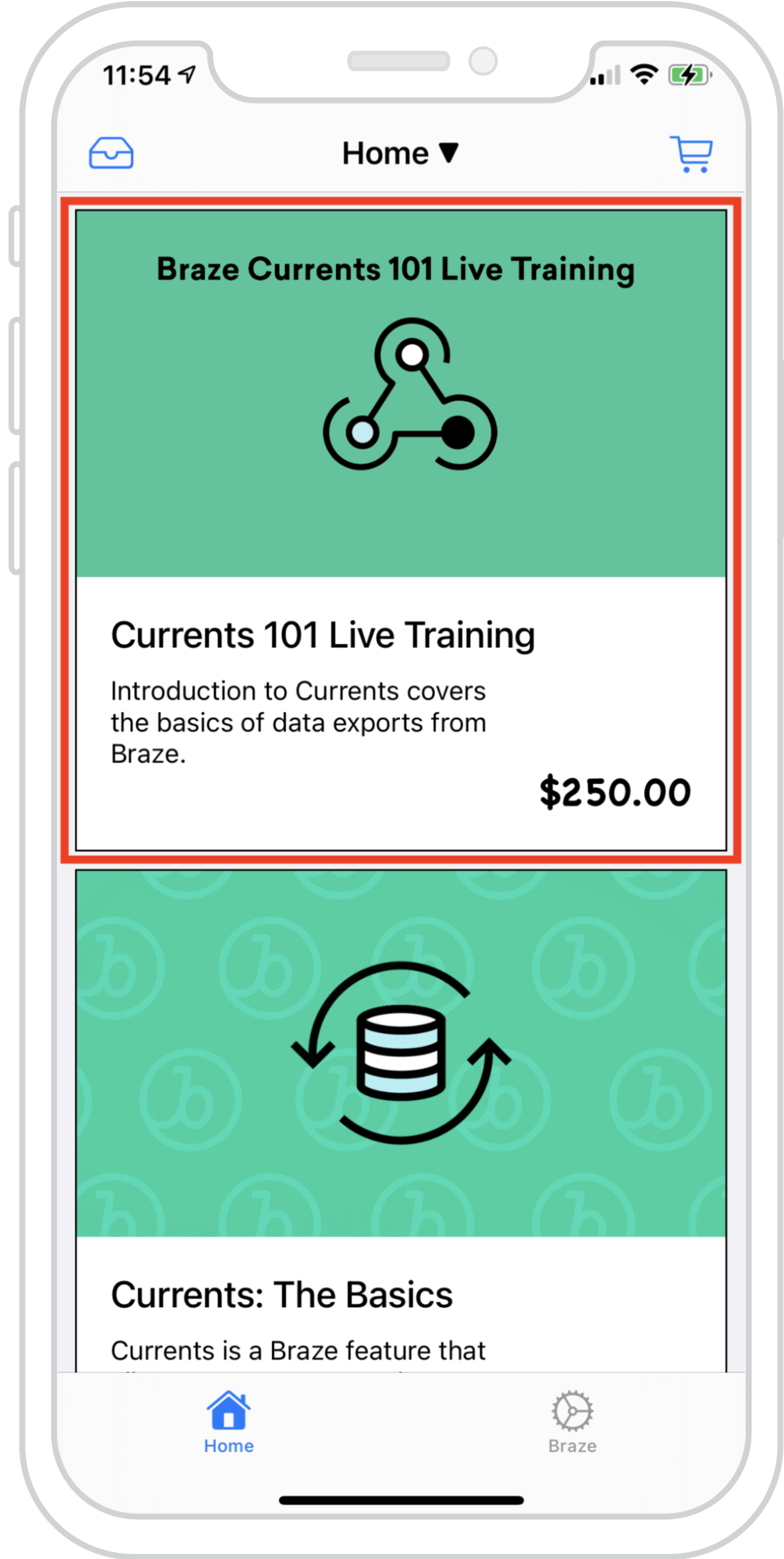
Content Cards를 기존 피드에 자연스럽게 혼합하여 여러 피드의 데이터를 동시에 로드할 수 있습니다. 이를 통해 Braze Content Cards와 기존 피드 콘텐츠가 조화롭고 일관된 경험을 만들어 냅니다.
함께 제공되는 예제에서는 로컬 데이터와 Braze 기반 Content Cards로 채워진 하이브리드 항목 목록이 포함된 UICollectionView를 보여줍니다. 이를 통해 Content Cards는 기존 콘텐츠와 구별할 수 없을 정도로 자연스럽게 표시될 수 있습니다.
대시보드 구성
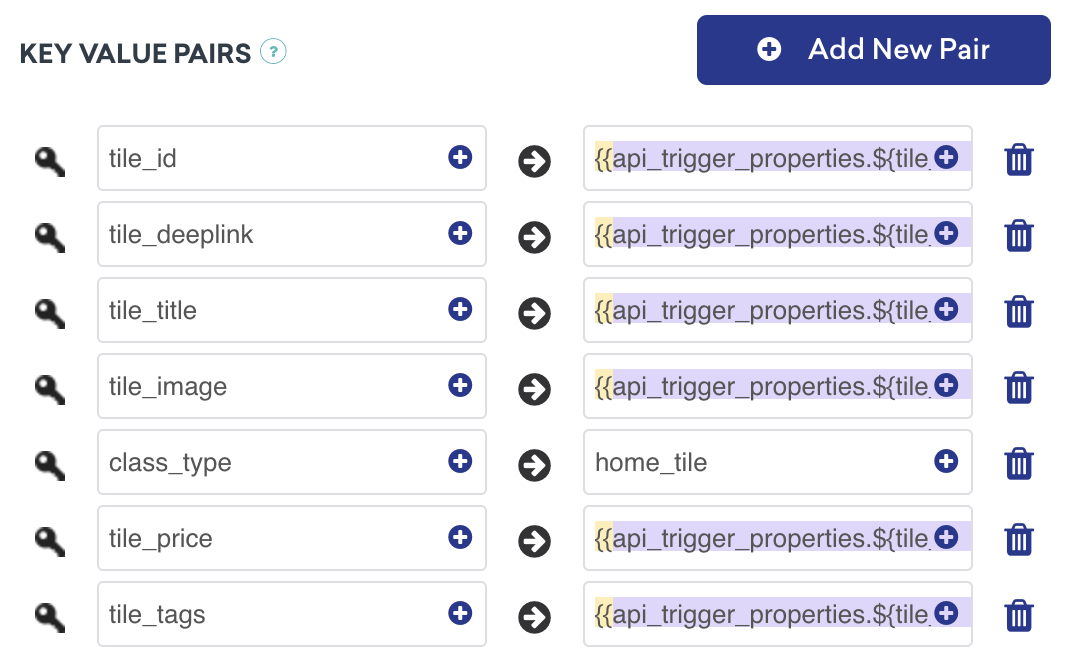
이 콘텐츠 카드는 API 트리거 키-값 페어가 포함된 API 트리거 Campaign으로 전달됩니다. 이는 카드의 값이 외부 요인에 따라 사용자에게 표시할 콘텐츠를 결정하는 Campaign에 이상적입니다. class_type은 설정 시점에 알려져 있어야 합니다.
분석 로깅 준비가 되셨나요?
데이터 흐름이 어떻게 구성되는지 더 잘 이해하려면 다음 섹션을 방문하세요.
메시지 센터의 Content Cards
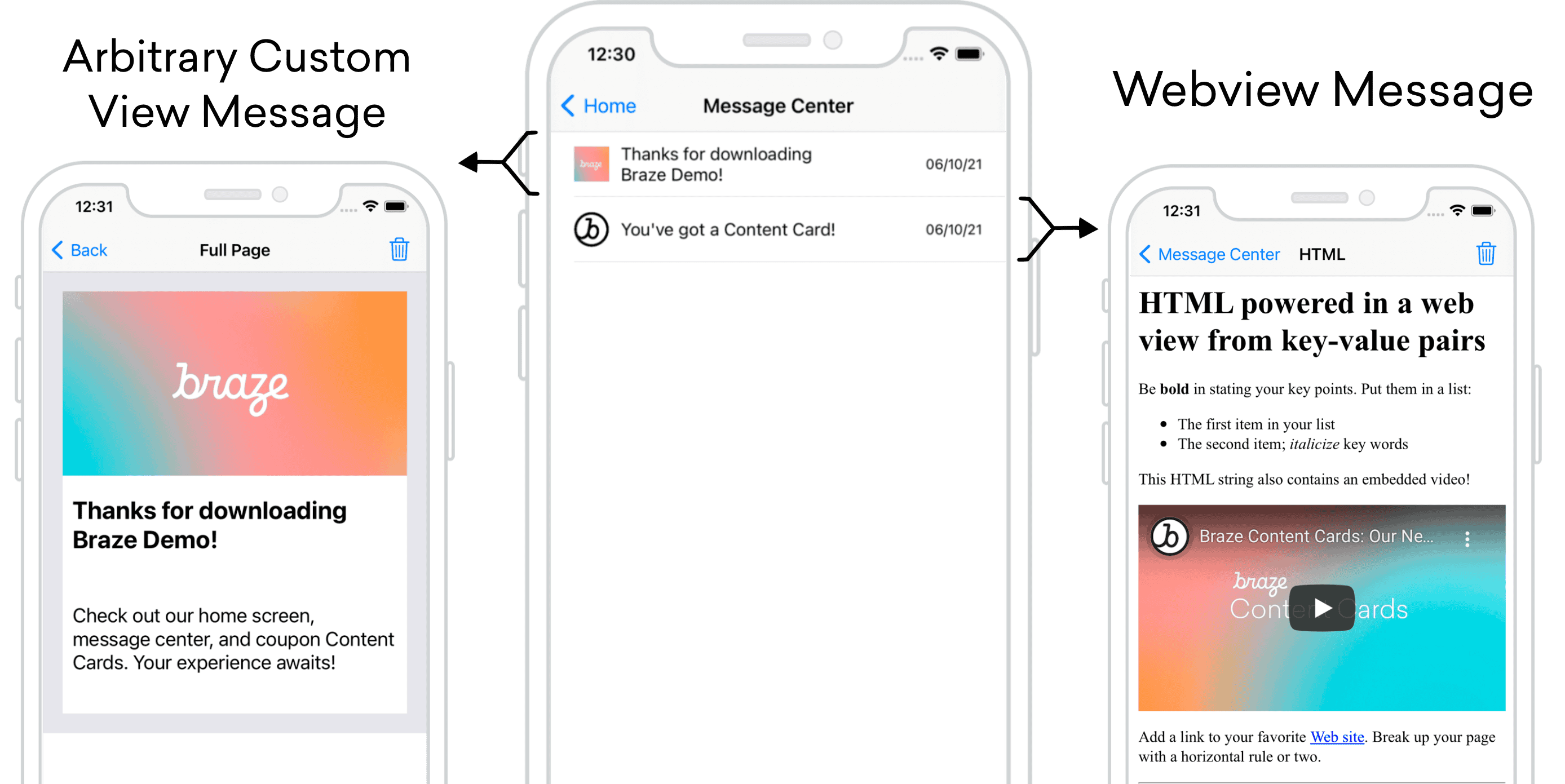
Content Cards는 각 메시지가 자체 카드인 메시지 센터 형식으로 사용할 수 있습니다. 메시지 센터의 각 메시지는 Content Card 페이로드를 통해 채워지며, 각 카드에는 클릭 시 UI/UX를 구동하는 추가 키-값 페어가 포함되어 있습니다. 다음 예제에서 하나의 메시지는 임의의 커스텀 뷰로 이동하고, 다른 하나는 커스텀 HTML을 표시하는 웹뷰를 엽니다.
대시보드 구성
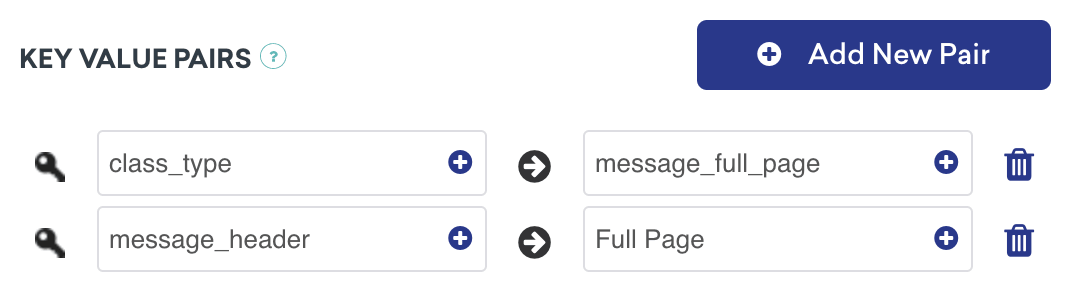
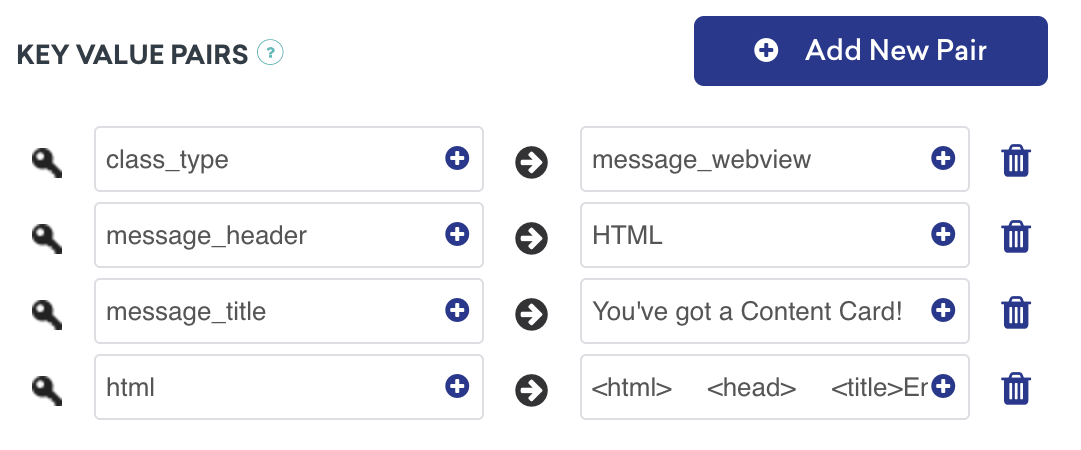
다음 메시지 유형의 경우 키-값 페어 class_type을 대시보드 구성에 추가해야 합니다. 여기에 할당된 값은 임의적이지만 클래스 유형 간에 구별할 수 있어야 합니다. 이러한 키-값 페어는 사용자가 축약된 받은편지함 메시지를 클릭할 때 어디로 이동할지 결정하기 위해 애플리케이션이 확인하는 핵심 식별자입니다.
이 사용 사례의 키-값 페어에는 다음이 포함됩니다:
message_header를Full Page로 설정class_type을message_full_page로 설정
이 사용 사례의 키-값 페어에는 다음이 포함됩니다:
message_header를HTML로 설정class_type을message_webview로 설정message_title
이 메시지는 HTML 키-값 페어도 찾지만, 웹 도메인을 사용하는 경우 URL 키-값 페어도 유효합니다.
추가 설명
메시지 센터 로직은 Braze의 키-값 페어에서 제공하는 contentCardClassType에 의해 구동됩니다. addContentCardToView 메서드를 사용하면 이러한 클래스 유형을 필터링하고 식별할 수 있습니다.
클릭 시 동작에 class_type 사용
메시지가 클릭되면 ContentCardClassType이 다음 화면을 어떻게 채울지 처리합니다.
func addContentCardToView(with message: Message) {
switch message.contentCardData?.contentCardClassType {
case .message(.fullPage):
loadContentCardFullPageView(with: message as! FullPageMessage)
case .message(.webView):
loadContentCardWebView(with: message as! WebViewMessage)
default:
break
}
}
클릭 시 동작에 class_type 사용
메시지가 클릭되면 ContentCardClassType이 다음 화면을 어떻게 채울지 처리합니다.
- (void)addContentCardToView:(Message *)message {
switch (message.contentCardData.classType) {
case ContentCardClassTypeMessageFullPage:
[self loadContentCardFullPageView:(FullPageMessage *)message];
break;
case ContentCardClassTypeMessageWebview:
[self loadContentCardWebView:(WebViewMessage *)message];
break;
default:
break;
}
}
분석 로깅 준비가 되셨나요?
데이터 흐름이 어떻게 구성되는지 더 잘 이해하려면 다음 섹션을 방문하세요.
인터랙티브 Content Cards
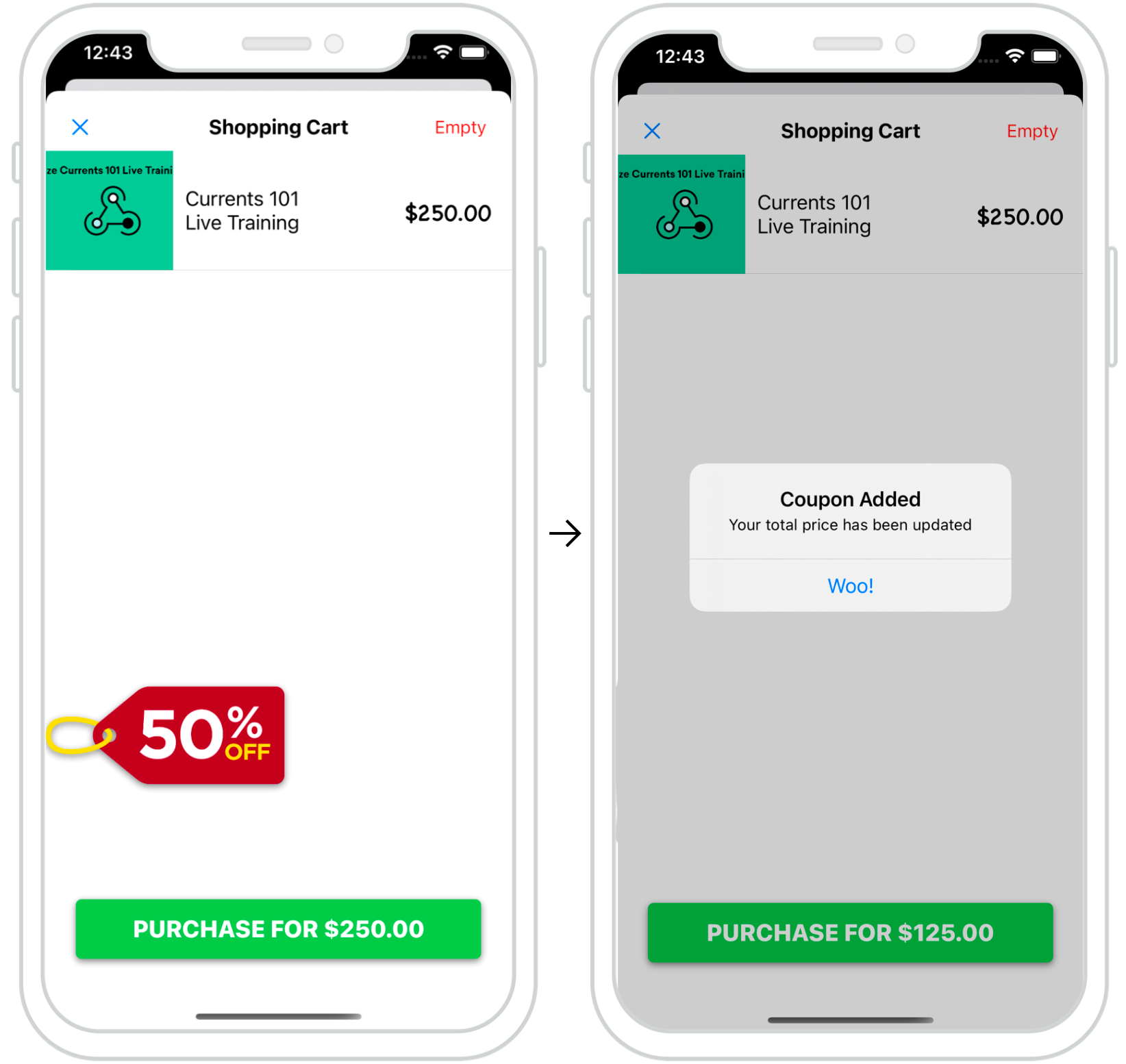
Content Cards를 사용하여 사용자에게 동적이고 인터랙티브한 경험을 제공할 수 있습니다. 함께 제공되는 예제에서는 결제 시 Content Card 팝업이 나타나 사용자에게 마지막 순간의 프로모션을 제공합니다.
이처럼 적절하게 배치된 카드는 사용자에게 특정 행동을 유도하는 “넛지”를 제공하는 좋은 방법입니다.
대시보드 구성
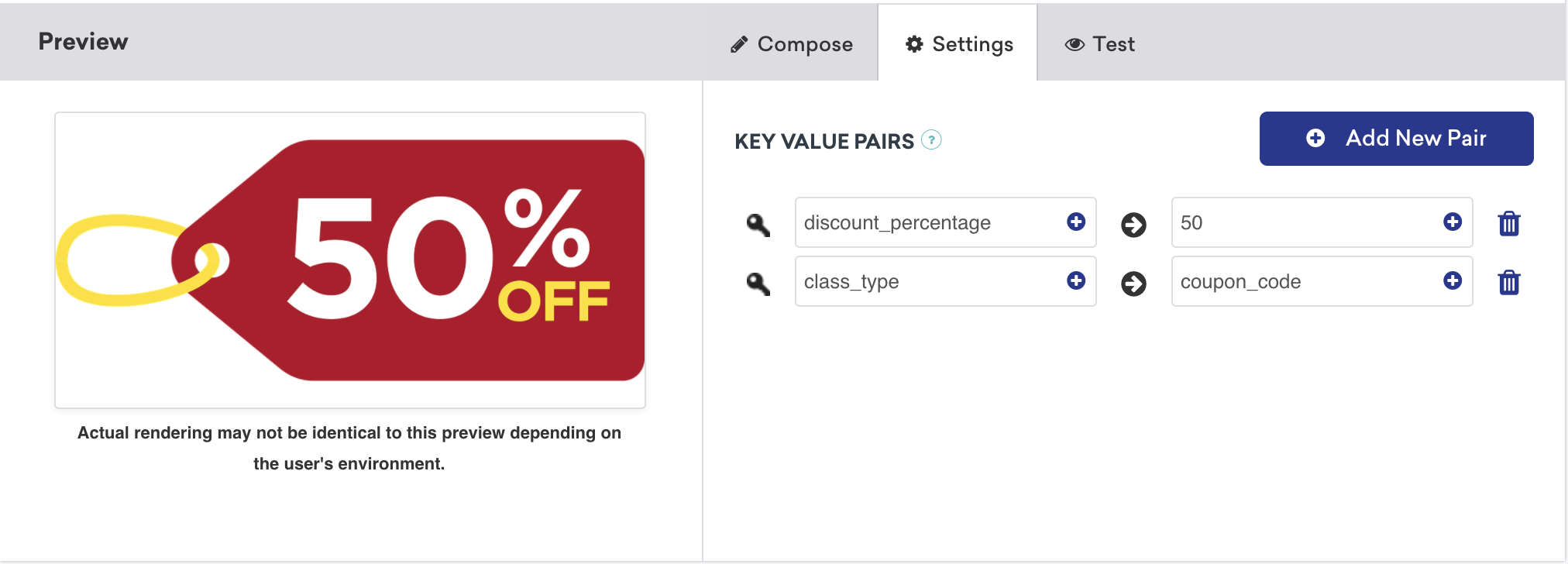
인터랙티브 Content Cards의 대시보드 구성은 간단합니다. 이 사용 사례의 키-값 페어에는 원하는 할인 금액으로 설정된 discount_percentage와 coupon_code로 설정된 class_type이 포함됩니다. 이러한 키-값 페어는 유형별 Content Cards가 결제 화면에서 필터링되고 표시되는 방식을 결정합니다.
분석 로깅 준비가 되셨나요?
데이터 흐름이 어떻게 구성되는지 더 잘 이해하려면 다음 섹션을 방문하세요.
다크 모드 커스터마이징
기본적으로 Content Cards 뷰는 테마 색상 세트를 사용하여 기기의 다크 모드 변경에 자동으로 대응합니다.
이 동작은 커스텀 스타일 가이드에 자세히 설명된 대로 재정의할 수 있습니다.
노출 횟수, 클릭 및 해제 로깅
커스텀 오브젝트를 Content Cards로 기능하도록 확장한 후, 노출 횟수, 클릭 및 해제와 같은 중요한 측정기준을 로깅하는 것은 매우 간단합니다. ContentCardable 프로토콜을 사용하여 헬퍼 파일에 데이터를 참조하고 제공하면 Braze SDK가 이를 로깅합니다.
구현 구성요소
분석 로깅
로깅 메서드는 ContentCardable 프로토콜을 준수하는 오브젝트에서 직접 호출할 수 있습니다.
customObject.logContentCardImpression()
customObject.logContentCardClicked()
customObject.logContentCardDismissed()
ABKContentCard 가져오기
커스텀 오브젝트에서 전달된 idString은 분석을 로깅하기 위해 연결된 콘텐츠 카드를 식별하는 데 사용됩니다.
extension BrazeManager {
func logContentCardImpression(idString: String?) {
guard let contentCard = getContentCard(forString: idString) else { return }
contentCard.logContentCardImpression()
}
private func getContentCard(forString idString: String?) -> ABKContentCard? {
return contentCards?.first(where: { $0.idString == idString })
}
}
분석 로깅
로깅 메서드는 ContentCardable 프로토콜을 준수하는 오브젝트에서 직접 호출할 수 있습니다.
[customObject logContentCardImpression];
[customObject logContentCardClicked];
[customObject logContentCardDismissed];
ABKContentCard 가져오기
커스텀 오브젝트에서 전달된 idString은 분석을 로깅하기 위해 연결된 콘텐츠 카드를 식별하는 데 사용됩니다.
- (void)logContentCardImpression:(NSString *)idString {
ABKContentCard *contentCard = [self getContentCard:idString];
[contentCard logContentCardImpression];
}
- (ABKContentCard *)getContentCard:(NSString *)idString {
NSPredicate *predicate = [NSPredicate predicateWithFormat:@"self.idString == %@", idString];
NSArray *filteredArray = [self.contentCards filteredArrayUsingPredicate:predicate];
return filteredArray.firstObject;
}
컨트롤 배리언트 콘텐츠 카드의 경우에도 커스텀 오브젝트가 인스턴스화되어야 하며, UI 로직은 해당 오브젝트의 대응하는 뷰를 숨김으로 설정해야 합니다. 그런 다음 해당 오브젝트가 노출 횟수를 로깅하여 사용자가 컨트롤 카드를 보았을 시점을 분석에 알릴 수 있습니다.
헬퍼 파일
ContentCardKey 헬퍼 파일
enum ContentCardKey: String {
case idString
case created
case classType = "class_type"
case dismissible
case extras
...
}
static NSString *const ContentCardKeyIdString = @"idString";
static NSString *const ContentCardKeyCreated = @"created";
static NSString *const ContentCardKeyClassType = @"class_type";
static NSString *const ContentCardKeyDismissible = @"dismissible";
static NSString *const ContentCardKeyExtras = @"extras";
...