
앱보이키트 (Objective-C 소프트웨어 개발 키트라고도 함)는 더 이상 지원되지 않으며 Swift SDK. 새로운 기능, 버그 수정, 보안 업데이트 또는 기술 지원은 더 이상 제공되지 않지만 메시징 및 분석은 정상적으로 계속 작동합니다. 자세한 내용은 새로운 Braze Swift 소프트웨어 개발 키트 소개 를 참조하세요.
iOS용 Google Tag Manager
SDK 초기화
Braze iOS SDK는 Google 태그 관리자 내에서 구성된 태그를 통해 초기화 및 제어할 수 있습니다.
Google Tag Manager를 사용하기 전에 먼저 초기 SDK 설정을 따르세요.
Google Tag Manager 구성
이 예에서는 사용자가 노래를 들을 때 다양한 이벤트를 기록하려는 음악 스트리밍 앱이라고 가정해 보겠습니다. iOS용 Google Tag Manager를 사용하면 이 이벤트를 수신할 서드파티 공급업체를 제어하고 Braze 전용 태그를 만들 수 있습니다.
사용자 지정 이벤트
커스텀 이벤트는 actionType이 logEvent로 설정되어 기록됩니다. 예제의 Braze 커스텀 태그 공급자는 eventName을 사용하여 커스텀 이벤트 이름을 설정한다고 예상합니다.
시작하려면 played song과 동일한 ‘이벤트 이름’을 찾는 트리거를 만듭니다.
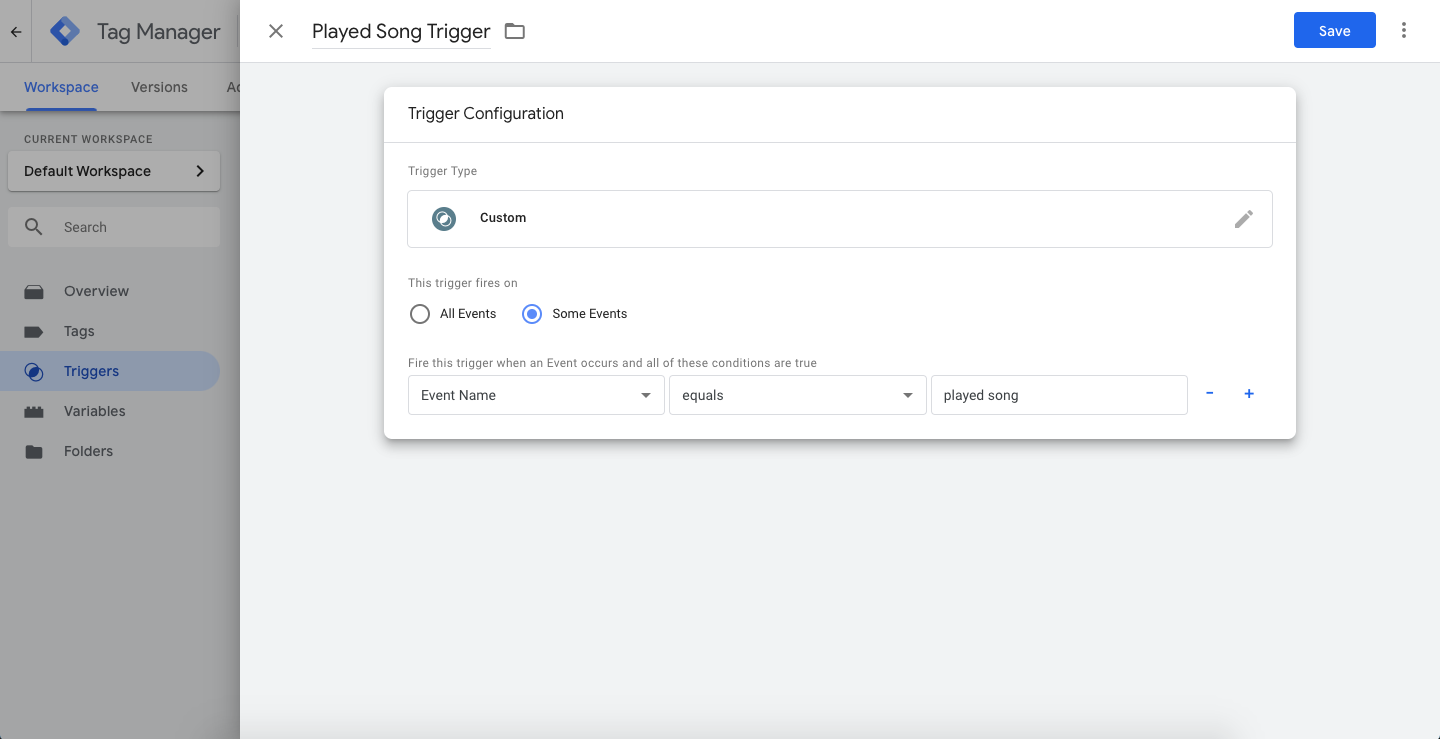
그런 다음, 새 태그(‘Function Call’)를 만들고 커스텀 태그 공급자(이 문서의 뒷부분에서 설명함)의 클래스 경로를 입력합니다.
이 태그는 방금 만든 played song 이벤트를 기록할 때 트리거됩니다.
예제 태그의 커스텀 매개변수(키-값 페어)에서는 eventName을 played song으로 설정했으며, 이는 Braze에 기록되는 커스텀 이벤트 이름이 됩니다.

커스텀 이벤트를 보낼 때는 다음 예제와 같이 actionType을 logEvent로 설정하고 eventName에 대한 값을 설정합니다.
이 예제에서 커스텀 태그 공급자는 이 키를 사용하여 Google Tag Manager에서 데이터를 수신할 때 수행할 작업과 Braze에 전송할 이벤트 이름을 결정합니다.
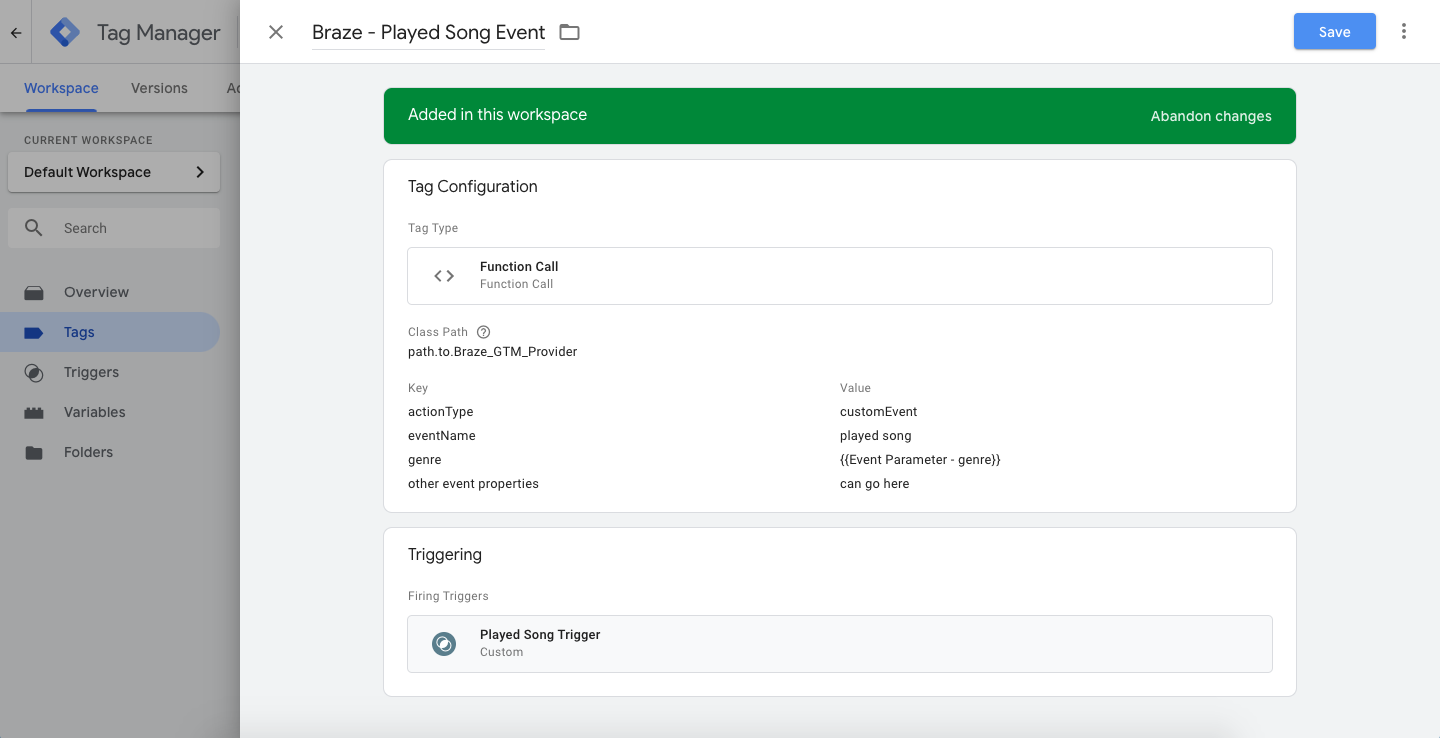
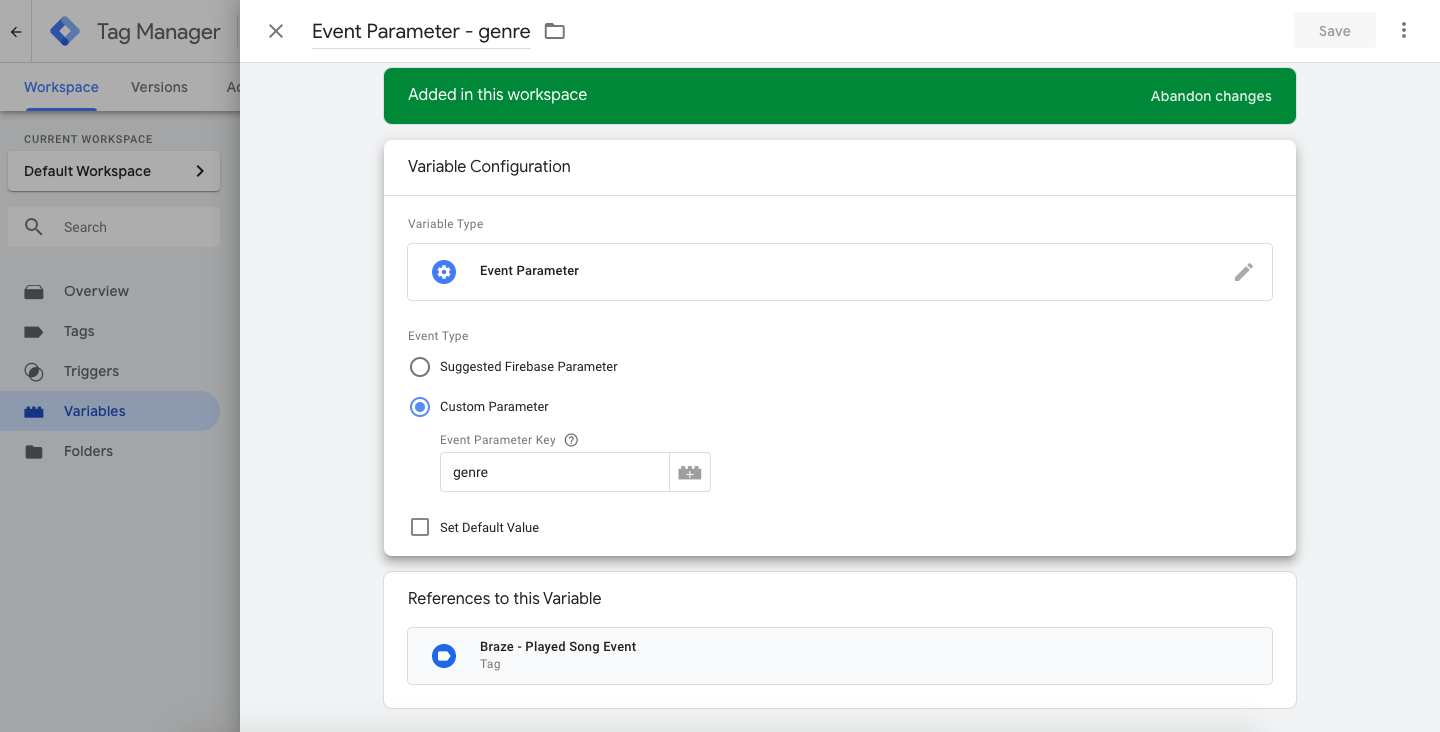
태그에 추가 키-값 쌍 인수를 포함할 수도 있으며, 이 인수는 사용자 지정 이벤트 속성으로 Braze에 전송됩니다. eventName 및 actionType 은 사용자 지정 이벤트 속성에 대해 무시되지 않습니다. 다음 예제 태그에서는 genre를 전달합니다. 이 항목은 Google Tag Manager에서 태그 변수를 사용하여 정의되며, 해당 변수는 앱에 기록된 커스텀 이벤트에서 가져옵니다.
genre 이벤트 속성정보는 iOS용 Google Tag Manager가 데이터 레이어로 Firebase를 사용하기 때문에 ‘Firebase - 이벤트 매개변수’ 변수로 Google Tag Manager에 전송됩니다.
마지막으로, 사용자가 앱에서 노래를 재생하면 Firebase 및 Google Tag Manager를 통해 태그의 트리거 이름(played song)과 일치하는 Firebase 분석 이벤트 이름을 사용하여 이벤트를 기록합니다.
1
2
3
NSDictionary *parameters = @{@"genre" : @"pop",
                             @"number of times listened" : @42};
[FIRAnalytics logEventWithName:@"played song" parameters:parameters];
커스텀 속성 로깅
actionType을 customAttribute로 설정하여 커스텀 속성은 설정됩니다. Braze 커스텀 태그 공급자는 customAttributeKey 및 customAttributeValue를 통해 커스텀 속성 키-값을 설정한다고 예상합니다.
1
2
3
NSDictionary *parameters = @{@"customAttributeKey" : @"favorite song",
                             @"customAttributeValue" : @"Private Eyes"};
[FIRAnalytics logEventWithName:@"customAttribute" parameters:parameters];
changeUser 호출
actionType을 changeUser로 설정하고 changeUser()에 대한 호출이 수행됩니다. Braze 커스텀 태그 공급자는 태그 내 externalUserId 키-값 페어를 통해 Braze 사용자 ID를 설정한다고 예상합니다.
1
2
NSDictionary *parameters = @{@"externalUserId" : userId};
[FIRAnalytics logEventWithName:@"changeUser" parameters:parameters];
Braze SDK 사용자 지정 태그 공급자
태그 및 트리거를 설정한 상태에서 Google Tag Manager를 iOS 앱에서도 구현해야 합니다(Google 설명서 참조).
앱에 Google Tag Manager를 설치한 후 Google Tag Manager 내에서 구성한 태그를 기반으로 Braze SDK 메서드를 호출하기 위해 커스텀 태그 제공자를 추가합니다.
“클래스 경로”를 파일에 기록해 두십시오. 이는 Google Tag Manager 콘솔에서 태그를 설정할 때 입력할 내용입니다.
이 예제에서는 커스텀 태그 공급자를 구성하는 여러 가지 방법 중 하나를 보여줍니다. 여기서는 Google Tag Manager에서 전송된 actionType 키-값 페어에 따라 호출할 Braze SDK 메서드를 결정합니다.
이 예제에서 지원되는 actionType은 logEvent, customAttribute, changeUser이지만, 태그 공급자가 Google Tag Manager에서 데이터를 처리하는 방식을 변경할 수도 있습니다.
BrazeGTMTagManager.h 파일에 다음 코드를 추가합니다:
1
2
3
4
5
6
@import Firebase;
@import GoogleTagManager;

@interface BrazeGTMTagManager : NSObject <TAGCustomFunction>

@end
그리고 BrazeGTMTagManager.m 파일에 다음 코드를 추가합니다:
1
2
3
4
5
6
7
8
9
10
11
12
13
14
15
16
17
18
19
20
21
22
23
24
25
26
27
28
29
30
31
32
33
34
35
36
37
38
39
40
41
42
43
44
45
46
47
48
49
50
51
52
53
54
55
56
57
58
59
60
61
62
63
64
65
66
67
68
69
70
71
72
73
74
75
76
77
78
79
80
81
82
83
84
85
86
87
88
#import <Foundation/Foundation.h>
#import "BrazeGTMTagManager.h"
#import "Appboy-iOS-SDK/AppboyKit.h"

static NSString *const ActionTypeKey = @"actionType";

// Custom Events
static NSString *const LogEventActionType = @"logEvent";
static NSString *const LogEventEventName = @"eventName";

// Custom Attributes
static NSString *const CustomAttributeActionType = @"customAttribute";
static NSString *const CustomAttributeKey = @"customAttributeKey";
static NSString *const CustomAttributeValueKey = @"customAttributeValue";

// Change User
static NSString *const ChangeUserActionType = @"changeUser";
static NSString *const ChangeUserExternalUserId = @"externalUserId";

@implementation BrazeGTMTagManager

- (NSObject *)executeWithParameters:(NSDictionary *)parameters {
  NSMutableDictionary *mutableParameters = [parameters mutableCopy];

  NSString *actionType = mutableParameters[ActionTypeKey];
  if (!actionType) {
    NSLog(@"There is no Braze action type key in this call. Doing nothing.", nil);
    return nil;
  }

  [mutableParameters removeObjectForKey:ActionTypeKey];

  if ([actionType isEqualToString:LogEventActionType]) {
    [self logEvent:mutableParameters];
  } else if ([actionType isEqualToString:CustomAttributeActionType]) {
    [self logCustomAttribute:mutableParameters];
  } else if ([actionType isEqualToString:ChangeUserActionType]) {
    [self changeUser:mutableParameters];
  } else {
    NSLog(@"Invalid action type. Doing nothing.");
  }
  return nil;
}

- (void)logEvent:(NSMutableDictionary *)parameters {
  NSString *eventName = parameters[LogEventEventName];
  [parameters removeObjectForKey:LogEventEventName];
  [[Appboy sharedInstance] logCustomEvent:eventName withProperties:parameters];
}

- (void)logCustomAttribute:(NSMutableDictionary *)parameters {
  NSString *customAttributeKey = parameters[CustomAttributeKey];
  id customAttributeValue = parameters[CustomAttributeValueKey];

  if ([customAttributeValue isKindOfClass:[NSString class]]) {
    [[Appboy sharedInstance].user setCustomAttributeWithKey:customAttributeKey
                                             andStringValue:customAttributeValue];
  } else if ([customAttributeValue isKindOfClass:[NSDate class]]) {
    [[Appboy sharedInstance].user setCustomAttributeWithKey:customAttributeKey
                                               andDateValue:customAttributeValue];
  } else if ([customAttributeValue isKindOfClass:[NSNumber class]]) {
    if (strcmp([customAttributeValue objCType], [@(YES) objCType]) == 0) {
      [[Appboy sharedInstance].user setCustomAttributeWithKey:customAttributeKey
                                                 andBOOLValue:[(NSNumber *)customAttributeValue boolValue]];
    } else if (strcmp([customAttributeValue objCType], @encode(short)) == 0 ||
               strcmp([customAttributeValue objCType], @encode(int)) == 0 ||
               strcmp([customAttributeValue objCType], @encode(long)) == 0) {
      [[Appboy sharedInstance].user setCustomAttributeWithKey:customAttributeKey
                                              andIntegerValue:[(NSNumber *)customAttributeValue integerValue]];
    } else if (strcmp([customAttributeValue objCType], @encode(float)) == 0 ||
               strcmp([customAttributeValue objCType], @encode(double)) == 0) {
      [[Appboy sharedInstance].user setCustomAttributeWithKey:customAttributeKey
                                               andDoubleValue:[(NSNumber *)customAttributeValue doubleValue]];
    } else {
      NSLog(@"Could not map NSNumber value to Appboy custom attribute:%@", customAttributeValue);
    }
  } else if ([customAttributeValue isKindOfClass:[NSArray class]]) {
    [[Appboy sharedInstance].user setCustomAttributeArrayWithKey:customAttributeKey
                                                           array:customAttributeValue];
  }
}

- (void)changeUser:(NSMutableDictionary *)parameters {
  NSString *userId = parameters[ChangeUserExternalUserId];
  [[Appboy sharedInstance] changeUser:userId];
}

@end