プッシュ分析とカスタムイベントのログ記録
このページでは、ネイティブプッシュ分析(開封、影響を受けた開封、キャンペーンレポート)とプッシュペイロードからのカスタムデータのログ記録(カスタムイベントと属性)のワークフローについて説明します。このガイドを使用して、ユースケースに該当するワークフローを特定し、プラットフォームに応じた手順に従ってください。
前提条件
始める前に、お使いのプラットフォームの初期プッシュ通知統合を完了してください。
ネイティブプッシュ分析とカスタムイベントログの比較
以下のワークフローには、それぞれ異なるレポートサーフェスがあります。
| 分析カテゴリ | 説明 | 表示場所 |
|---|---|---|
| ネイティブプッシュ分析 | 開封やインフルエンスド開封など、Brazeプッシュキャンペーンに紐づくプッシュ指標 | プッシュキャンペーン分析、Currentsメッセージエンゲージメントイベント、レポートビルダー |
| カスタムイベントと属性 | SDKメソッドまたは/users/trackエンドポイントを通じて定義・記録する分析 |
ユーザープロファイル、セグメンテーション、アクションベースのキャンペーンとキャンバス、カスタムイベント分析 |

カスタムイベント(push_notification_openedなど)を記録することは、Brazeのネイティブプッシュ開封トラッキングとは異なります。カスタムイベントでは、ネイティブプッシュキャンペーンの開封指標やプッシュアトリビューションは反映されません。
Brazeが自動的に記録するデータ
SDKの統合が設定されると、Brazeはプッシュの開封やインフルエンスドオープンなど、主要なチャネルインタラクションデータを自動的に記録します。標準的なプッシュ分析には追加のコードは必要ありません。自動的に収集されるデータの完全なリストについては、SDKデータ収集を参照してください。
詳細については、以下を参照してください。
- SDKデータ収集: 自動的に収集されるデータとオプションデータの完全なリスト。
- インフルエンスドオープン: Brazeがインフルエンスドオープンを計算する方法。
- メッセージエンゲージメントイベント: Currentsにおけるダウンストリームイベントスキーマ。
カスタムプッシュ処理によるネイティブプッシュ分析の保持
複数のプッシュプロバイダーを統合する場合、追加のペイロードデータを処理する場合、またはカスタム通知表示ロジックを実装する場合に、カスタムプッシュハンドラーを使用することがあります。カスタムプッシュハンドラーを使用する場合でも、プッシュペイロードをBraze SDKのメソッドに渡す必要があります。これにより、Brazeは埋め込まれたトラッキングデータを抽出し、ネイティブプッシュ分析(開封、影響を受けた開封、配信メトリクス)を記録できます。
カスタムFirebaseMessagingServiceがある場合は、onMessageReceivedメソッド内でBrazeFirebaseMessagingService.handleBrazeRemoteMessage(...)を呼び出します。FirebaseMessagingServiceサブクラスは、Androidシステムによってフラグ付けまたは終了されないよう、呼び出しから9秒以内に実行を完了する必要があることに注意してください。
public class MyFirebaseMessagingService extends FirebaseMessagingService {
@Override
public void onMessageReceived(RemoteMessage remoteMessage) {
super.onMessageReceived(remoteMessage);
if (BrazeFirebaseMessagingService.handleBrazeRemoteMessage(this, remoteMessage)) {
// Braze processed a Braze push payload.
} else {
// Non-Braze payload: pass to your other handlers.
}
}
}
完全な実装例については、Braze Android SDK Firebaseプッシュサンプルアプリを参照してください。
手動プッシュ統合では、バックグラウンドおよびユーザー通知コールバックをBrazeに転送します。
バックグラウンド通知:
if let braze = AppDelegate.braze, braze.notifications.handleBackgroundNotification(
userInfo: userInfo,
fetchCompletionHandler: completionHandler
) {
return
}
completionHandler(.noData)
ユーザー通知レスポンス:
if let braze = AppDelegate.braze, braze.notifications.handleUserNotification(
response: response,
withCompletionHandler: completionHandler
) {
return
}
completionHandler()
フォアグラウンド通知:
func userNotificationCenter(
_ center: UNUserNotificationCenter,
willPresent notification: UNNotification,
withCompletionHandler completionHandler: @escaping (UNNotificationPresentationOptions) -> Void
) {
if let braze = AppDelegate.braze {
braze.notifications.handleForegroundNotification(notification: notification)
}
if #available(iOS 14.0, *) {
completionHandler([.banner, .list, .sound])
} else {
completionHandler([.alert, .sound])
}
}
完全な実装例については、Braze Swift SDK手動プッシュサンプル(AppDelegate.swift)を参照してください。
Webプッシュについては、Webプッシュ通知の説明に従ってサービスワーカーとSDKの初期化を設定してください。
その他のコードサンプルについては、Braze Web SDKリポジトリを参照してください。
プッシュペイロードからカスタムデータを記録する
プッシュペイロードのキーと値のペアから、ビジネスロジックに関連するカスタムイベントや属性などの追加データを記録する必要がある場合は、このセクションを使用してください。
カスタムイベントの詳細については、カスタムイベントを参照してください。SDK メソッドを使用してカスタムイベントを記録する方法については、カスタムイベントを記録するを参照してください。
オプション A: /users/track エンドポイントで記録する
/users/track エンドポイントを呼び出すことで、分析データをリアルタイムで記録できます。
ユーザープロファイルを識別するには、プッシュペイロードのキーと値のペアに braze_id を含めてください。

braze_id を渡すと、プロファイルの識別のみが行われます。ペイロードの値を読み取り、記録したいイベントや属性を含む /users/track リクエストを送信する実装ロジックは別途必要です。
オプション B: アプリ起動後にSDKメソッドで記録する
ペイロードデータをローカルに保存し、アプリの初期化後にSDKメソッドを使用してカスタムイベントやカスタム属性を記録することもできます。この方法は、分析データを最初に永続化し、次回のアプリ起動時にフラッシュする通知コンテンツ拡張フローで一般的に使用されます。
分析データは、アプリが起動するまで Braze に送信されません。消去設定によっては、ユーザーが通知を閉じてからアプリが開いて分析データがフラッシュされるまでに遅延が発生する場合があります。
Notification Content Extension からのログ記録 (Swift)
以下のステップでは、Swift の Notification Content Extension からカスタムイベント、カスタム属性、ユーザー属性を保存・送信する方法について説明します。
ステップ1: Xcode でアプリグループを設定する
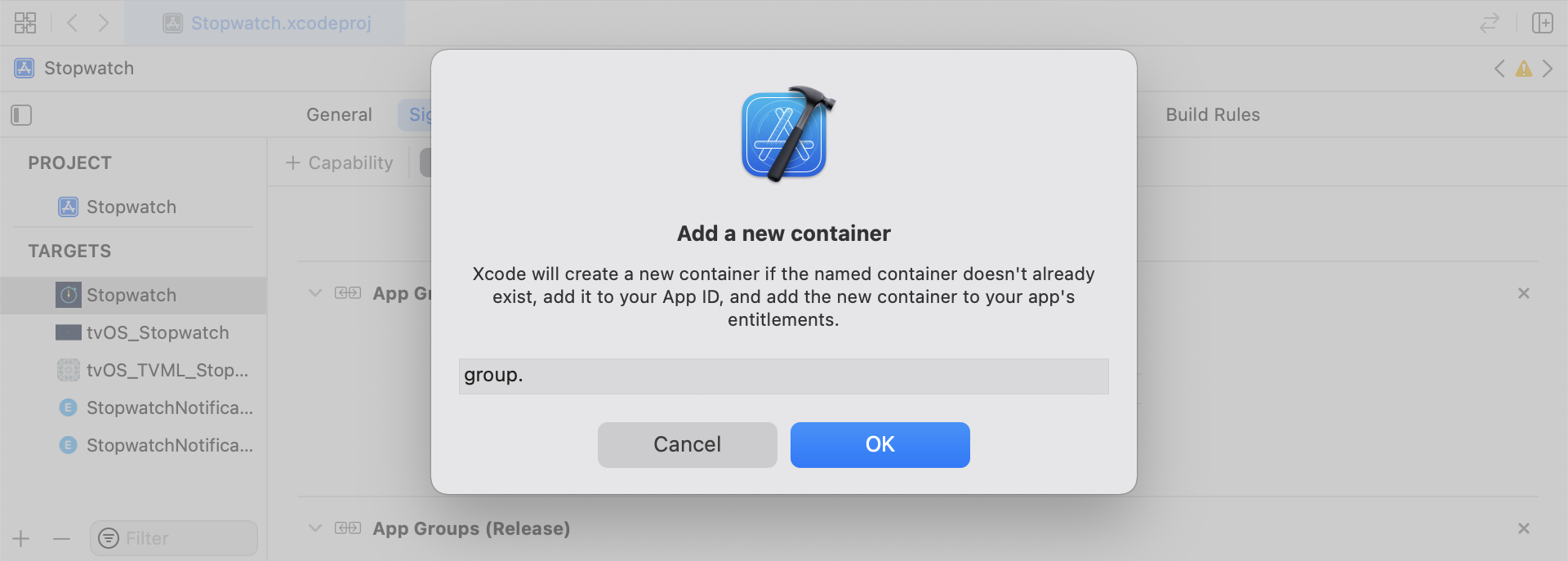
Xcode で、メインアプリターゲットに App Groups ケーパビリティを追加します。App Groups をオンにし、+ をクリックして新しいグループを追加します。アプリのバンドル ID を使用してグループ識別子を作成します(例: group.com.company.appname.xyz)。メインアプリターゲットと Content Extension ターゲットの両方で App Groups をオンにします。
ステップ2: ログ対象を選択する
スニペットを実装する前に、ログに記録する分析カテゴリを選択します。
- カスタムイベント: ユーザーが行うアクション(例: フローの完了や特定の UI 要素のタップ)。カスタムイベントは、アクションベースのトリガー、セグメンテーション、イベント分析に使用します。詳細については、カスタムイベントおよびカスタムイベントの記録を参照してください。
- カスタム属性: 定義したプロファイルフィールド(例:
plan_tierやpreferred_language)で、時間の経過とともに更新されます。詳細については、カスタム属性およびユーザー属性の設定を参照してください。 - ユーザー属性: 標準プロファイルフィールド(例: メール、名、電話番号)。サンプルコードでは、型付き
UserAttributeモデルで表現され、Braze のユーザーフィールドにマッピングされます。
このセクションのヘルパーファイル(RemoteStorage、UserAttribute、EventName Dictionary)は、このサンプル実装で使用されるローカルユーティリティファイルです。SDK 組み込みのクラスではありません。ペイロード由来のデータを UserDefaults に保存し、保留中のユーザー更新用の型付きモデルを定義し、イベントペイロードの構築を標準化します。ローカルデータストレージの動作の詳細については、ストレージを参照してください。
カスタムイベントの保存
ディクショナリを構築し、メタデータを入力し、ヘルパーファイルを使用して保存することで、分析ペイロードを作成します。
- イベントメタデータを含むディクショナリを初期化します。
- イベントデータの取得と保存のために
userDefaultsを初期化します。 - 既存の配列が見つかった場合は、追加して保存します。
- 配列が存在しない場合は、新しい配列を保存します。
カスタムイベントを Braze に送信する
SDKの初期化直後に、保存された分析データをログに記録します。
- 保留中のイベントをループ処理します。
- 各イベントのキーと値のペアをループ処理します。
event_nameキーをチェックします。- 残りのキーと値のペアを
propertiesディクショナリに追加します。 - 各カスタムイベントをログに記録します。
- 保留中のイベントをストレージから削除します。
func logPendingCustomEventsIfNecessary() {
let remoteStorage = RemoteStorage(storageType: .suite)
guard let pendingEvents = remoteStorage.retrieve(forKey: .pendingCustomEvents) as? [[String: Any]] else { return }
// 1
for event in pendingEvents {
var eventName: String?
var properties: [AnyHashable: Any] = [:]
// 2
for (key, value) in event {
if key == "event_name" {
// 3
if let eventNameValue = value as? String {
eventName = eventNameValue
} else {
print("Invalid type for event_name key")
}
} else {
// 4
properties[key] = value
}
}
// 5
if let eventName = eventName {
AppDelegate.braze?.logCustomEvent(name: eventName, properties: properties)
}
}
// 6
remoteStorage.removeObject(forKey: .pendingCustomEvents)
}
- (void)logPendingEventsIfNecessary {
RemoteStorage *remoteStorage = [[RemoteStorage alloc] initWithStorageType:StorageTypeSuite];
NSArray *pendingEvents = [remoteStorage retrieveForKey:RemoteStorageKeyPendingCustomEvents];
// 1
for (NSDictionary<NSString *, id> *event in pendingEvents) {
NSString *eventName = nil;
NSMutableDictionary *properties = [NSMutableDictionary dictionary];
// 2
for (NSString* key in event) {
if ([key isEqualToString:@"event_name"]) {
// 3
if ([[event objectForKey:key] isKindOfClass:[NSString class]]) {
eventName = [event objectForKey:key];
} else {
NSLog(@"Invalid type for event_name key");
}
} else {
// 4
properties[key] = event[key];
}
}
// 5
if (eventName != nil) {
[AppDelegate.braze logCustomEvent:eventName properties:properties];
}
}
// 6
[remoteStorage removeObjectForKey:RemoteStorageKeyPendingCustomEvents];
}
カスタム属性の保存
分析ディクショナリを新しいデザインとして作成し、永続化します。
- 属性メタデータを含むディクショナリを初期化します。
- 属性データの取得と保存のために
userDefaultsを初期化します。 - 既存の配列が見つかった場合は、追加して保存します。
- 配列が存在しない場合は、新しい配列を保存します。
func saveCustomAttribute() {
// 1
let customAttributeDictionary: [String: Any] = ["YOUR-CUSTOM-ATTRIBUTE-KEY": "YOUR-CUSTOM-ATTRIBUTE-VALUE"]
// 2
let remoteStorage = RemoteStorage(storageType: .suite)
// 3
if var pendingAttributes = remoteStorage.retrieve(forKey: .pendingCustomAttributes) as? [[String: Any]] {
pendingAttributes.append(contentsOf: [customAttributeDictionary])
remoteStorage.store(pendingAttributes, forKey: .pendingCustomAttributes)
} else {
// 4
remoteStorage.store([customAttributeDictionary], forKey: .pendingCustomAttributes)
}
}
- (void)saveCustomAttribute {
// 1
NSDictionary<NSString *, id> *customAttributeDictionary = @{ @"YOUR-CUSTOM-ATTRIBUTE-KEY": @"YOUR-CUSTOM-ATTRIBUTE-VALUE" };
// 2
RemoteStorage *remoteStorage = [[RemoteStorage alloc] initWithStorageType:StorageTypeSuite];
NSMutableArray *pendingAttributes = [[remoteStorage retrieveForKey:RemoteStorageKeyPendingCustomAttributes] mutableCopy];
// 3
if (pendingAttributes) {
[pendingAttributes addObject:customAttributeDictionary];
[remoteStorage store:pendingAttributes forKey:RemoteStorageKeyPendingCustomAttributes];
} else {
// 4
[remoteStorage store:@[ customAttributeDictionary ] forKey:RemoteStorageKeyPendingCustomAttributes];
}
}
カスタム属性を Braze に送信する
SDKの初期化直後に、保存された分析データをログに記録します。
- 保留中の属性をループ処理します。
- 各キーと値のペアをループ処理します。
- 各カスタム属性のキーと値をログに記録します。
- 保留中の属性をストレージから削除します。
func logPendingCustomAttributesIfNecessary() {
let remoteStorage = RemoteStorage(storageType: .suite)
guard let pendingAttributes = remoteStorage.retrieve(forKey: .pendingCustomAttributes) as? [[String: Any]] else { return }
// 1
pendingAttributes.forEach { setCustomAttributesWith(keysAndValues: $0) }
// 4
remoteStorage.removeObject(forKey: .pendingCustomAttributes)
}
func setCustomAttributesWith(keysAndValues: [String: Any]) {
// 2
for (key, value) in keysAndValues {
// 3
if let value = value as? [String] {
setCustomAttributeArrayWithKey(key, andValue: value)
} else {
setCustomAttributeWithKey(key, andValue: value)
}
}
}
- (void)logPendingCustomAttributesIfNecessary {
RemoteStorage *remoteStorage = [[RemoteStorage alloc] initWithStorageType:StorageTypeSuite];
NSArray *pendingAttributes = [remoteStorage retrieveForKey:RemoteStorageKeyPendingCustomAttributes];
// 1
for (NSDictionary<NSString*, id> *attribute in pendingAttributes) {
[self setCustomAttributeWith:attribute];
}
// 4
[remoteStorage removeObjectForKey:RemoteStorageKeyPendingCustomAttributes];
}
- (void)setCustomAttributeWith:(NSDictionary<NSString *, id> *)keysAndValues {
// 2
for (NSString *key in keysAndValues) {
// 3
[self setCustomAttributeWith:key andValue:[keysAndValues objectForKey:key]];
}
}
ユーザー属性の保存
ユーザー属性を保存する場合は、更新するユーザーフィールド(email、first_name、phone_number など)をキャプチャするカスタムオブジェクトを作成します。このオブジェクトは UserDefaults を介した保存と取得に対応している必要があります。一例として、ヘルパーファイル タブの UserAttribute ヘルパーファイルを参照してください。
- 対応する型でエンコードされた
UserAttributeオブジェクトを初期化します。 - データの取得と保存のために
userDefaultsを初期化します。 - 既存の配列が見つかった場合は、追加して保存します。
- 配列が存在しない場合は、新しい配列を保存します。
func saveUserAttribute() {
// 1
guard let data = try? PropertyListEncoder().encode(UserAttribute.email("USER-ATTRIBUTE-VALUE")) else { return }
// 2
let remoteStorage = RemoteStorage(storageType: .suite)
// 3
if var pendingAttributes = remoteStorage.retrieve(forKey: .pendingUserAttributes) as? [Data] {
pendingAttributes.append(contentsOf: [data])
remoteStorage.store(pendingAttributes, forKey: .pendingUserAttributes)
} else {
// 4
remoteStorage.store([data], forKey: .pendingUserAttributes)
}
}
- (void)saveUserAttribute {
// 1
UserAttribute *userAttribute = [[UserAttribute alloc] initWithUserField:@"USER-ATTRIBUTE-VALUE" attributeType:UserAttributeTypeEmail];
NSError *error;
NSData *data = [NSKeyedArchiver archivedDataWithRootObject:userAttribute requiringSecureCoding:YES error:&error];
if (error != nil) {
// log error
}
// 2
RemoteStorage *remoteStorage = [[RemoteStorage alloc] initWithStorageType:StorageTypeSuite];
NSMutableArray *pendingAttributes = [[remoteStorage retrieveForKey:RemoteStorageKeyPendingUserAttributes] mutableCopy];
// 3
if (pendingAttributes) {
[pendingAttributes addObject:data];
[remoteStorage store:pendingAttributes forKey:RemoteStorageKeyPendingUserAttributes];
} else {
// 4
[remoteStorage store:@[data] forKey:RemoteStorageKeyPendingUserAttributes];
}
}
ユーザー属性を Braze に送信する
SDKの初期化直後に、保存された分析データをログに記録します。
pendingAttributesデータをループ処理します。- 各
UserAttributeをデコードします。 - 属性タイプに基づいてユーザーフィールドを設定します。
- 保留中のユーザー属性をストレージから削除します。
func logPendingUserAttributesIfNecessary() {
let remoteStorage = RemoteStorage(storageType: .suite)
guard let pendingAttributes = remoteStorage.retrieve(forKey: .pendingUserAttributes) as? [Data] else { return }
// 1
for attributeData in pendingAttributes {
// 2
guard let userAttribute = try? PropertyListDecoder().decode(UserAttribute.self, from: attributeData) else { continue }
// 3
switch userAttribute {
case .email(let email):
AppDelegate.braze?.user.set(email: email)
}
}
// 4
remoteStorage.removeObject(forKey: .pendingUserAttributes)
}
- (void)logPendingUserAttributesIfNecessary {
RemoteStorage *remoteStorage = [[RemoteStorage alloc] initWithStorageType:StorageTypeSuite];
NSArray *pendingAttributes = [remoteStorage retrieveForKey:RemoteStorageKeyPendingUserAttributes];
// 1
for (NSData *attributeData in pendingAttributes) {
NSError *error;
// 2
UserAttribute *userAttribute = [NSKeyedUnarchiver unarchivedObjectOfClass:[UserAttribute class] fromData:attributeData error:&error];
if (error != nil) {
// log error
}
// 3
if (userAttribute) {
switch (userAttribute.attributeType) {
case UserAttributeTypeEmail:
[self user].email = userAttribute.userField;
break;
}
}
}
// 4
[remoteStorage removeObjectForKey:RemoteStorageKeyPendingUserAttributes];
}
RemoteStorage ヘルパーファイル
enum RemoteStorageKey: String, CaseIterable {
// MARK: - Notification Content Extension Analytics
case pendingCustomEvents = "pending_custom_events"
case pendingCustomAttributes = "pending_custom_attributes"
case pendingUserAttributes = "pending_user_attributes"
}
enum RemoteStorageType {
case standard
case suite
}
class RemoteStorage: NSObject {
private var storageType: RemoteStorageType = .standard
private lazy var defaults: UserDefaults = {
switch storageType {
case .standard:
return .standard
case .suite:
// Use the App Group identifier you created in Step 1.
return UserDefaults(suiteName: "group.com.company.appname.xyz")!
}
}()
init(storageType: RemoteStorageType = .standard) {
self.storageType = storageType
}
func store(_ value: Any, forKey key: RemoteStorageKey) {
defaults.set(value, forKey: key.rawValue)
}
func retrieve(forKey key: RemoteStorageKey) -> Any? {
return defaults.object(forKey: key.rawValue)
}
func removeObject(forKey key: RemoteStorageKey) {
defaults.removeObject(forKey: key.rawValue)
}
func resetStorageKeys() {
for key in RemoteStorageKey.allCases {
defaults.removeObject(forKey: key.rawValue)
}
}
}
@interface RemoteStorage ()
@property (nonatomic) StorageType storageType;
@property (nonatomic, strong) NSUserDefaults *defaults;
@end
@implementation RemoteStorage
- (id)initWithStorageType:(StorageType)storageType {
if (self = [super init]) {
self.storageType = storageType;
}
return self;
}
- (void)store:(id)value forKey:(RemoteStorageKey)key {
[[self defaults] setValue:value forKey:[self rawValueForKey:key]];
}
- (id)retrieveForKey:(RemoteStorageKey)key {
return [[self defaults] objectForKey:[self rawValueForKey:key]];
}
- (void)removeObjectForKey:(RemoteStorageKey)key {
[[self defaults] removeObjectForKey:[self rawValueForKey:key]];
}
- (void)resetStorageKeys {
[[self defaults] removeObjectForKey:[self rawValueForKey:RemoteStorageKeyPendingCustomEvents]];
[[self defaults] removeObjectForKey:[self rawValueForKey:RemoteStorageKeyPendingCustomAttributes]];
[[self defaults] removeObjectForKey:[self rawValueForKey:RemoteStorageKeyPendingUserAttributes]];
}
- (NSUserDefaults *)defaults {
if (!_defaults) {
switch (self.storageType) {
case StorageTypeStandard:
_defaults = [NSUserDefaults standardUserDefaults];
break;
case StorageTypeSuite:
_defaults = [[NSUserDefaults alloc] initWithSuiteName:@"group.com.company.appname.xyz"];
break;
}
}
return _defaults;
}
- (NSString*)rawValueForKey:(RemoteStorageKey)remoteStorageKey {
switch(remoteStorageKey) {
case RemoteStorageKeyPendingCustomEvents:
return @"pending_custom_events";
case RemoteStorageKeyPendingCustomAttributes:
return @"pending_custom_attributes";
case RemoteStorageKeyPendingUserAttributes:
return @"pending_user_attributes";
default:
[NSException raise:NSGenericException format:@"Unexpected FormatType."];
}
}
UserAttribute ヘルパーファイル
enum UserAttribute: Hashable {
case email(String?)
}
// MARK: - Codable
extension UserAttribute: Codable {
private enum CodingKeys: String, CodingKey {
case email
}
func encode(to encoder: Encoder) throws {
var values = encoder.container(keyedBy: CodingKeys.self)
switch self {
case .email(let email):
try values.encodeIfPresent(email, forKey: .email)
}
}
init(from decoder: Decoder) throws {
let values = try decoder.container(keyedBy: CodingKeys.self)
let email = try values.decodeIfPresent(String.self, forKey: .email)
self = .email(email)
}
}
@implementation UserAttribute
- (id)initWithUserField:(NSString *)userField attributeType:(UserAttributeType)attributeType {
if (self = [super init]) {
self.userField = userField;
self.attributeType = attributeType;
}
return self;
}
- (void)encodeWithCoder:(NSCoder *)encoder {
[encoder encodeObject:self.userField forKey:@"userField"];
[encoder encodeInteger:self.attributeType forKey:@"attributeType"];
}
- (id)initWithCoder:(NSCoder *)decoder {
if (self = [super init]) {
self.userField = [decoder decodeObjectForKey:@"userField"];
NSInteger attributeRawValue = [decoder decodeIntegerForKey:@"attributeType"];
self.attributeType = (UserAttributeType) attributeRawValue;
}
return self;
}
@end
EventName ディクショナリヘルパーファイル
extension Dictionary where Key == String, Value == Any {
init(eventName: String, properties: [String: Any]? = nil) {
self.init()
self[PushNotificationKey.eventName.rawValue] = eventName
if let properties = properties {
for (key, value) in properties {
self[key] = value
}
}
}
}
@implementation NSMutableDictionary (Helper)
+ (instancetype)dictionaryWithEventName:(NSString *)eventName
properties:(NSDictionary *)properties {
NSMutableDictionary *dict = [NSMutableDictionary dictionary];
dict[@"event_name"] = eventName;
if (properties) {
for (id key in properties) {
dict[key] = properties[key];
}
}
return dict;
}
@end
結果の分析
分析カテゴリーに応じたレポート画面を使用してください。
| 分析カテゴリー | Brazeでの確認方法 |
|---|---|
| ネイティブプッシュ分析 | キャンペーンレベルのプッシュ開封指標を確認するには、プッシュキャンペーンの「キャンペーン分析」ページに移動します。指標の定義については、間接開封を参照してください。カスタム分析ビューを作成するには、Analytics > Report Builder (New) に移動します。操作手順については、レポートビルダーを参照してください。ウェアハウスレベルのイベントスキーマについては、メッセージエンゲージメントイベントを参照してください。 |
| カスタムイベントと属性 | カスタムイベントのトレンドを確認するには、Analytics > Custom Events Report に移動します。詳細については、カスタムイベントを参照してください。ユーザーレベルの値を確認するには、ユーザーを検索 ページに移動してプロファイルを開きます。手順については、ユーザープロファイルを参照してください。これらの値でオーディエンスをフィルターするには、Audience > セグメント に移動します。操作手順については、セグメントの作成およびセグメンテーションフィルターのフィルターオプションを参照してください。 |
カスタムレポートの作成については、レポートビルダーを参照してください。