フィーチャーフラグを作成する
フィーチャーフラグを使用すると、選択したユーザーに対してリモートで機能を有効または無効にすることができます。Brazeダッシュボードで新しいフィーチャーフラグを作成します。名前と
ID、ターゲットオーディエンス、およびこの機能を有効にするユーザーの割合を指定します。その後、アプリまたはWebサイトのコードで同じIDを使用して、ビジネスロジックの特定の部分を条件付きで実行できます。フィーチャーフラグおよびBrazeでの使用方法の詳細については、フィーチャーフラグについてを参照してください。
前提条件
SDKバージョン
フィーチャーフラグを使用するには、SDKが少なくとも以下の最小バージョンに更新されていることを確認してください。
Brazeの権限
ダッシュボードでフィーチャーフラグを管理するには、管理者であるか、以下の権限を持っている必要があります。
| 権限 | できること |
|---|---|
| Manage Feature Flags | フィーチャーフラグの表示、作成、編集。 |
| Access キャンペーン, キャンバス, Cards, Feature Flags, セグメント, Media Library | 利用可能なフィーチャーフラグのリストを表示。 |
フィーチャーフラグの作成
ステップ1:新しいフィーチャーフラグを作成する
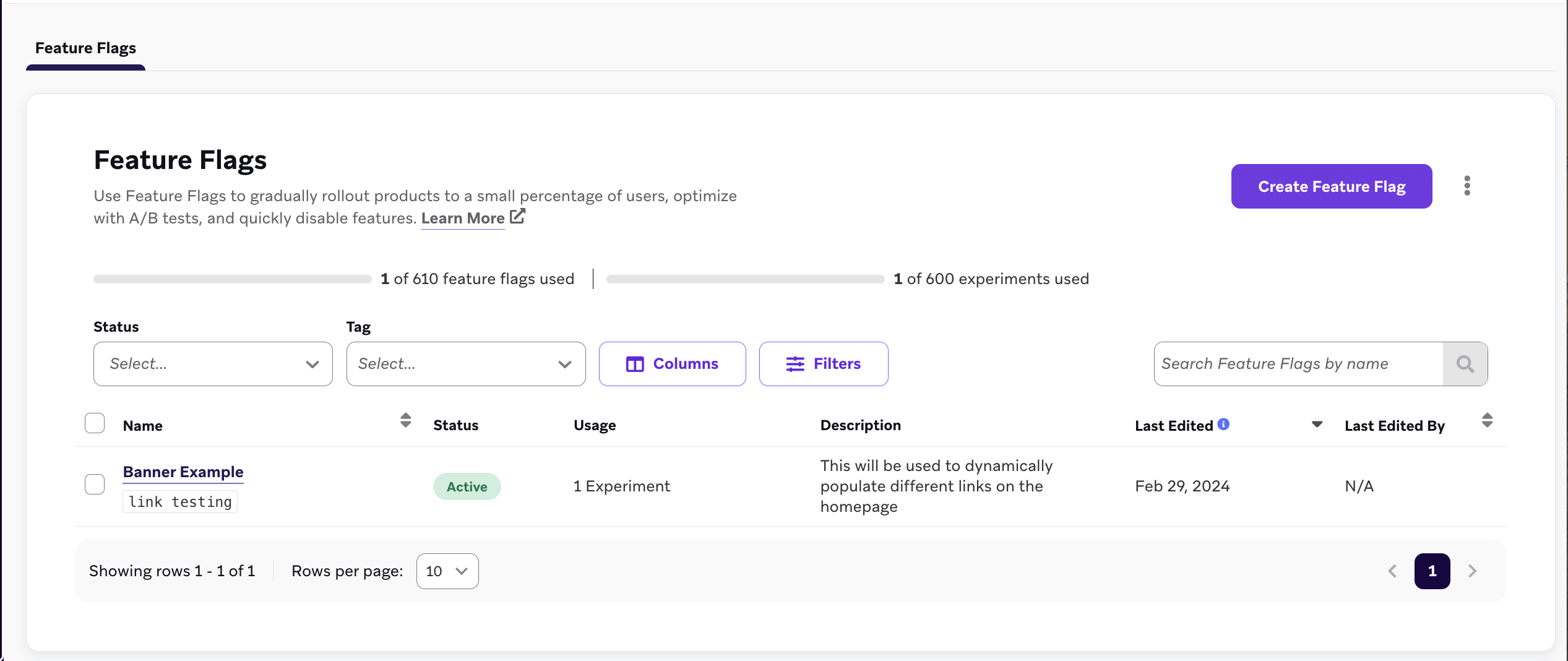
メッセージング > フィーチャーフラグに移動し、フィーチャーフラグを作成を選択します。
ステップ2:詳細を入力する
フィーチャーフラグの詳細で、フィーチャーフラグの名前、ID、および説明を入力します。
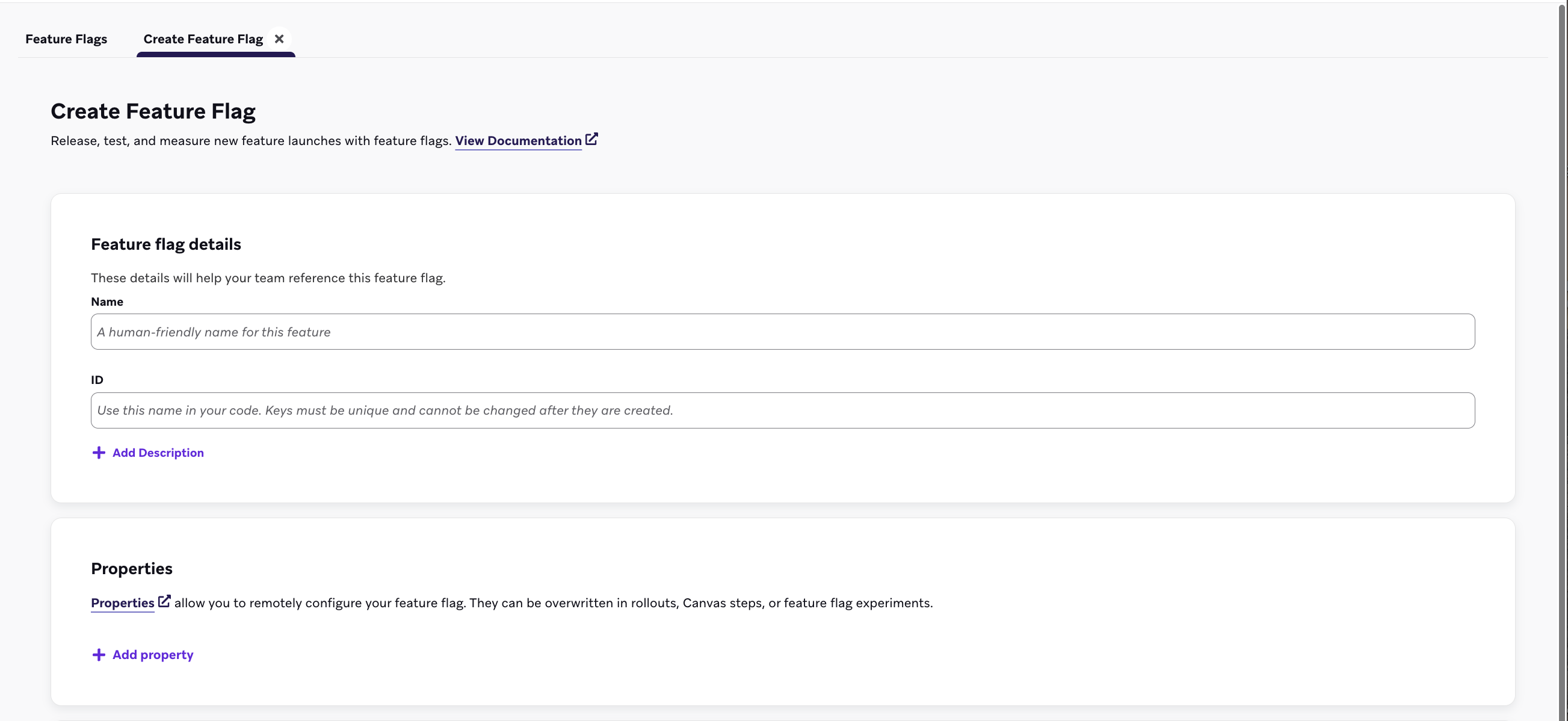
| フィールド | 説明 |
|---|---|
| 名前 | マーケターや管理者が読みやすいタイトルです。 |
| ID | この機能がユーザーに対して有効かどうかをコード内で確認するために使用する一意のIDです。このIDは後から変更できないため、続行する前にIDの命名のベストプラクティスを確認してください。 |
| 説明 | フィーチャーフラグに関するコンテキストを提供するオプションの説明です。 |
| プロパティ | フィーチャーフラグをリモートで設定するオプションのプロパティです。キャンバスステップやフィーチャーフラグの実験でオーバーライドできます。 |
ステップ2a:カスタムプロパティを作成する
プロパティで、機能が有効になっている場合にBraze SDKを通じてアプリがアクセスできるカスタムプロパティをオプションで作成できます。各変数に文字列、ブール値、画像、タイムスタンプ、JSON、または数値を割り当て、デフォルト値を設定できます。
以下の例では、フィーチャーフラグがリストされたカスタムプロパティを使用して、eコマースストアの在庫切れバナーを表示します。
| プロパティ名 | タイプ | 値 |
|---|---|---|
banner_height |
number |
75 |
banner_color |
string |
blue |
banner_text |
string |
Widgets are out of stock until July 1. |
dismissible |
boolean |
false |
homepage_icon |
image |
http://s3.amazonaws.com/[bucket_name]/ |
account_start |
timestamp |
2011-01-01T12:00:00Z |
footer_settings |
JSON |
{ "colors": [ "red", "blue", "green" ], "placement": 123 } |

追加できるプロパティの数に制限はありません。ただし、フィーチャーフラグのプロパティは合計10,000文字に制限されます。
ステップ4:ターゲットとなるセグメントを選択する
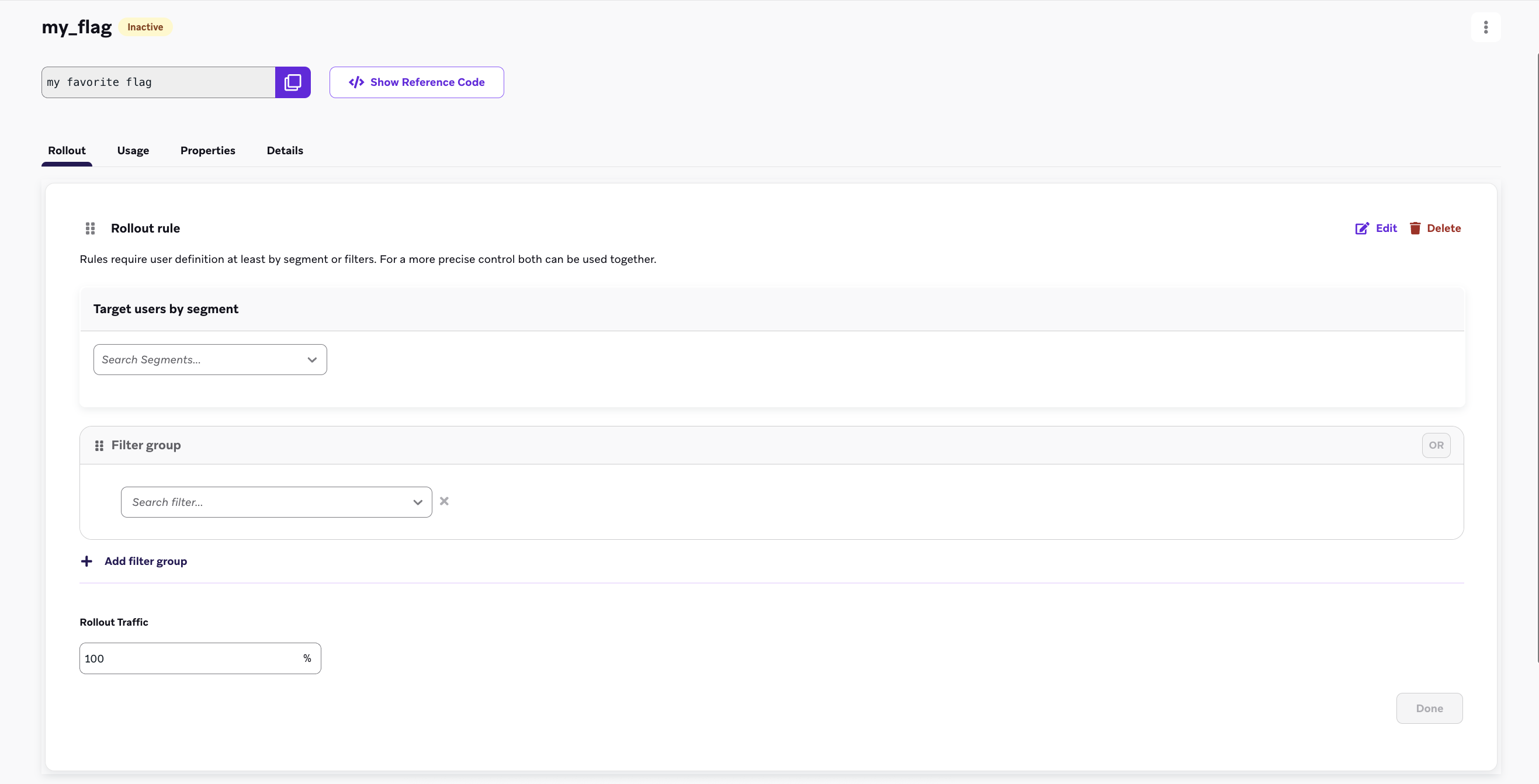
フィーチャーフラグをロールアウトする前に、ターゲットとなるユーザーのセグメントを選択する必要があります。新しく作成したフラグでルールを追加を選択し、フィルターグループとセグメントのドロップダウンメニューを使用して、ターゲットオーディエンスからユーザーをフィルタリングします。複数のフィルターを追加して、オーディエンスをさらに絞り込むことができます。
ステップ5:ロールアウトトラフィックを設定する
デフォルトでは、フィーチャーフラグは常に非アクティブです。これにより、機能のリリース日とユーザーの総アクティベーションを分離できます。ロールアウトを開始するには、ロールアウトトラフィックセクションを使用して、テキストボックスにパーセンテージを入力します。これにより、選択したセグメント内のランダムなユーザーのうち、この新機能を受け取るパーセンテージが選択されます。

新機能を本番環境に公開する準備ができるまで、ロールアウトトラフィックを0%より大きい値に設定しないでください。ダッシュボードでフィーチャーフラグを最初に定義するときは、この設定を0%のままにしてください。
1つのルールのみでフラグをロールアウトする場合、または単一のオーディエンスにロールアウトする場合は、セグメンテーション条件とロールアウトのパーセンテージを選択して最初のルールを追加します。最後に、Everyone Elseルールがオフに切り替えられていることを確認し、フラグを保存します。
マルチルールのフィーチャーフラグロールアウト
マルチルールのフィーチャーフラグロールアウトを使用すると、ユーザーを評価するためのルールのシーケンスを定義でき、精密なセグメンテーションと制御されたフィーチャーリリースが可能になります。この方法は、同じフィーチャーを多様なオーディエンスにデプロイする場合に最適です。
評価順序
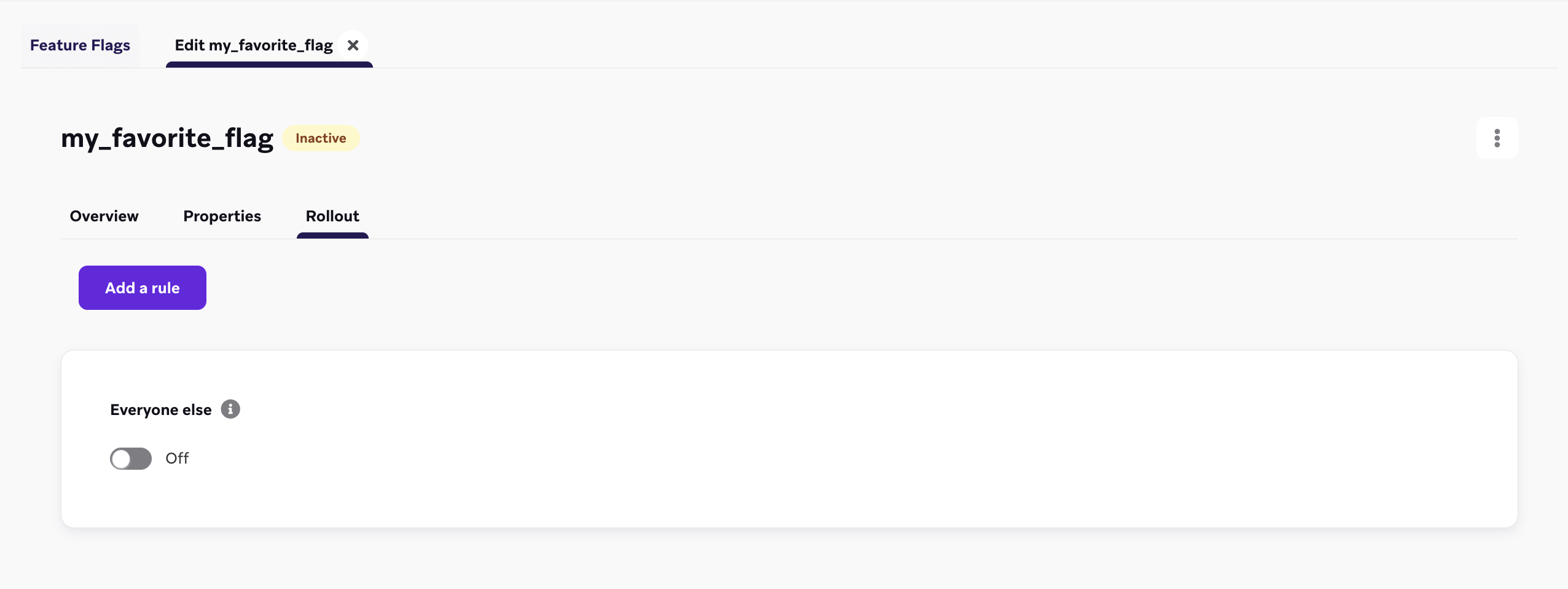
フィーチャーフラグのルールは、リストに表示されている順に上から下に評価されます。ユーザーは、最初に条件を満たしたルールに適用されます。いずれのルールにも該当しない場合、デフォルトの「Everyone Else」ルールによってそのユーザーの適格性が決まります。
ユーザーの適格性
- ユーザーが最初のルールの条件を満たした場合、そのフィーチャーフラグを受け取る資格が直ちに付与されます。
- 最初のルールに該当しなかった場合は、2番目のルールに対して評価され、以降も同様に続きます。
この順次評価は、ユーザーがいずれかのルールに該当するか、リストの最下部にある「Everyone Else」ルールに到達するまで続きます。
「Everyone Else」ルール
「Everyone Else」ルールはデフォルトとして機能します。ユーザーがそれ以前のどのルールにも該当しない場合、そのフィーチャーフラグの適格性は「Everyone Else」ルールのトグル設定によって決まります。たとえば、「Everyone Else」ルールがデフォルト状態で「Off」にトグルされている場合、他のどのルールの条件も満たさないユーザーは、セッション開始時にフィーチャーフラグを受け取りません。
ルールの並べ替え
デフォルトでは、ルールは作成された順に並んでいますが、ダッシュボードでドラッグ&ドロップすることで並べ替えることができます。
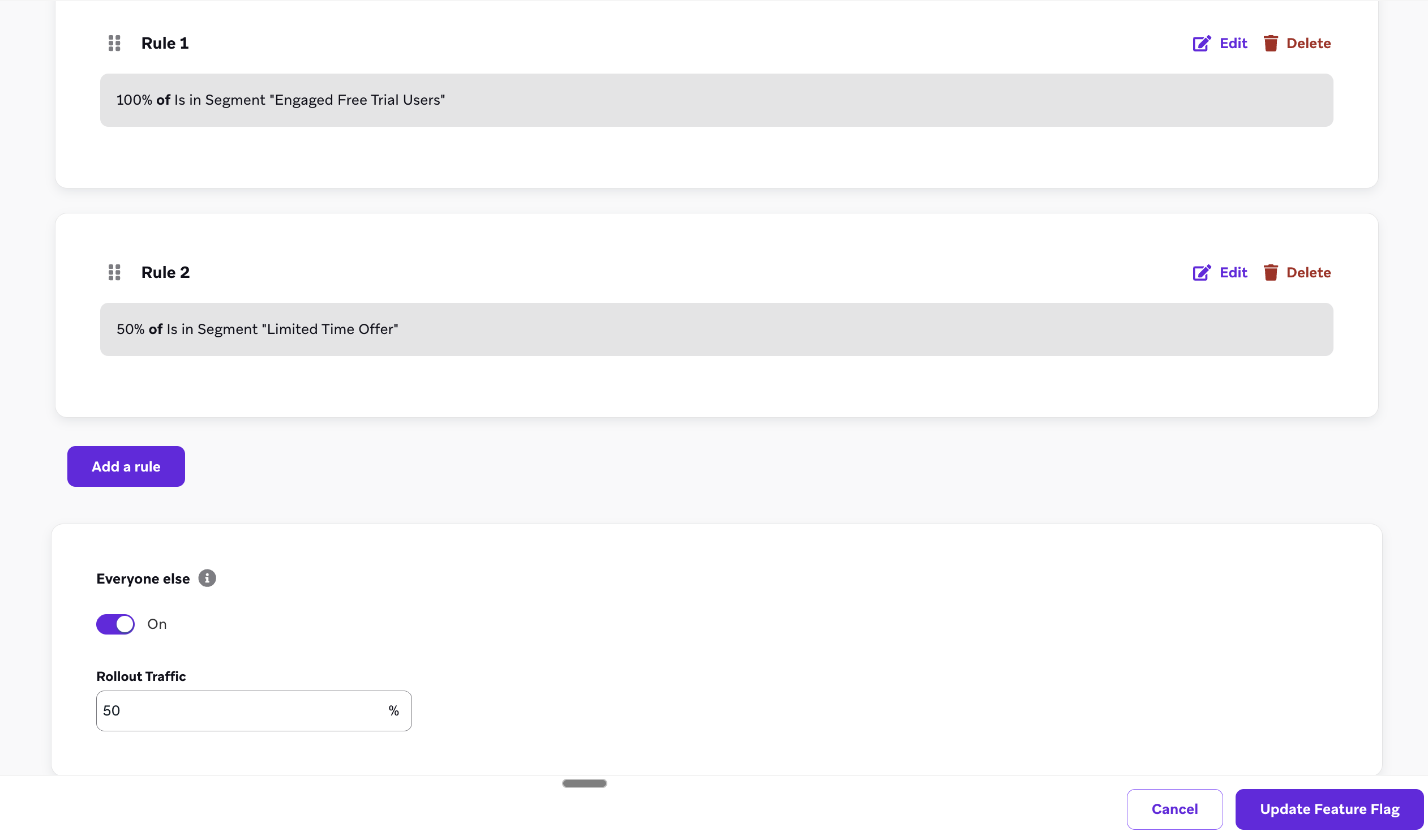
マルチルールのフィーチャーフラグのユースケース
チェックアウトページを段階的にリリースする
eコマースブランドで働いており、新しいチェックアウトページをさまざまな地域に展開して安定性を確保したいとします。マルチルールのフィーチャーフラグを使用して、以下のように設定できます。
- ルール1: 米国セグメントを100%に設定します。
- ルール2: ブラジルのユーザーの50%にセグメントを設定し、全員が一度にフローを受け取らないようにします。
- ルール3(Everyone Else): その他のすべてのユーザーに対して、「Everyone Else」ルールをオンにして15%に設定し、全ユーザーの一部が新しいフローでチェックアウトできるようにします。
内部テスターを最初にリーチする
プロダクトマネージャーとして、新しい製品をリリースする際に内部テスターが常にフィーチャーフラグを受け取れるようにしたいとします。内部テスターのセグメントを最初のルールに追加して100%に設定すれば、すべてのフィーチャーロールアウトにおいて内部テスターが適格となります。
フィーチャーフラグの「enabled」フィールドの使用
フィーチャーフラグを定義したら、アプリやサイトを設定して、特定のユーザーに対してそのフィーチャーフラグが有効かどうかを確認するようにします。有効になったら、ユースケースに応じて何らかのアクションを設定するか、フィーチャーフラグの変数プロパティを参照します。Braze SDKは、フィーチャーフラグのステータスとそのプロパティをアプリに取り込むためのゲッターメソッドを提供します。
フィーチャーフラグはセッション開始時に自動的に更新されるため、起動時に機能の最新バージョンを表示できます。SDKはこれらの値をキャッシュし、オフラインの状態でも使用できるようにします。

たとえば、アプリに新しいタイプのユーザープロファイルをロールアウトするとします。IDをexpanded_user_profileに設定します。次に、この新しいユーザープロファイルを特定のユーザーに表示するかどうかをアプリで確認します。以下に例を示します。
const featureFlag = braze.getFeatureFlag("expanded_user_profile");
if (featureFlag?.enabled) {
console.log(`expanded_user_profile is enabled`);
} else {
console.log(`expanded_user_profile is not enabled`);
}
let featureFlag = braze.featureFlags.featureFlag(id: "expanded_user_profile")
if featureFlag?.enabled == true {
print("expanded_user_profile is enabled")
} else {
print("expanded_user_profile is not enabled")
}
FeatureFlag featureFlag = braze.getFeatureFlag("expanded_user_profile");
if (featureFlag != null && featureFlag.getEnabled()) {
Log.i(TAG, "expanded_user_profile is enabled");
} else {
Log.i(TAG, "expanded_user_profile is not enabled");
}
val featureFlag = braze.getFeatureFlag("expanded_user_profile")
if (featureFlag?.enabled == true) {
Log.i(TAG, "expanded_user_profile is enabled.")
} else {
Log.i(TAG, "expanded_user_profile is not enabled.")
}
const featureFlag = await Braze.getFeatureFlag("expanded_user_profile");
if (featureFlag?.enabled) {
console.log(`expanded_user_profile is enabled`);
} else {
console.log(`expanded_user_profile is not enabled`);
}
var featureFlag = Appboy.AppboyBinding.GetFeatureFlag("expanded_user_profile");
if (featureFlag != null && featureFlag.Enabled) {
Console.WriteLine("expanded_user_profile is enabled");
} else {
Console.WriteLine("expanded_user_profile is not enabled");
}
const featureFlag = await BrazePlugin.getFeatureFlag("expanded_user_profile");
if (featureFlag?.enabled) {
console.log(`expanded_user_profile is enabled`);
} else {
console.log(`expanded_user_profile is not enabled`);
}
BrazeFeatureFlag? featureFlag = await braze.getFeatureFlagByID("expanded_user_profile");
if (featureFlag?.enabled == true) {
print("expanded_user_profile is enabled");
} else {
print("expanded_user_profile is not enabled");
}
featureFlag = m.braze.getFeatureFlag("expanded_user_profile")
if featureFlag <> invalid and featureFlag.enabled
print "expanded_user_profile is enabled"
else
print "expanded_user_profile is not enabled"
end if
フィーチャーフラグのインプレッションをログに記録する
ユーザーが新しい機能を操作する機会があった場合、または機能が無効になっている場合(A/Bテストのコントロールグループの場合)にユーザーが操作した__可能性がある__場合は、フィーチャーフラグのインプレッションを追跡します。フィーチャーフラグのインプレッションは、1セッションにつき1回のみ記録されます。
通常、このコード行は、アプリ内でフィーチャーフラグを参照する場所の直下に置くことができます。
braze.logFeatureFlagImpression("expanded_user_profile");
braze.featureFlags.logFeatureFlagImpression(id: "expanded_user_profile")
braze.logFeatureFlagImpression("expanded_user_profile");
braze.logFeatureFlagImpression("expanded_user_profile")
Braze.logFeatureFlagImpression("expanded_user_profile");
Appboy.AppboyBinding.LogFeatureFlagImpression("expanded_user_profile");
BrazePlugin.logFeatureFlagImpression("expanded_user_profile");
braze.logFeatureFlagImpression("expanded_user_profile");
m.Braze.logFeatureFlagImpression("expanded_user_profile");
プロパティにアクセスする
フィーチャーフラグのプロパティにアクセスするには、ダッシュボードで定義したタイプに応じて、以下のメソッドのいずれかを使用します。
指定したキーに対応する型のプロパティが存在しない場合、これらのメソッドはnullを返します。
// Returns the Feature Flag instance
const featureFlag = braze.getFeatureFlag("expanded_user_profile");
// Returns the String property
const stringProperty = featureFlag.getStringProperty("color");
// Returns the boolean property
const booleanProperty = featureFlag.getBooleanProperty("expanded");
// Returns the number property
const numberProperty = featureFlag.getNumberProperty("height");
// Returns the Unix UTC millisecond timestamp property as a number
const timestampProperty = featureFlag.getTimestampProperty("account_start");
// Returns the image property as a String of the image URL
const imageProperty = featureFlag.getImageProperty("homepage_icon");
// Returns the JSON object property as a FeatureFlagJsonPropertyValue
const jsonProperty = featureFlag.getJsonProperty("footer_settings");
// Returns the Feature Flag instance
let featureFlag: FeatureFlag = braze.featureFlags.featureFlag(id: "expanded_user_profile")
// Returns the string property
let stringProperty: String? = featureFlag.stringProperty(key: "color")
// Returns the boolean property
let booleanProperty: Bool? = featureFlag.boolProperty(key: "expanded")
// Returns the number property as a double
let numberProperty: Double? = featureFlag.numberProperty(key: "height")
// Returns the Unix UTC millisecond timestamp property as an integer
let timestampProperty: Int? = featureFlag.timestampProperty(key: "account_start")
// Returns the image property as a String of the image URL
let imageProperty: String? = featureFlag.imageProperty(key: "homepage_icon")
// Returns the JSON object property as a [String: Any] dictionary
let jsonObjectProperty: [String: Any]? = featureFlag.jsonObjectProperty(key: "footer_settings")
// Returns the Feature Flag instance
FeatureFlag featureFlag = braze.getFeatureFlag("expanded_user_profile");
// Returns the String property
String stringProperty = featureFlag.getStringProperty("color");
// Returns the boolean property
Boolean booleanProperty = featureFlag.getBooleanProperty("expanded");
// Returns the number property
Number numberProperty = featureFlag.getNumberProperty("height");
// Returns the Unix UTC millisecond timestamp property as a long
Long timestampProperty = featureFlag.getTimestampProperty("account_start");
// Returns the image property as a String of the image URL
String imageProperty = featureFlag.getImageProperty("homepage_icon");
// Returns the JSON object property as a JSONObject
JSONObject jsonObjectProperty = featureFlag.getJSONProperty("footer_settings");
// Returns the Feature Flag instance
val featureFlag = braze.getFeatureFlag("expanded_user_profile")
// Returns the String property
val stringProperty: String? = featureFlag.getStringProperty("color")
// Returns the boolean property
val booleanProperty: Boolean? = featureFlag.getBooleanProperty("expanded")
// Returns the number property
val numberProperty: Number? = featureFlag.getNumberProperty("height")
// Returns the Unix UTC millisecond timestamp property as a long
val timestampProperty: Long? = featureFlag.getTimestampProperty("account_start")
// Returns the image property as a String of the image URL
val imageProperty: String? = featureFlag.getImageProperty("homepage_icon")
// Returns the JSON object property as a JSONObject
val jsonObjectProperty: JSONObject? = featureFlag.getJSONProperty("footer_settings")
// Returns the String property
const stringProperty = await Braze.getFeatureFlagStringProperty("expanded_user_profile", "color");
// Returns the boolean property
const booleanProperty = await Braze.getFeatureFlagBooleanProperty("expanded_user_profile", "expanded");
// Returns the number property
const numberProperty = await Braze.getFeatureFlagNumberProperty("expanded_user_profile", "height");
// Returns the Unix UTC millisecond timestamp property as a number
const timestampProperty = await Braze.getFeatureFlagTimestampProperty("expanded_user_profile", "account_start");
// Returns the image property as a String of the image URL
const imageProperty = await Braze.getFeatureFlagImageProperty("expanded_user_profile", "homepage_icon");
// Returns the JSON object property as an object
const jsonObjectProperty = await Braze.getFeatureFlagJSONProperty("expanded_user_profile", "footer_settings");
// Returns the Feature Flag instance
var featureFlag = Appboy.AppboyBinding.GetFeatureFlag("expanded_user_profile");
// Returns the String property
var stringProperty = featureFlag.GetStringProperty("color");
// Returns the boolean property
var booleanProperty = featureFlag.GetBooleanProperty("expanded");
// Returns the number property as an integer
var integerProperty = featureFlag.GetIntegerProperty("height");
// Returns the number property as a double
var doubleProperty = featureFlag.GetDoubleProperty("height");
// Returns the Unix UTC millisecond timestamp property as a long
var timestampProperty = featureFlag.GetTimestampProperty("account_start");
// Returns the image property as a String of the image URL
var imageProperty = featureFlag.GetImageProperty("homepage_icon");
// Returns the JSON object property as a JSONObject
var jsonObjectProperty = featureFlag.GetJSONProperty("footer_settings");
// Returns the String property
const stringProperty = await BrazePlugin.getFeatureFlagStringProperty("expanded_user_profile", "color");
// Returns the boolean property
const booleanProperty = await BrazePlugin.getFeatureFlagBooleanProperty("expanded_user_profile", "expanded");
// Returns the number property
const numberProperty = await BrazePlugin.getFeatureFlagNumberProperty("expanded_user_profile", "height");
// Returns the Unix UTC millisecond timestamp property as a number
const timestampProperty = await BrazePlugin.getFeatureFlagTimestampProperty("expanded_user_profile", "account_start");
// Returns the image property as a String of the image URL
const imageProperty = await BrazePlugin.getFeatureFlagImageProperty("expanded_user_profile", "homepage_icon");
// Returns the JSON object property as an object
const jsonObjectProperty = await BrazePlugin.getFeatureFlagJSONProperty("expanded_user_profile", "footer_settings");
// Returns the Feature Flag instance
BrazeFeatureFlag featureFlag = await braze.getFeatureFlagByID("expanded_user_profile");
// Returns the String property
var stringProperty = featureFlag.getStringProperty("color");
// Returns the boolean property
var booleanProperty = featureFlag.getBooleanProperty("expanded");
// Returns the number property
var numberProperty = featureFlag.getNumberProperty("height");
// Returns the Unix UTC millisecond timestamp property as an integer
var timestampProperty = featureFlag.getTimestampProperty("account_start");
// Returns the image property as a String of the image URL
var imageProperty = featureFlag.getImageProperty("homepage_icon");
// Returns the JSON object property as a Map<String, dynamic> collection
var jsonObjectProperty = featureFlag.getJSONProperty("footer_settings");
' Returns the String property
color = featureFlag.getStringProperty("color")
' Returns the boolean property
expanded = featureFlag.getBooleanProperty("expanded")
' Returns the number property
height = featureFlag.getNumberProperty("height")
' Returns the Unix UTC millisecond timestamp property
account_start = featureFlag.getTimestampProperty("account_start")
' Returns the image property as a String of the image URL
homepage_icon = featureFlag.getImageProperty("homepage_icon")
' Returns the JSON object property
footer_settings = featureFlag.getJSONProperty("footer_settings")
すべてのフィーチャーフラグのリストを取得する
const features = getAllFeatureFlags();
for(const feature of features) {
console.log(`Feature: ${feature.id}`, feature.enabled);
}
let features = braze.featureFlags.featureFlags
for let feature in features {
print("Feature: \(feature.id)", feature.enabled)
}
List<FeatureFlag> features = braze.getAllFeatureFlags();
for (FeatureFlag feature: features) {
Log.i(TAG, "Feature: ", feature.getId(), feature.getEnabled());
}
val featureFlags = braze.getAllFeatureFlags()
featureFlags.forEach { feature ->
Log.i(TAG, "Feature: ${feature.id} ${feature.enabled}")
}
const features = await Braze.getAllFeatureFlags();
for(const feature of features) {
console.log(`Feature: ${feature.id}`, feature.enabled);
}
List<FeatureFlag> features = Appboy.AppboyBinding.GetAllFeatureFlags();
foreach (FeatureFlag feature in features) {
Console.WriteLine("Feature: {0} - enabled: {1}", feature.ID, feature.Enabled);
}
const features = await BrazePlugin.getAllFeatureFlags();
for(const feature of features) {
console.log(`Feature: ${feature.id}`, feature.enabled);
}
List<BrazeFeatureFlag> featureFlags = await braze.getAllFeatureFlags();
featureFlags.forEach((feature) {
print("Feature: ${feature.id} ${feature.enabled}");
});
features = m.braze.getAllFeatureFlags()
for each feature in features
print "Feature: " + feature.id + " enabled: " + feature.enabled.toStr()
end for
フィーチャーフラグを更新する
セッションの途中で現在のユーザーのフィーチャーフラグを更新して、Brazeから最新の値を取得できます。
更新はセッション開始時に自動的に行われます。更新が必要なのは、チェックアウトページの読み込み前や、フィーチャーフラグが参照されることがわかっている場合など、重要なユーザーアクションの前だけです。
braze.refreshFeatureFlags(() => {
console.log(`Feature flags have been refreshed.`);
}, () => {
console.log(`Failed to refresh feature flags.`);
});
braze.featureFlags.requestRefresh { result in
switch result {
case .success(let features):
print("Feature flags have been refreshed:", features)
case .failure(let error):
print("Failed to refresh feature flags:", error)
}
}
braze.refreshFeatureFlags();
braze.refreshFeatureFlags()
Braze.refreshFeatureFlags();
Appboy.AppboyBinding.RefreshFeatureFlags();
BrazePlugin.refreshFeatureFlags();
braze.refreshFeatureFlags();
m.Braze.refreshFeatureFlags()
変更をリッスンする
SDKがフィーチャーフラグを更新するときにアプリをリッスンして更新するようにBraze SDKを構成できます。
これは、ユーザーがある機能を利用できなくなった場合にアプリを更新したい場合に便利です。たとえば、ある機能が有効かどうか、またはそのプロパティ値の1つに基づいて、アプリの状態を設定する場合です。
subscribeToFeatureFlagsEventsを使用してフィーチャーフラグイベントをリッスンします。SDKはイベントオブジェクトを使用してハンドラーを呼び出します。event.typeで各種イベントを処理します。イベント値の詳細については、イベント購読を参照してください。
import * as braze from "@braze/web-sdk";
// - Available in version 7.0.0+
// Register an event listener
const subscriptionId = braze.subscribeToFeatureFlagsEvents((event) => {
switch (event.type) {
case braze.ChannelEventType.CACHE_REPLAY:
// Sent once, right away, with the feature flags that are already cached.
// Evaluate your flags now instead of waiting for the network.
console.log("Cached feature flags:", event.cacheSnapshot.featureFlags);
break;
case braze.ChannelEventType.CACHE_LOAD:
// The cache changed without a refresh, such as after changeUser().
// The snapshot can be empty, so reset any state from the previous user.
console.log("Feature flags reloaded:", event.cacheSnapshot.featureFlags);
break;
case braze.ChannelEventType.DATA_UPDATED:
// A refresh finished, even if no feature flags changed.
console.log("Feature flags were updated:", event.cacheSnapshot.featureFlags);
break;
case braze.ChannelEventType.ERROR:
switch (event.retryState) {
case braze.RetryState.SDK_WILL_RETRY:
// The SDK is retrying. Keep the current values and wait.
break;
case braze.RetryState.INTEGRATOR_MAY_RETRY: {
// The SDK stopped retrying. Try again later, and limit how often you retry.
const delayMs = event.rateLimitedUntil
? Math.max(event.rateLimitedUntil.getTime() - Date.now(), 0)
: 30000;
setTimeout(() => braze.refreshFeatureFlags(), delayMs);
break;
}
case braze.RetryState.DO_NOT_RETRY:
// The failure is final. For example, feature flags are disabled for this workspace.
if (event.reason === braze.ChannelErrorReason.FEATURE_DISABLED) {
// Fall back to the default behavior in your app.
}
break;
}
break;
}
});
// Register an event listener
const deprecatedSubscriptionId = braze.subscribeToFeatureFlagsUpdates((features) => {
console.log(`Features were updated`, features);
});
// Unregister this event listener
braze.removeSubscription(subscriptionId);
braze.removeSubscription(deprecatedSubscriptionId);
各イベントがいつ発生するか、また各更新理由、リトライ状態、分析アクション、エラー理由の意味については、イベント購読を参照してください。
Web SDK 7.0.0以降ではsubscribeToFeatureFlagsEventsを使用してください。subscribeToFeatureFlagsUpdatesは以前のパターンであり、7.0.0で非推奨になりました。以前のパターンは現在のフィーチャーフラグのみを配信するため、フラグが変更された理由や更新が失敗したタイミングを知ることができません。
// Create the feature flags subscription
// - You must keep a strong reference to the subscription to keep it active
// - Available in version 19.0.0+
let subscription = braze.featureFlags.subscribeToEvents { event in
switch event {
case .cacheReplay(let cacheSnapshot), .cacheLoad(let cacheSnapshot):
print("Feature flags were updated:", cacheSnapshot.featureFlags)
case .dataUpdated(let cacheSnapshot, _):
print("Feature flags were updated:", cacheSnapshot.featureFlags)
default:
break
}
}
// Cancel the subscription
subscription.cancel()
// - Available in version 44.0.0+
braze.subscribeToFeatureFlagsEvents(event -> {
if (event instanceof FeatureFlagsEvent.CacheReplay) {
logFeatureFlags(((FeatureFlagsEvent.CacheReplay) event).getCacheSnapshot());
} else if (event instanceof FeatureFlagsEvent.CacheLoad) {
logFeatureFlags(((FeatureFlagsEvent.CacheLoad) event).getCacheSnapshot());
} else if (event instanceof FeatureFlagsEvent.DataUpdated) {
logFeatureFlags(((FeatureFlagsEvent.DataUpdated) event).getCacheSnapshot());
}
});
braze.subscribeToFeatureFlagsUpdates(event -> {
for (FeatureFlag feature : event.getFeatureFlags()) {
Log.i(TAG, "Feature: " + feature.getId() + " " + feature.getEnabled());
}
});
private void logFeatureFlags(FeatureFlagsCacheSnapshot cacheSnapshot) {
for (FeatureFlag feature : cacheSnapshot.getFeatureFlags()) {
Log.i(TAG, "Feature: " + feature.getId() + " " + feature.getEnabled());
}
}
// - Available in version 44.0.0+
braze.subscribeToFeatureFlagsEvents { event ->
when (event) {
is FeatureFlagsEvent.CacheReplay -> logFeatureFlags(event.cacheSnapshot)
is FeatureFlagsEvent.CacheLoad -> logFeatureFlags(event.cacheSnapshot)
is FeatureFlagsEvent.DataUpdated -> logFeatureFlags(event.cacheSnapshot)
else -> {}
}
}
braze.subscribeToFeatureFlagsUpdates { event ->
event.featureFlags.forEach { feature ->
Log.i(TAG, "Feature: ${feature.id} ${feature.enabled}")
}
}
private fun logFeatureFlags(cacheSnapshot: FeatureFlagsCacheSnapshot) {
cacheSnapshot.featureFlags.forEach { feature ->
Log.i(TAG, "Feature: ${feature.id} ${feature.enabled}")
}
}
イベントはバックグラウンドスレッドで到着します。ビューを更新する前にメインスレッドに切り替えてください。
Android SDK 44.0.0以降ではsubscribeToFeatureFlagsEventsを使用してください。subscribeToFeatureFlagsUpdatesは以前のパターンであり、44.0.0で非推奨になりました。
// Register an event listener
Braze.addListener(braze.Events.FEATURE_FLAGS_UPDATED, (featureFlags) => {
console.log(`featureFlagUpdates`, JSON.stringify(featureFlags));
});
変更をリッスンするには、Braze Configuration > Feature FlagsのGame Object NameとCallback Method Nameの値を、アプリケーションの対応する値に設定します。
// Register an event listener
BrazePlugin.subscribeToFeatureFlagUpdates((featureFlags) => {
console.log(`featureFlagUpdates`, JSON.stringify(featureFlags));
});
アプリのDartコードでは、以下のサンプルコードを使用します。
// Create stream subscription
StreamSubscription featureFlagsStreamSubscription;
featureFlagsStreamSubscription = braze.subscribeToFeatureFlags((featureFlags) {
print("Feature flags were updated");
});
// Cancel stream subscription
featureFlagsStreamSubscription.cancel();
フィーチャーフラグのデータは、AndroidとiOSの両方のネイティブレイヤーから自動的に転送されます。追加のセットアップは不要です。
Flutter SDK 17.1.0以前を使用している場合、iOSネイティブレイヤーからのフィーチャーフラグデータの転送には手動セットアップが必要です。アプリケーションには、BrazePlugin.processFeatureFlags(featureFlags)を呼び出すfeatureFlags.subscribeToUpdatesコールバックが含まれている可能性があります。Flutter SDK 18.0.0に移行するには、BrazePlugin.processFeatureFlags(_:)の呼び出しを削除してください。データ転送は自動的に処理されるようになりました。
例については、Braze Flutter SDKサンプルアプリケーションのAppDelegate.swiftを参照してください。
' Define a function called `onFeatureFlagChanges` to be called when feature flags are refreshed
m.BrazeTask.ObserveField("BrazeFeatureFlags", "onFeatureFlagChanges")
import { useEffect, useState } from "react";
import {
ChannelEventType,
FeatureFlag,
getFeatureFlag,
removeSubscription,
subscribeToFeatureFlagsEvents,
subscribeToFeatureFlagsUpdates,
} from "@braze/web-sdk";
export const useFeatureFlag = (id: string): FeatureFlag => {
const [featureFlag, setFeatureFlag] = useState<FeatureFlag>(
getFeatureFlag(id)
);
useEffect(() => {
// - Available in version 7.0.0+
const listener = subscribeToFeatureFlagsEvents((event) => {
switch (event.type) {
case ChannelEventType.CACHE_REPLAY:
case ChannelEventType.CACHE_LOAD:
case ChannelEventType.DATA_UPDATED:
setFeatureFlag(getFeatureFlag(id));
break;
}
});
const deprecatedListener = subscribeToFeatureFlagsUpdates(() => {
setFeatureFlag(getFeatureFlag(id));
});
return () => {
removeSubscription(listener);
removeSubscription(deprecatedListener);
};
}, [id]);
return featureFlag;
};
Web SDK 7.0.0以降ではsubscribeToFeatureFlagsEventsを使用してください。subscribeToFeatureFlagsUpdatesは以前のパターンであり、7.0.0で非推奨になりました。
subscribeToFeatureFlagsEvents(Android)およびsubscribeToEvents(Swift)が配信できる各イベントの説明については、フィーチャーフラグのイベントテーブルを参照してください。Webについては、変更をリッスンするのイベントテーブルを参照してください。
ユーザーの適格性を確認する
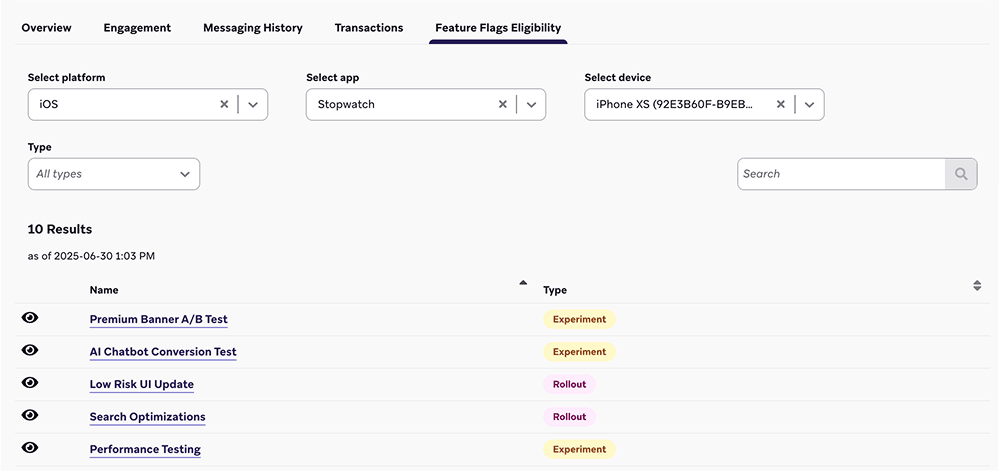
Brazeでユーザーがどのフィーチャーフラグに適格であるかを確認するには、オーディエンス > ユーザー検索に移動し、ユーザーを検索して選択します。
フィーチャーフラグの適格性タブでは、適格なフィーチャーフラグのリストをプラットフォーム、アプリケーション、またはデバイスでフィルタリングできます。また、フィーチャーフラグの横にあるを選択すると、ユーザーに返されるペイロードをプレビューできます。
変更ログの表示
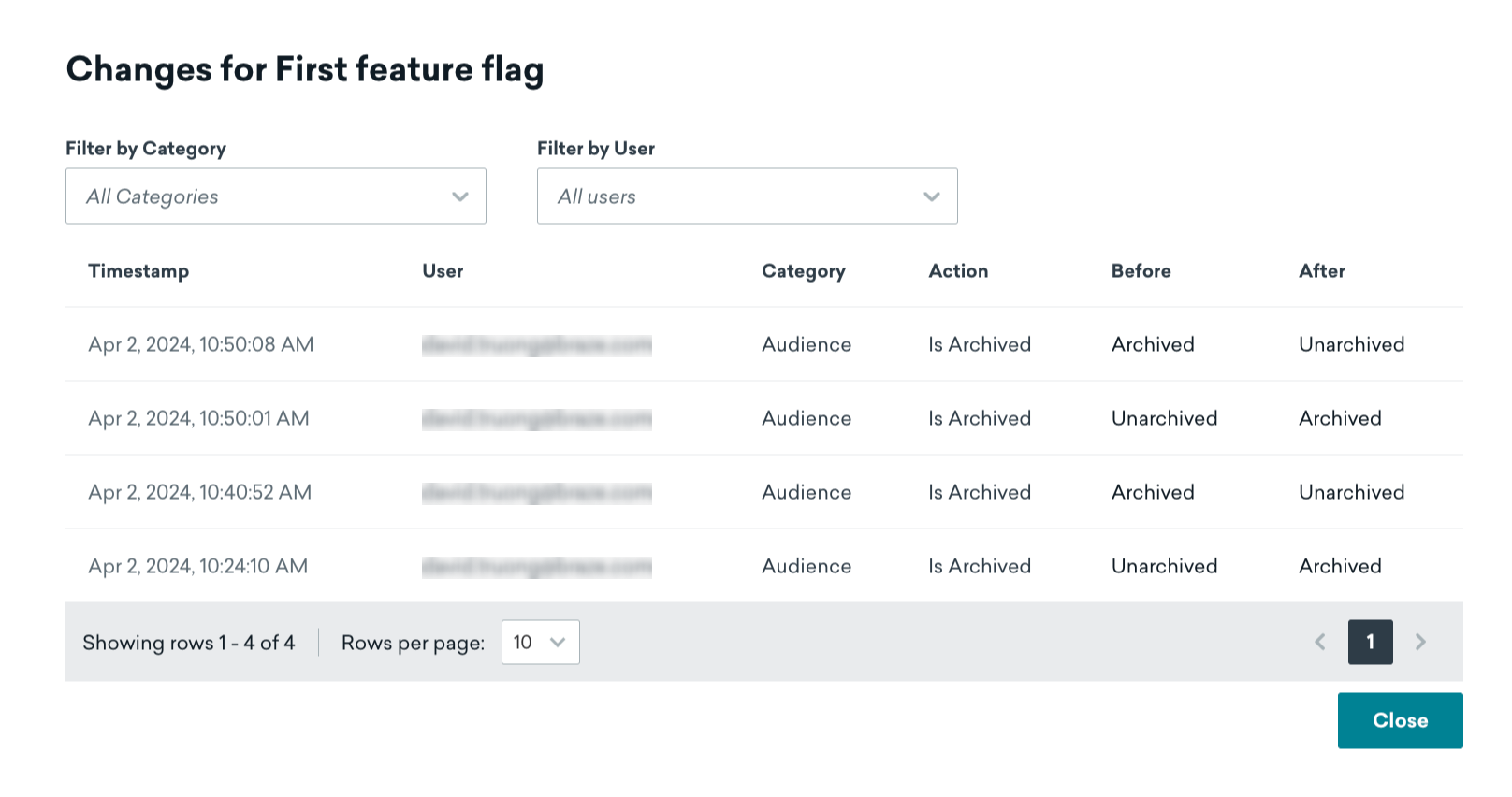
フィーチャーフラグの変更ログを表示するには、フィーチャーフラグを開いて変更ログを選択します。

ここでは、変更がいつ行われたか、誰が変更したか、どのカテゴリに属するかなどを確認できます。
フィーチャーフラグでセグメント化する
Brazeは、現在フィーチャーフラグが有効になっているユーザーを自動的に追跡します。フィーチャーフラグフィルターを使ってセグメントまたはターゲットメッセージングを作成できます。セグメントでのフィルタリングの詳細については、セグメントの作成を参照してください。

再帰的なセグメントを防ぐため、他のフィーチャーフラグを参照するセグメントを作成することはできません。
ベストプラクティス
ロールアウトをキャンバスや実験と組み合わせない
ユーザーが異なるエントリポイントによって有効化・無効化されるのを防ぐために、ロールアウトスライダーをゼロより大きい値に設定するか、キャンバスまたは実験でフィーチャーフラグを有効にするか、いずれか一方のみを行ってください。ベストプラクティスとして、キャンバスや実験でフィーチャーフラグを使用する予定がある場合は、ロールアウトの割合をゼロのままにしてください。
命名規則
コードを明確で一貫性のあるものにするために、フィーチャーフラグIDの命名には以下の形式を使用することを検討してください。
BEHAVIOR_PRODUCT_FEATURE
以下を置き換えてください。
| プレースホルダー | 説明 |
|---|---|
BEHAVIOR |
その機能の動作です。コード内では、動作がデフォルトで無効になるようにし、フィーチャーフラグ名にdisabledのようなフレーズを使用しないでください。 |
PRODUCT |
その機能が属する製品です。 |
FEATURE |
機能の名前です。 |
以下は、showが動作、animation_profileが製品、driverが機能であるフィーチャーフラグの例です。
show_animation_profile_driver
事前に計画する
常に安全策を取りましょう。オフスイッチが必要になる可能性のある新機能を検討する際は、フィーチャーフラグ付きで新しいコードをリリースして結果的に不要だったとしても、新しいアプリの更新が必要だと後から気づくよりもはるかに良いです。
説明を記載する
フィーチャーフラグに説明を追加してください。Brazeではこれはオプションフィールドですが、利用可能なフィーチャーフラグを閲覧する際に他の人が持つ疑問に答えるのに役立ちます。
- このフラグの有効化と動作に責任を持つ担当者の連絡先情報
- このフラグを無効にすべきタイミング
- このフラグが制御する新機能に関するドキュメントやメモへのリンク
- 依存関係や機能の使い方に関する注意事項
古いフィーチャーフラグをクリーンアップする
必要以上に長く100%ロールアウトのまま機能を放置してしまうことは、誰にでもあることです。
コード(およびBrazeダッシュボード)をクリーンに保つために、すべてのユーザーがアップグレードし、機能を無効にするオプションが不要になった時点で、コードベースから恒久的なフィーチャーフラグを削除してください。これにより、開発環境の複雑さを軽減し、フィーチャーフラグのリストを整理された状態に保つことができます。