プッシュ通知データをログに記録する
Braze SDKを通じてプッシュ通知データをログに記録する方法を説明します。
Braze APIを使用したデータのログ記録(推奨)
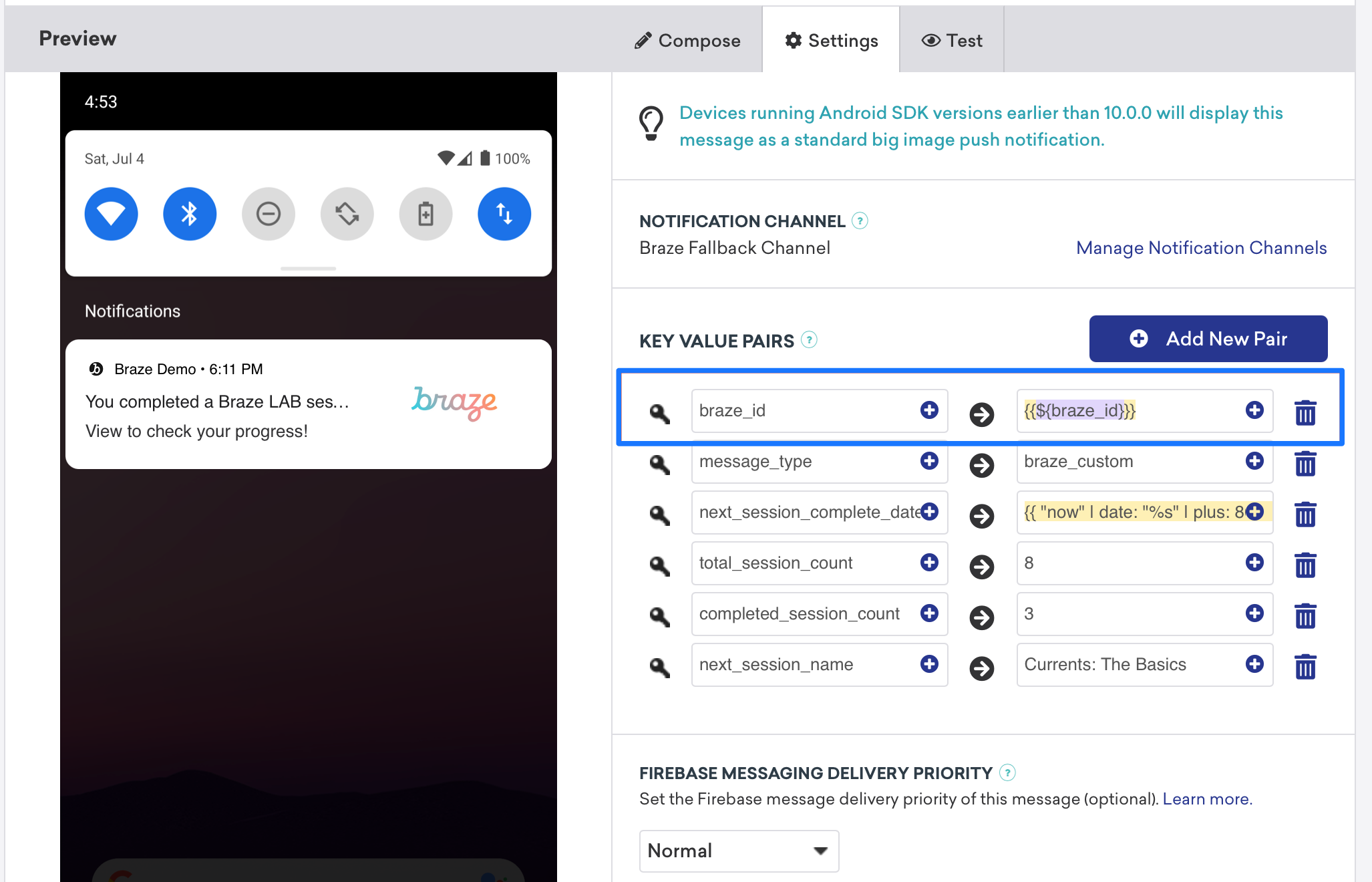
/users/trackエンドポイントを呼び出すことで、リアルタイムで分析データをログに記録できます。分析データをログに記録するには、Brazeダッシュボードからbraze_idの値を送信して、更新するユーザープロファイルを特定します。
手動でデータをログに記録する
ペイロードの詳細に応じて、FirebaseMessagingService.onMessageReceivedの実装内またはスタートアップアクティビティ内で手動で分析データをログに記録できます。FirebaseMessagingServiceのサブクラスは、Androidシステムによってフラグ付けまたは終了されないよう、呼び出しから9秒以内に実行を完了する必要があります。
Braze APIでのデータ記録(推奨)
Braze API /users/track エンドポイントを使用して、分析をリアルタイムで記録できます。分析を記録するには、キーと値のペアフィールドでbraze_id値を送信して(以下のスクリーンショットを参照)、更新するユーザープロファイルを識別します。

データの手動記録
手動で記録するには、まずXcode内でワークスペースを構成し、次に分析データを作成、保存、取得する必要があります。これには、開発者側でのカスタム作業が必要です。以下のコードスニペットがこの対応に役立ちます。
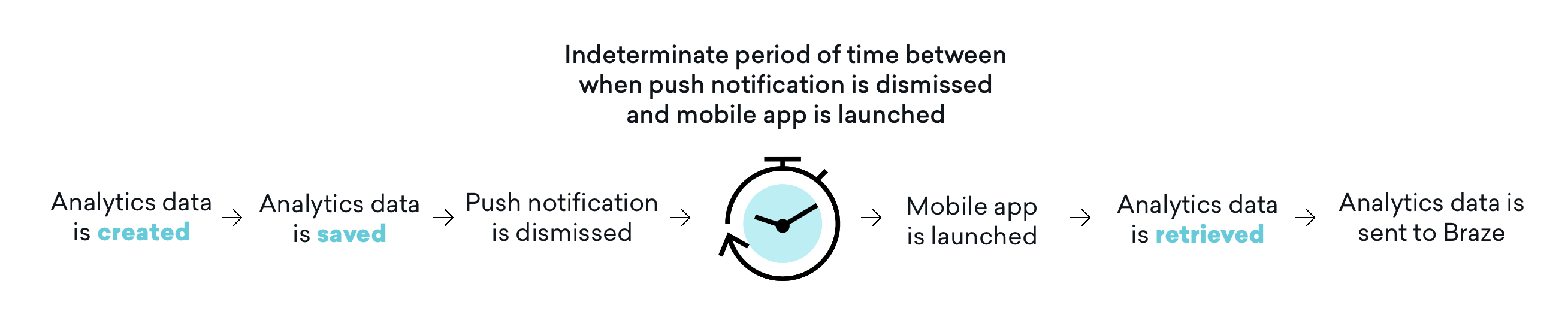
分析データは、モバイルアプリケーションがその後起動されるまでBrazeに送信されないことに注意してください。つまり、閉じる設定によっては、プッシュ通知が閉じられてからモバイルアプリが起動されて分析データが取得されるまでの間に、不確定な期間が存在することがよくあります。この時間バッファーがすべてのユースケースに影響するわけではありませんが、この影響を考慮し、この問題に対処するためにアプリの起動を含むようにユーザージャーニーを必要に応じて調整してください。
ステップ1: Xcode内でアプリグループを構成する
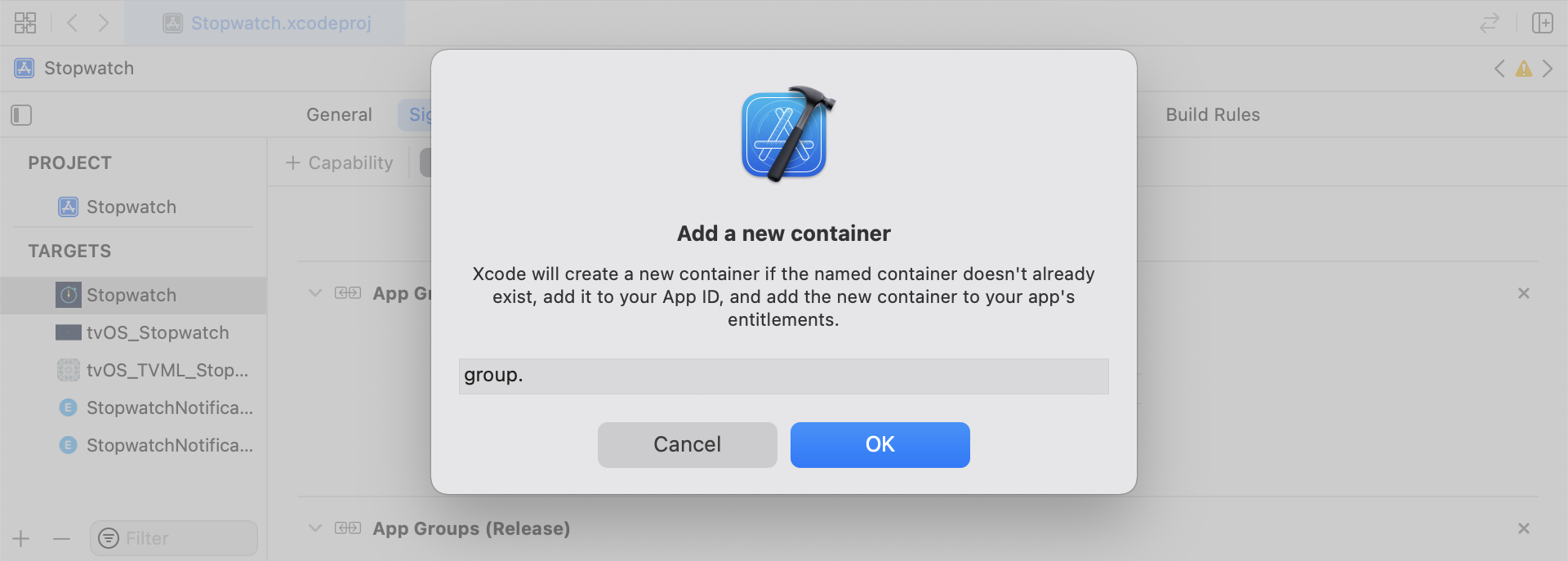
XcodeでApp Groups機能を追加します。アプリにワークスペースがない場合は、メインアプリターゲットの機能に移動し、App Groupsをオンにして、+追加ボタンをクリックします。次に、アプリのバンドルIDを使用してワークスペースを作成します。たとえば、アプリのバンドルIDがcom.company.appnameの場合、ワークスペースをgroup.com.company.appname.xyzと名前付けできます。メインアプリターゲットとコンテンツエクステンションターゲットの両方でApp Groupsがオンになっていることを確認してください。
ステップ2: コードスニペットを統合する
以下のコードスニペットは、カスタムイベント、カスタム属性、ユーザー属性を保存および送信する方法の参考になります。このガイドではUserDefaultsの観点で説明しますが、コードの表現はヘルパーファイルRemoteStorageの形式になります。ユーザー属性の送信と保存に使用される追加のヘルパーファイルUserAttributesとEventName Dictionaryもあります。
カスタムイベントの保存
カスタムイベントを保存するには、分析データをゼロから作成する必要があります。これはディクショナリを作成し、メタデータを入力し、ヘルパーファイルを使用してデータを保存することで行います。
- イベントメタデータでディクショナリを初期化する
userDefaultsを初期化してイベントデータを取得および保存する- 既存の配列がある場合、新しいデータを既存の配列に追加して保存する
- 既存の配列がない場合、新しい配列を
userDefaultsに保存する
func saveCustomEvent(with properties: [String: Any]? = nil) {
// 1
let customEventDictionary = Dictionary(eventName: "YOUR-EVENT-NAME", properties: properties)
// 2
let remoteStorage = RemoteStorage(storageType: .suite)
// 3
if var pendingEvents = remoteStorage.retrieve(forKey: .pendingCustomEvents) as? [[String: Any]] {
pendingEvents.append(contentsOf: [customEventDictionary])
remoteStorage.store(pendingEvents, forKey: .pendingCustomEvents)
} else {
// 4
remoteStorage.store([customEventDictionary], forKey: .pendingCustomEvents)
}
}
- (void)saveCustomEvent:(NSDictionary<NSString *, id> *)properties {
// 1
NSDictionary<NSString *, id> *customEventDictionary = [[NSDictionary alloc] initWithEventName:@"YOUR-EVENT-NAME" properties:properties];
// 2
RemoteStorage *remoteStorage = [[RemoteStorage alloc] initWithStorageType:StorageTypeSuite];
NSMutableArray *pendingEvents = [[remoteStorage retrieveForKey:RemoteStorageKeyPendingCustomEvents] mutableCopy];
// 3
if (pendingEvents) {
[pendingEvents addObject:customEventDictionary];
[remoteStorage store:pendingEvents forKey:RemoteStorageKeyPendingCustomAttributes];
} else {
// 4
[remoteStorage store:@[ customEventDictionary ] forKey:RemoteStorageKeyPendingCustomAttributes];
}
}
カスタムイベントをBrazeに送信する
通知コンテンツアプリエクステンションから保存された分析データを記録する最適なタイミングは、SDKが初期化された直後です。これは、保留中のイベントをループし、「Event Name」キーを確認し、Brazeで適切な値を設定し、次回この関数が必要になったときのためにストレージをクリアすることで行います。
- 保留中のイベントの配列をループする
pendingEventsディクショナリの各キーと値のペアをループする- 「Event Name」のキーを明示的にチェックして値を適切に設定する
- その他のすべてのキーと値のペアは
propertiesディクショナリに追加される - 個別のカスタムイベントを記録する
- 保留中のすべてのイベントをストレージから削除する
func logPendingCustomEventsIfNecessary() {
let remoteStorage = RemoteStorage(storageType: .suite)
guard let pendingEvents = remoteStorage.retrieve(forKey: .pendingCustomEvents) as? [[String: Any]] else { return }
// 1
for event in pendingEvents {
var eventName: String?
var properties: [AnyHashable: Any] = [:]
// 2
for (key, value) in event {
if key == PushNotificationKey.eventName.rawValue {
// 3
if let eventNameValue = value as? String {
eventName = eventNameValue
} else {
print("Invalid type for event_name key")
}
} else {
// 4
properties[key] = value
}
}
// 5
if let eventName = eventName {
AppDelegate.braze?.logCustomEvent(eventName, properties: properties)
}
}
// 6
remoteStorage.removeObject(forKey: .pendingCustomEvents)
}
- (void)logPendingEventsIfNecessary {
RemoteStorage *remoteStorage = [[RemoteStorage alloc] initWithStorageType:StorageTypeSuite];
NSArray *pendingEvents = [remoteStorage retrieveForKey:RemoteStorageKeyPendingCustomEvents];
// 1
for (NSDictionary<NSString *, id> *event in pendingEvents) {
NSString *eventName = nil;
NSMutableDictionary *properties = [NSMutableDictionary dictionary];
// 2
for (NSString* key in event) {
if ([key isEqualToString:@"event_name"]) {
// 3
if ([[event objectForKey:key] isKindOfClass:[NSString class]]) {
eventName = [event objectForKey:key];
} else {
NSLog(@"Invalid type for event_name key");
}
} else {
// 4
properties[key] = event[key];
}
}
// 5
if (eventName != nil) {
[AppDelegate.braze logCustomEvent:eventName properties:properties];
}
}
// 6
[remoteStorage removeObjectForKey:RemoteStorageKeyPendingCustomEvents];
}
カスタム属性の保存
カスタム属性を保存するには、分析データをゼロから作成する必要があります。これはディクショナリを作成し、メタデータを入力し、ヘルパーファイルを使用してデータを保存することで行います。
- 属性メタデータでディクショナリを初期化する
userDefaultsを初期化して属性データを取得および保存する- 既存の配列がある場合、新しいデータを既存の配列に追加して保存する
- 既存の配列がない場合、新しい配列を
userDefaultsに保存する
func saveCustomAttribute() {
// 1
let customAttributeDictionary: [String: Any] = ["YOUR-CUSTOM-ATTRIBUTE-KEY": "YOUR-CUSTOM-ATTRIBUTE-VALUE"]
// 2
let remoteStorage = RemoteStorage(storageType: .suite)
// 3
if var pendingAttributes = remoteStorage.retrieve(forKey: .pendingCustomAttributes) as? [[String: Any]] {
pendingAttributes.append(contentsOf: [customAttributeDictionary])
remoteStorage.store(pendingAttributes, forKey: .pendingCustomAttributes)
} else {
// 4
remoteStorage.store([customAttributeDictionary], forKey: .pendingCustomAttributes)
}
}
- (void)saveCustomAttribute {
// 1
NSDictionary<NSString *, id> *customAttributeDictionary = @{ @"YOUR-CUSTOM-ATTRIBUTE-KEY": @"YOUR-CUSTOM-ATTRIBUTE-VALUE" };
// 2
RemoteStorage *remoteStorage = [[RemoteStorage alloc] initWithStorageType:StorageTypeSuite];
NSMutableArray *pendingAttributes = [[remoteStorage retrieveForKey:RemoteStorageKeyPendingCustomAttributes] mutableCopy];
// 3
if (pendingAttributes) {
[pendingAttributes addObject:customAttributeDictionary];
[remoteStorage store:pendingAttributes forKey:RemoteStorageKeyPendingCustomAttributes];
} else {
// 4
[remoteStorage store:@[ customAttributeDictionary ] forKey:RemoteStorageKeyPendingCustomAttributes];
}
}
カスタム属性をBrazeに送信する
通知コンテンツアプリエクステンションから保存された分析データを記録する最適なタイミングは、SDKが初期化された直後です。これは、保留中の属性をループし、Brazeで適切なカスタム属性を設定し、次回この関数が必要になったときのためにストレージをクリアすることで行います。
- 保留中の属性の配列をループする
pendingAttributesディクショナリの各キーと値のペアをループする- 対応するキーと値で個別のカスタム属性を記録する
- 保留中のすべての属性をストレージから削除する
func logPendingCustomAttributesIfNecessary() {
let remoteStorage = RemoteStorage(storageType: .suite)
guard let pendingAttributes = remoteStorage.retrieve(forKey: .pendingCustomAttributes) as? [[String: Any]] else { return }
// 1
pendingAttributes.forEach { setCustomAttributesWith(keysAndValues: $0) }
// 4
remoteStorage.removeObject(forKey: .pendingCustomAttributes)
}
func setCustomAttributesWith(keysAndValues: [String: Any]) {
// 2
for (key, value) in keysAndValues {
// 3
if let value = value as? [String] {
setCustomAttributeArrayWithKey(key, andValue: value)
} else {
setCustomAttributeWithKey(key, andValue: value)
}
}
}
- (void)logPendingCustomAttributesIfNecessary {
RemoteStorage *remoteStorage = [[RemoteStorage alloc] initWithStorageType:StorageTypeSuite];
NSArray *pendingAttributes = [remoteStorage retrieveForKey:RemoteStorageKeyPendingCustomAttributes];
// 1
for (NSDictionary<NSString*, id> *attribute in pendingAttributes) {
[self setCustomAttributeWith:attribute];
}
// 4
[remoteStorage removeObjectForKey:RemoteStorageKeyPendingCustomAttributes];
}
- (void)setCustomAttributeWith:(NSDictionary<NSString *, id> *)keysAndValues {
// 2
for (NSString *key in keysAndValues) {
// 3
[self setCustomAttributeWith:key andValue:[keysAndValues objectForKey:key]];
}
}
ユーザー属性の保存
ユーザー属性を保存する際は、更新される属性のタイプ(email、first_name、phone_numberなど)を判別するためのカスタムオブジェクトを作成することをお勧めします。このオブジェクトはUserDefaultsとの保存/取得に互換性がある必要があります。これを実現する方法の一例については、UserAttributeヘルパーファイルを参照してください。
- 対応するタイプでエンコードされた
UserAttributeオブジェクトを初期化する userDefaultsを初期化してイベントデータを取得および保存する- 既存の配列がある場合、新しいデータを既存の配列に追加して保存する
- 既存の配列がない場合、新しい配列を
userDefaultsに保存する
func saveUserAttribute() {
// 1
guard let data = try? PropertyListEncoder().encode(UserAttribute.userAttributeType("USER-ATTRIBUTE-VALUE")) else { return }
// 2
let remoteStorage = RemoteStorage(storageType: .suite)
// 3
if var pendingAttributes = remoteStorage.retrieve(forKey: .pendingUserAttributes) as? [Data] {
pendingAttributes.append(contentsOf: [data])
remoteStorage.store(pendingAttributes, forKey: .pendingUserAttributes)
} else {
// 4
remoteStorage.store([data], forKey: .pendingUserAttributes)
}
}
- (void)saveUserAttribute {
// 1
UserAttribute *userAttribute = [[UserAttribute alloc] initWithUserField:@"USER-ATTRIBUTE-VALUE" attributeType:UserAttributeTypeEmail];
NSError *error;
NSData *data = [NSKeyedArchiver archivedDataWithRootObject:userAttribute requiringSecureCoding:YES error:&error];
if (error != nil) {
// log error
}
// 2
RemoteStorage *remoteStorage = [[RemoteStorage alloc] initWithStorageType:StorageTypeSuite];
NSMutableArray *pendingAttributes = [[remoteStorage retrieveForKey:RemoteStorageKeyPendingUserAttributes] mutableCopy];
// 3
if (pendingAttributes) {
[pendingAttributes addObject:data];
[remoteStorage store:pendingAttributes forKey:RemoteStorageKeyPendingUserAttributes];
} else {
// 4
[remoteStorage store:@[data] forKey:RemoteStorageKeyPendingUserAttributes];
}
}
ユーザー属性をBrazeに送信する
通知コンテンツアプリエクステンションから保存された分析データを記録する最適なタイミングは、SDKが初期化された直後です。これは、保留中の属性をループし、Brazeで適切なカスタム属性を設定し、次回この関数が必要になったときのためにストレージをクリアすることで行います。
pendingAttributesデータの配列をループする- 属性データからエンコードされた
UserAttributeオブジェクトを初期化する - ユーザー属性タイプ(メール)に基づいて特定のユーザーフィールドを設定する
- 保留中のすべてのユーザー属性をストレージから削除する
func logPendingUserAttributesIfNecessary() {
let remoteStorage = RemoteStorage(storageType: .suite)
guard let pendingAttributes = remoteStorage.retrieve(forKey: .pendingUserAttributes) as? [Data] else { return }
// 1
for attributeData in pendingAttributes {
// 2
guard let userAttribute = try? PropertyListDecoder().decode(UserAttribute.self, from: attributeData) else { continue }
// 3
switch userAttribute {
case .email(let email):
user?.email = email
}
}
// 4
remoteStorage.removeObject(forKey: .pendingUserAttributes)
}
- (void)logPendingUserAttributesIfNecessary {
RemoteStorage *remoteStorage = [[RemoteStorage alloc] initWithStorageType:StorageTypeSuite];
NSArray *pendingAttributes = [remoteStorage retrieveForKey:RemoteStorageKeyPendingUserAttributes];
// 1
for (NSData *attributeData in pendingAttributes) {
NSError *error;
// 2
UserAttribute *userAttribute = [NSKeyedUnarchiver unarchivedObjectOfClass:[UserAttribute class] fromData:attributeData error:&error];
if (error != nil) {
// log error
}
// 3
if (userAttribute) {
switch (userAttribute.attributeType) {
case UserAttributeTypeEmail:
[self user].email = userAttribute.userField;
break;
}
}
}
// 4
[remoteStorage removeObjectForKey:RemoteStorageKeyPendingUserAttributes];
}
ヘルパーファイル
RemoteStorageヘルパーファイル
enum RemoteStorageKey: String, CaseIterable {
// MARK: - Notification Content Extension Analytics
case pendingCustomEvents = "pending_custom_events"
case pendingCustomAttributes = "pending_custom_attributes"
case pendingUserAttributes = "pending_user_attributes"
}
enum RemoteStorageType {
case standard
case suite
}
class RemoteStorage: NSObject {
private var storageType: RemoteStorageType = .standard
private lazy var defaults: UserDefaults = {
switch storageType {
case .standard:
return .standard
case .suite:
return UserDefaults(suiteName: "YOUR-DOMAIN-IDENTIFIER")!
}
}()
init(storageType: RemoteStorageType = .standard) {
self.storageType = storageType
}
func store(_ value: Any, forKey key: RemoteStorageKey) {
defaults.set(value, forKey: key.rawValue)
}
func retrieve(forKey key: RemoteStorageKey) -> Any? {
return defaults.object(forKey: key.rawValue)
}
func removeObject(forKey key: RemoteStorageKey) {
defaults.removeObject(forKey: key.rawValue)
}
func resetStorageKeys() {
for key in RemoteStorageKey.allCases {
defaults.removeObject(forKey: key.rawValue)
}
}
}
@interface RemoteStorage ()
@property (nonatomic) StorageType storageType;
@property (nonatomic, strong) NSUserDefaults *defaults;
@end
@implementation RemoteStorage
- (id)initWithStorageType:(StorageType)storageType {
if (self = [super init]) {
self.storageType = storageType;
}
return self;
}
- (void)store:(id)value forKey:(RemoteStorageKey)key {
[[self defaults] setValue:value forKey:[self rawValueForKey:key]];
}
- (id)retrieveForKey:(RemoteStorageKey)key {
return [[self defaults] objectForKey:[self rawValueForKey:key]];
}
- (void)removeObjectForKey:(RemoteStorageKey)key {
[[self defaults] removeObjectForKey:[self rawValueForKey:key]];
}
- (void)resetStorageKeys {
[[self defaults] removeObjectForKey:[self rawValueForKey:RemoteStorageKeyPendingCustomEvents]];
[[self defaults] removeObjectForKey:[self rawValueForKey:RemoteStorageKeyPendingCustomAttributes]];
[[self defaults] removeObjectForKey:[self rawValueForKey:RemoteStorageKeyPendingUserAttributes]];
}
- (NSUserDefaults *)defaults {
if (!self.defaults) {
switch (self.storageType) {
case StorageTypeStandard:
return [NSUserDefaults standardUserDefaults];
break;
case StorageTypeSuite:
return [[NSUserDefaults alloc] initWithSuiteName:@"YOUR-DOMAIN-IDENTIFIER"];
}
} else {
return self.defaults;
}
}
- (NSString*)rawValueForKey:(RemoteStorageKey)remoteStorageKey {
switch(remoteStorageKey) {
case RemoteStorageKeyPendingCustomEvents:
return @"pending_custom_events";
case RemoteStorageKeyPendingCustomAttributes:
return @"pending_custom_attributes";
case RemoteStorageKeyPendingUserAttributes:
return @"pending_user_attributes";
default:
[NSException raise:NSGenericException format:@"Unexpected FormatType."];
}
}
UserAttributeヘルパーファイル
enum UserAttribute: Hashable {
case email(String?)
}
// MARK: - Codable
extension UserAttribute: Codable {
private enum CodingKeys: String, CodingKey {
case email
}
func encode(to encoder: Encoder) throws {
var values = encoder.container(keyedBy: CodingKeys.self)
switch self {
case .email(let email):
try values.encode(email, forKey: .email)
}
}
init(from decoder: Decoder) throws {
let values = try decoder.container(keyedBy: CodingKeys.self)
let email = try values.decode(String.self, forKey: .email)
self = .email(email)
}
}
@implementation UserAttribute
- (id)initWithUserField:(NSString *)userField attributeType:(UserAttributeType)attributeType {
if (self = [super init]) {
self.userField = userField;
self.attributeType = attributeType;
}
return self;
}
- (void)encodeWithCoder:(NSCoder *)encoder {
[encoder encodeObject:self.userField forKey:@"userField"];
[encoder encodeInteger:self.attributeType forKey:@"attributeType"];
}
- (id)initWithCoder:(NSCoder *)decoder {
if (self = [super init]) {
self.userField = [decoder decodeObjectForKey:@"userField"];
NSInteger attributeRawValue = [decoder decodeIntegerForKey:@"attributeType"];
self.attributeType = (UserAttributeType) attributeRawValue;
}
return self;
}
@end
EventName Dictionaryヘルパーファイル
extension Dictionary where Key == String, Value == Any {
init(eventName: String, properties: [String: Any]? = nil) {
self.init()
self[PushNotificationKey.eventName.rawValue] = eventName
if let properties = properties {
for (key, value) in properties {
self[key] = value
}
}
}
}
@implementation NSDictionary (Helper)
- (id)initWithEventName:(NSString *)eventName properties:(NSDictionary *)properties {
self = [self init];
if (self) {
dict[@"event_name"] = eventName;
for(id key in properties) {
dict[key] = properties[key];
}
}
return self;
}
@end