Branch for attribution
Branch, a mobile linking platform, helps you acquire, engage, and measure across all devices, channels, and platforms by providing a holistic view of all user touchpoints.
This integration is maintained by Branch.
About the integration
The Braze and Branch integration will help you understand exactly when and where users were acquired as well as how to personalize their journeys through robust attribution and deep linking.
Prerequisites
| Requirement | Description |
|---|---|
| Branch account | A Branch account is required to take advantage of this partnership. |
| iOS or Android app | This integration supports iOS and Android apps. Depending on your platform, code snippets may be required in your application. Details on these requirements can be found in step 1 of the integration process. |
| Branch SDK | In addition to the required Braze SDK, you must install the Branch SDK. |
Integration
Step 1: Map device IDs
Android
If you have an Android app, you will need to pass a unique Braze device ID to Branch. This ID can be set in the Branch SDK’s setRequestMetadataKey() method. The following code snippet must be included before calling initSession. You must also initialize the Braze SDK before setting the request metadata in the Branch SDK.
Branch.getInstance().setRequestMetadata("$braze_install_id", Braze.getInstance(context).deviceId);
Branch.getInstance().setRequestMetadata("$braze_install_id", Braze.getInstance(context).deviceId)
iOS

Prior to February 2023, our Branch attribution integration used the Identifier for Vendor (IDFV) as the primary identifier to match iOS attribution data. It is not necessary for Braze customers using Objective-C to fetch the Braze device_id and send it to Branch upon install because there is no disruption of service.
For those using the Swift SDK v5.7.0+, if you wish to continue using IDFV as the mutual identifier, you must ensure that the useUUIDAsDeviceId field is set to false so there is no disruption of the integration.
If set to true, you must implement the iOS device ID mapping for Swift in order to pass the Braze device_id to Branch upon app install in order for Braze to appropriately match iOS attributions.
[braze deviceIdOnQueue:dispatch_get_main_queue() completion:^(NSString * _Nonnull deviceId) {
[[Branch getInstance] setRequestMetadataKey:@"$braze_install_id" value:deviceId];
// Branch init
}];
braze.deviceId { deviceId in
Branch.getInstance.setRequestMetadata("$braze_install_id", deviceId)
// Branch init
}
Step 2: Get the Braze data import key
In Braze, navigate to Partner Integrations > Technology Partners and select Branch.
Here, you will find the REST endpoint and generate your Braze data import key. After the key is generated, you can create a new key or invalidate an existing one. The data import key and the REST endpoint are used in the next step when setting up a postback in Branch’s dashboard.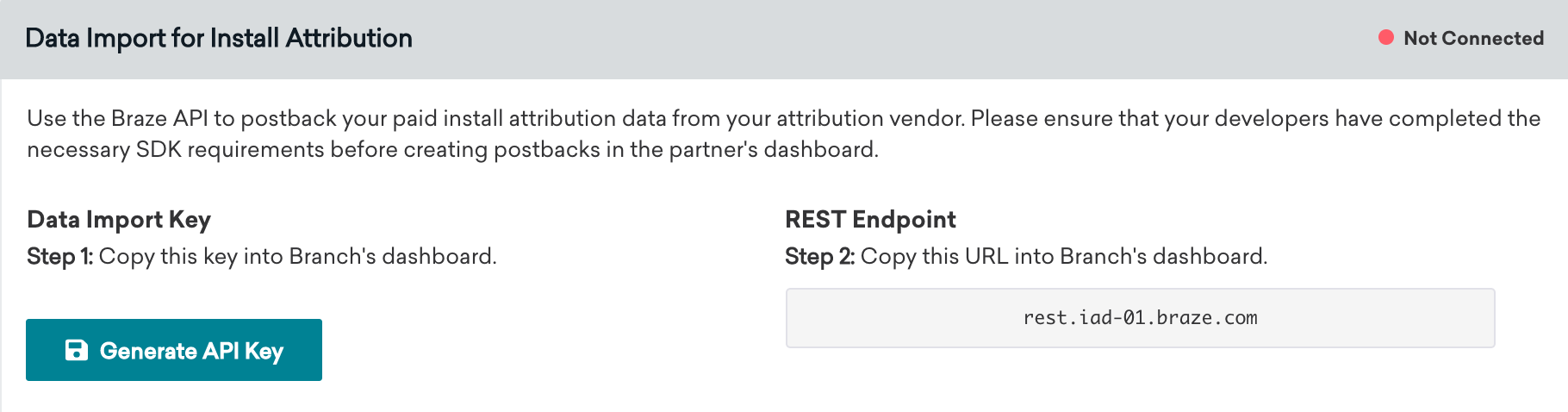
Step 3: Set up data feeds
- In Branch, under the Exports section, select Data Feeds.
- On the Data Feeds Manager page, select the Data Integrations tab at the top of the page.
- Select Braze from the list of available data partners.
- On the Braze export page, provide the data import key and REST endpoint that you found in the Braze dashboard and select Enable.
Step 4: Confirm the integration
On the Branch technology partners page in Braze, the connection indicator shows Not Connected until you generate a data import API key in Step 2. After you generate the key, the indicator changes to Connected and displays a timestamp. That timestamp reflects when the integration was first set up in Braze (when the data import key was created), not when Branch last sent a postback.
To confirm that install attribution data is flowing from Branch, check that non-organic install data appears in Braze segment filters. Braze ignores organic installs from Branch postbacks when the attribution source is organic and does not store them as attributed install data.
Field mapping
Branch attribution fields map to Braze as follows:
| Branch field | Braze field |
|---|---|
| Campaign | campaign |
| Channel | source |
| Ad Set Name | adgroup |
| Ad Name | ad |
Facebook and X (formerly Twitter) attribution data
Attribution data for Facebook and X (formerly Twitter) campaigns is not available through our partners. These media sources do not permit their partners to share attribution data with third parties and, therefore, our partners cannot send that data to Braze.
Branch click tracking URLs in Braze (optional)
Using click tracking links in your Braze campaigns will allow you to easily see which campaigns are driving app installs and re-engagement. As a result, you’ll be able to measure your marketing efforts more effectively and make data-driven decisions on where to invest more resources for the maximum ROI.
To get started with Branch click tracking links, visit their documentation. You can insert the Branch click tracking links into your Braze campaigns directly. Branch will then use their probabilistic attribution methodologies to attribute the user that has clicked on the link. We recommend appending your Branch tracking links with a device identifier to improve the accuracy of attributions from your Braze campaigns. This will deterministically attribute the user that has clicked on the link.
For Android, Braze allows customers to opt-in to Google Advertising ID collection (GAID). The GAID is also collected natively through the Branch SDK integration. You can include the GAID in your Branch click tracking links by utilizing the following Liquid logic:
{% if most_recently_used_device.${platform} == 'android' %}
user_data_aaid={{most_recently_used_device.${google_ad_id}}}
{% endif %}
For iOS, append the Braze device identifier to improve deterministic attribution. In Liquid, most_recently_used_device.${id} is the Braze device ID, which may be the IDFV or a UUID depending on your Swift SDK useUUIDAsDeviceId setting. Branch click-tracking URLs commonly use a user_data_idfv query parameter for this value:
{% if most_recently_used_device.${platform} == 'ios' %}
user_data_idfv={{most_recently_used_device.${id}}}
{% endif %}

This recommendation is purely optional
If you currently don’t use any device identifiers—such as the Braze device ID or GAID—in your click tracking links, or don’t plan to in the future, Branch can still attribute these clicks through their probabilistic modeling.