Trustpilot
Trustpilot is an online review platform that enables customers to share feedback and allows you to manage and respond to reviews.
This page provides a step-by-step guide for:
- Creating review invitations using Trustpilot’s Create Invitation API
- Personalizing messages with product reviews through Trustpilot’s Product Reviews API
Prerequisites
Before you start, you’ll need the following:
| Requirements | Description |
|---|---|
| A Trustpilot account | You need a Trustpilot account with access to Trustpilot’s API. |
| A Trustpilot authentication key | You will need to set up an API key and request an access token. |
Integration
Step 1: Get your Trustpilot API credentials
- Log into Trustpilot with your credentials.
- Create or retrieve the API key and secret in the Trustpilot dashboard by going to Integrations > Developers > APIs. If you don’t already have an API key, create a new one:
- Go to Application Name > Create Application
- Copy your API key and secret, which will be used to authenticate your Connected Content requests.
Sending Trustpilot review invitations
Step 1: Set up a Braze webhook campaign
Set up an action-based Braze webhook campaign to trigger the Trustpilot APIs to send email review invitations to users. For example, you could send a review invitation after a user places an order with the following webhook details:
- Webhook URL:
https://invitations-api.trustpilot.com/v1/private/business-units/{businessUnitId}/email-invitations - Method: POST
- Add the relevant customer information as key-value pairs
Step 2: Retrieve the access token
- Use Connected Content to make a request to Trustpilot’s Authentication endpoint to retrieve the Access Token.
- Use the client_credentials grant type, and enter your API key and secret into a Connected Content tag to retrieve a token. The Connected Content request can be entered into the request header. The Connected Content may look like this:
{% connected_content
https://api.trustpilot.com/v1/oauth/oauth-business-users-for-applications/accesstoken
:method post
:headers {"Content-Type": "application/x-www-form-urlencoded", "Authorization": "Basic {{'API_KEY:API_SECRET' | base64_encode}}" }
:body grant_type=client_credentials
:save token
:retry
:cache_max_age 3600 %}
{{token.access_token}}
- Add the access token to the request header of your webhook campaign.

Personalizing messages with product review insights
In your Braze campaign, make a Connected Content call to request data from Trustpilot’s Get product reviews summary endpoint (https://api.trustpilot.com/v1/product-reviews/business-units/{businessUnitId}). This method retrieves product reviews for specific SKUs from the business unit. The following example specifies the specific product SKU and filters for five-star reviews.
{% connected_content https://api.trustpilot.com/v1/product-reviews/business-units/66ea0530xxxxxx/reviews?sku={{event_properties.${item_sku}}}&stars=5
:method get
:headers {"apikey": "xxxxx"}
:content_type application/json :save result %}
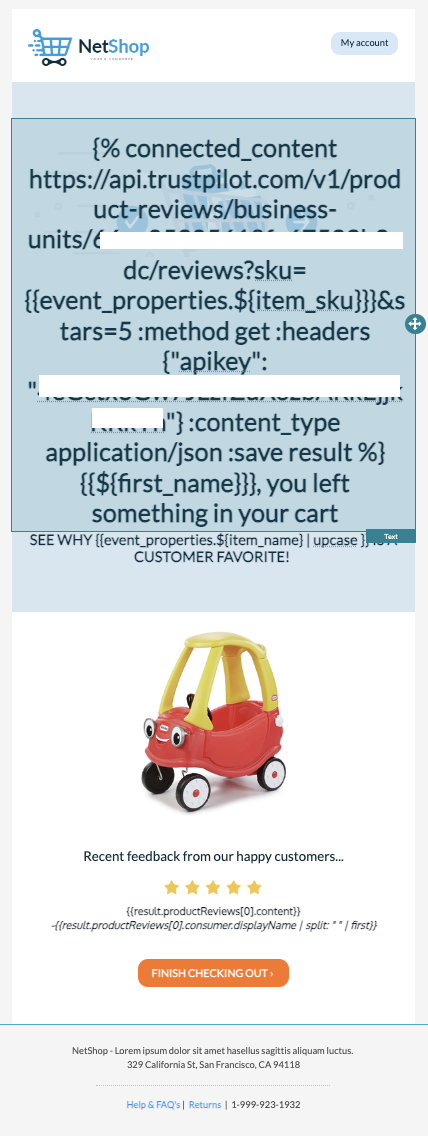
The Connected Content request will return the product reviews.
{
"productReviews": [
{
"id": "670d5810ba62e6b31de97de9",
"createdAt": "2024-10-14T17:42:40.286Z",
"stars": 5,
"content": "Such a great toy truck, my kids really enjoy it! ",
"consumer": {
"id": "6176xxxx",
"displayName": "Kevin Bob"
},
"language": "en",
"attributeRatings": [],
"attachments": [],
"firstCompanyComment": null
}
],
"links": []
- Use Liquid syntax to pull the relevant content into your message. For example, to pull in the product review’s content, use the Liquid tag
{{result.productReviews[0].content}}.