GRAVTY® Loyalty Platform
GRAVTY® is an enterprise-grade loyalty platform from Loyalty Juggernaut Inc. (LJI) that enables brands across retail, travel, restaurants (including quick-service restaurants), and financial services to design, manage, and scale next-generation programs—driving measurable growth in engagement, retention, and customer lifetime value through personalized, data-led experiences.
Built on a flexible, API-first architecture, GRAVTY® supports real-time earn and burn, partner ecosystem management, and integration across channels. Teams can launch faster, iterate on programs, and deliver loyalty experiences at scale.
This integration is maintained by LJI.
About the integration
The Braze and GRAVTY® integration connects loyalty data and messaging triggers across both platforms. GRAVTY® sends user data to Braze as attributes, events, and purchases. Braze stores that data and delivers messages across channels such as SMS, email, and push notifications. You use the synced data for segmentation, personalization, and triggers.
Prerequisites
Before you start, you need the following:
| Requirement | Description |
|---|---|
| GRAVTY® account | A GRAVTY® account with permission to configure integrations and manage event subscriptions. |
| Braze account | An active Braze account with API access enabled. |
| Braze REST API key | A REST API key with campaigns.trigger.send, canvas.trigger.send, and users.track permissions.Create this key in the Braze dashboard from Settings > API Keys. |
| Braze API endpoint | Your Braze REST endpoint (for example, https://rest.fra-01.braze.eu). For more information, see Braze instances and endpoints. |
| Campaign or Canvas IDs | IDs for the Campaigns or Canvas workflows you trigger from GRAVTY®. |
Use cases
This integration supports the following Braze capabilities:
- User data sync (
/users/track): Sync member attributes, events, and purchases to Braze for segmentation and personalization. - Campaign triggering (
/campaigns/trigger/send): Trigger one-time or transactional messages using Braze campaigns. - Canvas triggering (
/canvas/trigger/send): Start multi-step journeys and lifecycle messaging using Braze Canvas. - Segmentation and personalization: Build targeted audiences and deliver personalized communications from synced data.
Integration
The GRAVTY® and Braze integration is API-based, enabling real-time data synchronization and communication triggering between GRAVTY® and Braze.
Step 1: Connect Braze with GRAVTY®
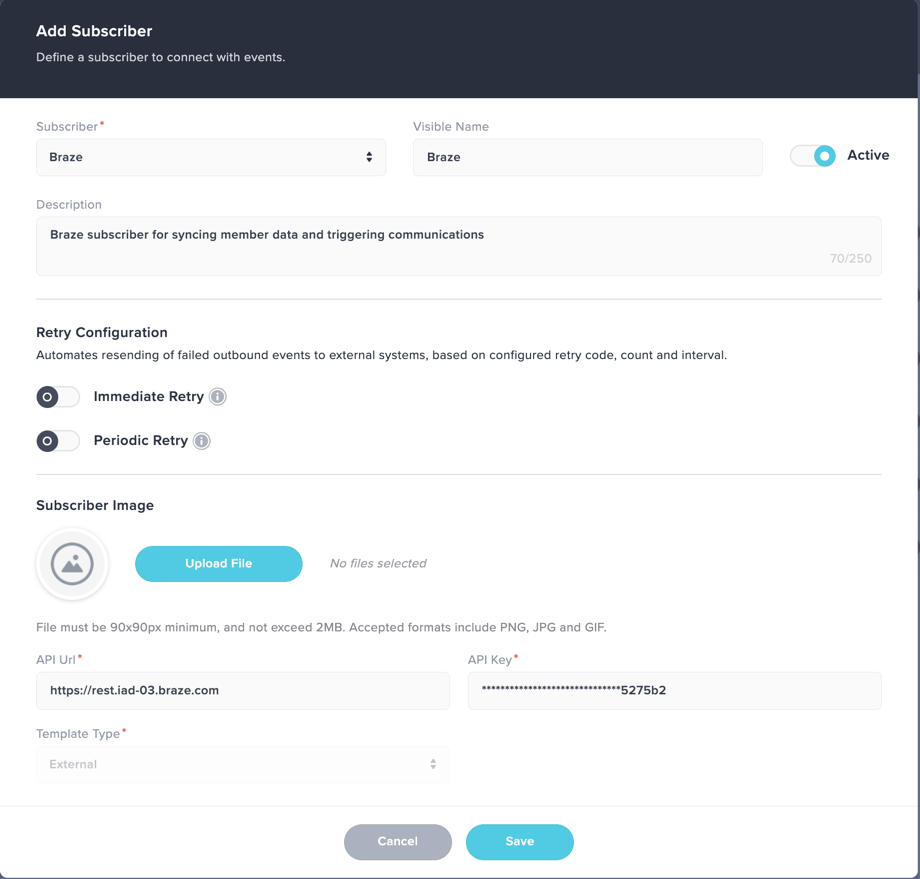
- Go to Subscriber Setup in GRAVTY® to manage external integrations.
- Select Add New Subscriber.
- Select Braze as the integration provider.
- Enter the following:
- API URL (your Braze REST endpoint)
- API Key (your Braze REST API key)
- Save the configuration and confirm the connection is active.
Step 2: Configure event trigger
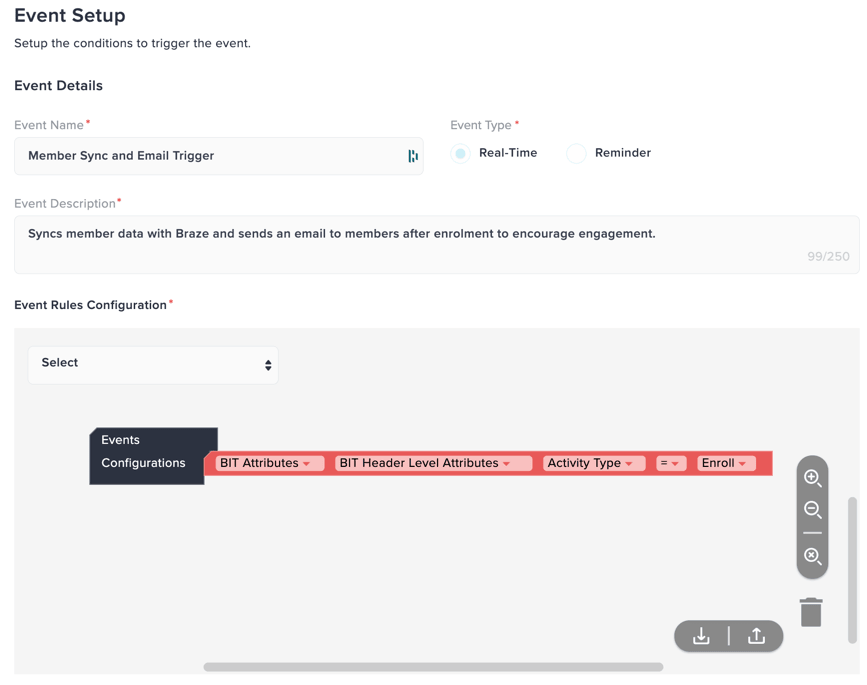
Create an event in GRAVTY® that runs when member activity meets conditions you define (for example, a transaction, points earned, a tier change, or program enrollment).
- Navigate to the Events section in GRAVTY®.
- Click Create Event.
- Define the event conditions (for example, transaction created, points earned, or tier upgrade).
- Configure the rules that determine when the event should be triggered.
- Attach the Braze subscriber to the event to enable communication triggers.
- Save the event configuration.
The following is an example of an event configured to trigger when a member is enrolled into the program:
Step 3: Configure template attribute mapping
After configuring the event, complete the subscriber configuration to enable data sync and communication triggers:
- Select the Braze subscriber created in Step 1 from the subscriber dropdown.
- Choose the appropriate channel (Campaign or Canvas) based on your use case. For data sync-only scenarios, the channel can be left unselected.
- Enter the corresponding Campaign ID or Canvas ID in the Template Name field, as applicable.
- Configure the communication type to support sync and/or trigger-based messaging.
To configure field mapping in GRAVTY®:
- Click Add New Field.
- Select the GRAVTY® attribute from the dropdown.
- Enter the corresponding Braze attribute name where the data should be mapped.

You don’t need to map external_id. GRAVTY® generates it internally by hashing the member ID (the unique member identifier in GRAVTY®), and Braze receives that hashed value as external_id on the user profile.
Before you enable the integration, confirm this matches how you set external_id in Braze today. If Braze already uses a different external_id for the same people, work with LJI to align identifiers before you sync data.
- Repeat steps 1–3 to add additional mappings as needed.
- Click Save to apply the configuration.
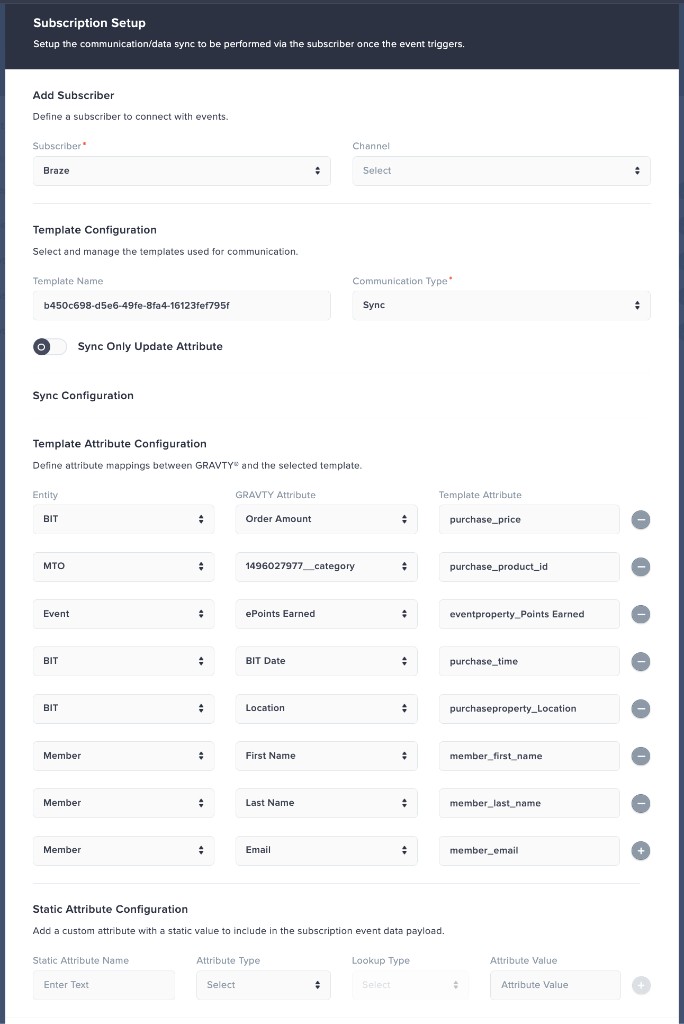

The integration supports all Braze custom attribute data types, including numbers (integer, float), strings, arrays, booleans, objects, arrays of objects, and dates.
Step 4: Test the integration
Trigger a sample event in GRAVTY® to verify that sync, communication triggers, and overall integration are working as expected.
- Member data is synced to Braze and reflected in the member profile.
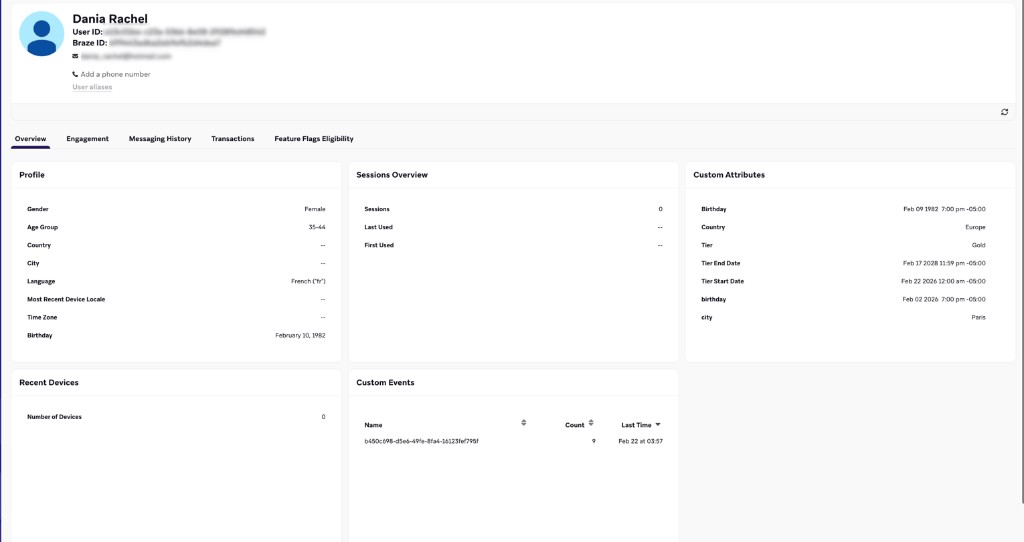
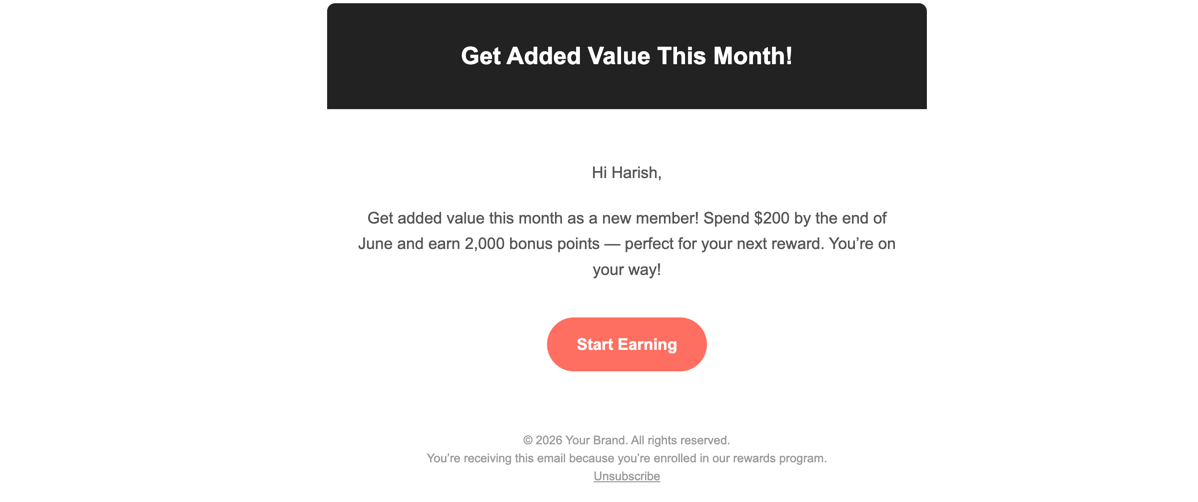
- Communication is triggered based on the configured Campaign or Canvas.
Support
For integration support or troubleshooting, contact LJI at [email protected].