Refiner
Refiner is an in-app survey platform for SaaS and mobile apps. It enables product and voice-of-customer teams to launch targeted in-app surveys and continuously collect NPS, CSAT, CES, product feedback, and zero-party user data.
This integration is maintained by Refiner.
About the integration
Use the Refiner and Braze integration to send survey events and response data from Refiner into your Braze account. Use this data to trigger Braze campaigns based on survey interactions (such as a completed survey), segment users based on responses, and update Braze user profiles with traits derived from survey answers.
Use cases
- Segment users based on survey responses, such as NPS scores or CSAT ratings.
- Trigger personalized campaigns in Braze based on survey outcomes.
- Drive cross-channel journeys using Braze Canvas or other orchestration tools.
Prerequisites
| Requirement | Description |
|---|---|
| Refiner account | A Refiner account is required to use this integration. |
| Braze REST API key | A Braze REST API key with users.track permissions. This can be created in the Braze dashboard from Settings > API Keys. |
| Braze REST endpoint | Your REST endpoint URL. Your endpoint depends on the Braze URL for your instance. |
Integration
Step 1: Connect your Braze account
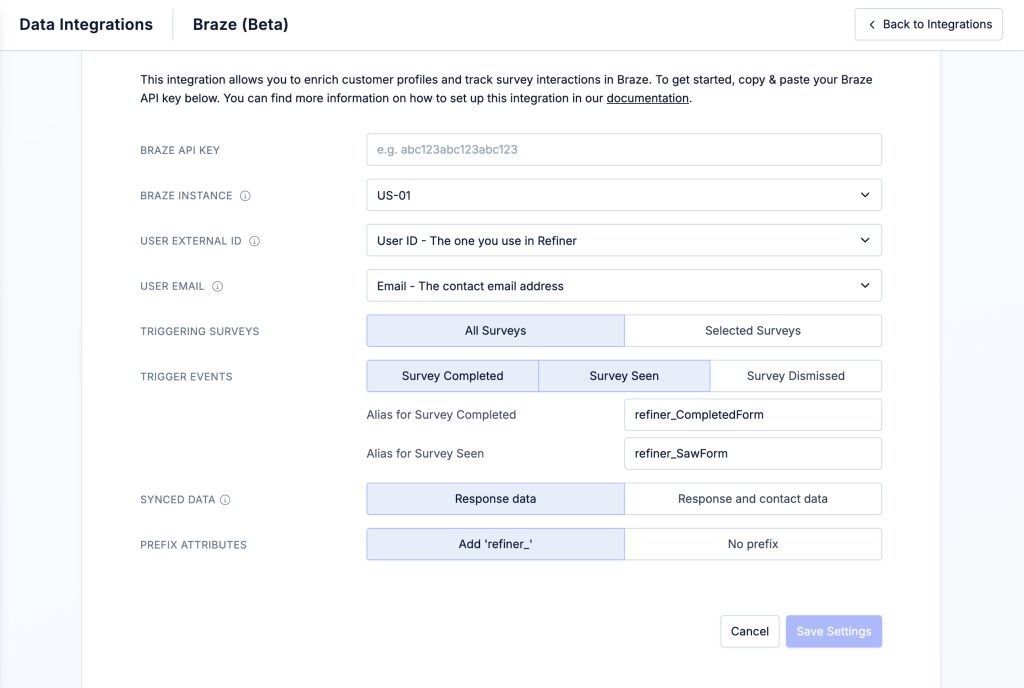
In the Integrations section of your Refiner project, select Connect Braze. Enter your Braze REST API key and your Braze instance identifier.
Step 2: Map user identifiers
Map the Refiner user identifier to the Braze identifier you use, such as a Braze external_id or email address. This ensures events are associated with the correct user in Braze.
Step 3: Choose data to sync
- Select the surveys whose data you want to sync to Braze.
- Select which Refiner events to send to Braze, such as Survey Seen, Survey Dismissed, and Survey Completed.
Customize Refiner
- Choose whether the data sent to Braze includes only survey responses or additional contact data fields.
- Choose whether synced data fields should be prefixed with
refiner_to make them easier to identify in your Braze account.
Use survey data in Braze
After connecting Braze and Refiner, survey events such as Saw Survey or Completed Survey appear on user profiles in your Braze account. Use these events to trigger and personalize messages in Braze, or use survey response data to segment users.

You can also send Refiner surveys by email through Braze. For details, see Refiner’s integration documentation.
Troubleshooting
If you experience issues with the integration, see the following resources: