Análisis push y registro de eventos personalizados
Esta página cubre los siguientes flujos de trabajo: análisis nativos de push (aperturas, Influenced Opens e informes de campaña) y registro de datos personalizados (eventos personalizados y atributos) a partir de cargas útiles push. Usa esta guía para identificar qué flujo de trabajo se aplica a tu caso de uso y sigue los pasos para tu plataforma.
Requisitos previos
Antes de empezar, completa la integración inicial de notificaciones push para tu plataforma:
Análisis nativos de push vs. registro de eventos personalizados
Los siguientes flujos de trabajo tienen diferentes superficies de informes.
| Categoría de análisis | Descripción | Dónde aparece |
|---|---|---|
| Análisis nativos de push | Métricas push como aperturas e Influenced Opens, vinculadas a campañas push de Braze | Análisis de campañas push, eventos de interacción de mensajes en Currents, generador de informes |
| Eventos personalizados y atributos | Análisis que defines y registras a través de métodos del SDK o del punto de conexión /users/track |
Perfiles de usuario, segmentación, campañas y Canvas basados en acciones, análisis de eventos personalizados |
Registrar un evento personalizado (como push_notification_opened) no es lo mismo que el seguimiento nativo de aperturas push de Braze. Los eventos personalizados no rellenan las métricas nativas de apertura de campañas push ni la atribución push.
Qué registra Braze automáticamente
Cuando la integración de tu SDK está configurada, Braze registra automáticamente los datos principales de interacción del canal, incluyendo aperturas push e Influenced Opens. No se requiere código adicional para los análisis push estándar. Para una lista completa de los datos recopilados automáticamente, consulta Recopilación de datos del SDK.
Para más detalles, consulta lo siguiente:
- Recopilación de datos del SDK para una lista completa de datos recopilados automáticamente y opcionales.
- Influenced Opens para saber cómo Braze calcula las Influenced Opens.
- Eventos de interacción de mensajes para los esquemas de eventos posteriores en Currents.
Preservar los análisis nativos de push con manejo personalizado de push
Podrías usar un controlador push personalizado cuando necesites integrar múltiples proveedores push, procesar datos adicionales de la carga útil o implementar lógica personalizada de visualización de notificaciones. Si usas un controlador push personalizado, debes seguir pasando las cargas útiles push a los métodos del SDK de Braze. Esto permite que Braze extraiga los datos de seguimiento integrados y registre los análisis nativos de push (aperturas, Influenced Opens y métricas de entrega).
Si tienes un FirebaseMessagingService personalizado, llama a BrazeFirebaseMessagingService.handleBrazeRemoteMessage(...) dentro de tu método onMessageReceived. Ten en cuenta que tu subclase de FirebaseMessagingService debe finalizar la ejecución en 9 segundos desde la invocación para evitar ser marcada o terminada por el sistema Android.
1
2
3
4
5
6
7
8
9
10
11
public class MyFirebaseMessagingService extends FirebaseMessagingService {
  @Override
  public void onMessageReceived(RemoteMessage remoteMessage) {
    super.onMessageReceived(remoteMessage);
    if (BrazeFirebaseMessagingService.handleBrazeRemoteMessage(this, remoteMessage)) {
      // Braze processed a Braze push payload.
    } else {
      // Non-Braze payload: pass to your other handlers.
    }
  }
}
Para un ejemplo completo de implementación, consulta la aplicación de ejemplo de push Firebase del SDK de Braze para Android.
En una integración push manual, reenvía las devoluciones de llamada de notificaciones en segundo plano y de notificaciones de usuario a Braze.
Notificaciones en segundo plano:
1
2
3
4
5
6
7
if let braze = AppDelegate.braze, braze.notifications.handleBackgroundNotification(
  userInfo: userInfo,
  fetchCompletionHandler: completionHandler
) {
  return
}
completionHandler(.noData)
Respuestas de notificaciones de usuario:
1
2
3
4
5
6
7
if let braze = AppDelegate.braze, braze.notifications.handleUserNotification(
  response: response,
  withCompletionHandler: completionHandler
) {
  return
}
completionHandler()
Notificaciones en primer plano:
1
2
3
4
5
6
7
8
9
10
11
12
13
14
func userNotificationCenter(
  _ center: UNUserNotificationCenter,
  willPresent notification: UNNotification,
  withCompletionHandler completionHandler: @escaping (UNNotificationPresentationOptions) -> Void
) {
  if let braze = AppDelegate.braze {
    braze.notifications.handleForegroundNotification(notification: notification)
  }
  if #available(iOS 14.0, *) {
    completionHandler([.banner, .list, .sound])
  } else {
    completionHandler([.alert, .sound])
  }
}
Para un ejemplo completo de implementación, consulta el ejemplo de push manual del SDK Swift de Braze (AppDelegate.swift).
Para notificaciones push web, configura tu prestador de servicios y la inicialización del SDK como se describe en Notificaciones push web.
Para más ejemplos de código, consulta el repositorio del SDK Web de Braze.
Registrar datos personalizados a partir de cargas útiles push
Usa esta sección cuando necesites registrar datos adicionales a partir de pares clave-valor de la carga útil push, como eventos personalizados o atributos vinculados a tu lógica de negocio.
Para más información sobre eventos personalizados, consulta Eventos personalizados. Para registrar eventos personalizados a través de métodos del SDK, consulta Registrar eventos personalizados.
Opción A: Registrar con el punto de conexión /users/track
Puedes registrar análisis en tiempo real llamando al punto de conexión /users/track.
Para identificar el perfil de usuario, incluye braze_id en los pares clave-valor de tu carga útil push.
Pasar braze_id solo identifica el perfil. Aún necesitas lógica de implementación que lea los valores de la carga útil y envíe la solicitud /users/track con los eventos o atributos que deseas registrar.
Opción B: Registrar con métodos del SDK después del lanzamiento de la aplicación
También puedes guardar los datos de la carga útil localmente y registrar eventos personalizados y atributos a través de métodos del SDK después de que la aplicación se inicialice. Este enfoque es común en flujos de extensiones de contenido de notificaciones donde los datos de análisis se persisten primero y se envían en el siguiente lanzamiento de la aplicación.
Los análisis no se envían a Braze hasta que la aplicación se lance. Dependiendo de tu configuración de descarte, puede haber un retraso entre el momento en que el usuario descarta la notificación y cuando la aplicación se abre y envía los análisis.
Registrar desde una extensión de contenido de notificación (Swift)
Los siguientes pasos cubren cómo guardar y enviar eventos personalizados, atributos personalizados y atributos de usuario desde una extensión de contenido de notificación en Swift.
Paso 1: Configurar grupos de aplicaciones en Xcode
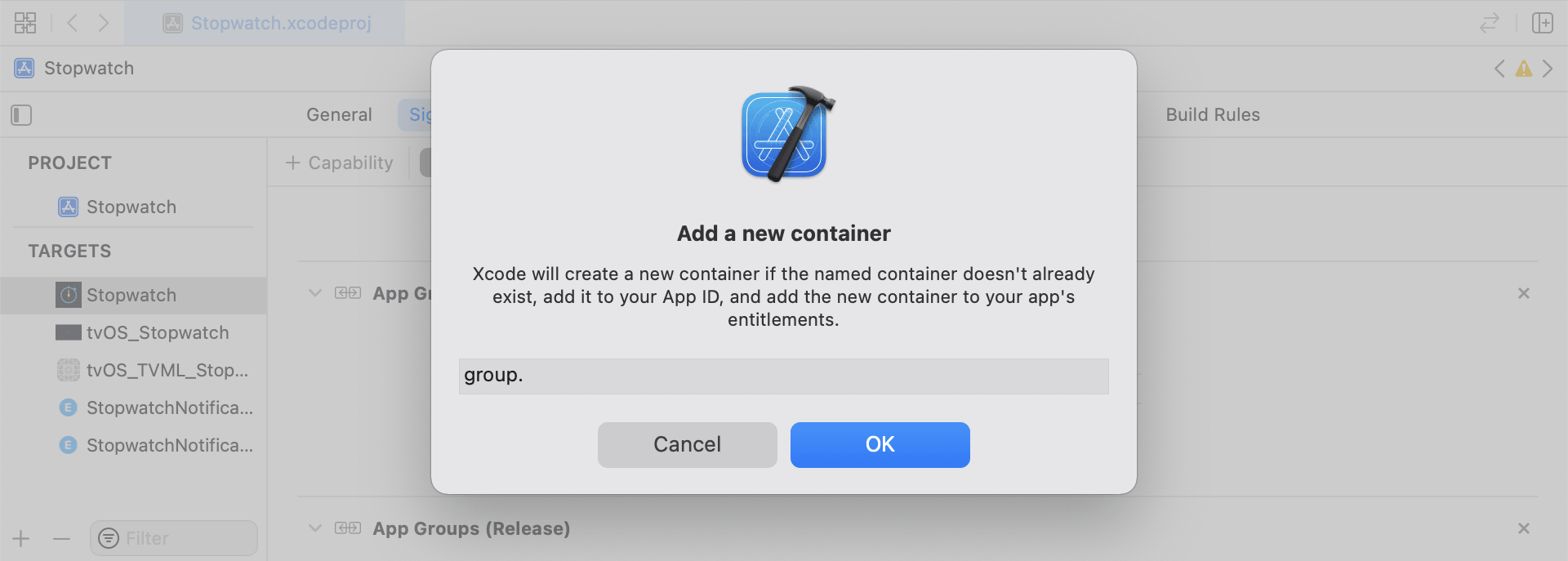
En Xcode, añade la capacidad App Groups a tu target principal de la aplicación. Activa App Groups, luego haz clic en + para añadir un nuevo grupo. Usa el bundle ID de tu aplicación para crear el identificador del grupo (por ejemplo, group.com.company.appname.xyz). Activa App Groups tanto para el target principal de tu aplicación como para el target de la extensión de contenido.
Paso 2: Elegir qué registrar
Antes de implementar los fragmentos de código, elige qué categoría de análisis deseas registrar:
- Eventos personalizados: Acciones que realizan los usuarios (por ejemplo, completar un flujo o tocar un elemento específico de la interfaz). Usa eventos personalizados para desencadenantes basados en acciones, segmentación y análisis de eventos. Para más información, consulta Eventos personalizados y Registrar eventos personalizados.
- Atributos personalizados: Campos de perfil que defines (por ejemplo,
plan_tieropreferred_language) y actualizas con el tiempo. Para más información, consulta Atributos personalizados y Configurar atributos de usuario. - Atributos de usuario: Campos estándar del perfil (por ejemplo, correo electrónico, nombre y número de teléfono). En el código de ejemplo, estos se representan mediante un modelo tipado
UserAttributey luego se mapean a campos de usuario de Braze.
Los archivos auxiliares en esta sección (RemoteStorage, UserAttribute y EventName Dictionary) son archivos de utilidad locales usados por esta implementación de ejemplo. No son clases integradas del SDK. Almacenan datos derivados de la carga útil en UserDefaults, definen un modelo tipado para actualizaciones pendientes de usuario y estandarizan la construcción de la carga útil de eventos. Para más información sobre el comportamiento de almacenamiento local de datos, consulta Almacenamiento.
Los ejemplos de archivos auxiliares en esta sección son específicos de iOS (Swift y Objective-C). Para enfoques de Android y Web para registrar eventos personalizados y atributos, consulta Registrar eventos personalizados (Android, Web) y Configurar atributos de usuario (Android, Web).
Guardar eventos personalizados
Crea la carga útil de análisis construyendo un diccionario, rellenando los metadatos y guardándolo con el archivo auxiliar.
- Inicializa un diccionario con los metadatos del evento.
- Inicializa
userDefaultspara recuperar y almacenar datos de eventos. - Si se encuentra un array existente, añade y guarda.
- Si no existe un array, guarda uno nuevo.
1
2
3
4
5
6
7
8
9
10
11
12
13
14
15
16
func saveCustomEvent(with properties: [String: Any]? = nil) {
  // 1
  let customEventDictionary = Dictionary(eventName: "YOUR-EVENT-NAME", properties: properties)

  // 2
  let remoteStorage = RemoteStorage(storageType: .suite)

  // 3
  if var pendingEvents = remoteStorage.retrieve(forKey: .pendingCustomEvents) as? [[String: Any]] {
    pendingEvents.append(contentsOf: [customEventDictionary])
    remoteStorage.store(pendingEvents, forKey: .pendingCustomEvents)
  } else {
    // 4
    remoteStorage.store([customEventDictionary], forKey: .pendingCustomEvents)
  }
}
1
2
3
4
5
6
7
8
9
10
11
12
13
14
15
16
17
- (void)saveCustomEvent:(NSDictionary<NSString *, id> *)properties {
  // 1
  NSDictionary<NSString *, id> *customEventDictionary = [[NSDictionary alloc] initWithEventName:@"YOUR-EVENT-NAME" properties:properties];

  // 2
  RemoteStorage *remoteStorage = [[RemoteStorage alloc] initWithStorageType:StorageTypeSuite];
  NSMutableArray *pendingEvents = [[remoteStorage retrieveForKey:RemoteStorageKeyPendingCustomEvents] mutableCopy];

  // 3
  if (pendingEvents) {
    [pendingEvents addObject:customEventDictionary];
    [remoteStorage store:pendingEvents forKey:RemoteStorageKeyPendingCustomEvents];
  } else {
    // 4
    [remoteStorage store:@[ customEventDictionary ] forKey:RemoteStorageKeyPendingCustomEvents];
  }
}
Enviar eventos personalizados a Braze
Registra los análisis guardados justo después de la inicialización del SDK.
- Recorre los eventos pendientes.
- Recorre los pares clave-valor de cada evento.
- Busca la clave
event_name. - Añade los pares clave-valor restantes al diccionario
properties. - Registra cada evento personalizado.
- Elimina los eventos pendientes del almacenamiento.
1
2
3
4
5
6
7
8
9
10
11
12
13
14
15
16
17
18
19
20
21
22
23
24
25
26
27
28
29
30
31
32
func logPendingCustomEventsIfNecessary() {
  let remoteStorage = RemoteStorage(storageType: .suite)
  guard let pendingEvents = remoteStorage.retrieve(forKey: .pendingCustomEvents) as? [[String: Any]] else { return }

  // 1
  for event in pendingEvents {
    var eventName: String?
    var properties: [AnyHashable: Any] = [:]

    // 2
    for (key, value) in event {
      if key == "event_name" {
        // 3
        if let eventNameValue = value as? String {
          eventName = eventNameValue
        } else {
          print("Invalid type for event_name key")
        }
      } else {
        // 4
        properties[key] = value
      }
    }
    // 5
    if let eventName = eventName {
      AppDelegate.braze?.logCustomEvent(name: eventName, properties: properties)
    }
  }

  // 6
  remoteStorage.removeObject(forKey: .pendingCustomEvents)
}
1
2
3
4
5
6
7
8
9
10
11
12
13
14
15
16
17
18
19
20
21
22
23
24
25
26
27
28
29
30
31
32
- (void)logPendingEventsIfNecessary {
  RemoteStorage *remoteStorage = [[RemoteStorage alloc] initWithStorageType:StorageTypeSuite];
  NSArray *pendingEvents = [remoteStorage retrieveForKey:RemoteStorageKeyPendingCustomEvents];

  // 1
  for (NSDictionary<NSString *, id> *event in pendingEvents) {
    NSString *eventName = nil;
    NSMutableDictionary *properties = [NSMutableDictionary dictionary];

    // 2
    for (NSString* key in event) {
      if ([key isEqualToString:@"event_name"]) {
        // 3
        if ([[event objectForKey:key] isKindOfClass:[NSString class]]) {
          eventName = [event objectForKey:key];
        } else {
          NSLog(@"Invalid type for event_name key");
        }
      } else {
        // 4
        properties[key] = event[key];
      }
    }
    // 5
    if (eventName != nil) {
      [AppDelegate.braze logCustomEvent:eventName properties:properties];
    }
  }

  // 6
  [remoteStorage removeObjectForKey:RemoteStorageKeyPendingCustomEvents];
}
Guardar atributos personalizados
Crea el diccionario de análisis desde cero y luego persístelo.
- Inicializa un diccionario con los metadatos del atributo.
- Inicializa
userDefaultspara recuperar y almacenar datos de atributos. - Si se encuentra un array existente, añade y guarda.
- Si no existe un array, guarda uno nuevo.
1
2
3
4
5
6
7
8
9
10
11
12
13
14
15
16
func saveCustomAttribute() {
  // 1
  let customAttributeDictionary: [String: Any] = ["YOUR-CUSTOM-ATTRIBUTE-KEY": "YOUR-CUSTOM-ATTRIBUTE-VALUE"]

  // 2
  let remoteStorage = RemoteStorage(storageType: .suite)

  // 3
  if var pendingAttributes = remoteStorage.retrieve(forKey: .pendingCustomAttributes) as? [[String: Any]] {
    pendingAttributes.append(contentsOf: [customAttributeDictionary])
    remoteStorage.store(pendingAttributes, forKey: .pendingCustomAttributes)
  } else {
    // 4
    remoteStorage.store([customAttributeDictionary], forKey: .pendingCustomAttributes)
  }
}
1
2
3
4
5
6
7
8
9
10
11
12
13
14
15
16
17
- (void)saveCustomAttribute {
  // 1
  NSDictionary<NSString *, id> *customAttributeDictionary = @{ @"YOUR-CUSTOM-ATTRIBUTE-KEY": @"YOUR-CUSTOM-ATTRIBUTE-VALUE" };

  // 2
  RemoteStorage *remoteStorage = [[RemoteStorage alloc] initWithStorageType:StorageTypeSuite];
  NSMutableArray *pendingAttributes = [[remoteStorage retrieveForKey:RemoteStorageKeyPendingCustomAttributes] mutableCopy];

  // 3
  if (pendingAttributes) {
    [pendingAttributes addObject:customAttributeDictionary];
    [remoteStorage store:pendingAttributes forKey:RemoteStorageKeyPendingCustomAttributes];
  } else {
    // 4
    [remoteStorage store:@[ customAttributeDictionary ] forKey:RemoteStorageKeyPendingCustomAttributes];
  }
}
Enviar atributos personalizados a Braze
Registra los análisis guardados justo después de la inicialización del SDK.
- Recorre los atributos pendientes.
- Recorre cada par clave-valor.
- Registra cada clave y valor de atributo personalizado.
- Elimina los atributos pendientes del almacenamiento.
1
2
3
4
5
6
7
8
9
10
11
12
13
14
15
16
17
18
19
20
21
22
func logPendingCustomAttributesIfNecessary() {
  let remoteStorage = RemoteStorage(storageType: .suite)
  guard let pendingAttributes = remoteStorage.retrieve(forKey: .pendingCustomAttributes) as? [[String: Any]] else { return }

  // 1
  pendingAttributes.forEach { setCustomAttributesWith(keysAndValues: $0) }

  // 4
  remoteStorage.removeObject(forKey: .pendingCustomAttributes)
}

func setCustomAttributesWith(keysAndValues: [String: Any]) {
  // 2
  for (key, value) in keysAndValues {
    // 3
    if let value = value as? [String] {
      setCustomAttributeArrayWithKey(key, andValue: value)
    } else {
      setCustomAttributeWithKey(key, andValue: value)
    }
  }
}
1
2
3
4
5
6
7
8
9
10
11
12
13
14
15
16
17
18
19
20
- (void)logPendingCustomAttributesIfNecessary {
  RemoteStorage *remoteStorage = [[RemoteStorage alloc] initWithStorageType:StorageTypeSuite];
  NSArray *pendingAttributes = [remoteStorage retrieveForKey:RemoteStorageKeyPendingCustomAttributes];

  // 1
  for (NSDictionary<NSString*, id> *attribute in pendingAttributes) {
    [self setCustomAttributeWith:attribute];
  }

  // 4
  [remoteStorage removeObjectForKey:RemoteStorageKeyPendingCustomAttributes];
}

- (void)setCustomAttributeWith:(NSDictionary<NSString *, id> *)keysAndValues {
  // 2
  for (NSString *key in keysAndValues) {
    // 3
    [self setCustomAttributeWith:key andValue:[keysAndValues objectForKey:key]];
  }
}
Guardar atributos de usuario
Al guardar atributos de usuario, crea un objeto personalizado para capturar qué campo de usuario se está actualizando (email, first_name, phone_number, etc.). El objeto debe ser compatible con el almacenamiento y la recuperación a través de UserDefaults. Consulta el archivo auxiliar UserAttribute en la pestaña Archivos auxiliares para ver un ejemplo.
- Inicializa un objeto
UserAttributecodificado con el tipo correspondiente. - Inicializa
userDefaultspara recuperar y almacenar los datos. - Si se encuentra un array existente, añade y guarda.
- Si no existe un array, guarda uno nuevo.
1
2
3
4
5
6
7
8
9
10
11
12
13
14
15
16
func saveUserAttribute() {
  // 1
  guard let data = try? PropertyListEncoder().encode(UserAttribute.email("USER-ATTRIBUTE-VALUE")) else { return }

  // 2
  let remoteStorage = RemoteStorage(storageType: .suite)

  // 3
  if var pendingAttributes = remoteStorage.retrieve(forKey: .pendingUserAttributes) as? [Data] {
    pendingAttributes.append(contentsOf: [data])
    remoteStorage.store(pendingAttributes, forKey: .pendingUserAttributes)
  } else {
    // 4
    remoteStorage.store([data], forKey: .pendingUserAttributes)
  }
}
1
2
3
4
5
6
7
8
9
10
11
12
13
14
15
16
17
18
19
20
21
22
23
- (void)saveUserAttribute {
  // 1
  UserAttribute *userAttribute = [[UserAttribute alloc] initWithUserField:@"USER-ATTRIBUTE-VALUE" attributeType:UserAttributeTypeEmail];

  NSError *error;
  NSData *data = [NSKeyedArchiver archivedDataWithRootObject:userAttribute requiringSecureCoding:YES error:&error];

  if (error != nil) {
    // log error
  }
  // 2
  RemoteStorage *remoteStorage = [[RemoteStorage alloc] initWithStorageType:StorageTypeSuite];
  NSMutableArray *pendingAttributes = [[remoteStorage retrieveForKey:RemoteStorageKeyPendingUserAttributes] mutableCopy];

  // 3
  if (pendingAttributes) {
    [pendingAttributes addObject:data];
    [remoteStorage store:pendingAttributes forKey:RemoteStorageKeyPendingUserAttributes];
  } else {
    // 4
    [remoteStorage store:@[data] forKey:RemoteStorageKeyPendingUserAttributes];
  }
}
Enviar atributos de usuario a Braze
Registra los análisis guardados justo después de la inicialización del SDK.
- Recorre los datos de
pendingAttributes. - Decodifica cada
UserAttribute. - Establece los campos de usuario según el tipo de atributo.
- Elimina los atributos de usuario pendientes del almacenamiento.
1
2
3
4
5
6
7
8
9
10
11
12
13
14
15
16
17
18
func logPendingUserAttributesIfNecessary() {
  let remoteStorage = RemoteStorage(storageType: .suite)
  guard let pendingAttributes = remoteStorage.retrieve(forKey: .pendingUserAttributes) as? [Data] else { return }

  // 1
  for attributeData in pendingAttributes {
    // 2
    guard let userAttribute = try? PropertyListDecoder().decode(UserAttribute.self, from: attributeData) else { continue }

    // 3
    switch userAttribute {
    case .email(let email):
      AppDelegate.braze?.user.set(email: email)
    }
  }
  // 4
  remoteStorage.removeObject(forKey: .pendingUserAttributes)
}
1
2
3
4
5
6
7
8
9
10
11
12
13
14
15
16
17
18
19
20
21
22
23
24
25
26
27
- (void)logPendingUserAttributesIfNecessary {
  RemoteStorage *remoteStorage = [[RemoteStorage alloc] initWithStorageType:StorageTypeSuite];
  NSArray *pendingAttributes = [remoteStorage retrieveForKey:RemoteStorageKeyPendingUserAttributes];

  // 1
  for (NSData *attributeData in pendingAttributes) {
    NSError *error;

    // 2
    UserAttribute *userAttribute = [NSKeyedUnarchiver unarchivedObjectOfClass:[UserAttribute class] fromData:attributeData error:&error];

    if (error != nil) {
      // log error
    }

    // 3
    if (userAttribute) {
      switch (userAttribute.attributeType) {
        case UserAttributeTypeEmail:
          [self user].email = userAttribute.userField;
          break;
      }
    }
  }
  // 4
  [remoteStorage removeObjectForKey:RemoteStorageKeyPendingUserAttributes];
}
Archivo auxiliar RemoteStorage
1
2
3
4
5
6
7
8
9
10
11
12
13
14
15
16
17
18
19
20
21
22
23
24
25
26
27
28
29
30
31
32
33
34
35
36
37
38
39
40
41
42
43
44
45
46
47
enum RemoteStorageKey: String, CaseIterable {

  // MARK: - Notification Content Extension Analytics
  case pendingCustomEvents = "pending_custom_events"
  case pendingCustomAttributes = "pending_custom_attributes"
  case pendingUserAttributes = "pending_user_attributes"
}

enum RemoteStorageType {
  case standard
  case suite
}

class RemoteStorage: NSObject {
  private var storageType: RemoteStorageType = .standard
  private lazy var defaults: UserDefaults = {
    switch storageType {
    case .standard:
      return .standard
    case .suite:
      // Use the App Group identifier you created in Step 1.
      return UserDefaults(suiteName: "group.com.company.appname.xyz")!
    }
  }()

  init(storageType: RemoteStorageType = .standard) {
    self.storageType = storageType
  }

  func store(_ value: Any, forKey key: RemoteStorageKey) {
    defaults.set(value, forKey: key.rawValue)
  }

  func retrieve(forKey key: RemoteStorageKey) -> Any? {
    return defaults.object(forKey: key.rawValue)
  }

  func removeObject(forKey key: RemoteStorageKey) {
    defaults.removeObject(forKey: key.rawValue)
  }

  func resetStorageKeys() {
    for key in RemoteStorageKey.allCases {
      defaults.removeObject(forKey: key.rawValue)
    }
  }
}
1
2
3
4
5
6
7
8
9
10
11
12
13
14
15
16
17
18
19
20
21
22
23
24
25
26
27
28
29
30
31
32
33
34
35
36
37
38
39
40
41
42
43
44
45
46
47
48
49
50
51
52
53
54
55
56
57
58
59
60
@interface RemoteStorage ()

@property (nonatomic) StorageType storageType;
@property (nonatomic, strong) NSUserDefaults *defaults;

@end

@implementation RemoteStorage

- (id)initWithStorageType:(StorageType)storageType {
  if (self = [super init]) {
    self.storageType = storageType;
  }
  return self;
}

- (void)store:(id)value forKey:(RemoteStorageKey)key {
  [[self defaults] setValue:value forKey:[self rawValueForKey:key]];
}

- (id)retrieveForKey:(RemoteStorageKey)key {
  return [[self defaults] objectForKey:[self rawValueForKey:key]];
}

- (void)removeObjectForKey:(RemoteStorageKey)key {
  [[self defaults] removeObjectForKey:[self rawValueForKey:key]];
}

- (void)resetStorageKeys {
  [[self defaults] removeObjectForKey:[self rawValueForKey:RemoteStorageKeyPendingCustomEvents]];
  [[self defaults] removeObjectForKey:[self rawValueForKey:RemoteStorageKeyPendingCustomAttributes]];
  [[self defaults] removeObjectForKey:[self rawValueForKey:RemoteStorageKeyPendingUserAttributes]];
}

- (NSUserDefaults *)defaults {
  if (!_defaults) {
    switch (self.storageType) {
      case StorageTypeStandard:
        _defaults = [NSUserDefaults standardUserDefaults];
        break;
      case StorageTypeSuite:
        _defaults = [[NSUserDefaults alloc] initWithSuiteName:@"group.com.company.appname.xyz"];
        break;
    }
  }
  return _defaults;
}

- (NSString*)rawValueForKey:(RemoteStorageKey)remoteStorageKey {
    switch(remoteStorageKey) {
    case RemoteStorageKeyPendingCustomEvents:
      return @"pending_custom_events";
    case RemoteStorageKeyPendingCustomAttributes:
      return @"pending_custom_attributes";
    case RemoteStorageKeyPendingUserAttributes:
      return @"pending_user_attributes";
    default:
      [NSException raise:NSGenericException format:@"Unexpected FormatType."];
  }
}
Archivo auxiliar UserAttribute
1
2
3
4
5
6
7
8
9
10
11
12
13
14
15
16
17
18
19
20
21
22
23
24
25
26
enum UserAttribute: Hashable {
  case email(String?)
}

// MARK: - Codable
extension UserAttribute: Codable {
  private enum CodingKeys: String, CodingKey {
    case email
  }

  func encode(to encoder: Encoder) throws {
    var values = encoder.container(keyedBy: CodingKeys.self)

    switch self {
    case .email(let email):
      try values.encodeIfPresent(email, forKey: .email)
    }
  }

  init(from decoder: Decoder) throws {
    let values = try decoder.container(keyedBy: CodingKeys.self)

    let email = try values.decodeIfPresent(String.self, forKey: .email)
    self = .email(email)
  }
}
1
2
3
4
5
6
7
8
9
10
11
12
13
14
15
16
17
18
19
20
21
22
23
24
25
26
@implementation UserAttribute

- (id)initWithUserField:(NSString *)userField attributeType:(UserAttributeType)attributeType {
  if (self = [super init]) {
    self.userField = userField;
    self.attributeType = attributeType;
  }
  return self;
}

- (void)encodeWithCoder:(NSCoder *)encoder {
  [encoder encodeObject:self.userField forKey:@"userField"];
  [encoder encodeInteger:self.attributeType forKey:@"attributeType"];
}

- (id)initWithCoder:(NSCoder *)decoder {
  if (self = [super init]) {
    self.userField = [decoder decodeObjectForKey:@"userField"];

    NSInteger attributeRawValue = [decoder decodeIntegerForKey:@"attributeType"];
    self.attributeType = (UserAttributeType) attributeRawValue;
  }
  return self;
}

@end
Archivo auxiliar de diccionario EventName
1
2
3
4
5
6
7
8
9
10
11
12
extension Dictionary where Key == String, Value == Any {
  init(eventName: String, properties: [String: Any]? = nil) {
    self.init()
    self[PushNotificationKey.eventName.rawValue] = eventName

    if let properties = properties {
      for (key, value) in properties {
        self[key] = value
      }
    }
  }
}
1
2
3
4
5
6
7
8
9
10
11
12
13
14
15
16
17
@implementation NSMutableDictionary (Helper)

+ (instancetype)dictionaryWithEventName:(NSString *)eventName
                              properties:(NSDictionary *)properties {
  NSMutableDictionary *dict = [NSMutableDictionary dictionary];
  dict[@"event_name"] = eventName;

  if (properties) {
    for (id key in properties) {
      dict[key] = properties[key];
    }
  }

  return dict;
}

@end
Analizar resultados
Usa la superficie de informes que corresponda a la categoría de análisis:
| Categoría de análisis | Dónde verlo en Braze |
|---|---|
| Análisis nativos de push | Para ver las métricas de apertura push a nivel de campaña, navega a la página Análisis de campaña de tu campaña push. Para las definiciones de métricas, consulta Influenced Opens. Para crear vistas de análisis personalizadas, navega a Análisis > Generador de informes (nuevo). Para los pasos de navegación, consulta Generador de informes. Para los esquemas de eventos a nivel de almacén de datos, consulta Eventos de interacción de mensajes. |
| Eventos personalizados y atributos | Para ver tendencias de eventos personalizados, navega a Análisis > Informe de eventos personalizados. Para más detalles, consulta Eventos personalizados. Para inspeccionar valores a nivel de usuario, navega a la página Buscar usuarios y abre un perfil. Para los pasos, consulta Perfiles de usuario. Para filtrar audiencias por estos valores, navega a Audiencia > Segmentos. Para los pasos de navegación, consulta Crear un segmento y las opciones de filtro en Filtros de segmentación. |
Para la creación de informes personalizados, consulta Generador de informes.
 Editar esta página en GitHub